全文搜索 Cordova 与 OpenHarmony 混合开发实战
📌 模块概述
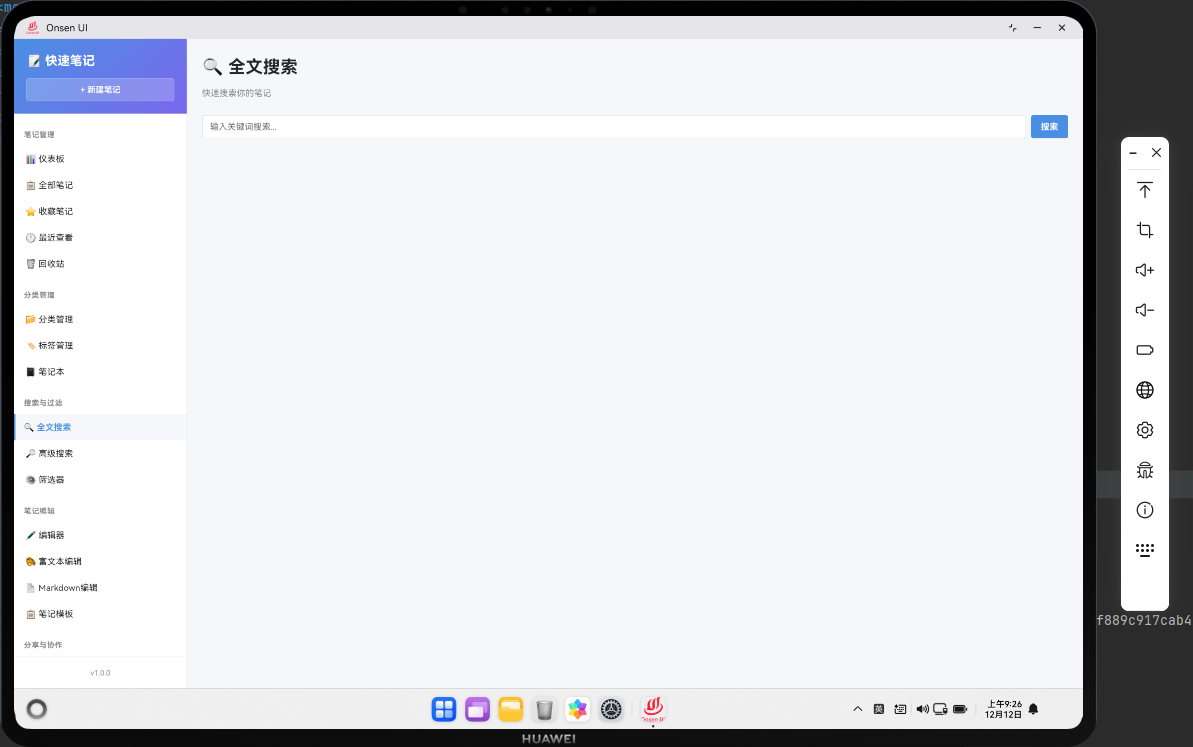
全文搜索功能允许用户通过关键词快速查找笔记。搜索会在笔记的标题和内容中进行,返回匹配的笔记列表。全文搜索是快速笔记应用中最重要的功能之一,特别是当笔记数量很多时。
全文搜索的实现需要考虑性能问题。当笔记数量很大时,遍历所有笔记进行搜索会很慢。我们可以使用索引、缓存等技术来优化搜索性能。
🔗 完整流程
第一步:搜索输入处理
当用户在搜索框中输入关键词时,我们需要使用防抖技术来避免频繁的搜索操作。防抖意味着只有在用户停止输入一段时间后,才会执行搜索操作。这样可以减少不必要的数据库查询。
搜索关键词需要进行规范化处理,比如转换为小写、去除多余空格等。这样可以提高搜索的准确性。
第二步:执行搜索
搜索操作涉及到遍历所有笔记,检查笔记的标题和内容是否包含搜索关键词。为了提高性能,我们可以使用正则表达式或字符串匹配算法。
搜索结果应该按照相关性排序,比如标题中出现关键词的笔记排在前面,出现次数多的笔记排在前面。
第三步:显示搜索结果
搜索结果应该以列表形式显示,每个结果项显示笔记的标题、分类、创建时间等信息。用户可以点击搜索结果来打开笔记。
🔧 Web代码实现
// 全文搜索页面渲染函数
async renderSearch() {
  return `
    <div class="page active">
      <div class="page-header">
        <h1 class="page-title">🔍 全文搜索</h1>
        <div class="search-box">
          <input type="text" id="search-input" class="form-control"
                 placeholder="输入关键词搜索..." onkeyup="app.performSearch(this.value)">
        </div>
      </div>
      <div id="search-results" class="search-results"></div>
    </div>
  `;
}
这段代码展示了全文搜索页面的初始化。搜索框使用onkeyup事件来触发搜索操作。
// 执行搜索函数,使用防抖技术
let searchTimeout;
async performSearch(keyword) {
  // 清除之前的超时
  clearTimeout(searchTimeout);

  // 如果搜索关键词为空,清空搜索结果
  if (!keyword.trim()) {
    document.getElementById('search-results').innerHTML = '<p class="empty-state">输入关键词开始搜索</p>';
    return;
  }

  // 延迟执行搜索,实现防抖
  searchTimeout = setTimeout(async () => {
    try {
      // 获取所有笔记
      const allNotes = await noteDB.getAllNotes();

      // 规范化搜索关键词
      const normalizedKeyword = keyword.toLowerCase().trim();

      // 搜索笔记
      const results = allNotes.filter(note => {
        const titleMatch = note.title.toLowerCase().includes(normalizedKeyword);
        const contentMatch = note.content.toLowerCase().includes(normalizedKeyword);
        return titleMatch || contentMatch;
      });

      // 按相关性排序
      const sortedResults = results.sort((a, b) => {
        // 标题匹配的笔记排在前面
        const aTitle = a.title.toLowerCase().includes(normalizedKeyword);
        const bTitle = b.title.toLowerCase().includes(normalizedKeyword);
        if (aTitle && !bTitle) return -1;
        if (!aTitle && bTitle) return 1;

        // 相同情况下,按更新时间排序
        return new Date(b.updatedAt) - new Date(a.updatedAt);
      });

      // 生成搜索结果HTML
      const resultsHTML = sortedResults.map(note => `
        <div class="search-result-item">
          <div class="result-title" onclick="app.navigateTo('edit-note', ${note.id})">
            ${Utils.highlightKeyword(note.title, normalizedKeyword)}
          </div>
          <div class="result-preview">
            ${Utils.highlightKeyword(note.content.substring(0, 100), normalizedKeyword)}...
          </div>
          <div class="result-meta">
            <span>${note.category || '未分类'}</span>
            <span>${Utils.formatDate(note.updatedAt)}</span>
          </div>
        </div>
      `).join('');

      // 显示搜索结果
      const resultsContainer = document.getElementById('search-results');
      if (sortedResults.length === 0) {
        resultsContainer.innerHTML = '<p class="empty-state">未找到匹配的笔记</p>';
      } else {
        resultsContainer.innerHTML = `<p class="search-count">找到 ${sortedResults.length} 个结果</p>${resultsHTML}`;
      }
    } catch (error) {
      console.error('搜索失败:', error);
      Utils.showToast('搜索失败,请重试', 'error');
    }
  }, 300); // 延迟300毫秒执行搜索
}
这段代码实现了全文搜索功能。使用防抖技术避免频繁搜索,使用关键词高亮来显示匹配的内容。
🔌 OpenHarmony 原生代码
// SearchPlugin.ets - 搜索插件
import { webview } from '@kit.ArkWeb';
import { common } from '@kit.AbilityKit';
import { fileIo } from '@kit.CoreFileKit';

@NativeComponent
export class SearchPlugin {
  private context: common.UIAbilityContext;

  constructor(context: common.UIAbilityContext) {
    this.context = context;
  }

  // 初始化插件
  public init(webviewController: webview.WebviewController): void {
    webviewController.registerJavaScriptProxy(
      new SearchJSProxy(this),
      'searchPlugin',
      ['search', 'advancedSearch']
    );
  }

  // 执行全文搜索
  public search(keyword: string): Promise<Array<any>> {
    return new Promise((resolve) => {
      try {
        const notesPath = this.context.cacheDir + '/notes.json';
        const content = fileIo.readTextSync(notesPath);
        const allNotes = JSON.parse(content);

        // 规范化搜索关键词
        const normalizedKeyword = keyword.toLowerCase().trim();

        // 搜索笔记
        const results = allNotes.filter((note: any) => {
          const titleMatch = note.title.toLowerCase().includes(normalizedKeyword);
          const contentMatch = note.content.toLowerCase().includes(normalizedKeyword);
          return titleMatch || contentMatch;
        });

        // 按相关性排序
        results.sort((a: any, b: any) => {
          const aTitle = a.title.toLowerCase().includes(normalizedKeyword);
          const bTitle = b.title.toLowerCase().includes(normalizedKeyword);
          if (aTitle && !bTitle) return -1;
          if (!aTitle && bTitle) return 1;
          return new Date(b.updatedAt).getTime() - new Date(a.updatedAt).getTime();
        });

        resolve(results);
      } catch (error) {
        console.error('Failed to search:', error);
        resolve([]);
      }
    });
  }

  // 高级搜索
  public advancedSearch(keyword: string, category: string, startDate: string, endDate: string): Promise<Array<any>> {
    return new Promise((resolve) => {
      try {
        const notesPath = this.context.cacheDir + '/notes.json';
        const content = fileIo.readTextSync(notesPath);
        let allNotes = JSON.parse(content);

        // 按关键词搜索
        if (keyword) {
          const normalizedKeyword = keyword.toLowerCase().trim();
          allNotes = allNotes.filter((note: any) =>
            note.title.toLowerCase().includes(normalizedKeyword) ||
            note.content.toLowerCase().includes(normalizedKeyword)
          );
        }

        // 按分类过滤
        if (category) {
          allNotes = allNotes.filter((note: any) => note.category === category);
        }

        // 按日期范围过滤
        if (startDate && endDate) {
          const start = new Date(startDate).getTime();
          const end = new Date(endDate).getTime();
          allNotes = allNotes.filter((note: any) => {
            const noteTime = new Date(note.createdAt).getTime();
            return noteTime >= start && noteTime <= end;
          });
        }

        resolve(allNotes);
      } catch (error) {
        console.error('Failed to advanced search:', error);
        resolve([]);
      }
    });
  }
}

// SearchJSProxy.ets - JavaScript代理类
class SearchJSProxy {
  private plugin: SearchPlugin;

  constructor(plugin: SearchPlugin) {
    this.plugin = plugin;
  }

  search(keyword: string): void {
    this.plugin.search(keyword).then(results => {
      console.log('Search results:', results.length);
    });
  }

  advancedSearch(keyword: string, category: string, startDate: string, endDate: string): void {
    this.plugin.advancedSearch(keyword, category, startDate, endDate).then(results => {
      console.log('Advanced search results:', results.length);
    });
  }
}
Web-Native 通信
// 在Web端调用原生搜索方法
async function searchNative(keyword) {
  return new Promise((resolve) => {
    cordova.exec(
      function(results) {
        console.log('Search results from native:', results);
        resolve(results);
      },
      function(error) {
        console.error('Failed to search:', error);
        resolve([]);
      },
      'SearchPlugin',
      'search',
      [keyword]
    );
  });
}

// 在Web端调用原生高级搜索方法
async function advancedSearchNative(keyword, category, startDate, endDate) {
  return new Promise((resolve) => {
    cordova.exec(
      function(results) {
        console.log('Advanced search results from native:', results);
        resolve(results);
      },
      function(error) {
        console.error('Failed to advanced search:', error);
        resolve([]);
      },
      'SearchPlugin',
      'advancedSearch',
      [keyword, category, startDate, endDate]
    );
  });
}
📝 总结
全文搜索功能展示了如何在Cordova与OpenHarmony混合开发中实现一个高性能的搜索系统。通过防抖技术、关键词高亮和相关性排序,我们为用户提供了一个快速、易用的搜索体验。
搜索功能的实现涉及到性能优化、算法设计和用户体验等多个方面,是一个相对复杂的功能模块。通过合理的设计和优化,我们可以为用户提供一个高效的搜索工具。
欢迎加入开源鸿蒙跨平台社区:https://openharmonycrossplatform.csdn.net

AtomGit 是由开放原子开源基金会联合 CSDN 等生态伙伴共同推出的新一代开源与人工智能协作平台。平台坚持“开放、中立、公益”的理念,把代码托管、模型共享、数据集托管、智能体开发体验和算力服务整合在一起,为开发者提供从开发、训练到部署的一站式体验。
更多推荐
 4
4 0
0- 0


 已为社区贡献24条内容

所有评论(0)