flutter_for_openharmony口腔护理app实战+我的产品实现
前言
口腔护理离不开各种护理产品,如牙刷、牙膏、漱口水、牙线等。在口腔护理应用中,提供产品管理功能可以帮助用户记录自己使用的产品,追踪产品使用情况,甚至可以根据使用时长提醒用户更换产品。这个功能不仅能帮助用户管理口腔护理用品,还能通过使用记录分析用户的护理习惯,提供个性化的建议。
本文将介绍如何在 Flutter 中实现一个带有分类和评分的产品管理页面。我们将详细讲解产品数据模型设计、分类展示逻辑、评分系统实现、产品更换提醒等功能,帮助开发者构建一个完整的产品管理系统。通过本文的学习,你将掌握列表分类展示、数据模型设计、状态管理等实用技能。
功能设计与业务逻辑
产品管理页面需要实现以下核心功能:
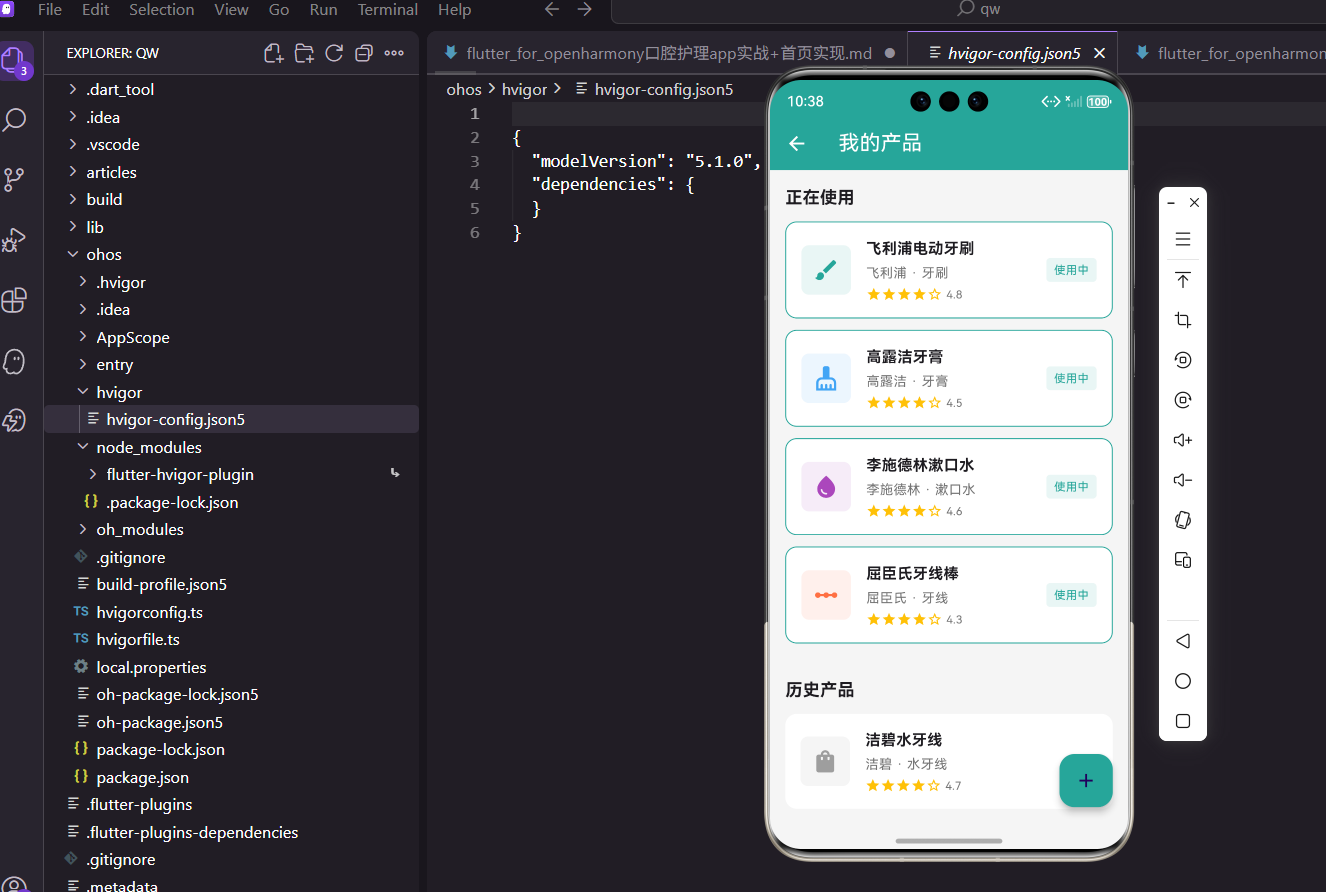
分类展示管理:将产品分为"正在使用"和"历史产品"两类,帮助用户区分当前在用和已停用的产品。正在使用的产品会显示使用天数和更换提醒,历史产品则记录了使用时间段。这种分类方式符合用户的使用习惯,让产品管理更加清晰。
产品信息展示:每个产品卡片展示名称、品牌、分类、评分等关键信息。使用卡片式设计,信息层次分明。不同类型的产品使用不同的图标和颜色标识,如牙刷用绿色、牙膏用蓝色、漱口水用紫色等,通过视觉编码帮助用户快速识别。
评分系统:支持用户对产品进行评分(0-5星),记录使用体验。评分数据可以帮助用户回顾产品效果,也可以为其他用户提供参考。使用星级评分的方式直观易懂,符合用户习惯。
产品添加与编辑:提供完整的产品添加表单,包括名称、品牌、分类、评分等字段。支持编辑已有产品信息,更新使用状态。表单验证确保数据完整性和有效性。
更换提醒功能:根据产品类型和使用时长,自动提醒用户更换产品。例如牙刷建议每3个月更换一次,超过使用期限会显示提醒标识。这个功能体现了应用的关怀,帮助用户养成良好的护理习惯。
页面基础结构与浮动按钮
产品管理页面使用 StatelessWidget 实现,因为页面本身不需要管理状态,数据由Provider管理:
class ProductPage extends StatelessWidget {
const ProductPage({super.key});
Widget build(BuildContext context) {
return Scaffold(
appBar: AppBar(title: const Text('我的产品')),
floatingActionButton: FloatingActionButton(
onPressed: () => _showAddDialog(context),
backgroundColor: const Color(0xFF26A69A),
child: const Icon(Icons.add),
),
页面配置了标题栏和浮动操作按钮FloatingActionButton。浮动按钮固定在屏幕右下角,是Material Design中添加新内容的标准交互方式。按钮使用主题色背景,加号图标清晰表达"添加"的含义。点击按钮会调用_showAddDialog方法,弹出添加产品的对话框。这种交互方式简洁直观,用户无需在页面中寻找添加入口。
数据分类处理与状态管理
将产品按使用状态分类,使用Provider获取数据:
      body: Consumer<AppProvider>(
        builder: (context, provider, _) {
          final inUse = provider.products.where((p) => p.isInUse).toList();
          final notInUse = provider.products.where((p) => !p.isInUse).toList();
使用Consumer组件监听AppProvider的数据变化,当产品数据更新时,UI会自动重建。通过where方法过滤产品列表,将其分为正在使用和历史产品两个列表。isInUse是产品模型中的布尔字段,标记产品的使用状态。这种分类方式让用户能够清晰地看到当前在用的产品和已停用的产品,便于管理。使用toList()将过滤结果转换为列表,方便后续操作。
分类列表展示
使用 SingleChildScrollView 展示分类列表:
          return SingleChildScrollView(
            padding: const EdgeInsets.all(16),
            child: Column(
              crossAxisAlignment: CrossAxisAlignment.start,
              children: [
                const Text('正在使用',
                    style: TextStyle(fontSize: 18, fontWeight: FontWeight.bold)),
                const SizedBox(height: 12),
                if (inUse.isEmpty)
                  _buildEmptyCard('暂无正在使用的产品')
                else
                  ...inUse.map((p) => _buildProductCard(p, true)),
                const SizedBox(height: 24),
                const Text('历史产品',
                    style: TextStyle(fontSize: 18, fontWeight: FontWeight.bold)),
                const SizedBox(height: 12),
                if (notInUse.isEmpty)
                  _buildEmptyCard('暂无历史产品')
                else
                  ...notInUse.map((p) => _buildProductCard(p, false)),
              ],
            ),
          );
        },
      ),
    );
  }
两个分类分别展示,空状态时显示提示卡片。
空状态卡片
空状态卡片组件:
Widget _buildEmptyCard(String text) {
  return Container(
    padding: const EdgeInsets.all(20),
    decoration: BoxDecoration(
      color: Colors.white,
      borderRadius: BorderRadius.circular(12),
    ),
    child: Center(
        child: Text(text, style: const TextStyle(color: Colors.grey))),
  );
}
简洁的空状态提示。
产品分类图标映射
根据产品类型确定图标和颜色:
Widget _buildProductCard(dynamic product, bool isInUse) {
  IconData categoryIcon;
  Color categoryColor;
  switch (product.category) {
    case '牙刷':
      categoryIcon = Icons.brush;
      categoryColor = const Color(0xFF26A69A);
      break;
    case '牙膏':
      categoryIcon = Icons.cleaning_services;
      categoryColor = const Color(0xFF42A5F5);
      break;
    case '漱口水':
      categoryIcon = Icons.water_drop;
      categoryColor = const Color(0xFFAB47BC);
      break;
    case '牙线':
      categoryIcon = Icons.linear_scale;
      categoryColor = const Color(0xFFFF7043);
      break;
    default:
      categoryIcon = Icons.shopping_bag;
      categoryColor = Colors.grey;
  }
四种主要产品类型使用不同的图标和颜色,便于用户快速识别。
产品卡片设计
产品卡片展示完整信息:
  return Container(
    margin: const EdgeInsets.only(bottom: 12),
    padding: const EdgeInsets.all(16),
    decoration: BoxDecoration(
      color: Colors.white,
      borderRadius: BorderRadius.circular(12),
      border: isInUse ? Border.all(color: const Color(0xFF26A69A)) : null,
    ),
    child: Row(
      children: [
        Container(
          padding: const EdgeInsets.all(12),
          decoration: BoxDecoration(
            color: categoryColor.withOpacity(0.1),
            borderRadius: BorderRadius.circular(8),
          ),
          child: Icon(categoryIcon, color: categoryColor, size: 28),
        ),
正在使用的产品添加主题色边框,图标使用对应分类的颜色。
产品名称和品牌信息:
        const SizedBox(width: 16),
        Expanded(
          child: Column(
            crossAxisAlignment: CrossAxisAlignment.start,
            children: [
              Text(product.name,
                  style: const TextStyle(fontWeight: FontWeight.bold, fontSize: 16)),
              const SizedBox(height: 4),
              Text('${product.brand} · ${product.category}',
                  style: TextStyle(color: Colors.grey.shade600)),
产品名称作为主标题,品牌和分类作为副标题。
星级评分展示:
              const SizedBox(height: 4),
              Row(
                children: [
                  ...List.generate(5, (index) => Icon(
                    index < product.rating.floor()
                        ? Icons.star
                        : Icons.star_border,
                    size: 16,
                    color: Colors.amber,
                  )),
                  const SizedBox(width: 4),
                  Text('${product.rating}',
                      style: TextStyle(color: Colors.grey.shade600, fontSize: 12)),
                ],
              ),
            ],
          ),
        ),
使用五星评分展示用户对产品的评价,实心星表示已评分,空心星表示未评分。
使用状态标签:
        if (isInUse)
          Container(
            padding: const EdgeInsets.symmetric(horizontal: 8, vertical: 4),
            decoration: BoxDecoration(
              color: const Color(0xFF26A69A).withOpacity(0.1),
              borderRadius: BorderRadius.circular(4),
            ),
            child: const Text('使用中',
                style: TextStyle(color: Color(0xFF26A69A), fontSize: 12)),
          ),
      ],
    ),
  );
}
正在使用的产品显示"使用中"标签。
添加产品对话框
添加产品的对话框(简化版):
void _showAddDialog(BuildContext context) {
  ScaffoldMessenger.of(context).showSnackBar(
    const SnackBar(content: Text('添加产品功能开发中')),
  );
}
实际项目中需要实现完整的表单对话框。
数据模型定义
产品的数据模型:
class OralProduct {
  final String id;
  final String name;
  final String brand;
  final String category;
  final double rating;
  final bool isInUse;
  final DateTime? startDate;
  final DateTime? endDate;

  OralProduct({
    String? id,
    required this.name,
    required this.brand,
    required this.category,
    this.rating = 0,
    this.isInUse = true,
    this.startDate,
    this.endDate,
  }) : id = id ?? DateTime.now().millisecondsSinceEpoch.toString();
}
模型包含名称、品牌、分类、评分、使用状态和使用时间等字段。
Provider 数据管理
在 AppProvider 中管理产品数据:
List<OralProduct> _products = [];
List<OralProduct> get products => _products;

void addProduct(OralProduct product) {
  _products.insert(0, product);
  notifyListeners();
}

void updateProductStatus(String id, bool isInUse) {
  final index = _products.indexWhere((p) => p.id == id);
  if (index != -1) {
    final old = _products[index];
    _products[index] = OralProduct(
      id: old.id,
      name: old.name,
      brand: old.brand,
      category: old.category,
      rating: old.rating,
      isInUse: isInUse,
      startDate: old.startDate,
      endDate: isInUse ? null : DateTime.now(),
    );
    notifyListeners();
  }
}
提供添加产品和更新使用状态的方法。
测试数据生成
生成测试数据:
void initTestData() {
  _products = [
    OralProduct(
      name: '声波电动牙刷',
      brand: '飞利浦',
      category: '牙刷',
      rating: 4.5,
      isInUse: true,
      startDate: DateTime.now().subtract(const Duration(days: 30)),
    ),
    OralProduct(
      name: '美白牙膏',
      brand: '佳洁士',
      category: '牙膏',
      rating: 4.0,
      isInUse: true,
    ),
    OralProduct(
      name: '清新漱口水',
      brand: '李施德林',
      category: '漱口水',
      rating: 3.5,
      isInUse: false,
    ),
  ];
}
测试数据包含不同分类和状态的产品。
完整添加对话框
实现完整的添加产品对话框:
void _showAddDialog(BuildContext context) {
  final nameController = TextEditingController();
  final brandController = TextEditingController();
  String category = '牙刷';
  double rating = 3.0;

  showDialog(
    context: context,
    builder: (ctx) => StatefulBuilder(
      builder: (context, setState) => AlertDialog(
        title: const Text('添加产品'),
        content: SingleChildScrollView(
          child: Column(
            mainAxisSize: MainAxisSize.min,
            children: [
              TextField(
                controller: nameController,
                decoration: const InputDecoration(labelText: '产品名称'),
              ),
              const SizedBox(height: 12),
              TextField(
                controller: brandController,
                decoration: const InputDecoration(labelText: '品牌'),
              ),
              const SizedBox(height: 12),
              DropdownButtonFormField<String>(
                value: category,
                decoration: const InputDecoration(labelText: '分类'),
                items: const [
                  DropdownMenuItem(value: '牙刷', child: Text('牙刷')),
                  DropdownMenuItem(value: '牙膏', child: Text('牙膏')),
                  DropdownMenuItem(value: '漱口水', child: Text('漱口水')),
                  DropdownMenuItem(value: '牙线', child: Text('牙线')),
                ],
                onChanged: (v) => setState(() => category = v!),
              ),
              const SizedBox(height: 12),
              Row(
                children: [
                  const Text('评分:'),
                  Expanded(
                    child: Slider(
                      value: rating,
                      min: 0,
                      max: 5,
                      divisions: 10,
                      label: rating.toString(),
                      onChanged: (v) => setState(() => rating = v),
                    ),
                  ),
                  Text(rating.toStringAsFixed(1)),
                ],
              ),
            ],
          ),
        ),
        actions: [
          TextButton(
              onPressed: () => Navigator.pop(ctx),
              child: const Text('取消')),
          ElevatedButton(
            onPressed: () {
              if (nameController.text.isEmpty || brandController.text.isEmpty) {
                return;
              }
              final product = OralProduct(
                name: nameController.text,
                brand: brandController.text,
                category: category,
                rating: rating,
                startDate: DateTime.now(),
              );
              context.read<AppProvider>().addProduct(product);
              Navigator.pop(ctx);
            },
            child: const Text('保存'),
          ),
        ],
      ),
    ),
  );
}
表单包含产品名称、品牌、分类和评分输入。
产品更换提醒
根据使用时长提醒更换产品:
String getProductReminder(OralProduct product) {
  if (product.category == '牙刷' && product.startDate != null) {
    final daysSince = DateTime.now().difference(product.startDate!).inDays;
    if (daysSince > 90) {
      return '已使用${daysSince}天,建议更换新牙刷';
    } else if (daysSince > 75) {
      return '已使用${daysSince}天,即将到期';
    }
  }
  return '';
}
牙刷建议每3个月更换一次。
产品统计信息
统计产品相关数据:
int get inUseProductCount => _products.where((p) => p.isInUse).length;

Map<String, int> getProductCategoryStats() {
  final stats = <String, int>{};
  for (var product in _products) {
    stats[product.category] = (stats[product.category] ?? 0) + 1;
  }
  return stats;
}
统计正在使用的产品数量和各分类的产品数量。
产品评分功能
更新产品评分:
void updateProductRating(String id, double rating) {
  final index = _products.indexWhere((p) => p.id == id);
  if (index != -1) {
    final old = _products[index];
    _products[index] = OralProduct(
      id: old.id,
      name: old.name,
      brand: old.brand,
      category: old.category,
      rating: rating,
      isInUse: old.isInUse,
      startDate: old.startDate,
      endDate: old.endDate,
    );
    notifyListeners();
  }
}
用户可以随时更新产品评分。
总结与技术要点
本文详细介绍了口腔护理 App 中产品管理功能的完整实现方案。通过分类展示和评分系统,我们构建了一个实用的产品管理页面,帮助用户更好地管理口腔护理用品。
核心技术点总结:
使用switch语句映射产品分类到图标和颜色,实现视觉编码。通过List.generate生成星级评分UI,直观展示产品评价。使用Slider组件实现评分输入,提供流畅的交互体验。按使用状态分类展示产品,使用where方法过滤数据。Provider模式管理全局状态,确保数据在不同页面间同步。
设计亮点分析:
不同产品类型使用专属图标和颜色,如牙刷用绿色、牙膏用蓝色,视觉识别度高。正在使用的产品添加边框标识,与历史产品形成对比。星级评分系统直观易懂,符合用户习惯。产品更换提醒功能体现应用关怀,帮助用户养成良好习惯。
功能扩展方向:
添加产品图片上传功能,让记录更加直观。集成条形码扫描,快速添加产品信息。支持产品使用记录统计,分析使用习惯。添加产品推荐功能,根据用户评分推荐优质产品。支持产品分享,让用户可以分享使用体验。
性能优化建议:
使用const构造函数优化不变的Widget。图片使用缓存机制,避免重复加载。列表使用ListView.builder实现懒加载。数据持久化使用SharedPreferences或数据库。
产品管理功能帮助用户追踪护理产品的使用情况,是口腔护理应用的实用功能。通过合理的数据结构设计和交互逻辑,我们创建了一个既美观又实用的产品管理系统,提升了应用的整体价值。
欢迎加入开源鸿蒙跨平台社区:https://openharmonycrossplatform.csdn.net
产品使用记录功能
记录产品的使用情况,追踪使用频率:
class ProductUsageRecord {
  final String productId;
  final DateTime usageDate;

  ProductUsageRecord({
    required this.productId,
    required this.usageDate,
  });
}

void recordProductUsage(String productId) {
  final record = ProductUsageRecord(
    productId: productId,
    usageDate: DateTime.now(),
  );
  _usageRecords.add(record);
  notifyListeners();
}

int getProductUsageCount(String productId, {int days = 30}) {
  final cutoffDate = DateTime.now().subtract(Duration(days: days));
  return _usageRecords.where((r) =>
    r.productId == productId && r.usageDate.isAfter(cutoffDate)
  ).length;
}
记录每次使用产品的时间,可以统计使用频率。通过使用记录可以分析哪些产品用得最多,哪些产品闲置。这些数据帮助用户优化产品配置,避免购买不需要的产品。使用频率高的产品说明效果好或使用方便,可以继续使用。使用频率低的产品可能不适合,可以考虑更换。
产品推荐功能
根据用户的产品使用情况推荐相关产品:
List<OralProduct> getRecommendedProducts() {
  final recommendations = <OralProduct>[];

  // 如果用户使用电动牙刷,推荐配套刷头
  if (_products.any((p) => p.category == '牙刷' && p.name.contains('电动'))) {
    recommendations.add(OralProduct(
      name: '电动牙刷替换刷头',
      brand: '飞利浦',
      category: '牙刷配件',
      rating: 4.5,
    ));
  }

  // 如果用户没有使用牙线,推荐牙线产品
  if (!_products.any((p) => p.category == '牙线')) {
    recommendations.add(OralProduct(
      name: '便携牙线棒',
      brand: '佳洁士',
      category: '牙线',
      rating: 4.0,
    ));
  }

  return recommendations;
}
基于用户当前的产品配置,智能推荐相关产品。推荐逻辑可以根据产品类型、品牌、评分等因素综合判断。这个功能帮助用户发现可能需要的产品,完善口腔护理工具箱。推荐要适度,避免过度推销引起用户反感。
产品对比功能
支持选择两个产品进行对比:
void showProductComparison(OralProduct product1, OralProduct product2) {
  showDialog(
    context: context,
    builder: (ctx) => AlertDialog(
      title: const Text('产品对比'),
      content: SingleChildScrollView(
        child: Column(
          crossAxisAlignment: CrossAxisAlignment.start,
          children: [
            _buildComparisonRow('名称', product1.name, product2.name),
            _buildComparisonRow('品牌', product1.brand, product2.brand),
            _buildComparisonRow('分类', product1.category, product2.category),
            _buildComparisonRow('评分', '${product1.rating}', '${product2.rating}'),
            _buildComparisonRow('使用状态',
              product1.isInUse ? '使用中' : '已停用',
              product2.isInUse ? '使用中' : '已停用'),
          ],
        ),
      ),
      actions: [
        TextButton(
          onPressed: () => Navigator.pop(ctx),
          child: const Text('关闭'),
        ),
      ],
    ),
  );
}

Widget _buildComparisonRow(String label, String value1, String value2) {
  return Padding(
    padding: const EdgeInsets.symmetric(vertical: 8),
    child: Row(
      children: [
        SizedBox(width: 60, child: Text(label, style: TextStyle(fontWeight: FontWeight.bold))),
        Expanded(child: Text(value1)),
        Expanded(child: Text(value2)),
      ],
    ),
  );
}
对比功能让用户可以并排查看两个产品的信息,方便做出选择。可以对比同类产品的不同品牌,或者对比新旧产品的使用效果。对比结果清晰展示各项指标的差异,帮助用户做出明智决策。
产品分享功能
用户可以分享自己使用的产品给朋友:
void shareProduct(OralProduct product) {
  final text = '我在使用${product.brand}的${product.name},评分${product.rating}分,推荐给你!';
  Share.share(text);
}
分享功能让用户可以向朋友推荐好用的产品。分享内容包含产品名称、品牌、评分等关键信息。这种口碑传播比广告更有说服力,也能增加应用的曝光度。
产品购买链接
为产品添加购买链接,方便用户购买:
class OralProduct {
  // ... 其他字段
  final String? purchaseUrl;

  OralProduct({
    // ... 其他参数
    this.purchaseUrl,
  });
}

void openPurchaseLink(String url) async {
  if (await canLaunch(url)) {
    await launch(url);
  } else {
    ScaffoldMessenger.of(context).showSnackBar(
      const SnackBar(content: Text('无法打开购买链接')),
    );
  }
}
产品卡片上添加购买按钮,点击跳转到电商平台。这个功能方便用户补充产品,也可以作为应用的变现渠道。购买链接可以是联盟链接,应用可以获得佣金分成。
产品图片上传
支持用户上传产品实拍图片:
Future<void> uploadProductImage(String productId) async {
  final picker = ImagePicker();
  final image = await picker.pickImage(source: ImageSource.camera);

  if (image != null) {
    // 上传图片到服务器
    final imageUrl = await uploadImage(image.path);

    // 更新产品信息
    updateProductImage(productId, imageUrl);
  }
}
用户可以拍照上传自己的产品图片,让记录更真实。实拍图片比默认图标更有辨识度,也能记录产品的使用状态。例如牙刷用旧了可以拍照记录,提醒自己该更换了。
产品标签功能
为产品添加自定义标签:
class OralProduct {
  // ... 其他字段
  final List<String> tags;

  OralProduct({
    // ... 其他参数
    this.tags = const [],
  });
}

void addProductTag(String productId, String tag) {
  final index = _products.indexWhere((p) => p.id == productId);
  if (index != -1) {
    final old = _products[index];
    final newTags = [...old.tags, tag];
    _products[index] = OralProduct(
      id: old.id,
      name: old.name,
      brand: old.brand,
      category: old.category,
      rating: old.rating,
      isInUse: old.isInUse,
      startDate: old.startDate,
      endDate: old.endDate,
      tags: newTags,
    );
    notifyListeners();
  }
}
标签功能让用户可以自定义产品属性,如"敏感牙齿专用"、“美白效果好”、"性价比高"等。通过标签可以快速筛选和查找产品,也能记录产品的特点和使用感受。
产品使用提醒
设置产品更换提醒:
void checkProductReminders() {
  for (var product in _products.where((p) => p.isInUse)) {
    final reminder = getProductReminder(product);
    if (reminder.isNotEmpty) {
      showNotification(reminder);
    }
  }
}

String getProductReminder(OralProduct product) {
  if (product.category == '牙刷' && product.startDate != null) {
    final daysSince = DateTime.now().difference(product.startDate!).inDays;
    if (daysSince > 90) {
      return '${product.name}已使用${daysSince}天,建议更换新牙刷';
    } else if (daysSince > 75) {
      return '${product.name}已使用${daysSince}天,即将到期';
    }
  }

  if (product.category == '牙膏' && product.startDate != null) {
    final daysSince = DateTime.now().difference(product.startDate!).inDays;
    if (daysSince > 180) {
      return '${product.name}已开封${daysSince}天,建议检查是否过期';
    }
  }

  return '';
}
根据产品类型和使用时长,自动提醒用户更换产品。牙刷建议每3个月更换,牙膏开封后建议半年内用完。这些提醒帮助用户养成良好的产品更换习惯,保证护理效果。
总结与展望
本文详细介绍了口腔护理App中产品管理功能的完整实现方案。通过分类展示、评分系统、使用记录等功能,我们构建了一个实用的产品管理系统,帮助用户更好地管理口腔护理用品。
核心价值体现:
产品管理功能帮助用户追踪护理用品的使用情况,及时更换过期产品。通过评分系统记录使用体验,为选择产品提供参考。使用记录分析帮助用户了解产品使用频率,优化产品配置。更换提醒功能体现应用关怀,帮助用户养成良好习惯。
技术实现总结:
使用switch语句映射产品分类到图标和颜色,实现视觉编码。通过List.generate生成星级评分UI,直观展示产品评价。使用Slider组件实现评分输入,提供流畅的交互体验。按使用状态分类展示产品,使用where方法过滤数据。Provider模式管理全局状态,确保数据在不同页面间同步。
产品管理是口腔护理应用的实用功能,通过合理的数据结构设计和交互逻辑,我们创建了一个既美观又实用的产品管理系统,提升了应用的整体价值。
欢迎加入开源鸿蒙跨平台社区:https://openharmonycrossplatform.csdn.net

AtomGit 是由开放原子开源基金会联合 CSDN 等生态伙伴共同推出的新一代开源与人工智能协作平台。平台坚持“开放、中立、公益”的理念,把代码托管、模型共享、数据集托管、智能体开发体验和算力服务整合在一起,为开发者提供从开发、训练到部署的一站式体验。
更多推荐

 12
12 0
0- 0


 已为社区贡献20条内容

所有评论(0)