Flutter框架适配鸿蒙:TextDirection和VerticalDirection多语言布局
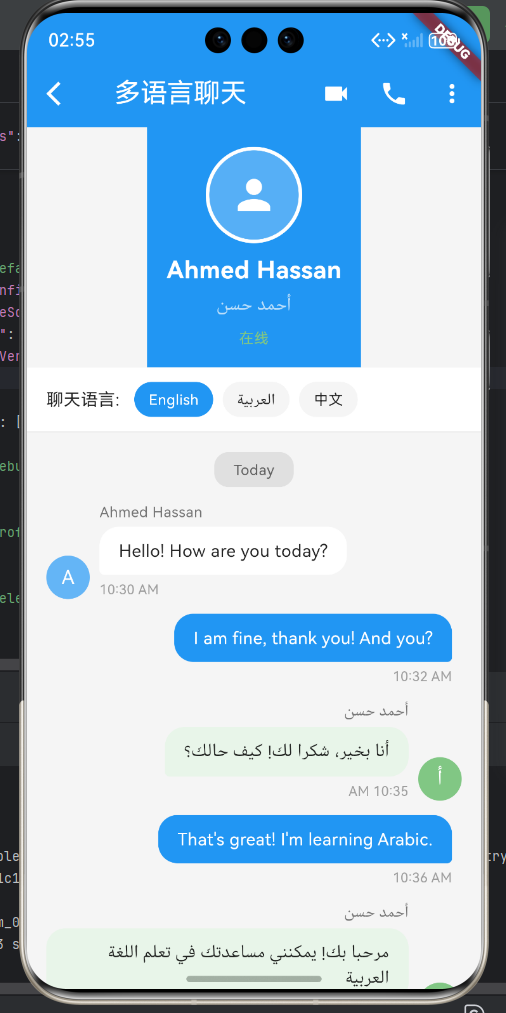
完整示例:多语言聊天应用
下面是一个完整的多语言聊天应用示例,展示了 TextDirection 在支持从左到右(如英语、中文)和从右到左(如阿拉伯语)语言时的应用:
import 'package:flutter/material.dart';
class MultiLanguageChatPage extends StatelessWidget {
const MultiLanguageChatPage({super.key});
Widget build(BuildContext context) {
return Scaffold(
backgroundColor: Colors.grey[100],
appBar: _buildAppBar(),
body: Column(
children: [
_buildContactInfo(),
_buildLanguageToggle(),
Expanded(
child: _buildChatList(),
),
],
),
);
}
AppBar _buildAppBar() {
return AppBar(
backgroundColor: Colors.blue,
elevation: 0,
leading: IconButton(
icon: const Icon(Icons.arrow_back_ios, color: Colors.white),
onPressed: () {},
),
title: const Text('多语言聊天',
style: TextStyle(color: Colors.white)),
actions: [
IconButton(icon: const Icon(Icons.videocam, color: Colors.white),
onPressed: () {}),
IconButton(icon: const Icon(Icons.phone, color: Colors.white),
onPressed: () {}),
PopupMenuButton<String>(
icon: const Icon(Icons.more_vert, color: Colors.white),
color: Colors.white,
itemBuilder: (context) => [
const PopupMenuItem(value: '1', child: Text('查看资料')),
const PopupMenuItem(value: '2', child: Text('清空聊天')),
const PopupMenuItem(value: '3', child: Text('举报')),
],
),
],
);
}
// 联系人信息
Widget _buildContactInfo() {
return Container(
padding: const EdgeInsets.all(16),
color: Colors.blue,
child: Column(
children: [
Container(
width: 80,
height: 80,
decoration: BoxDecoration(
shape: BoxShape.circle,
border: Border.all(color: Colors.white, width: 3),
),
child: ClipOval(
child: Container(
color: Colors.white24,
child:
const Icon(Icons.person, size: 40, color: Colors.white),
),
),
),
const SizedBox(height: 8),
const Text(
'Ahmed Hassan',
style: TextStyle(
color: Colors.white,
fontSize: 20,
fontWeight: FontWeight.bold),
),
const SizedBox(height: 4),
Text(
'أحمد حسن',
style: TextStyle(color: Colors.white70, fontSize: 14),
),
const SizedBox(height: 8),
Text(
'在线',
style: TextStyle(color: Colors.green[300], fontSize: 12),
),
],
),
);
}
// 语言切换
Widget _buildLanguageToggle() {
return Container(
padding: const EdgeInsets.symmetric(horizontal: 16, vertical: 12),
decoration: BoxDecoration(
color: Colors.white,
border: Border(bottom: BorderSide(color: Colors.grey[200]!)),
),
child: Row(
children: [
const Text('聊天语言: ',
style: TextStyle(fontSize: 14, color: Colors.black87)),
const SizedBox(width: 8),
_buildLanguageChip('English', true),
const SizedBox(width: 8),
_buildLanguageChip('العربية', false),
const SizedBox(width: 8),
_buildLanguageChip('中文', false),
],
),
);
}
Widget _buildLanguageChip(String language, bool isSelected) {
return Container(
padding: const EdgeInsets.symmetric(horizontal: 12, vertical: 6),
decoration: BoxDecoration(
color: isSelected ? Colors.blue : Colors.grey[100],
borderRadius: BorderRadius.circular(16),
),
child: Text(
language,
style: TextStyle(
color: isSelected ? Colors.white : Colors.black87,
fontSize: 12,
),
),
);
}
// 聊天列表
Widget _buildChatList() {
return ListView(
padding: const EdgeInsets.all(16),
children: [
_buildDateHeader('Today'),
const SizedBox(height: 12),
// 左侧消息(对方发送 - 英文,从左到右)
_buildChatBubble(
isMe: false,
name: 'Ahmed Hassan',
message: 'Hello! How are you today?',
time: '10:30 AM',
avatar: 'A',
),
const SizedBox(height: 12),
// 右侧消息(我发送)
_buildChatBubble(
isMe: true,
message: 'I am fine, thank you! And you?',
time: '10:32 AM',
),
const SizedBox(height: 12),
// 左侧消息(对方发送 - 阿拉伯语,从右到左)
_buildArabicChatBubble(
isMe: false,
name: 'أحمد حسن',
message: 'أنا بخير، شكرا لك! كيف حالك؟',
time: '10:35 AM',
avatar: 'أ',
),
const SizedBox(height: 12),
// 右侧消息(我发送)
_buildChatBubble(
isMe: true,
message: 'That\'s great! I\'m learning Arabic.',
time: '10:36 AM',
),
const SizedBox(height: 12),
// 左侧消息(对方发送 - 阿拉伯语)
_buildArabicChatBubble(
isMe: false,
name: 'أحمد حسن',
message: 'مرحبا بك! يمكنني مساعدتك في تعلم اللغة العربية',
time: '10:40 AM',
avatar: 'أ',
),
],
);
}
Widget _buildDateHeader(String date) {
return Center(
child: Container(
padding: const EdgeInsets.symmetric(horizontal: 16, vertical: 6),
decoration: BoxDecoration(
color: Colors.grey[300],
borderRadius: BorderRadius.circular(12),
),
child: Text(
date,
style: TextStyle(color: Colors.grey[700], fontSize: 12),
),
),
);
}
// 普通聊天气泡(从左到右 - TextDirection.ltr)
Widget _buildChatBubble({
required bool isMe,
required String message,
required String time,
String? name,
String? avatar,
}) {
return Row(
mainAxisAlignment: isMe ? MainAxisAlignment.end : MainAxisAlignment.start,
crossAxisAlignment: CrossAxisAlignment.end,
children: [
if (!isMe) ...[
Container(
width: 36,
height: 36,
decoration: BoxDecoration(
color: Colors.blue[300],
shape: BoxShape.circle,
),
child: Center(
child: Text(
avatar ?? '',
style: const TextStyle(color: Colors.white, fontSize: 16),
),
),
),
const SizedBox(width: 8),
],
Flexible(
child: Column(
crossAxisAlignment:
isMe ? CrossAxisAlignment.end : CrossAxisAlignment.start,
children: [
if (name != null)
Padding(
padding: const EdgeInsets.only(bottom: 4),
child: Text(
name,
style: TextStyle(
color: Colors.grey[600],
fontSize: 12,
),
),
),
Container(
padding:
const EdgeInsets.symmetric(horizontal: 16, vertical: 10),
decoration: BoxDecoration(
color: isMe ? Colors.blue : Colors.white,
borderRadius: BorderRadius.only(
topLeft: const Radius.circular(16),
topRight: const Radius.circular(16),
bottomLeft: isMe ? const Radius.circular(16) : const Radius.circular(4),
bottomRight: isMe ? const Radius.circular(4) : const Radius.circular(16),
),
),
child: Text(
message,
style: TextStyle(
color: isMe ? Colors.white : Colors.black87,
fontSize: 14,
),
),
),
const SizedBox(height: 4),
Text(
time,
style: TextStyle(
color: Colors.grey[500],
fontSize: 11,
),
),
],
),
),
if (isMe) const SizedBox(width: 8),
],
);
}
// 阿拉伯语聊天气泡(从右到左 - TextDirection.rtl)
Widget _buildArabicChatBubble({
required bool isMe,
required String message,
required String time,
String? name,
String? avatar,
}) {
return Directionality(
textDirection: TextDirection.rtl,
child: Row(
mainAxisAlignment: isMe ? MainAxisAlignment.end : MainAxisAlignment.start,
crossAxisAlignment: CrossAxisAlignment.end,
children: [
if (!isMe) ...[
Container(
width: 36,
height: 36,
decoration: BoxDecoration(
color: Colors.green[300],
shape: BoxShape.circle,
),
child: Center(
child: Text(
avatar ?? '',
style: const TextStyle(color: Colors.white, fontSize: 16),
),
),
),
const SizedBox(width: 8),
],
Flexible(
child: Column(
crossAxisAlignment:
isMe ? CrossAxisAlignment.end : CrossAxisAlignment.start,
children: [
if (name != null)
Padding(
padding: const EdgeInsets.only(bottom: 4),
child: Text(
name,
style: TextStyle(
color: Colors.grey[600],
fontSize: 12,
),
),
),
Container(
padding:
const EdgeInsets.symmetric(horizontal: 16, vertical: 10),
decoration: BoxDecoration(
color: isMe ? Colors.blue : Colors.green[50],
borderRadius: BorderRadius.only(
topLeft: const Radius.circular(16),
topRight: const Radius.circular(16),
bottomLeft: isMe ? const Radius.circular(16) : const Radius.circular(4),
bottomRight: isMe ? const Radius.circular(4) : const Radius.circular(16),
),
),
child: Text(
message,
style: TextStyle(
color: isMe ? Colors.white : Colors.black87,
fontSize: 14,
),
),
),
const SizedBox(height: 4),
Text(
time,
style: TextStyle(
color: Colors.grey[500],
fontSize: 11,
),
),
],
),
),
if (isMe) const SizedBox(width: 8),
],
),
);
}
}
void main() {
runApp(const MaterialApp(
home: MultiLanguageChatPage(),
debugShowCheckedModeBanner: false,
));
}
关键点说明
-
TextDirection.ltr(从左到右):
- 用于英语、中文等语言
- 默认方向,无需显式指定
-
TextDirection.rtl(从右到左):
- 使用
Directionalitywidget 包裹 - 用于阿拉伯语、希伯来语等语言
- 文字和布局都会从右向左排列
- 使用
-
实际应用场景:
- 国际化聊天应用
- 多语言内容平台
- 双语界面设计
TextDirection和VerticalDirection多语言布局
TextDirection和VerticalDirection是Flutter中控制布局方向的重要属性,它们支持从左到右、从右到左、从上到下、从下到上等多种布局方向。这两个属性对于开发多语言应用和支持不同文字方向的用户界面至关重要。
一、TextDirection水平方向控制
TextDirection控制Row中子组件的水平排列方向。
1.1 TextDirection.ltr
从左到右排列(Left To Right),适用于英语、中文等大多数语言。
Row(
  textDirection: TextDirection.ltr,
  children: [
    Container(width: 60, height: 40, color: Colors.red),
    Container(width: 60, height: 40, color: Colors.green),
    Container(width: 60, height: 40, color: Colors.blue),
  ],
)
// 排列顺序:红 → 绿 → 蓝
1.2 TextDirection.rtl
从右到左排列(Right To Left),适用于阿拉伯语、希伯来语等语言。
Row(
  textDirection: TextDirection.rtl,
  children: [
    Container(width: 60, height: 40, color: Colors.red),
    Container(width: 60, height: 40, color: Colors.green),
    Container(width: 60, height: 40, color: Colors.blue),
  ],
)
// 排列顺序:红 ← 绿 ← 蓝
二、VerticalDirection垂直方向控制
VerticalDirection控制Column中子组件的垂直排列方向。
2.1 VerticalDirection.down
从上到下排列(默认值),适用于大多数布局场景。
Column(
  verticalDirection: VerticalDirection.down,
  children: [
    Container(height: 40, color: Colors.red),
    Container(height: 40, color: Colors.green),
    Container(height: 40, color: Colors.blue),
  ],
)
// 排列顺序:红(上) → 绿(中) → 蓝(下)
2.2 VerticalDirection.up
从下到上排列,适用于特殊的布局需求。
Column(
  verticalDirection: VerticalDirection.up,
  children: [
    Container(height: 40, color: Colors.red),
    Container(height: 40, color: Colors.green),
    Container(height: 40, color: Colors.blue),
  ],
)
// 排列顺序:红(下) ← 绿(中) ← 蓝(上)
三、TextDirection与VerticalDirection对比
| 属性 | 作用 | 可选值 | 应用场景 |
|---|---|---|---|
textDirection |
控制水平排列方向 | ltr, rtl |
多语言支持 |
verticalDirection |
控制垂直排列方向 | down, up |
特殊布局需求 |
四、多语言应用实战
4.1 多语言聊天界面
class ChatBubble extends StatelessWidget {
final String message;
final bool isMe;
final String language;
const ChatBubble({
required this.message,
required this.isMe,
this.language = 'zh',
});
Widget build(BuildContext context) {
final isRTL = language == 'ar' || language == 'he';
return Row(
textDirection: isRTL ? TextDirection.rtl : TextDirection.ltr,
mainAxisAlignment: isMe ? MainAxisAlignment.end : MainAxisAlignment.start,
children: [
Container(
padding: EdgeInsets.symmetric(horizontal: 16, vertical: 12),
constraints: BoxConstraints(
maxWidth: MediaQuery.of(context).size.width * 0.7,
),
decoration: BoxDecoration(
color: isMe ? Colors.blue : Colors.grey[200],
borderRadius: BorderRadius.circular(16),
),
child: Text(
message,
style: TextStyle(
color: isMe ? Colors.white : Colors.black87,
),
),
),
],
);
}
}
// 使用
Column(
children: [
ChatBubble(
message: '你好!',
isMe: false,
language: 'zh',
),
ChatBubble(
message: 'مرحبا!', // 阿拉伯语:你好
isMe: false,
language: 'ar',
),
ChatBubble(
message: 'Hi there!',
isMe: false,
language: 'en',
),
],
)
4.2 多语言导航栏
class MultiLanguageAppBar extends StatelessWidget {
final String title;
final String language;
const MultiLanguageAppBar({
required this.title,
required this.language,
});
bool get isRTL => language == 'ar' || language == 'he';
Widget build(BuildContext context) {
return Container(
height: 56,
padding: EdgeInsets.symmetric(horizontal: 16),
decoration: BoxDecoration(
color: Colors.blue,
),
child: Row(
textDirection: isRTL ? TextDirection.rtl : TextDirection.ltr,
children: [
if (!isRTL)
IconButton(
icon: Icon(Icons.menu, color: Colors.white),
onPressed: () {},
),
Expanded(
child: Text(
title,
style: TextStyle(color: Colors.white, fontSize: 18),
textAlign: isRTL ? TextAlign.right : TextAlign.left,
),
),
if (isRTL)
IconButton(
icon: Icon(Icons.menu, color: Colors.white),
onPressed: () {},
),
],
),
);
}
}
五、VerticalDirection特殊应用
5.1 倒计时布局
class CountdownLayout extends StatelessWidget {
final int seconds;
const CountdownLayout({
required this.seconds,
});
Widget build(BuildContext context) {
return Container(
height: 200,
decoration: BoxDecoration(
color: Colors.grey[100],
borderRadius: BorderRadius.circular(8),
),
child: Column(
verticalDirection: VerticalDirection.up,
children: List.generate(
5,
(index) {
final value = seconds - index;
if (value < 0) return Container();
return Padding(
padding: EdgeInsets.symmetric(vertical: 4),
child: Text(
'$value 秒',
style: TextStyle(
fontSize: 18,
fontWeight: FontWeight.bold,
color: value == seconds ? Colors.red : Colors.grey,
),
),
);
},
),
),
);
}
}
5.2 时间轴布局
class Timeline extends StatelessWidget {
final List<TimelineItem> items;
const Timeline({
required this.items,
});
Widget build(BuildContext context) {
return SingleChildScrollView(
scrollDirection: Axis.horizontal,
child: Row(
children: items.asMap().entries.map((entry) {
final index = entry.key;
final item = entry.value;
return Row(
children: [
_buildTimelineDot(item, index == items.length - 1),
if (index < items.length - 1) _buildTimelineLine(),
],
);
}).toList(),
),
);
}
Widget _buildTimelineDot(TimelineItem item, bool isLast) {
return Column(
verticalDirection: VerticalDirection.up,
children: [
if (!isLast)
Text(
item.time,
style: TextStyle(fontSize: 12, color: Colors.grey),
),
Container(
width: 16,
height: 16,
decoration: BoxDecoration(
color: item.completed ? Colors.green : Colors.grey[300],
shape: BoxShape.circle,
),
),
Text(
item.label,
style: TextStyle(
fontSize: 14,
fontWeight: FontWeight.bold,
color: item.completed ? Colors.black87 : Colors.grey[600],
),
),
],
);
}
Widget _buildTimelineLine() {
return Container(
width: 40,
height: 2,
color: Colors.grey[300],
);
}
}
class TimelineItem {
final String time;
final String label;
final bool completed;
TimelineItem({
required this.time,
required this.label,
required this.completed,
});
}
六、TextDirection与MainAxisAlignment的配合
6.1 不同方向的spaceBetween
// LTR + spaceBetween
Row(
  textDirection: TextDirection.ltr,
  mainAxisAlignment: MainAxisAlignment.spaceBetween,
  children: [
    Container(width: 60, height: 40, color: Colors.red),
    Container(width: 60, height: 40, color: Colors.green),
  ],
)
// 红(左)                    绿(右)

// RTL + spaceBetween
Row(
  textDirection: TextDirection.rtl,
  mainAxisAlignment: MainAxisAlignment.spaceBetween,
  children: [
    Container(width: 60, height: 40, color: Colors.red),
    Container(width: 60, height: 40, color: Colors.green),
  ],
)
// 红(右)                    绿(左)
6.2 居中对齐
// LTR + center
Row(
  textDirection: TextDirection.ltr,
  mainAxisAlignment: MainAxisAlignment.center,
  children: [
    Container(width: 60, height: 40, color: Colors.red),
    Container(width: 60, height: 40, color: Colors.green),
  ],
)
//                红 绿(居中)

// RTL + center
Row(
  textDirection: TextDirection.rtl,
  mainAxisAlignment: MainAxisAlignment.center,
  children: [
    Container(width: 60, height: 40, color: Colors.red),
    Container(width: 60, height: 40, color: Colors.green),
  ],
)
//                绿 红(居中,但顺序相反)
七、实际应用案例:多语言个人资料页
class MultiLanguageProfile extends StatelessWidget {
final String language;
const MultiLanguageProfile({
required this.language,
});
bool get isRTL => language == 'ar' || language == 'he';
Widget build(BuildContext context) {
return Scaffold(
body: SingleChildScrollView(
padding: EdgeInsets.all(16),
child: Directionality(
textDirection: isRTL ? TextDirection.rtl : TextDirection.ltr,
child: Column(
children: [
_buildHeader(),
SizedBox(height: 16),
_buildStats(),
SizedBox(height: 16),
_buildInfo(),
],
),
),
),
);
}
Widget _buildHeader() {
return Row(
children: [
CircleAvatar(
radius: 40,
backgroundColor: Colors.blue[100],
child: Icon(Icons.person, size: 40, color: Colors.blue),
),
SizedBox(width: 16),
Expanded(
child: Column(
crossAxisAlignment: CrossAxisAlignment.start,
children: [
Text(
'张三',
style: TextStyle(
fontSize: 24,
fontWeight: FontWeight.bold,
),
),
SizedBox(height: 4),
Text(
'软件工程师',
style: TextStyle(
fontSize: 14,
color: Colors.grey[600],
),
),
],
),
),
IconButton(
icon: Icon(Icons.edit),
onPressed: () {},
),
],
);
}
Widget _buildStats() {
return Row(
mainAxisAlignment: MainAxisAlignment.spaceAround,
children: [
_buildStatItem('文章', '128'),
_buildStatItem('关注', '56'),
_buildStatItem('粉丝', '2340'),
],
);
}
Widget _buildStatItem(String label, String value) {
return Column(
children: [
Text(
value,
style: TextStyle(
fontSize: 24,
fontWeight: FontWeight.bold,
),
),
SizedBox(height: 4),
Text(
label,
style: TextStyle(
fontSize: 12,
color: Colors.grey,
),
),
],
);
}
Widget _buildInfo() {
return Card(
child: Padding(
padding: EdgeInsets.all(16),
child: Column(
crossAxisAlignment: CrossAxisAlignment.start,
children: [
_buildInfoRow('邮箱', 'zhangsan@example.com', Icons.email),
SizedBox(height: 12),
_buildInfoRow('电话', '138****8888', Icons.phone),
SizedBox(height: 12),
_buildInfoRow('位置', '北京市海淀区', Icons.location_on),
],
),
),
);
}
Widget _buildInfoRow(String label, String value, IconData icon) {
return Row(
children: [
Icon(icon, size: 20, color: Colors.grey[600]),
SizedBox(width: 12),
Text('$label: '),
SizedBox(width: 8),
Text(
value,
style: TextStyle(fontWeight: FontWeight.w500),
),
],
);
}
}
八、Directionality的使用
Directionality可以统一设置整个子树的文字方向。
Directionality(
  textDirection: TextDirection.rtl,
  child: Column(
    children: [
      Text('你好'),  // 从右到左显示
      Row(
        children: [
          Text('A'),
          Text('B'),
          Text('C'),
        ],
      ),
    ],
  ),
)
九、选择TextDirection的流程图
十、常见问题与解决方案
10.1 文字显示方向错误
问题:RTL语言的文字显示方向不正确
解决方案:使用Directionality统一设置
Directionality(
  textDirection: TextDirection.rtl,
  child: YourWidget(),
)
10.2 图标位置不对
问题:RTL布局下图标位置不符合预期
解决方案:根据语言方向动态调整图标位置
Row(
  textDirection: isRTL ? TextDirection.rtl : TextDirection.ltr,
  children: [
    if (!isRTL) Icon(Icons.arrow_back),
    Expanded(child: Text('标题')),
    if (isRTL) Icon(Icons.arrow_back),
  ],
)
10.3 MainAxisAlignment效果异常
问题:RTL下mainAxisAlignment的效果与预期不符
解决方案:理解方向性的影响
// LTR + end = 右对齐
Row(
  textDirection: TextDirection.ltr,
  mainAxisAlignment: MainAxisAlignment.end,
  children: [...],
)

// RTL + end = 左对齐
Row(
  textDirection: TextDirection.rtl,
  mainAxisAlignment: MainAxisAlignment.end,
  children: [...],
)
十一、总结
TextDirection和VerticalDirection是Flutter中控制布局方向的重要属性,它们对于开发多语言应用和特殊布局需求至关重要。
核心要点
- TextDirection:控制水平排列方向,支持LTR和RTL
- VerticalDirection:控制垂直排列方向,支持down和up
- Directionality:可以统一设置子树的文字方向
- 多语言支持:根据语言类型动态选择合适的方向
应用场景
// 使用LTR的场景
- 英语、中文等大多数语言
- 标准从左到右的布局
- 大部分应用界面

// 使用RTL的场景
- 阿拉伯语、希伯来语等
- 从右到左的布局需求
- 特殊的界面设计

// 使用down的场景
- 标准的从上到下布局
- 大部分列表和卡片
- 默认的垂直排列

// 使用up的场景
- 倒计时显示
- 时间轴布局
- 特殊的界面设计
通过掌握TextDirection和VerticalDirection的使用方法,你将能够开发出支持多语言的国际化应用,满足不同用户的布局需求。
欢迎加入开源鸿蒙跨平台社区:https://openharmonycrossplatform.csdn.net

AtomGit 是由开放原子开源基金会联合 CSDN 等生态伙伴共同推出的新一代开源与人工智能协作平台。平台坚持“开放、中立、公益”的理念,把代码托管、模型共享、数据集托管、智能体开发体验和算力服务整合在一起,为开发者提供从开发、训练到部署的一站式体验。
更多推荐
 18
18 0
0- 0


 已为社区贡献18条内容

所有评论(0)