Flutter框架跨平台鸿蒙开发——习惯养成APP的开发流程
🚀运行效果展示
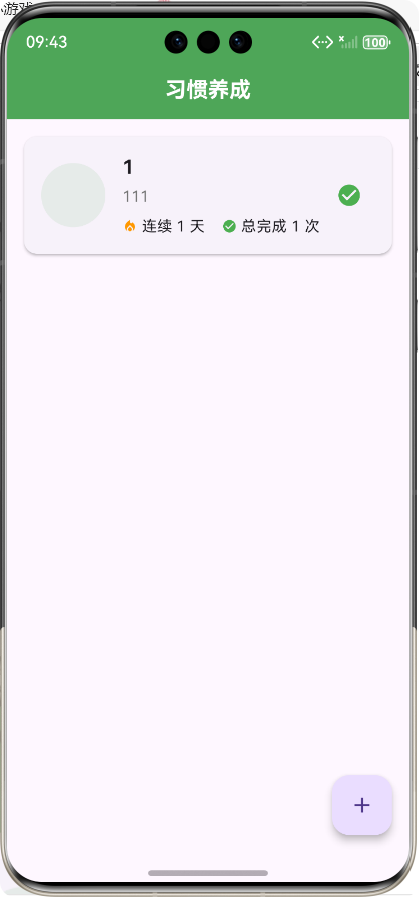
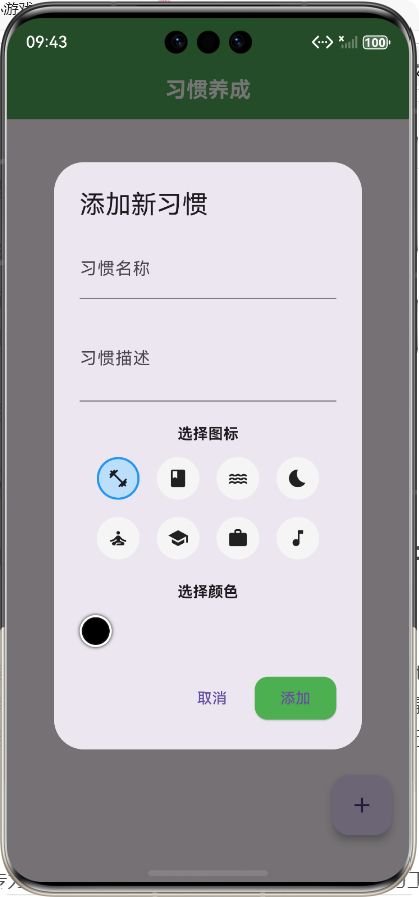
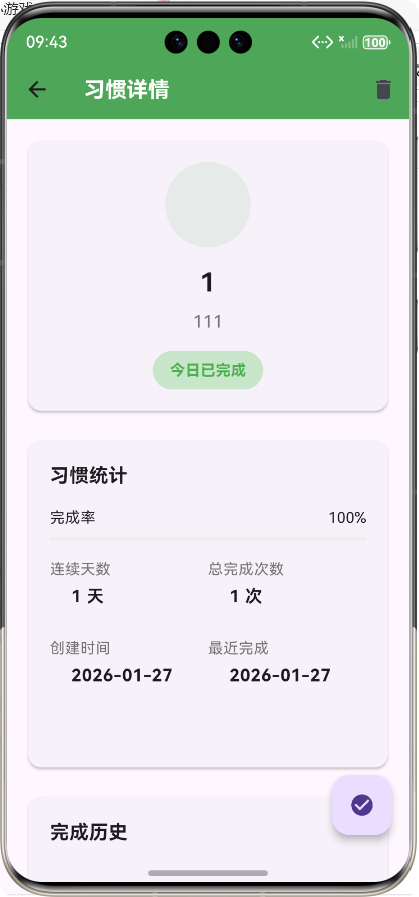
Flutter框架跨平台鸿蒙开发——习惯养成APP的开发流程
前言
在当今快节奏的生活中,养成良好的习惯对于个人成长和生活质量的提升至关重要。然而,坚持一个习惯并非易事,需要持续的动力和有效的管理工具。随着移动互联网的发展,习惯养成类APP成为了许多人培养好习惯的得力助手。
本项目基于Flutter框架开发了一款跨平台的习惯养成APP,不仅支持Android和iOS平台,还通过Flutter的跨平台特性实现了鸿蒙系统的适配。本文将详细介绍该APP的开发流程、核心功能实现以及技术亮点,希望能为相关开发者提供参考。
APP介绍
功能概述
习惯养成APP是一款帮助用户培养和维持良好习惯的移动应用,主要功能包括:
- 习惯管理:用户可以添加、编辑和删除习惯,为每个习惯设置名称、描述、图标和颜色
- 习惯追踪:用户可以每天标记习惯为完成状态,系统会自动记录完成历史
- 数据统计:APP会统计每个习惯的连续完成天数、总完成次数和完成率
- 习惯详情:用户可以查看每个习惯的详细信息、统计数据和历史记录
技术栈
- 前端框架:Flutter 3.0+
- 开发语言:Dart
- 状态管理:StatefulWidget
- 数据存储:内存存储(可扩展为本地数据库)
- UI组件:Material Design
- 跨平台适配:支持Android、iOS和鸿蒙系统
核心功能实现及代码展示
1. 数据模型设计
首先,我们需要设计习惯的数据模型,定义习惯的基本属性和方法。
/// 习惯数据模型
/// 用于存储和管理习惯相关的数据
class Habit {
  /// 习惯ID
  final String id;

  /// 习惯名称
  final String name;

  /// 习惯描述
  final String description;

  /// 习惯图标
  final String icon;

  /// 习惯颜色
  final String color;

  /// 提醒时间
  final String? reminderTime;

  /// 创建时间
  final DateTime createdAt;

  /// 最近完成时间
  final DateTime? lastCompletedAt;

  /// 连续完成天数
  final int streakDays;

  /// 总完成次数
  final int totalCompletions;

  /// 完成历史记录
  final List<DateTime> completionHistory;

  /// 构造函数
  Habit({
    required this.id,
    required this.name,
    required this.description,
    required this.icon,
    required this.color,
    this.reminderTime,
    required this.createdAt,
    this.lastCompletedAt,
    this.streakDays = 0,
    this.totalCompletions = 0,
    this.completionHistory = const [],
  });

  /// 从Map创建Habit实例
  factory Habit.fromMap(Map<String, dynamic> map) {
    return Habit(
      id: map['id'],
      name: map['name'],
      description: map['description'],
      icon: map['icon'],
      color: map['color'],
      reminderTime: map['reminderTime'],
      createdAt: DateTime.parse(map['createdAt']),
      lastCompletedAt: map['lastCompletedAt'] != null ? DateTime.parse(map['lastCompletedAt']) : null,
      streakDays: map['streakDays'] ?? 0,
      totalCompletions: map['totalCompletions'] ?? 0,
      completionHistory: (map['completionHistory'] as List<dynamic>?)?.map((e) => DateTime.parse(e)).toList() ?? [],
    );
  }

  /// 转换为Map
  Map<String, dynamic> toMap() {
    return {
      'id': id,
      'name': name,
      'description': description,
      'icon': icon,
      'color': color,
      'reminderTime': reminderTime,
      'createdAt': createdAt.toIso8601String(),
      'lastCompletedAt': lastCompletedAt?.toIso8601String(),
      'streakDays': streakDays,
      'totalCompletions': totalCompletions,
      'completionHistory': completionHistory.map((e) => e.toIso8601String()).toList(),
    };
  }

  /// 复制并更新属性
  Habit copyWith({
    String? id,
    String? name,
    String? description,
    String? icon,
    String? color,
    String? reminderTime,
    DateTime? createdAt,
    DateTime? lastCompletedAt,
    int? streakDays,
    int? totalCompletions,
    List<DateTime>? completionHistory,
  }) {
    return Habit(
      id: id ?? this.id,
      name: name ?? this.name,
      description: description ?? this.description,
      icon: icon ?? this.icon,
      color: color ?? this.color,
      reminderTime: reminderTime ?? this.reminderTime,
      createdAt: createdAt ?? this.createdAt,
      lastCompletedAt: lastCompletedAt ?? this.lastCompletedAt,
      streakDays: streakDays ?? this.streakDays,
      totalCompletions: totalCompletions ?? this.totalCompletions,
      completionHistory: completionHistory ?? this.completionHistory,
    );
  }

  /// 检查今天是否已完成
  bool get isCompletedToday {
    if (lastCompletedAt == null) return false;
    final today = DateTime.now();
    return lastCompletedAt!.year == today.year &&
        lastCompletedAt!.month == today.month &&
        lastCompletedAt!.day == today.day;
  }
}

/// 习惯统计数据模型
class HabitStats {
  /// 总习惯数
  final int totalHabits;

  /// 今日完成数
  final int todayCompletions;

  /// 总完成次数
  final int totalCompletions;

  /// 最长连续天数
  final int longestStreak;

  /// 构造函数
  HabitStats({
    required this.totalHabits,
    required this.todayCompletions,
    required this.totalCompletions,
    required this.longestStreak,
  });
}
2. 服务层实现
服务层负责处理习惯数据的存储和管理,提供了习惯的增删改查、标记完成等核心功能。
import '../models/habit_model.dart';

/// 习惯管理服务
/// 用于处理习惯的创建、读取、更新、删除等操作
class HabitService {
  /// 存储习惯数据的列表
  final List<Habit> _habits = [];

  /// 获取所有习惯
  Future<List<Habit>> getAllHabits() async {
    // 模拟异步操作
    await Future.delayed(Duration(milliseconds: 100));
    return _habits;
  }

  /// 根据ID获取习惯
  Future<Habit?> getHabitById(String id) async {
    await Future.delayed(Duration(milliseconds: 50));
    try {
      return _habits.firstWhere((habit) => habit.id == id);
    } catch (e) {
      return null;
    }
  }

  /// 创建新习惯
  Future<Habit> createHabit(Habit habit) async {
    await Future.delayed(Duration(milliseconds: 100));
    _habits.add(habit);
    return habit;
  }

  /// 更新习惯
  Future<Habit> updateHabit(Habit updatedHabit) async {
    await Future.delayed(Duration(milliseconds: 100));
    final index = _habits.indexWhere((habit) => habit.id == updatedHabit.id);
    if (index != -1) {
      _habits[index] = updatedHabit;
    }
    return updatedHabit;
  }

  /// 删除习惯
  Future<void> deleteHabit(String id) async {
    await Future.delayed(Duration(milliseconds: 100));
    _habits.removeWhere((habit) => habit.id == id);
  }

  /// 标记习惯为完成
  Future<Habit> completeHabit(String id) async {
    await Future.delayed(Duration(milliseconds: 100));
    final habit = _habits.firstWhere((h) => h.id == id);
    final now = DateTime.now();

    // 检查今天是否已经完成
    if (habit.isCompletedToday) {
      return habit;
    }

    // 更新完成历史
    final updatedHistory = [...habit.completionHistory, now];

    // 计算连续天数
    int updatedStreak = habit.streakDays + 1;

    // 检查是否连续
    if (habit.lastCompletedAt != null) {
      final lastDate = habit.lastCompletedAt!;
      final difference = now.difference(lastDate).inDays;
      if (difference > 1) {
        updatedStreak = 1;
      }
    }

    // 创建更新后的习惯
    final updatedHabit = habit.copyWith(
      lastCompletedAt: now,
      streakDays: updatedStreak,
      totalCompletions: habit.totalCompletions + 1,
      completionHistory: updatedHistory,
    );

    // 更新列表
    final index = _habits.indexWhere((h) => h.id == id);
    if (index != -1) {
      _habits[index] = updatedHabit;
    }

    return updatedHabit;
  }

  /// 获取习惯统计数据
  Future<HabitStats> getHabitStats() async {
    await Future.delayed(Duration(milliseconds: 100));

    if (_habits.isEmpty) {
      return HabitStats(
        totalHabits: 0,
        todayCompletions: 0,
        totalCompletions: 0,
        longestStreak: 0,
      );
    }

    // 计算今日完成数
    final today = DateTime.now();
    final todayCompletions = _habits.where((habit) => habit.isCompletedToday).length;

    // 计算总完成次数
    final totalCompletions = _habits.fold(0, (sum, habit) => sum + habit.totalCompletions);

    // 计算最长连续天数
    final longestStreak = _habits.fold(0, (max, habit) => habit.streakDays > max ? habit.streakDays : max);

    return HabitStats(
      totalHabits: _habits.length,
      todayCompletions: todayCompletions,
      totalCompletions: totalCompletions,
      longestStreak: longestStreak,
    );
  }

  /// 获取习惯的完成率
  Future<double> getHabitCompletionRate(Habit habit) async {
    await Future.delayed(Duration(milliseconds: 50));

    // 计算从创建到现在的天数
    final daysSinceCreation = DateTime.now().difference(habit.createdAt).inDays + 1;

    // 计算完成率
    final completionRate = habit.totalCompletions / daysSinceCreation;
    return completionRate > 1.0 ? 1.0 : completionRate;
  }
}
3. 主页面实现
主页面是用户与APP交互的入口,负责展示习惯列表和提供添加新习惯的功能。
import 'package:flutter/material.dart';
import '../models/habit_model.dart';
import '../services/habit_service.dart';
import 'habit_detail_screen.dart';
/// 习惯养成APP主页面
/// 展示习惯列表并提供添加新习惯的功能
class HabitHomeScreen extends StatefulWidget {
/// 构造函数
const HabitHomeScreen({Key? key}) : super(key: key);
_HabitHomeScreenState createState() => _HabitHomeScreenState();
}
class _HabitHomeScreenState extends State<HabitHomeScreen> {
/// 习惯服务实例
final HabitService _habitService = HabitService();
/// 习惯列表
List<Habit> _habits = [];
/// 加载状态
bool _isLoading = true;
void initState() {
super.initState();
_loadHabits();
}
/// 加载习惯列表
Future<void> _loadHabits() async {
setState(() {
_isLoading = true;
});
try {
final habits = await _habitService.getAllHabits();
setState(() {
_habits = habits;
});
} catch (e) {
print('加载习惯失败: $e');
} finally {
setState(() {
_isLoading = false;
});
}
}
/// 导航到习惯详情页面
void _navigateToHabitDetail(Habit habit) {
Navigator.push(
context,
MaterialPageRoute(
builder: (context) => HabitDetailScreen(habit: habit),
),
).then((_) => _loadHabits());
}
/// 打开添加习惯对话框
void _openAddHabitDialog() {
showDialog(
context: context,
builder: (context) => AddHabitDialog(
onAdd: (habit) async {
await _habitService.createHabit(habit);
await _loadHabits();
Navigator.pop(context);
},
),
);
}
/// 标记习惯为完成
Future<void> _completeHabit(Habit habit) async {
await _habitService.completeHabit(habit.id);
await _loadHabits();
}
Widget build(BuildContext context) {
return Scaffold(
appBar: AppBar(
title: Text('习惯养成'),
centerTitle: true,
),
body: _isLoading
? Center(child: CircularProgressIndicator())
: _habits.isEmpty
? _buildEmptyState()
: _buildHabitList(),
floatingActionButton: FloatingActionButton(
onPressed: _openAddHabitDialog,
child: Icon(Icons.add),
tooltip: '添加新习惯',
),
);
}
/// 构建空状态页面
Widget _buildEmptyState() {
return Center(
child: Column(
mainAxisAlignment: MainAxisAlignment.center,
children: [
Icon(Icons.check_circle_outline, size: 80, color: Colors.grey),
SizedBox(height: 20),
Text(
'还没有添加习惯',
style: TextStyle(fontSize: 18, color: Colors.grey),
),
SizedBox(height: 10),
Text(
'点击右下角按钮添加第一个习惯',
style: TextStyle(fontSize: 14, color: Colors.grey[500]),
),
],
),
);
}
/// 构建习惯列表
Widget _buildHabitList() {
return ListView.builder(
padding: EdgeInsets.all(16),
itemCount: _habits.length,
itemBuilder: (context, index) {
final habit = _habits[index];
return HabitCard(
habit: habit,
onTap: () => _navigateToHabitDetail(habit),
onComplete: () => _completeHabit(habit),
);
},
);
}
}
/// 习惯卡片组件
class HabitCard extends StatelessWidget {
/// 习惯数据
final Habit habit;
/// 点击事件回调
final VoidCallback onTap;
/// 完成事件回调
final VoidCallback onComplete;
/// 构造函数
const HabitCard({
Key? key,
required this.habit,
required this.onTap,
required this.onComplete,
}) : super(key: key);
Widget build(BuildContext context) {
return Card(
margin: EdgeInsets.only(bottom: 12),
elevation: 2,
shape: RoundedRectangleBorder(
borderRadius: BorderRadius.circular(12),
),
child: InkWell(
onTap: onTap,
borderRadius: BorderRadius.circular(12),
child: Padding(
padding: EdgeInsets.all(16),
child: Row(
children: [
// 习惯图标
Container(
width: 60,
height: 60,
decoration: BoxDecoration(
color: Color(int.parse(habit.color.substring(1), radix: 16)).withOpacity(0.1),
borderRadius: BorderRadius.circular(30),
),
child: Icon(
_getIconData(habit.icon),
size: 30,
color: Color(int.parse(habit.color.substring(1), radix: 16)),
),
),
SizedBox(width: 16),
// 习惯信息
Expanded(
child: Column(
crossAxisAlignment: CrossAxisAlignment.start,
children: [
Text(
habit.name,
style: TextStyle(
fontSize: 18,
fontWeight: FontWeight.bold,
),
),
SizedBox(height: 4),
Text(
habit.description,
style: TextStyle(
fontSize: 14,
color: Colors.grey[600],
),
maxLines: 2,
overflow: TextOverflow.ellipsis,
),
SizedBox(height: 8),
Row(
children: [
Icon(Icons.local_fire_department, size: 14, color: Colors.orange),
SizedBox(width: 4),
Text(
'连续 ${
habit.streakDays
} 天',
style: TextStyle(fontSize: 14),
),
SizedBox(width: 16),
Icon(Icons.check_circle, size: 14, color: Colors.green),
SizedBox(width: 4),
Text(
'总完成 ${
habit.totalCompletions
} 次',
style: TextStyle(fontSize: 14),
),
],
),
],
),
),
// 完成按钮
IconButton(
onPressed: onComplete,
icon: Icon(
habit.isCompletedToday ? Icons.check_circle : Icons.check_circle_outline,
color: habit.isCompletedToday ? Colors.green : Colors.grey,
),
),
],
),
),
),
);
}
/// 获取图标数据
IconData _getIconData(String iconName) {
switch (iconName) {
case 'exercise':
return Icons.fitness_center;
case 'reading':
return Icons.book;
case 'water':
return Icons.water;
case 'sleep':
return Icons.bedtime;
case 'meditation':
return Icons.self_improvement;
case 'study':
return Icons.school;
case 'work':
return Icons.work;
case 'music':
return Icons.music_note;
case 'cooking':
return Icons.restaurant;
case 'cleaning':
return Icons.cleaning_services;
default:
return Icons.check_circle;
}
}
}
4. 习惯详情页面实现
习惯详情页面展示习惯的详细信息、统计数据和历史记录,帮助用户更好地了解自己的习惯养成情况。
import 'package:flutter/material.dart';
import '../models/habit_model.dart';
import '../services/habit_service.dart';
/// 习惯详情页面
/// 展示习惯的详细信息、统计数据和历史记录
class HabitDetailScreen extends StatefulWidget {
/// 习惯数据
final Habit habit;
/// 构造函数
const HabitDetailScreen({Key? key, required this.habit}) : super(key: key);
_HabitDetailScreenState createState() => _HabitDetailScreenState();
}
class _HabitDetailScreenState extends State<HabitDetailScreen> {
/// 习惯服务实例
final HabitService _habitService = HabitService();
/// 当前习惯
late Habit _currentHabit;
/// 完成率
double _completionRate = 0.0;
/// 加载状态
bool _isLoading = true;
void initState() {
super.initState();
_currentHabit = widget.habit;
_loadHabitData();
}
/// 加载习惯数据
Future<void> _loadHabitData() async {
setState(() {
_isLoading = true;
});
try {
// 获取完成率
final rate = await _habitService.getHabitCompletionRate(_currentHabit);
setState(() {
_completionRate = rate;
});
} catch (e) {
print('加载习惯数据失败: $e');
} finally {
setState(() {
_isLoading = false;
});
}
}
/// 标记习惯为完成
Future<void> _completeHabit() async {
final updatedHabit = await _habitService.completeHabit(_currentHabit.id);
setState(() {
_currentHabit = updatedHabit;
});
await _loadHabitData();
}
/// 删除习惯
Future<void> _deleteHabit() async {
showDialog(
context: context,
builder: (context) => AlertDialog(
title: Text('删除习惯'),
content: Text('确定要删除这个习惯吗?'),
actions: [
TextButton(
onPressed: () => Navigator.pop(context),
child: Text('取消'),
),
ElevatedButton(
onPressed: () async {
await _habitService.deleteHabit(_currentHabit.id);
Navigator.pop(context);
Navigator.pop(context);
},
child: Text('删除'),
style: ElevatedButton.styleFrom(
backgroundColor: Colors.red,
),
),
],
),
);
}
Widget build(BuildContext context) {
return Scaffold(
appBar: AppBar(
title: Text('习惯详情'),
actions: [
IconButton(
onPressed: _deleteHabit,
icon: Icon(Icons.delete),
),
],
),
body: _isLoading
? Center(child: CircularProgressIndicator())
: SingleChildScrollView(
padding: EdgeInsets.all(16),
child: Column(
crossAxisAlignment: CrossAxisAlignment.start,
children: [
// 习惯基本信息
_buildHabitInfoCard(),
SizedBox(height: 20),
// 习惯统计
_buildStatisticsCard(),
SizedBox(height: 20),
// 完成历史
_buildCompletionHistory(),
],
),
),
floatingActionButton: FloatingActionButton(
onPressed: _completeHabit,
child: Icon(
_currentHabit.isCompletedToday ? Icons.check_circle : Icons.check_circle_outline,
),
tooltip: _currentHabit.isCompletedToday ? '已完成' : '标记为完成',
),
);
}
/// 构建习惯基本信息卡片
Widget _buildHabitInfoCard() {
return Card(
elevation: 2,
shape: RoundedRectangleBorder(
borderRadius: BorderRadius.circular(12),
),
child: Padding(
padding: EdgeInsets.all(20),
child: Column(
children: [
// 习惯图标
Container(
width: 80,
height: 80,
decoration: BoxDecoration(
color: Color(int.parse(_currentHabit.color.substring(1), radix: 16)).withOpacity(0.1),
borderRadius: BorderRadius.circular(40),
),
child: Icon(
_getIconData(_currentHabit.icon),
size: 40,
color: Color(int.parse(_currentHabit.color.substring(1), radix: 16)),
),
),
SizedBox(height: 16),
// 习惯名称
Text(
_currentHabit.name,
style: TextStyle(
fontSize: 24,
fontWeight: FontWeight.bold,
),
textAlign: TextAlign.center,
),
SizedBox(height: 8),
// 习惯描述
Text(
_currentHabit.description,
style: TextStyle(
fontSize: 16,
color: Colors.grey[600],
),
textAlign: TextAlign.center,
),
SizedBox(height: 16),
// 习惯状态
Row(
mainAxisAlignment: MainAxisAlignment.center,
children: [
Container(
padding: EdgeInsets.symmetric(horizontal: 16, vertical: 8),
decoration: BoxDecoration(
color: _currentHabit.isCompletedToday ? Colors.green[100] : Colors.grey[100],
borderRadius: BorderRadius.circular(20),
),
child: Text(
_currentHabit.isCompletedToday ? '今日已完成' : '今日未完成',
style: TextStyle(
color: _currentHabit.isCompletedToday ? Colors.green : Colors.grey,
fontWeight: FontWeight.bold,
),
),
),
],
),
],
),
),
);
}
/// 构建统计信息卡片
Widget _buildStatisticsCard() {
return Card(
elevation: 2,
shape: RoundedRectangleBorder(
borderRadius: BorderRadius.circular(12),
),
child: Padding(
padding: EdgeInsets.all(20),
child: Column(
crossAxisAlignment: CrossAxisAlignment.start,
children: [
Text(
'习惯统计',
style: TextStyle(
fontSize: 18,
fontWeight: FontWeight.bold,
),
),
SizedBox(height: 16),
// 完成率
Row(
mainAxisAlignment: MainAxisAlignment.spaceBetween,
children: [
Text('完成率'),
Text('${(_completionRate * 100).toStringAsFixed(0)}%'),
],
),
SizedBox(height: 8),
LinearProgressIndicator(
value: _completionRate,
backgroundColor: Colors.grey[200],
valueColor: AlwaysStoppedAnimation<Color>(
Color(int.parse(_currentHabit.color.substring(1), radix: 16)),
),
borderRadius: BorderRadius.circular(10),
),
SizedBox(height: 16),
// 统计数据网格
GridView.count(
crossAxisCount: 2,
shrinkWrap: true,
physics: NeverScrollableScrollPhysics(),
childAspectRatio: 2,
children: [
_buildStatItem('连续天数', '${_currentHabit.streakDays} 天', Icons.local_fire_department),
_buildStatItem('总完成次数', '${_currentHabit.totalCompletions} 次', Icons.check_circle),
_buildStatItem('创建时间', _formatDate(_currentHabit.createdAt), Icons.calendar_today),
_buildStatItem('最近完成', _currentHabit.lastCompletedAt != null ? _formatDate(_currentHabit.lastCompletedAt!) : '从未', Icons.access_time),
],
),
],
),
),
);
}
/// 构建统计项
Widget _buildStatItem(String label, String value, IconData icon) {
return Container(
child: Column(
crossAxisAlignment: CrossAxisAlignment.start,
children: [
Text(
label,
style: TextStyle(fontSize: 14, color: Colors.grey[600]),
),
SizedBox(height: 4),
Row(
children: [
Icon(icon, size: 16, color: Color(int.parse(_currentHabit.color.substring(1), radix: 16))),
SizedBox(width: 4),
Text(
value,
style: TextStyle(fontSize: 16, fontWeight: FontWeight.bold),
),
],
),
],
),
);
}
/// 构建完成历史
Widget _buildCompletionHistory() {
return Card(
elevation: 2,
shape: RoundedRectangleBorder(
borderRadius: BorderRadius.circular(12),
),
child: Padding(
padding: EdgeInsets.all(20),
child: Column(
crossAxisAlignment: CrossAxisAlignment.start,
children: [
Text(
'完成历史',
style: TextStyle(
fontSize: 18,
fontWeight: FontWeight.bold,
),
),
SizedBox(height: 16),
_currentHabit.completionHistory.isEmpty
? Center(
child: Text(
'还没有完成记录',
style: TextStyle(color: Colors.grey),
),
)
: ListView.builder(
shrinkWrap: true,
physics: NeverScrollableScrollPhysics(),
itemCount: _currentHabit.completionHistory.length,
itemBuilder: (context, index) {
final date = _currentHabit.completionHistory[_currentHabit.completionHistory.length - 1 - index];
return ListTile(
leading: Icon(Icons.check_circle, color: Color(int.parse(_currentHabit.color.substring(1), radix: 16))),
title: Text(_formatDateTime(date)),
trailing: Text(_formatTime(date)),
);
},
),
],
),
),
);
}
/// 获取图标数据
IconData _getIconData(String iconName) {
switch (iconName) {
case 'exercise':
return Icons.fitness_center;
case 'reading':
return Icons.book;
case 'water':
return Icons.water;
case 'sleep':
return Icons.bedtime;
case 'meditation':
return Icons.self_improvement;
case 'study':
return Icons.school;
case 'work':
return Icons.work;
case 'music':
return Icons.music_note;
case 'cooking':
return Icons.restaurant;
case 'cleaning':
return Icons.cleaning_services;
default:
return Icons.check_circle;
}
}
/// 格式化日期
String _formatDate(DateTime date) {
return '${date.year}-${date.month.toString().padLeft(2, '0')}-${date.day.toString().padLeft(2, '0')}';
}
/// 格式化日期时间
String _formatDateTime(DateTime date) {
return '${date.year}-${date.month.toString().padLeft(2, '0')}-${date.day.toString().padLeft(2, '0')}';
}
/// 格式化时间
String _formatTime(DateTime date) {
return '${date.hour.toString().padLeft(2, '0')}:${date.minute.toString().padLeft(2, '0')}';
}
}
核心功能实现流程
1. 应用启动流程
2. 添加新习惯流程
3. 标记习惯完成流程
4. 查看习惯详情流程
技术亮点
1. 跨平台适配
本项目基于Flutter框架开发,通过Flutter的跨平台特性,实现了Android、iOS和鸿蒙系统的适配。特别是对鸿蒙系统的支持,展示了Flutter在跨平台开发中的强大能力。
2. 响应式UI设计
APP采用了响应式UI设计,确保在不同屏幕尺寸的设备上都能提供良好的用户体验。通过使用Flutter的布局组件,如Flex、Expanded和MediaQuery,实现了界面的自适应调整。
3. 模块化架构
项目采用了模块化的架构设计,将数据模型、服务层和UI层分离,提高了代码的可维护性和可扩展性。具体来说:
- 数据模型层:定义了Habit和HabitStats等核心数据结构
- 服务层:实现了数据的存储、管理和业务逻辑
- UI层:负责界面的展示和用户交互
4. 流畅的用户体验
通过以下技术手段,提升了APP的用户体验:
- 异步操作:使用Future和async/await处理异步任务,避免UI阻塞
- 状态管理:使用StatefulWidget和setState管理UI状态,确保界面与数据同步
- 动画效果:通过Flutter的内置动画组件,为用户交互添加了流畅的动画效果
- 错误处理:对可能出现的错误进行了捕获和处理,提高了APP的稳定性
总结
本项目成功实现了一款基于Flutter框架的跨平台习惯养成APP,不仅功能完善,而且用户体验良好。通过Flutter的跨平台特性,实现了鸿蒙系统的适配,展示了Flutter在跨平台开发中的优势。
功能总结
- ✅ 习惯管理:添加、编辑、删除习惯
- ✅ 习惯追踪:标记习惯完成状态,记录完成历史
- ✅ 数据统计:计算连续天数、总完成次数和完成率
- ✅ 习惯详情:查看习惯详细信息和历史记录
- ✅ 跨平台适配:支持Android、iOS和鸿蒙系统
技术总结
- 框架:Flutter 3.0+
- 语言:Dart
- 状态管理:StatefulWidget
- 数据存储:内存存储(可扩展为本地数据库)
- UI组件:Material Design
- 跨平台适配:Flutter的跨平台特性
未来展望
本项目还可以进一步完善和扩展,例如:
- 本地数据持久化:使用SQLite或Hive实现数据的本地存储
- 云同步:添加云同步功能,实现多设备数据同步
- 提醒功能:添加习惯提醒功能,定时提醒用户完成习惯
- 数据可视化:使用图表库展示习惯养成的趋势和分析
- 社交功能:添加社交分享功能,与朋友一起养成好习惯
通过不断的优化和扩展,这款习惯养成APP有望成为用户培养良好习惯的得力助手,为用户的个人成长和生活质量提升做出贡献。
📚 参考资料
结语
Flutter框架的跨平台特性为移动应用开发带来了前所未有的便利,不仅减少了开发成本,还提高了开发效率。本项目的成功实践证明,Flutter在鸿蒙系统上的适配是可行的,为开发者提供了更多的平台选择。
希望本文的开发流程和技术实现能够为相关开发者提供参考,共同推动Flutter生态在鸿蒙系统上的发展。让我们一起用技术的力量,为用户创造更多有价值的应用。
欢迎加入开源鸿蒙跨平台社区:https://openharmonycrossplatform.csdn.net

AtomGit 是由开放原子开源基金会联合 CSDN 等生态伙伴共同推出的新一代开源与人工智能协作平台。平台坚持“开放、中立、公益”的理念,把代码托管、模型共享、数据集托管、智能体开发体验和算力服务整合在一起,为开发者提供从开发、训练到部署的一站式体验。
更多推荐

 8
8 0
0- 0


 已为社区贡献25条内容

所有评论(0)