Flutter框架开发鸿蒙项目——图片滤镜效果
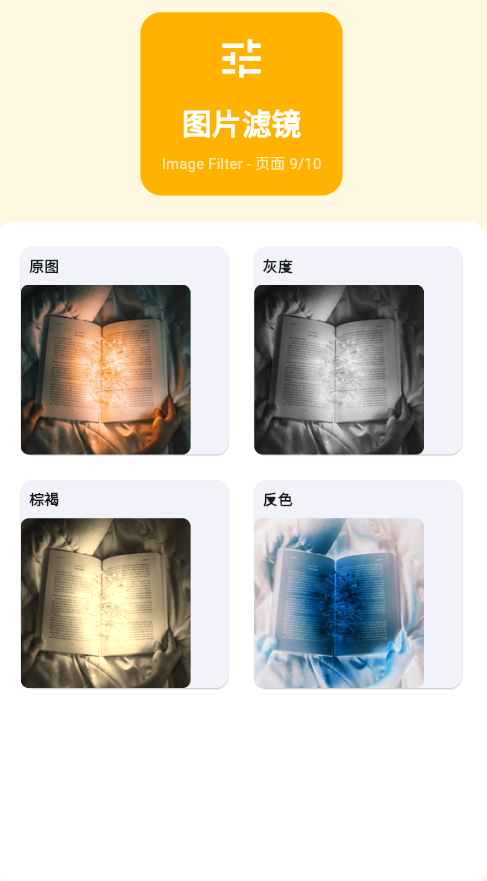
一、ColorFiltered概述
ColorFiltered是Flutter中实现图片滤镜效果的核心组件,它通过ColorFilter对子widget的渲染结果进行颜色变换。这种变换可以基于颜色矩阵(Color Matrix)或颜色混合模式(Blend Mode)来实现。
图片滤镜在移动应用中应用广泛,从简单的黑白效果到复杂的色彩调整,都能通过ColorFiltered实现。相比原生图片处理库,ColorFiltered的优势在于:
- 跨平台一致:在所有平台提供相同的视觉效果
- 性能良好:利用GPU加速,实时渲染流畅
- 易于使用:无需处理原生代码集成
- 动态调整:可以实时改变滤镜参数
滤镜类型
二、基础滤镜详解
灰度效果
灰度滤镜将彩色图像转换为黑白图像,通过加权平均RGB通道实现。
Gray = 0.299 × R + 0.587 × G + 0.114 × B \text{Gray} = 0.299 \times R + 0.587 \times G + 0.114 \times B Gray=0.299×R+0.587×G+0.114×B
ColorFiltered(
  colorFilter: ColorFilter.matrix(<double>[
    0.2126, 0.7152, 0.0722, 0, 0,  // R通道:使用亮度公式
    0.2126, 0.7152, 0.0722, 0, 0,  // G通道
    0.2126, 0.7152, 0.0722, 0, 0,  // B通道
    0, 0, 0, 1, 0,                   // A通道保持不变
  ]),
  child: Image.asset('assets/image.png'),
)
可变灰度效果
class GrayscaleFilter extends StatelessWidget {
final double intensity;
const GrayscaleFilter({
super.key,
this.intensity = 1.0,
});
Widget build(BuildContext context) {
final matrix = <double>[
0.2126 + (0.7874 * (1 - intensity)), 0.7152 * (1 - intensity), 0.0722 * (1 - intensity), 0, 0,
0.2126 * (1 - intensity), 0.7152 + (0.2848 * (1 - intensity)), 0.0722 * (1 - intensity), 0, 0,
0.2126 * (1 - intensity), 0.7152 * (1 - intensity), 0.0722 + (0.9278 * (1 - intensity)), 0, 0,
0, 0, 0, 1, 0,
];
return ColorFiltered(
colorFilter: ColorFilter.matrix(matrix),
child: child,
);
}
}
棕褐色效果(怀旧风格)
棕褐色滤镜模拟老照片的效果,给图片添加温暖的黄褐色调。
ColorFiltered(
  colorFilter: ColorFilter.matrix(<double>[
    0.393, 0.769, 0.189, 0, 0,  // 增加红色和绿色
    0.349, 0.686, 0.168, 0, 0,  // 红色主导
    0.272, 0.534, 0.131, 0, 0,  // 降低蓝色
    0, 0, 0, 1, 0,
  ]),
  child: Image.asset('assets/image.png'),
)
反色效果(底片效果)
反色滤镜反转所有颜色值,产生底片效果。
R ′ = 255 − R G ′ = 255 − G B ′ = 255 − B \begin{aligned} R' &= 255 - R \\ G' &= 255 - G \\ B' &= 255 - B \end{aligned} R′G′B′=255−R=255−G=255−B
ColorFiltered(
  colorFilter: ColorFilter.matrix(<double>[
    -1, 0, 0, 0, 255,  // R' = -R + 255
    0, -1, 0, 0, 255,  // G' = -G + 255
    0, 0, -1, 0, 255,  // B' = -B + 255
    0, 0, 0, 1, 0,     // A' = A
  ]),
  child: Image.asset('assets/image.png'),
)
亮度调整
class BrightnessFilter extends StatelessWidget {
final double brightness; // -1.0 到 1.0
const BrightnessFilter({
super.key,
required this.brightness,
});
Widget build(BuildContext context) {
final matrix = <double>[
1, 0, 0, 0, brightness * 255,
0, 1, 0, 0, brightness * 255,
0, 0, 1, 0, brightness * 255,
0, 0, 0, 1, 0,
];
return ColorFiltered(
colorFilter: ColorFilter.matrix(matrix),
child: child,
);
}
}
对比度调整
class ContrastFilter extends StatelessWidget {
final double contrast; // 0.0 到 2.0,1.0为原始对比度
const ContrastFilter({
super.key,
required this.contrast,
});
Widget build(BuildContext context) {
final factor = (259 * (contrast + 255)) / (255 * (259 - contrast));
final matrix = <double>[
factor, 0, 0, 0, 128 * (1 - factor),
0, factor, 0, 0, 128 * (1 - factor),
0, 0, factor, 0, 128 * (1 - factor),
0, 0, 0, 1, 0,
];
return ColorFiltered(
colorFilter: ColorFilter.matrix(matrix),
child: child,
);
}
}
饱和度调整
class SaturationFilter extends StatelessWidget {
final double saturation; // 0.0 为灰度,1.0 为原始,>1.0 为高饱和
const SaturationFilter({
super.key,
required this.saturation,
});
Widget build(BuildContext context) {
const rw = 0.2126;
const gw = 0.7152;
const bw = 0.0722;
final matrix = <double>[
(1 - saturation) * rw + saturation, (1 - saturation) * gw, (1 - saturation) * bw, 0, 0,
(1 - saturation) * rw, (1 - saturation) * gw + saturation, (1 - saturation) * bw, 0, 0,
(1 - saturation) * rw, (1 - saturation) * gw, (1 - saturation) * bw + saturation, 0, 0,
0, 0, 0, 1, 0,
];
return ColorFiltered(
colorFilter: ColorFilter.matrix(matrix),
child: child,
);
}
}
三、颜色叠加与混合模式
颜色叠加基础
ColorFiltered(
  colorFilter: ColorFilter.mode(
    Colors.blue.withOpacity(0.5),
    BlendMode.modulate,
  ),
  child: Image.asset('assets/image.png'),
)
色调调整
class HueFilter extends StatelessWidget {
final double hue; // 色相偏移,范围 0-360
const HueFilter({
super.key,
required this.hue,
});
Widget build(BuildContext context) {
final radians = hue * pi / 180;
final cos = math.cos(radians);
final sin = math.sin(radians);
final matrix = <double>[
0.213 + cos * 0.787 - sin * 0.213, 0.715 - cos * 0.715 - sin * 0.715, 0.072 - cos * 0.072 + sin * 0.928, 0, 0,
0.213 - cos * 0.213 + sin * 0.143, 0.715 + cos * 0.285 + sin * 0.140, 0.072 - cos * 0.072 - sin * 0.283, 0, 0,
0.213 - cos * 0.213 - sin * 0.787, 0.715 - cos * 0.715 + sin * 0.715, 0.072 + cos * 0.928 + sin * 0.072, 0, 0,
0, 0, 0, 1, 0,
];
return ColorFiltered(
colorFilter: ColorFilter.matrix(matrix),
child: child,
);
}
}
色温调整
class ColorTemperatureFilter extends StatelessWidget {
final double temperature; // -1.0(冷色调)到 1.0(暖色调)
const ColorTemperatureFilter({
super.key,
this.temperature = 0,
});
Widget build(BuildContext context) {
final r = temperature.clamp(-1.0, 1.0);
final matrix = <double>[
1, 0, 0, 0, r * 100, // 增加或减少红色
0, 1, 0, 0, 0, // 绿色不变
0, 0, 1, 0, -r * 50, // 蓝色与红色相反
0, 0, 0, 1, 0,
];
return ColorFiltered(
colorFilter: ColorFilter.matrix(matrix),
child: child,
);
}
}
柔光效果
ColorFiltered(
  colorFilter: ColorFilter.mode(
    Colors.white.withOpacity(0.3),
    BlendMode.softLight,
  ),
  child: Image.asset('assets/image.png'),
)
叠加效果
ColorFiltered(
  colorFilter: ColorFilter.mode(
    Colors.purple.withOpacity(0.4),
    BlendMode.overlay,
  ),
  child: Image.asset('assets/image.png'),
)
颜色混合模式对比
| 混合模式 | 效果描述 | 适用场景 |
|---|---|---|
| modulate | 颜色相乘,变暗 | 实现半透明色层 |
| multiply | 正片叠底 | 深色水印、阴影 |
| screen | 滤色,变亮 | 高光效果、提亮 |
| overlay | 叠加 | 增强对比度 |
| softLight | 柔光 | 柔和的光照效果 |
| hardLight | 强光 | 强烈的光照效果 |
| color | 染色 | 单色化效果 |
| luminosity | 亮度叠加 | 保留原图色相 |
四、完整示例代码
class ImageFilterExample extends StatelessWidget {
const ImageFilterExample({super.key});
Widget build(BuildContext context) {
return Scaffold(
appBar: AppBar(title: Text('图片滤镜演示')),
body: DefaultTabController(
length: 2,
child: Column(
children: [
TabBar(
tabs: [
Tab(text: '基础滤镜'),
Tab(text: '高级滤镜'),
],
),
Expanded(
child: TabBarView(
children: [
_buildBasicFilters(),
_buildAdvancedFilters(),
],
),
),
],
),
),
);
}
Widget _buildBasicFilters() {
return GridView.count(
crossAxisCount: 2,
padding: EdgeInsets.all(16),
mainAxisSpacing: 16,
crossAxisSpacing: 16,
children: [
_buildFilterCard('灰度', _buildGrayscaleFilter()),
_buildFilterCard('棕褐', _buildSepiaFilter()),
_buildFilterCard('反色', _buildInvertFilter()),
_buildFilterCard('蓝色叠加', _buildBlueOverlay()),
],
);
}
Widget _buildAdvancedFilters() {
return ListView(
padding: EdgeInsets.all(16),
children: [
_buildAdjustmentFilter('亮度调节', BrightnessAdjuster()),
SizedBox(height: 16),
_buildAdjustmentFilter('对比度调节', ContrastAdjuster()),
SizedBox(height: 16),
_buildAdjustmentFilter('饱和度调节', SaturationAdjuster()),
SizedBox(height: 16),
_buildAdjustmentFilter('色温调节', TemperatureAdjuster()),
],
);
}
Widget _buildFilterCard(String label, Widget child) {
return Card(
elevation: 2,
child: Column(
children: [
Padding(
padding: EdgeInsets.all(8),
child: Text(
label,
style: TextStyle(fontWeight: FontWeight.bold),
),
),
Expanded(
child: Center(
child: ClipRRect(
borderRadius: BorderRadius.circular(8),
child: child,
),
),
),
],
),
);
}
Widget _buildAdjustmentFilter(String title, Widget child) {
return Card(
elevation: 2,
child: Padding(
padding: EdgeInsets.all(16),
child: Column(
crossAxisAlignment: CrossAxisAlignment.start,
children: [
Text(
title,
style: TextStyle(fontSize: 18, fontWeight: FontWeight.bold),
),
SizedBox(height: 12),
child,
],
),
),
);
}
Widget _buildGrayscaleFilter() {
return ColorFiltered(
colorFilter: ColorFilter.matrix(<double>[
0.2126, 0.7152, 0.0722, 0, 0,
0.2126, 0.7152, 0.0722, 0, 0,
0.2126, 0.7152, 0.0722, 0, 0,
0, 0, 0, 1, 0,
]),
child: Image.asset('assets/image.png'),
);
}
Widget _buildSepiaFilter() {
return ColorFiltered(
colorFilter: ColorFilter.matrix(<double>[
0.393, 0.769, 0.189, 0, 0,
0.349, 0.686, 0.168, 0, 0,
0.272, 0.534, 0.131, 0, 0,
0, 0, 0, 1, 0,
]),
child: Image.asset('assets/image.png'),
);
}
Widget _buildInvertFilter() {
return ColorFiltered(
colorFilter: ColorFilter.matrix(<double>[
-1, 0, 0, 0, 255,
0, -1, 0, 0, 255,
0, 0, -1, 0, 255,
0, 0, 0, 1, 0,
]),
child: Image.asset('assets/image.png'),
);
}
Widget _buildBlueOverlay() {
return ColorFiltered(
colorFilter: ColorFilter.mode(
Colors.blue.withOpacity(0.5),
BlendMode.modulate,
),
child: Image.asset('assets/image.png'),
);
}
}
// 可调节滤镜组件
class BrightnessAdjuster extends StatefulWidget {
State<BrightnessAdjuster> createState() => _BrightnessAdjusterState();
}
class _BrightnessAdjusterState extends State<BrightnessAdjuster> {
double _brightness = 0;
Widget build(BuildContext context) {
return Column(
children: [
ColorFiltered(
colorFilter: ColorFilter.matrix(<double>[
1, 0, 0, 0, _brightness * 255,
0, 1, 0, 0, _brightness * 255,
0, 0, 1, 0, _brightness * 255,
0, 0, 0, 1, 0,
]),
child: Image.asset('assets/image.png'),
),
Slider(
value: _brightness,
min: -0.5,
max: 0.5,
divisions: 10,
label: '${_brightness.toStringAsFixed(2)}',
onChanged: (value) {
setState(() {
_brightness = value;
});
},
),
],
);
}
}
class ContrastAdjuster extends StatefulWidget {
State<ContrastAdjuster> createState() => _ContrastAdjusterState();
}
class _ContrastAdjusterState extends State<ContrastAdjuster> {
double _contrast = 1.0;
Widget build(BuildContext context) {
final factor = (259 * (_contrast + 255)) / (255 * (259 - _contrast));
final matrix = <double>[
factor, 0, 0, 0, 128 * (1 - factor),
0, factor, 0, 0, 128 * (1 - factor),
0, 0, factor, 0, 128 * (1 - factor),
0, 0, 0, 1, 0,
];
return Column(
children: [
ColorFiltered(
colorFilter: ColorFilter.matrix(matrix),
child: Image.asset('assets/image.png'),
),
Slider(
value: _contrast,
min: 0.5,
max: 2.0,
divisions: 15,
label: '${_contrast.toStringAsFixed(2)}',
onChanged: (value) {
setState(() {
_contrast = value;
});
},
),
],
);
}
}
class SaturationAdjuster extends StatefulWidget {
State<SaturationAdjuster> createState() => _SaturationAdjusterState();
}
class _SaturationAdjusterState extends State<SaturationAdjuster> {
double _saturation = 1.0;
Widget build(BuildContext context) {
const rw = 0.2126;
const gw = 0.7152;
const bw = 0.0722;
final matrix = <double>[
(1 - _saturation) * rw + _saturation,
(1 - _saturation) * gw,
(1 - _saturation) * bw,
0,
0,
(1 - _saturation) * rw,
(1 - _saturation) * gw + _saturation,
(1 - _saturation) * bw,
0,
0,
(1 - _saturation) * rw,
(1 - _saturation) * gw,
(1 - _saturation) * bw + _saturation,
0,
0,
0, 0, 0, 1, 0,
];
return Column(
children: [
ColorFiltered(
colorFilter: ColorFilter.matrix(matrix),
child: Image.asset('assets/image.png'),
),
Slider(
value: _saturation,
min: 0,
max: 2.0,
divisions: 20,
label: '${_saturation.toStringAsFixed(2)}',
onChanged: (value) {
setState(() {
_saturation = value;
});
},
),
],
);
}
}
class TemperatureAdjuster extends StatefulWidget {
State<TemperatureAdjuster> createState() => _TemperatureAdjusterState();
}
class _TemperatureAdjusterState extends State<TemperatureAdjuster> {
double _temperature = 0;
Widget build(BuildContext context) {
final r = _temperature.clamp(-1.0, 1.0);
final matrix = <double>[
1, 0, 0, 0, r * 100,
0, 1, 0, 0, 0,
0, 0, 1, 0, -r * 50,
0, 0, 0, 1, 0,
];
return Column(
children: [
ColorFiltered(
colorFilter: ColorFilter.matrix(matrix),
child: Image.asset('assets/image.png'),
),
Slider(
value: _temperature,
min: -1,
max: 1,
divisions: 20,
label: _temperature > 0 ? '暖色调' : _temperature < 0 ? '冷色调' : '原色',
onChanged: (value) {
setState(() {
_temperature = value;
});
},
),
],
);
}
}
五、滤镜应用场景分析
滤镜选择决策树
不同场景的滤镜推荐
| 应用场景 | 推荐滤镜 | 效果特点 | 备注说明 |
|---|---|---|---|
| 摄影作品展示 | 高对比度 + 轻饱和度 | 专业质感 | 避免过度处理 |
| 美食图片 | 增加饱和度 + 暖色温 | 增进食欲 | 红色黄色突出 |
| 风景照片 | 增加对比度 + 冷色温 | 增强层次感 | 蓝色绿色突出 |
| 人像摄影 | 柔光 + 适度亮度 | 温柔质感 | 避免过度锐化 |
| 产品展示 | 高亮度 + 高清晰度 | 细节清晰 | 避免失真 |
| 复古风格 | 棕褐色 + 胶片噪点 | 怀旧感 | 适合艺术创作 |
| 黑白照片 | 灰度 + 高对比度 | 经典韵味 | 突出光影对比 |
滤镜性能对比
| 滤镜类型 | 性能影响 | CPU占用 | GPU占用 | 适用图片尺寸 |
|---|---|---|---|---|
| 灰度滤镜 | 低 | ★★☆☆☆ | ★★★☆☆ | 任意尺寸 |
| 棕褐色 | 低 | ★★☆☆☆ | ★★★☆☆ | 任意尺寸 |
| 反色效果 | 极低 | ★☆☆☆☆ | ★★☆☆☆ | 任意尺寸 |
| 亮度调整 | 低 | ★★☆☆☆ | ★★★☆☆ | 中小尺寸 |
| 对比度调整 | 中 | ★★★☆☆ | ★★★★☆ | 中小尺寸 |
| 饱和度调整 | 中 | ★★★☆☆ | ★★★★☆ | 中小尺寸 |
| 色相调整 | 高 | ★★★★☆ | ★★★★★ | 小尺寸 |
| 多滤镜叠加 | 高 | ★★★★★ | ★★★★★ | 需谨慎使用 |
六、滤镜设计原则
色彩理论基础
1. RGB色彩空间
RGB(红绿蓝)是最常用的色彩空间,通过三种颜色的不同组合产生各种颜色。
2. 色彩三要素
色彩三要素是理解滤镜效果的核心概念:
| 要素 | 定义 | 影响因素 | 滤镜调节 |
|---|---|---|---|
| 色相 | 颜色的基本属性 | RGB通道的比例 | 色相旋转 |
| 饱和度 | 颜色的鲜艳程度 | 与灰色的距离 | 饱和度调整 |
| 亮度 | 颜色的明暗程度 | RGB值的平均值 | 亮度调整 |
3. 色彩关系
滤镜使用最佳实践
原则1:适度原则
滤镜应当辅助而非主导图片的表达。过度使用滤镜会让图片失真,失去自然感。
适度使用指南:
| 滤镜类型 | 推荐强度 | 极限值 | 禁止操作 |
|---|---|---|---|
| 亮度调节 | ±10% | ±30% | 完全过曝/欠曝 |
| 对比度 | 1.1-1.3倍 | 2.0倍 | 过度对比 |
| 饱和度 | 1.0-1.2倍 | 2.0倍 | 颜色失真 |
| 色相偏移 | ±10° | ±30° | 颜色怪异 |
| 混合模式 | 不透明度30-50% | 不透明度80% | 遮盖原图 |
原则2:场景适配
不同场景需要不同的滤镜策略:
-
产品展示场景
- 目标:真实还原产品细节
- 策略:轻微提亮,适度对比度
- 避免:色彩失真、风格化滤镜
-
社交媒体场景
- 目标:视觉吸引力,个性表达
- 策略:使用预设滤镜,适度饱和度
- 避免:过度风格化,影响辨识
-
摄影作品场景
- 目标:艺术表达,氛围营造
- 策略:创意滤镜组合,风格统一
- 避免:破坏画面平衡
原则3:性能考量
滤镜效果会影响渲染性能,需要在视觉效果和性能之间找到平衡:
原则4:用户控制
提供用户对滤镜的控制权:
| 控制项 | 实现方式 | 用户体验 |
|---|---|---|
| 开关控制 | 滤镜ON/OFF | 快速切换对比 |
| 强度调节 | 滑块0-100% | 精细控制效果 |
| 预设选择 | 预设滤镜库 | 快速应用风格 |
| 自定义 | 参数调节面板 | 专业用户定制 |
| 重置功能 | 一键恢复原状 | 降低试错成本 |
七、滤镜开发流程
完整开发流程图
滤镜测试检查清单
| 测试项 | 检查内容 | 通过标准 |
|---|---|---|
| 功能测试 | 滤镜效果是否正确 | 视觉效果符合设计 |
| 性能测试 | 渲染帧率是否流畅 | ≥60fps |
| 兼容性测试 | 不同设备是否一致 | iOS/Android效果相同 |
| 边界测试 | 极端参数是否崩溃 | 参数范围保护 |
| 内存测试 | 内存占用是否合理 | 无内存泄漏 |
| 用户体验 | 加载速度可接受 | ≤500ms |
| 视觉质量 | 无明显锯齿/失真 | 符合质量标准 |
八、常见问题与解决方案
Q1: 滤镜导致图片模糊怎么办?
原因分析:
- 滤镜矩阵计算错误
- 多次叠加导致精度损失
- 图片分辨率不匹配
解决方案:
- 检查矩阵计算公式
- 使用RepaintBoundary缓存
- 调整图片缓存尺寸
Q2: 滤镜效果在不同设备不一致?
原因分析:
- 设备色彩校准差异
- GPU渲染算法差异
- 屏幕分辨率差异
解决方案:
- 统一使用sRGB色彩空间
- 测试多种设备
- 提供滤镜强度调节
Q3: 滤镜性能如何优化?
优化策略:
九、滤镜技术发展趋势
未来发展方向
| 技术方向 | 当前状态 | 未来趋势 | 应用场景 |
|---|---|---|---|
| AI滤镜 | 初步应用 | 智能推荐 | 自动美化 |
| 3D滤镜 | 实验性 | 实时渲染 | AR/VR |
| 实时滤镜 | 部分支持 | 全面普及 | 直播/视频 |
| 云端滤镜 | 服务器端 | 边缘计算 | 大图处理 |
| 协作滤镜 | 独立应用 | 社区共享 | 创作平台 |
欢迎加入开源鸿蒙跨平台社区:https://openharmonycrossplatform.csdn.net

AtomGit 是由开放原子开源基金会联合 CSDN 等生态伙伴共同推出的新一代开源与人工智能协作平台。平台坚持“开放、中立、公益”的理念,把代码托管、模型共享、数据集托管、智能体开发体验和算力服务整合在一起,为开发者提供从开发、训练到部署的一站式体验。
更多推荐

 18
18 0
0- 0


 已为社区贡献16条内容

所有评论(0)