Flutter框架跨平台鸿蒙开发——小区物业通知APP的开发流程
🚀运行效果展示
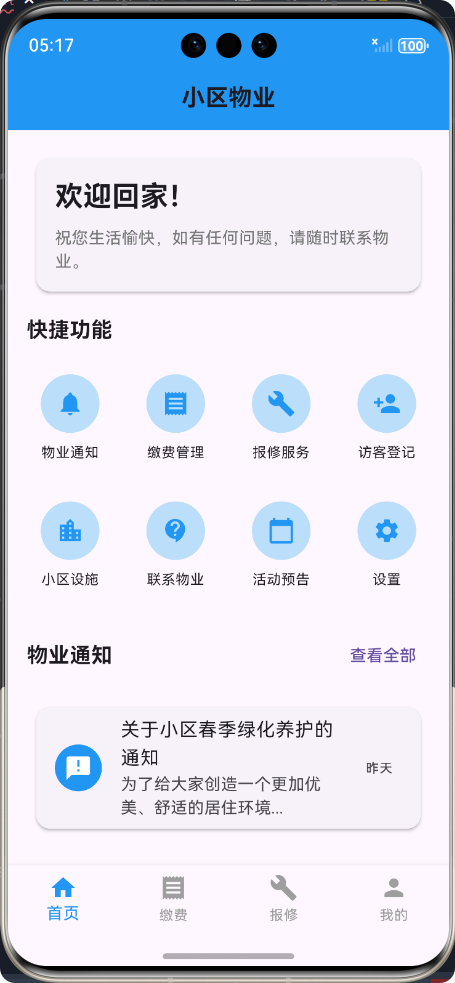
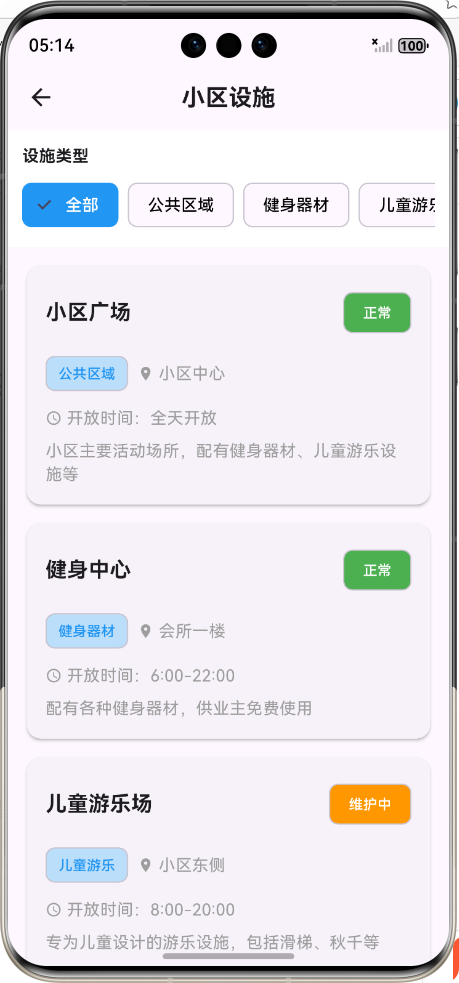
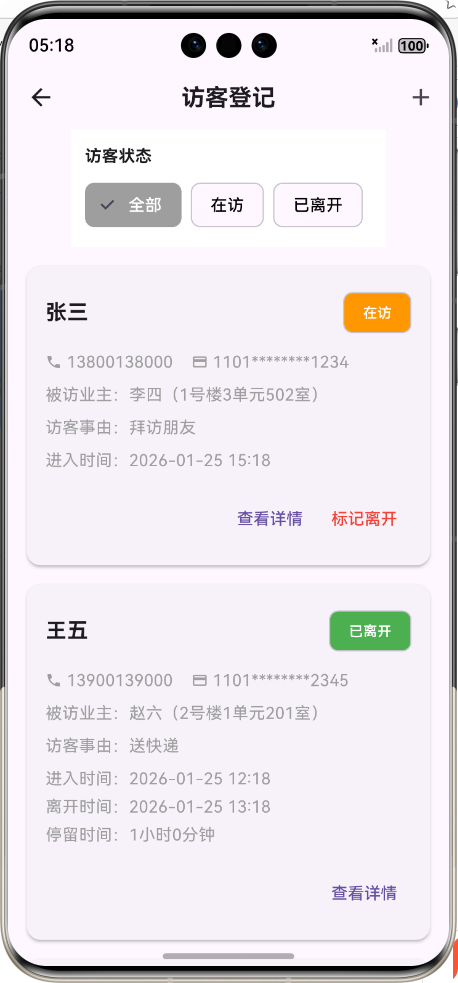
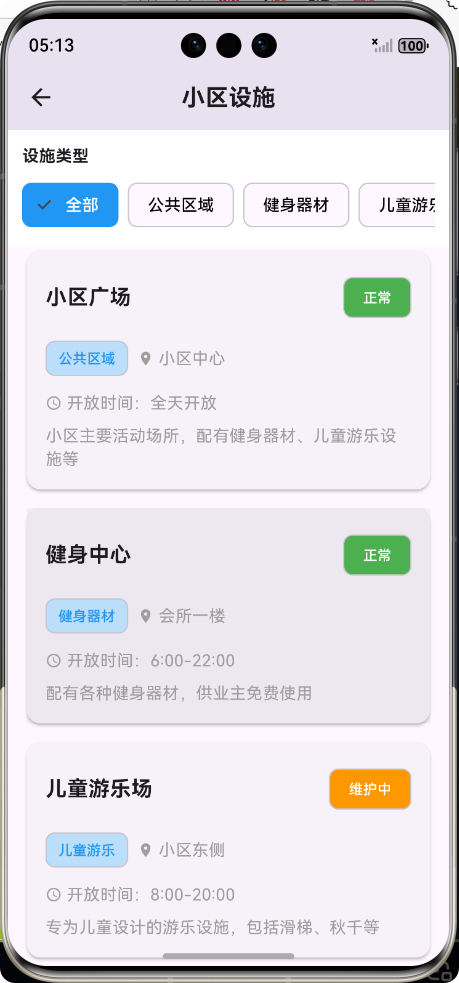
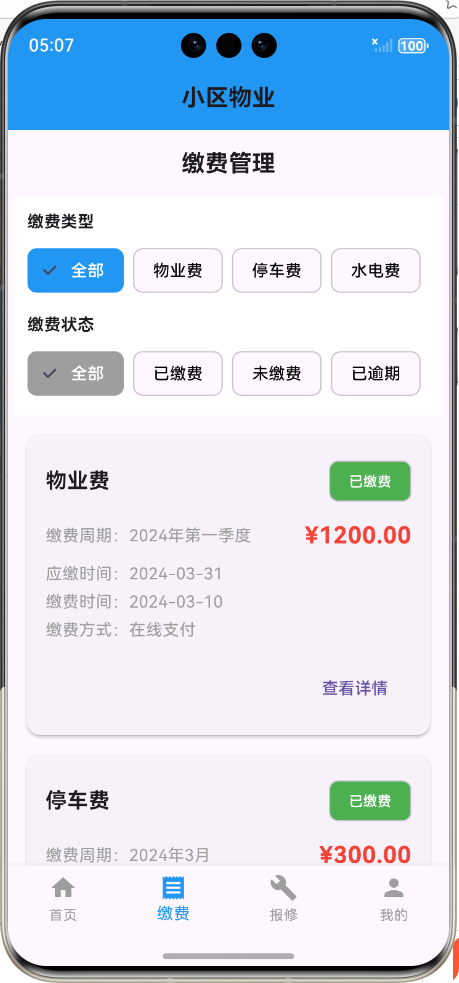
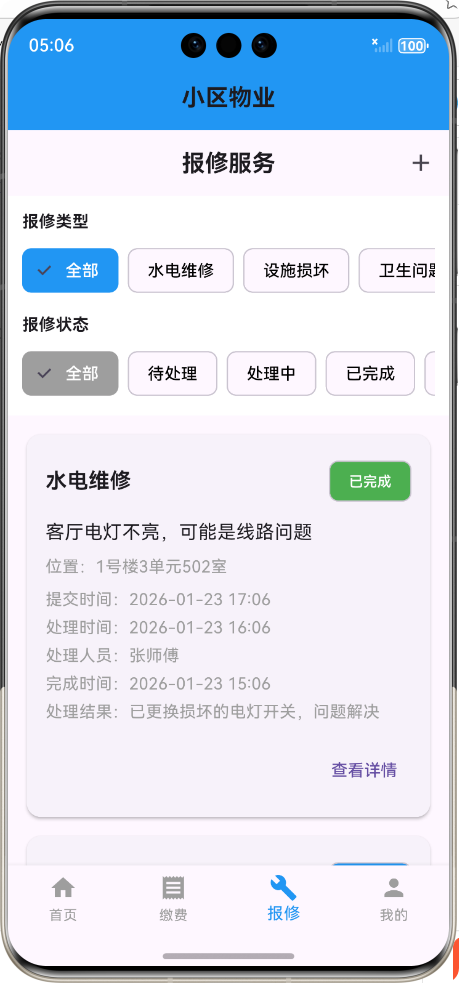
Flutter框架跨平台鸿蒙开发——小区物业APP的开发流程
前言
随着移动互联网的快速发展,小区物业APP已经成为现代社区管理的重要工具。本文将介绍如何使用Flutter框架开发一款跨平台的小区物业APP,该APP可以同时运行在鸿蒙系统和其他主流移动操作系统上。我们将详细讲解APP的核心功能实现、代码结构设计以及跨平台适配等内容,希望能够为开发者们提供一些参考和帮助。
一、项目概述
1.1 项目背景
传统的小区物业管理存在信息传递不及时、服务响应慢等问题。通过开发小区物业APP,可以实现物业通知推送、在线缴费、报修服务、访客登记等功能,提高物业工作效率,提升业主满意度。
1.2 项目目标
开发一款功能完整、用户体验良好的小区物业APP,支持鸿蒙系统和其他主流移动操作系统,主要功能包括:
- 物业通知
- 缴费管理
- 报修服务
- 访客登记
- 小区设施
- 联系物业
- 个人中心
1.3 技术栈
- 开发框架:Flutter 3.x
- 编程语言:Dart
- UI设计:Material Design
- 状态管理:setState(简单状态管理)
- 数据存储:本地存储(模拟数据)
- 跨平台适配:Flutter自带跨平台支持
二、系统架构设计
2.1 整体架构
小区物业APP采用典型的Flutter应用架构,分为数据模型层、服务层、页面层和路由层。
┌─────────────────────────────────────────────────────────────┐
│                       页面层 (Pages)                       │
├─────────┬─────────┬─────────┬─────────┬─────────┬─────────┤
│ 物业通知 │ 缴费管理 │ 报修服务 │ 访客登记 │ 小区设施 │ 个人中心 │
└─────────┴─────────┴─────────┴─────────┴─────────┴─────────┘
                              │
┌──────────────────────────────┴──────────────────────────────┐
│                       服务层 (Services)                     │
├─────────────────────────────────────────────────────────────┤
│                    PropertyService                        │
└──────────────────────────────┬──────────────────────────────┘
                              │
┌──────────────────────────────┴──────────────────────────────┐
│                       数据模型层 (Models)                   │
├─────────┬─────────┬─────────┬─────────┬─────────┬─────────┤
│ Property │ Payment │ Repair  │ Visitor │ Facility│ Contact │
│  Notice  │ Record  │ Record  │ Record  │  Info   │  Info   │
└─────────┴─────────┴─────────┴─────────┴─────────┴─────────┘
                              │
┌──────────────────────────────┴──────────────────────────────┐
│                       路由层 (Routes)                      │
├─────────────────────────────────────────────────────────────┤
│                    MaterialApp Routes                     │
└─────────────────────────────────────────────────────────────┘
2.2 目录结构
lib/
├── models/              # 数据模型
│   └── property_model.dart
├── pages/               # 页面
│   ├── property_main_page.dart
│   ├── property_notice_page.dart
│   ├── property_payment_page.dart
│   ├── property_repair_page.dart
│   ├── property_visitor_page.dart
│   ├── property_facility_page.dart
│   ├── property_contact_page.dart
│   └── property_profile_page.dart
├── services/            # 服务
│   └── property_service.dart
└── main.dart            # 应用入口
三、核心功能实现
3.1 数据模型设计
数据模型层定义了APP中使用的各种数据结构,包括物业通知、缴费记录、报修记录等。以物业通知模型为例:
/// 物业通知模型类
class PropertyNotice {
  /// 通知ID
  final String id;

  /// 通知标题
  final String title;

  /// 通知内容
  final String content;

  /// 通知发布时间
  final DateTime publishTime;

  /// 通知类型 (公告、提醒、活动等)
  final String type;

  /// 是否已读
  bool isRead;

  /// 构造函数
  PropertyNotice({
    required this.id,
    required this.title,
    required this.content,
    required this.publishTime,
    required this.type,
    this.isRead = false,
  });

  /// 从JSON创建通知实例
  factory PropertyNotice.fromJson(Map<String, dynamic> json) {
    return PropertyNotice(
      id: json['id'],
      title: json['title'],
      content: json['content'],
      publishTime: DateTime.parse(json['publishTime']),
      type: json['type'],
      isRead: json['isRead'] ?? false,
    );
  }

  /// 转换为JSON
  Map<String, dynamic> toJson() {
    return {
      'id': id,
      'title': title,
      'content': content,
      'publishTime': publishTime.toIso8601String(),
      'type': type,
      'isRead': isRead,
    };
  }
}
3.2 服务层实现
服务层负责数据的获取和处理,以物业服务为例:
/// 物业服务类,用于管理物业相关数据
import '../models/property_model.dart';

class PropertyService {
  /// 生成模拟物业通知数据
  List<PropertyNotice> generateMockNotices() {
    return [
      PropertyNotice(
        id: '1',
        title: '关于小区春季绿化养护的通知',
        content: '尊敬的业主:\n\n为了给大家创造一个更加优美、舒适的居住环境...',
        publishTime: DateTime.now().subtract(Duration(days: 1)),
        type: '公告',
        isRead: false,
      ),
      // 更多模拟数据...
    ];
  }

  // 其他服务方法...
}
3.3 页面层实现
页面层负责UI展示和用户交互,以物业通知页面为例:
/// 物业通知列表页面
class PropertyNoticePage extends StatefulWidget {
/// 构造函数
const PropertyNoticePage({super.key});
State<PropertyNoticePage> createState() => _PropertyNoticePageState();
}
class _PropertyNoticePageState extends State<PropertyNoticePage> {
/// 当前选中的通知类型
String _selectedType = '全部';
/// 通知列表
late List<PropertyNotice> _notices;
/// 所有通知类型列表
late List<String> _noticeTypes;
/// 物业服务实例
final PropertyService _propertyService = PropertyService();
void initState() {
super.initState();
_notices = _propertyService.generateMockNotices();
_noticeTypes = ['全部', '公告', '提醒', '活动'];
}
/// 更新通知列表
void _updateNotices() {
final allNotices = _propertyService.generateMockNotices();
if (_selectedType == '全部') {
_notices = allNotices;
} else {
_notices = allNotices.where((notice) => notice.type == _selectedType).toList();
}
}
/// 切换通知类型
void _changeNoticeType(String type) {
setState(() {
_selectedType = type;
_updateNotices();
});
}
/// 标记通知为已读
void _markAsRead(PropertyNotice notice) {
setState(() {
notice.isRead = true;
});
}
/// 跳转到通知详情页面
void _navigateToDetail(PropertyNotice notice) {
_markAsRead(notice);
Navigator.push(
context,
MaterialPageRoute(
builder: (context) => PropertyNoticeDetailPage(notice: notice),
),
);
}
Widget build(BuildContext context) {
return Scaffold(
appBar: AppBar(
title: const Text('物业通知'),
centerTitle: true,
),
body: Column(
children: [
// 通知类型筛选标签
Container(
padding: const EdgeInsets.symmetric(vertical: 12),
color: Colors.white,
child: SingleChildScrollView(
scrollDirection: Axis.horizontal,
child: Row(
children: _noticeTypes.map((type) {
return Padding(
padding: const EdgeInsets.symmetric(horizontal: 8),
child: ChoiceChip(
label: Text(type),
selected: _selectedType == type,
onSelected: (selected) {
if (selected) {
_changeNoticeType(type);
}
},
selectedColor: Colors.blue,
labelStyle: TextStyle(
color: _selectedType == type ? Colors.white : Colors.black,
),
),
);
}).toList(),
),
),
),
// 通知列表
Expanded(
child: ListView.builder(
padding: const EdgeInsets.all(16),
itemCount: _notices.length,
itemBuilder: (context, index) {
final notice = _notices[index];
return Card(
elevation: 2,
margin: const EdgeInsets.only(bottom: 16),
child: ListTile(
leading: CircleAvatar(
backgroundColor: notice.isRead ? Colors.grey.shade200 : Colors.blue,
child: Icon(
_getNoticeIcon(notice.type),
color: notice.isRead ? Colors.blue : Colors.white,
),
),
title: Text(
notice.title,
style: TextStyle(
fontWeight: notice.isRead ? FontWeight.normal : FontWeight.bold,
fontSize: 16,
),
),
subtitle: Column(
crossAxisAlignment: CrossAxisAlignment.start,
children: [
const SizedBox(height: 4),
Text(
notice.content,
maxLines: 2,
overflow: TextOverflow.ellipsis,
style: const TextStyle(fontSize: 14, color: Colors.grey),
),
const SizedBox(height: 4),
Row(
mainAxisAlignment: MainAxisAlignment.spaceBetween,
children: [
Text(
_formatDateTime(notice.publishTime),
style: const TextStyle(fontSize: 12, color: Colors.grey),
),
Chip(
label: Text(
notice.type,
style: const TextStyle(fontSize: 12),
),
backgroundColor: _getTypeColor(notice.type),
labelStyle: const TextStyle(color: Colors.white),
padding: const EdgeInsets.all(2),
visualDensity: VisualDensity.compact,
),
],
),
],
),
onTap: () => _navigateToDetail(notice),
),
);
},
),
),
],
),
);
}
/// 获取通知类型对应的图标
IconData _getNoticeIcon(String type) {
switch (type) {
case '公告':
return Icons.announcement;
case '提醒':
return Icons.notifications;
case '活动':
return Icons.event;
default:
return Icons.info;
}
}
/// 获取通知类型对应的颜色
Color _getTypeColor(String type) {
switch (type) {
case '公告':
return Colors.blue;
case '提醒':
return Colors.orange;
case '活动':
return Colors.green;
default:
return Colors.grey;
}
}
/// 格式化日期时间
String _formatDateTime(DateTime dateTime) {
final now = DateTime.now();
final difference = now.difference(dateTime);
if (difference.inDays > 0) {
return '${difference.inDays}天前';
} else if (difference.inHours > 0) {
return '${difference.inHours}小时前';
} else if (difference.inMinutes > 0) {
return '${difference.inMinutes}分钟前';
} else {
return '刚刚';
}
}
}
3.4 路由配置
在main.dart中配置路由,实现页面之间的跳转:
/// 应用根组件
class MyApp extends StatelessWidget {
/// 构造函数
const MyApp({super.key});
Widget build(BuildContext context) {
return MaterialApp(
title: '小区物业',
/// 禁用Debug模式下的右上角DEBUG横幅
debugShowCheckedModeBanner: false,
theme: ThemeData(
/// 主色调 - 使用蓝色系,代表专业、信任
primarySwatch: Colors.blue,
/// 应用整体亮度
brightness: Brightness.light,
/// 文本主题
textTheme: const TextTheme(
bodyLarge: TextStyle(fontSize: 16.0),
bodyMedium: TextStyle(fontSize: 14.0),
titleLarge: TextStyle(fontSize: 20.0, fontWeight: FontWeight.bold),
),
/// 卡片主题
cardTheme: CardTheme(
elevation: 2.0,
margin: const EdgeInsets.all(8.0),
shape: RoundedRectangleBorder(
borderRadius: BorderRadius.circular(12.0),
),
),
/// 按钮主题
elevatedButtonTheme: ElevatedButtonThemeData(
style: ElevatedButton.styleFrom(
padding: const EdgeInsets.symmetric(horizontal: 16.0, vertical: 8.0),
shape: RoundedRectangleBorder(
borderRadius: BorderRadius.circular(8.0),
),
),
),
/// 应用栏主题
appBarTheme: const AppBarTheme(
elevation: 0.0,
centerTitle: true,
),
),
darkTheme: ThemeData(
primarySwatch: Colors.blue,
brightness: Brightness.dark,
),
themeMode: ThemeMode.system,
/// 路由配置
initialRoute: '/',
routes: {
'/': (context) => const PropertyMainPage(),
'/property_notice': (context) => const PropertyNoticePage(),
'/property_payment': (context) => const PropertyPaymentPage(),
'/property_repair': (context) => const PropertyRepairPage(),
'/property_visitor': (context) => const PropertyVisitorPage(),
'/property_facility': (context) => const PropertyFacilityPage(),
'/property_contact': (context) => const PropertyContactPage(),
'/property_profile': (context) => const PropertyProfilePage(),
},
);
}
}
四、跨平台适配
4.1 Flutter跨平台原理
Flutter采用自绘UI的方式,通过Skia图形库在不同平台上绘制相同的UI界面,实现了真正的跨平台开发。Flutter应用的运行流程如下:
- 开发者使用Dart语言编写Flutter应用代码
- Flutter框架将Dart代码编译成原生代码
- 在目标平台上运行原生代码,通过Skia图形库绘制UI界面
4.2 鸿蒙系统适配
Flutter官方已经支持鸿蒙系统,开发者可以通过以下步骤将Flutter应用部署到鸿蒙设备上:
- 安装鸿蒙开发工具DevEco Studio
- 配置Flutter环境,支持鸿蒙平台
- 创建Flutter项目,添加鸿蒙支持
- 编写Flutter代码,实现APP功能
- 构建鸿蒙应用包(HAP)
- 部署到鸿蒙设备上运行
4.3 适配注意事项
在开发跨平台Flutter应用时,需要注意以下几点:
-
UI适配:使用Flutter提供的响应式布局组件,如MediaQuery、LayoutBuilder等,确保APP在不同屏幕尺寸上都能正常显示。
-
平台差异处理:针对不同平台的特性差异,使用Platform类或第三方插件进行处理。
-
性能优化:避免不必要的重建和重绘,合理使用StatefulWidget和StatelessWidget,优化列表性能。
-
资源管理:使用Flutter的资源管理机制,统一管理图片、字体等资源。
-
测试:在不同平台上进行充分测试,确保APP在各平台上都能正常运行。
五、项目总结
5.1 项目成果
通过使用Flutter框架,我们成功开发了一款功能完整的小区物业APP,支持鸿蒙系统和其他主流移动操作系统。APP主要功能包括:
- 物业通知:及时推送物业公告、提醒和活动信息
- 缴费管理:支持在线查看和缴纳物业费、停车费等
- 报修服务:方便业主在线提交报修申请,跟踪报修进度
- 访客登记:实现访客信息在线登记,提高小区安全性
- 小区设施:展示小区设施信息,方便业主使用
- 联系物业:提供多种联系方式,方便业主与物业沟通
- 个人中心:管理个人信息和查看服务记录
5.2 项目亮点
- 跨平台支持:使用Flutter框架,实现了一次开发,多平台运行
- 良好的用户体验:采用Material Design设计规范,界面美观、易用
- 功能完整:涵盖了小区物业管理的主要功能
- 模块化设计:代码结构清晰,易于维护和扩展
- 响应式布局:适配不同屏幕尺寸的设备
5.3 未来展望
小区物业APP的开发是一个持续迭代的过程,未来可以考虑以下改进方向:
- 接入真实数据:与物业管理系统对接,实现数据实时同步
- 增加更多功能:如社区论坛、周边服务、智能家居控制等
- 优化用户体验:根据用户反馈,不断改进APP功能和界面
- 增强安全性:加强数据加密和用户身份验证
- 支持更多平台:如Web端、桌面端等
六、结束语
本文介绍了使用Flutter框架开发跨平台小区物业APP的流程,包括系统架构设计、核心功能实现和跨平台适配等内容。Flutter框架的跨平台特性使得开发者可以高效地开发出支持多种操作系统的应用,降低了开发成本,提高了开发效率。
随着鸿蒙系统的不断发展,Flutter在鸿蒙平台上的应用前景广阔。希望本文能够为开发者们提供一些参考和帮助,共同推动Flutter和鸿蒙生态的发展。
七、参考文献
欢迎加入开源鸿蒙跨平台社区:https://openharmonycrossplatform.csdn.net

AtomGit 是由开放原子开源基金会联合 CSDN 等生态伙伴共同推出的新一代开源与人工智能协作平台。平台坚持“开放、中立、公益”的理念,把代码托管、模型共享、数据集托管、智能体开发体验和算力服务整合在一起,为开发者提供从开发、训练到部署的一站式体验。
更多推荐
 13
13 0
0- 0


 已为社区贡献25条内容

所有评论(0)