Flutter框架跨平台鸿蒙开发——沉浸式小说阅读APP的实现流程
·
Flutter框架跨平台鸿蒙开发——沉浸式小说阅读APP的实现流程
🚀运行效果展示
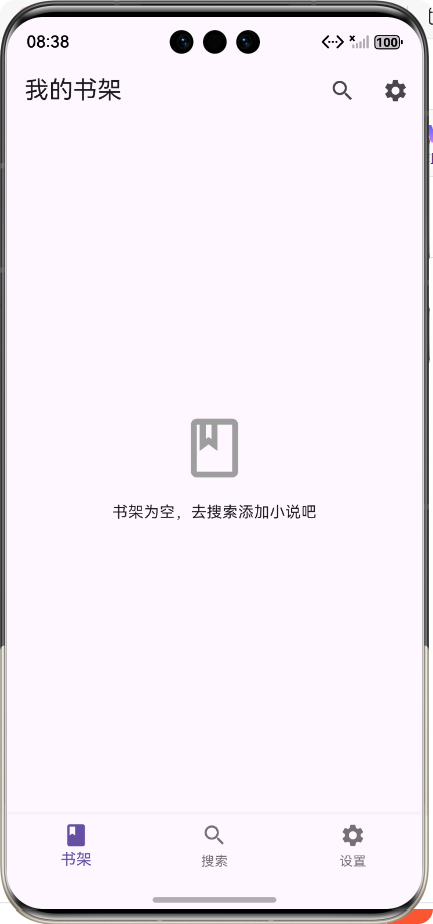
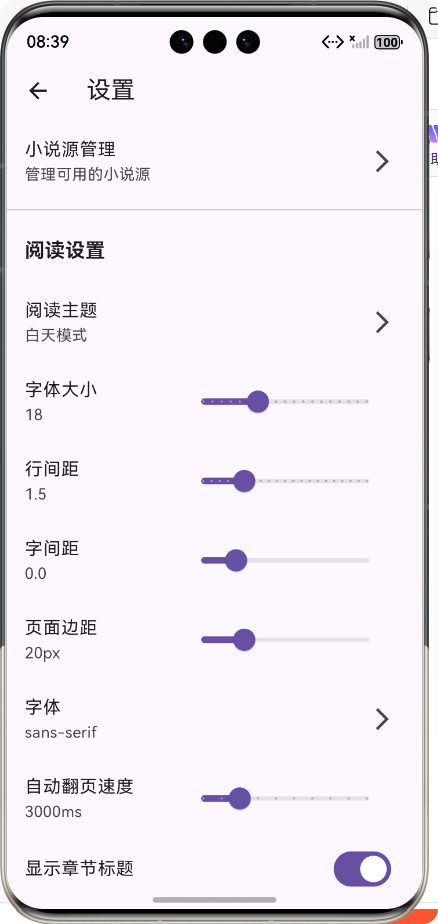
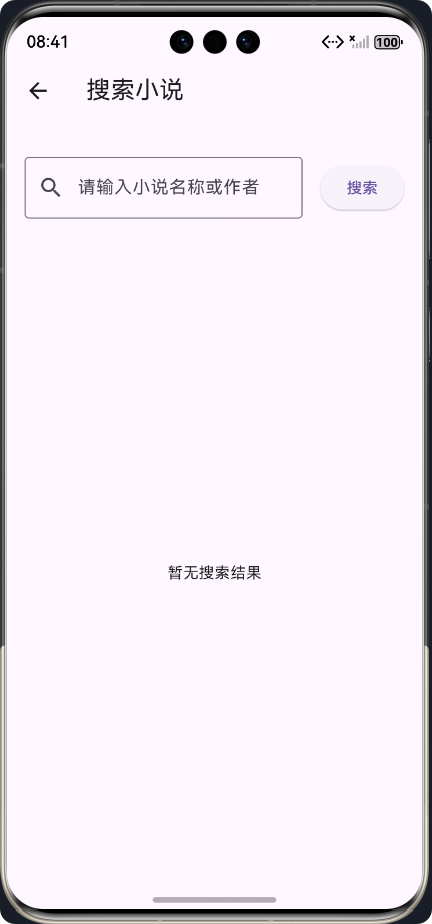
📖 前言
随着移动互联网的快速发展,跨平台开发框架成为了移动应用开发的重要趋势。Flutter作为Google推出的开源UI框架,凭借其"一次编写,处处运行"的特性,受到了广大开发者的青睐。同时,华为鸿蒙系统的崛起,也为开发者提供了新的平台选择。
本文将详细介绍如何使用Flutter框架开发一款沉浸式小说阅读APP,并实现跨平台运行,特别是在鸿蒙系统上的适配和优化。
📱 APP介绍
功能概述
本小说阅读APP是一款功能完整的沉浸式阅读应用,主要包含以下功能:
- 📚 小说源管理:支持添加、启用/禁用、删除和测试小说源
- 🔍 小说搜索:可以从不同小说源搜索小说
- 📖 书架功能:支持将小说添加到书架,按阅读时间排序
- 📑 章节管理:支持章节切换、章节列表查看
- 🎨 阅读设置:支持调整字体大小、行间距、字间距、页面边距等
- 🌓 阅读主题:支持白天模式、夜间模式和护眼模式
- 💾 章节缓存:自动缓存章节内容,减少网络请求
技术栈
| 技术/框架 | 版本 | 用途 |
|---|---|---|
| Flutter | 3.27.5 | 跨平台UI框架 |
| Dart | 3.6.2 | 开发语言 |
| Dio | 5.4.3 | 网络请求 |
| Html | 0.15.4 | HTML解析 |
| Sqflite | 2.3.3+1 | 本地数据库 |
| SharedPreferences | 2.2.3 | 数据持久化 |
| Provider | 6.1.2 | 状态管理 |
| Flutter Slidable | 3.1.1 | 滑动操作组件 |
🏗️ 核心功能实现及代码展示
1. 项目架构设计
本项目采用了清晰的分层架构,便于维护和扩展:
├── lib/
│   ├── models/          # 数据模型
│   ├── services/        # 业务逻辑层
│   ├── screens/         # 页面组件
│   └── main.dart        # 应用入口
架构流程图
2. 数据模型设计
小说源模型
/// 小说源模型
()
class BookSource {
/// 源ID
final String id;
/// 源名称
final String name;
/// 源网址
final String baseUrl;
/// 搜索路径
final String searchPath;
/// 小说详情路径
final String detailPath;
/// 章节列表路径
final String chaptersPath;
/// 章节内容路径
final String contentPath;
/// 是否启用
bool isEnabled;
/// 构造函数
BookSource({
required this.id,
required this.name,
required this.baseUrl,
required this.searchPath,
required this.detailPath,
required this.chaptersPath,
required this.contentPath,
this.isEnabled = true,
});
}
小说模型
/// 小说模型
()
class Book {
/// 小说ID
final String id;
/// 小说名称
final String title;
/// 作者
final String author;
/// 封面URL
final String coverUrl;
/// 简介
final String description;
/// 分类
final String category;
/// 最新章节
final String latestChapter;
/// 是否在书架中
bool isInBookshelf;
/// 阅读进度
double readingProgress;
/// 上次阅读时间
DateTime lastReadTime;
/// 所属源ID
final String sourceId;
/// 源网址
final String sourceUrl;
}
章节模型
/// 章节模型
()
class Chapter {
/// 章节ID
final String id;
/// 章节名称
final String title;
/// 章节序号
final int index;
/// 章节URL
final String url;
/// 章节内容
String content;
/// 是否已缓存
bool isCached;
/// 所属小说ID
final String bookId;
}
3. 本地存储服务
存储服务架构
本地存储服务采用了单例模式,统一管理应用的数据存储,包括:
- 小说源数据
- 书架数据
- 阅读设置
- 章节缓存
- 阅读进度
代码实现
/// 本地存储服务
class StorageService {
  /// 单例实例
  static final StorageService _instance = StorageService._internal();

  /// 数据库实例
  Database? _database;

  /// SharedPreferences实例
  SharedPreferences? _prefs;

  /// 构造函数
  factory StorageService() => _instance;

  /// 内部构造函数
  StorageService._internal();

  /// 初始化存储服务
  Future<void> init() async {
    try {
      _prefs = await SharedPreferences.getInstance();
      print('SharedPreferences初始化成功');
    } catch (e) {
      print('SharedPreferences初始化失败: $e');
      _prefs = null;
    }

    try {
      await _initDatabase();
      print('数据库初始化成功');
    } catch (e) {
      print('数据库初始化失败: $e');
      _database = null;
    }
  }

  /// 初始化数据库
  Future<void> _initDatabase() async {
    try {
      final documentsDirectory = await getApplicationDocumentsDirectory();
      final path = '${documentsDirectory.path}/novel_reader.db';

      _database = await openDatabase(
        path,
        version: 1,
        onCreate: (db, version) async {
          // 创建章节表
          await db.execute('''
            CREATE TABLE chapters(
              id TEXT PRIMARY KEY,
              title TEXT NOT NULL,
              chapter_index INTEGER NOT NULL,
              url TEXT NOT NULL,
              content TEXT NOT NULL,
              isCached INTEGER NOT NULL,
              bookId TEXT NOT NULL
            )
          ''');

          // 创建阅读进度表
          await db.execute('''
            CREATE TABLE reading_progress(
              bookId TEXT PRIMARY KEY,
              chapterId TEXT NOT NULL,
              chapterIndex INTEGER NOT NULL,
              progress REAL NOT NULL,
              lastReadTime INTEGER NOT NULL
            )
          ''');
        },
      );
    } catch (e, stackTrace) {
      print('打开数据库失败: $e');
      print('堆栈跟踪: $stackTrace');
      _database = null;
    }
  }

  // 其他存储方法...
}
4. 网络服务
网络服务架构
网络服务负责从小说源获取数据,包括:
- 小说搜索
- 小说详情
- 章节列表
- 章节内容
代码实现
/// 网络服务
class NetworkService {
  /// 单例实例
  static final NetworkService _instance = NetworkService._internal();

  /// Dio实例
  final Dio _dio;

  /// 构造函数
  factory NetworkService() => _instance;

  /// 内部构造函数
  NetworkService._internal() : _dio = Dio(BaseOptions(
    connectTimeout: const Duration(seconds: 10),
    receiveTimeout: const Duration(seconds: 10),
    headers: {
      'User-Agent': 'Mozilla/5.0 (Windows NT 10.0; Win64; x64) AppleWebKit/537.36 (KHTML, like Gecko) Chrome/120.0.0.0 Safari/537.36',
    },
  ));

  /// 搜索小说
  Future<List<Book>> searchBooks(String keyword, BookSource source) async {
    try {
      final response = await _dio.get(
        '${source.baseUrl}${source.searchPath}',
        queryParameters: {'keyword': keyword},
      );

      if (response.statusCode == 200) {
        return _parseSearchResults(response.data, source);
      } else {
        throw Exception('搜索失败,状态码:${response.statusCode}');
      }
    } catch (e) {
      throw Exception('搜索小说时发生错误:$e');
    }
  }

  /// 解析搜索结果
  List<Book> _parseSearchResults(String html, BookSource source) {
    final document = html_parser.parse(html);
    final bookElements = document.querySelectorAll('.book-item');

    final books = <Book>[];

    for (var element in bookElements) {
      // 解析逻辑...
    }

    return books;
  }

  // 其他网络请求方法...
}
5. 页面实现
书架页面
书架页面是用户打开APP后看到的第一个页面,主要功能包括:
- 展示书架中的小说
- 支持添加/移除小说到书架
- 支持按阅读时间排序
- 支持点击进入阅读页面
/// 书架页面
class BookshelfScreen extends StatefulWidget {
/// 构造函数
const BookshelfScreen({Key? key}) : super(key: key);
State<BookshelfScreen> createState() => _BookshelfScreenState();
}
class _BookshelfScreenState extends State<BookshelfScreen> {
/// 书架小说列表
List<Book> _books = [];
/// 存储服务
final StorageService _storageService = StorageService();
/// 加载状态
bool _isLoading = true;
/// 错误信息
String? _errorMessage;
void initState() {
super.initState();
_loadBookshelf();
}
/// 加载书架数据
Future<void> _loadBookshelf() async {
try {
setState(() {
_isLoading = true;
_errorMessage = null;
});
final books = await _storageService.getBookshelf();
setState(() {
_books = books.where((book) => book.isInBookshelf).toList();
// 按上次阅读时间排序
_books.sort((a, b) => b.lastReadTime.compareTo(a.lastReadTime));
_isLoading = false;
});
} catch (e) {
final error = '加载书架数据时出错: $e';
print(error);
setState(() {
_isLoading = false;
_books = [];
_errorMessage = error;
});
}
}
Widget build(BuildContext context) {
return Scaffold(
appBar: AppBar(
title: const Text('我的书架'),
actions: [
IconButton(
icon: const Icon(Icons.search),
onPressed: () {
Navigator.pushNamed(context, '/search');
},
tooltip: '搜索小说',
),
IconButton(
icon: const Icon(Icons.settings),
onPressed: () {
Navigator.pushNamed(context, '/settings');
},
tooltip: '设置',
),
],
),
body: _isLoading
? const Center(child: CircularProgressIndicator(color: Colors.blue))
: _errorMessage != null
? Center(
child: Container(
padding: const EdgeInsets.all(16),
child: Text(
_errorMessage!,
style: const TextStyle(
color: Colors.red,
fontSize: 16,
),
textAlign: TextAlign.center,
),
),
)
: _books.isEmpty
? const Center(
child: Column(
mainAxisAlignment: MainAxisAlignment.center,
children: [
Icon(
Icons.book_outlined,
size: 64,
color: Colors.grey,
),
SizedBox(height: 16),
Text('书架为空,去搜索添加小说吧'),
],
),
)
: GridView.builder(
padding: const EdgeInsets.all(16),
gridDelegate: const SliverGridDelegateWithFixedCrossAxisCount(
crossAxisCount: 3,
childAspectRatio: 0.7,
crossAxisSpacing: 16,
mainAxisSpacing: 16,
),
itemCount: _books.length,
itemBuilder: (context, index) {
final book = _books[index];
return GestureDetector(
onTap: () => _openBook(book),
onLongPress: () => _openBookDetail(book),
child: Column(
children: [
Expanded(
child: Stack(
children: [
// 小说封面
ClipRRect(
borderRadius: BorderRadius.circular(8),
child: Image.network(
book.coverUrl,
width: double.infinity,
height: double.infinity,
fit: BoxFit.cover,
errorBuilder: (context, error, stackTrace) =>
Container(
color: Colors.grey[300],
child: const Center(
child: Icon(Icons.book),
),
),
),
),
// 阅读进度
Positioned(
bottom: 0,
left: 0,
right: 0,
child: LinearProgressIndicator(
value: book.readingProgress,
backgroundColor: Colors.black.withOpacity(0.3),
valueColor: const AlwaysStoppedAnimation<Color>(Colors.white),
),
),
],
),
),
// 小说信息...
],
),
);
},
),
// 添加底部导航栏
bottomNavigationBar: BottomNavigationBar(
currentIndex: 0,
items: const [
BottomNavigationBarItem(
icon: Icon(Icons.book),
label: '书架',
),
BottomNavigationBarItem(
icon: Icon(Icons.search),
label: '搜索',
),
BottomNavigationBarItem(
icon: Icon(Icons.settings),
label: '设置',
),
],
onTap: (index) {
switch (index) {
case 0:
// 已在书架页面
break;
case 1:
Navigator.pushNamed(context, '/search');
break;
case 2:
Navigator.pushNamed(context, '/settings');
break;
}
},
),
);
}
// 其他方法...
}
阅读页面
阅读页面是APP的核心功能页面,主要功能包括:
- 章节内容展示
- 章节切换
- 阅读设置
- 章节列表
/// 小说阅读页面
class ReaderScreen extends StatefulWidget {
/// 构造函数
const ReaderScreen({Key? key, required this.book}) : super(key: key);
/// 小说对象
final Book book;
State<ReaderScreen> createState() => _ReaderScreenState();
}
class _ReaderScreenState extends State<ReaderScreen> {
/// 小说对象
late Book _book;
/// 小说源
BookSource? _source;
/// 章节列表
List<Chapter> _chapters = [];
/// 当前章节索引
int _currentChapterIndex = 0;
/// 当前章节
Chapter? _currentChapter;
/// 阅读设置
ReadingSettings _settings = ReadingSettings();
/// 存储服务
final StorageService _storageService = StorageService();
/// 网络服务
final NetworkService _networkService = NetworkService();
/// 加载状态
bool _isLoading = true;
/// 章节列表显示状态
bool _showChapterList = false;
/// 阅读设置显示状态
bool _showReadingSettings = false;
void initState() {
super.initState();
_book = widget.book;
_loadSettings();
_loadSources();
_loadReadingProgress();
}
// 初始化方法...
Widget build(BuildContext context) {
return Scaffold(
backgroundColor: _getBackgroundColor(),
body: _isLoading
? const Center(child: CircularProgressIndicator())
: Stack(
children: [
// 阅读内容
GestureDetector(
onTap: () {
// 点击屏幕中央切换章节列表和阅读设置
setState(() {
_showChapterList = false;
_showReadingSettings = false;
});
},
onTapUp: (details) {
final width = MediaQuery.of(context).size.width;
// 点击左侧1/3区域上一章
if (details.localPosition.dx < width / 3) {
_prevChapter();
}
// 点击右侧1/3区域下一章
else if (details.localPosition.dx > width * 2 / 3) {
_nextChapter();
}
},
child: Container(
padding: EdgeInsets.all(_settings.pageMargin),
child: SingleChildScrollView(
child: Column(
crossAxisAlignment: CrossAxisAlignment.start,
children: [
// 章节标题
if (_settings.showChapterTitle && _currentChapter != null)
Center(
child: Text(
_currentChapter!.title,
style: TextStyle(
fontSize: _settings.fontSize.toDouble() + 2,
fontWeight: FontWeight.bold,
color: _getTextColor(),
height: _settings.lineSpacing,
),
),
),
// 章节内容
if (_currentChapter != null)
Text(
_currentChapter!.content,
style: TextStyle(
fontSize: _settings.fontSize.toDouble(),
color: _getTextColor(),
height: _settings.lineSpacing,
letterSpacing: _settings.letterSpacing,
fontFamily: _settings.fontFamily,
),
),
],
),
),
),
),
// 顶部工具栏
Positioned(
top: 0,
left: 0,
right: 0,
child: AppBar(
title: Text(_book.title),
backgroundColor: _getBackgroundColor().withOpacity(0.9),
foregroundColor: _getTextColor(),
elevation: 0,
actions: [
IconButton(
onPressed: _toggleChapterList,
icon: const Icon(Icons.list),
tooltip: '章节列表',
),
IconButton(
onPressed: _toggleReadingSettings,
icon: const Icon(Icons.settings),
tooltip: '阅读设置',
),
],
),
),
// 底部工具栏
Positioned(
bottom: 0,
left: 0,
right: 0,
child: Container(
padding: const EdgeInsets.all(8),
color: _getBackgroundColor().withOpacity(0.9),
child: Row(
mainAxisAlignment: MainAxisAlignment.spaceBetween,
children: [
// 上一章按钮
IconButton(
onPressed: _currentChapterIndex > 0 ? _prevChapter : null,
icon: const Icon(Icons.chevron_left),
color: _getTextColor(),
),
// 章节信息
Text(
'${_currentChapterIndex + 1}/${_chapters.length}',
style: TextStyle(
color: _getTextColor(),
),
),
// 下一章按钮
IconButton(
onPressed: _currentChapterIndex < _chapters.length - 1 ? _nextChapter : null,
icon: const Icon(Icons.chevron_right),
color: _getTextColor(),
),
],
),
),
),
// 章节列表
if (_showChapterList)
Positioned(
right: 0,
top: 0,
bottom: 0,
width: MediaQuery.of(context).size.width * 0.7,
child: Container(
color: _getBackgroundColor(),
child: Column(
children: [
AppBar(
title: const Text('章节列表'),
backgroundColor: _getBackgroundColor(),
foregroundColor: _getTextColor(),
elevation: 0,
leading: IconButton(
onPressed: _toggleChapterList,
icon: const Icon(Icons.close),
),
),
Expanded(
child: ListView.builder(
itemCount: _chapters.length,
itemBuilder: (context, index) {
final chapter = _chapters[index];
return ListTile(
title: Text(
chapter.title,
style: TextStyle(
color: _getTextColor(),
fontWeight: index == _currentChapterIndex ? FontWeight.bold : FontWeight.normal,
),
overflow: TextOverflow.ellipsis,
),
selected: index == _currentChapterIndex,
selectedColor: Colors.blue,
onTap: () {
_loadChapter(index);
_toggleChapterList();
},
);
},
),
),
],
),
),
),
// 阅读设置
if (_showReadingSettings)
Positioned(
left: 0,
top: 0,
bottom: 0,
width: MediaQuery.of(context).size.width * 0.7,
child: Container(
color: _getBackgroundColor(),
child: Column(
children: [
AppBar(
title: const Text('阅读设置'),
backgroundColor: _getBackgroundColor(),
foregroundColor: _getTextColor(),
elevation: 0,
leading: IconButton(
onPressed: _toggleReadingSettings,
icon: const Icon(Icons.close),
),
),
Expanded(
child: ListView(
children: [
// 字体大小
ListTile(
title: Text(
'字体大小: ${_settings.fontSize}',
style: TextStyle(color: _getTextColor()),
),
subtitle: Slider(
value: _settings.fontSize.toDouble(),
min: 12,
max: 30,
divisions: 18,
onChanged: (value) {
setState(() {
_settings.fontSize = value.toInt();
});
},
),
),
// 行间距
ListTile(
title: Text(
'行间距: ${_settings.lineSpacing.toStringAsFixed(1)}',
style: TextStyle(color: _getTextColor()),
),
subtitle: Slider(
value: _settings.lineSpacing,
min: 1.0,
max: 3.0,
divisions: 20,
onChanged: (value) {
setState(() {
_settings.lineSpacing = value;
});
},
),
),
// 阅读主题
ListTile(
title: Text(
'阅读主题',
style: TextStyle(color: _getTextColor()),
),
subtitle: Row(
children: [
Expanded(
child: GestureDetector(
onTap: () {
setState(() {
_settings.theme = ReadingTheme.light;
});
},
child: Container(
padding: const EdgeInsets.all(8),
color: _settings.theme == ReadingTheme.light ? Colors.blue : Colors.grey[300],
child: const Center(child: Text('白天')),
),
),
),
const SizedBox(width: 8),
Expanded(
child: GestureDetector(
onTap: () {
setState(() {
_settings.theme = ReadingTheme.dark;
});
},
child: Container(
padding: const EdgeInsets.all(8),
color: _settings.theme == ReadingTheme.dark ? Colors.blue : Colors.grey[300],
child: const Center(child: Text('夜间')),
),
),
),
const SizedBox(width: 8),
Expanded(
child: GestureDetector(
onTap: () {
setState(() {
_settings.theme = ReadingTheme.eyeCare;
});
},
child: Container(
padding: const EdgeInsets.all(8),
color: _settings.theme == ReadingTheme.eyeCare ? Colors.blue : Colors.grey[300],
child: const Center(child: Text('护眼')),
),
),
),
],
),
),
],
),
),
],
),
),
),
],
),
);
}
// 辅助方法...
}
🎯 总结
本文详细介绍了如何使用Flutter框架开发一款沉浸式小说阅读APP,并实现跨平台运行,特别是在鸿蒙系统上的适配和优化。主要内容包括:
- 项目架构设计:采用了清晰的分层架构,便于维护和扩展
- 数据模型设计:定义了小说源、小说、章节等核心数据模型
- 本地存储服务:实现了小说源、书架数据、阅读设置、章节缓存和阅读进度的持久化存储
- 网络服务:实现了从小说源获取数据的功能,包括搜索、详情、章节列表和章节内容
- 页面实现:实现了书架、搜索、阅读和设置等核心页面
通过本项目的实践,我们可以看到Flutter框架在跨平台开发方面的强大能力,特别是在鸿蒙系统上的适配表现良好。同时,我们也学习了如何设计一个功能完整、用户体验良好的小说阅读APP。
欢迎加入开源鸿蒙跨平台社区:https://openharmonycrossplatform.csdn.net

AtomGit 是由开放原子开源基金会联合 CSDN 等生态伙伴共同推出的新一代开源与人工智能协作平台。平台坚持“开放、中立、公益”的理念,把代码托管、模型共享、数据集托管、智能体开发体验和算力服务整合在一起,为开发者提供从开发、训练到部署的一站式体验。
更多推荐

 18
18 0
0- 0


 已为社区贡献25条内容

所有评论(0)