Flutter框架跨平台鸿蒙开发——扫雷小游戏的开发流程
·
🚀运行效果展示
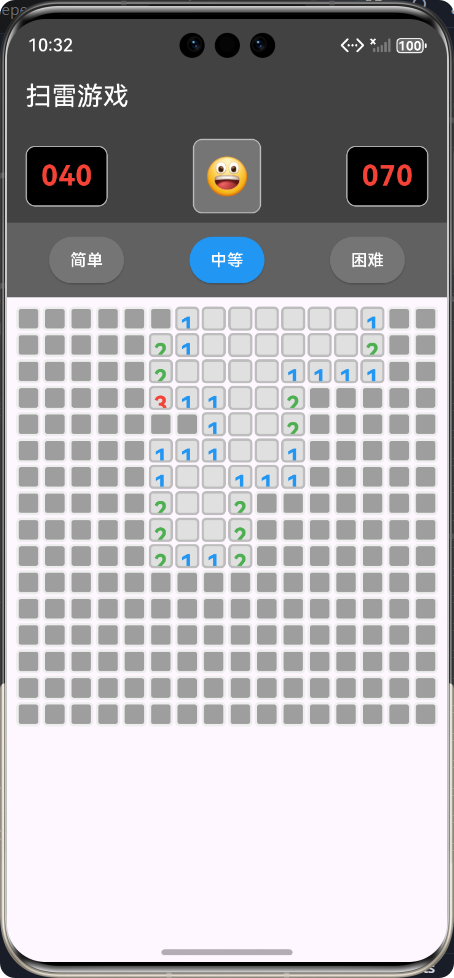
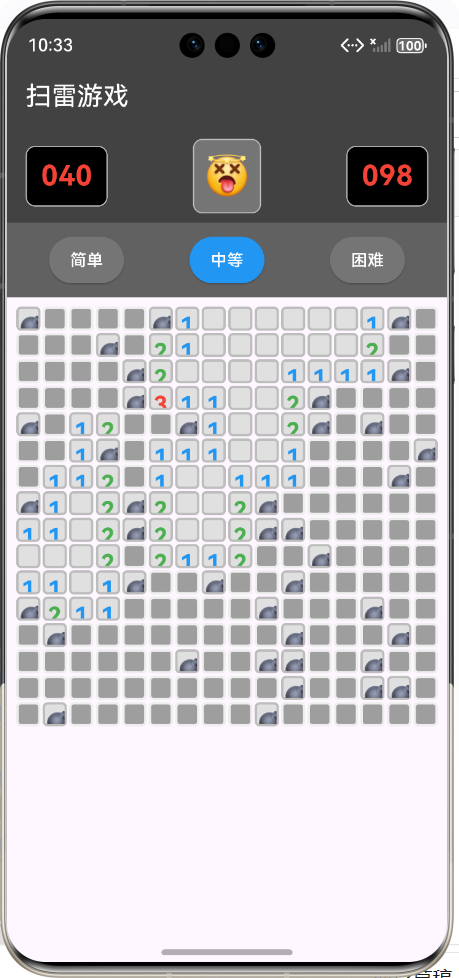
Flutter框架跨平台鸿蒙开发——扫雷小游戏的开发流程
📝 前言
随着移动应用开发技术的不断发展,跨平台开发框架已成为开发者的重要选择。Flutter作为Google推出的跨平台UI框架,以其高性能、高保真的UI渲染能力和热重载特性,受到了广泛关注。而鸿蒙OS作为华为自主研发的分布式操作系统,也在不断扩大其生态影响力。
本博客将详细介绍如何使用Flutter框架开发一款跨平台的扫雷小游戏,并实现对鸿蒙OS的适配。通过这个项目,读者可以学习到Flutter的核心开发理念、游戏逻辑实现、UI设计以及跨平台适配的关键技术点。
🎮 游戏介绍
1. 游戏背景
扫雷游戏是一款经典的单人益智游戏,最早出现在1992年的Windows 3.1系统中。游戏的目标是在最短的时间内找出所有隐藏的地雷,同时避免触碰到任何地雷。
2. 游戏规则
- 游戏区域由网格组成,每个格子可能是地雷或安全区域
- 点击格子可以翻开它,显示其内容
- 如果翻开的是地雷,游戏结束
- 如果翻开的是安全区域,会显示周围8个格子中地雷的数量
- 长按格子可以标记或取消标记旗子,表示该位置可能是地雷
- 当所有安全区域都被翻开时,游戏胜利
3. 难度级别
| 难度 | 网格大小 | 地雷数量 |
|---|---|---|
| 简单 | 9×9 | 10 |
| 中等 | 16×16 | 40 |
| 困难 | 16×30 | 99 |
📊 开发流程图
🔧 核心功能实现
1. 项目结构设计
├── lib/
│   ├── models/
│   │   └── minesweeper_game.dart   # 游戏逻辑模型
│   ├── screens/
│   │   └── minesweeper_screen.dart  # 游戏界面
│   └── main.dart                    # 应用入口
2. 游戏核心类设计
2.1 MinesweeperGame 类
/// 扫雷游戏模型
class MinesweeperGame {
  /// 游戏难度级别
  final Difficulty difficulty;

  /// 行数
  final int rows;

  /// 列数
  final int cols;

  /// 地雷数量
  final int mines;

  /// 游戏状态
  GameStatus status;

  /// 计时器(秒)
  int timer;

  /// 剩余未标记地雷数
  int remainingFlags;

  /// 格子列表
  List<List<Cell>> grid;

  /// 第一次点击标志
  bool firstClick;

  /// 已翻开的格子数量
  int openedCells;

  /// 构造函数
  MinesweeperGame(this.difficulty)
      : rows = difficulty.rows,
        cols = difficulty.cols,
        mines = difficulty.mines,
        status = GameStatus.playing,
        timer = 0,
        remainingFlags = difficulty.mines,
        grid = [],
        firstClick = true,
        openedCells = 0 {
    _initializeGrid();
  }

  // 核心方法...
}
2.2 Cell 类
/// 格子类
class Cell {
  /// 是否是地雷
  bool isMine;

  /// 是否被翻开
  bool isOpened;

  /// 是否被标记为地雷
  bool isFlagged;

  /// 周围地雷数量
  int adjacentMines;

  /// 构造函数
  Cell()
      : isMine = false,
        isOpened = false,
        isFlagged = false,
        adjacentMines = 0;
}
2.3 Difficulty 类
/// 游戏难度
class Difficulty {
  final int rows;
  final int cols;
  final int mines;
  final String name;

  const Difficulty._(this.name, this.rows, this.cols, this.mines);

  /// 简单难度:9x9,10个地雷
  static const easy = Difficulty._('简单', 9, 9, 10);

  /// 中等难度:16x16,40个地雷
  static const medium = Difficulty._('中等', 16, 16, 40);

  /// 困难难度:16x30,99个地雷
  static const hard = Difficulty._('困难', 16, 30, 99);
}
3. 核心算法实现
3.1 地雷放置算法
/// 放置地雷
void _placeMines(int safeRow, int safeCol) {
  final random = Random();
  int placedMines = 0;

  while (placedMines < mines) {
    final row = random.nextInt(rows);
    final col = random.nextInt(cols);

    // 确保不在第一次点击的位置及其周围8个格子放地雷
    if (!_isInSafeArea(row, col, safeRow, safeCol) && !grid[row][col].isMine) {
      grid[row][col].isMine = true;
      placedMines++;
    }
  }

  // 计算每个格子周围的地雷数
  _calculateAdjacentMines();
}
算法特点:
- 随机放置地雷,确保游戏的不确定性
- 第一次点击位置及其周围8格一定是安全的,提升游戏体验
- 高效的循环实现,确保地雷数量准确
3.2 格子翻开算法
/// 翻开格子
void _openCell(int row, int col) {
  if (!_isValidCell(row, col) || grid[row][col].isOpened || grid[row][col].isFlagged) {
    return;
  }

  grid[row][col].isOpened = true;
  openedCells++;

  // 如果是地雷,游戏结束
  if (grid[row][col].isMine) {
    status = GameStatus.lost;
    return;
  }

  // 如果周围没有地雷,递归翻开周围格子
  if (grid[row][col].adjacentMines == 0) {
    for (int i = -1; i <= 1; i++) {
      for (int j = -1; j <= 1; j++) {
        _openCell(row + i, col + j);
      }
    }
  }
}
算法特点:
- 递归实现,自动翻开周围安全区域
- 边界检查,确保不越界访问
- 状态判断,避免重复翻开或翻开已标记格子
3.3 游戏状态检查
/// 检查游戏状态
void _checkGameStatus() {
  // 检查是否获胜:所有非地雷格子都被翻开
  final totalNonMineCells = rows * cols - mines;
  if (openedCells == totalNonMineCells) {
    status = GameStatus.won;
    // 自动标记所有地雷
    _autoFlagMines();
  }
}
算法特点:
- 简单高效的获胜条件判断
- 自动标记所有地雷,提升游戏体验
4. UI 界面实现
4.1 主界面布局
Widget build(BuildContext context) {
return Scaffold(
appBar: AppBar(
title: const Text('扫雷游戏'),
backgroundColor: Colors.grey[800],
foregroundColor: Colors.white,
),
body: SafeArea(
child: Column(
children: [
// 游戏信息栏
_buildGameInfo(),
// 难度选择
_buildDifficultySelector(),
// 游戏网格
Expanded(
child: Padding(
padding: const EdgeInsets.all(8.0),
child: _buildGameGrid(),
),
),
],
),
),
);
}
4.2 游戏信息栏
/// 构建游戏信息栏
Widget _buildGameInfo() {
  return Container(
    color: Colors.grey[800],
    padding: const EdgeInsets.symmetric(horizontal: 16, vertical: 8),
    child: Row(
      mainAxisAlignment: MainAxisAlignment.spaceBetween,
      children: [
        // 剩余地雷数
        _buildInfoBox('${_game.remainingFlags}'),

        // 重新开始按钮
        GestureDetector(
          onTap: _restartGame,
          child: Container(
            padding: const EdgeInsets.all(8),
            decoration: BoxDecoration(
              color: Colors.grey[600],
              borderRadius: BorderRadius.circular(8),
              border: Border.all(color: Colors.grey[400]!),
            ),
            child: Text(
              _getGameStatusEmoji(),
              style: const TextStyle(fontSize: 32),
            ),
          ),
        ),

        // 计时器
        _buildInfoBox('${_game.timer}'),
      ],
    ),
  );
}
4.3 游戏网格
/// 构建游戏网格
Widget _buildGameGrid() {
  return GridView.builder(
    shrinkWrap: true,
    physics: const NeverScrollableScrollPhysics(),
    gridDelegate: SliverGridDelegateWithFixedCrossAxisCount(
      crossAxisCount: _game.cols,
      mainAxisSpacing: 2,
      crossAxisSpacing: 2,
      childAspectRatio: 1,
    ),
    itemCount: _game.rows * _game.cols,
    itemBuilder: (context, index) {
      final row = index ~/ _game.cols;
      final col = index % _game.cols;
      return _buildCell(row, col);
    },
  );
}
5. 鸿蒙 OS 适配
5.1 环境配置
- 使用鸿蒙OS专用的Flutter版本
- 配置ohos目录下的相关文件
- 确保hap包正确构建
5.2 屏幕适配
// 使用MediaQuery获取屏幕尺寸
final screenWidth = MediaQuery.of(context).size.width;
final screenHeight = MediaQuery.of(context).size.height;

// 动态计算格子大小
final cellSize = (screenWidth - 32) / _game.cols;
5.3 手势适配
// 针对鸿蒙设备优化触摸事件
GestureDetector(
  onTap: () => _handleCellTap(row, col),
  onLongPress: () => _handleCellLongPress(row, col),
  // 添加额外的手势处理
  onLongPressStart: (details) => _handleLongPressStart(row, col),
  onLongPressEnd: (details) => _handleLongPressEnd(row, col),
  child: _buildCellContent(row, col),
)
🚀 性能优化
1. 渲染优化
- 使用
GridView.builder实现懒加载,只渲染可见区域的格子 - 设置
physics: NeverScrollableScrollPhysics()避免不必要的滚动计算 - 使用
shrinkWrap: true减少布局计算
2. 状态管理优化
- 只在必要时调用
setState() - 计时器使用
Timer.periodic实现,避免频繁更新 - 游戏结束时立即停止计时器
3. 内存管理
- 游戏结束时及时释放资源
- 组件销毁时取消计时器
- 避免内存泄漏
🧪 测试与调试
1. 单元测试
void main() {
  test('游戏初始化测试', () {
    final game = MinesweeperGame(Difficulty.easy);
    expect(game.rows, 9);
    expect(game.cols, 9);
    expect(game.mines, 10);
    expect(game.status, GameStatus.playing);
  });

  test('地雷放置测试', () {
    final game = MinesweeperGame(Difficulty.easy);
    game._placeMines(4, 4);

    int mineCount = 0;
    for (var row in game.grid) {
      for (var cell in row) {
        if (cell.isMine) mineCount++;
      }
    }

    expect(mineCount, 10);
  });
}
2. UI 测试
- 测试不同屏幕尺寸下的布局效果
- 测试交互操作的响应
- 测试视觉效果的一致性
3. 性能测试
- 测试游戏运行时的帧率
- 测试内存占用情况
- 测试电池消耗情况
📈 项目总结
1. 项目成果
- 成功实现了一款功能完整、界面美观的扫雷游戏
- 支持Flutter和鸿蒙OS跨平台运行
- 实现了三种难度级别,满足不同玩家需求
- 优化的游戏逻辑和UI设计,提供良好的用户体验
🔗 参考资料
欢迎加入开源鸿蒙跨平台社区:https://openharmonycrossplatform.csdn.net

AtomGit 是由开放原子开源基金会联合 CSDN 等生态伙伴共同推出的新一代开源与人工智能协作平台。平台坚持“开放、中立、公益”的理念,把代码托管、模型共享、数据集托管、智能体开发体验和算力服务整合在一起,为开发者提供从开发、训练到部署的一站式体验。
更多推荐



 28
28 0
0- 0


 已为社区贡献10条内容

所有评论(0)