windows10 里的winsxs目录是啥? 为什么这么大?可以删除吗?
·
WinSxS 目录详解
C:\Windows\WinSxS(Windows Side-by-Side)是 Windows 的核心组件存储目录,被称为 "组件存储" 或 "Side-by-Side 程序集"。
核心作用
| 功能 | 说明 |
|---|---|
| 系统组件存储 | 存放 Windows 的所有系统文件、DLL、驱动等 |
| 版本隔离 | 同一组件的多个版本共存,避免"DLL Hell" |
| 系统恢复 | 支持卸载更新、回滚到之前状态 |
| 并行运行 | 不同应用可使用不同版本的同一组件 |
为什么体积巨大?
WinSxS 典型大小:5-20 GB(随使用时间增长)

组成:
├── 实际系统文件(硬链接到 C:\Windows\System32 等)
├── 备份的更新文件(用于卸载)
├── 不同架构版本(x86/x64/ARM)
└── 多语言资源文件
重要:WinSxS 中的很多文件是硬链接,
dir或资源管理器显示的体积包含重复计算,实际占用磁盘空间没那么大。
可以删除吗?
| 操作 | 结果 |
|---|---|
| ❌ 直接手动删除 | 绝对禁止 → 系统崩溃、无法启动 |
| ✅ 使用系统工具清理 | 安全,见下方命令 |
安全清理方法
都需要以管理员运行 PowerShell,在PowerShell中清理。
方法 1:磁盘清理工具
# 以管理员运行
cleanmgr /sageset:1
# 勾选 "Windows Update 清理",然后
cleanmgr /sagerun:1
方法 2:DISM 命令(推荐)
# 以管理员运行 PowerShell

# 分析可清理空间
Dism.exe /Online /Cleanup-Image /AnalyzeComponentStore

# 清理过期组件(安全)
Dism.exe /Online /Cleanup-Image /StartComponentCleanup

# 清理并删除旧版本(⚠️ 无法回滚更新)
Dism.exe /Online /Cleanup-Image /StartComponentCleanup /ResetBase
方法 3:存储感知(自动)
设置 → 系统 → 存储 → 存储感知 → 开启 → 自动清理临时文件和回收站
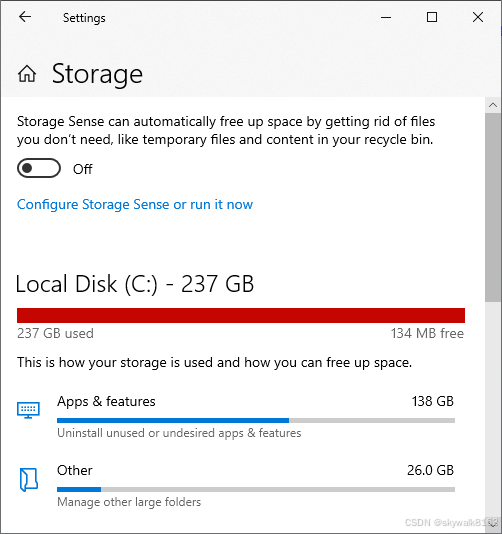
把上面的开关打开,
常见误区
| 误区 | 真相 |
|---|---|
| "WinSxS 有 15GB,我直接删掉省空间" | 实际占用可能只有 5-8GB(硬链接重复计算) |
| "清理后 WinSxS 还是很大" | 正常,核心组件必须保留 |
/ResetBase 能大幅瘦身" | 是的,但会失去卸载更新的能力 |
检查实际大小(非硬链接计算)
# 以管理员运行,查看真实磁盘占用
(Get-ChildItem C:\Windows\WinSxS -Recurse -Force -ErrorAction SilentlyContinue |
    Measure-Object -Property Length -Sum).Sum / 1GB
或使用 Sysinternals 的 du 工具:
du -l C:\Windows\WinSxS
总结
| 问题 | 答案 |
|---|---|
| 这是什么? | Windows 系统组件的核心仓库 |
| 能手动删吗? | 绝对不能 |
| 能安全清理吗? | 可以,用 DISM 或磁盘清理 |
| 为什么这么大? | 包含多版本备份,支持系统恢复 |
Dism.exe /Online /Cleanup-Image /AnalyzeComponentStore
实践
用DISM命令清理
PS C:\Users\Admin> Dism.exe /Online /Cleanup-Image /AnalyzeComponentStore

Deployment Image Servicing and Management tool
Version: 10.0.19041.3636

Image Version: 10.0.19045.6466

[==========================100.0%==========================]

Component Store (WinSxS) information:

Windows Explorer Reported Size of Component Store : 12.02 GB

Actual Size of Component Store : 11.79 GB

    Shared with Windows : 6.90 GB
    Backups and Disabled Features : 4.89 GB
    Cache and Temporary Data :  0 bytes

Date of Last Cleanup : 2026-03-06 17:41:52

Number of Reclaimable Packages : 1
Component Store Cleanup Recommended : Yes

The operation completed successfully.
PS C:\Users\Admin> Dism.exe /Online /Cleanup-Image /StartComponentCleanup

Deployment Image Servicing and Management tool
Version: 10.0.19041.3636

Image Version: 10.0.19045.6466

[=====                      10.0%                          ]
[==========================100.0%==========================]
The operation completed successfully.
最终清理了1G左右
查看WinSxs真实占用空间
PS C:\Users\Admin> (Get-ChildItem C:\Windows\WinSxS -Recurse -Force -ErrorAction SilentlyContinue |
>>     Measure-Object -Property Length -Sum).Sum / 1GB
11.1445577209815
看来暂用11G
清理临时文件和回收站并删除C:\Windows\Temp目录内容
现在c盘总算清出来4G空间了.

AtomGit 是由开放原子开源基金会联合 CSDN 等生态伙伴共同推出的新一代开源与人工智能协作平台。平台坚持“开放、中立、公益”的理念,把代码托管、模型共享、数据集托管、智能体开发体验和算力服务整合在一起,为开发者提供从开发、训练到部署的一站式体验。
更多推荐


 9
9 0
0- 0


 已为社区贡献53条内容

所有评论(0)