Ubuntu 24.04 换源指南(使用 .sources 新格式)
自 Ubuntu 24.04 (Noble Numbat) 起,APT 的软件源配置方式发生了变化:
不再使用传统的 /etc/apt/sources.list 文件,而是采用新的 .sources 格式文件,默认路径为:
/etc/apt/sources.list.d/ubuntu.sources
本文将指导你如何备份、修改并切换至国内镜像源(如清华、中科大、阿里云等),以提升软件包下载速度。
一、备份原始配置
在进行任何修改前,请先备份原文件:
sudo cp /etc/apt/sources.list.d/ubuntu.sources /etc/apt/sources.list.d/ubuntu.sources.bak
二、编辑源配置文件
使用你喜欢的编辑器(如 vim)打开配置文件:
sudo vim /etc/apt/sources.list.d/ubuntu.sources
💡 刚安装完 Ubuntu 24.04 时,默认内容通常包含官方源(http://archive.ubuntu.com/ubuntu/),格式为结构化的 .sources 文件。
三、替换为国内镜像源
✅ 推荐:清华大学开源软件镜像站(清华源)
将文件内容替换为以下配置:
Types: deb
URIs: http://mirrors.tuna.tsinghua.edu.cn/ubuntu/
Suites: noble noble-updates noble-security
Components: main restricted universe multiverse
Signed-By: /usr/share/keyrings/ubuntu-archive-keyring.gpg
📌 说明:
noble 是 Ubuntu 24.04 的代号。
Signed-By 确保软件包来源可信,无需额外导入密钥(系统已内置)。
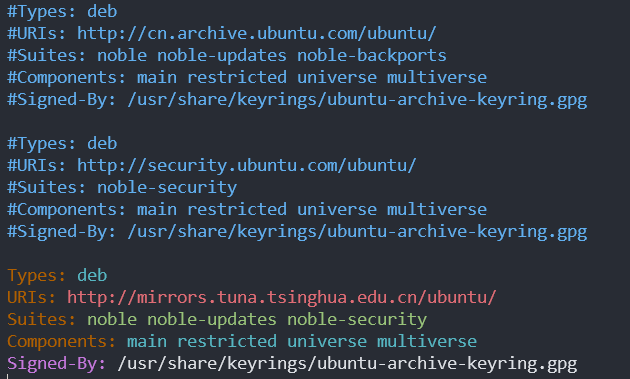
注释掉原来的换源后结果
其他可选镜像源
中国科学技术大学(中科大源)
Types: deb
URIs: http://mirrors.ustc.edu.cn/ubuntu/
Suites: noble noble-updates noble-security
Components: main restricted universe multiverse
Signed-By: /usr/share/keyrings/ubuntu-archive-keyring.gpg
阿里云镜像源
Types: deb
URIs: http://mirrors.aliyun.com/ubuntu/
Suites: noble noble-updates noble-security
Components: main restricted universe multiverse
Signed-By: /usr/share/keyrings/ubuntu-archive-keyring.gpg
网易镜像源
Types: deb
URIs: http://mirrors.163.com/ubuntu/
Suites: noble noble-updates noble-security
Components: main restricted universe multiverse
Signed-By: /usr/share/keyrings/ubuntu-archive-keyring.gpg
四、ARM64 架构用户注意(如树莓派、鲲鹏服务器等)
如果你使用的是 ARM64 (aarch64) 架构设备,请使用 ubuntu-ports 镜像:
Types: deb
URIs: http://mirrors.tuna.tsinghua.edu.cn/ubuntu-ports/
Suites: noble noble-updates noble-security
Components: main restricted universe multiverse
Signed-By: /usr/share/keyrings/ubuntu-archive-keyring.gpg
🔍 清华大学镜像站的 ubuntu-ports 目录最新同步时间为 2025-07-28,确保软件包及时更新。
五、更新软件包列表
保存配置后,执行以下命令刷新 APT 缓存并升级系统:
sudo apt update
sudo apt upgrade -y
若无报错且下载速度明显提升,说明换源成功!
六、恢复默认源(可选)
如需恢复官方源,只需还原备份:
sudo mv /etc/apt/sources.list.d/ubuntu.sources.bak /etc/apt/sources.list.d/ubuntu.sources
sudo apt update
✅ 完成! 你现在已成功为 Ubuntu 24.04 配置高速国内软件源。享受更快的 apt install 吧!
如需进一步优化(如启用 deb-src 源、添加 backports 等),可在此基础上扩展配置。

AtomGit 是由开放原子开源基金会联合 CSDN 等生态伙伴共同推出的新一代开源与人工智能协作平台。平台坚持“开放、中立、公益”的理念,把代码托管、模型共享、数据集托管、智能体开发体验和算力服务整合在一起,为开发者提供从开发、训练到部署的一站式体验。
更多推荐


 16
16 0
0- 0


 已为社区贡献1条内容

所有评论(0)