创建Conda环境报错
创建Conda环境报错
CondaToSNonInteractiveError: Terms of Service have not been accepted for the following channels. Please accept or remove them before proceeding:
\u2022 https://repo.anaconda.com/pkgs/msys2
\u2022 https://repo.anaconda.com/pkgs/r
\u2023 conda tos accept --override-channels --channel CHANNEL
To accept a channel’s Terms of Service, run the following and replace CHANNEL with the channel name/URL:
To remove channels with rejected Terms of Service, run the following and replace CHANNEL with the channel name/URL:
\u2023 conda config --remove channels CHANNEL
\u2022 https://repo.anaconda.com/pkgs/main
原因:
CondaToSNonInteractiveError,意思是你正在尝试使用一些 Conda 源(channel),但尚未接受这些源的 服务条款(Terms of Service, TOS)。因此 Conda 阻止了操作。你有两个解决方案:接受 TOS 或 移除相关源(建议接受)
接受TOS:使用下面命令
conda tos accept --override-channels --channel https://repo.anaconda.com/pkgs/msys2 --channel https://repo.anaconda.com/pkgs/r --channel https://repo.anaconda.com/pkgs/main

移除TOS:使用下面命令
conda config --remove channels https://repo.anaconda.com/pkgs/msys2
conda config --remove channels https://repo.anaconda.com/pkgs/r
conda config --remove channels https://repo.anaconda.com/pkgs/main
查看哪些 Channel 的 TOS 已接受
conda tos view
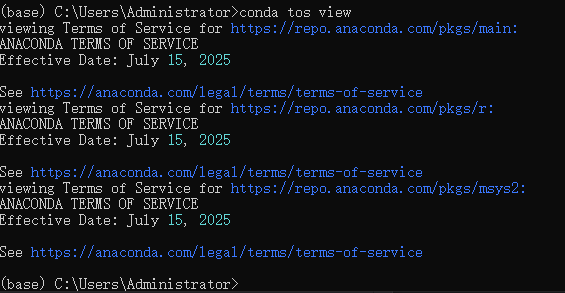
这条命令会列出所有 channel 的 TOS 状态,例如:
Channel: https://repo.anaconda.com/pkgs/main
accepted: True
timestamp: 2025-10-09T06:10:23Z
只要看到 accepted: True,说明 TOS 已经接受成功。
查看当前 Conda 配置的 channels
conda config --show channels
输出示例:
channels:
- https://repo.anaconda.com/pkgs/main
- https://repo.anaconda.com/pkgs/r
- https://repo.anaconda.com/pkgs/msys2
这表示当前生效的源列表。
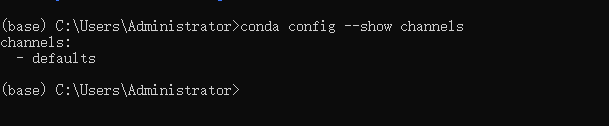
这表示当前你的 Conda 配置只使用了默认源(defaults),而这个默认源实际上对应的就是:
https://repo.anaconda.com/pkgs/main
https://repo.anaconda.com/pkgs/r
https://repo.anaconda.com/pkgs/msys2
也就是说:
现在的配置是“默认使用 Anaconda 官方源”,
刚才接受的 TOS 就是针对这些默认源的。
所以现在的状态完全 正确、 安全、 可以正常用 Conda 安装包。

AtomGit 是由开放原子开源基金会联合 CSDN 等生态伙伴共同推出的新一代开源与人工智能协作平台。平台坚持“开放、中立、公益”的理念,把代码托管、模型共享、数据集托管、智能体开发体验和算力服务整合在一起,为开发者提供从开发、训练到部署的一站式体验。
更多推荐


 26
26 0
0- 0


 已为社区贡献3条内容

所有评论(0)