Python包管理工具uv安装(网络受限情况下)
uv官网给出的安装方式很简单,执行下述指令即可(以windows为例)
powershell -ExecutionPolicy ByPass -c "irm https://astral.sh/uv/install.ps1 | iex"由于网络问题有时无法直接用命令行进行安装,会出现

因此需要手动下载安装。
windows
- step1 下载install文件
直接进入https://astral.sh/uv/install.ps1进行下载,将uv-installer.ps1下载到本地
- step2 下载安装包
文本编辑器打开uv-installer.ps1,找到
The installer for uv 0.6.14

.DESCRIPTION

This script detects what platform you're on and fetches an appropriate archive from
https://github.com/astral-sh/uv/releases/download/0.6.14
then unpacks the binaries and installs them to the first of the following locations
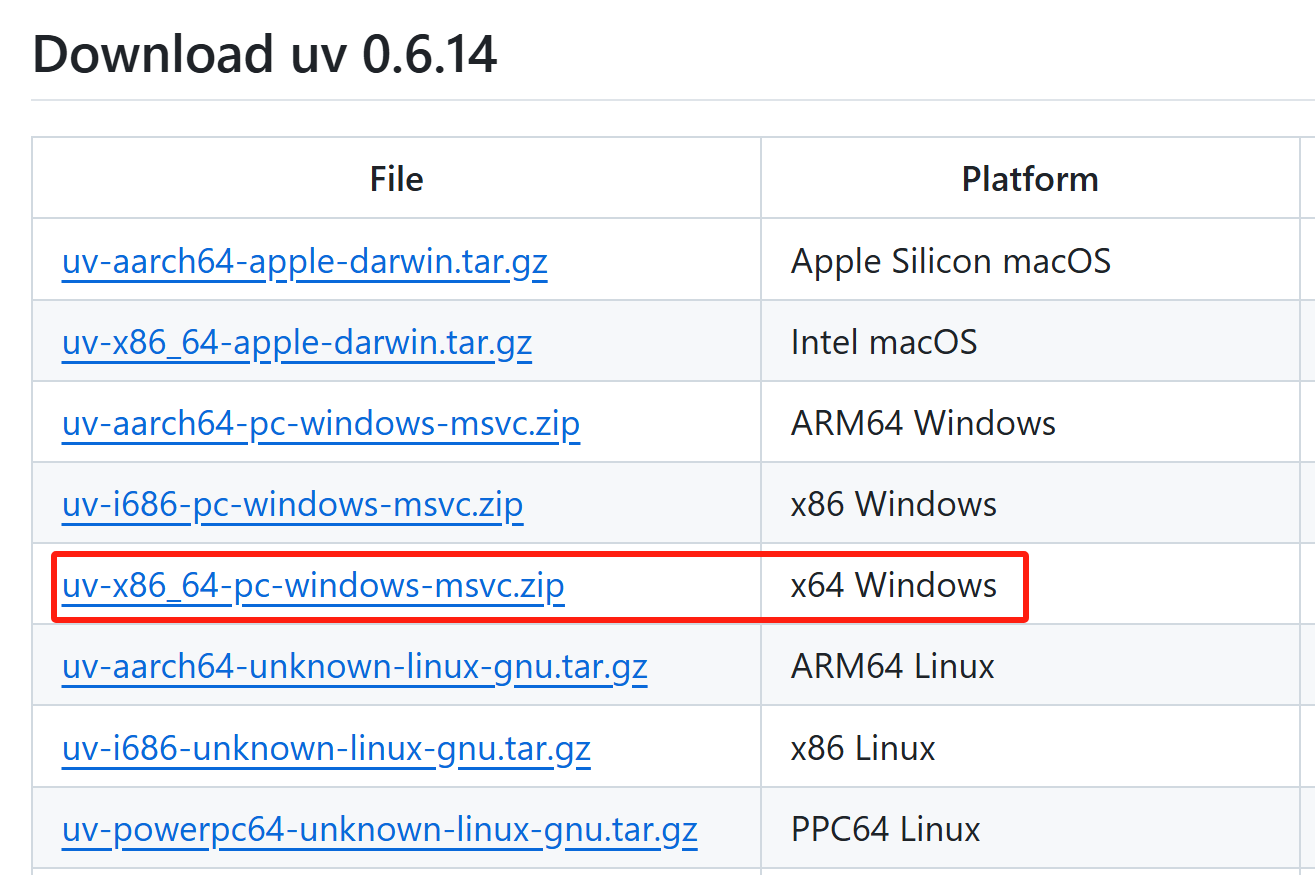
访问 GitHub Release 页面https://github.com/astral-sh/uv/releases,找到对应你系统架构的文件(例如 uv-x86_64-pc-windows-msvc.zip)并下载到本地。
- step3 修改脚本以使用本地文件
打开 uv-installer.ps1 脚本文件,找到以下代码段
$url = "$download_url/$artifact_name"
Write-Information "Downloading $app_name $app_version ($arch)"
Write-Verbose "  from $url"
Write-Verbose "  to $dir_path"
$wc = New-Object Net.Webclient
$wc.downloadFile($url, $dir_path)
将上述代码替换为以下内容:
$localFilePath = "C:\Downloads\uv-x86_64-pc-windows-msvc.zip"  # 替换为你的本地文件路径
Write-Information "Using local file: $localFilePath"
Copy-Item -Path $localFilePath -Destination $dir_path
这步表示用本地下载的压缩包进行安装,而不进行downloading。
- step4 运行安装脚本
在安装脚本所在目录下打开powershell,设置执行策略并执行脚本
Set-ExecutionPolicy -ExecutionPolicy Bypass -Scope Process
.\uv-installer.ps1- step5 查看是否安装成功
打开新的终端输入uv --version查看是否安装成功

ubuntu
与上述步骤基本类似,如果网络没问题的话直接执行
curl -LsSf https://astral.sh/uv/install.sh | sh否则进行手动安装
- step1 下载install文件
直接进入https://astral.sh/uv/install.sh进行下载,将uv-install.sh下载到本地
- step2 下载安装包
文本编辑器打开uv-install.sh,找到
The installer for uv 0.6.14

This script detects what platform you're on and fetches an appropriate archive from
https://github.com/astral-sh/uv/releases/download/0.6.14
then unpacks the binaries and installs them to the first of the following locations
访问 GitHub Release 页面https://github.com/astral-sh/uv/releases,找到对应你系统架构的文件并下载到本地(参考windows安装)。
- step3 修改脚本以使用本地文件
打开 uv-installer.ps1 脚本文件,找到以下代码段
    # download the archive
    local _url="$ARTIFACT_DOWNLOAD_URL/$_artifact_name"
    local _dir
    _dir="$(ensure mktemp -d)" || return 1
    local _file="$_dir/input$_zip_ext"

    say "downloading $APP_NAME $APP_VERSION ${_arch}" 1>&2
    say_verbose "  from $_url" 1>&2
    say_verbose "  to $_file" 1>&2

    ensure mkdir -p "$_dir"

    if ! downloader "$_url" "$_file"; then
      say "failed to download $_url"
      say "this may be a standard network error, but it may also indicate"
      say "that $APP_NAME's release process is not working. When in doubt"
      say "please feel free to open an issue!"
      exit 1
    fi
将上述代码替换为以下内容:
    # download the archive
    local _url="$ARTIFACT_DOWNLOAD_URL/$_artifact_name"
    local _dir
    _dir="$(ensure mktemp -d)" || return 1
    local _file="/home/hzbz/下载/uv-i686-unknown-linux-gnu.tar.gz"  # 替换为你的本地文件路径

    say "using local file $_file" 1>&2
    if [ ! -f "$_file" ]; then
      say "local file $_file does not exist"
      exit 1
    fi
这步表示用本地下载的压缩包进行安装,而不进行downloading。
- step4 运行安装脚本
在安装脚本所在目录下打开powershell,设置执行策略并执行脚本
chmod +x uv-installer.sh
./uv-installer.sh- step5 查看是否安装成功
打开新的终端输入uv --version查看是否安装成功


AtomGit 是由开放原子开源基金会联合 CSDN 等生态伙伴共同推出的新一代开源与人工智能协作平台。平台坚持“开放、中立、公益”的理念,把代码托管、模型共享、数据集托管、智能体开发体验和算力服务整合在一起,为开发者提供从开发、训练到部署的一站式体验。
更多推荐


 20
20 0
0- 0


 已为社区贡献1条内容

所有评论(0)