“农心向荣“(FHFP)创作平台项目说明
“农心向荣”项目和项目团队将智能体系统和原创复合微调技术与农产品视频创作赛道紧密结合,搭建NiceGUI-FastAPI Python一体化前后端系统,用户只需按照既定创作流程,描述清楚自己的创作需求,一键到底,强大的AI助手就能为你生成定制化的、片段级别的、从画面音频到多人物台词设计的、可能爆款的——视频拍摄建议(支持返稿和修改)!
目前版本v1.0,GitHub&B站&CSDN同步转播,版本迭代进行中,暂时未开放公共优质数据库和个人作品库后端接口、暂时未引入用户画像构建和农业知识库功能,欢迎各位关注!
GitHub仓库链接:https://github.com/wawaforest4689/FHFP/tree/master
B站演示视频:https://www.bilibili.com/video/BV1cMjq6nEf5/
B站基础功能&注意事项讲解视频:https://www.bilibili.com/video/BV1pNjq6pEWp/
文章目录
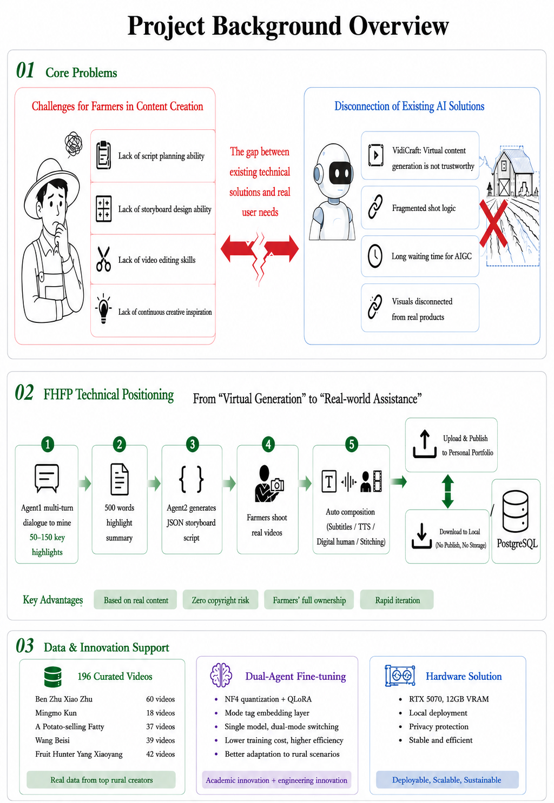
项目介绍
面向群体
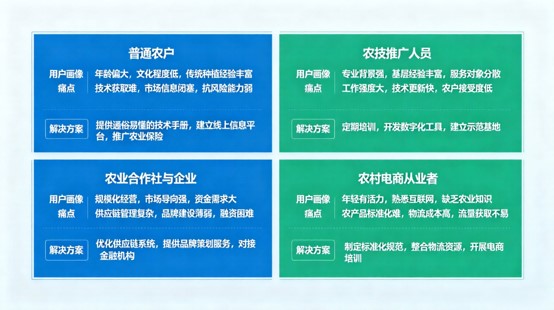
痛点分析
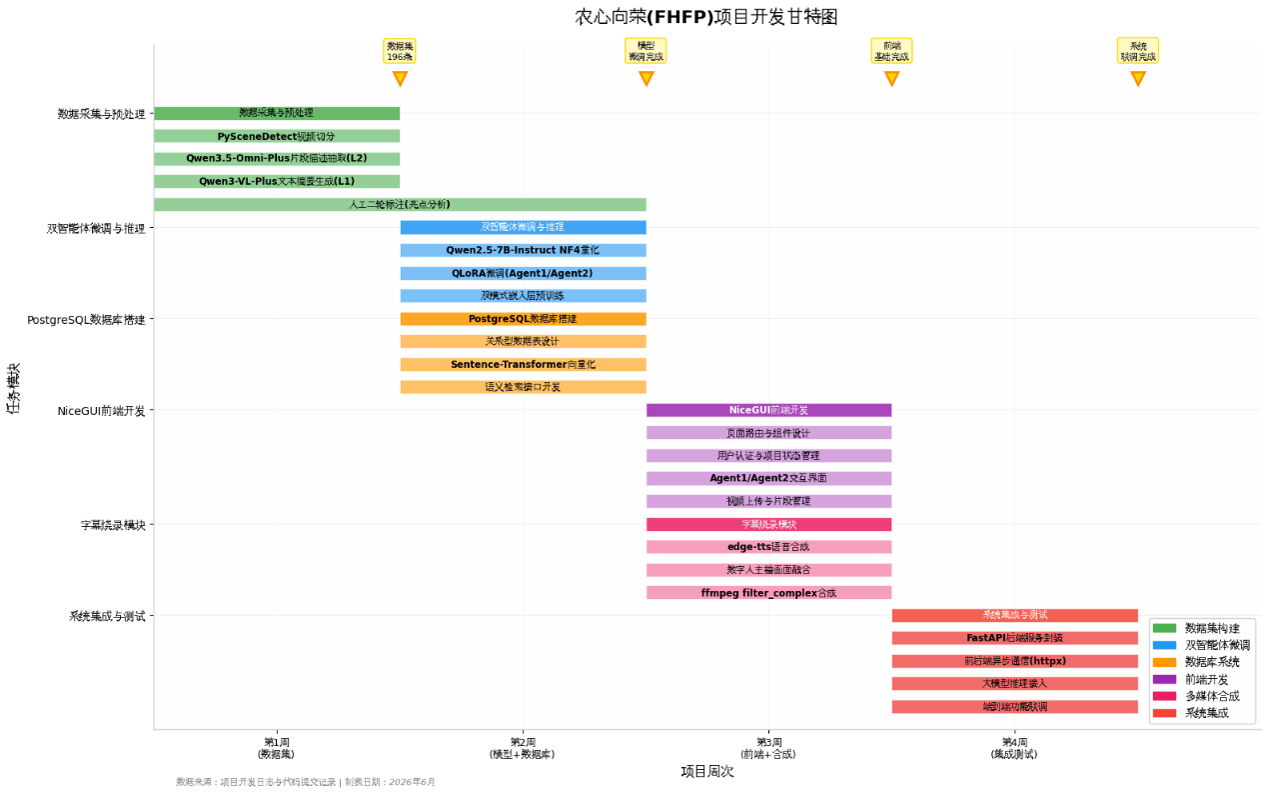
项目规划-甘特图
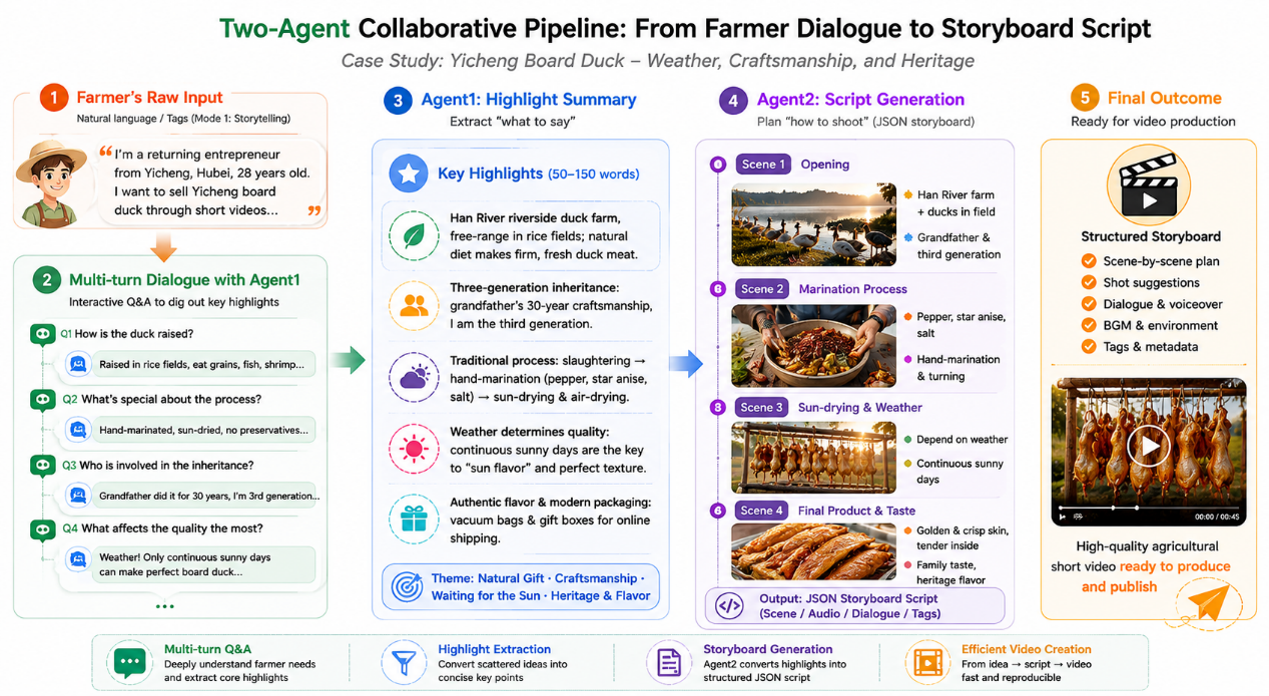
项目功能-流程图
数据集构建
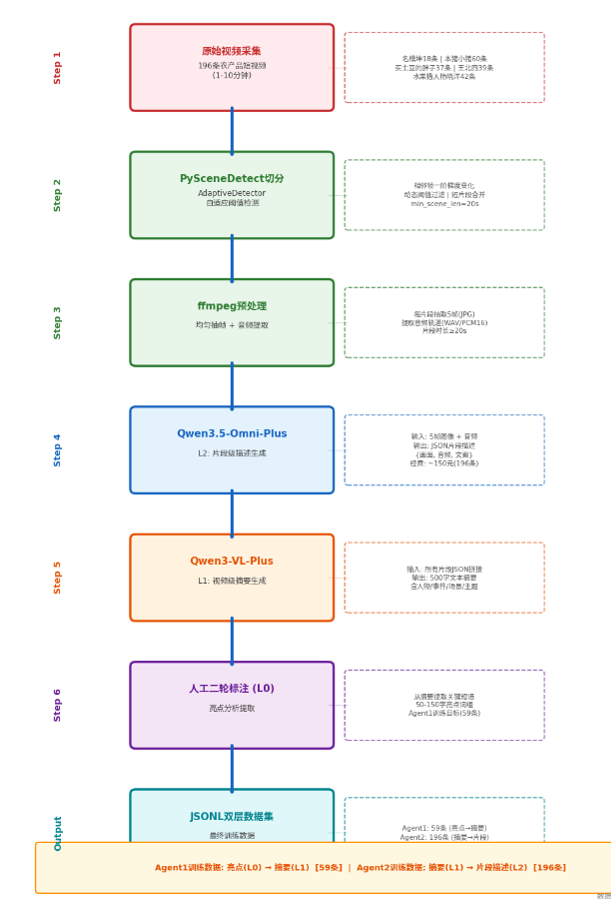
- Layer 2 (Clip-level Description): Call Qwen3.5-Omni-Plus on DashScope. Take sampled frames, audio and system prompts as input, and output standardized JSON-format clip descriptions including scene, audio and text fields. We restrict the maximum output tokens and adjust sampling parameters to control content length and format compliance. To reduce API costs, only text output is enabled.
- Layer 1 (Video-level Summary): Concatenate all Layer 2 clip descriptions of one video, and input the combined text into Qwen3-VL-Plus (pure text mode) to generate a video summary within 500 words, covering main characters, events, scenes and themes.
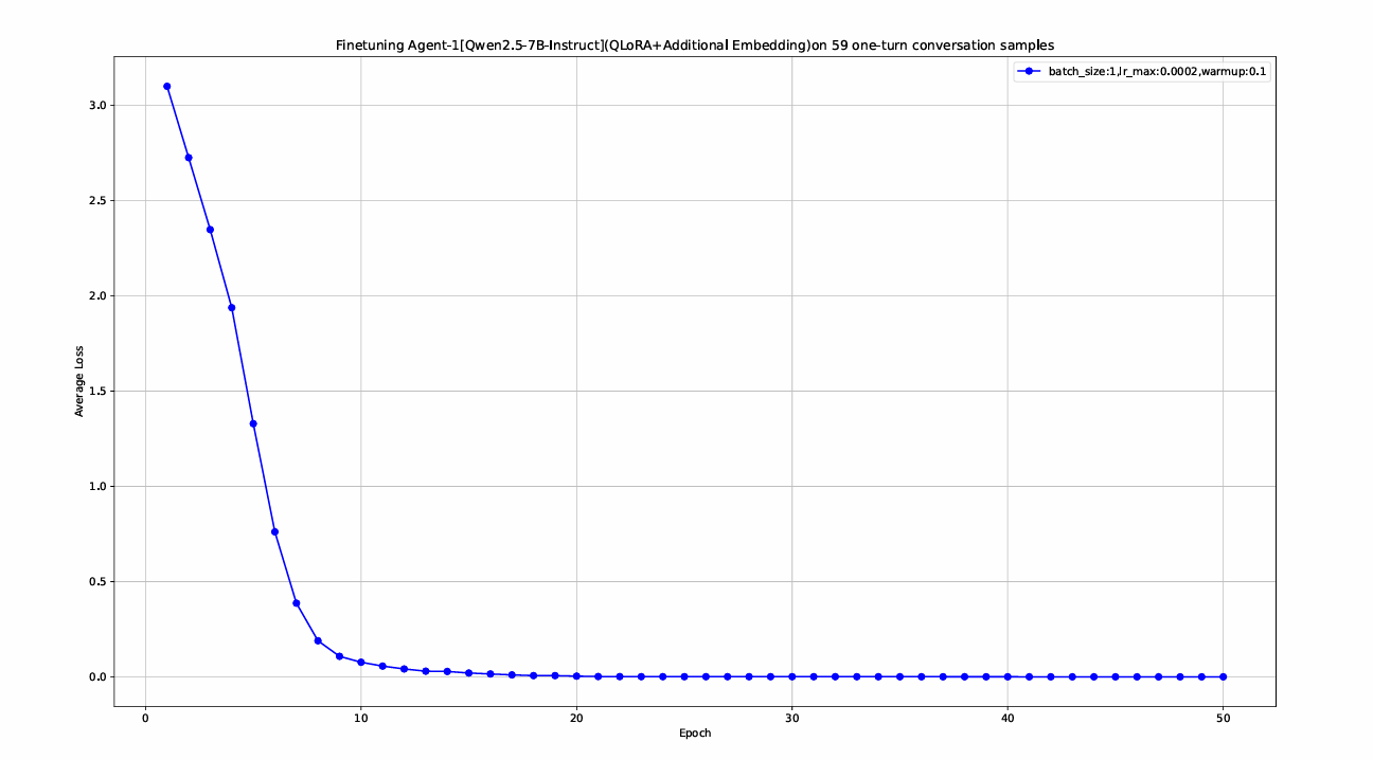
- Layer 0 (Highlight Extraction): Manually extract key phrases (50-150 words) from Layer 1 summaries for Agent 1 fine-tuning. A total of 59 qualified annotated data samples are available for Agent 1 due to manual workload constraints.
模型微调/推理WorkFlow
Model Selection and Quantization Configuration
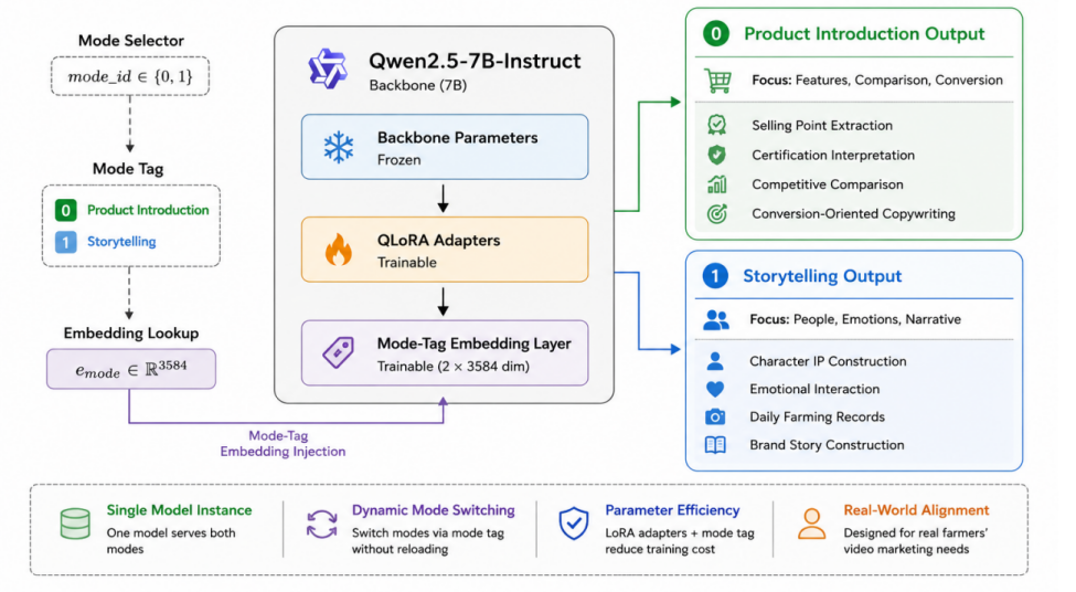
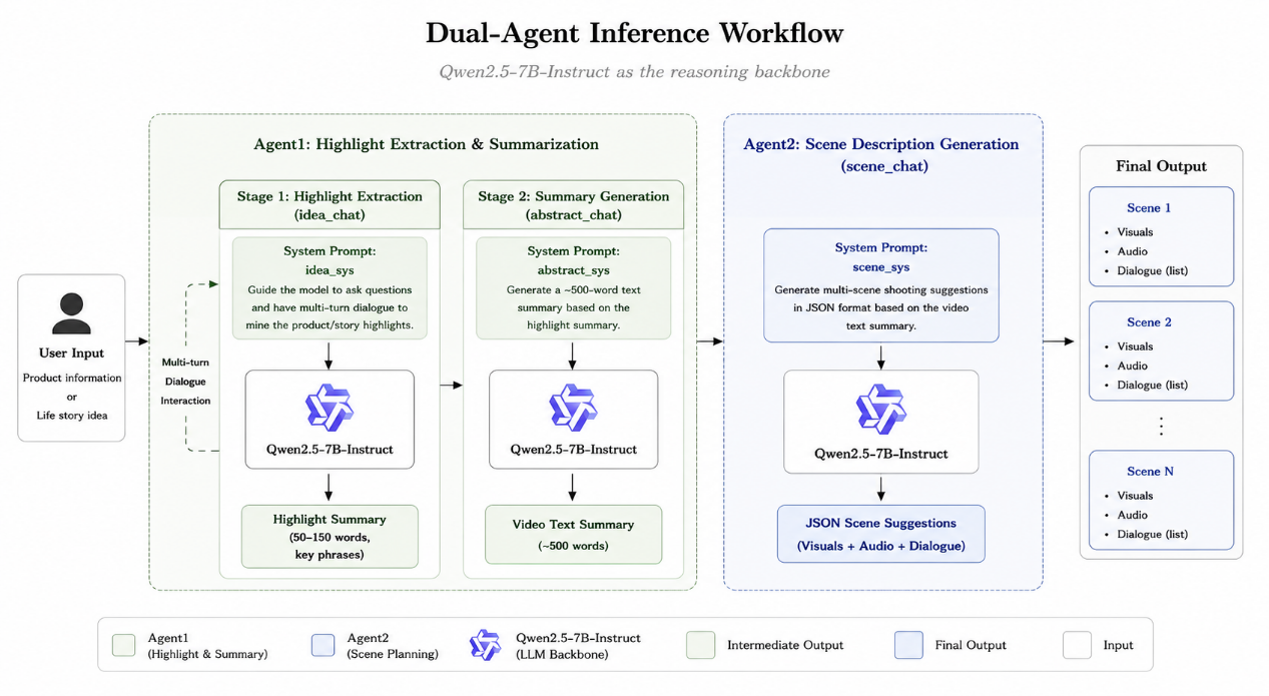
We select Qwen2.5-7B-Instruct as the base model, which has powerful Chinese comprehension and generation capabilities and supports a long context window of 128K tokens. To deploy and run the model on consumer-grade NVIDIA RTX 5070 (12GB VRAM),
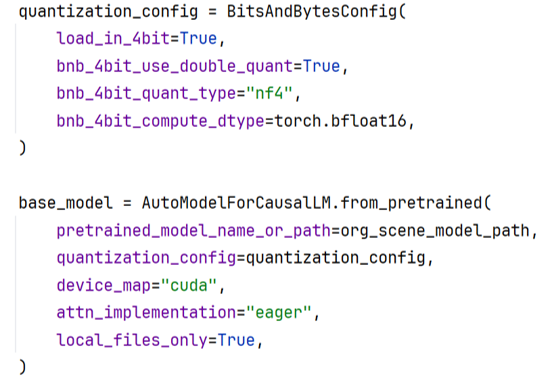
we adopt NF4 (4-bit Normal Float) quantization combined with double quantization. After quantization, the model occupies only 5-6GB VRAM, leaving sufficient resources for QLoRA fine-tuning.
Fine-tuning Settings and Training Details
-
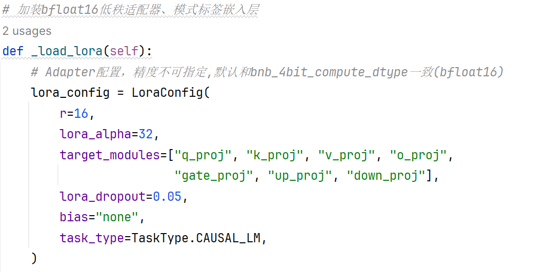
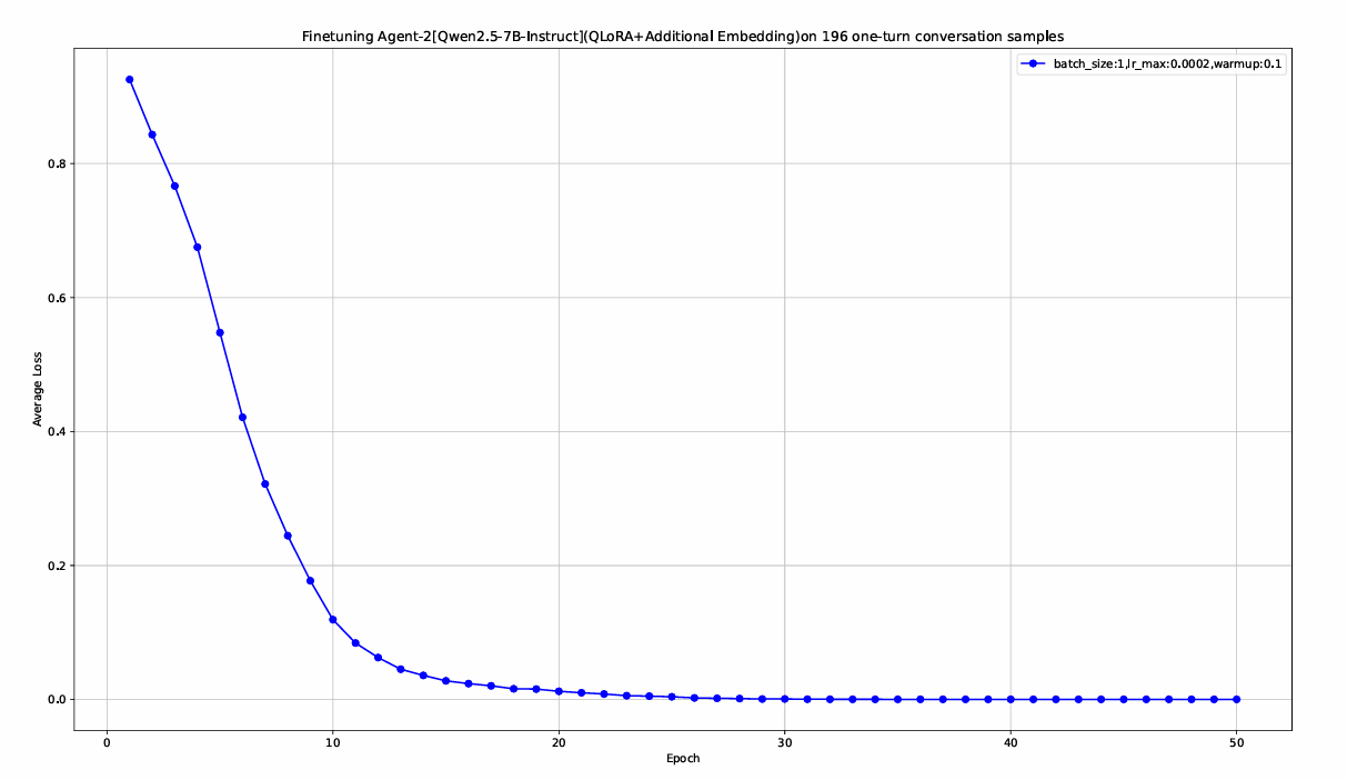
QLoRA Configuration: LoRA rank is set to 16, alpha scaling factor to 32, target modules include attention projection layers and feed-forward network layers, dropout rate is 0.05. AdamW optimizer with a learning rate of 2e-4 is adopted, combined with linear warm-up and cosine annealing learning rate scheduling.
-
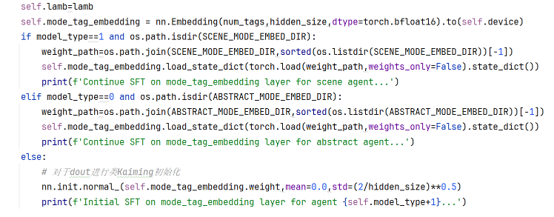
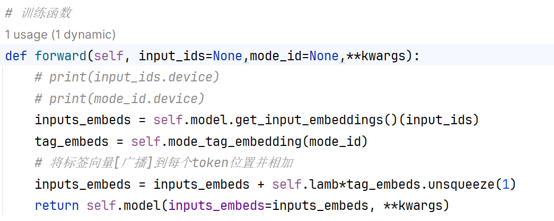
Dual-mode Embedding Layer: An additional trainable mode tag embedding layer is added on top of the original embedding layer to distinguish the two operating modes (product introduction / story creation). A scaling factor is set to control the impact of mode embedding on the original semantic representation to avoid semantic confusion.

Dual-Agent Inference Workflow
Agent 1: Highlight Extraction and Summary Generation
The workflow is divided into two stages:
- Highlight Extraction: With dedicated system prompts, the AI conducts multi-round interactive conversations with users to dig out key highlights of products or stories. After users confirm the conversation, the model outputs key highlights in phrase format (50-150 words).

- Summary Generation: Take the extracted highlights as input, and generate a complete video text summary (around 500 words) following corresponding system prompts.

Agent 2: Clip Description Generation
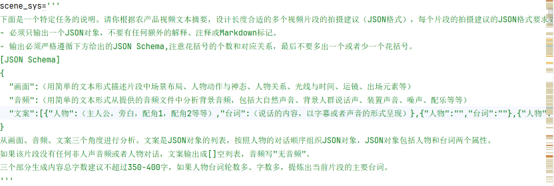
Take the text summary generated by Agent 1 as input, and generate standardized JSON-format shot guidelines according to system prompts. Each JSON object contains three parts: scene description, audio description and character lines (a list of objects including character name and lines).
项目(实机)视频
(1) 演示[含移动端/PC端]:https://www.bilibili.com/video/BV1cMjq6nEf5/?vd_source=042f7eb039218f092216ee53fc47d873
(2) 讲解:https://www.bilibili.com/video/BV1pNjq6pEWp/?vd_source=042f7eb039218f092216ee53fc47d873
运行说明
环境配置
环境启动须知:需要先从https://repo.anaconda.com/miniconda/Miniconda3-latest-Windows-x86_64.exe下载Anaconda3安装程序,Anaconda是项目依赖库管理工具。
-
conda create -n fhfp_video_assist python=3.9 -y -
conda activate fhfp_video_assist -
进入你的项目目录并根据依赖文件安装第三方库 pip install -r requirements.txt -
运行后端测试环境脚本 python backend/main_with_empty_model_v2.py 运行后端生产环境(接入双智能体大模型推理)脚本(需要20GB以上显存(含专用和共享)) python backend/main.py scene_model_id='Qwen/Qwen2.5-7B-Instruct' org_scene_model_path='E:/LLMs/Scene_Qwen2.5-7B-Instruct' # scene_merged_dir="./scene_agent_merged" SCENE_LORA_DIR="./scene-lora" SCENE_MODE_EMBED_DIR="./scene-mode-embed" abstract_model_id='Qwen/Qwen2.5-7B-Instruct' org_abstract_model_path='E:/LLMs/Abstract_Qwen2.5-7B-Instruct' # abstract_merged_dir="./abstract_agent_merged" ABSTRACT_LORA_DIR="./abstract-lora" ABSTRACT_MODE_EMBED_DIR="./abstract-mode-embed" quantization_config = BitsAndBytesConfig( load_in_4bit=True, bnb_4bit_use_double_quant=True, bnb_4bit_quant_type="nf4", bnb_4bit_compute_dtype=torch.bfloat16, ) """ # 第一次需要从transformers拉取Qwen2.5-7B-Instruct(双智能体共同基座模型) # 如果网速较慢,需要配置镜像或者代理,镜像配置不一定成功,建议使用代理连接 import os os.environ["HF_ENDPOINT"] = "https://hf-mirror.com" # 如果显卡可以安装flash-attn,可以把eager(sdpa)改成flash_attention_2 base_model = AutoModelForCausalLM.from_pretrained( pretrained_model_name_or_path=scene_model_id, quantization_config=quantization_config, device_map="cuda", attn_implementation="eager", local_files_only=False, ) """ # 后续部署模型直接使用本地模型路径(因为基座是一致的,两个智能体可以共享基座,如果需要全量微调就要把基座分开) base_model = AutoModelForCausalLM.from_pretrained( pretrained_model_name_or_path=org_scene_model_path, quantization_config=quantization_config, device_map="cuda", attn_implementation="eager", local_files_only=True, ) -
运行前端脚本(自动弹出网页)
python frontend/main_kimi_v3.py
flash-attn依赖库安装说明
pip install flash-attn --no-build-isolation
注意:FlashAttention 需要 CUDA 编译,安装时间较长,且只支持 NVIDIA Ampere (A100/RTX 30xx)、Ada (RTX 40xx)、Hopper (H100) 架构。
补充说明
如果网页没有弹开,在浏览器里面输入http://127.0.0.1:3000即可访问网页端,NiceGUI接口还提供公网访问链接(在控制台的第二个链接的位置),移动设备或者其他电脑可以输入访问

AtomGit 是由开放原子开源基金会联合 CSDN 等生态伙伴共同推出的新一代开源与人工智能协作平台。平台坚持“开放、中立、公益”的理念,把代码托管、模型共享、数据集托管、智能体开发体验和算力服务整合在一起,为开发者提供从开发、训练到部署的一站式体验。
更多推荐



 10
10 0
0- 0


 已为社区贡献2条内容

所有评论(0)