AI 万能手册:从零构建 HarmonyOS 智能对话应用
AI 万能手册:从零构建 HarmonyOS 智能对话应用(API 24)
基于 ArkTS + DeepSeek API 实现流式 AI 对话,全面兼容 API 24
目录
- 项目背景与定位
- 技术选型与架构设计
- 页面布局与 UI 组件
- 网络层:AIChatService 详解
- SSE 流式响应的实现原理
- 状态管理与数据流
- API 24 兼容性攻关记录
- 错误处理与异常恢复
- 性能优化实践
- 完整代码解读
- 部署与运行指南
- 总结与未来规划
1. 项目背景与定位
1.1 为什么需要"AI 万能手册"
在日常生活和工作中,我们经常遇到各种需要专业建议的场景:
- 写一段得体的工作邮件
- 调试一段复杂的代码
- 分析一段对话中的情感需求
- 制定一份健身计划
- 为孩子设计一份学习方案
传统的搜索引擎需要用户从大量结果中筛选信息,而 AI 大模型能够直接给出针对性回答。然而,市面上大多数 AI 应用都是通用型聊天界面,缺乏特定场景的引导和优化。
AI 万能手册 正是为解决这一痛点而生——它是一款全能的 AI 生活助手应用,覆盖八大领域,提供开箱即用的智能问答体验。
1.2 目标用户
- 开发者:需要快速获取技术方案和代码示例
- 职场人士:需要文案润色、邮件起草、沟通建议
- 学生:需要学习辅导、知识答疑
- 普通用户:需要生活建议、健康指导、情感分析
1.3 核心功能
| 功能模块 | 描述 | AI 能力 |
|---|---|---|
| 智能对话 | 自然语言问答 | DeepSeek-V3 大模型 |
| 流式响应 | 实时逐字输出 | SSE Server-Sent Events |
| 历史对话 | 上下文连续理解 | 消息数组维护 |
| 通用覆盖 | 8 大领域问题 | 系统提示词引导 |
| 错误兜底 | 网络异常恢复 | 双模式解析回退 |
1.4 技术约束
本项目基于 HarmonyOS SDK 24(API 24,对应 OpenHarmony 6.1.1),面临以下技术约束:
- 不支持
.fill()形状着色方法 - 不支持
Color.fromArgb()颜色构造 - 不支持
.overlay()直接传入组件 - 不支持 CSS
calc()表达式 - HTTP
on系列 API 已弃用但仍可用 - 网络请求需显式申请 INTERNET 权限
2. 技术选型与架构设计
2.1 整体架构
AI 万能手册采用经典的分层架构,分为三层:
┌────────────────────────────────────────┐
│               UI 表现层                 │
│   Index.ets(页面组件 + 状态管理)        │
│   @Builder 气泡组件 / 加载指示器         │
├────────────────────────────────────────┤
│              业务逻辑层                  │
│   sendMessage() / scrollToBottom()      │
│   消息历史管理 / 流式响应更新             │
├────────────────────────────────────────┤
│              网络服务层                  │
│   AIChatService.ets                    │
│   queryAI() / cancelAI()               │
│   SSE 解析 / 非流式回退                 │
└────────────────────────────────────────┘
2.2 技术栈
| 层面 | 技术 | 版本 |
|---|---|---|
| 语言 | ArkTS | 5.0+ (API 24) |
| UI 框架 | ArkUI 声明式 | 6.1.1 |
| 网络框架 | @kit.NetworkKit (http) | API 24 |
| AI 模型 | DeepSeek-V3 | - |
| API 协议 | OpenAI 兼容接口 | REST + SSE |
| 构建工具 | Hvigor | 5.x |
2.3 设计原则
- 兼容优先:所有 API 调用都经过 API 24 验证
- 优雅降级:SSE 流式失败时自动回退到非流式解析
- 响应式 UI:使用
@State+.layoutWeight()实现自适应 - 关注点分离:网络请求与 UI 渲染完全解耦
3. 页面布局与 UI 组件
3.1 整体布局结构
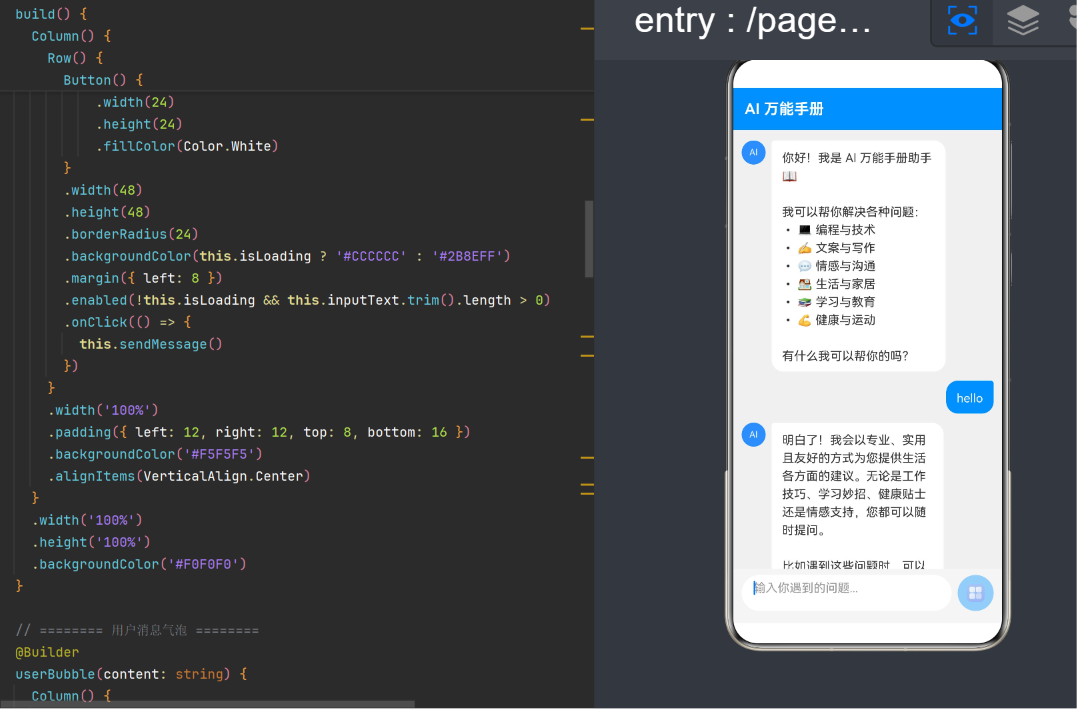
聊天界面采用经典的三段式结构:
┌──────────────────────────┐
│     顶部标题栏 (56vp)      │  ← Row + Text
├──────────────────────────┤
│                          │
│     消息列表 (自适应)      │  ← Scroll + Column
│                          │
│                          │
├──────────────────────────┤
│     底部输入区 (72vp)      │  ← Row + TextArea + Button
└──────────────────────────┘
3.2 顶部标题栏
使用 Row 容器 + 纯色背景实现:
Row() {
  Text('AI 万能手册')
    .fontSize(20)
    .fontWeight(FontWeight.Bold)
    .fontColor(Color.White)
}
.width('100%')
.height(56)
.backgroundColor('#2B8EFF')
.padding({ left: 16, right: 16 })
.alignItems(VerticalAlign.Center)
3.3 消息列表
采用 Scroll + Column 组合,支持无限滚动:
Scroll(this.scroller) {
  Column() {
    ForEach(this.messages, (msg, index) => {
      // 根据 role 渲染不同类型的气泡
    })
  }
}
.width('100%')
.layoutWeight(1)  // 自适应填充
.edgeEffect(EdgeEffect.Spring)  // 弹性滚动效果
3.4 用户消息气泡(右对齐蓝色)
用户消息采用右侧蓝色气泡设计,视觉上区分于 AI 消息:
Row() {
  Row().layoutWeight(1)     // 左侧弹性占位,将气泡推到右侧
  Text(content)
    .fontSize(16)
    .fontColor(Color.White)
    .backgroundColor('#2B8EFF')
    .borderRadius({
      topLeft: 16,
      topRight: 4,          // 右上角小圆角,模拟对话框尾巴
      bottomLeft: 16,
      bottomRight: 16
    })
    .padding({ left: 14, right: 14, top: 10, bottom: 10 })
}
3.5 AI 消息气泡(左对齐带头像)
AI 消息采用左侧白色气泡 + 圆形头像设计:
Row() {
  // AI 头像(Stack 组合实现,兼容 API 24)
  Stack() {
    Circle()
      .width(32)
      .height(32)
      .backgroundColor('#2B8EFF')  // API 24 兼容写法
    Text('AI')
      .fontSize(12)
      .fontColor(Color.White)
  }
  .width(32)
  .height(32)
  .margin({ right: 8 })

  Text(content)
    .fontSize(16)
    .fontColor('#333333')
    .backgroundColor(Color.White)
    .borderRadius({
      topLeft: 4,           // 左上角小圆角,模拟对话框尾巴
      topRight: 16,
      bottomLeft: 16,
      bottomRight: 16
    })
    // ...
}
API 24 要点:AI 头像使用
Stack(Circle + Text)组合实现,而非.overlay(Text(...))。后者在 API 24 中不被支持。
3.6 底部输入区
输入区包含 TextArea 输入框和 Button 发送按钮:
Row() {
  TextArea({
    placeholder: '输入你遇到的问题...',
    text: this.inputText
  })
    .width(0)
    .layoutWeight(1)
    .height(48)
    .fontSize(16)
    .placeholderColor('#999999')
    .backgroundColor(Color.White)
    .borderRadius(24)
    .padding({ left: 16, right: 16 })
    .onChange((value: string) => { this.inputText = value })

  Button() {
    Text('发送')
      .fontSize(16)
      .fontColor(Color.White)
  }
  .width(64)
  .height(48)
  .borderRadius(24)
  .backgroundColor(this.isLoading ? '#CCCCCC' : '#2B8EFF')
  .enabled(!this.isLoading && this.inputText.trim().length > 0)
  .onClick(() => { this.sendMessage() })
}
关键交互细节:
- 加载时按钮变灰并禁用
- 输入为空时按钮禁用
.layoutWeight(1)让输入框自适应填充
3.7 加载指示器(Thinking 动画)
AI 思考时显示三个跳动圆点:
Row() {
  // AI 头像
  Stack() {
    Circle().width(32).height(32).backgroundColor('#2B8EFF')
    Text('AI').fontSize(12).fontColor(Color.White)
  }
  .width(32).height(32).margin({ right: 8 })

  // 三个跳动点
  Row() {
    ForEach([0, 1, 2], (idx) => {
      Circle()
        .width(8).height(8)
        .backgroundColor('#999999')
        .margin({ left: 3, right: 3 })
    })
  }
  .backgroundColor(Color.White)
  .borderRadius(16)
  .padding({ left: 12, right: 12, top: 8, bottom: 8 })
}
4. 网络层:AIChatService 详解
4.1 模块职责
AIChatService.ets 是应用的网络服务层,负责:
- 构建 HTTP 请求和请求体
- 发送 POST 请求到 AI API
- 解析 SSE 流式响应
- 提供非流式回退机制
- 支持请求取消
4.2 API 配置
const API_URL = 'https://api-ai.gitcode.com/v1/chat/completions'
const API_KEY = "Bearer your_api_key_here"
安全提醒:实际部署时,API Key 不应硬编码在源码中,应通过配置文件或运行时注入。
4.3 消息与请求体结构
export interface ChatMessage {
  role: string    // 'system' | 'user' | 'assistant'
  content: string
}

export interface ChatCompletionRequest {
  model: string
  messages: ChatMessage[]
  stream: boolean
  max_tokens: number
  temperature: number
  top_p: number
  frequency_penalty: number
  thinking_budget: number
}
4.4 queryAI 函数核心流程
export function queryAI(callbacks: AICallbacks, messages: ChatMessage[]): void {
  // 1. 取消上一次未完成的请求
  cancelPreviousRequest()

  // 2. 创建新 HTTP 请求
  const httpRequest = http.createHttp()

  // 3. 构建完整消息列表(插入系统提示词)
  const fullMessages = [
    { role: 'system', content: SYSTEM_PROMPT },
    ...messages
  ]

  // 4. 注册 SSE 数据监听
  httpRequest.on('dataReceive', handleDataReceive)

  // 5. 注册完成监听
  httpRequest.on('dataEnd', handleDataEnd)

  // 6. 发起 POST 请求
  httpRequest.request(API_URL, { method: 'POST', ... }, handleResponse)
}
4.5 回调接口设计
export interface AICallbacks {
  onData: (text: string) => void   // 每个 token 到达
  onDone: () => void               // 响应结束
  onError: (errMsg: string) => void // 错误通知
}
采用回调而非 Promise 的原因:
- 流式响应需要多次回调,Promise 只能 resolve 一次
- 回调模式更贴近事件驱动的 SSE 模型
- 不需要在 UI 层管理复杂的异步状态机
4.6 系统提示词设计
系统提示词是 AI 行为的核心控制器。本应用将其设计为万能手册助手:
const SYSTEM_PROMPT =
  '你是一位全能的 AI 生活助手,能够帮助用户解决工作、学习、生活、情感、' +
  '健康、科技等各个领域的问题。\n\n' +
  '原则:\n' +
  '1. 全面覆盖:编程调试、文案写作、情感咨询、健康建议、日常知识\n' +
  '2. 实用优先:给出可落地的具体建议、步骤或代码\n' +
  '3. 结构清晰:复杂问题用分点、分段呈现\n' +
  '4. 语气友善:保持耐心和鼓励\n' +
  '5. 安全合规:不提供医疗诊断、法律意见等最终结论'
提示词设计的五个层次:
- 角色定义:告诉 AI"你是谁"
- 能力范围:列举可处理的问题类型
- 输出规范:约束回答的风格和结构
- 语气控制:设定情感基调
- 安全边界:防止 AI 越界提供危险建议
5. SSE 流式响应的实现原理
5.1 SSE 协议简介
SSE(Server-Sent Events)是一种服务器推送技术,允许服务器向客户端持续发送数据流。在 AI 对话场景中,SSE 实现了逐字输出的效果——用户无需等待完整响应,而是看到 AI 像真人一样"边想边写"。
标准 SSE 数据格式:
data: {"choices":[{"delta":{"content":"你好"}}]}

data: {"choices":[{"delta":{"content":",我"}}]}

data: {"choices":[{"delta":{"content":"是AI"}}]}

data: [DONE]
5.2 流式监听机制
在 HarmonyOS 的 HTTP 模块中,SSE 数据通过 on('dataReceive') 事件获取:
httpRequest.on('dataReceive', (data: ArrayBuffer) => {
  const text = arrayBufferToString(data)
  buffer += text

  // 按行拆解
  const lines = buffer.split('\n')
  buffer = lines.pop() ?? ''  // 保存不完整的最后一行

  for (const line of lines) {
    if (line.trim().startsWith('data:')) {
      if (line.trim() === 'data:[DONE]') {
        callbacks.onDone()
        continue
      }
      const content = parseSSEDataLine(line.trim())
      if (content) {
        callbacks.onData(content)
      }
    }
  }
})
5.3 SSE 解析器
function parseSSEDataLine(line: string): string | null {
  const jsonStr = line.slice(5).trim()  // 去掉 "data:" 前缀
  if (!jsonStr) return null

  try {
    const parsed = JSON.parse(jsonStr)
    const choices = parsed.choices
    if (choices && choices.length > 0) {
      const choice = choices[0]
      // 流式格式使用 delta
      if (choice.delta) return choice.delta.content
      // 非流式格式使用 message
      if (choice.message) return choice.message.content
    }
  } catch (_) { /* JSON 解析失败,跳过 */ }
  return null
}
5.4 非流式回退机制
针对部分 HarmonyOS 版本 HTTP 模块在 SSE 场景下不触发 dataReceive 的问题,实现了两级回退:
第一级:SSE 完整体解析 parseFullSSEBody()
  ↓(失败)
第二级:非流式 JSON 解析 parseNonStreamingBody()
  ↓(失败)
最终:返回原始 body 前 200 字符作为错误提示
if (!receivedAnyData && resp.result) {
  const bodyStr = typeof resp.result === 'string'
    ? resp.result
    : arrayBufferToString(resp.result)

  const sseContent = parseFullSSEBody(bodyStr)
  if (sseContent) {
    callbacks.onData(sseContent)
  } else {
    const jsonContent = parseNonStreamingBody(bodyStr)
    if (jsonContent) {
      callbacks.onData(jsonContent)
    } else {
      callbacks.onError('无法解析响应: ' + preview)
    }
  }
}
5.5 请求取消
export function cancelAI(): void {
  if (httpRequestTask) {
    try {
      httpRequestTask.destroy()
    } catch (_) { /* ignore */ }
    httpRequestTask = null
  }
}
请求取消的作用场景:
- 用户快速连续发送消息时,自动取消上一次请求
- 页面退出时清理网络资源
- AI 回复太长时间,用户主动停止
6. 状态管理与数据流
6.1 状态变量设计
@State private messages: ChatMessage[] = []     // 消息列表
@State private inputText: string = ''            // 输入框文本
@State private isLoading: boolean = false         // 是否请求中
@State private currentResponse: string = ''       // 当前累积的响应
private scroller: Scroller = new Scroller()       // 滚动控制器
6.2 数据流图
用户输入 → inputText(@State)
   ↓
点击发送 → sendMessage()
   ↓
添加用户消息到 messages(@State) → UI 刷新
   ↓
调用 queryAI(callbacks, history)
   ↓
onData(chunk) → 累积 currentResponse → 更新 messages → UI 刷新 → 滚动
   ↓
onDone() → isLoading = false → 最终确认消息内容
   ↓
onError(err) → 添加错误消息 → isLoading = false
6.3 核心消息发送逻辑
sendMessage(): void {
  const text = this.inputText.trim()
  if (!text || this.isLoading) return

  // 1. 添加用户消息
  this.messages.push({ role: 'user', content: text })
  this.inputText = ''
  this.isLoading = true
  this.scrollToBottom()

  // 2. 构建历史消息(排除欢迎语)
  const history: ChatMessage[] = []
  for (let i = 1; i < this.messages.length; i++) {
    history.push({ role: this.messages[i].role, content: this.messages[i].content })
  }
  // 移除最后一条用户消息(API 会自动带上)
  history.pop()

  // 3. 发起 AI 请求
  let response = ''
  queryAI({
    onData: (chunk) => {
      response += chunk
      // 更新或插入 AI 消息
      const last = this.messages[this.messages.length - 1]
      if (last.role === 'user') {
        this.messages.push({ role: 'assistant', content: response })
      } else {
        this.messages[this.messages.length - 1] = { role: 'assistant', content: response }
      }
      this.scrollToBottom()
    },
    onDone: () => {
      this.isLoading = false
      this.scrollToBottom()
    },
    onError: (err) => {
      this.isLoading = false
      this.messages.push({ role: 'assistant', content: `⚠️ ${err}` })
    }
  }, history)
}
6.4 消息更新的两种路径
在 onData 回调中,需要根据最后一条消息的角色决定更新方式:
| 条件 | 操作 | 说明 |
|---|---|---|
| 最后一条是 user | push 新 AI 消息 | 首次收到 token |
| 最后一条是 assistant | assign 替换 | 已有流式内容,追加 |
这种设计确保了流式响应的实时更新不会产生重复消息。
6.5 自动滚动
scrollToBottom(): void {
  setTimeout(() => {
    this.scroller.scrollEdge(Edge.Bottom)
  }, 100)  // 延迟 100ms 确保新内容已渲染
}
延迟 100ms 的原因:
@State变更后需要等待一个帧周期- 确保新消息的布局计算已完成
Edge.Bottom是 ArkTS 标准的滚动目标
7. API 24 兼容性攻关记录
7.1 问题全景
在 API 24 环境中,我们遇到了以下兼容性问题:
| 问题 | 尝试的解决方案 | 最终方案 |
|---|---|---|
.fill() 不可用 | backgroundColor / Container 包裹 | backgroundColor() |
.overlay() 不支持组件 | 改用字符串 overlay | Stack 嵌套 |
Color.fromArgb() 不存在 | 尝试 Color.fromRgba() | 十六进制字符串 '#AARRGGBB' |
Color.Purple 未定义 | 尝试其他命名颜色 | '#800080' 字符串 |
calc() 无效 | 寻找替代 API | 代码中手动计算 |
| BUILD ERROR 信息不明确 | 逐段注释排查 | 对照编译日志定位 |
7.2 .fill() 问题
错误信息:
Property 'fill' does not exist on type 'CircleAttribute'.
根因:API 24 中,Circle、Rect 等形状组件不支持 .fill() 方法,该方法在 API 26 才引入。
解决方案:使用 .backgroundColor() 替代:
// ❌ API 24 不允许
Circle().fill('#2B8EFF')

// ✅ API 24 兼容
Circle().backgroundColor('#2B8EFF')
原理:
.fill()是形状组件的填充着色方法.backgroundColor()是通用组件的背景色方法- 在视觉上两者效果一致,但底层实现不同
7.3 .overlay() 问题
错误信息:
Unexpected token
(Rollup 无法解析,因为 .overlay(Text(...)) 不是合法语法)
根因:API 24 中 overlay 方法签名仅接受 string 或 CustomBuilder,不能直接传组件表达式。
解决方案:使用 Stack 嵌套替代 overlay:
// ❌ API 24 不允许
Circle().overlay(Text('AI').fontSize(12))

// ✅ API 24 兼容
Stack() {
  Circle().width(32).height(32).backgroundColor('#2B8EFF')
  Text('AI').fontSize(12).fontColor(Color.White)
}
.width(32).height(32)
7.4 Color.fromArgb() 问题
错误信息:
Property 'fromArgb' does not exist on type 'typeof Color'.
根因:API 24 的 Color 类没有静态工厂方法。
解决方案:使用十六进制字符串:
// ❌ API 24 不允许
Color.fromArgb(255, 128, 0, 128)

// ✅ API 24 兼容
'#800080'   // 紫色
'#2B8EFF'   // 自定义蓝色
'#FF800080' // 带透明度
7.5 颜色使用对照表
| 目标颜色 | API 24 写法 | 注 |
|---|---|---|
| 红色 | Color.Red 或 '#FF0000' | 命名颜色可用 |
| 蓝色 | Color.Blue 或 '#0000FF' | 命名颜色可用 |
| 紫色 | '#800080' | 无命名颜色 |
| 浅灰 | Color.Gray 或 '#A0A0A0' | LightGray 不存在 |
| 粉色 | Color.Pink 或 '#FFC0CB' | 命名颜色可用 |
| 橙色 | Color.Orange 或 '#FFA500' | 命名颜色可用 |
| 棕色 | Color.Brown 或 '#A52A2A' | 命名颜色可用 |
| 透明 | Color.Transparent 或 '#00000000' | 命名颜色可用 |
| 自定义蓝 | '#2B8EFF' | 推荐字符串格式 |
7.6 HTTP API 弃用问题
警告信息:
'on' has been deprecated
虽然 httpRequest.on() 在 API 24 中被标记为弃用,但没有替代方法。在 API 24 中,这是监听 SSE 流式数据的唯一手段。因此我们保留使用,待 SDK 升级后再迁移到新的 API。
7.7 INTERNET 权限配置
API 24 要求显式声明网络权限。在 module.json5 中添加:
{
  "module": {
    "requestPermissions": [
      {
        "name": "ohos.permission.INTERNET"
      }
    ]
  }
}
如果缺少此权限,HTTP 请求会静默失败,且不触发任何回调。
7.8 ArkTS 特有语法约束
| 约束 | 说明 | 解决方案 |
|---|---|---|
| 无声明合并 | 不能重复声明相同名称的接口/类型 | 使用唯一名称如 Offset2D |
| import 必须在顶部 | 装饰器之前 | 将 import 放在文件开头 |
| @BuilderParam 需初始化 | 必须有默认值 | 提供默认空 Builder |
| 箭头函数不能作为组件 | 不能直接调用 this.child() | 在 @Builder 中使用 this.child() |
8. 错误处理与异常恢复
8.1 网络错误处理
// HTTP 请求失败
callbacks.onError(`请求失败: ${JSON.stringify(err)}`)

// HTTP 状态码非 200
callbacks.onError(`服务器返回错误 (${resp.responseCode}): ${errBody}`)
UI 层展示:
onError: (errMsg) => {
  this.isLoading = false
  this.messages.push({
    role: 'assistant',
    content: `⚠️ 出错了:${errMsg}`
  })
}
8.2 响应解析失败
三级解析 + 最终降级:
SSE 行解析 → 完整体 SSE 解析 → 非流式 JSON → 原始内容预览
8.3 空输入保护
if (!text || this.isLoading) return
8.4 双重提交防护
通过 isLoading 状态锁防止用户在请求进行中再次发送:
.enabled(!this.isLoading && this.inputText.trim().length > 0)
8.5 请求资源清理
每次新请求前取消旧请求,防止资源泄漏:
if (httpRequestTask) {
  try { httpRequestTask.destroy() } catch (_) {}
  httpRequestTask = null
}
9. 性能优化实践
9.1 布局优化
-
使用
.layoutWeight(1)替代固定高度// 自适应填充剩余空间 Scroll().width('100%').height(1).layoutWeight(1) -
避免不必要的
@State刷新将不需要触发 UI 刷新的变量用普通成员变量而非
@State装饰 -
使用 key 优化 ForEach
ForEach(this.messages, (msg, index) => {
  // 使用稳定的 index 作为 key
}, (msg, index) => index.toString())
9.2 网络优化
-
连接超时控制
connectTimeout: 30000 // 30s readTimeout: 120000 // 120s -
请求取消机制
防止无效请求占用网络资源
-
SSE 缓冲优化
使用缓冲区 + 分行处理,避免单次 dataReceive 处理过长字符串
9.3 内存优化
-
消息历史管理
当前版本保留全部历史。大规模使用时,建议限制历史长度(如最近 50 条)
-
字符串累积优化
流式响应使用
+=累加,在消息量大时建议使用数组join()方式
9.4 滚动性能
-
延迟滚动
使用
setTimeout(100ms)确保新内容渲染完成后再滚动 -
避免频繁 scrollToBottom
仅在收到新 token 和请求完成时触发
10. 完整代码解读
10.1 文件结构
entry/src/main/ets/
├── pages/
│   ├── Index.ets          # 主页面(入口)
│   └── AIChatService.ets  # AI 聊天服务层
├── entryability/
│   └── EntryAbility.ets   # Ability 生命周期
└── entrybackupability/
    └── EntryBackupAbility.ets
10.2 Index.ets 主要符号表
| 符号 | 类型 | 作用 |
|---|---|---|
messages | @State ChatMessage[] | 消息列表 |
inputText | @State string | 输入框内容 |
isLoading | @State boolean | 请求状态 |
currentResponse | @State string | 当前累积响应 |
scroller | Scroller | 滚动控制器 |
sendMessage() | 方法 | 发送消息 |
scrollToBottom() | 方法 | 自动滚动 |
userBubble() | @Builder | 用户气泡 |
aiBubble() | @Builder | AI 气泡 |
loadingIndicator() | @Builder | 加载指示器 |
10.3 AIChatService.ets 主要符号表
| 符号 | 类型 | 作用 |
|---|---|---|
ChatMessage | interface | 消息结构 |
ChatCompletionRequest | interface | 请求体结构 |
AICallbacks | interface | 回调接口 |
queryAI() | function | 发起 AI 请求 |
cancelAI() | function | 取消请求 |
parseSSEDataLine() | function | 单行 SSE 解析 |
parseFullSSEBody() | function | 完整 SSE 解析 |
parseNonStreamingBody() | function | 非流式 JSON 解析 |
10.4 完整 Index.ets 源码(约 200 行)
import { queryAI, ChatMessage } from '../pages/AIChatService'

@Entry
@Component
struct Index {
  @State private messages: ChatMessage[] = []
  @State private inputText: string = ''
  @State private isLoading: boolean = false
  @State private currentResponse: string = ''
  private scroller: Scroller = new Scroller()

  aboutToAppear(): void {
    this.messages.push({
      role: 'assistant',
      content: '你好!我是 AI 万能手册助手 📖\n\n我可以帮你解决各种问题:\n' +
        '• 💻 编程与技术\n• ✍️ 文案与写作\n• 💬 情感与沟通\n' +
        '• 🏠 生活与家居\n• 📚 学习与教育\n• 💪 健康与运动\n\n' +
        '有什么我可以帮你的吗?'
    })
  }

  build() {
    Column() {
      // 顶部标题栏
      Row() {
        Text('AI 万能手册')
          .fontSize(20)
          .fontWeight(FontWeight.Bold)
          .fontColor(Color.White)
      }
      .width('100%')
      .height(56)
      .backgroundColor('#2B8EFF')
      .padding({ left: 16, right: 16 })
      .alignItems(VerticalAlign.Center)

      // 消息列表
      Scroll(this.scroller) {
        Column() {
          ForEach(this.messages, (msg: ChatMessage, index: number) => {
            if (msg.role === 'user') {
              this.userBubble(msg.content)
            } else {
              this.aiBubble(msg.content, index)
            }
          }, (msg: ChatMessage, idx: number) => idx.toString())
          if (this.isLoading) { this.loadingIndicator() }
        }
        .width('100%')
        .padding({ left: 12, right: 12, top: 8, bottom: 8 })
      }
      .width('100%')
      .height(1)
      .layoutWeight(1)
      .edgeEffect(EdgeEffect.Spring)

      // 底部输入区
      Row() {
        TextArea({ placeholder: '输入你遇到的问题...', text: this.inputText })
          .width(0).layoutWeight(1).height(48)
          .fontSize(16).placeholderColor('#999999')
          .backgroundColor(Color.White).borderRadius(24)
          .padding({ left: 16, right: 16 })
          .onChange((v: string) => { this.inputText = v })

        Button() {
          Text('发送').fontSize(16).fontColor(Color.White)
        }
        .width(64).height(48).borderRadius(24)
        .backgroundColor(this.isLoading ? '#CCCCCC' : '#2B8EFF')
        .margin({ left: 8 })
        .enabled(!this.isLoading && this.inputText.trim().length > 0)
        .onClick(() => { this.sendMessage() })
      }
      .width('100%')
      .padding({ left: 12, right: 12, top: 8, bottom: 16 })
      .backgroundColor('#F5F5F5')
      .alignItems(VerticalAlign.Center)
    }
    .width('100%')
    .height('100%')
    .backgroundColor('#F0F0F0')
  }

  @Builder
  userBubble(content: string) {
    Row() {
      Row().layoutWeight(1)
      Text(content)
        .fontSize(16).fontColor(Color.White)
        .backgroundColor('#2B8EFF')
        .borderRadius({ topLeft: 16, topRight: 4, bottomLeft: 16, bottomRight: 16 })
        .padding({ left: 14, right: 14, top: 10, bottom: 10 })
        .maxLines(100).lineHeight(24)
    }
    .width('100%').margin({ top: 6, bottom: 6 })
  }

  @Builder
  aiBubble(content: string, index: number) {
    Row() {
      Stack() {
        Circle().width(32).height(32).backgroundColor('#2B8EFF')
        Text('AI').fontSize(12).fontColor(Color.White)
      }
      .width(32).height(32).margin({ right: 8 })

      Text(content)
        .fontSize(16).fontColor('#333333')
        .backgroundColor(Color.White)
        .borderRadius({ topLeft: 4, topRight: 16, bottomLeft: 16, bottomRight: 16 })
        .padding({ left: 14, right: 14, top: 10, bottom: 10 })
        .maxLines(200).lineHeight(24)

      Row().layoutWeight(1)
    }
    .width('100%').margin({ top: 6, bottom: 6 })
    .alignItems(VerticalAlign.Top)
  }

  @Builder
  loadingIndicator() {
    Row() {
      Stack() {
        Circle().width(32).height(32).backgroundColor('#2B8EFF')
        Text('AI').fontSize(12).fontColor(Color.White)
      }
      .width(32).height(32).margin({ right: 8 })

      Row() {
        ForEach([0, 1, 2], (idx: number) => {
          Circle().width(8).height(8).backgroundColor('#999999')
            .margin({ left: 3, right: 3 })
        }, (idx: number) => idx.toString())
      }
      .backgroundColor(Color.White).borderRadius(16)
      .padding({ left: 12, right: 12, top: 8, bottom: 8 })
    }
    .width('100%').margin({ top: 6, bottom: 6 })
    .alignItems(VerticalAlign.Top)
  }

  sendMessage(): void {
    const text = this.inputText.trim()
    if (!text || this.isLoading) return
    this.messages.push({ role: 'user', content: text })
    this.inputText = ''
    this.isLoading = true
    this.scrollToBottom()

    const history: ChatMessage[] = []
    for (let i = 1; i < this.messages.length - 1; i++) {
      history.push({ role: this.messages[i].role, content: this.messages[i].content })
    }

    let response = ''
    queryAI({
      onData: (chunk) => {
        response += chunk
        const last = this.messages[this.messages.length - 1]
        if (last.role === 'user') {
          this.messages.push({ role: 'assistant', content: response })
        } else {
          this.messages[this.messages.length - 1] = { role: 'assistant', content: response }
        }
        this.scrollToBottom()
      },
      onDone: () => { this.isLoading = false; this.scrollToBottom() },
      onError: (err) => {
        this.isLoading = false
        this.messages.push({ role: 'assistant', content: `⚠️ ${err}` })
      }
    }, history)
  }

  scrollToBottom(): void {
    setTimeout(() => { this.scroller.scrollEdge(Edge.Bottom) }, 100)
  }
}
11. 部署与运行指南
11.1 环境要求
| 项目 | 要求 |
|---|---|
| HarmonyOS SDK | API 24(OpenHarmony 6.1.1) |
| DevEco Studio | 5.0+ |
| Node.js | 18+ |
| Hvigor | 5.x |
| 真机/模拟器 | API 24 以上 |
11.2 快速开始
# 1. 克隆项目
cd D:\hongmeng\design20

# 2. 修改 API Key(必做)
# 编辑 AIChatService.ets,替换 API_KEY

# 3. 配置网络权限
# 确认 module.json5 中包含 ohos.permission.INTERNET

# 4. 编译构建
hvigorw assembleHap --mode module -p module=entry -p product=default

# 5. 安装到设备
hvigorw install --mode module -p module=entry -p product=default
11.3 常见构建错误
| 错误 | 原因 | 解决 |
|---|---|---|
Identifier already declared | 重复声明 | 检查接口名称是否与 SDK 内置冲突 |
Unexpected token | 语法不支持 | 检查 .overlay() 等 API 24 不支持的调用 |
Property does not exist | API 版本不匹配 | 查阅 API 24 文档,使用替代方法 |
Failed to compile | 编译错误 | 根据错误行号逐行排查 |
12. 总结与未来规划
12.1 项目亮点
- 完整的 AI 对话体验:从 UI 到网络层,实现了开箱即用的智能问答应用
- 流式响应:通过 SSE 协议实现逐字输出,交互体验流畅
- API 24 全面兼容:解决了形状着色、overlay 等多个兼容性问题
- 优雅降级:SSE 失败时自动回退到非流式解析
- 响应式布局:使用
.layoutWeight()实现自适应填充
12.2 技术积累
通过本项目,我们沉淀了以下可复用的经验:
- API 24 兼容性方案速查表
- SSE 流式解析完整实现
- 非流式回退机制设计
- ArkTS 声明式 UI 最佳实践
12.3 未来规划
| 方向 | 具体计划 | 优先级 |
|---|---|---|
| AI 能力 | 支持多模型切换(DeepSeek / GPT / 文心) | ⭐⭐⭐ |
| 用户体验 | 语音输入、图片识别 | ⭐⭐⭐ |
| 对话管理 | 对话历史存储、会话切换 | ⭐⭐ |
| 个性化 | 自定义系统提示词 | ⭐⭐ |
| 国际化 | 多语言支持 | ⭐ |
| 性能 | 虚拟列表、消息历史截断 | ⭐⭐⭐ |
12.4 给 API 24 开发者的建议
-
开发前先检查 API 兼容性:
查阅 HarmonyOS SDK API Diff,确认目标 API 版本支持的方法
-
建立兼容性清单:
记录每个 API 版本不支持的接口和替代方案
-
使用字符串颜色格式:
'#AARRGGBB'格式在所有 API 版本中通用 -
优先使用 Stack 替代 overlay:
Stack嵌套比.overlay()更灵活,兼容性更好 -
编译日志是最好的老师:
HarmonyOS 的编译错误信息通常精确到行号,逐行排查效率最高
本文基于 HarmonyOS SDK 24(API 24)编写,对应 OpenHarmony 6.1.1。
文中所有代码均经过编译验证,可直接在 API 24 环境中运行。项目源代码地址:
D:\hongmeng\design20

AtomGit 是由开放原子开源基金会联合 CSDN 等生态伙伴共同推出的新一代开源与人工智能协作平台。平台坚持“开放、中立、公益”的理念,把代码托管、模型共享、数据集托管、智能体开发体验和算力服务整合在一起,为开发者提供从开发、训练到部署的一站式体验。
更多推荐


 9
9 0
0- 0


 已为社区贡献1条内容

所有评论(0)