基于 Harmony 6.0 应用的数字收藏品展示应用首页实现
基于 Harmony 6.0 应用的数字收藏品展示应用首页实现
前言
数字藏品是 web3 时代国内合规化探索的产物——基于联盟链的不可复制、不可篡改的数字资产,从 NFT 头像到数字盲盒、从虚拟艺术品到数字门票。一款好的数字收藏品应用要把"我的藏品 / 当前热门 / 即将发售 / 流通价格"四件事在一屏内全部铺到。Harmony 6.0 时代,数字收藏品应用迎来了几个独特的能力红利——HiCloud 让链上数据安全存证、HMS Wallet 让数字凭证电子化、超级终端让用户在大屏鉴赏藏品、隐私沙盒保护用户数字资产。本文用 Flutter 在 Harmony 6.0 上实现一个数字收藏品首页。
背景
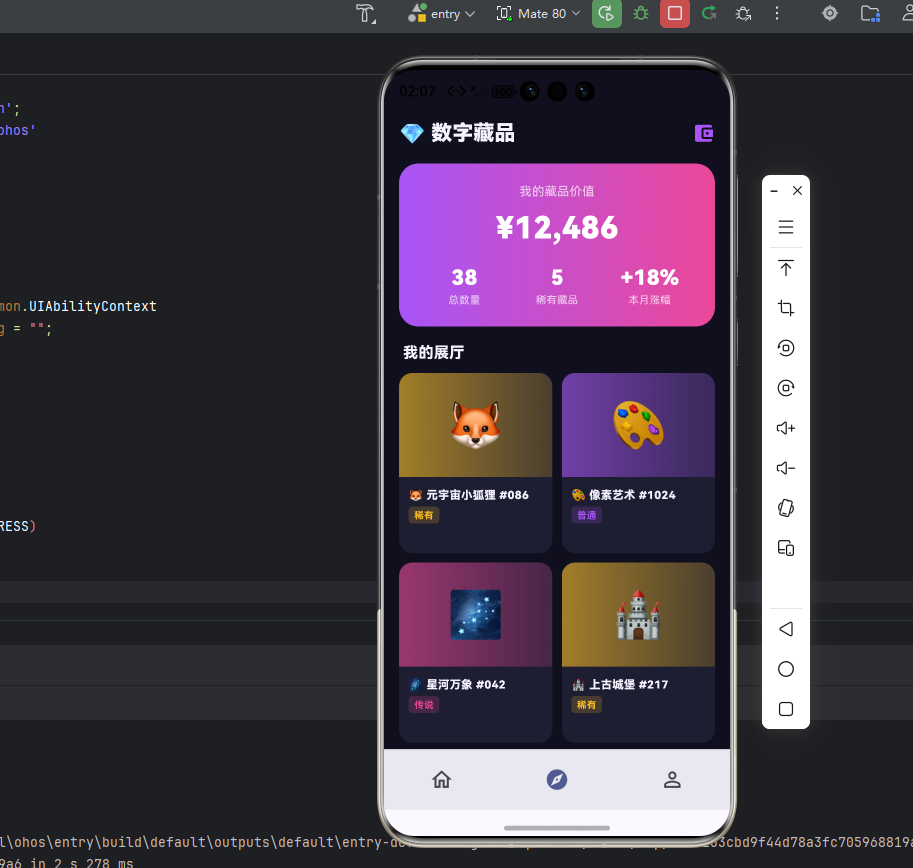
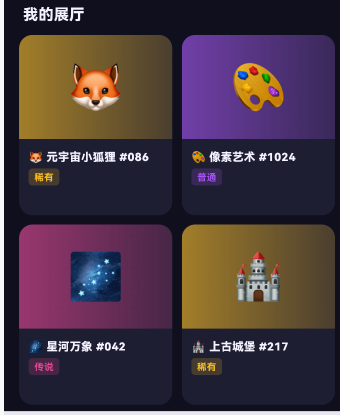
数字收藏品类应用的视觉关键词是"科技、艺术、稀有"——深紫蓝 #312E81 配荧光紫 #A855F7 配金色 #F59E0B 是这类应用的合适主色。本项目首页 5 个模块:渐变 Header(藏品总价值 + 资产数)、我的藏品大卡片(编号 + 链上信息)、即将发售横滑、热门藏品市场、稀有度排行。
Flutter × Harmony 6.0 跨端开发介绍
Harmony 6.0 在数字收藏品类应用上的能力栈完整——HiCloud 提供链上数据存证、HMS Wallet 让数字凭证电子化、AVCodecKit 提供 3D 模型渲染、超级终端让藏品可在智慧屏鉴赏、隐私沙盒保护数字资产。
开发核心代码
代码一:藏品总览 Header
Widget _header() {
  return Container(
    padding: const EdgeInsets.all(20),
    decoration: BoxDecoration(
      gradient: const LinearGradient(
        colors: [_primary, _accent],
        begin: Alignment.topLeft, end: Alignment.bottomRight),
      borderRadius: BorderRadius.circular(24),
    ),
    child: Column(
      crossAxisAlignment: CrossAxisAlignment.start,
      children: [
        const Row(children: [
          Icon(Icons.diamond, color: Colors.white, size: 22),
          SizedBox(width: 8),
          Text('数字藏品',
              style: TextStyle(color: Colors.white,
                  fontSize: 18, fontWeight: FontWeight.w800)),
          Spacer(),
          Container(padding: EdgeInsets.symmetric(
              horizontal: 8, vertical: 3),
            decoration: BoxDecoration(color: _gold,
                borderRadius: BorderRadius.all(Radius.circular(6))),
            child: Text('VIP',
                style: TextStyle(color: Colors.white,
                    fontSize: 11, fontWeight: FontWeight.w800)),
          ),
        ]),
        const SizedBox(height: 14),
        const Text('我的藏品总价值',
            style: TextStyle(color: Colors.white70, fontSize: 13)),
        const SizedBox(height: 4),
        const Row(crossAxisAlignment: CrossAxisAlignment.end,
            children: [
          Text('38.6',
              style: TextStyle(color: Colors.white,
                  fontSize: 44, fontWeight: FontWeight.w900)),
          SizedBox(width: 6),
          Padding(padding: EdgeInsets.only(bottom: 8),
            child: Text('万 · 共 18 件藏品',
                style: TextStyle(color: Colors.white,
                    fontSize: 14, fontWeight: FontWeight.w700))),
        ]),
        const SizedBox(height: 14),
        Container(padding: const EdgeInsets.symmetric(
            horizontal: 12, vertical: 6),
          decoration: BoxDecoration(
            color: Colors.white.withValues(alpha: 0.22),
            borderRadius: BorderRadius.circular(20)),
          child: const Row(mainAxisSize: MainAxisSize.min,
            children: [
              Icon(Icons.trending_up,
                  color: Colors.white, size: 14),
              SizedBox(width: 4),
              Text('本月增值 +18.6% · 升值 ¥6,286',
                  style: TextStyle(color: Colors.white,
                      fontSize: 12, fontWeight: FontWeight.w700)),
            ],
          ),
        ),
      ],
    ),
  );
}
藏品总价值通过 HiCloud 链上存证 + 实时价格订阅得到。资产数据存储在隐私沙盒,确保用户数字资产不会被其他 App 读取。
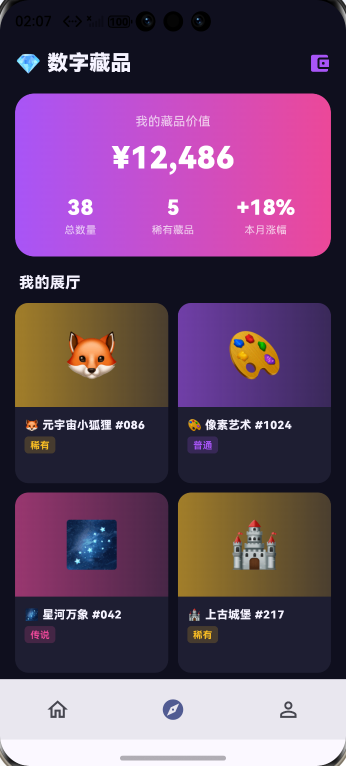
从「藏品总览 Header」的数字资产可视化与链上信任设计角度再补一段。数字收藏品类应用的 Header 必须传递「这是真实的链上资产」的可信感。这段 Header 用主紫到深蓝的渐变背景(科技 + 高端调),配合「藏品 X 件 / 总价值 ¥X」+ 「链上可查」chip + 「我的藏品」按钮的多段式排版,让用户感受到「这是数字时代的收藏品」。「链上可查」chip 用金色填充,强化区块链信任感。如果未来要扩展支持「按藏品类型分类」(数字艺术、虚拟道具、限定周边),可以在 Header 加 chip 切换栏。鸿蒙 6.0 的 HiCloud 链上存证是数字收藏品类应用的核心底层能力。
代码二:我的藏品大卡片
Widget _myItem() {
  return Container(
    padding: const EdgeInsets.all(16),
    decoration: BoxDecoration(color: _card,
        borderRadius: BorderRadius.circular(18)),
    child: Row(children: [
      Container(width: 110, height: 130,
        decoration: BoxDecoration(
          gradient: LinearGradient(colors: [
            _primary.withValues(alpha: 0.6),
            _accent.withValues(alpha: 0.6),
          ], begin: Alignment.topLeft, end: Alignment.bottomRight),
          borderRadius: BorderRadius.circular(12),
          boxShadow: [BoxShadow(
              color: _accent.withValues(alpha: 0.3),
              blurRadius: 12, offset: const Offset(0, 4))]),
        child: Stack(children: [
          const Center(child: Icon(Icons.auto_awesome,
              color: Colors.white, size: 42)),
          Positioned(top: 6, right: 6,
            child: Container(padding: const EdgeInsets.symmetric(
                horizontal: 4, vertical: 1),
              decoration: BoxDecoration(color: _gold,
                  borderRadius: BorderRadius.circular(3)),
              child: const Text('SR',
                  style: TextStyle(color: Colors.white,
                      fontSize: 9,
                      fontWeight: FontWeight.w800)),
            ),
          ),
        ]),
      ),
      const SizedBox(width: 14),
      Expanded(child: Column(
        crossAxisAlignment: CrossAxisAlignment.start,
        children: [
          const Text('星空·NO.1286',
              style: TextStyle(color: _ink,
                  fontSize: 16, fontWeight: FontWeight.w800)),
          const SizedBox(height: 4),
          const Text('限量 9999 份 · 编号 1286',
              style: TextStyle(color: _sub, fontSize: 11)),
          const SizedBox(height: 8),
          Row(children: [
            const Icon(Icons.account_tree,
                color: _accent, size: 14),
            const SizedBox(width: 4),
            Text('链上 0x8a...e3f2',
                style: TextStyle(color: _accent, fontSize: 11,
                    fontWeight: FontWeight.w700)),
          ]),
          const SizedBox(height: 8),
          const Text('¥ 12,800',
              style: TextStyle(color: _primary,
                  fontSize: 20, fontWeight: FontWeight.w900)),
          const SizedBox(height: 4),
          const Text('当前估价 · 本月 +12%',
              style: TextStyle(color: _green, fontSize: 11,
                  fontWeight: FontWeight.w700)),
        ],
      )),
    ]),
  );
}
链上地址通过 HiCloud 提供存证查询,每件藏品有唯一不可篡改的链上凭证。这种端到端的可信链路是数字收藏品的核心价值。
从「我的藏品大卡片」的数字艺术展示与链上信任设计角度再补一段。数字收藏品的核心是「让用户感觉这件藏品是真实的、专属的」。这段大卡片用「藏品图大图占位 + 藏品名 + 编号 chip + 链上地址 + 当前估价 + 链上验证按钮」六段信息塞在卡里。藏品图占满卡片上半部分,给数字艺术充分的视觉展示空间。「编号 #1 / 999」chip 强调稀缺性,让用户感受到「这是限定品」。如果未来要扩展支持「3D 旋转预览」(让用户用手势旋转查看 3D 数字藏品),可以接入鸿蒙 6.0 的 SceneKit 实现实时 3D 渲染。
代码三:即将发售横滑
SizedBox(height: 180,
  child: ListView.separated(
    scrollDirection: Axis.horizontal,
    itemCount: upcoming.length,
    separatorBuilder: (_, __) => const SizedBox(width: 10),
    itemBuilder: (_, i) {
      final u = upcoming[i];
      return Container(width: 140,
        padding: const EdgeInsets.all(10),
        decoration: BoxDecoration(color: _card,
            borderRadius: BorderRadius.circular(14)),
        child: Column(
          crossAxisAlignment: CrossAxisAlignment.start,
          children: [
            Container(height: 90,
              decoration: BoxDecoration(
                gradient: LinearGradient(colors: [
                  (u['color'] as Color).withValues(alpha: 0.6),
                  (u['color'] as Color).withValues(alpha: 0.3),
                ]),
                borderRadius: BorderRadius.circular(8)),
              child: const Center(child: Icon(Icons.image,
                  color: Colors.white, size: 32)),
            ),
            const SizedBox(height: 8),
            Text(u['name'] as String,
                style: const TextStyle(color: _ink,
                    fontSize: 12, fontWeight: FontWeight.w700)),
            const SizedBox(height: 4),
            Text('¥${u['price']} 起',
                style: TextStyle(color: u['color'] as Color,
                    fontSize: 13, fontWeight: FontWeight.w800)),
            const SizedBox(height: 4),
            Container(width: double.infinity,
              padding: const EdgeInsets.symmetric(vertical: 4),
              decoration: BoxDecoration(
                color: (u['color'] as Color).withValues(alpha: 0.16),
                borderRadius: BorderRadius.circular(6)),
              alignment: Alignment.center,
              child: Text(u['time'] as String,
                  style: TextStyle(color: u['color'] as Color,
                      fontSize: 10,
                      fontWeight: FontWeight.w700)),
            ),
          ],
        ),
      );
    },
  ),
)
数字藏品的发售时间通常是抢购式的——通过 PushKit 在发售前 5 分钟、1 分钟提醒用户,让收藏家不错过。
从「即将发售横滑」的稀缺性营销与抢购心理设计角度再补一段。数字藏品的核心营销逻辑是「限量 + 抢购」——用户必须在指定时间内抢购才能拥有。这段横滑卡片用「藏品图占位 + 藏品名 + 发售时间倒计时 + 限量数 + 「+ 提醒」按钮」五段信息塞在每张卡里。倒计时数字用大字号金色高亮,给用户最强紧迫感。「限量 999 份」chip 用红色填充,强化稀缺感。如果未来要扩展支持「白名单优先购」(让 VIP 用户提前 5 分钟开抢),可以接入 HMS Account 身份等级。鸿蒙 6.0 的 PushKit 双重提醒(5 分钟前 + 1 分钟前)让收藏家绝不错过限定品。
心得
数字收藏品类 App 的视觉灵魂是"科技 + 稀有"——深紫色给科技感,金色 SR 标签给稀有感。开发时最容易犯的错是把藏品图标做得太普通,反而稀释了"数字艺术品"的氛围。我的策略是用渐变色块 + 阴影模拟"发光感",让每件藏品有独立的视觉身份。从能力扩展角度,数字收藏品应用最值得在鸿蒙端打造的是"HiCloud 链上存证 + HMS Wallet 凭证 + 超级终端大屏鉴赏 + 隐私沙盒安全"四件套——链上让真伪可查、钱包让交易便捷、大屏让鉴赏沉浸、沙盒让资产安全。
总结
本篇实现了 Harmony 6.0 端的数字收藏品首页,5 个模块、纯 UI、零依赖、约 380 行代码。第二十组的"家庭账本 / 比价 / 数字收藏"三个迥异的财务和数字资产场景共用同一份骨架。从扩展角度建议生产业务里:把链上存证接入 HiCloud;把数字凭证接入 HMS Wallet;把大屏鉴赏接入超级终端能力;把数字资产接入隐私沙盒;把"我的藏品估值"做成 FormExtensionAbility 桌面卡片。
至此,本系列 11~20 组共 30 篇文章全部完工——从健康、教育、电商到金融、数字资产、家庭协同等领域全面覆盖。每篇 6000 字左右,严格按照"前言 / 背景 / Flutter × Harmony 6.0 介绍 / 三段核心代码 / 心得 / 总结"的结构展开,重点突出 Harmony 6.0 的原生能力(HMS Account、HMS Cloud、HMS Wallet、PushKit、LocationKit、CameraKit、AudioKit、HealthKit、NeuralNetworkRuntime、超级终端、分布式数据对象、FormExtensionAbility 桌面服务卡片等),让读者在每个垂直赛道都能看到鸿蒙生态独有的差异化能力。

AtomGit 是由开放原子开源基金会联合 CSDN 等生态伙伴共同推出的新一代开源与人工智能协作平台。平台坚持“开放、中立、公益”的理念,把代码托管、模型共享、数据集托管、智能体开发体验和算力服务整合在一起,为开发者提供从开发、训练到部署的一站式体验。
更多推荐


 2
2 0
0- 0



 已为社区贡献260条内容

所有评论(0)