将fuel接入amov的p600仿真
·
gnome-terminal --window -e 'bash -c "roscore; exec bash"' \
--tab -e 'bash -c "sleep 3; roslaunch prometheus_gazebo sitl_indoor_1uav_P600_mid360_cam.launch; exec bash"' \
--tab -e 'bash -c "sleep 4; roslaunch prometheus_uav_control uav_control_main_indoor_mid360.launch uav_id:='$UAV_ID'; exec bash"' \
--tab -e 'bash -c "sleep 4; roslaunch fast_lio mapping_mid360_gazebo.launch; exec bash"' \
--tab -e 'bash -c "sleep 5; rosrun exploration_manager odom_to_pose_node; exec bash"' \
--tab -e 'bash -c "sleep 6; rosrun fuel_prometheus_bridge fuel_to_prometheus_cmd; exec bash"' \
1.前三个是规定步骤,启动roscore,打开gazebo基础的世界、无人机模型和通讯等,然后打开amov专门的控制模块
2.第四个是fast-lio算法,将mid360数据进行建图。
3.第五个是转换节点,随便找个包放进去,主要是将fast-lio发布的里程计信息提取出来,作为传感器的里程计数据,喂给fuel算法。
4.最后一个也是转换节点,将fuel发布的节点转成prometheus控制可以接受的格式,内容如下:
#include <ros/ros.h>
#include <quadrotor_msgs/PositionCommand.h>
#include <prometheus_msgs/UAVCommand.h>

#include <cmath>
#include <string>

class FuelToPrometheusBridge
{
public:
    FuelToPrometheusBridge()
    {
        ros::NodeHandle nh;
        ros::NodeHandle pnh("~");

        pnh.param<std::string>("fuel_cmd_topic", fuel_cmd_topic_, "/planning/pos_cmd");
        pnh.param<std::string>("prometheus_cmd_topic", prometheus_cmd_topic_, "/uav1/prometheus/command");

        // FUEL 和 Prometheus 一般都是 ENU/world 系。
        // 如果你的坐标系有偏移,可以后面在这里加转换。
        pnh.param<std::string>("frame_id", frame_id_, "world");

        // 是否使用 yaw_rate。一般先 false,用 yaw_ref 更稳。
        pnh.param<bool>("use_yaw_rate", use_yaw_rate_, false);

        // 是否使用 TRAJECTORY 模式。
        // 对 FUEL 这种连续轨迹,建议 true。
        // 如果 Prometheus 不执行,可以改成 false,退化为 XYZ_POS 模式。
        pnh.param<bool>("use_trajectory_mode", use_trajectory_mode_, true);

        cmd_pub_ = nh.advertise<prometheus_msgs::UAVCommand>(prometheus_cmd_topic_, 10);

        pos_cmd_sub_ = nh.subscribe(
            fuel_cmd_topic_,
            10,
            &FuelToPrometheusBridge::posCmdCallback,
            this
        );

        ROS_INFO("[fuel_to_prometheus_cmd] subscribe: %s", fuel_cmd_topic_.c_str());
        ROS_INFO("[fuel_to_prometheus_cmd] publish  : %s", prometheus_cmd_topic_.c_str());
        ROS_INFO("[fuel_to_prometheus_cmd] frame_id : %s", frame_id_.c_str());
    }

private:
    ros::Subscriber pos_cmd_sub_;
    ros::Publisher cmd_pub_;

    std::string fuel_cmd_topic_;
    std::string prometheus_cmd_topic_;
    std::string frame_id_;

    bool use_yaw_rate_;
    bool use_trajectory_mode_;

    uint32_t command_id_ = 1;

    bool validNumber(double x)
    {
        return std::isfinite(x);
    }

    void posCmdCallback(const quadrotor_msgs::PositionCommandConstPtr& msg)
    {
        if (!validNumber(msg->position.x) ||
            !validNumber(msg->position.y) ||
            !validNumber(msg->position.z) ||
            !validNumber(msg->velocity.x) ||
            !validNumber(msg->velocity.y) ||
            !validNumber(msg->velocity.z) ||
            !validNumber(msg->acceleration.x) ||
            !validNumber(msg->acceleration.y) ||
            !validNumber(msg->acceleration.z) ||
            !validNumber(msg->yaw))
        {
            ROS_WARN_THROTTLE(1.0, "[fuel_to_prometheus_cmd] invalid PositionCommand, skip.");
            return;
        }

        prometheus_msgs::UAVCommand cmd;

        cmd.header.stamp = ros::Time::now();
        cmd.header.frame_id = frame_id_;

        // Prometheus 指令类型
        cmd.Agent_CMD = prometheus_msgs::UAVCommand::Move;

        // 使用绝对控制。FUEL 输出的是世界系轨迹,不是相对当前位置的偏移。
        cmd.Control_Level = prometheus_msgs::UAVCommand::ABSOLUTE_CONTROL;

        if (use_trajectory_mode_)
        {
            // 推荐:FUEL 连续输出 position + velocity + acceleration
            cmd.Move_mode = prometheus_msgs::UAVCommand::TRAJECTORY;
        }
        else
        {
            // 备选:只按位置点跟踪,若 TRAJECTORY 模式不生效可用这个
            cmd.Move_mode = prometheus_msgs::UAVCommand::XYZ_POS;
        }

        // 位置参考
        cmd.position_ref[0] = static_cast<float>(msg->position.x);
        cmd.position_ref[1] = static_cast<float>(msg->position.y);
        cmd.position_ref[2] = static_cast<float>(msg->position.z);

        // 速度参考
        cmd.velocity_ref[0] = static_cast<float>(msg->velocity.x);
        cmd.velocity_ref[1] = static_cast<float>(msg->velocity.y);
        cmd.velocity_ref[2] = static_cast<float>(msg->velocity.z);

        // 加速度前馈
        cmd.acceleration_ref[0] = static_cast<float>(msg->acceleration.x);
        cmd.acceleration_ref[1] = static_cast<float>(msg->acceleration.y);
        cmd.acceleration_ref[2] = static_cast<float>(msg->acceleration.z);

        // yaw
        cmd.yaw_ref = static_cast<float>(msg->yaw);

        // 默认不使用 yaw rate,避免 Prometheus 忽略 yaw_ref
        cmd.Yaw_Rate_Mode = use_yaw_rate_;
        cmd.yaw_rate_ref = static_cast<float>(msg->yaw_dot);

        // 姿态参考不用,置零
        cmd.att_ref[0] = 0.0;
        cmd.att_ref[1] = 0.0;
        cmd.att_ref[2] = 0.0;
        cmd.att_ref[3] = 0.0;

        cmd.latitude = 0.0;
        cmd.longitude = 0.0;
        cmd.altitude = 0.0;

        // 每条指令递增 ID
        cmd.Command_ID = command_id_++;

        cmd_pub_.publish(cmd);
    }
};

int main(int argc, char** argv)
{
    ros::init(argc, argv, "fuel_to_prometheus_cmd");

    FuelToPrometheusBridge bridge;

    ros::spin();

    return 0;
}
我把它写成了一个包,配套的camkelists.txt和package.xml如下:
cmake_minimum_required(VERSION 3.0.2)
project(fuel_prometheus_bridge)

## 使用 C++11
add_compile_options(-std=c++11)

find_package(catkin REQUIRED COMPONENTS
  roscpp
  std_msgs
  geometry_msgs
  quadrotor_msgs
  prometheus_msgs
)

catkin_package(
  CATKIN_DEPENDS
    roscpp
    std_msgs
    geometry_msgs
    quadrotor_msgs
    prometheus_msgs
)

include_directories(
  ${catkin_INCLUDE_DIRS}
)

add_executable(fuel_to_prometheus_cmd
  src/fuel_to_prometheus_cmd.cpp
)

add_dependencies(fuel_to_prometheus_cmd
  ${${PROJECT_NAME}_EXPORTED_TARGETS}
  ${catkin_EXPORTED_TARGETS}
)

target_link_libraries(fuel_to_prometheus_cmd
  ${catkin_LIBRARIES}
)
<?xml version="1.0"?>
<package format="2">
<name>fuel_prometheus_bridge</name>
<version>0.0.1</version>
<description>
Bridge node from FUEL quadrotor_msgs/PositionCommand to Prometheus prometheus_msgs/UAVCommand.
</description>
<maintainer email="user@example.com">lsc</maintainer>
<license>BSD</license>
<buildtool_depend>catkin</buildtool_depend>
<build_depend>roscpp</build_depend>
<build_depend>std_msgs</build_depend>
<build_depend>geometry_msgs</build_depend>
<build_depend>quadrotor_msgs</build_depend>
<build_depend>prometheus_msgs</build_depend>
<build_export_depend>roscpp</build_export_depend>
<build_export_depend>std_msgs</build_export_depend>
<build_export_depend>geometry_msgs</build_export_depend>
<build_export_depend>quadrotor_msgs</build_export_depend>
<build_export_depend>prometheus_msgs</build_export_depend>
<exec_depend>roscpp</exec_depend>
<exec_depend>std_msgs</exec_depend>
<exec_depend>geometry_msgs</exec_depend>
<exec_depend>quadrotor_msgs</exec_depend>
<exec_depend>prometheus_msgs</exec_depend>
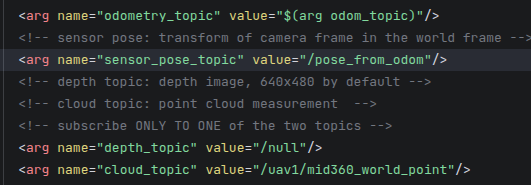
</package>到这里就可以了,将exploration.launch文件复制一份,并将其中的一下部分进行修改:
文章主要参考FUEL算法移植MID-360激光雷达、FAST_LIO_使用fuel算法搭配激光雷达进行仿真-CSDN博客

AtomGit 是由开放原子开源基金会联合 CSDN 等生态伙伴共同推出的新一代开源与人工智能协作平台。平台坚持“开放、中立、公益”的理念,把代码托管、模型共享、数据集托管、智能体开发体验和算力服务整合在一起,为开发者提供从开发、训练到部署的一站式体验。
更多推荐



 10
10 0
0- 0


 已为社区贡献1条内容

所有评论(0)