Hermes Agent 实战:基于开源智能体搭建 AI 实时资讯看板(完整代码)
Hermes Agent 实战:基于开源智能体搭建 AI 实时资讯看板(完整代码)
本文提供一套完整可运行的解决方案,使用 Hermes Agent + DuckDB + Streamlit 搭建 AI 行业实时情报看板。全部代码已开源,复制即可运行。
一、项目背景
AI 行业信息更新极快:每天有新的模型发布、产品迭代、行业动态。传统的信息获取方式(刷公众号、逛推特)存在几个问题:
- 信息源分散:需要关注几十个渠道
- 时效性不足:看到时可能已是"旧闻"
- 噪音过多:大量无关内容挤占注意力
针对上述问题,本文基于 Hermes Agent(NousResearch 出品的开源智能体框架)+ DuckDB(嵌入式 OLAP 数据库)+ Streamlit(数据应用框架),构建了一套自动化 AI 热点情报系统。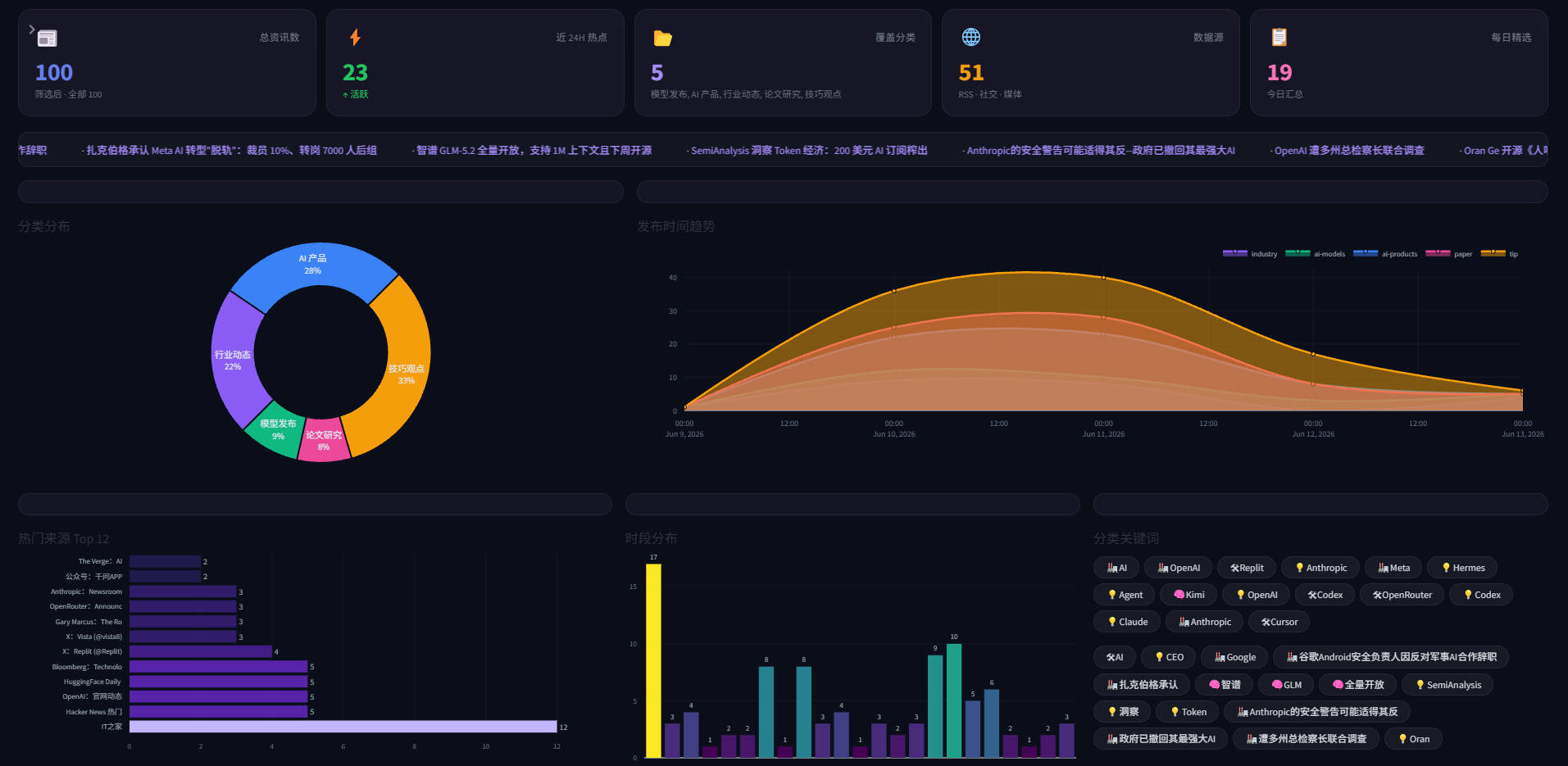
二、为什么选择 Hermes Agent
目前市面上的 Agent 框架较多,以下是主要选型对比:
| Agent 框架 | 模型绑定 | 信息采集能力 | 可定制性 | 上手成本 |
|---|---|---|---|---|
| Hermes Agent | 不绑定,支持多模型 | 强,工具链丰富 | 高 | 低 |
| AutoGPT | 仅支持 GPT 系列 | 中等 | 一般 | 中等 |
| CrewAI | 需手动配置 | 依赖工具插件 | 较高 | 较高 |
| LangChain Agent | 多模型支持 | 一般 | 依赖模板 | 中等 |
Hermes Agent 的核心优势:
- 模型无关架构:可对接 DeepSeek-V4、GLM-5.1、Kimi-K2.6 等不同模型
- 生产级验证:在 OpenRouter 上已处理超过 17 万亿 tokens
- 桌面端支持:Hermes Agent Desktop 已发布,硅基流动提供国内一键部署
三、系统架构设计
整体数据流如下:
┌─────────────────────────────────────────────────────────┐
│                    Hermes Agent                          │
│  ┌──────────┐  ┌──────────┐  ┌──────────┐  ┌────────┐  │
│  │ RSS 采集  │  │ 网页抓取  │  │ 摘要生成  │  │ 分类标记 │  │
│  └────┬─────┘  └────┬─────┘  └────┬─────┘  └────┬───┘  │
└───────┼──────────────┼──────────────┼──────────────┼──────┘
        ▼              ▼              ▼              ▼
┌─────────────────────────────────────────────────────────┐
│                    DuckDB(存储层)                        │
│              单表结构,零配置,嵌入式运行                     │
└─────────────────────────────────────────────────────────┘
        ▼
┌─────────────────────────────────────────────────────────┐
│                Streamlit(展示层)                         │
│              交互式大屏,支持实时刷新                         │
└─────────────────────────────────────────────────────────┘
技术栈选型逻辑:
- Hermes Agent:负责智能采集、摘要、分类——替代人工阅读
- DuckDB:嵌入式数据库,无需单独部署,单文件存储,查询性能优异
- Streamlit:纯 Python 数据应用框架,上手快,可视化能力强
关于 DuckDB 的更多优化技巧和进阶用法,可参考 DuckDB 实验室,该站点提供了丰富的 DuckDB 实战案例与性能调优指南。
四、环境准备
4.1 依赖安装
# 创建虚拟环境(建议 Python 3.11+)
python -m venv ai-hot-env
# Windows
ai-hot-env\Scripts\activate
# Linux/Mac
# source ai-hot-env/bin/activate

# 安装依赖
pip install duckdb streamlit plotly pandas requests beautifulsoup4 feedparser
4.2 依赖说明
| 库 | 版本要求 | 用途 |
|---|---|---|
| duckdb | >= 1.0 | 嵌入式 OLAP 数据库,负责数据存储与查询 |
| streamlit | >= 1.30 | 数据应用框架,构建交互式大屏 |
| plotly | >= 5.18 | 可视化图表库 |
| feedparser | >= 6.0 | RSS 订阅解析 |
| beautifulsoup4 | >= 4.12 | HTML 内容解析 |
五、核心代码实现
5.1 Hermes Agent 数据采集流水线
创建 hermes_pipeline.py,负责从多个 RSS 源采集信息,通过 Hermes Agent 进行智能分析后写入 DuckDB:
"""
Hermes Agent 驱动的 AI 热点采集流水线
兼容 OpenRouter 和硅基流动两种后端
"""

import feedparser
import requests
from bs4 import BeautifulSoup
import duckdb
import json
from datetime import datetime
import hashlib
import time

# Hermes Agent API 配置
# 方式 A:OpenRouter(国际用户)
HERMES_API = "https://openrouter.ai/api/v1"
HERMES_MODEL = "nousresearch/hermes-agent"
API_KEY = "sk-your-api-key-here"  # 请替换为实际密钥

# 方式 B:硅基流动(国内用户,取消下方注释)
# HERMES_API = "https://api.siliconflow.cn/v1"
# HERMES_MODEL = "NousResearch/Hermes-Agent"

# 信息源配置——可按需增删
SOURCES = {
    "IT之家AI频道": "https://feedx.net/rss/ithome.xml",
    "Hacker News 热门": "https://hnrss.org/frontpage",
    "HuggingFace 每日论文": "https://huggingface.co/papers.rss",
    "OpenRouter 公告": "https://openrouter.ai/rss/announcements",
}

# Agent 提示词模板——控制输出格式
PROMPT_TEMPLATE = """你是一个AI热点情报分析师。请分析以下原始内容,输出JSON格式的结果。

原始内容:{raw_content}

要求:
1. 提取关键信息:标题、核心要点(100字以内)、分类
2. 分类只能是:模型发布、产品更新、行业动态、观点技巧、论文研究
3. 如果内容无明显价值则返回 null
4. 只输出JSON,不要其他文字

输出格式:
{{"title":"...","summary":"...","category":"..."}}
"""


def fetch_rss(url):
    """采集 RSS 源,返回条目列表"""
    try:
        feed = feedparser.parse(url)
        entries = []
        for entry in feed.entries[:10]:
            entries.append({
                "title": entry.get("title", ""),
                "link": entry.get("link", ""),
                "summary": entry.get("summary", ""),
                "published": entry.get("published", ""),
            })
        return entries
    except Exception as e:
        print(f"RSS 采集失败: {url} — {e}")
        return []


def call_hermes_agent(text):
    """调用 Hermes Agent 进行智能分析"""
    prompt = PROMPT_TEMPLATE.format(raw_content=text[:2000])

    try:
        response = requests.post(
            f"{HERMES_API}/chat/completions",
            headers={
                "Authorization": f"Bearer {API_KEY}",
                "Content-Type": "application/json",
            },
            json={
                "model": HERMES_MODEL,
                "messages": [{"role": "user", "content": prompt}],
                "temperature": 0.1,
                "max_tokens": 500,
            },
            timeout=30,
        )
        result = response.json()
        content = result["choices"][0]["message"]["content"]
        content = content.replace("```json", "").replace("```", "").strip()
        return json.loads(content)

    except Exception as e:
        print(f"Hermes Agent 调用失败: {e}")
        return None


def init_database():
    """初始化 DuckDB 数据库"""
    conn = duckdb.connect("ai_hot_news.db")
    conn.execute("""
        CREATE TABLE IF NOT EXISTS news_items (
            id VARCHAR PRIMARY KEY,
            title VARCHAR,
            summary VARCHAR,
            url VARCHAR,
            source VARCHAR,
            category VARCHAR,
            published_at TIMESTAMP,
            created_at TIMESTAMP DEFAULT CURRENT_TIMESTAMP
        )
    """)
    return conn


def save_to_db(conn, item):
    """写入 DuckDB,自动去重"""
    item_id = hashlib.md5(item["url"].encode()).hexdigest()[:16]
    conn.execute("""
        INSERT OR IGNORE INTO news_items (id, title, summary, url, source, category, published_at)
        VALUES (?, ?, ?, ?, ?, ?, ?)
    """, (
        item_id,
        item.get("title", ""),
        item.get("summary", ""),
        item.get("url", ""),
        item.get("source", ""),
        item.get("category", "未分类"),
        datetime.now(),
    ))


def main():
    """主流水线入口"""
    print("Hermes Agent 情报流水线启动")
    print(f"信息源数量: {len(SOURCES)}")
    print()

    conn = init_database()
    total_saved = 0

    for source_name, rss_url in SOURCES.items():
        print(f"正在采集: {source_name}...")

        entries = fetch_rss(rss_url)
        print(f"  获取到 {len(entries)} 条原始内容")

        for entry in entries:
            raw = f"标题: {entry['title']}\n摘要: {entry['summary'][:500]}"

            result = call_hermes_agent(raw)

            if result and result.get("title"):
                item = {
                    "title": result["title"],
                    "summary": result.get("summary", ""),
                    "url": entry["link"],
                    "source": source_name,
                    "category": result.get("category", "未分类"),
                }
                save_to_db(conn, item)
                total_saved += 1
                print(f"  [+] [{item['category']}] {result['title'][:50]}...")
            else:
                print(f"  [-] 跳过(价值评估不足)")

        time.sleep(1)

    # 输出统计
    count = conn.execute("SELECT COUNT(*) FROM news_items").fetchone()[0]
    print(f"\n本次新增: {total_saved} 条")
    print(f"累计总量: {count} 条")

    conn.close()
    print("流水线执行完毕")


if __name__ == "__main__":
    main()
5.2 Streamlit 大屏展示
创建 dashboard.py,约 150 行代码实现可视化看板:
"""
AI 热点实时看板 — Streamlit + DuckDB
可直接运行,无需额外配置
"""

import streamlit as st
import duckdb
import pandas as pd
import plotly.express as px

st.set_page_config(page_title="AI 实时热点看板", layout="wide")
conn = duckdb.connect("ai_hot_news.db", read_only=True)

# 页面样式
st.markdown("""
<style>
    .stat-card {
        background: white;
        border-radius: 12px;
        padding: 1.2rem;
        box-shadow: 0 2px 12px rgba(0,0,0,0.06);
        text-align: center;
        border: 1px solid #f0f0f0;
    }
    .stat-num {
        font-size: 2.2rem;
        font-weight: 700;
        color: #667eea;
    }
    .section-title {
        font-size: 1.2rem;
        font-weight: 600;
        border-left: 4px solid #667eea;
        padding-left: 12px;
        margin: 1.5rem 0 1rem 0;
    }
    .news-item {
        background: white;
        border-radius: 10px;
        padding: 1rem 1.2rem;
        margin-bottom: 0.8rem;
        box-shadow: 0 1px 6px rgba(0,0,0,0.04);
        border-left: 4px solid #667eea;
    }
</style>
""", unsafe_allow_html=True)

# 顶部信息
total = conn.execute("SELECT COUNT(*) FROM news_items").fetchone()[0]
today = conn.execute(
    "SELECT COUNT(*) FROM news_items WHERE DATE(created_at) = CURRENT_DATE"
).fetchone()[0]

st.markdown(f"""
<div style="background:linear-gradient(135deg,#667eea,#764ba2);
    border-radius:16px; padding:1.5rem 2rem; color:white; margin-bottom:1.5rem;">
    <h1 style="margin:0;">AI 实时热点情报看板</h1>
    <p style="opacity:0.9;margin-top:0.3rem;">
        数据来源: Hermes Agent 智能采集 | 累计 {total} 条 | 今日新增 {today} 条
    </p>
</div>
""", unsafe_allow_html=True)

# KPI 指标行
col1, col2, col3, col4 = st.columns(4)
kpi_data = {
    "总资讯": total,
    "今日新增": today,
    "分类数": conn.execute("SELECT COUNT(DISTINCT category) FROM news_items").fetchone()[0],
    "数据源": conn.execute("SELECT COUNT(DISTINCT source) FROM news_items").fetchone()[0],
}
for col, (label, value) in zip([col1, col2, col3, col4], kpi_data.items()):
    with col:
        st.markdown(f'<div class="stat-card"><div class="stat-num">{value}</div>'
                     f'<div style="color:#888;font-size:0.85rem;">{label}</div></div>',
                    unsafe_allow_html=True)

# 图表行
col_l, col_r = st.columns([1, 1.5])

with col_l:
    st.markdown('<div class="section-title">分类分布</div>', unsafe_allow_html=True)
    cats = conn.execute(
        "SELECT category, COUNT(*) as cnt FROM news_items GROUP BY category ORDER BY cnt DESC"
    ).fetchdf()
    if not cats.empty:
        fig = px.pie(cats, names="category", values="cnt", hole=0.5,
                     color_discrete_sequence=px.colors.sequential.Viridis)
        fig.update_layout(height=300, margin=dict(l=10, r=10, t=10, b=10))
        st.plotly_chart(fig, use_container_width=True)

with col_r:
    st.markdown('<div class="section-title">每日趋势</div>', unsafe_allow_html=True)
    timeline = conn.execute("""
        SELECT DATE(created_at) as d, COUNT(*) as cnt
        FROM news_items GROUP BY d ORDER BY d
    """).fetchdf()
    if not timeline.empty:
        fig = px.bar(timeline, x="d", y="cnt",
                     color_discrete_sequence=["#667eea"])
        fig.update_layout(height=300, margin=dict(l=10, r=10, t=10, b=10),
                          xaxis_title="", yaxis_title="资讯数")
        st.plotly_chart(fig, use_container_width=True)

# 最新资讯列表
st.markdown('<div class="section-title">最新资讯</div>', unsafe_allow_html=True)

items = conn.execute("""
    SELECT title, summary, source, category, created_at
    FROM news_items ORDER BY created_at DESC LIMIT 20
""").fetchdf()

for _, row in items.iterrows():
    st.markdown(f"""
    <div class="news-item">
        <div style="font-weight:600;margin-bottom:0.2rem;">{row["title"]}</div>
        <div style="font-size:0.8rem;color:#999;margin-bottom:0.2rem;">
            {row["category"]} | {row["source"]} | {str(row["created_at"])[:16]}
        </div>
        <div style="color:#666;font-size:0.9rem;">
            {str(row["summary"])[:200]}{"…" if len(str(row["summary"])) > 200 else ""}
        </div>
    </div>
    """, unsafe_allow_html=True)

conn.close()
5.3 定时任务配置
Windows 计划任务:
创建 run_pipeline.bat:
@echo off
cd /d D:\your-project-path
call ai-hot-env\Scripts\activate
python hermes_pipeline.py
echo %date% %time% 采集完成 >> pipeline.log
在"任务计划程序"中设置为每 30 分钟执行一次。
Linux Crontab:
*/30 * * * * cd /path/to/project && source ai-hot-env/bin/activate && python hermes_pipeline.py >> pipeline.log 2>&1
六、运行与验证
6.1 启动数据采集
python hermes_pipeline.py
首次运行会创建 ai_hot_news.db 文件,并开始从各 RSS 源采集数据。
6.2 启动可视化看板
streamlit run dashboard.py --server.port 8501
打开浏览器访问 http://localhost:8501 即可查看实时看板。
6.3 效果验证
正常运行的看板应包含以下内容:
- 顶部统计卡片显示总资讯数、今日新增、分类数、数据源数
- 分类分布饼图展示各类别占比
- 每日趋势柱状图显示数据采集时间分布
- 最新资讯列表按时间倒序排列
七、扩展与进阶
7.1 增加信息源
直接在代码中的 SOURCES 字典添加条目即可:
SOURCES = {
    "新源名称": "https://example.com/rss",
    # ... 原有源保持不变
}
7.2 接入更多模型
Hermes Agent 支持通过修改 API 端点和模型名称切换后端模型:
# 切换到 DeepSeek-V4
HERMES_API = "https://api.siliconflow.cn/v1"
HERMES_MODEL = "deepseek-ai/DeepSeek-V4"

# 切换到 GLM-5.1
HERMES_MODEL = "THUDM/GLM-5.1"
7.3 DuckDB 性能优化
当数据量增长后,可通过以下方式优化查询性能:
-- 创建索引加速时间范围查询
CREATE INDEX idx_created_at ON news_items(created_at);

-- 创建物化视图加速分类统计
CREATE MATERIALIZED VIEW category_stats AS
SELECT category, COUNT(*) as cnt
FROM news_items GROUP BY category;
关于 DuckDB 的更多优化技巧、窗口函数用法以及大规模数据分析实践,推荐关注 DuckDB 实验室,上面持续更新 DuckDB 在实时数据处理场景中的最佳实践。
八、总结
本文实现了一套完整的 AI 行业情报看板系统:
- 数据采集:Hermes Agent 驱动,支持多信息源自动采集
- 智能处理:通过 Agent 进行内容摘要和分类标记
- 数据存储:DuckDB 嵌入式数据库,零运维成本
- 可视化展示:Streamlit 交互式大屏,数据一目了然
整套方案全部基于开源工具,零成本部署,可根据需求灵活扩展信息源和分析维度。
参考资料:
- Hermes Agent 官方仓库:https://github.com/NousResearch/Hermes
- OpenRouter Hermes 接入指南:https://openrouter.ai/blog/tutorials/hermes-agent
- DuckDB 官方文档:https://duckdb.org/docs/
- DuckDB 实验室(实战案例):https://duckdblab.org/
- Streamlit 文档:https://docs.streamlit.io/

AtomGit 是由开放原子开源基金会联合 CSDN 等生态伙伴共同推出的新一代开源与人工智能协作平台。平台坚持“开放、中立、公益”的理念,把代码托管、模型共享、数据集托管、智能体开发体验和算力服务整合在一起,为开发者提供从开发、训练到部署的一站式体验。
更多推荐



 7
7 0
0- 0


 已为社区贡献5条内容

所有评论(0)