基于ppocrv6的onnx模型实现图片文字检测识别python源码+onnx模型
·
PP-OCRv6 ONNX Runtime 推理(2026 最新版)
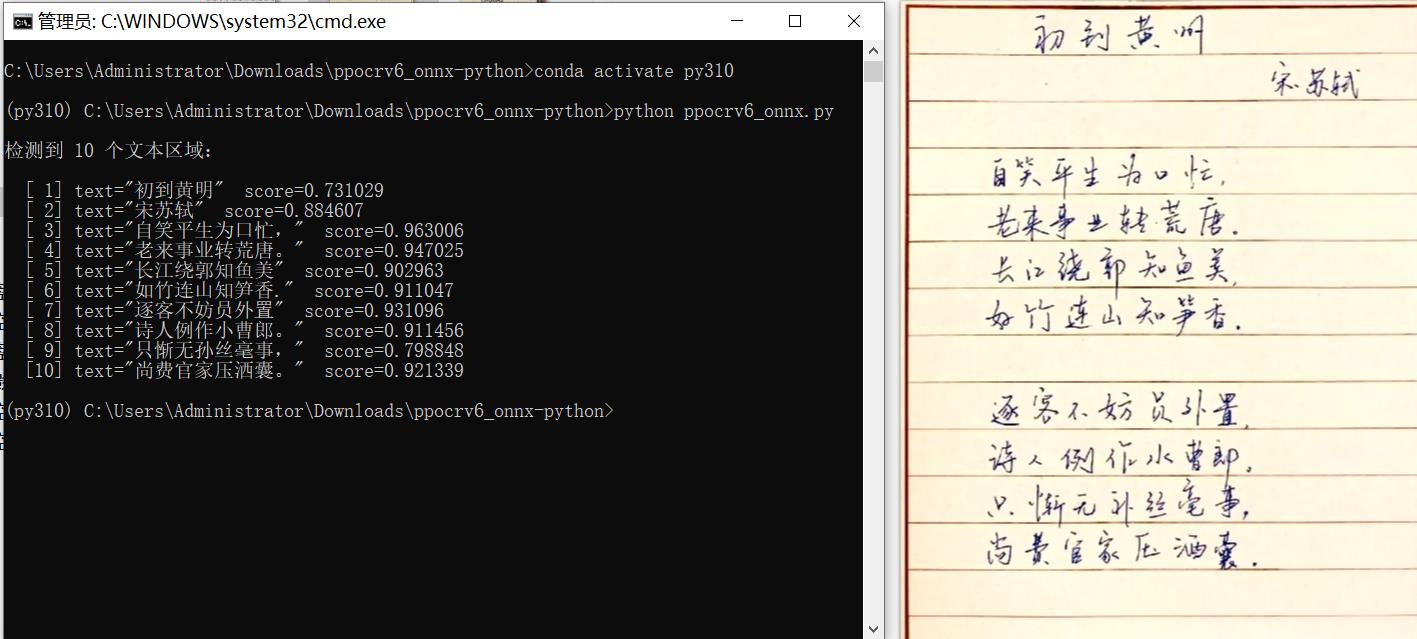
基于 PP-OCRv6 ONNX 模型的纯 Python 文字检测 + 识别推理代码。
零 PaddlePaddle 依赖,仅需onnxruntime+opencv+numpy+pyclipper。
内置 Tiny 版检测 / 识别 ONNX 模型,开箱即用。
✨ 特性
- 2026 最新 PP-OCRv6 — 使用百度 PaddleOCR v6 版本导出的 ONNX 模型
- 零 PaddlePaddle 依赖 — 不安装 Paddle,不装 PaddleX,体积仅 ~200 MB
- 内置 Tiny 模型 —
models/目录已包含检测 + 识别 ONNX 模型(tiny 版),无需额外下载 - 完整 OCR 流水线 — 文字检测 → 框排序 → 透视裁剪 → 文字识别,全流程纯 Python 实现
- 高精度 — 与 PaddleX 在同 ONNX Runtime 后端下 bit-exact 对齐
- 高性能 — 比 PaddlePaddle 原生推理快约 3×
📋 环境要求
| 依赖 | 最低版本 | 说明 |
|---|---|---|
| Python | ≥ 3.10 | 使用了 dataclass(slots=True) 等 3.10+ 特性 |
| onnxruntime | ≥ 1.23.2 | 需支持 ONNX IR version 10 |
| opencv-python | 任意稳定版 | 图像处理 |
| numpy | 任意稳定版 | 数组运算 |
| pyclipper | 任意稳定版 | 多边形偏移(文本框扩展) |
🚀 快速开始
1. 安装依赖
pip install onnxruntime opencv-python numpy pyclipper
2. 直接运行
python ppocrv6_onnx.py
# 默认对 test_images/handwrite_ch_demo.png 进行识别
或指定图片:
python ppocrv6_onnx.py your_image.png
3. 作为模块使用
import cv2
from ppocrv6_onnx import PPOCRv6Onnx, OCRResult

det_model = "models/PP-OCRv6_tiny_det_onnx/inference.onnx"
rec_model = "models/PP-OCRv6_tiny_rec_onnx/inference.onnx"
char_dict = "models/rec_char_dict.txt"          # 已内置

with PPOCRv6Onnx(det_model, rec_model, char_dict) as ocr:
    img = cv2.imread("your_image.png")
    results: list[OCRResult] = ocr(img)

    for r in results:
        print(f"{r.text}  ({r.score:.3f})")
📁 项目结构
ppocrv6_onnx-python/
├── ppocrv6_onnx.py              # 核心推理模块(检测 + 识别,~890 行)
├── demo.py                      # 快速 Demo 脚本
├── benchmark.py                 # 性能基准测试工具
├── pyproject.toml               # 项目元数据与依赖声明
├── README.md                    # 本文档
├── models/
│   ├── PP-OCRv6_tiny_det_onnx/  # ✅ 已内置:文字检测 ONNX 模型(tiny)
│   │   ├── inference.onnx
│   │   └── inference.yml
│   ├── PP-OCRv6_tiny_rec_onnx/  # ✅ 已内置:文字识别 ONNX 模型(tiny)
│   │   ├── inference.onnx
│   │   └── inference.yml
│   └── rec_char_dict.txt        # ✅ 已内置:7180 字符字典
├── assets/                      # 示例图片
├── test_images/                 # 多语言测试图片(中/英/日/手写/杂志/竖排)
├── scripts/                     # 精度验证脚本
└── docs/                        # 方法论说明
🤖 内置模型说明
models/ 目录已包含以下 ONNX 模型(tiny 版,开箱即用):
| 模型 | 路径 | 用途 |
|---|---|---|
| 文字检测(DB) | models/PP-OCRv6_tiny_det_onnx/inference.onnx |
定位图中文字区域 |
| 文字识别(CRNN+CTC) | models/PP-OCRv6_tiny_rec_onnx/inference.onnx |
识别裁剪后的文字行 |
| 字符字典 | models/rec_char_dict.txt |
CTC 解码字符表(7180 字) |
📖 API 参考
PPOCRv6Onnx
class PPOCRv6Onnx:
    def __init__(
        self,
        det_model_path: str,           # 检测 ONNX 模型路径
        rec_model_path: str,           # 识别 ONNX 模型路径
        rec_char_dict_path: str,       # 字符字典路径
        *,
        det_thresh: float = 0.3,       # 检测二值化阈值
        det_box_thresh: float = 0.6,   # 检测框置信度阈值
        det_unclip_ratio: float = 1.5, # 文本框扩展比例(Vatti clipping)
        rec_batch_size: int = 6,       # 识别批大小
        prefer_accelerator: bool = False,  # 启用 CUDA / CoreML 加速
    ) -> None: ...

    def __call__(self, img_bgr: np.ndarray) -> list[OCRResult]:
        """完整 OCR 流程:检测 → 排序 → 裁剪 → 识别"""

    def detect(self, img_bgr: np.ndarray) -> tuple[np.ndarray, list[float]]:
        """仅检测。返回 (boxes[N,4,2], scores[N])"""

    def recognize(self, img_list: list[np.ndarray]) -> tuple[list[str], list[float]]:
        """仅识别。返回 (texts, scores)"""

    def close(self) -> None:
        """释放 ONNX Runtime 会话资源(幂等)"""
支持 with 上下文管理,退出时自动释放资源。
OCRResult
@dataclass(frozen=True, slots=True)
class OCRResult:
    text: str                # 识别文本
    score: float             # 置信度,范围 [0, 1]
    box: list[list[int]]     # 四顶点坐标 [[x0,y0],[x1,y1],[x2,y2],[x3,y3]]
🔧 流水线架构
输入图片 (BGR)
    │
    ▼
[文字检测]     DB 模型 → Resize → ImageNet 归一化 → ONNX 推理 → DBPostProcess
    │
    ▼
[框排序]       按阅读顺序(上→下,左→右)稳定排序
    │
    ▼
[区域裁剪]     透视变换逐区域裁剪,自动处理旋转 / 竖排文本
    │
    ▼
[文字识别]     CRNN 模型 → Resize(H=48, 宽按比例) → 归一化[-1,1] → ONNX → CTC Greedy Decode
    │
    ▼
list[OCRResult]
⚡ 高级用法:GPU / CoreML 加速
默认使用 CPU(CPUExecutionProvider)以保证跨平台 bit-exact 精度。如需 GPU 或 CoreML 加速:
ocr = PPOCRv6Onnx(
    det_model_path=...,
    rec_model_path=...,
    rec_char_dict_path=...,
    prefer_accelerator=True,   # 自动选择 CoreML(macOS) > CUDA > CPU
)
注意:加速器因硬件浮点优化可能产生微小置信度差异,识别文本结果不变。
🐛 常见问题
Q: 运行时报 Unsupported model IR version: 10
A: onnxruntime 版本过低,需升级到 ≥ 1.23.2:
pip install --upgrade onnxruntime
源码地址:https://download.csdn.net/download/FL1623863129/90010788

AtomGit 是由开放原子开源基金会联合 CSDN 等生态伙伴共同推出的新一代开源与人工智能协作平台。平台坚持“开放、中立、公益”的理念,把代码托管、模型共享、数据集托管、智能体开发体验和算力服务整合在一起,为开发者提供从开发、训练到部署的一站式体验。
更多推荐
 0
0 0
0- 0


 已为社区贡献70条内容

所有评论(0)