采用CSS3设计的登陆界面
·
body部分内容:
<body>
		<form id="form_id" name="form_id" method="get" action="http://baidu.com" onsubmit="return checkUser()">
			<div id="loginForm">
				<div id="loginTitle">LOGIN</div>
				<div id="loginContent">
					<div id="user_info">
						<label>Username:</label><img src="./user.png" /><input id="login_username" type="text" name="login_username" maxlength="32" placeholder="Username" />
						<br />
						<label>Password:</label><img src="./pwd.png" /><input id="login_password" type="password" name="login_password" maxlength="32" placeholder="Password" />
					</div>
					<div id="user_help">
						<input id="login_save" type="checkbox" /><label>Remember me</label>     |     <a href="#" target="_blank">Forgot password?</a>
					</div>
				</div>
				<div id="loginButton">
					<div id="register"><input id="register_button" type="button" name="regButton" value="register" onclick="register()" /></div>
					<div id="login"><input id="login_button" type="submit" name="login_button" value="login" /></div>
				</div>
			</div>
		</form>
	</body>
style部分内容:
<style>
			html,body,div{
				margin:0;
				padding:0;
				font-size:100%;
			}
			html{
				background:url('./bgeight.jpg') no-repeat;
				background-size:cover;
			}
			#loginForm{
				height:200px;
				width:350px;
				position:absolute;
				top:50%;
				left:50%;
				margin:-100px 0 0 -175px;
				box-shadow:0px 0px 25px 12px #c0c0c0;
				border:6px solid;
				border-color:#c0c0c0;
				border-radius:12px;
			}
			#loginTitle{
				height:50px;
				width:100%;
				font-family:blazed,Kunstler Script"New York",Georgia;
				font-weight:bold;
				font-style:oblique;
				font-size:2em;
				text-align:center;
				line-height:50px;
				//-webkit-text-stroke:10px black;
				color:white;
				text-shadow:1px 1px 0 rgba(107,223,248,0.8),2px 2px 0 rgba(107,223,248,0.8),3px 3px 0 rgba(107,223,248,0.8),4px 4px 0 rgba(107,223,248,0.8),5px 5px 0 rgba(107,223,248,0.8);
			}
			#loginContent{
				height:110px;
				width:100%;
				position:relative;
			}
			#loginButton{
				height:40px;
				width:100%;
			}
			#register{
				height:40px;
				width:175px;
				float:left;
			}
			#login{
				height:40px;
				width:175px;
				float:left;
			}
			#register_button{
				height:40px;
				width:175px;
				background:none;
				border-radius:6px;
				border:1px solid;
				border-color:#808080;
				box-shadow:0px 0px 10px 0px #c0c0c0 inset;
				font-weight:bold;
			}
			#login_button{
				height:40px;
				width:175px;
				background:none;
				border-radius:6px;
				border:1px solid;
				border-color:#808080;
				box-shadow:0px 0px 10px 0px #c0c0c0 inset;
				font-weight:bold;
			}
			#user_info{
				position:absolute;
				height:80px;
				width:250px;
				left:75px;
				top:0px;
			}
			#user_help{
				position:absolute;
				height:30px;
				width:230px;
				left:60px;
				top:80px;
			}
			label{
				font-weight:bold;
				width:20px;
			}
			#user_info input{
				background:none;
				width:175px;
			}
			input[type=checkbox]{
				vertical-align:middle;
				margin-top:0;
			}
			#user_help input,#user_help label,#user_help a{
				line-height:30px;
				font-size:12px;
			}
			img{
				height:20px;
				width:20px;
				display:block;
				float:left;
			}
			#user_info label{
				display:block;
			}
		</style>
简单的登陆名与密码判断:
<script>
			function checkUser(){
				var Username=document.getElementById('login_username').value;
				var Password=document.getElementById('login_password').value;

				if(Username==""||Username==null){
					alert("The Username can't be null");
					return false;
				}
				if(Password==""||Password==null){
					alert("The Password can't be null");
					return false;
				}
				else
				{
					return true;
				}
			}
		</script>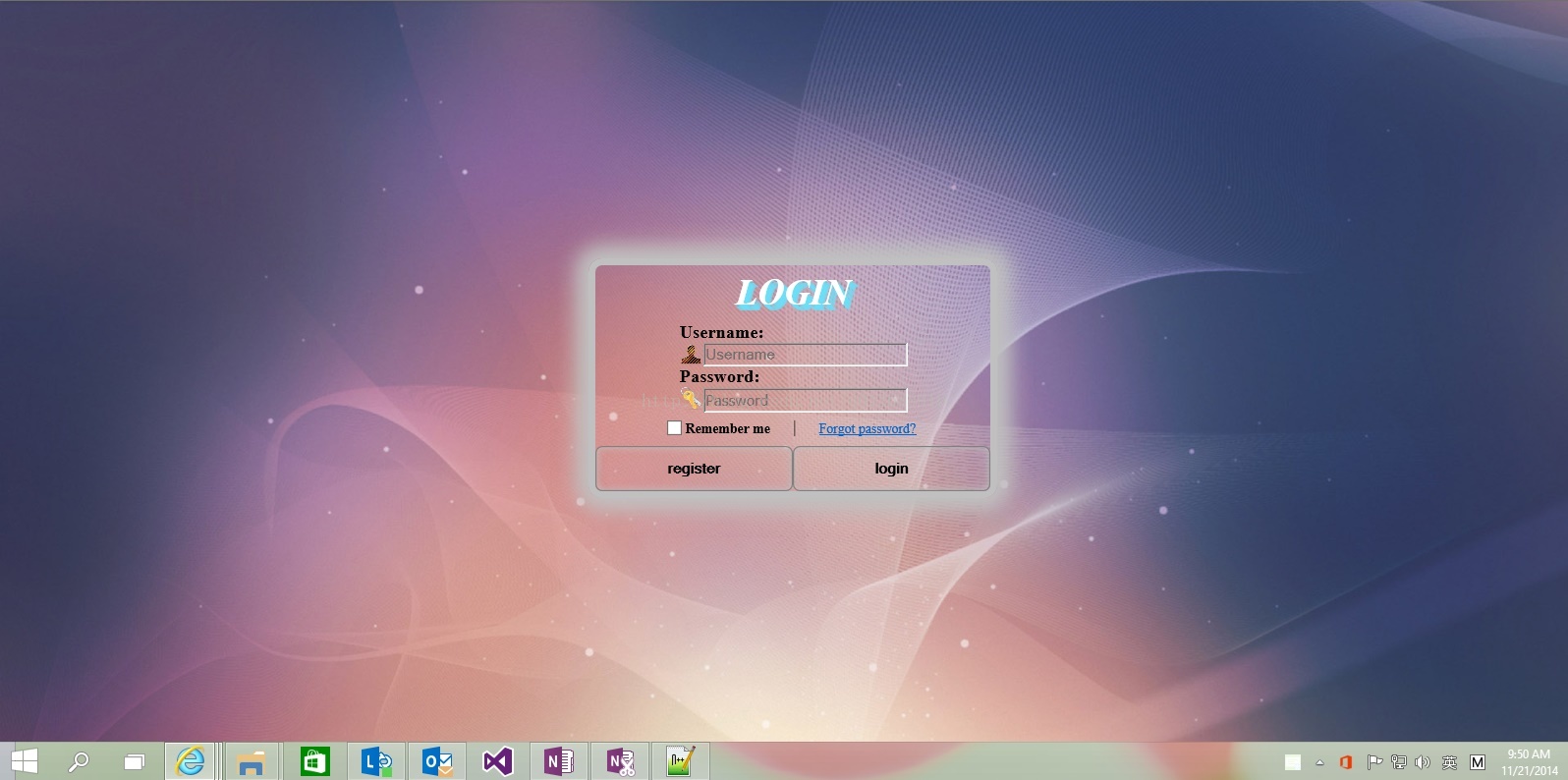
这个示例采用CSS3的一些特性来制作的,自己学习HTML5+CSS3的一个练习作品,请大家欣赏与指导,谢谢!
新业务拓展,欢迎大家访问-> 云享耕科技

AtomGit 是由开放原子开源基金会联合 CSDN 等生态伙伴共同推出的新一代开源与人工智能协作平台。平台坚持“开放、中立、公益”的理念,把代码托管、模型共享、数据集托管、智能体开发体验和算力服务整合在一起,为开发者提供从开发、训练到部署的一站式体验。
更多推荐



 0
0 0
0- 0



 已为社区贡献4条内容

所有评论(0)