【项目实训个人工作记录(七)】——剧情推演中编排器的实现
日期: 2026年5月13日——2026年5月29日
项目: 阅见:基于大模型的交互式小说阅读平台
项目实训个人工作记录(七)——剧情推演中编排器的实现
一、概述
本阶段实现了剧情推演子系统的核心调度层——PlotOrchestrator(剧情编排器),代码位于 ai-service/Plot_development/agents/orchestrator.py。编排器负责在每一回合中,根据玩家选择与世界/角色当前状态,动态决定下一步调用世界智能体(WorldAgent)还是某位角色智能体(RoleAgent),并在多步行动结束后整合生成叙事与可选分支。
从 AI 能力角度看,编排器并非单次调模型出一段文字,而是在一回合内串联多次 LLM 调用+向量检索(RAG)+流式叙事生成,形成检索增强 → 决策调度 → 角色/世界行动 → 日志整合 → 选项生成的完整 AI 流水线。WorldAgent 与 RoleAgent 分别走不同的模型调用通道,向量库负责注入书籍设定与用户历史,共同保证推演既贴合原著设定、又具备跨回合连贯性。
前端页面 frontend/src/views/PlotBranch.vue 通过 SSE 流式接口实时展示编排过程:索引构建,智能体逐步行动,叙事整合,下一回合选项。后端 Spring Boot 经 PlotController / PlotService 转发请求至 ai-service 的 /v1/plot/advance/stream,会话状态持久化在 MySQL 表 vr_plot_session 的 state_json 字段中。
二、功能目标
-
多智能体回合调度
- 每回合最多执行 8 步(
DEFAULT_MAX_ORCHESTRATOR_STEPS = HARD_MAX_ORCHESTRATOR_STEPS = 8),这里是考虑到单次推演的执行时间与用户体验综合性从而设置的参数,编排器 LLM 每步输出{ next, role_name, hint },next取值role/world/finish。 - 角色步:调用
RoleAgent.plan_with_llm规划行动,支持与环境交互或与其他角色单聊;世界步:调用WorldAgent.environment_interact生成环境反馈。
- 每回合最多执行 8 步(
-
AI 上下文增强(RAG)
- 推演前自动构建/校验 Chroma 知识索引;每回合按玩家选择拼接 query,检索书籍设定片段与本会话历史片段注入 prompt。
- 回合结束后将本轮叙事写入历史向量库,供后续回合检索。
-
流式输出与前端可视化
astream_step按阶段 yield 事件:indexing→agents→orchestrator→action→narrative(content 块)→done。- 仅叙事整合阶段使用 LLM 流式输出(
aiter_log2story),其余步骤为同步调用。
-
容错与兜底
- 世界/角色数据缺失、LLM 未配置时返回 offline 响应,不中断页面。
- 编排器 JSON 解析失败时按 scene_actors 轮询降级;本回合尚无输出时不允许直接
finish(_coerce_orchestrator_decision)。
三、技术实现
(一)数据与依赖
| 存储 | 作用 | 在编排器中的使用点 |
|---|---|---|
vr_plot_session | 用户×书籍推演会话,state_json 存回合 state + 分支树 | PlotService.getOrCreateSession 读取/写回;编排器入参 state_json,出参 state |
Plot_development/data/ | 世界/地点/角色运行时数据 | resolve_plot_preset(book_id) 加载 world_description、role_names、location |
Chroma vistaread_plot_knowledge | 书籍设定向量索引 | _retrieve_vectors → knowledge_indexer.search_formatted |
Chroma vistaread_plot_history | 用户推演历史向量 | _finalize_step 写入;检索时排除本回合 recent_snippets 防重复 |
state_json 内 branch_tree | 多分支时间线 | resolve_advance / append_turn_node 支持回溯分叉 |
state 核心字段:turn、summary、event、logs(智能体行动日志)、agents(各 RoleAgent 持久化状态)、scene、last_choices、branch_tree。
(二)编排器如何调用 AI(重点)
1. AI 基础设施:双通道模型调用
编排器在 main.py 中通过 _make_plot_orchestrator() 组装,注入三类 AI 依赖:
PlotOrchestrator(
    llm=LlmClient(),                    # 世界智能体 + 编排器决策 + 角色规划
    llm_caller=_call_chat_model,        # 角色对话/回应(带 system prompt 与人设)
    knowledge_indexer=plot_knowledge_indexer,
    history_store=plot_history_store,
)
| 通道 | 实现 | 主要用于 | 特点 |
|---|---|---|---|
| LlmClient | llm_client.py,OpenAI 兼容 /chat/completions | WorldAgent 全部能力;编排器 _orchestrator_decide;RoleAgent plan_with_llm | 可配置 LLM_MODEL / LLM_MODEL_WORLD;支持 iter_chat / aiter_chat 流式;默认 thinking: disabled |
| llm_caller | main.py 的 _call_chat_model | RoleAgent respond / single_role_interact | 注入 _build_role_system_prompt(角色人设、关系、动机);默认开启 thinking 模式 |
环境变量(节选):
LLM_API_BASE/LLM_API_KEY/LLM_MODEL:对话模型(默认兼容 DashScope)LLM_MODEL_WORLD:世界智能体专用模型,未配置时回退LLM_MODELEMBEDDING_MODEL:向量模型(默认text-embedding-v2)CHROMA_PLOT_KNOWLEDGE_COLLECTION/CHROMA_PLOT_HISTORY_COLLECTION:两个 Chroma 集合名
未配置 LLM_API_KEY 时,llm.configured == False,_prepare_step 直接返回 offline 响应,不发起任何模型请求。
2. RAG:Embedding + Chroma 双库检索
推演 AI 的「长期记忆」分两层,均在 ai-service 启动时初始化(main.py lifespan):
EmbeddingService (dashscope embedding)
    ├── PlotKnowledgeIndexer → vistaread_plot_knowledge  (按 book_id,全员共享设定)
    └── PlotHistoryStore     → vistaread_plot_history      (按 user_id + book_id + session_id)
知识库构建(非 LLM,纯 Embedding)
- 首次推演前
astream_step会 yieldphase: indexing,调用knowledge_indexer.ensure_index(book_id)。 - 从
data/worlds/、data/locations/、data/maps/、data/roles/*/role_info.json切分 chunk,批量embedding.embed()写入 Chroma。 - 通过
data/.index_manifest/book_{id}.json比对源文件 mtime,仅在数据变更时重建。
回合内检索(RAG 注入点)
_prepare_step 拼接检索 query:
search_query = choice + event + location + summary[:200]
调用 _retrieve_vectors 得到两段格式化文本,经 _append_retrieved_context 拼入 WorldAgent 的 update_event 历史上下文,以及编排器 ORCHESTRATOR_DECIDE 的 {retrieved_knowledge} / {retrieved_history} 占位符:
| 检索源 | 方法 | top_k | 截断 | 过滤 |
|---|---|---|---|---|
| 设定知识库 | knowledge_indexer.search_formatted(book_id, query) | 5 | 1600 字符 | book_id |
| 推演历史 | history_store.search_formatted(..., exclude_snippets=logs[-8:]) | 5 | 3000 字符 | user + book + session;排除本回合已写 log 防重复 |
历史回写(回合结束后)
_finalize_step 调用 history_store.add_turn():将 turn、玩家选择、场景、角色、事件、旁白摘要拼成 document → embedding.embed() → upsert 至 Chroma,供下一回合编排器决策时检索。
3. 单回合 AI 调用全景
一回合完整推演中,LLM 调用次数随编排步数动态变化(理论上限约 2 + 8×(1~3) + 3 ≈ 30+ 次,实际通常 10~20 次)。按流水线顺序如下:
[可选] ensure_index(仅 Embedding)
    ↓
① update_event          — WorldAgent,LlmClient,temp=0.5
    ↓
② orchestrator_decide   — 编排器,LlmClient,temp=0.35,JSON 决策(每步 1 次,最多 8 次)
    ↓
③ role_plan             — RoleAgent,LlmClient,temp=0.65,JSON 行动方案(每 role 步 1 次)
    ↓
④a single_role_interact — RoleAgent,llm_caller,角色人设对话(interact_type=single 时)
④b environment_interact — WorldAgent,LlmClient,temp=0.6,环境反馈文本
    ↓(循环 ②~④ 直至 finish 或达 max_steps)
⑤ log2story             — WorldAgent,LlmClient,temp=0.65,流式叙事(astream 路径)
⑥ generate_choices      — WorldAgent,LlmClient,temp=0.7,JSON 数组 2~4 项
⑦ judge_if_ended        — WorldAgent,LlmClient,temp=0.3,JSON {if_end, detail}
    ↓
[Embedding] history_store.add_turn — 写入向量库
4. 各 AI 调用点详解
(1)编排器决策 _orchestrator_decide
- Prompt 模板:
prompts/plot_zh.py→ORCHESTRATOR_DECIDE - 输入:世界描述、场景、当前事件、玩家选择、在场角色列表、本回合 logs(
_round_logs,不含历史回合)、RAG 检索结果、当前步/最大步 - 输出解析:
_parse_orchestrator_decision从模型回复中提取 JSON,next ∈ {role, world, finish} - 温度 0.35:偏低,保证调度稳定、格式可解析
- 业务纠偏:
_coerce_orchestrator_decision在代码层约束 AI——本回合尚无智能体输出时不允许finish,改为轮询scene_actors;JSON 解析失败时同样降级为按角色名单轮流调用
(2)世界智能体 WorldAgent(LlmClient + model_world)
| 方法 | Prompt | temperature | 输出 |
|---|---|---|---|
update_event | UPDATE_EVENT | 0.5 | 一句更新后的事件摘要 |
environment_interact | ENVIRONMENT_INTERACT | 0.6 | 环境反馈纯文本 |
log2story / aiter_log2story | LOG2STORY | 0.65 | 150~280 字第三人称叙事;流式逐 chunk 推送 |
generate_choices | GENERATE_CHOICES | 0.7 | JSON 数组,2~4 个后续选项 |
judge_if_ended | JUDGE_IF_ENDED | 0.3 | JSON {if_end, detail} |
LOG2STORY 明确要求承接「上一轮旁白」、禁止无故重置场景,是将多步智能体 logs 二次加工为读者可读叙事的关键 AI 环节;流式路径下通过 aiter_log2story → SSE content 事件推送到前端。
(3)角色智能体 RoleAgent(双模型分工)
规划阶段 plan_with_llm(LlmClient)
- Prompt:
ROLE_PLAN,注入角色目标、状态、其他在场角色、历史(含编排 hint) - 输出 JSON:
{ interact_type, detail, target_role_name, action } interact_type == "single":触发目标角色的对话 AI;否则走世界环境反馈
回应阶段 single_role_interact(llm_caller)
- 不走
plot_zh.py模板,而是_call_chat_model(mode="character", ...) - System prompt 由
_build_role_system_prompt动态构建:角色名 +role_info.json中的 identity / relations / motivation_goal - 将「与行动者的关系说明 + 对方刚刚的行动」写入
extra_context,让模型以该角色口吻回应 - 默认 thinking 模式开启,适合需要推理的角色反应;规划 JSON 仍走 LlmClient 且 thinking disabled
(4)AI 输出后处理
所有智能体输出的 detail / 环境反馈 / 回复文本,经 text_sanitize.sanitize_plot_agent_text 清洗:
- 剥离
...思考链残留 - 去除 markdown 代码块、JSON 字段泄漏
- 规范化换行与零宽字符
避免模型偶发输出 JSON 或思考过程污染前端时间线展示。
5. 流式 vs 同步:AI 结果如何到达前端
| 阶段 | AI 调用方式 | SSE 事件 |
|---|---|---|
| 知识索引 | Embedding(线程池) | { phase: "indexing", message } |
| 事件更新 | WorldAgent.update_event 同步 | { action: { actor:"world", act_type:"event" } } |
| 编排调度 | _orchestrator_decide 同步 | { phase: "orchestrator" } / { phase: "agents", stage: "step" } |
| 角色/世界行动 | plan + interact 同步 | { action: { actor, act_type, detail } } |
| 叙事整合 | aiter_log2story 流式 | { phase: "narrative" } + 多次 { content: "..." } |
| 收尾 | choices / ended 同步 | { done: true, narrative, choices, state } |
编排器在 _run_orchestrated_phase 中将同步 LLM 调用包在 asyncio.to_thread 内,避免阻塞 FastAPI 事件循环;仅叙事阶段使用真正的 async 流式 iterator。
6. AI 降级策略小结
| 场景 | 处理方式 |
|---|---|
| LLM 未配置 | offline 响应 + 固定占位选项 |
| 知识索引失败 | done.error + offline: true |
| 编排器 JSON 无效 | 按 scene_actors 轮流调用 role |
| 本回合无输出即 finish | _coerce_orchestrator_decision 强制 role |
| role_plan 异常 | 默认 { interact_type: "environment", detail: "环顾四周" } |
| log2story 超时/失败 | 回退为 logs 原文或「第 N 轮:你选择了…」 |
| generate_choices 失败 | 固定三个通用选项 |
(三)编排器核心流程(PlotOrchestrator)
1. 准备阶段 _prepare_step
- 校验
preset.has_world/preset.has_roles,缺失则返回 offline 错误提示。 - 执行 RAG 检索,实例化 RoleAgent,调用
WorldAgent.update_event(第 1 次 LLM)。
2. 调度循环 _orchestrator_decide + _run_orchestrated_phase
编排器 prompt 定义于 ORCHESTRATOR_DECIDE,每步一次 LLM 决策,驱动 role/world 行动子流程(见上一节调用全景)。
防空回合机制:若 LLM 返回 finish 但本回合 _round_logs 为空,强制改为调用 scene_actors 中第一位角色。
3. 角色行动 _execute_role_action
RoleAgent.plan_with_llm→ 按interact_type分支至single_role_interact或WorldAgent.environment_interact。- 所有 detail 经
sanitize_plot_agent_text清洗后写入 logs。
4. 收尾 _finalize_step
- 流式/同步
log2story→generate_choices→judge_if_ended→history_store.add_turn(Embedding 写入)。 - 输出 state 合并分支树。
5. 双模式入口
| 方法 | 用途 |
|---|---|
run_step | 同步整轮推演,POST /v1/plot/advance |
astream_step | 异步流式,POST /v1/plot/advance/stream,叙事阶段 SSE 推送 content |
(四)后端桥接层
PlotController(前缀 /api/plot):
GET /{bookId}/session:获取/创建会话POST /{bookId}/advance/stream:流式推演(前端主路径)POST /{bookId}/branch/goto:分支树节点跳转
PlotService 组装请求体,经 AiStreamingService.streamPlot 转发至 ai-service;done 事件中 state 回写 vr_plot_session。
(五)前端实现(PlotBranch.vue)
1. 流式消费 pick(choice)
- 解析 SSE:phase 更新状态栏;action 追加智能体时间线;content 流式写入叙事;done 更新 state/choices。
2. 智能体回合 UI
agent-round消息块展示编排器调度过程;narrativeStarted后锁定 action 追加,仅消费 content 流。
3. 分支与回溯
- 回溯节点传入
branchFromNodeId,编排器resolve_advance从该节点分叉,AI 上下文仍走同一套 RAG + 决策流程。
(六)业务流程总结
- 用户进入剧情推演页,加载
vr_plot_session.state_json。 - 用户点击选项 → ensure_index(Embedding)→ prepare(RAG + update_event)→ 编排器多步 LLM 调度 → 流式 log2story → generate_choices → 历史写入 Chroma。
- 下一回合检索到本轮写入的历史片段,AI 决策时可「想起」此前旁白与选择。
- 用户回溯分叉时,state 切换至历史节点 snapshot,后续推演重新走完整 AI 流水线。
四、问题反馈
1. 编排器过早 finish 导致空回合
现象: LLM 直接返回 finish,本回合无智能体输出。
处理: _coerce_orchestrator_decision 代码层纠偏 + 循环结束后兜底执行 scene_actor。单测:test_coerce_finish_when_round_logs_empty。
2. 向量检索与当前 logs 重复
现象: RAG 注入内容与刚产生的 log 高度重合。
处理: exclude_snippets=logs[-8:] 过滤近期片段。
3. 角色回应出现思考链或 JSON 泄漏
现象: 时间线卡片出现 `` 或 "detail": "..." 原文。
处理: sanitize_plot_agent_text 统一清洗;规划类调用使用 LlmClient 且 thinking disabled。
4. 流式阶段与叙事块时序错乱
现象: 叙事 content 出现在智能体步骤之前。
处理: PlotBranch.vue 中 parsed.action 仅在 !narrativeStarted 时 append。
五、界面展示
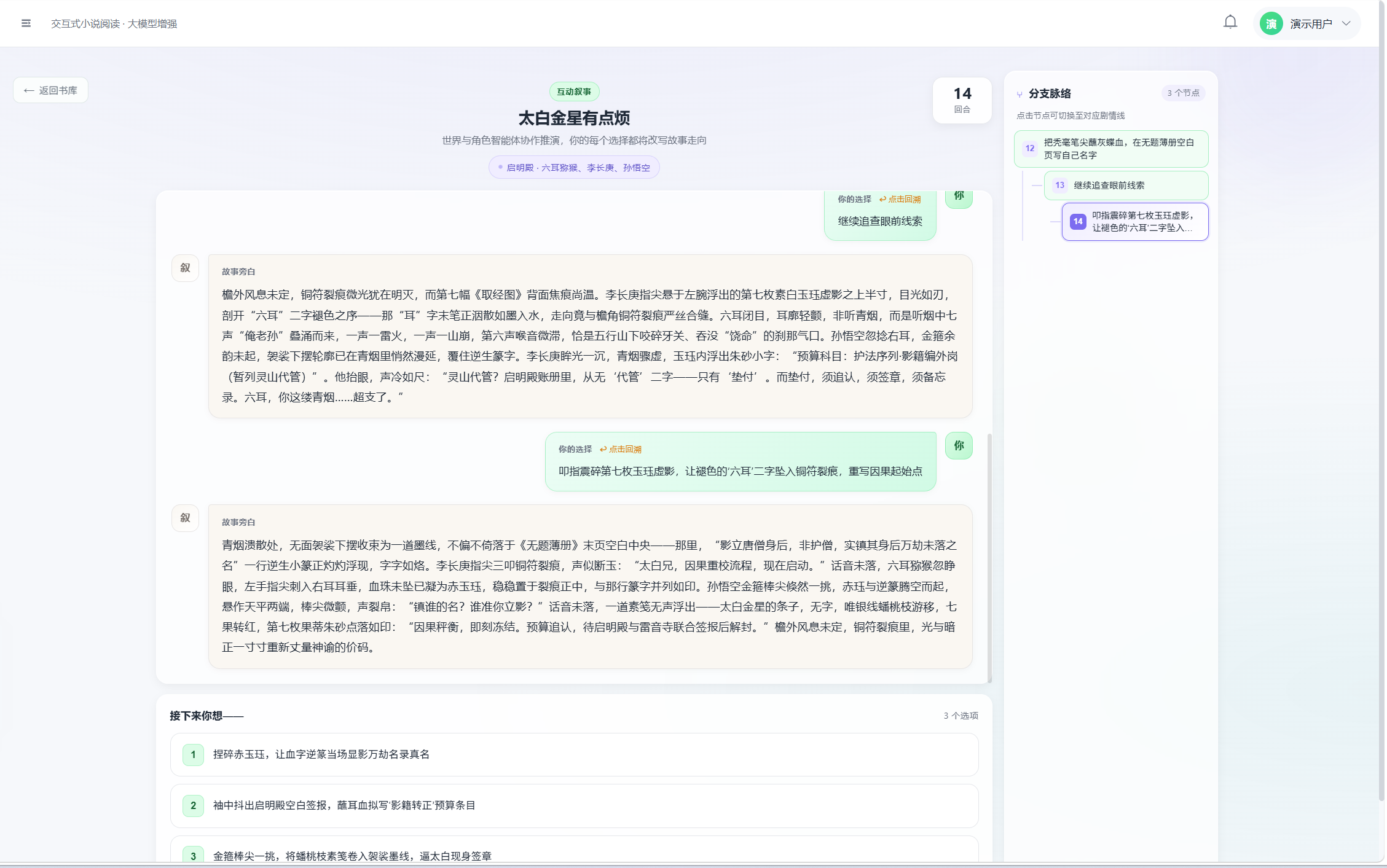
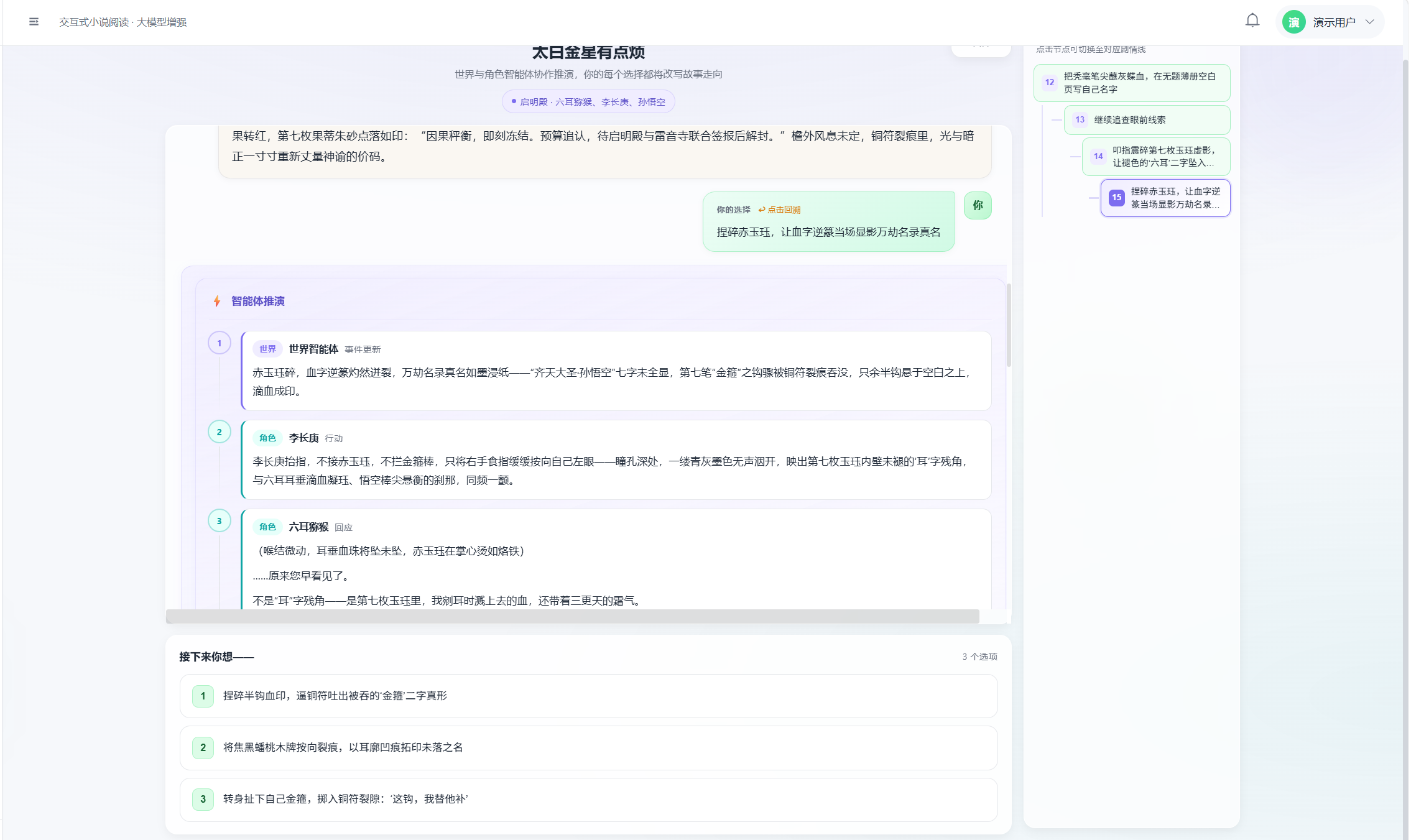
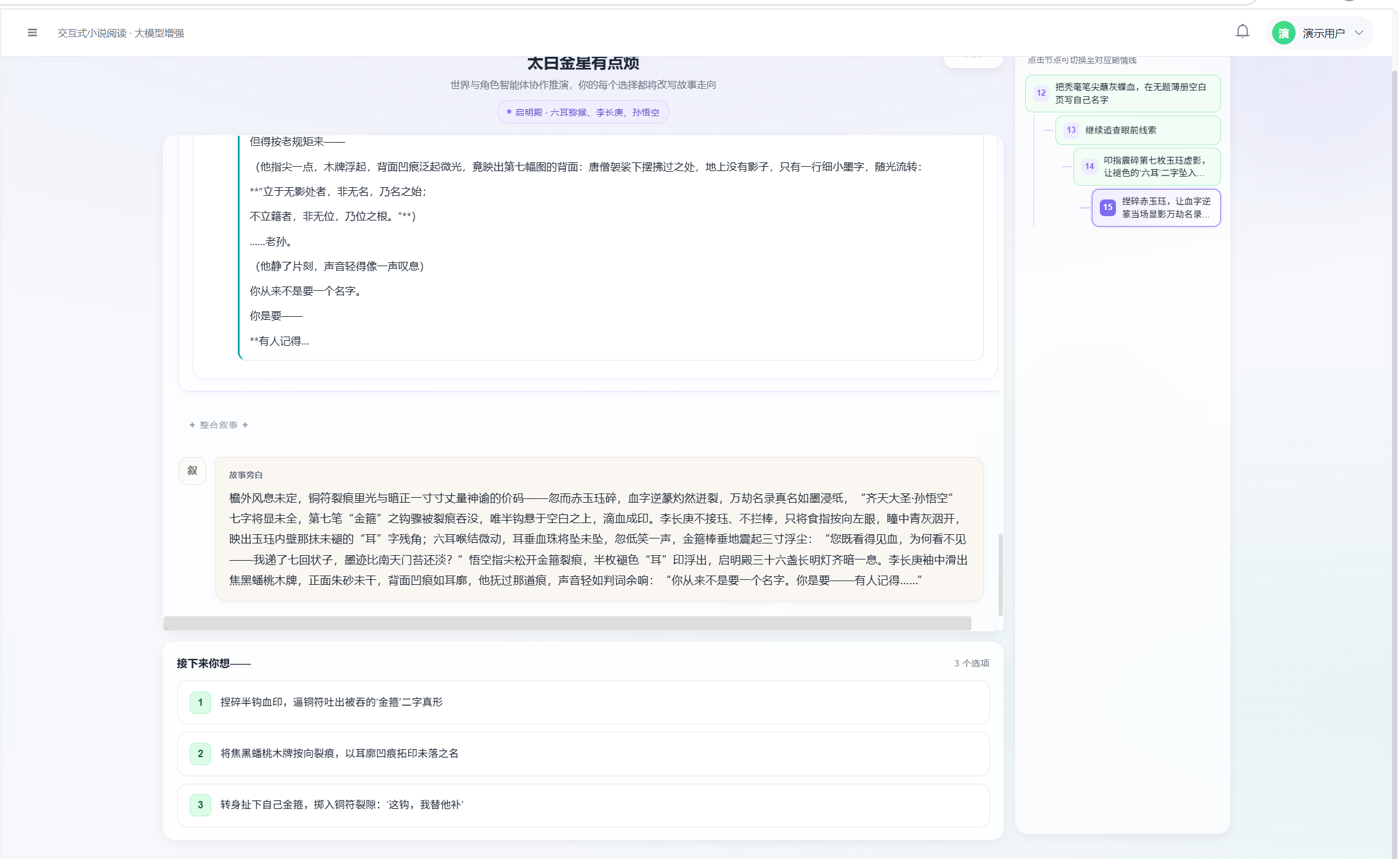
页面左侧右侧为分支脉络面板;状态栏显示「编排器正在调度智能体…」「正在整合叙事…」等阶段提示。
六、优化思路
- 模型分级:编排器决策、JSON 结构化输出走轻量模型;log2story 走更强模型,降低延迟与成本。
- RAG query 优化:除 choice+event 外,可加入上一回合 narrative embedding 做 hybrid 检索。
- Thinking 模式按需开关:规划/调度关闭 thinking,仅角色深度对话开启,减少 token 消耗。
- 编排器决策缓存:相似 state 下缓存最近决策(需注意剧情多样性)。
七、总结
本阶段我完成了剧情推演编排器 PlotOrchestrator 的端到端落地。从 AI 视角看,其核心是:以 Embedding+RAG 注入设定与历史上下文,以编排器 LLM 做多步 {next, role_name, hint} 调度,以 WorldAgent/RoleAgent 分工完成事件更新、行动规划、角色对话与环境反馈,最终以流式 log2story 将离散 logs 整合为连贯叙事,并回写历史向量供下回合检索。双通道模型调用(LlmClient + llm_caller)、分阶段 temperature 控制、JSON 解析纠偏与 sanitize 后处理,共同保证了多轮、多智能体场景下 AI 输出的可用性与体验一致性。
AI 提示词记录(节选):
请为「剧情推演编排器 PlotOrchestrator」设计多智能体调度方案:每回合由编排器 LLM 决定下一步调用 role/world/finish,RoleAgent 负责 plan + 交互,WorldAgent 负责 event 更新、环境反馈与 log2story 叙事整合;需支持 SSE 流式、Chroma 向量上下文、分支树 state 持久化。
实现
ORCHESTRATOR_DECIDEprompt 与_coerce_orchestrator_decision防空回合;前端 PlotBranch.vue 消费phase/action/content/done事件,展示 agent-round 时间线。

AtomGit 是由开放原子开源基金会联合 CSDN 等生态伙伴共同推出的新一代开源与人工智能协作平台。平台坚持“开放、中立、公益”的理念,把代码托管、模型共享、数据集托管、智能体开发体验和算力服务整合在一起,为开发者提供从开发、训练到部署的一站式体验。
更多推荐



 10
10 0
0- 0


 已为社区贡献4条内容

所有评论(0)