gitlab 开启ssh
·
1.本地生成ssh puBlic key 上传到gitlab
2.使用ssh协议上传
如仓库地址:git@gitlab.umi-meta.com:backend/cpp-world.git
3.指定ssh协议
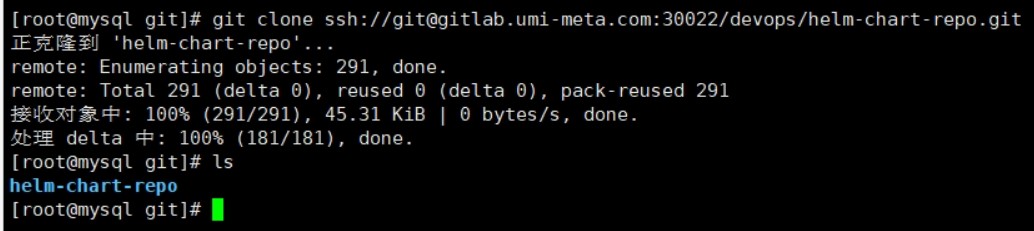
git clone ssh://git@gitlab.umi-meta.com:30022/devops/helm-chart-repo.git
a.需要修改路径
b.需要确认ssh 端口(目标主机端口为 30022,docker启动)
gitlab_rails['gitlab_shell_ssh_port'] = 30022 标识(系统内仍为22端口)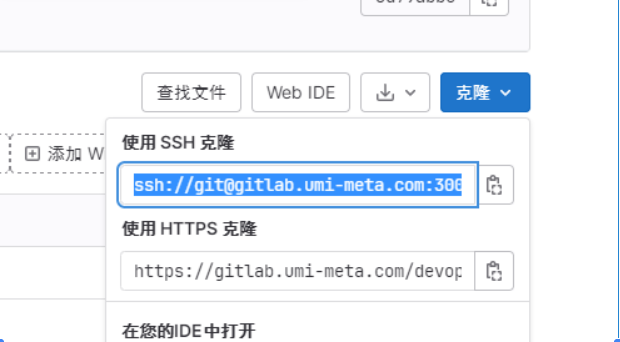
#nginx
version: '3.8'
services:
  nginx:
    # image: nginx:1.22.1
    build:
      context: .
      dockerfile: ./dockerfile
      args:
        buildno: 1
    container_name: nginx
    volumes:
      - ./conf:/etc/nginx/conf.d
      - ./logs:/var/log/nginx
      - ./ssl:/etc/nginx/ssl
      - ./nginx.conf:/etc/nginx/nginx.conf
      - /data/gitlab/data:/var/opt/gitlab
      - /etc/localtime:/etc/localtime:ro
    ports:
      - "80:80"
      - "443:443"
    networks:
      - meta
networks:
  meta:
    external: true
    name: meta
#gitlab
version: '3.6'
services:
  gitlab:
    # image: 'gitlab/gitlab-ce:15.10.2-ce.0'
    image: 'gitlab/gitlab-ce:16.0.1-ce.0'
    container_name: gitlab
    restart: always
    hostname: 'meta-gitlab'
    environment:
      GITLAB_OMNIBUS_CONFIG: |
        gitlab_rails['gitlab_shell_ssh_port'] = 30022
#        external_url 'https://gitlab.umi.com'
#        external_url 'https://gitlab.umi.com'
        # Add any other gitlab.rb configuration here, each on its own line
    ports:
#      - '80:80'
#      - '443:443'
      - '30022:22'
    volumes:
      - '/data/gitlab/config:/etc/gitlab'
      - '/data/gitlab/logs:/var/log/gitlab'
      - '/data/gitlab/data:/var/opt/gitlab'
    shm_size: '256m'
    networks:
      - meta
networks:
  meta:
    external: true
    name: meta

AtomGit 是由开放原子开源基金会联合 CSDN 等生态伙伴共同推出的新一代开源与人工智能协作平台。平台坚持“开放、中立、公益”的理念,把代码托管、模型共享、数据集托管、智能体开发体验和算力服务整合在一起,为开发者提供从开发、训练到部署的一站式体验。
更多推荐



 6
6 0
0- 0


 已为社区贡献2条内容

所有评论(0)