【CH02】Working with text data
零、前言
很久没读英文文本了,原作第二章读了有俩小时……
总体来说还是非常简单的,主要就是为 llm training 做一些文本预处理的工作。
本章代码:ch02
一、Working With Text Data
我们自然不能直接给 llm 喂 raw text,数据预处理是不可避免的。
流程总览:
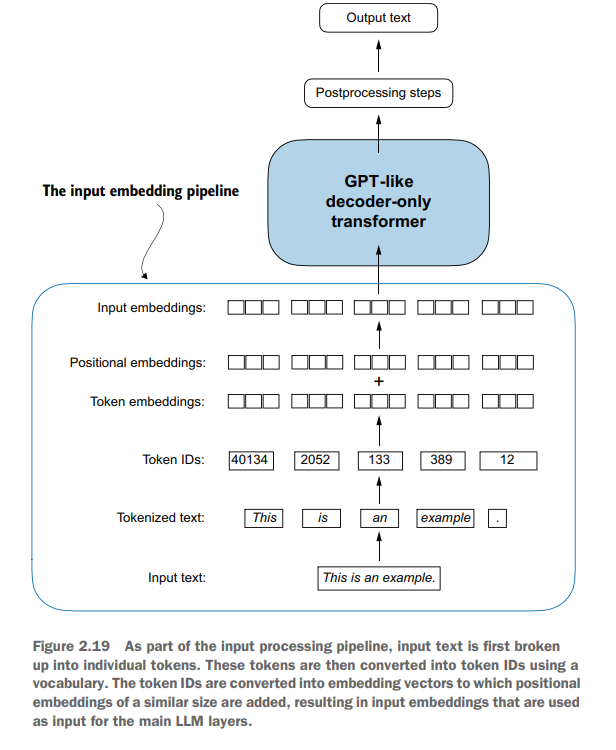
1.1 data download
import urllib.request
url = ("https://raw.githubusercontent.com/rasbt/"
"LLMs-from-scratch/main/ch02/01_main-chapter-code/"
"the-verdict.txt")
file_path = "the-verdict.txt"
urllib.request.urlretrieve(url, file_path)
with open("the-verdict.txt", "r", encoding="utf-8") as f:
     raw_text = f.read()
print("Total number of character:", len(raw_text))
Total number of character: 20479
数据是某个神秘小故事“The Verdict”,没空看,直接下了。
1.2 Tokenizing text
我们要先把原始文本,拆分成一个个的token。一个简答的做法就是直接用正则表达式。
现在llm倒是省去了记忆正则表达式规则的负担hh
preprocessed = re.split(r'([,.:;?_!"()\']|--|\s)', raw_text)
preprocessed = [item.strip() for item in preprocessed if item.strip()]
print(len(preprocessed))
4690
1.3 token2ID
然后就是建立 vocabulary,完成 token2ID,ID2token的映射。
class SimpleTokenizerV1:
    # Creates an inverse vocabulary that maps token IDs back to the original text tokens
    def __init__(self, vocab):
        self.str_to_int = vocab
        self.int_to_str = {i:s for s, i in vocab.items()}

    # Processes input text into token IDs
    def encode(self, text):
        preprocessed = re.split(r'([,.?_!"()\']|--|\s)', text)
        preprocessed = [
            item.strip() for item in preprocessed if item.strip()
        ]
        ids = [self.str_to_int[s] for s in preprocessed]
        return ids

    # Converts token IDs back into text
    def decode(self, ids):
        text = " ".join([self.int_to_str[i] for i in ids])
        # Replace spaces before the specified punctuations
        text = re.sub(r'\s+([,.?!"()\'])', r'\1', text)
        return text
tokenizer = SimpleTokenizerV1(vocab)
text = """"It's the last he painted, you know,"
Mrs. Gisburn said with pardonable pride."""
ids = tokenizer.encode(text)
print(ids)
[1, 56, 2, 850, 988, 602, 533, 746, 5, 1126, 596, 5, 1, 67, 7, 38, 851, 1108, 754, 793, 7]
print(tokenizer.decode(ids))
" It' s the last he painted, you know," Mrs. Gisburn said with pardonable pride.
很简单,但是有明显的问题:
text = "Hello, do you like tea?"
print(tokenizer.encode(text))
---------------------------------------------------------------------------
KeyError                                  Traceback (most recent call last)
Cell In[26], line 2
      1 text = "Hello, do you like tea?"
----> 2 print(tokenizer.encode(text))

Cell In[23], line 13
      9         preprocessed = re.split(r'([,.?_!"()\']|--|\s)', text)
     10         preprocessed = [
     11             item.strip() for item in preprocessed if item.strip()
     12         ]
---> 13         ids = [self.str_to_int[s] for s in preprocessed]
     14         return ids

KeyError: 'Hello'
因为我们的vocab中没有"Hello" 这个词,这说明在llm训练时,需要庞大且多元化的training sets。
下面我们考虑如何应对没见过的词。
1.4 Adding special context token
我们给vocab加两个特殊token:
- <|unk|>:即,unknown
- <|endoftext|>:即,end of text
all_tokens = sorted(list(set(preprocessed)))
all_tokens.extend(["<|endoftext|>", "<|unk|>"])
vocab = {token:integer for integer,token in enumerate(all_tokens)}
print(len(vocab.items()))
1132
对SimpleTokenizerV1进行更新,得到SimpleTokenizerV2:
class SimpleTokenizerV2:
    # Creates an inverse vocabulary that maps token IDs back to the original text tokens
    def __init__(self, vocab):
        self.str_to_int = vocab
        self.int_to_str = {i:s for s, i in vocab.items()}

    # Processes input text into token IDs
    def encode(self, text):
        preprocessed = re.split(r'([,.?_!"()\']|--|\s)', text)
        preprocessed = [
            item.strip() for item in preprocessed if item.strip()
        ]
        # Replaces unknown words by <|unk|> tokens
        preprocessed = [item if item in self.str_to_int else "<|unk|>" for item in preprocessed]
        ids = [self.str_to_int[s] for s in preprocessed]
        return ids

    # Converts token IDs back into text
    def decode(self, ids):
        text = " ".join([self.int_to_str[i] for i in ids])
        # Replace spaces before the specified punctuations
        text = re.sub(r'\s+([,.?!"()\'])', r'\1', text)
        return text
text1 = "Hello, do you like tea?"
text2 = "In the sunlit terraces of the palace."
text = " <|endoftext|> ".join((text1, text2))
print(text)
Hello, do you like tea? <|endoftext|> In the sunlit terraces of the palace.
tokenizer = SimpleTokenizerV2(vocab)
print(tokenizer.encode(text))
[1131, 5, 355, 1126, 628, 975, 10, 1130, 55, 988, 956, 984, 722, 988, 1131, 7]
print(tokenizer.decode(tokenizer.encode(text)))
<|unk|>, do you like tea? <|endoftext|> In the sunlit terraces of the <|unk|>.
我们知道 “The Verdict” 没有 “Hello” 和 “Palace” 这两个单词,所以是符合预期的。
还有一些常见的 special token:
- [BOS]:beginning of sequence
- [EOS]:end of sequence
- [PAD]:padding,这个主要是对于长度不够的句子进行填充
不过有趣的是,GPT models并不需要任何的上面的token,它只用了一个 <|endoftext|>。
<|endoftext|>有点像 [EOS],它也可以用来做填充。
而且 GPT models 用的tokenizer连 <|unk|>都没。GPT models 用了 byte pair encoding tokenizer来将单词拆成更小的字母组合。
1.5 Byte pair encoding
GPT-2、GPT-3 以及ChatGPT 所用的original model 都是采用的基于 byte pair encoding (BPE) 的tokenizer。
手搓 BPE还是太复杂了,我们用开源库 tiktoken:
! pip install tiktoken
from importlib.metadata import version
import tiktoken
tokenizer = tiktoken.get_encoding("gpt2")
text = (
 "Hello, do you like tea? <|endoftext|> In the sunlit terraces"
 "of someunknownPlace."
)
ids = tokenizer.encode(text, allowed_special={"<|endoftext|>"})
print(ids)
[15496, 11, 466, 345, 588, 8887, 30, 220, 50256, 554, 262, 4252, 18250, 8812, 2114, 286, 262, 20562, 13]
words = tokenizer.decode(ids)
words
'Hello, do you like tea? <|endoftext|> In the sunlit terraces of the palace.'
BPE算法将不认识的单词拆分成更小的subword序列来应对tokenization时遇到陌生单词的状况。
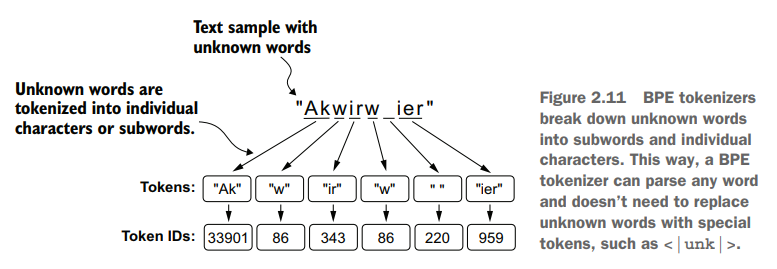
BPE算法的实现rasbt并没有在书中讲解,不过大致讲了下思想
- 初始加入 “a”, “b”… 这些字母到vocab
- 然后对于subword组合在原文中出现的频次,从高到低依次加入vocab
- 然后以某个频次作为算法停止的边界
这个算法还是比较trivial的。
1.6 Data sampling with a sliding window
然后我们要为LLM的训练创建 input-targe pairs
如果我们的LLM pretraing是预测文本的下一个词的话,input-targe pair 应该长这个样子:
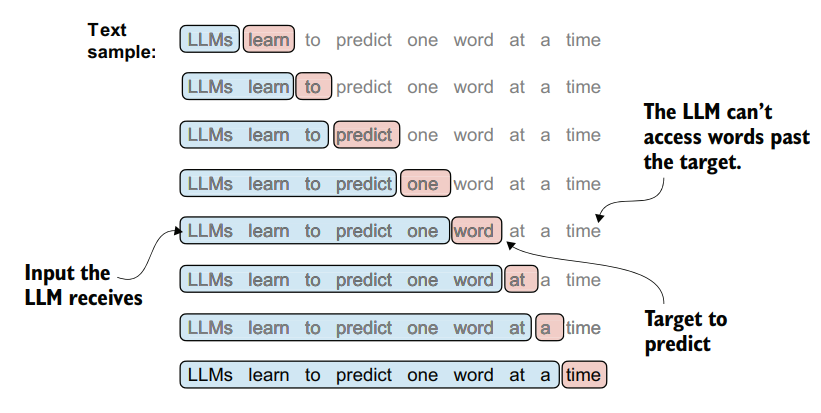
那很简单了,我们维护一个滑动窗口就可以了:
with open("the-verdict.txt", "r", encoding="utf-8") as f:
    raw_text = f.read()
enc_text = tokenizer.encode(raw_text)
print(len(enc_text))
5145
enc_sample = enc_text[50:]
context_size = 4
x = enc_sample[:context_size]
y = enc_sample[1:context_size+1]
print(f"x: {x}")
print(f"y:      {y}")
x: [290, 4920, 2241, 287]
y:      [4920, 2241, 287, 257]
for i in range(1, context_size + 1):
    context = enc_sample[:i]
    desired = enc_sample[i]
    print(context, "---->", desired)
[290] ----> 4920
[290, 4920] ----> 2241
[290, 4920, 2241] ----> 287
[290, 4920, 2241, 287] ----> 257
for i in range(1, context_size+1):
    context = enc_sample[:i]
    desired = enc_sample[i]
    print(tokenizer.decode(context), "---->", tokenizer.decode([desired]))
 and ---->  established
 and established ---->  himself
 and established himself ---->  in
 and established himself in ---->  a
在我们将token转成embeddings之前,还需要准备一下 data loader,dataset 来获取 input-target pairs
import torch
from torch.utils.data import Dataset, DataLoader
class GPTDatasetV1(Dataset):
    def __init__(self, txt, tokenizer, max_length, stride):
        self.input_ids = []
        self.target_ids = []
        # Tokenizes the entire text
        token_ids = tokenizer.encode(txt)
        for i in range(0, len(token_ids) - max_length, stride):
            x = token_ids[i:i+max_length]
            y = token_ids[i+1:i+max_length+1]
            self.input_ids.append(torch.tensor(x))
            self.target_ids.append(torch.tensor(y))

    def __len__(self):
        return len(self.input_ids)

    def __getitem__(self, idx):
        return self.input_ids[idx], self.target_ids[idx]
def create_dataloader_v1(txt, batch_size=4, max_length=256, stride=128, shuffle=True, drop_last=True, num_workers=0):
    tokenizer = tiktoken.get_encoding("gpt2")
    dataset = GPTDatasetV1(txt, tokenizer, max_length, stride)
    dataloader = DataLoader(
        dataset,
        batch_size=batch_size,
        shuffle=shuffle,
        drop_last=drop_last,    # we drop the last batch if it's shorter than batch_size
        num_workers=num_workers # num of GPU processes
    )
    return dataloader
都是最基本的pytorch操作。
with open("the-verdict.txt", "r", encoding="utf-8") as f:
    raw_text = f.read()
dataloader = create_dataloader_v1(
    raw_text, batch_size=8, max_length=4, stride=4, shuffle=False)
data_iter = iter(dataloader)
first_batch = next(data_iter)
print(first_batch)
[tensor([[   40,   367,  2885,  1464],
        [ 1807,  3619,   402,   271],
        [10899,  2138,   257,  7026],
        [15632,   438,  2016,   257],
        [  922,  5891,  1576,   438],
        [  568,   340,   373,   645],
        [ 1049,  5975,   284,   502],
        [  284,  3285,   326,    11]]), tensor([[  367,  2885,  1464,  1807],
        [ 3619,   402,   271, 10899],
        [ 2138,   257,  7026, 15632],
        [  438,  2016,   257,   922],
        [ 5891,  1576,   438,   568],
        [  340,   373,   645,  1049],
        [ 5975,   284,   502,   284],
        [ 3285,   326,    11,   287]])]
1.7 Create token Embeddings
然后就可以创建 token Embeddings了。
pytorch 提供了 Embedding层:
input_ids = torch.tensor([2, 3, 5, 1])

vocab_size = 6
output_dim = 3

torch.manual_seed(123)
embedding_layer = torch.nn.Embedding(vocab_size, output_dim)
print(embedding_layer(input_ids))
tensor([[ 1.2753, -0.2010, -0.1606],
        [-0.4015,  0.9666, -1.1481],
        [-2.8400, -0.7849, -1.4096],
        [ 0.9178,  1.5810,  1.3010]], grad_fn=<EmbeddingBackward0>)
Embedding 层就是一个可训练的查表矩阵,每一行是该行对应token_id 的vector
1.8 Encoding word positions
positions Encoding 大致可以分为两种:
- absolute Encoding,我们将绝对位置进行编码
- 其实就是一个按照绝对位置查表的位置编码矩阵
- relative Encoding,我们将相对位置的信息进行编码
- 比如 a t t e n t i o n S c o r e ( i , j ) = q i ⋅ k j + b i − j attentionScore(i, j) = q_i · k_j + b_{i-j} attentionScore(i,j)=qi⋅kj+bi−j
早期的 GPT models 采用absolute Encoding,有如下原因:
- 简单,不改 attention 公式
- 参数和计算更直观
- 能够表达绝对位置特征
- 对早期 GPT 的训练长度设定足够好,因为早期 GPT 的目标不是无限外推到超长上下文,而是在固定上下文内最大化语言建模能力。
Relative Encoding 也有其有点:
-
更适合长度泛化
- Absolute learned embedding 最大的问题是:如果训练时最大长度是 1024,如果推理时给它 4096 个 token,模型就很难外推到更长序列
-
更符合 attention 的交互方式,因为自注意力机制要计算两两token之间的关系,那么我们加入 i - j 这样的项到attention 计算当中是很合理的
-
平移不变性更好
-
位置 10: New York City
位置 200: New York City
这个短语从开头移动到句子中间,这个局部结构本身没有变。Relative encoding 更容易捕捉这种平移不变的局部模式。
而Absolute encoding 需要模型自己学习两者之间的局部关系。
-
不过我们这里就只关注 absolute encoding 这一简单实现了:
max_length = 4 #token 序列长度
output_dim = 256 #embedding维度
vocab_size = 50257 #词表大小
pos_embedding_layer = torch.nn.Embedding(max_length , output_dim)
#根据索引取出对应的position embedding,这里直接一次性取出[0, 1, 2, 3]位置的embedding
pos_embeddings = pos_embedding_layer(torch.arange(max_length))
print(pos_embeddings.shape)
torch.Size([4, 256])
我们再创建一个 token embedding 层:
token_embedding_layer = torch.nn.Embedding(vocab_size, output_dim)
以及dataloader
max_length = 4
dataloader = create_dataloader_v1(
    raw_text, batch_size=8, max_length=max_length,
    stride=max_length, shuffle=False
)
data_iter = iter(dataloader)
inputs, targets = next(data_iter)
我们的输入就是:token_embeddings + pos_embeddings
input_embeddings = token_embeddings + pos_embeddings
print(input_embeddings.shape)
至此,整个文本处理流程结束:

AtomGit 是由开放原子开源基金会联合 CSDN 等生态伙伴共同推出的新一代开源与人工智能协作平台。平台坚持“开放、中立、公益”的理念,把代码托管、模型共享、数据集托管、智能体开发体验和算力服务整合在一起,为开发者提供从开发、训练到部署的一站式体验。
更多推荐



 7
7 0
0- 0


 已为社区贡献9条内容

所有评论(0)