模型注解、LINQ和EF中的外键应用
一、EF外键关系
a.创建EF框架
b.1.添加ADO.NET实体数据模型
2.选择数据库优先
c.From1类绑定数据源
//Model1.Context.tt下面Model1.Context.cs内容

//------------------------------------------------------------------------------
// <auto-generated>
//     此代码已从模板生成。
//
//     手动更改此文件可能导致应用程序出现意外的行为。
//     如果重新生成代码,将覆盖对此文件的手动更改。
// </auto-generated>
//------------------------------------------------------------------------------

namespace MYN_FKModel
{
    using System;
    using System.Data.Entity;
    using System.Data.Entity.Infrastructure;

    public partial class  MYNEntities : DbContext
    {
        public MaoYaNanEntities()
            : base("name=MaoYaNanEntities")
        {
        }

        protected override void OnModelCreating(DbModelBuilder modelBuilder)
        {
            throw new UnintentionalCodeFirstException();
        }

        public virtual DbSet<Depart> Depart { get; set; }
        public virtual DbSet<Teacher> Teacher { get; set; }
    }
}

//Model1.tt下面Depart.cs和Teacher.cs内容
//------------------------------------------------------------------------------
// <auto-generated>
//     此代码已从模板生成。
//
//     手动更改此文件可能导致应用程序出现意外的行为。
//     如果重新生成代码,将覆盖对此文件的手动更改。
// </auto-generated>
//------------------------------------------------------------------------------

namespace MYN_FKModel
{
    using System;
    using System.Collections.Generic;

    public partial class Depart
    {
        [System.Diagnostics.CodeAnalysis.SuppressMessage("Microsoft.Usage", "CA2214:DoNotCallOverridableMethodsInConstructors")]
        public Depart()
        {
            this.Teacher = new HashSet<Teacher>();
        }

        public int DepartId { get; set; }
        public string DepartName { get; set; }
        public int CollegeId { get; set; }
        public int Status { get; set; }
        public int CreateUserId { get; set; }
        public System.DateTime CreateTime { get; set; }
        public Nullable<int> LastUpdateUserId { get; set; }
        public Nullable<System.DateTime> LastUpdateTime { get; set; }

        [System.Diagnostics.CodeAnalysis.SuppressMessage("Microsoft.Usage", "CA2227:CollectionPropertiesShouldBeReadOnly")]
        public virtual ICollection<Teacher> Teacher { get; set; }
    }
}

//------------------------------------------------------------------------------
// <auto-generated>
//     此代码已从模板生成。
//
//     手动更改此文件可能导致应用程序出现意外的行为。
//     如果重新生成代码,将覆盖对此文件的手动更改。
// </auto-generated>
//------------------------------------------------------------------------------

namespace MYN_FKModel
{
    using System;
    using System.Collections.Generic;

    public partial class Teacher
    {
        public int TeacherId { get; set; }
        public string TeacherName { get; set; }
        public int DeptId { get; set; }
        public int Status { get; set; }
        public int CreateUserId { get; set; }
        public System.DateTime CreateTime { get; set; }
        public Nullable<int> LastUpdateUserId { get; set; }
        public Nullable<System.DateTime> LastUpdateTime { get; set; }

        public virtual Depart Depart { get; set; }
    }
}


//From1内容

using System;
using System.Collections.Generic;
using System.ComponentModel;
using System.Data;
using System.Drawing;
using System.Linq;
using System.Text;
using System.Threading.Tasks;
using System.Windows.Forms;

namespace MYN_FKModel
{
    public partial class Form1 : Form
    {
        public Form1()
        {
            InitializeComponent();
        }

        private void Form1_Load(object sender, EventArgs e)
        {
            using (var cxt=new MaoYaNanEntities())
            {
                dataGridView1.DataSource = cxt.Depart.Include("Teacher.Depart").ToList();
            }
        }
    }
}
注意1:


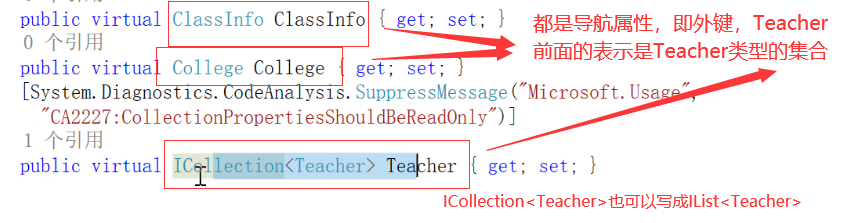
下面都是集合:

注意2:

直接像上面代码一样直接绑定数据源,会报错,因为外键关系存在,外键关联的实体不能加载过来
报错内容如下: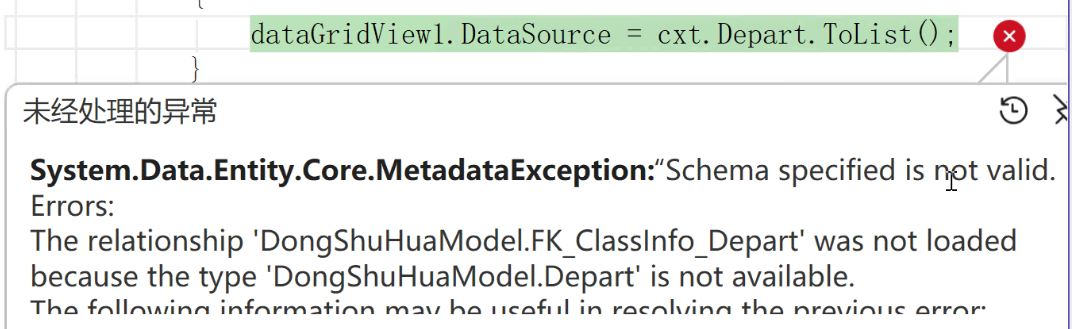
修改方法:加上Include("导航属性")

但是数据库中的强外键关系使用Include需要一直向后加导航属性,性能慢,不建议使用
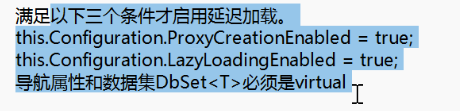
导航属性定义为虚方法原因1.方便重写 2.默认启动延迟加载(根本原因)
禁用延迟加载两种方法:1.去掉导航属性中的virtual
2.this.Configuration.LazyLoadingEnabled=false;
二、EF框架进行代码优先和数据库优先两种使用方法时,生成的数据库表列的内容不符合程序员的要求,这种情况就用到模型注解,即特性的方法解决。详细代码如下:
//Models层User类

using System;
using System.ComponentModel;
using System.ComponentModel.DataAnnotations;
using System.ComponentModel.DataAnnotations.Schema;

namespace _2.自己编写外键关系.Models
{
    // 注解特性参考:https://learn.microsoft.com/zh-cn/ef/ef6/modeling/code-first/data-annotations
    // 模型注解,使用C#中的特性实现,所有的注解特性都在System.ComponentModel.DataAnnotations.Schema命名空间下。
    // 对模型添加各种注解(特性)之后,可以让数据库生成时,按你设定的特性规则去生成对应的表,列等。
    [Table("User")]  // Table控制生成的表名
    public class User
    {
        [Key]  // Key控制主键,默认以Id结尾为主键
        [DatabaseGenerated(DatabaseGeneratedOption.Identity)] // 控制自动增长
        [Column(Order = 1, TypeName = "int")]
        public int UserId { get; set; }

        [Required(ErrorMessage = "请输入用户名")]  // 控制必填项
        [Column("UserName", TypeName = "varchar", Order = 2), MaxLength(20)]  // 控制列的名称,类型,顺序
        public string UserName { get; set; }

        [Required]
        [MaxLength(12,ErrorMessage = "密码不能超过12位")]  // 不会生成数据库约束。
        [MinLength(6,ErrorMessage = "密码不能少于6位")]
        public string Password { get; set; }

        [StringLength(20)]  // 20长度的字符串
        public string Email { get; set; }

        [DefaultValue("0")]  // 这种添加的默认值,在生成数据库时,不会生效。只是在C#代码中有默认值。
        public int Stauts { get; set; } = 0; // 这种添加的默认值,在生成数据库时,不会生效。只是在C#代码中有默认值。


        /* [NotMapped]   // 在生成数据库表时,不会把此属性生成对应的列。
         public string Property1 { get; set; }


         [Timestamp]  // 时间戳  了解
         public byte[] Property2 { get; set; }*/
    }
}


//MOdels层Student类

using System;
using System.Collections.Generic;
using System.ComponentModel;
using System.ComponentModel.DataAnnotations;
using System.ComponentModel.DataAnnotations.Schema;
using System.Linq;
using System.Text;
using System.Threading.Tasks;

namespace _2.自己编写外键关系.Models
{
    [Table("Student")]
    public class Student
    {
        /// <summary>
        /// 学生编号
        /// </summary>
        [Column(Order =1)]
        public int StudentId { get; set; }

        [Column(Order = 2)]
        [Description("学生姓名")]  // 不会在数据库中给某列添加说明。
        public string StudentName { get; set; }

        [Column(TypeName = "image", Order = 3)]
        public byte[] StudentLogo { get; set; }  // image类型

        [Column(Order = 4)]
        public int? Age { get; set; }   // int

        [Column(Order = 5)]
        public bool? Sex { get; set; }  // bit

        [Column(TypeName = "float", Order = 6)]
        public float? Socre1 { get; set; }  // float

        //public decimal? Socre2 { get; set; }  // decimal

        [Required] // 此字段不能为空
        [Column(Order = 7)]
        [ForeignKey("CreateUser")]  // 定义强处键关系。参数是导航属性的名称。
        public int CreateUserId { get; set; }

        [Required]
        [Column(Order = 8)]
        public DateTime CreateTime { get; set; } = DateTime.Now;  // datetime

        [Column(Order = 9)]
        [ForeignKey("LastUpdateUser")]
        public int? LastUpdateUserId { get; set; }

        [Column(Order = 10)]
        public DateTime? LastUpdateTime { get; set; }

        // 导航属性。定义完导航属性后,在成强外键关系中使用才有意义。
        // 这样不会在表Student中创建CreateUser_UserId列。
        // 并且会给CreateUserId列添加外键关系。
        public virtual User CreateUser { get; set; }

        public virtual User LastUpdateUser { get; set; }

    }
}
三、LINQ
1.LINQ概念?LINQ组成部分?LINQ分类?LINQ语法?(重要)
LINQ概念:
LINQ(Language Integrated Query)是一种C#语言中的查询技术,它允许我们在代码中使用类似SQL的查询语句来操作各种数据源。这些数据源可以是集合、数组、数据库、XML文档等等。LINQ提供了一种统一的编程模型,使我们能够使用相同的方式来查询和操作不同类型的数据。
2.LINQ组成部分:
数据源(Data source):可以是集合、数组、数据库、XML文档等等。
查询变量(Query variable):用于存储查询结果的变量。
查询表达式(Query expression):类似于SQL语句的查询表达式,用于描述查询的逻辑和条件。
查询操作符(Query operator):用于执行各种查询操作,如筛选、排序、分组、投影等等。
查询结果(Query result):查询操作的返回结果。
其中数据源,查询变量,查询结果是必选项,查询表达式,查询操作符是可选项。
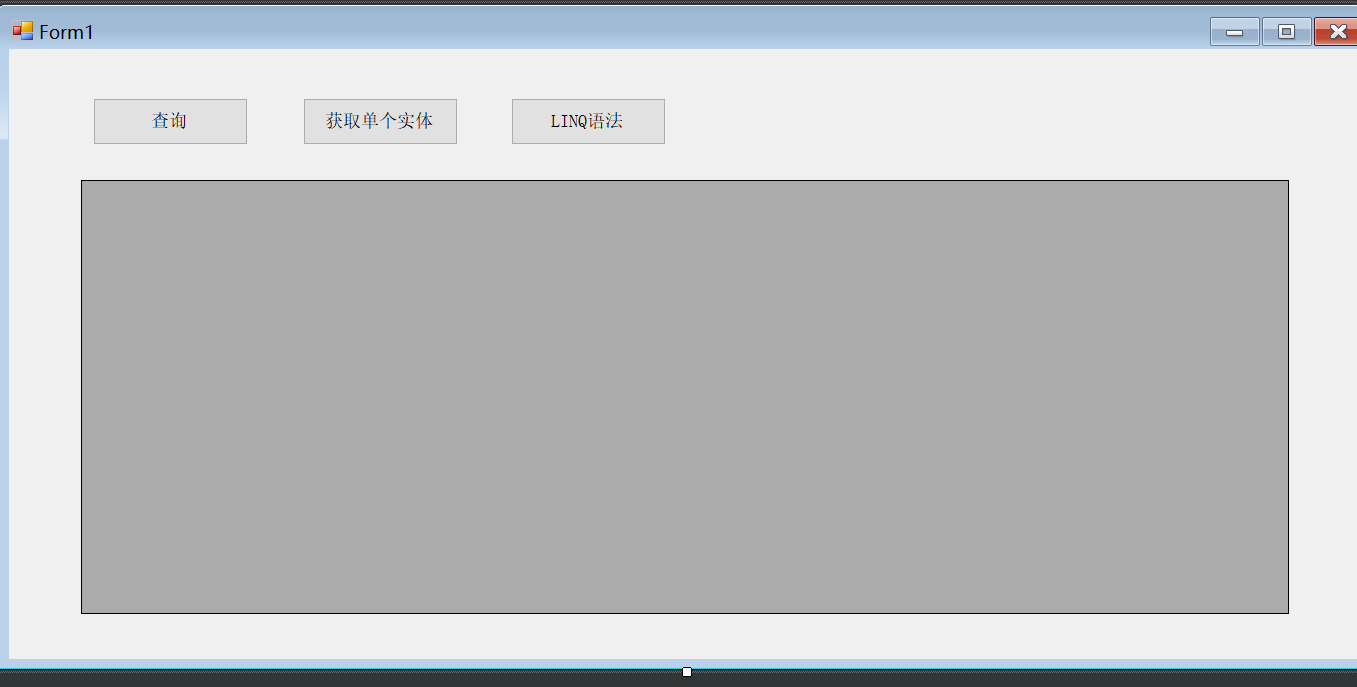
3.详细代码案例:
using _2.自己编写外键关系.Contexts;
using _2.自己编写外键关系.Models;
using System;
using System.Collections.Generic;
using System.ComponentModel;
using System.Data;
using System.Data.Entity;
using System.Drawing;
using System.Linq;
using System.Runtime.Remoting.Contexts;
using System.Text;
using System.Threading.Tasks;
using System.Windows.Forms;

namespace _2.自己编写外键关系
{
    public partial class Form1 : Form
    {
        private EFDemoContext cxt = new EFDemoContext();
        public Form1()
        {
            InitializeComponent();

            /*object obj = new object();

            var obj2 = new User() { UserName = "fdsfd" };

            string name = "hello";
            // 当匿名对象中的属性名称,和它对应的值所在的变量名称一样时,可以省略属性名称
            var obj3 = new { a = "hello", b = 10, name = name };  // 匿名对象*/
        }

        private void Form1_Load(object sender, EventArgs e)
        {
            BindDataGridView();
        }

        private void BindDataGridView()
        {
            // A. 使用强外键关系实现读取学生的“创建人信息”
            // Include(导航属性)使用预先加载
            var query = cxt.Students
                .Include("CreateUser")
                .Include("LastUpdateUser");

            var query2 = from s in query
                         select new {
                             StudentId = s.StudentId,
                             StudentName = s.StudentName,
                             StudentLogo = s.StudentLogo,
                             Age = s.Age,
                             Sex = s.Sex,
                             Socre1 = s.Socre1,
                             CreateUserId = s.CreateUserId,
                             CreateUserName = s.CreateUser.UserName,
                             CreateTime = s.CreateTime,
                             LastUpdateUserId = s.LastUpdateUserId,
                             LastUpdateUserName = s.LastUpdateUser == null ? "无" : s.LastUpdateUser.UserName,
                             LastUpdateTime = s.LastUpdateTime,
                         };

           dataGridView1.DataSource = query2.ToList();

            //MessageBox.Show(query[0].StudentName);
            //MessageBox.Show(query[0].CreateUser.UserName);
            //MessageBox.Show(query[0].LastUpdateUser?.UserName);  // 修改人有可能为null


            // B. 不使用强外键关系,而使用关联查询实现读取学生的“创建人信息”(推荐)
            // query类型为IQueryable<T>,不能直接绑定DataSource属性
            // join...in...on...equals默认inner join
            // join...in...on...equals...into配合DefaultIfEmpty()默认是left join
            // item1和item2就是数据源,结果集
            // u查询变量,是item中的一行数据,DefaultIfEmpty()把为空的数据设置成默认值
            // select筛选
            // 为啥要对into后的数据源item1或者item2再次查询一下呢?为了筛选
            /*var query = from s in cxt.Students
                        join u1 in cxt.Users on s.CreateUserId equals u1.UserId into item1
                        join u2 in cxt.Users on s.LastUpdateUserId equals u2.UserId into item2
                        from it1 in item1.DefaultIfEmpty()
                        from it2 in item2.DefaultIfEmpty()
                        select new {
                            StudentId=s.StudentId,
                            StudentName=s.StudentName,
                            StudentLogo=s.StudentLogo,
                            Age=s.Age,
                            Sex=s.Sex,
                            Socre1=s.Socre1,
                            CreateUserId = s.CreateUserId,
                            CreateUserName = it1.UserName,
                            CreateTime = s.CreateTime,
                            LastUpdateUserId = s.LastUpdateUserId,
                            LastUpdateUserName = it2.UserName,
                            LastUpdateTime = s.LastUpdateTime,
                        };

            dataGridView1.DataSource = query.ToList();*/
        }

        private void btnQuery_Click(object sender, EventArgs e)
        {
            BindDataGridView();
        }

        private void btnGetModel_Click(object sender, EventArgs e)
        {

            var model = cxt.Students.FirstOrDefault(s => s.StudentId == 1);

            // 显示加载的两种写法,显示加载什么时候用呢?延迟加载禁用的情况,才使用显示加载。
            //cxt.Entry(model).Reference(s => s.CreateUser).Load();
            cxt.Entry(model).Reference("CreateUser").Load();

            MessageBox.Show(model.CreateUser.UserName);

        }

        private void btnLINQ_Click(object sender, EventArgs e)
        {
            Form2 form2 = new Form2();
            form2.ShowDialog();
        }
    }
}
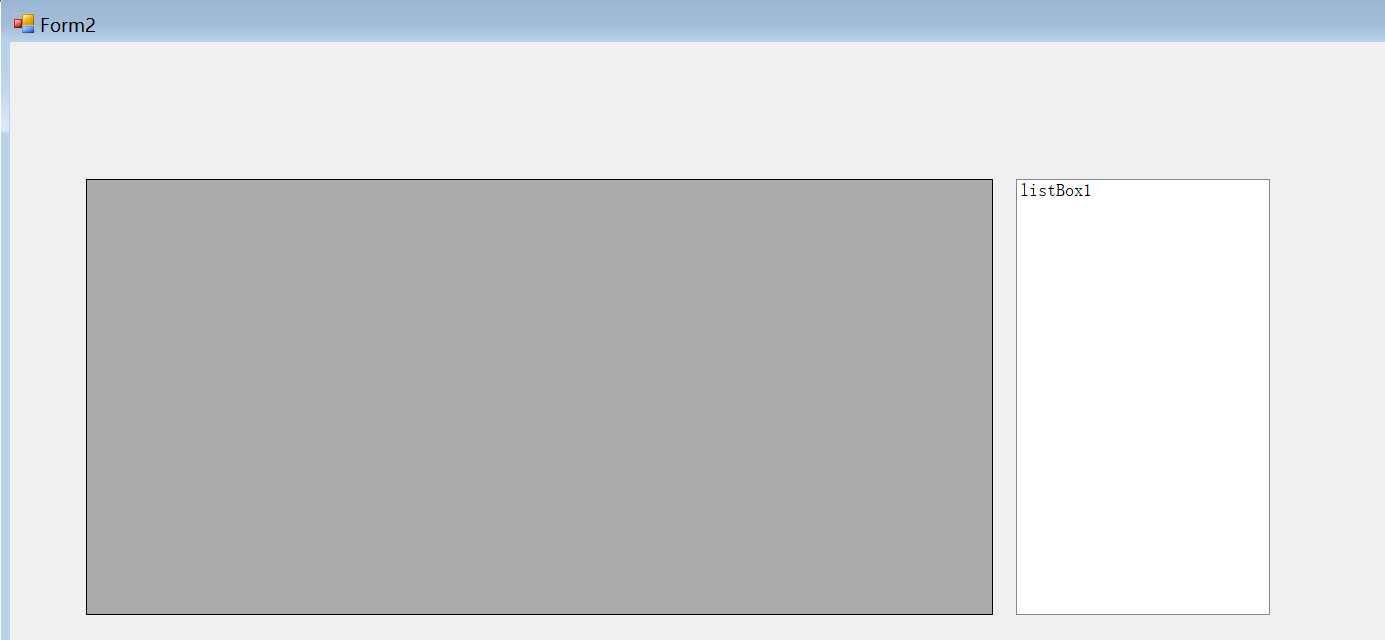
using _2.自己编写外键关系.Contexts;
using _2.自己编写外键关系.Extentions;
using _2.自己编写外键关系.Models;
using System;
using System.Collections.Generic;
using System.ComponentModel;
using System.Data;
using System.Drawing;
using System.Linq;
using System.Text;
using System.Threading.Tasks;
using System.Windows.Forms;

namespace _2.自己编写外键关系
{
    public partial class Form2 : Form
    {
        EFDemoContext cxt = new EFDemoContext();
        public Form2()
        {
            InitializeComponent();
        }

        // LINQ语法参考:https://learn.microsoft.com/zh-cn/dotnet/csharp/language-reference/keywords/query-keywords
        private void Form2_Load(object sender, EventArgs e)
        {
            BindDataGridView();
        }

        private void BindDataGridView()
        {
            // 案例1:
            /*int[] numbers = new int[] { 5, 4, 1, 3, 9, 8, 6, 7, 2, 0 };

            // from从数据源numbers中查询num。 num称查询变量
            // where查询条件,即查询表达式
            // select num 查询结果
            var lowNums = from num in numbers
                          where num < 5
                          select num;

            listBox1.DataSource = lowNums.ToList();*/

            // 案例2:
            //var query = from x in cxt.Students
            //            select new {x.StudentId,x.StudentName};

            // ascending升序, descending降序
            /*var query = from x in cxt.Students
                        where 1 == 1 && 1 == 1
                        orderby x.StudentName descending, x.StudentId descending
                        select new Person
                        {
                            Id = x.StudentId,
                            Name = x.StudentName
                        };*/

            // group...by不能配合select进行筛选,先排序,再分组。
            // where和ordeby之间没有顺序。但建议先where,后orderby
            /*var query = from x in cxt.Students
                        where 1 == 1 && 1 == 1
                        orderby x.StudentName descending
                        group x by x.StudentName;*/

            // group...by...into如果把分组的结果存储到一个变量g中,就可以先分组,再排序,并且可以和select配合。
            /*var query = from x in cxt.Students
                        where 1 == 1 && 1 == 1
                        group x by x.StudentName into g
                        orderby g.Key descending
                        select g;*/

            //dataGridView1.DataSource = query.ToList();

            // 案例3:

            /* string[] strings = new string[]
             {
                    "A penny saved is a penny earned.",
                     "The early bird catches the worm.",
                     "The pen is mightier than the sword."
              };*/

            // let让,设置,给一个数据集起一个别名,相当于定义一个变量
            /* var earlyBirdQuery =
                 from sentence in strings
                 let words = sentence.Split(' ')
                 from word in words
                 let w = word.ToLower()
                 where w[0] == 'a' || w[0] == 'e'
                     || w[0] == 'i' || w[0] == 'o'
                     || w[0] == 'u'
                 select word;*/

            // 案例4:
            // 扩展方法如何定义,如何使用?
            //string a = "hello";
            //StringExtention.SayHello(a);  // 不优雅。
            //a.SayHello2(10);

            // 案例5:
            /*dataGridView1.DataSource =  cxt.Students
                 .Where(s => s.StudentName.Contains("z"))
                 .Select(s => new  { s.StudentId,学生姓名=s.StudentName })
                 .ToList();*/


            // 案例6:
            /*dataGridView1.DataSource = cxt.Students
                 .Where(s => 1 == 1)
                 //.OrderBy(s => s.StudentId)
                 .OrderByDescending(s => s.StudentId)
                 .GroupBy(s => s.StudentName)
                 .ToList();

            var g = cxt.Students
                   .Where(s => 1 == 1)
                   .OrderByDescending(s => s.StudentId)
                   .GroupBy(s => s.StudentName).ToList();

            MessageBox.Show(g[1].Key);
            MessageBox.Show(g[1].Count().ToString());*/


            // Skip跳过的偏移量, 公式:(page-1)*pageSize
            // Take取几条,公式:pageSize
            //cxt.Students.Skip(0).Take(10)

            // 参数1:关联的别外一个数据源, 第二个参数:关联条件1, 第三个参数:关联条件2, 第四个参数:筛选结果
            /*var query = cxt.Students.Join(cxt.Users, s => s.CreateUserId, u => u.UserId, (s, u) => new
            {
                s.StudentId,
                s.StudentName,
                s.CreateUserId,
                CreateUserName = u.UserName
            }).ToList();

            dataGridView1.DataSource = query;*/

            // LINQ子句和LINQ扩展方法可以混合使用。告诉开发者你擅长那种语法就使用哪个。
            /* var query = from s in cxt.Students
                         join u in cxt.Users on s.CreateUserId equals u.UserId
                         select new
                         {
                             s.StudentId,
                             s.StudentName,
                             s.CreateUserId,
                             CreateUserName = u.UserName
                         };

             var query2 = query
                 .Where(s=>1==1)
                 .ToList();

             dataGridView1.DataSource = query2;*/

            // 案例7:
            var query = cxt.Hellos.SqlQuery("select * from [Hello]");
            dataGridView1.DataSource = query.ToList();
        }
    }

    class Person
    {
        public int Id { get; set; }
        public string Name { get; set; }
    }
}
4.LINQ分类
LINQ To Entities
LINQ To Objects
LINQ To XML
LINQ文档:https://www.cnblogs.com/jack-jiang0/p/17819430.html
5。LINQ函数及实战训练:
https://www.cnblogs.com/xiyin/p/6078385.html
https://www.cnblogs.com/xiyin/p/6086119.html
https://www.cnblogs.com/xiyin/p/6089142.html
6。LINQ语法细节:
https://learn.microsoft.com/zh-cn/dotnet/csharp/language-reference/keywords/query-keywords
https://learn.microsoft.com/zh-cn/dotnet/csharp/linq/
https://learn.microsoft.com/zh-cn/dotnet/csharp/language-reference/keywords/from-clause
四、扩展方法
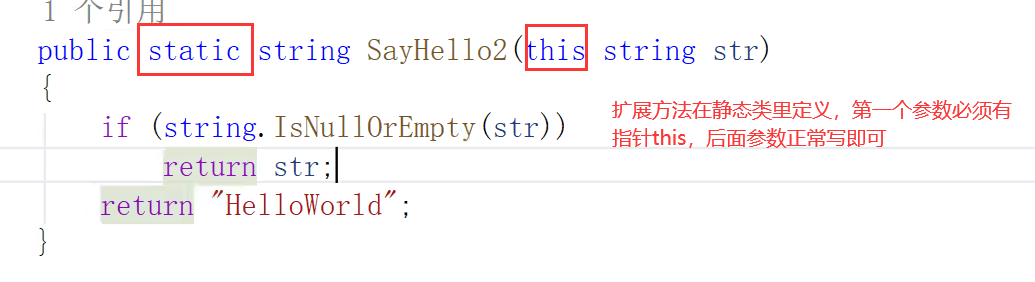
扩展方法定义在静态类里,参数中必须有指针this

AtomGit 是由开放原子开源基金会联合 CSDN 等生态伙伴共同推出的新一代开源与人工智能协作平台。平台坚持“开放、中立、公益”的理念,把代码托管、模型共享、数据集托管、智能体开发体验和算力服务整合在一起,为开发者提供从开发、训练到部署的一站式体验。
更多推荐



 17
17 0
0- 0


 已为社区贡献1条内容

所有评论(0)