Function Calling
·
两次请求、两次响应
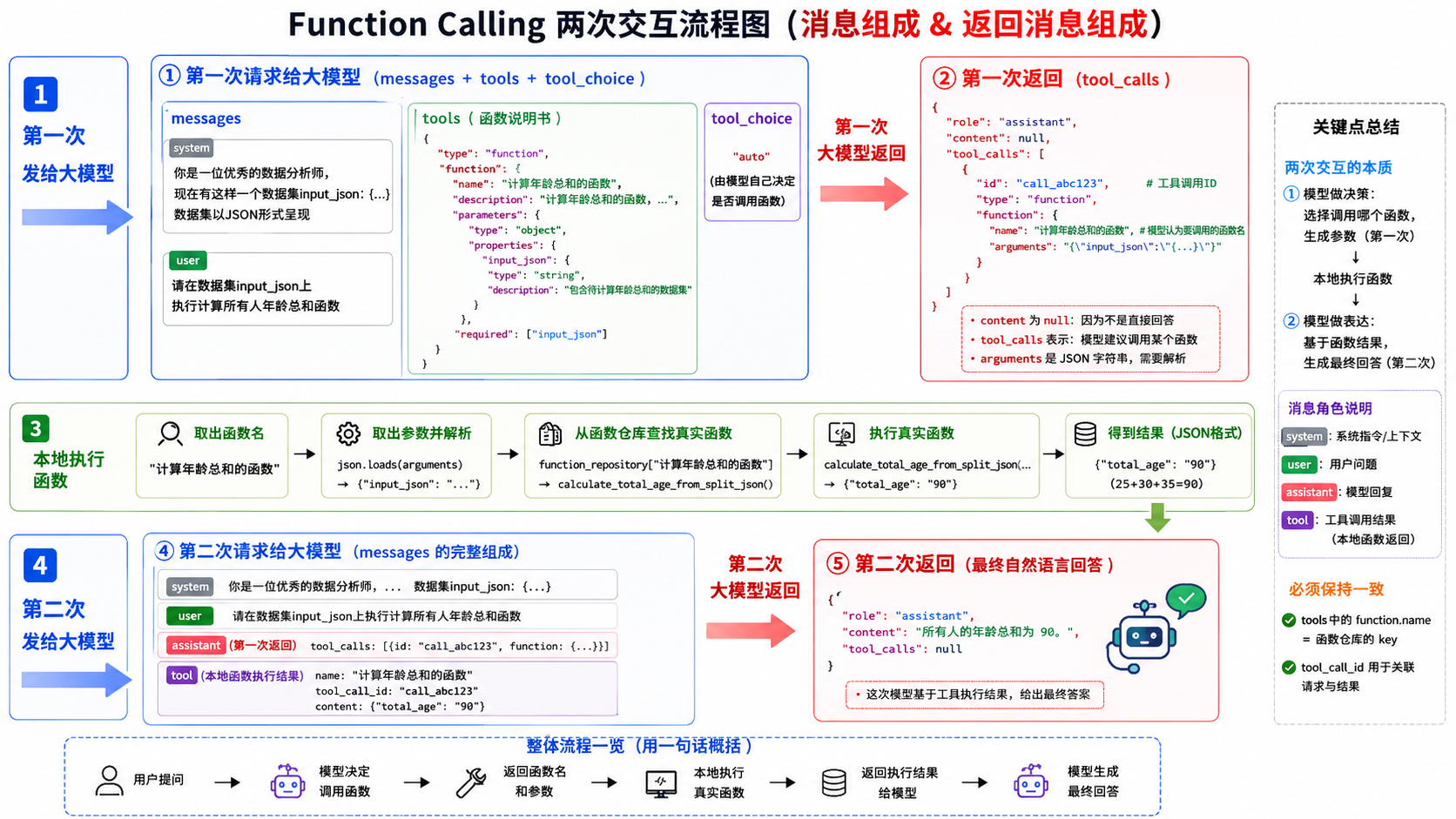
(1)第一次发给大模型的消息组成
system 消息 + user 消息 + tools 函数说明(system 给背景和数据,user 给任务,tools 告诉模型有哪些函数可以用、函数叫什么、需要什么参数。)
response = client.chat.completions.create(
    model=ALI_TONGYI_PLUS_MODEL,
    messages=messages,
    tools=[...],
    tool_choice="auto"
)

messages = [
    {
        "role": "system",
        "content": "你是一位优秀的数据分析师, 现在有这样一个数据集...,数据集以JSON形式呈现"
    },
    {
        "role": "user",
        "content": "请在数据集input_json上执行计算所有人年龄总和函数"
    }
]

tools = [
    {
        "type": "function",
        "function": {
            "name": "计算年龄总和的函数",
            "description": "计算年龄总和的函数...",
            "parameters": {
                "type": "object",
                "properties": {
                    "input_json": {
                        "type": "string",
                        "description": "包含待计算年龄总和的数据集"
                    }
                },
                "required": ["input_json"]
            }
        }
    }
](2)第一次大模型返回的消息组成
"我建议调用这个函数,并传入这些参数"
ChatCompletionMessage(
    role="assistant",
    content="",
    tool_calls=[                                          // 工具调用请求
        ChatCompletionMessageFunctionToolCall(
            id="call_4a7973e412f247f8ac80d1",             // 这次工具调用的唯一编号
            type="function",
            function=Function(                            // 模型想调用的函数名
                name="计算年龄总和的函数",
                arguments='{"input_json": "..."}'         // 模型生成的函数参数,JSON 字符串
            )
        )
    ]
)(3)第二次发给大模型的消息组成
本地程序执行完函数后,会把system + user + assistant(tool_calls) + tool(函数结果)都拼进 messages。
messages = [
    // system-背景和数据
    {
        "role": "system",
        "content": "你是一位优秀的数据分析师, 现在有这样一个数据集input_json:...,数据集以JSON形式呈现"
    },
    // user-用户任务
    {
        "role": "user",
        "content": "请在数据集input_json上执行计算所有人年龄总和函数"
    },
    // assistant-模型第一次提出的函数调用请求
    {
        "role": "assistant",
        "content": "",
        "tool_calls": [
            {
                "id": "call_4a7973e412f247f8ac80d1",
                "type": "function",
                "function": {
                    "name": "计算年龄总和的函数",
                    "arguments": "{\"input_json\": \"...\"}"
                }
            }
        ]
    },
    // tool-本地函数执行结果
    {
        "role": "tool",
        "name": "计算年龄总和的函数",
        "tool_call_id": "call_4a7973e412f247f8ac80d1",
        "content": "{\"total_age\": \"90\"}"
    }
](4)第二次大模型返回的消息组成
ChatCompletionMessage(
    role="assistant",
    content="数据集中所有人的年龄总和为:90。",    //  最终回答文本
    tool_calls=None
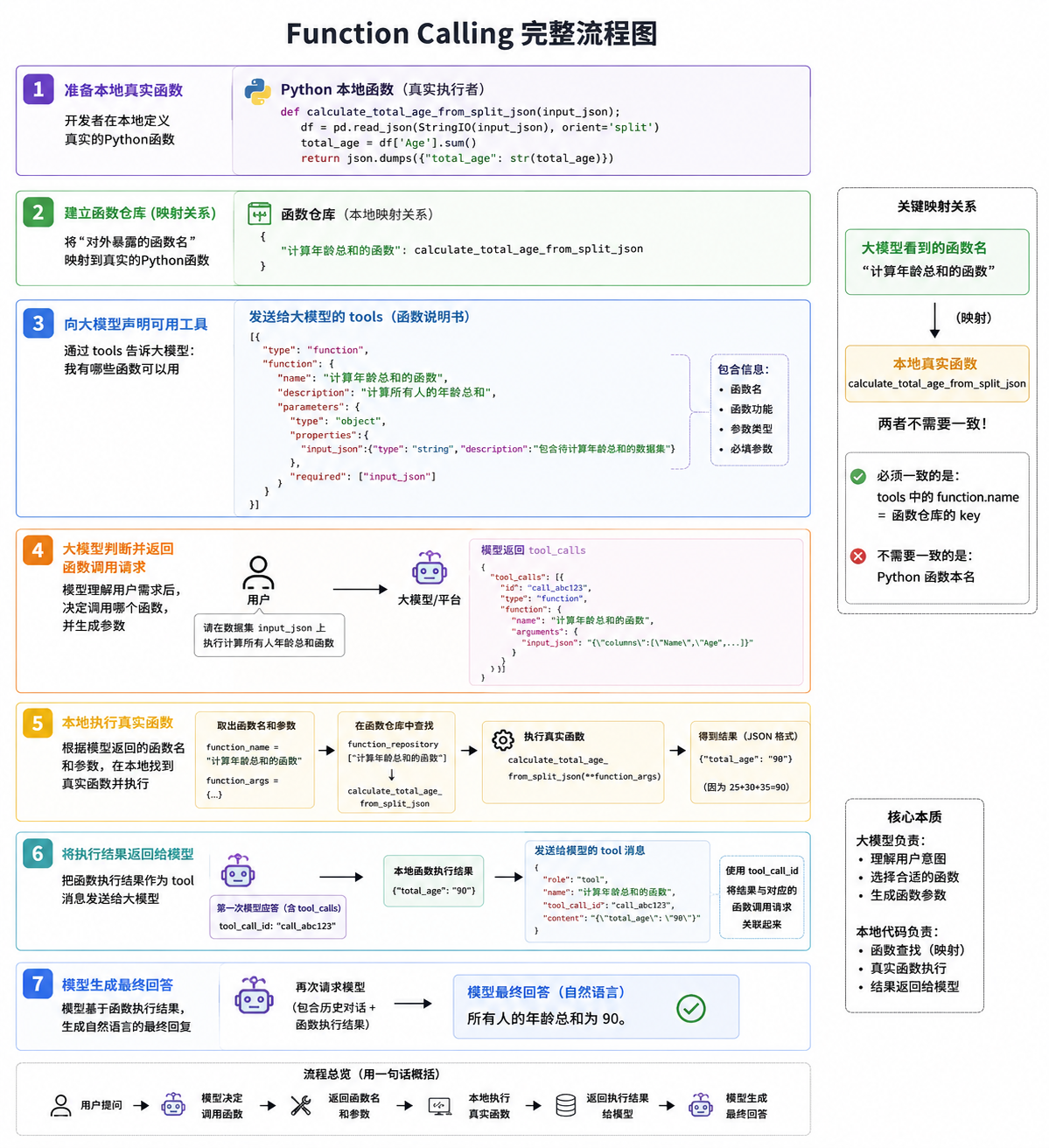
)
"""
传给大模型的函数名称必须和函数的本名一模一样吗?
"""
import pandas as pd

from models import get_normal_client, ALI_TONGYI_MAX_MODEL, ALI_TONGYI_PLUS_MODEL

client = get_normal_client()
import json
from io import StringIO

# 加载样例数据
df_complex = pd.DataFrame({
    'Name': ['Alice', 'Bob', 'Charlie'],
    'Age': [25, 30, 35],
    'Salary': [50000.0, 100000.5, 150000.75],
    'IsMarried': [True, False, True]
})
print(df_complex)

# 将样例数据中的DataFrame转换为JSON格式
df_complex_json = df_complex.to_json(orient='split')

# 编写函数功能
def calculate_total_age_from_split_json(input_json):
    """
    从给定的JSON格式字符串(按'split'方向排列)中解析出DataFrame,计算所有人的年龄总和,并以JSON格式返回结果。
    参数:
    input_json (str): 包含个体数据的JSON格式字符串。
    返回:
    str: 所有人的年龄总和,以JSON格式返回。
    """
    print("函数calculate_total_age_from_split_json被调用")
    # 将JSON字符串转换为DataFrame
    df = pd.read_json(StringIO(input_json), orient='split')
    # 计算所有人的年龄总和
    total_age = df['Age'].sum()
    # 将结果转换为字符串形式,然后使用json.dumps()转换为JSON格式
    return json.dumps({"total_age": str(total_age)})

#  测试函数功能  使用函数计算年龄总和,并以JSON格式输出
result = calculate_total_age_from_split_json(df_complex_json)
print("The JSON output is:", result)

# 定义函数库
function_repository = {
    "计算年龄总和的函数": calculate_total_age_from_split_json,
}

# 构建messages
messages = [
    {"role": "system","content": "你是一位优秀的数据分析师, 现在有这样一个数据集input_json:%s,数据集以JSON形式呈现" % df_complex_json},
    {"role": "user", "content": "请在数据集input_json上执行计算所有人年龄总和函数"}
]
response = client.chat.completions.create(
    model=ALI_TONGYI_PLUS_MODEL,
    messages=messages,
    # 加载函数调用的参数
    tools=[{  # 用 JSON 描述函数。可以定义多个。由大模型决定调用谁。也可能都不调用
        "type": "function",
        "function": {
            "name": "计算年龄总和的函数",
            "description": "计算年龄总和的函数,会从给定的JSON格式字符串中解析出DataFrame,计算所有人的年龄总和,并以JSON格式返回结果。",
            "parameters": {
                "type": "object",
                "properties": {
                    "input_json": {
                        "type": "string",
                        "description": "包含待计算年龄总和的数据集",
                    },
                },
                "required": ["input_json"],
            }
        }
    }],  # 编写JSON Schema描述
    tool_choice="auto"
)
print('发送给大模型的消息: ',messages)
print('大模型的应答:  ',response.choices[0].message)

# 保存交互过程中的函数名称
function_name = response.choices[0].message.tool_calls[0].function.name
print('大模型的认为应该执行的函数: ', function_name)

# 加载交互过程中的参数
function_args = json.loads(response.choices[0].message.tool_calls[0].function.arguments)
print('应该执行的函数所需要的参数:',function_args)

# 保存交互过程中的函数ID
tool_calls_id = response.choices[0].message.tool_calls[0].id
print('应该执行的函数的ID: ',tool_calls_id)


# 得到外部函数的响应结果
local_fuction_call = function_repository[function_name]
print('本地函数调用: ',local_fuction_call)
function_response = local_fuction_call(**function_args)
print('本地函数调用结果:',function_response)

# 拼接模型返回结果messages
messages.append(response.choices[0].message)
print('发送给大模型的消息拼接 - 1、应答: ',messages)

# 拼接函数执行结果messages
messages.append({
    "role": "tool",
    "name": function_name,
    "tool_call_id": tool_calls_id,
    "content": function_response
    }
)

print('发送给大模型的消息拼接- 2、函数执行结果: ',messages)

# 再次向ChatCompletion模型提问
final_response = client.chat.completions.create(
    model=ALI_TONGYI_PLUS_MODEL,
    messages=messages,
)

print('answer: ',final_response.choices[0].message.content)

AtomGit 是由开放原子开源基金会联合 CSDN 等生态伙伴共同推出的新一代开源与人工智能协作平台。平台坚持“开放、中立、公益”的理念,把代码托管、模型共享、数据集托管、智能体开发体验和算力服务整合在一起,为开发者提供从开发、训练到部署的一站式体验。
更多推荐


 1
1 0
0- 0


 已为社区贡献2条内容

所有评论(0)