卡帕西 AI 编程神级指令!Codex / Claude / Cursor 通用 AGENTS.md 保姆级教程
目录
二、GitHub 上如何找到 andrej-karpathy-skills 和 AGENTS.md
2.4 点击进入 Add Codex AGENTS instructions
三、Codex、Claude Code、Cursor 都能用吗
4.2 Claude Code 对应内容:CLAUDE.md
4.3 Cursor 对应内容:karpathy-guidelines.mdc
5.2 建议二:Codex、Claude Code、Cursor 可以同步维护
摘要
最近 GitHub 上一个名为 andrej-karpathy-skills 的项目非常火。它把 Andrej Karpathy 对 AI 编程智能体常见问题的观察,整理成了一套非常实用的行为准则,用来约束 Claude Code、Cursor、Codex 这类 AI 编程工具。
这个项目的核心目标不是让 AI 写更多代码,而是让 AI 写代码时更稳、更准、更少乱改。它通过 CLAUDE.md、.cursor/rules/karpathy-guidelines.mdc、AGENTS.md 这类规则文件,约束 AI 在写代码前先思考、实现时保持简单、修改时只动必要代码、完成后必须验证结果。
本文重点讲三件事:
- 第一,这个项目到底解决什么问题;
- 第二,如何在 GitHub 上一步步找到 Codex 可用的
AGENTS.md; - 第三,给出最终可直接复制到 Codex 自定义指令中的
AGENTS.md完整项目地址
 https://github.com/multica-ai/andrej-karpathy-skills
后续可以部署到对应的Agents上,比如我这是Codex:
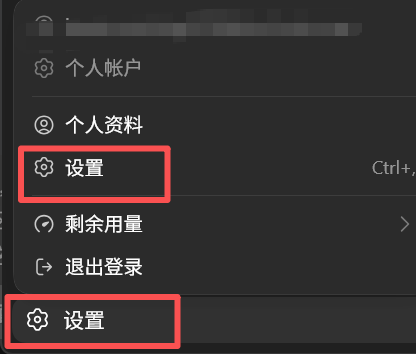
1. 打开Codex,点击左下角设置:
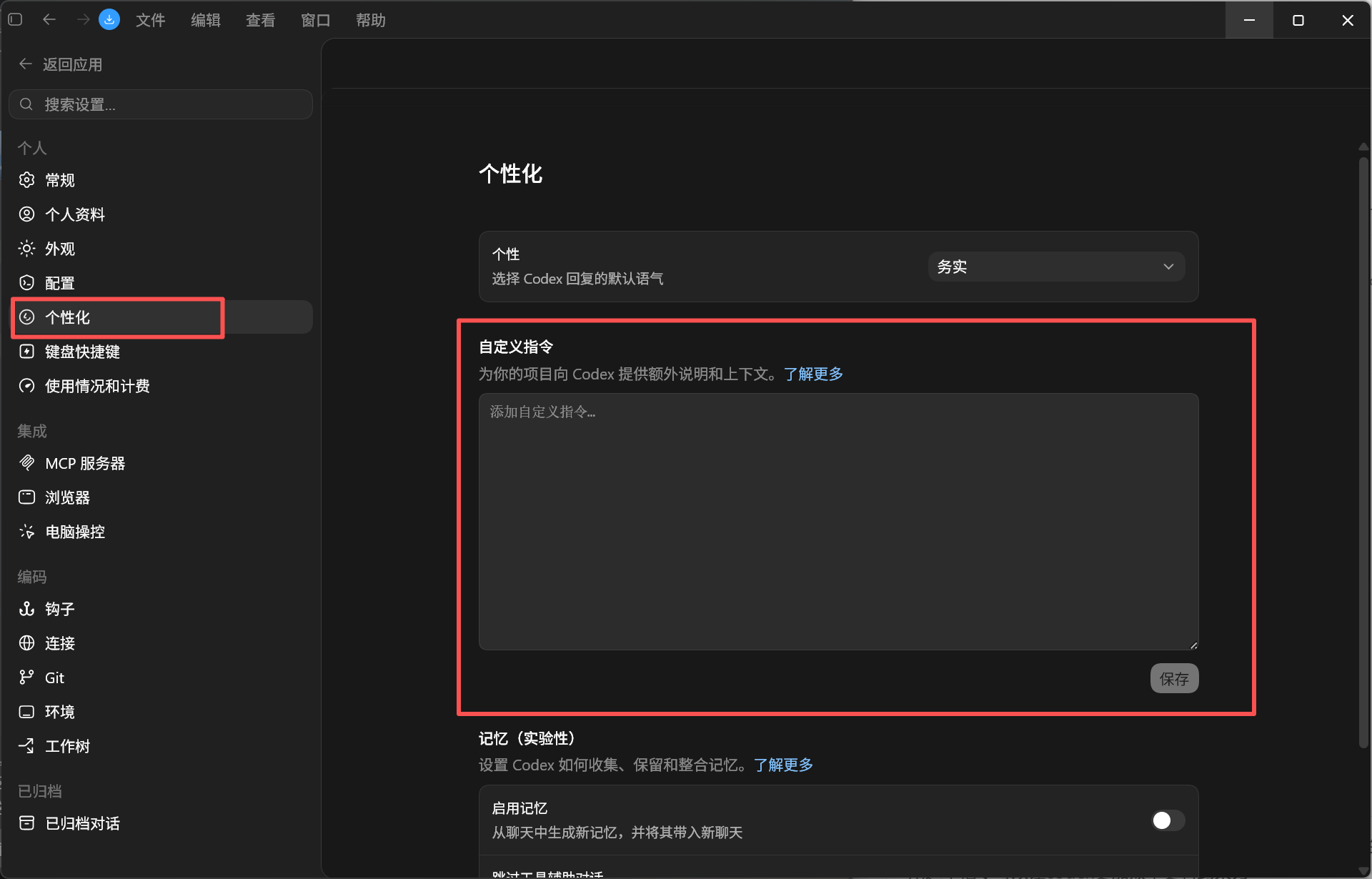
2. 点击个性化,在自定义指令中将 AGENTS.md 内容复制进去
一、为什么卡帕西 AI 编程规则突然火了
1.1 项目背景
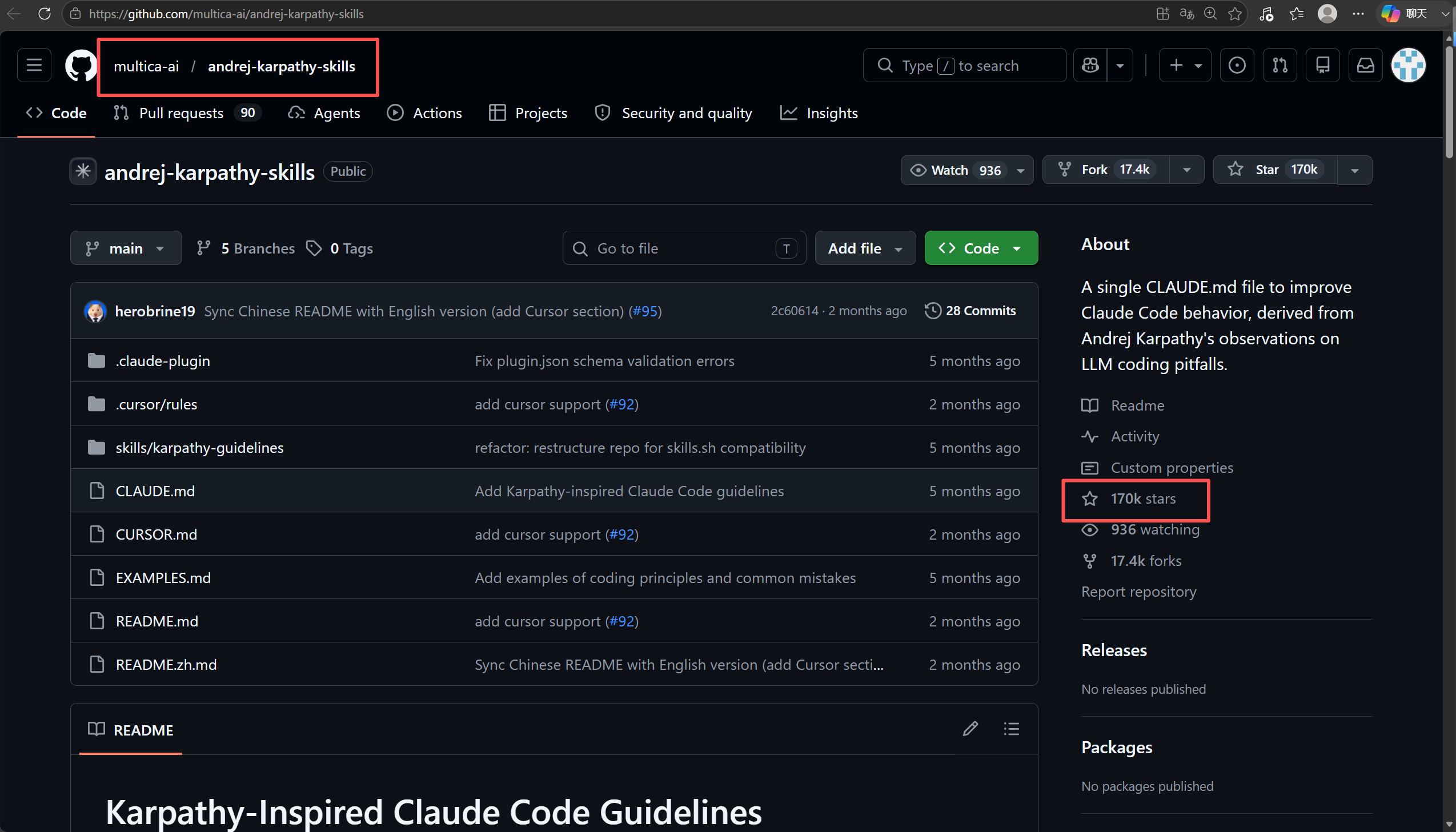
andrej-karpathy-skills 是一个围绕 AI 编程智能体行为约束的开源项目。项目 README 中介绍,它原本主要通过一个 CLAUDE.md 文件改善 Claude Code 的行为,规则来源于 Andrej Karpathy 对 LLM 编程常见问题的观察。项目当前在 GitHub 上已经达到约 170k Star、17.4k Fork,Star 数会持续变化,所以网上看到的 11.7 万、15 万、17 万,本质上都是不同时间点的数据。
项目链接:
https://github.com/multica-ai/andrej-karpathy-skills有些文章中也可能写成:
https://github.com/forrestchang/andrej-karpathy-skills现在访问时,建议优先使用 multica-ai/andrej-karpathy-skills 这个仓库地址。
1.2 Karpathy 观察到的 AI 编程问题
在 AI 编程过程中,LLM Agent 经常会出现一些很典型的问题。
(1)默默做假设
用户只是说“帮我优化一下”,AI 可能没有问清楚到底是优化性能、代码结构、可读性,还是修复潜在 bug,就自己选择一个方向开始改。
(2)过度复杂化
一个本来几十行代码能解决的问题,AI 可能会加一堆抽象层、配置项、工具类和复杂错误处理。项目 README 中也提到,模型容易把原本 100 行能完成的事情扩展成 1000 行。
(3)乱改无关代码
AI 在修改一个小功能时,经常会顺手改动旁边的注释、格式、命名,甚至重构不相关代码。这样会导致 diff 很脏,代码审查难度变大。
(4)没有验证目标
很多 AI 编程任务只是“改完了”,但没有明确验证:bug 是否复现过?测试是否通过?功能是否符合预期?这就很容易出现“看起来改了,其实没改对”的情况。
1.3 四条核心原则
这个项目把这些问题总结成四条规则:
(1)Think Before Coding:先思考再编码
要求 AI 不要一上来就写代码,而是先说明假设。如果有多种理解方式,要主动说出来。如果需求不清楚,要先问。
(2)Simplicity First:简洁优先
要求 AI 用最少代码解决问题,不要添加用户没有要求的功能,不要为了单次使用写复杂抽象。
(3)Surgical Changes:精准修改
要求 AI 只修改任务直接相关的代码,不要顺手优化无关内容,不要删除自己不理解的旧代码。
(4)Goal-Driven Execution:目标驱动执行
要求 AI 把模糊任务变成可验证目标。例如“修复 bug”应该变成“先复现 bug,再写测试或最小复现场景,然后修复并验证”。
这四条规则的核心价值可以总结为一句话:
让 AI 不再只是能写代码,而是写得更像一个有边界感的工程助手。
二、GitHub 上如何找到 andrej-karpathy-skills 和 AGENTS.md
2.1 搜索项目主页
先打开 GitHub,搜索:
multica-ai/andrej-karpathy-skills
进入项目主页后,可以看到项目描述大致是:一个用于改善 Claude Code 行为的 CLAUDE.md 文件,来源于 Andrej Karpathy 对 LLM 编程陷阱的观察。项目文件列表中能看到 CLAUDE.md、CURSOR.md、EXAMPLES.md、README.md、.cursor/rules、skills/karpathy-guidelines 等内容。
2.2 为什么首页可能找不到 AGENTS.md
这里要注意一点:项目主页当前主要文件是 CLAUDE.md 和 Cursor 相关规则,不一定能直接在主分支根目录看到 AGENTS.md。
原因是:
AGENTS.md 是在 Pull Request #164 中新增的。
也就是说,Codex 版本的 AGENTS.md 来源于该项目的一个 PR,而不是一开始就在主分支根目录里。
2.3 找到 Pull Request #164
操作步骤如下:
(1)打开项目主页
https://github.com/multica-ai/andrej-karpathy-skills(2)点击顶部菜单中的 Pull requests
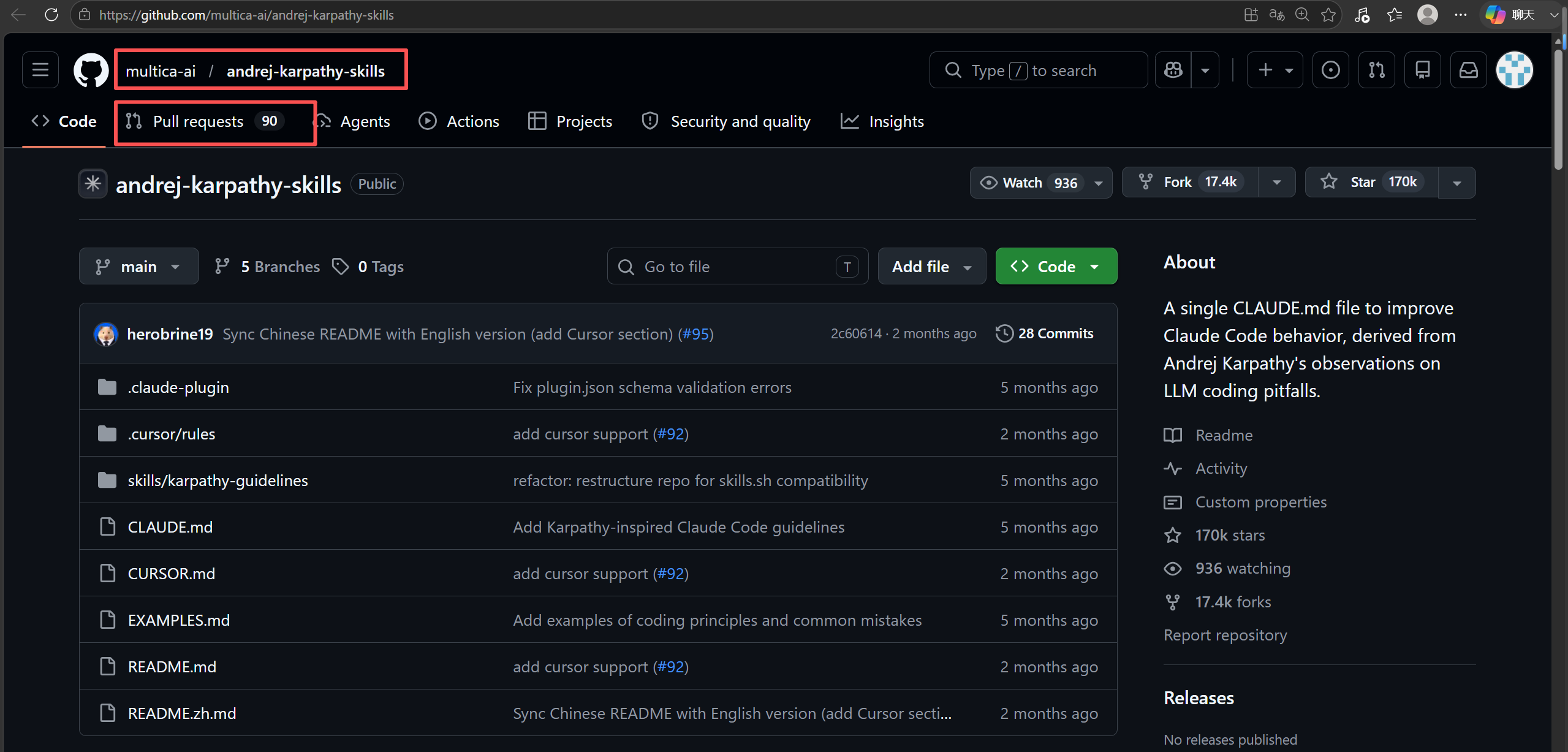
进入后搜索:
Add Codex AGENTS instructions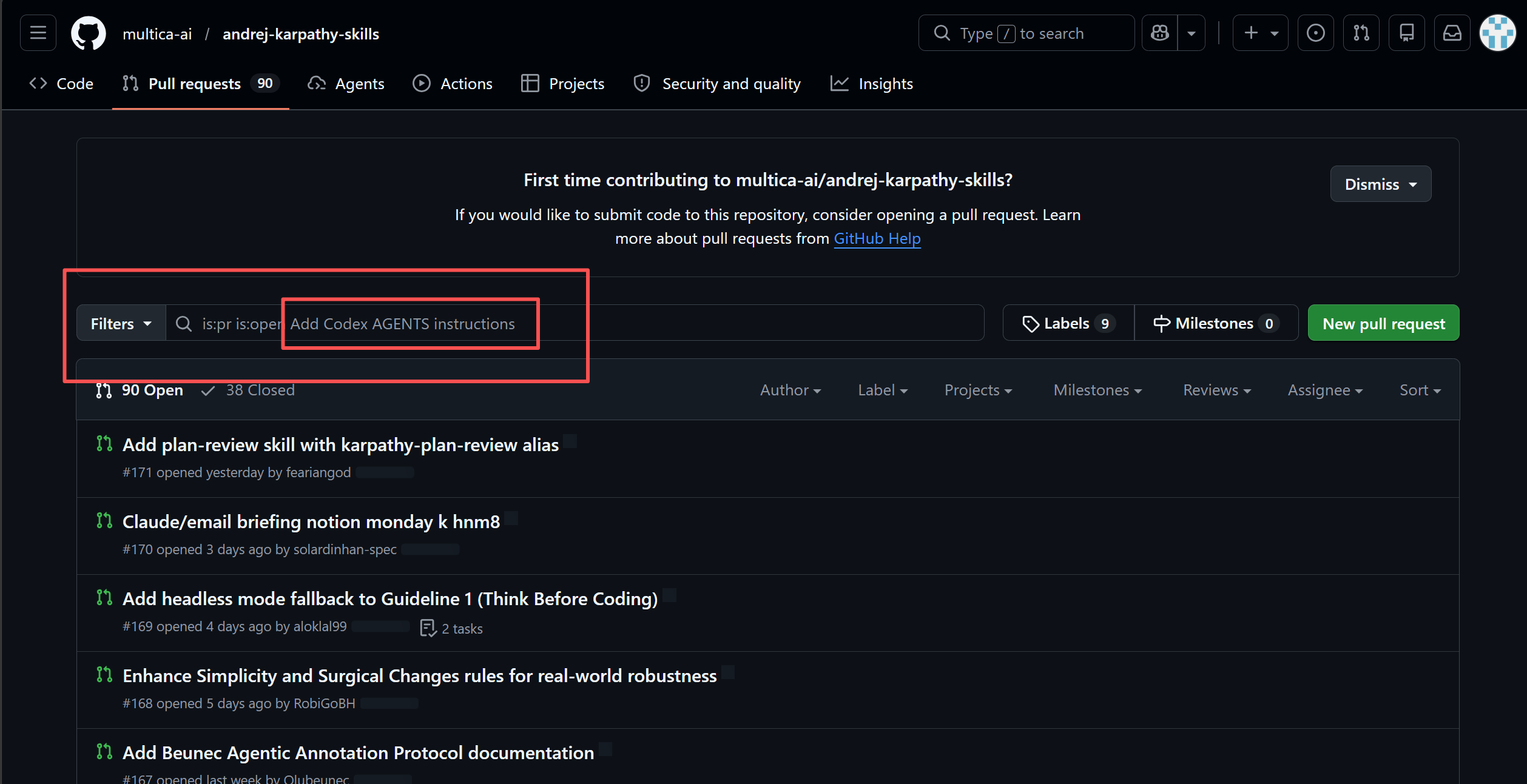
(3)打开这个 PR
PR 名称是:
Add Codex AGENTS instructions #164这个 PR 是由 gitbenlewis 提交,目标是把 1 个 commit 合并到 multica-ai:main,并且文件变化中包含 AGENTS.md 和 README.md。
PR 链接:
https://github.com/multica-ai/andrej-karpathy-skills/pull/164/files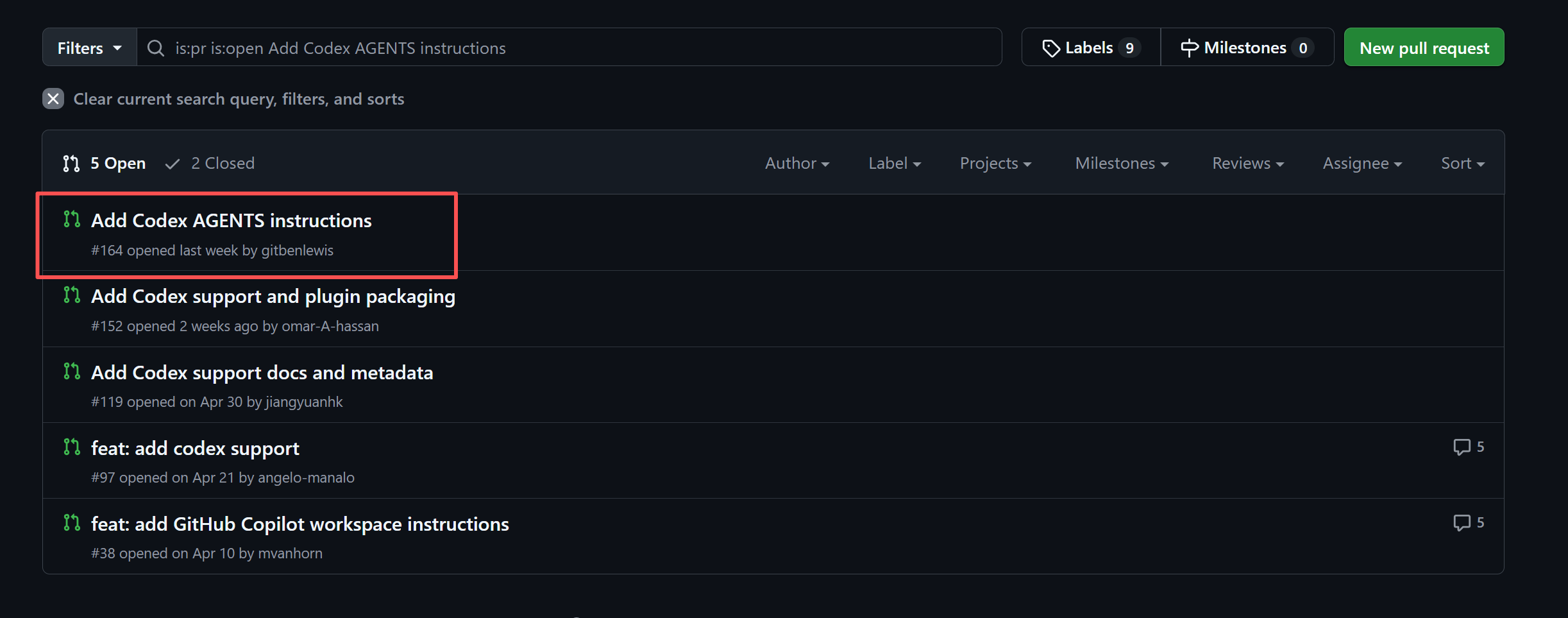
2.4 点击进入 Add Codex AGENTS instructions
进入 PR 后,点击:
Commits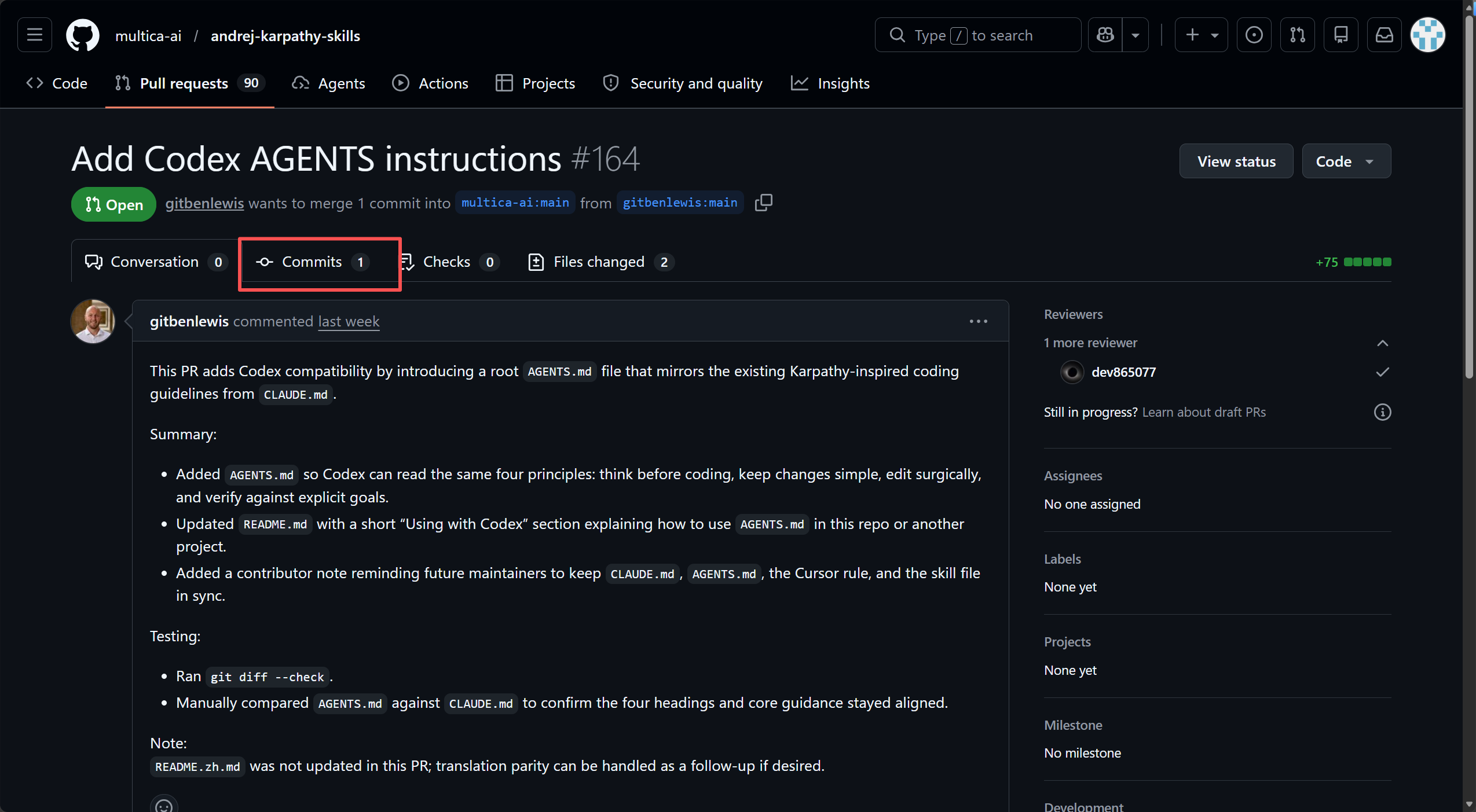
然后在文件列表中可以看到:
Add Codex AGENTS instructions
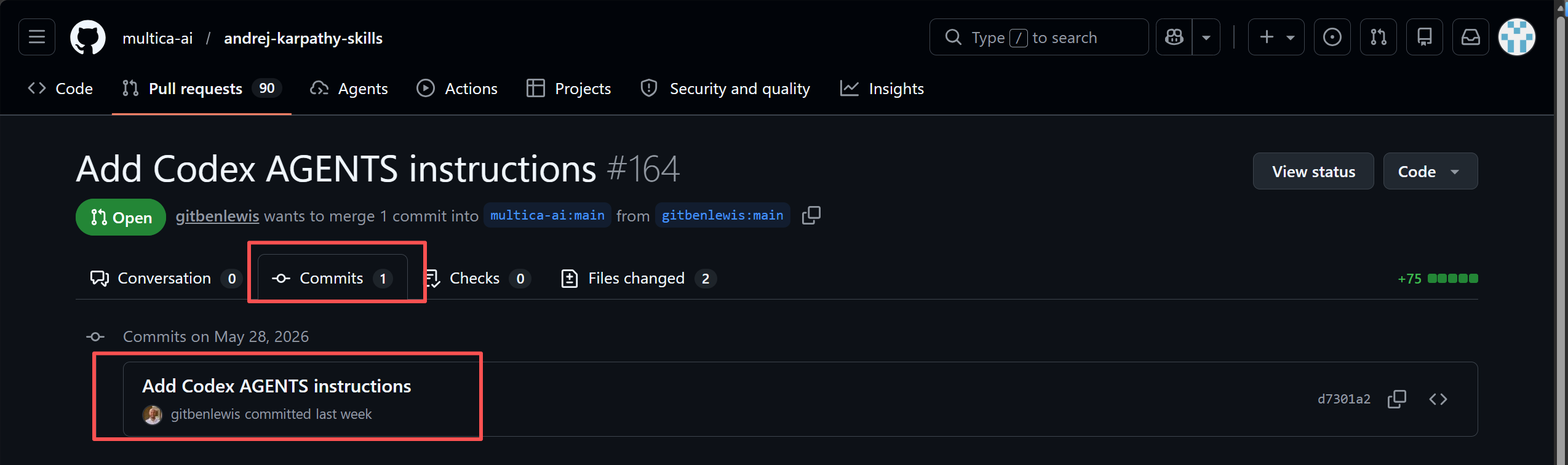
点击进入可以看到:
AGENTS.md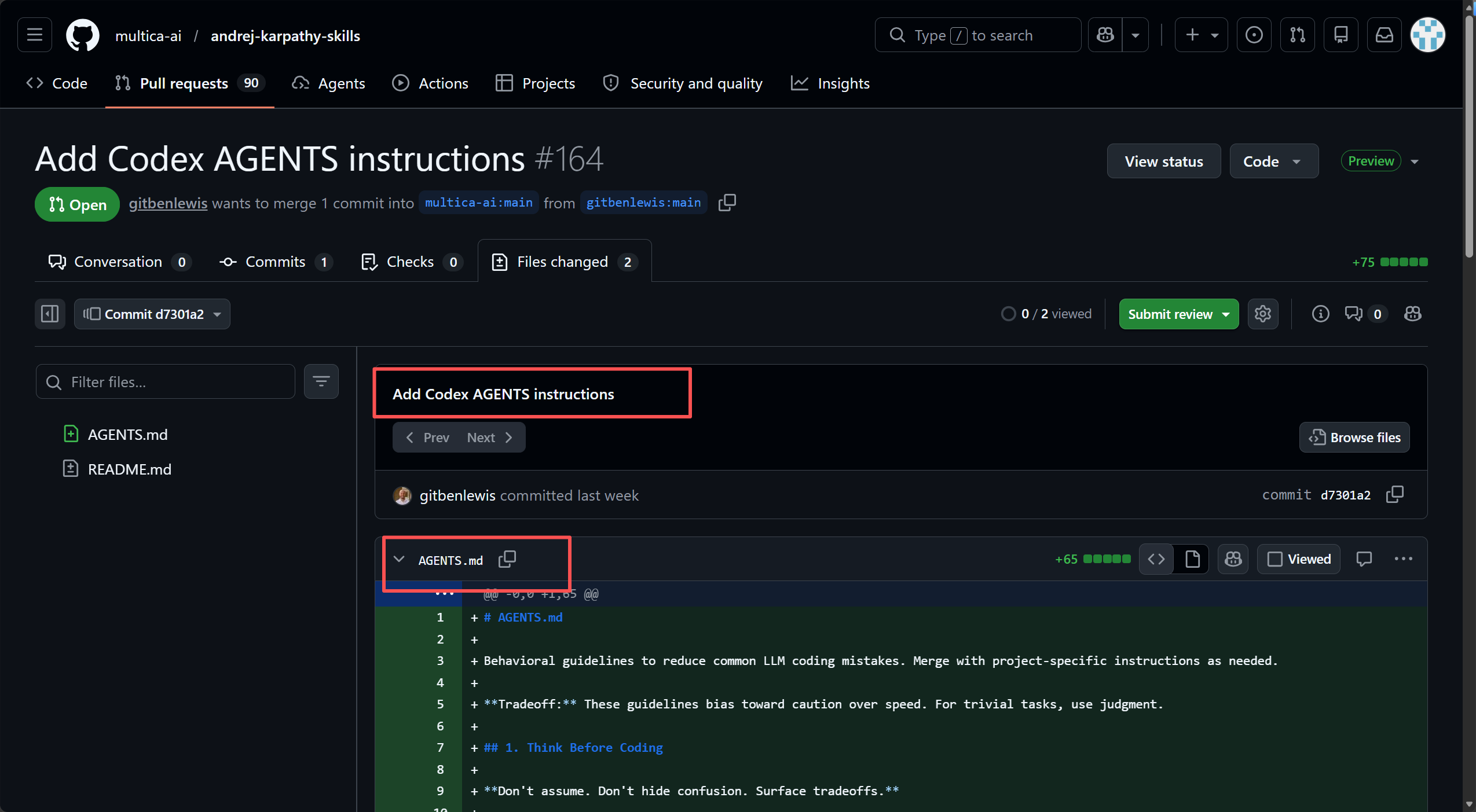
其中 AGENTS.md 是新增文件,显示为 65 行新增内容。文件内容从 # AGENTS.md 开始,后面就是四条行为准则:Think Before Coding、Simplicity First、Surgical Changes、Goal-Driven Execution。
PR 中 README 也新增了 Using with Codex 部分,说明这个仓库新增根目录 AGENTS.md 后,Codex 可以读取和项目指令相同的行为准则;如果要在其他项目复用,可以把 AGENTS.md 复制到目标项目根目录,或者合并进已有的 AGENTS.md。
三、Codex、Claude Code、Cursor 都能用吗
3.1 三者都可以用,但入口文件不同
答案是:Codex、Claude Code、Cursor 都可以用这套规则。
但是它们读取规则的方式不完全一样。
| 工具 | 推荐文件 | 推荐位置 | 作用 |
|---|---|---|---|
| Codex | AGENTS.md |
项目根目录或 ~/.codex/AGENTS.md |
Codex 项目级/全局指令 |
| Claude Code | CLAUDE.md |
项目根目录或 ~/.claude/CLAUDE.md |
Claude Code 项目记忆/用户记忆 |
| Cursor | karpathy-guidelines.mdc 或 AGENTS.md |
.cursor/rules/ 或项目根目录 |
Cursor 项目规则 |
Codex 官方文档说明,Codex 会在开始工作前读取 AGENTS.md,并且支持全局作用域和项目作用域。例如全局文件可以放在 ~/.codex/AGENTS.md,项目文件可以放在仓库根目录。Codex 会按照从全局到项目、从根目录到当前目录的顺序组合这些规则。
Claude Code 官方文档说明,CLAUDE.md 可以作为项目记忆或用户记忆被自动加载,例如项目级可以放在 ./CLAUDE.md,用户级可以放在 ~/.claude/CLAUDE.md。
Cursor 官方文档说明,Project Rules 通常存放在 .cursor/rules 目录中,规则文件使用 .mdc 格式;同时新版规则体系也支持 AGENTS.md 作为更简单的 Agent 指令方式。
3.2 三者内容一样吗
核心内容是一样的。
不管是 Codex 的 AGENTS.md,Claude Code 的 CLAUDE.md,还是 Cursor 的 .cursor/rules/karpathy-guidelines.mdc,它们本质上都是同一套 Karpathy 风格行为准则:
1. Think Before Coding
2. Simplicity First
3. Surgical Changes
4. Goal-Driven Execution
区别主要有三个:
(1)文件名不同
Codex 推荐使用:
AGENTS.mdClaude Code 推荐使用:
CLAUDE.mdCursor 推荐使用:
.cursor/rules/karpathy-guidelines.mdc(2)加载方式不同
Codex 会读取 AGENTS.md;Claude Code 会读取 CLAUDE.md;Cursor 会读取 .cursor/rules/ 下的规则文件。项目中的 CURSOR.md 也说明,Cursor 不会默认读取 .claude-plugin/ 或 CLAUDE.md,所以 Cursor 更推荐使用 .cursor/rules/karpathy-guidelines.mdc。
(3)Cursor 需要额外的 frontmatter
Cursor 的 .mdc 文件前面一般会有一段元信息,例如:
---
description: ...
alwaysApply: true
---
其中 alwaysApply: true 表示这条规则尽量始终应用到当前项目中。项目的 CURSOR.md 中也说明,该仓库已经提交了 .cursor/rules/karpathy-guidelines.mdc,并设置为 alwaysApply: true。
3.3 怎么选择
如果你主要用 Codex,就用:
AGENTS.md如果你主要用 Claude Code,就用:
CLAUDE.md如果你主要用 Cursor,就用:
.cursor/rules/karpathy-guidelines.mdc它们内容核心保持一致即可。这样不管你用哪个 AI 编程工具打开项目,都能受到同一套工程规则约束。
四、三种工具对应的规则文件内容
4.1 Codex 对应内容:AGENTS.md
如果你使用 Codex,可以在项目根目录新建:
AGENTS.md然后复制下面内容。
# AGENTS.md

Behavioral guidelines to reduce common LLM coding mistakes. Merge with project-specific instructions as needed.

**Tradeoff:** These guidelines bias toward caution over speed. For trivial tasks, use judgment.

## 1. Think Before Coding

**Don't assume. Don't hide confusion. Surface tradeoffs.**

Before implementing:
- State your assumptions explicitly. If uncertain, ask.
- If multiple interpretations exist, present them - don't pick silently.
- If a simpler approach exists, say so. Push back when warranted.
- If something is unclear, stop. Name what's confusing. Ask.

## 2. Simplicity First

**Minimum code that solves the problem. Nothing speculative.**

- No features beyond what was asked.
- No abstractions for single-use code.
- No "flexibility" or "configurability" that wasn't requested.
- No error handling for impossible scenarios.
- If you write 200 lines and it could be 50, rewrite it.

Ask yourself: "Would a senior engineer say this is overcomplicated?" If yes, simplify.

## 3. Surgical Changes

**Touch only what you must. Clean up only your own mess.**

When editing existing code:
- Don't "improve" adjacent code, comments, or formatting.
- Don't refactor things that aren't broken.
- Match existing style, even if you'd do it differently.
- If you notice unrelated dead code, mention it - don't delete it.

When your changes create orphans:
- Remove imports/variables/functions that YOUR changes made unused.
- Don't remove pre-existing dead code unless asked.

The test: Every changed line should trace directly to the user's request.

## 4. Goal-Driven Execution

**Define success criteria. Loop until verified.**

Transform tasks into verifiable goals:
- "Add validation" -> "Write tests for invalid inputs, then make them pass"
- "Fix the bug" -> "Write a test that reproduces it, then make it pass"
- "Refactor X" -> "Ensure tests pass before and after"

For multi-step tasks, state a brief plan:
```
1. [Step] -> verify: [check]
2. [Step] -> verify: [check]
3. [Step] -> verify: [check]
```

Strong success criteria let you loop independently. Weak criteria ("make it work") require constant clarification.

---

**These guidelines are working if:** fewer unnecessary changes in diffs, fewer rewrites due to overcomplication, and clarifying questions come before implementation rather than after mistakes.
Codex 全局使用时,可以放到:
~/.codex/AGENTS.md项目级使用时,可以放到项目根目录:
my_project/
├── AGENTS.md
├── src/
├── include/
├── CMakeLists.txt
└── README.md
4.2 Claude Code 对应内容:CLAUDE.md
如果你使用 Claude Code,可以在项目根目录新建:
CLAUDE.md内容和 AGENTS.md 基本一样,只是文件名和标题改成 CLAUDE.md。
# CLAUDE.md

Behavioral guidelines to reduce common LLM coding mistakes. Merge with project-specific instructions as needed.

**Tradeoff:** These guidelines bias toward caution over speed. For trivial tasks, use judgment.

## 1. Think Before Coding

**Don't assume. Don't hide confusion. Surface tradeoffs.**

Before implementing:
- State your assumptions explicitly. If uncertain, ask.
- If multiple interpretations exist, present them - don't pick silently.
- If a simpler approach exists, say so. Push back when warranted.
- If something is unclear, stop. Name what's confusing. Ask.

## 2. Simplicity First

**Minimum code that solves the problem. Nothing speculative.**

- No features beyond what was asked.
- No abstractions for single-use code.
- No "flexibility" or "configurability" that wasn't requested.
- No error handling for impossible scenarios.
- If you write 200 lines and it could be 50, rewrite it.

Ask yourself: "Would a senior engineer say this is overcomplicated?" If yes, simplify.

## 3. Surgical Changes

**Touch only what you must. Clean up only your own mess.**

When editing existing code:
- Don't "improve" adjacent code, comments, or formatting.
- Don't refactor things that aren't broken.
- Match existing style, even if you'd do it differently.
- If you notice unrelated dead code, mention it - don't delete it.

When your changes create orphans:
- Remove imports/variables/functions that YOUR changes made unused.
- Don't remove pre-existing dead code unless asked.

The test: Every changed line should trace directly to the user's request.

## 4. Goal-Driven Execution

**Define success criteria. Loop until verified.**

Transform tasks into verifiable goals:
- "Add validation" -> "Write tests for invalid inputs, then make them pass"
- "Fix the bug" -> "Write a test that reproduces it, then make it pass"
- "Refactor X" -> "Ensure tests pass before and after"

For multi-step tasks, state a brief plan:
```
1. [Step] -> verify: [check]
2. [Step] -> verify: [check]
3. [Step] -> verify: [check]
```

Strong success criteria let you loop independently. Weak criteria ("make it work") require constant clarification.

---

**These guidelines are working if:** fewer unnecessary changes in diffs, fewer rewrites due to overcomplication, and clarifying questions come before implementation rather than after mistakes.
如果使用项目 README 中的方式,也可以通过命令下载 CLAUDE.md。
新项目:
curl -o CLAUDE.md https://raw.githubusercontent.com/forrestchang/andrej-karpathy-skills/main/CLAUDE.md已有项目追加:
echo "" >> CLAUDE.md
curl https://raw.githubusercontent.com/forrestchang/andrej-karpathy-skills/main/CLAUDE.md >> CLAUDE.md
项目 README 中也提供了 Claude Code 插件安装方式:
/plugin marketplace add forrestchang/andrej-karpathy-skills
/plugin install andrej-karpathy-skills@karpathy-skills
这些命令来自项目 README 的安装说明。
4.3 Cursor 对应内容:karpathy-guidelines.mdc
如果你使用 Cursor,推荐在项目中创建目录:
.cursor/rules/然后新建文件:
karpathy-guidelines.mdcCursor 版本比 AGENTS.md / CLAUDE.md 多了一段 .mdc 元信息,核心正文仍然是同样的四条规则。
---
description: Behavioral guidelines to reduce common LLM coding mistakes. Use when writing, reviewing, or refactoring code to avoid overcomplication, make surgical changes, surface assumptions, and define verifiable success criteria.
alwaysApply: true
---

# Karpathy behavioral guidelines

Behavioral guidelines to reduce common LLM coding mistakes. Merge with project-specific instructions as needed.

**Tradeoff:** These guidelines bias toward caution over speed. For trivial tasks, use judgment.

## 1. Think Before Coding

**Don't assume. Don't hide confusion. Surface tradeoffs.**

Before implementing:
- State your assumptions explicitly. If uncertain, ask.
- If multiple interpretations exist, present them - don't pick silently.
- If a simpler approach exists, say so. Push back when warranted.
- If something is unclear, stop. Name what's confusing. Ask.

## 2. Simplicity First

**Minimum code that solves the problem. Nothing speculative.**

- No features beyond what was asked.
- No abstractions for single-use code.
- No "flexibility" or "configurability" that wasn't requested.
- No error handling for impossible scenarios.
- If you write 200 lines and it could be 50, rewrite it.

Ask yourself: "Would a senior engineer say this is overcomplicated?" If yes, simplify.

## 3. Surgical Changes

**Touch only what you must. Clean up only your own mess.**

When editing existing code:
- Don't "improve" adjacent code, comments, or formatting.
- Don't refactor things that aren't broken.
- Match existing style, even if you'd do it differently.
- If you notice unrelated dead code, mention it - don't delete it.

When your changes create orphans:
- Remove imports/variables/functions that YOUR changes made unused.
- Don't remove pre-existing dead code unless asked.

The test: Every changed line should trace directly to the user's request.

## 4. Goal-Driven Execution

**Define success criteria. Loop until verified.**

Transform tasks into verifiable goals:
- "Add validation" -> "Write tests for invalid inputs, then make them pass"
- "Fix the bug" -> "Write a test that reproduces it, then make it pass"
- "Refactor X" -> "Ensure tests pass before and after"

For multi-step tasks, state a brief plan:
```
1. [Step] -> verify: [check]
2. [Step] -> verify: [check]
3. [Step] -> verify: [check]
```

Strong success criteria let you loop independently. Weak criteria ("make it work") require constant clarification.

---

**These guidelines are working if:** fewer unnecessary changes in diffs, fewer rewrites due to overcomplication, and clarifying questions come before implementation rather than after mistakes.
Cursor 项目结构可以这样放:
my_project/
├── .cursor/
│   └── rules/
│       └── karpathy-guidelines.mdc
├── src/
├── package.json
└── README.md
4.4 三种文件内容对比
三种文件可以这样理解:
| 工具 | 文件 | 内容是否一样 | 主要区别 |
|---|---|---|---|
| Codex | AGENTS.md |
核心一样 | Codex 推荐的项目指令文件 |
| Claude Code | CLAUDE.md |
核心一样 | Claude Code 的项目记忆文件 |
| Cursor | .cursor/rules/karpathy-guidelines.mdc |
核心一样 | 多了 .mdc 元信息和 alwaysApply: true |
所以严格来说:
规则思想一样,正文核心一样,文件格式不同。五、使用建议与总结
5.1 建议一:不要只放通用规则,还要加项目规则
通用规则只能约束 AI 的行为习惯,但真正做工程时,还需要加入你的项目特定要求。
例如 ROS2 项目可以补充:
## Project-Specific Guidelines

- 使用 ROS2 Humble 风格编写代码。
- 不要随意修改 package.xml 和 CMakeLists.txt,除非任务明确要求。
- 节点名、话题名、消息类型必须和现有工程保持一致。
- 修改代码后,至少说明应该使用哪些 ros2 命令验证。
C++ 项目可以补充:
## Project-Specific Guidelines

- 使用 C++17。
- 不要随意改变已有函数接口。
- 优先保持原项目代码风格。
- 修改后检查是否引入未使用头文件。
这样 AI 不仅知道“不要乱改”,还知道“这个项目具体不能乱改哪里”。
5.2 建议二:Codex、Claude Code、Cursor 可以同步维护
如果你同时使用三个工具,建议保持这三个文件同步:
AGENTS.md
CLAUDE.md
.cursor/rules/karpathy-guidelines.mdc
每次修改规则时,三个地方都同步更新。
项目自己的 CURSOR.md 也提醒贡献者,如果修改四条原则,需要让 CLAUDE.md、.cursor/rules/karpathy-guidelines.mdc 和 Skill 内容保持同步;PR #164 中也进一步提到要让 CLAUDE.md、AGENTS.md、Cursor 规则和 Skill 文件保持同步。
5.3 建议三:不要期待规则 100% 强制执行
这类规则本质上是给 AI 的行为指导,不是编译器规则,也不是强制约束。
它能显著降低 AI 乱改代码、过度设计、没问清楚就动手的概率,但不代表 AI 永远不会犯错。
所以正确使用方式应该是:
规则文件负责约束 AI;
人负责审查关键逻辑;
测试负责验证最终结果。
尤其是涉及机器人控制、自动驾驶、硬件驱动、金融交易、生产环境代码时,一定不要完全依赖 AI 直接提交。
六、总结
andrej-karpathy-skills 这个项目真正有价值的地方,不是代码量,而是它把 AI 编程中最容易出问题的地方总结成了四条非常清晰的工程纪律:
- 先思考,再编码;
- 保持简单,不要过度设计;
- 精准修改,不乱碰无关代码;
- 定义目标,改完必须验证。
对于 Codex 来说,它对应的是:
AGENTS.md对于 Claude Code 来说,它对应的是:
CLAUDE.md对于 Cursor 来说,它对应的是:
.cursor/rules/karpathy-guidelines.mdc三者内容核心一样,区别只是不同工具读取规则的入口不同。
如果你正在用 Codex、Claude Code、Cursor 做 C++、ROS2、机器人、算法工程或者论文代码,这套规则非常值得放进项目里。它不能保证 AI 永远不犯错,但可以让 AI 少一点“自作主张”,多一点“工程边界感”。

AtomGit 是由开放原子开源基金会联合 CSDN 等生态伙伴共同推出的新一代开源与人工智能协作平台。平台坚持“开放、中立、公益”的理念,把代码托管、模型共享、数据集托管、智能体开发体验和算力服务整合在一起,为开发者提供从开发、训练到部署的一站式体验。
更多推荐
 17
17 0
0- 0



 已为社区贡献15条内容

所有评论(0)