IO全家桶——C++输入输出
一、IO流类继承体系
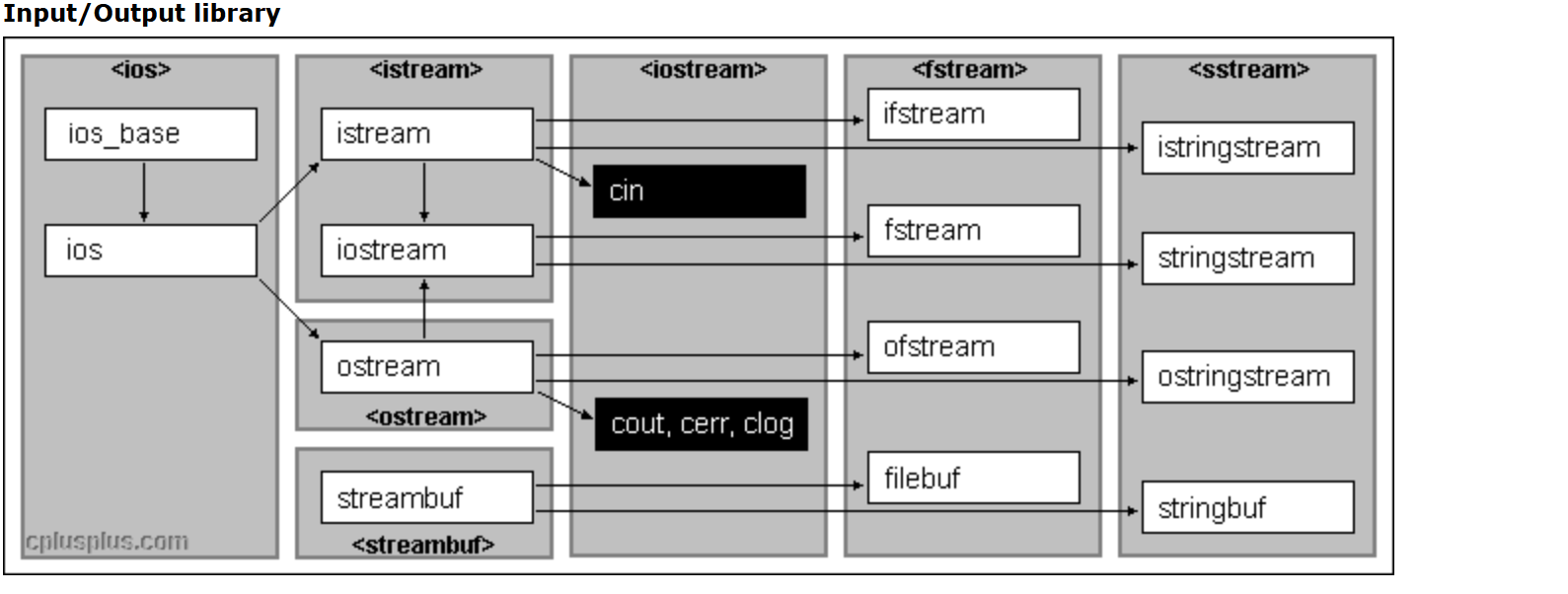
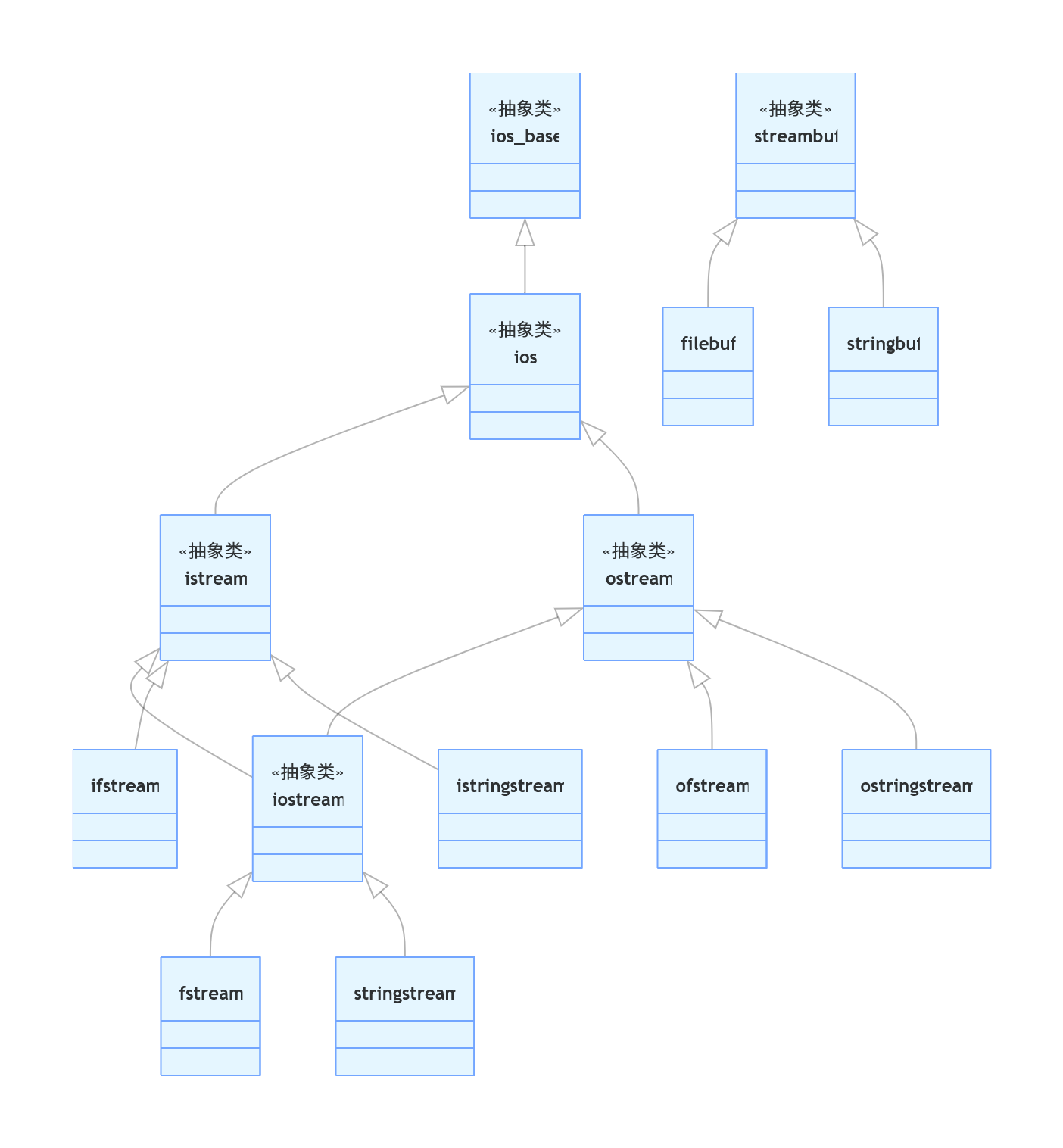
1上层流体系(格式化、<<>> 操作)
普通流
ios_base:最顶层基类,管控格式标志、流异常、精度,不读写数据。
ios:继承 ios_base,绑定缓冲区指针,管理流状态位 (good/eof/fail/bad)。
istream:继承 ios,输入基类,重载
>>,负责从键盘读信息;实例化对象:cin。ostream:继承 ios,输出基类,重载
<<,负责打印信息到屏幕;实例化对象:cout、cerr、clog。iostream:多继承 istream+ostream,继承了istream 和 ostream的所有功能。
文件流(<fstream>)
ifstream:继承 istream,负责实现读取文件信息ofstream:继承 ostream,负责实现写入信息到文件中fstream:继承 iostream,负责文件读写(不常用)
字符串流(<sstream>)
istringstream:继承 istream,从 string 读数据、串转数值ostringstream:继承 ostream,数据写入 string、数值转串stringstream:继承 iostream,string 双向读写
2底层缓冲体系(真实存数据,独立分支,一般不显式调用,是底层逻辑,工程项目中意义不大)
- streambuf:缓冲顶层父类,负责底层内存 / 磁盘数据存取。
- filebuf:继承 streambuf,文件流配套缓冲区。
- stringbuf:继承 streambuf,字符串流配套缓冲区
3IO标准流对象和重定向
iostream文件中定义了四个标准对象:
常用的cin是i继承的ostream的对象,cout是继承的ostream的对象,另外还有cerr clog两个用于打印错误信息的对象。
所谓重定向就是 改变流的默认方向
原本:
cout输出到屏幕cin从键盘读取重定向后:
cout可以输出到文件cin可以从文件读取- 代码完全不用改!
值得注意的是cin,cout才有重定向,cerr和clog都没有
cin重定向从文件读取:
#include <iostream>
#include <fstream>
using namespace std;

int main() {
    // 打开输入文件
    ifstream file("in.txt");

    // cin 重定向 → 从文件读,不再从键盘读
    cin.rdbuf(file.rdbuf());

    int a;
    cin >> a;  // 从 in.txt 读取
    cout << "读取到:" << a << endl;

    return 0;
}
cout重定向输出到文件中:
#include <iostream>
#include <fstream>   // 文件流头文件
using namespace std;

int main() {
    // 1. 打开一个输出文件
    ofstream file("out.txt");

    // 2. 把 cout 的缓冲区 换成 文件的缓冲区
    cout.rdbuf(file.rdbuf());

    // 3. 现在所有 cout 都不会输出到屏幕,而是写入 out.txt!
    cout << "Hello, 重定向!" << endl;
    cout << 12345 << endl;

    return 0;
}
4常用的输入输出相关函数
iostream 常用输入输出函数(纯控制台)
4.1输出函数(cout 相关)
1. cout << (最常用)
- 标准输出
- 输出数字、字符、字符串
- 自动排版
- 不同类型的变量用<<间隔输出
cout << "Hello" << endl;
cout << 123 << " " << 3.14;
2. cout.put()
输出单个字符。
cout.put('A');
3. cout.write()
按字节输出字符串(C 风格)
cout.write("abcde", 3); // 输出前3个字符:abc
4.2输入函数(cin 相关)
1. cin >> (最常用)
- 标准输入
- 自动跳过空格、回车、制表符
- 适合读数字、单词
- 不同类型的变量用>>间隔输入
int a;
cin >> a;

char s[20];
cin >> s;
2. cin.get()
读取一个字符(包括空格、回车),不跳过任何字符。
两种写法:
char ch;
cin.get(ch);   // 读入 ch
char ch = cin.get(); // 返回读取的字符
3. cin.getline()
读取一整行到 char[],遇到回车结束。可以读空格!
char buf[100];
cin.getline(buf, 100);
4. cin.peek()
偷看下一个字符,不读取、指针不动。
常用于:
- 判断下一个是不是回车
- 判断是否结束输入
char ch = cin.peek();
5. cin.ignore()
跳过(忽略)字符,最常用:吃掉缓冲区里的回车
cin.ignore(); // 跳过1个字符
cin.ignore(100, '\n'); // 跳过100个字符 或 直到换行
二、流四种状态标记
1.4种流状态
| 标志位 | 对应状态 | 含义 | 检测函数 | 能否恢复 |
|---|---|---|---|---|
| ios::goodbit | 正常 | 流正常,可读写 | good() | — |
| ios::badbit | 严重错误 | 流损坏,无法使用 | bad() | ❌ 不可恢复 |
| ios::eofbit | 到达末尾 | 已读到数据结尾 | eof() | ✅ 可恢复 |
| ios::failbit | 格式错误 | 类型不匹配 / 操作失败 | fail() | ✅ 可恢复 |
每个流对象都重载了operator bool 因此可以将流对象放置在if()()之中来判断流对象功能是否正常,下图代码就是通过此原理来实现OJ中最简单的多组输入:
#include<iostream>
using namespace std;
int main()
{
	int a ,b;
	while (cin >> a>>b)
	{
		if (a > b)cout << "yes" << endl;
		else cout << "no" << endl;
	}
}
如果要手动关闭连续输入,只需按CTRL +Z即可。
2.4 个 状态查询函数
作用:判断流现在处于什么状态,如果是对应状态就返回true
good()
- 流完全正常,无任何错误
- 返回 true = 可以正常读写
eof()
- 已读到末尾(文件 / 输入结束)
- 返回 true = 没有数据可读了
fail()
- 格式错误、操作失败(如类型不匹配如期望读取int 给的数据是char)
- 流未损坏,可以恢复
bad()
- 严重错误、流已损坏(磁盘错误、内存崩溃)
- 返回 true = 流彻底不能用
3.1 个 状态清除函数
clear()
- 作用:重置所有流状态位,把流恢复成正常状态
- 场景:
failbit错误后,必须用它恢复流 - 写法:
cin.clear(); // 恢复流状态
4.1 个 缓冲区清空函数
ignore()
- 作用:清空输入缓冲区里的垃圾数据
- 场景:
cin输入错误后,缓冲区残留错误字符,必须清空 - 常用写法(清空所有残留):
cin.ignore( numeric_limits<streamsize>::max(), '\n' );
5.1 个 获取当前状态码函数
rdstate()
- 作用:返回当前所有状态位组合(流状态储存信息是一个位运算的组合)
- 用途:判断流具体错误类型
- 示例:
if (cin.rdstate() == ios::failbit)
    cout << "格式错误";
知识切片——位组合:
基于二进制位运算设计的一种存储信息的方式,将不同信息存储进入同一变量,是用二进制位运算,把多个
是/否类型的小信息,塞进同一个数字变量里存储的技巧,核心是:一个变量存多组开关状态。
1. 底层原理:二进制的每一位都是一个开关
计算机里的数字,本质是二进制:
- 1 个字节(8 位)= 8 个独立的
0/1开关- 每一位代表一种状态:0 = 关闭 / 不包含,1 = 开启 / 包含
- 位组合就是用位与 (&)、位或 (|) 操作这些开关
举个例子(8 位二进制):
二进制:0      0     0    0     0    0     0     0
每一位:第7位 第6位 第5位 第4位 第3位 第2位 第1位 第0位
每一位都可以独立表示一个信息,比如:
- 第 0 位:是否开启加粗
- 第 1 位:是否开启斜体
- 第 2 位:是否开启下划线
2. 核心操作
我们先定义位常量(每一位对应一个 2 的幂):
// 每个常量独占 1 个二进制位,互不重叠
const BOLD = 1 << 0;  // 0001  二进制第0位
const ITALIC = 1 << 1; // 0010 二进制第1位
const UNDERLINE = 1 << 2; // 0100 二进制第2位
① 组合状态(添加开关:位或 |)
把多个状态合并存到一个变量里:
// 同时开启 加粗 + 斜体
let style = BOLD | ITALIC;
// 二进制:0011  十进制:3
|运算:只要有一个是 1,结果就是 1 → 把多个开关同时打开。② 判断状态(检查开关:位与 &)
查看变量里是否包含某个状态:
// 判断是否开启了加粗
if (style & BOLD) {
  console.log("已加粗");
}

// 判断是否开启了下划线
if (style & UNDERLINE) {
  console.log("已加下划线");
}
&运算:只有两位都是 1,结果才是 1 → 精准检测某一位是否为 1。③ 删除状态(关闭开关:位与非 &~)
从组合里移除某个状态:
// 关闭斜体,保留其他状态
style = style & ~ITALIC;
// 二进制从 0011 → 0001
3. 为什么要用位组合?
- 极省空间:1 个字节(8 位)能存 8 个开关,普通变量只能存 1 个状态
- 运算超快:位运算直接操作硬件,比判断多个布尔值快得多
代码简洁:不用定义一堆变量,一个变量管理所有状态
4.位组合实战
设计两个函数,一个用于记录日期错误信息,另一个用于输出日期错误信息:
#include<iostream>
using namespace std;
int monthDay[13] = { 0,31,28,31,30,31,30,31,31,30,31,30,31 };
class date
{
public:
	int _year;
	int _month;
	int _day;

};
istream& operator>>(istream& in, date& d1)
{
	cout << "请输入年/月/日" << endl;
	in >> d1._year >> d1._month >> d1._day;
	return in;
}
int is_leap(int year)
{
	return ((year % 4 == 0 && year % 100 != 0) || year % 400 == 0) ? 1 : 0;
}
int get_month_day(date d1)
{
	if (is_leap(d1._year) == 1)return 29;
	else if (d1._month > 0 && d1._month < 13) return monthDay[d1._month];
	else return -1;
}
int check_date()
{
	date d1;
	cin >> d1;
	int error = 0;
	if (d1._year < 1)error |= 1;
	if (d1._month < 1 || d1._month>12)error |= 2;
	if (d1._day<0 || d1._day>get_month_day(d1)) error |= 4;
	return error;
}
void print_error(int error)
{
	if ((error & 4) == 1)cout << "日期年无效" << endl;
	if ((error & 2) == 1)cout << "日期月无效" << endl;
	if ((error & 1) == 1)cout << "日期日无效" << endl;


}
int main()
{

	int error=check_date();
	print_error(error);

}
6.一个标记设置函数
setstate (标记)
- 作用:手动设置某个错误标志
- 示例:
cin.setstate(ios::failbit);
7.代码示例
// 定义一个 int 类型变量 a,用来接收输入
	int a;

	// 从控制台读取一个整数,存入变量 a
	// 如果输入不是数字(比如字母),cin 会进入错误状态
	cin >> a;

	// 输出 cin 的状态:good() 流正常返回 1,出错返回 0
	cout << cin.good() << endl
		// bad() 发生致命错误(如流损坏)返回 1,否则 0
		<< cin.bad() << endl
		// eof() 读到文件末尾/输入结束返回 1,否则 0
		<< cin.eof() << endl
		// fail() 格式错误/读取失败返回 1,否则 0(最常用)
		<< cin.fail() << endl;

	// 判断 cin 当前状态 是否 等于 failbit(读取失败)
	// rdstate() 返回当前所有状态位组合
	// ios::failbit 表示“读取格式错误”
	if(cin.rdstate()==ios::failbit)
		cout<<"failbit"<<endl;

	// 【关键】清除 cin 的所有错误状态位,把流恢复为“正常可用”
	// 如果不清空,后面的 cin 会一直失效
	cin.clear();

	// 忽略缓冲区中残留的 1 个字符(比如刚才输错的字母/回车)
	// 如果不忽略,残留字符会被下一个 cin 读到,继续报错
	cin.ignore();

	// 手动设置流状态为 goodbit(正常状态)
	// 其实 clear() 已经会自动设为 goodbit,这行是多余的演示
	cin.setstate(ios::goodbit);

	// 错误状态已清除 + 缓冲区已清空,现在可以重新正常输入
	cin >> a;
三、缓冲区
1.缓冲区是什么
1. 1.缓冲区概念
缓冲区(Buffer):是一块内存空间,用来临时存放输入 / 输出数据在IO操作中如果不刷新缓冲区的话,交互的信息不会迅速浮现在被被交互的界面如cin一串数据到文件,数据先被寄存到缓冲区,待缓冲区刷新之后再写入文件。
作用:
- 减少频繁直接访问磁盘 / 外设,提高效率
- 先把数据攒起来,再批量处理
- 避免每次读写都直接操作硬件
1.2缓冲区的三种类型
- 全缓冲:满了才刷新(文件流默认)
- 行缓冲:遇到换行
\n才刷新(cout/cin 默认) - 无缓冲:立即输出(cerr 错误流)
3.刷新 / 管理缓冲区的 4 个核心函数
3.1 endl
- 作用:换行 + 强制刷新缓冲区
- 最常用:
cout << "hello" << endl; - 考点:endl 不只换行,还会刷缓冲!
3.2 flush
- 作用:立即刷新缓冲区,不换行
- 用法:
cout << "test" << flush; - 场景:需要立刻输出,不等待缓冲区满
3.3 ends
- 作用:输出字符串结束符
\0+ 刷新缓冲区 - 用法:
cout << "abc" << ends;
3.4 unitbuf / nounitbuf
unitbuf:设置每次输出都自动刷新nounitbuf:取消自动刷新- 用法:
cout << unitbuf;     // 自动刷新
cout << nounitbuf;   // 关闭自动刷新
4什么是 “刷新缓冲区”?
刷新 = 把缓冲区里的数据立刻交给设备输出 / 写入不管缓冲区满没满,强制立刻处理。
5缓冲区什么时候自动刷新?
- 缓冲区满了
- 遇到 相关刷新缓冲区函数
- 程序正常结束
- 关闭文件流
- 需要读取输入时(cout 自动刷新)
6.OJ中提高IO效率的方式:
int main()
{
    // ==================== C++ IO 加速核心三行 ====================
    // 在IO需求很高的地方(比如算法竞赛大量输入输出)
    // 加上这几行可以大幅提升 cin / cout 的速度
    // 建议用 '\n' 代替 endl,因为 endl 会强制刷新缓冲区,速度慢

    // 1. 关闭 C++ 流与 C 流的同步
    // 默认情况下,cin/cout 和 C语言的 scanf/printf 是同步的
    // 目的是让你混用两种输出时,顺序不乱
    // 但同步会严重拖慢 cin/cout 的速度
    // 关闭后,cin/cout 速度接近 scanf/printf
    ios_base::sync_with_stdio(false);

    // 2. 解绑 cin 和 cout 的默认绑定关系
    // 默认:每次 cin 输入前,cout 都会强制刷新缓冲区(把内容输出到屏幕)
    // 解绑后,cin 不会再触发 cout 刷新,减少不必要的IO操作,速度更快
    cin.tie(nullptr);

    // 3. 解绑 cout 和其他流的绑定(可选,和上面作用一样,更彻底)
    // 一般只写 cin.tie(0) 或 cin.tie(nullptr) 就够了
    cout.tie(nullptr);

    // ==========================================================

    // 关闭同步后,混用 cout 和 printf 会出现输出顺序错乱
    // 因为两者缓冲区独立了
    // 例子:
    // std::cout << "a\n";
    // std::printf("b\n");
    // std::cout << "c\n";
    // 输出顺序可能变成:b a c(C语言流先输出,C++流后输出)

    return 0;
}
1.
ios_base::sync_with_stdio(false);
- 默认:
cin/cout和 C 语言的scanf/printf保持同步,保证混用不乱序。- 关闭后:断开同步,少了很多检查和等待,
cin/cout速度直接起飞。2.
cin.tie(nullptr);
- 默认:
cin和cout绑在一起,你一输入,系统就强制把输出刷到屏幕。- 解绑后:输入时不刷输出,减少无用操作,更快。
3. 为什么用
'\n'不用endl?
endl= 换行 + 强制刷新缓冲区(很慢)'\n'= 只换行(不刷新,系统批量输出,很快)上述操作之后需要注意:
- 不要混用 cin/cout 和 scanf/printf → 顺序会乱
- 输出用
'\n',别用endl- 只需要在
main()开头加一次,全局生效
四、输出流操纵算
头文件<iomanip>
1.换行 / 刷新类(最基础)
1.1 endl
- 作用:换行 + 强制刷新缓冲区
- 作用域:一次性(只对当前输出生效一个cout语句起作用)
1.2. flush
- 作用:立即刷新缓冲区,不换行
- 作用域:一次性
1.3. ends
- 作用:输出字符串结束符
\0+ 刷新 - 作用域:一次性
2.布尔输出格式(2 个)
2.1. boolalpha
- 作用:把
bool输出成 true / false - 作用域:持续生效(直到取消)
2.2. noboolalpha
- 作用:取消 boolalpha,输出 1 / 0
- 作用域:持续生效
3.整数进制格式(4 个)
3.1. dec(默认)
- 作用:十进制 输出
- 作用域:持续生效
3.2. hex
- 作用:十六进制 输出
- 作用域:持续生效
3.3. oct
- 作用:八进制 输出
- 作用域:持续生效
3.4.setbase(b) b=8,6,10
- 作用:b进制 输出
- 作用域:持续生效
设置输出整数的进制之后是全局有效的!!!
4.浮点数格式(5 个)
4.1. fixed
- 作用:固定小数形式 输出
- 作用域:持续生效
4.2. scientific
- 作用:科学计数法 输出
- 作用域:持续生效
4.3. setprecision(n)
- 作用:设置有效数字位数 或 小数位数
- 作用域:持续生效
4.4. showpoint
- 作用:强制显示小数点和尾随 0
- 作用域:持续生效
4.5. noshowpoint
- 作用:取消强制显示小数点
- 作用域:持续生效
5.正负号显示(2 个)
5.1. showpos
- 作用:正数前面显示 + 号
- 作用域:持续生效
5.2. noshowpos
- 作用:取消显示正号(默认)
- 作用域:持续生效
6.大小写格式(2 个)
6.1. uppercase
- 作用:十六进制、科学计数法 大写输出
- 作用域:持续生效
6.2. nouppercase
- 作用:恢复小写(默认)
- 作用域:持续生效
7.对齐方式(3 个)
7.1. left
- 作用:左对齐
- 作用域:持续生效
7.2. right
- 作用:右对齐(默认)
- 作用域:持续生效
7.3. internal
- 作用:符号左对齐,数值右对齐
- 作用域:持续生效
8.宽度、填充
8.1. setw(n)
- 作用:设置输出宽度占 n 位
- 作用域:只对下一个输出项生效(一次性!)
8.2. setfill(c)
- 作用:空白处用字符 c 填充
- 作用域:持续生效
9.启用或关闭某个操纵算子
9.1.setiosflags()
参数:ios::算子名称
作用:启用某个算子
9.2.resetiosflags()
参数:ios::算子名称
作用:关闭某个算子
10.常用流操纵算子搭配
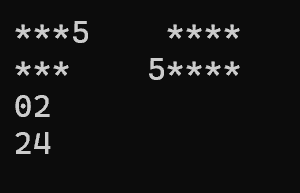
10.1.整数相关输出操作:设置位宽以方便对齐,设置”补位“。
#include<iostream>
using namespace std;
#include<iomanip>
int main()
{
	cout << "***" << setw(5) << left  << 5 << "****" << endl;
	cout << "***" << setw(5) << right << 5 << "****" << endl;
	cout << setw(2) << right << setfill('0') << 2 << endl;
	cout << setw(2) << right << setfill('0') << 24 << endl;
}
输出结果:
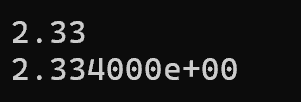
10.2.小数相关输出操作:设置科学计数法方式输出、控制保留小数点位数
#include<iostream>
using namespace std;
#include<iomanip>
int main()
{

	cout << fixed << setprecision(2) << 2.334 << endl;//设置精度
	cout.unsetf(ios::fixed);//取消精度设置
	cout.precision(6);//恢复默认精度
    // cout << defaultfloat;//上面两个语句可用这个替代
	cout << scientific << 2.334 << endl;//科学计数法输出
}
输出结果:
10.3.进制相关操作
#include<iostream>
using namespace std;
#include<iomanip>
int main()
{
	cout << dec << 10 << endl;//十进制
	cout << hex << 10 << endl;//十六进制
	cout << oct << 10 << endl;//八进制
}
输出结果:

10.4.上述提及的竞赛IO性能设置
ios::sync_with_stdio(false);
cin.tie(nullptr);
cout << fixed << setprecision(10);
五、IO文件流
1.文件打开
1.1. 头文件
<fstream>
1.2. 文件流三种类
ifstream:只读(输入文件流)ofstream:只写(输出文件流)fstream:可读可写
使用这三种类实例化出对象,就可以通过对象调用相关的文件操作函数
1.3. 打开文件两种方式
方式 1:构造时打开
ifstream fin("test.txt");
方式 2:open 函数打开
fstream f;
f.open("test.txt", 打开方式);
1.4. 判断是否打开成功
if(!fin) {
    cout << "打开失败!";
}
2.文件打开方式
| 打开方式 | 含义 |
|---|---|
ios::in | 只读(文件必须存在) |
ios::out | 只写(清空原有内容) |
ios::app | 追加写(不清空,从末尾写) |
ios::ate | 打开后文件指针移到末尾 |
ios::binary | 二进制方式打开 |
ios::trunc | 打开时清空文件 |
常用组合:文件打开方式也是一个位组合,可以通过|将不同的打开方式组合到一起
- 只读:
ios::in - 只写:
ios::out - 追加:
ios::out | ios::app - 二进制读写:
ios::in | ios::out | ios::binary
3.文件读写操作
3.1. 文本文件读写
写文件:
ostream fout("示例文件.txt",ios::out)
fout << "hello" << endl;
读文件:
istream fin("示例文件.txt",in);
int ch;
fin>>ch;
独门妙技:
使用流插入,流提取运算符进行文件读写时,容易使用混淆,记住:重载<<运算符<角的方向表示数据流入的方向
3.2. 二进制文件读写
写:write(地址, 长度)从指定地址开始指定长度的数据写入文件
ofstream fout("演示文件.dat",ios::binary||ios::out)
int data=23;
fout.write((char*)&data, sizeof(data));
读:read(地址, 长度)
ifstream fin("演示文件.dat",ios::binary||ios::in)

fin.read((char*)&data, sizeof(data));
4.文件指针操作
4.1. 读指针(ifstream 使用)
seekg(偏移量, 起始位置)移动读指针tellg()获取当前读指针位置
4.2. 写指针(ofstream 使用)
seekp(偏移量, 起始位置)移动写指针tellp()获取当前写指针位置
4.3. 三个起始位置
ios::beg文件开头ios::cur当前位置ios::end文件末尾
示例
ifstream fin ("演示文件.txt",ios::in);
fin.seekg(0, ios::end);    // 移到末尾
int len = fin.tellg();     // 获取文件大小
5.文件操作代码模板
#include<iostream>
using namespace std;
#include<fstream>
int main()
{
	//文件打开
	ofstream fout("示例文件.txt", ios::out);
	ofstream fin("示例文件.txt", ios::in);//文件打开方式只是演示
	//判断文件打开是否成功
	if (!fout || !fin) cout << "文件打开失败" << endl;
	//文件读写操作
	//……
	//……
	//文件关闭
	fout.close();
	fin.close();

}
六、IOstring流
1.字符串流是什么(概念)
字符串流(stringstream 系列):以内存中的 string 字符串为读写对象的流,不操作文件、不操作控制台,而是在内存里模拟流输入输出。
作用:
- 字符串 ↔ 数值 类型转换(最常用)
- 字符串分割、拆分
- 多类型数据拼接成字符串
- 格式化字符串处理
#include <sstream>
2.三个字符串流类
2.1. istringstream —— 字符串输入流(只读)
- 从string 里读数据
- 相当于把字符串当 cin 用
- 用途:字符串转数字、分割字符串
2.2. ostringstream —— 字符串输出流(只写)
- 把数据写入 string
- 相当于把字符串当 cout 用
- 用途:数字转字符串、拼接字符串
2.3. stringstream —— 字符串双向流(可读可写)
- 继承 iostream
- 既能读、又能写
3.字符串流 核心功能
功能 1:任意类型 ↔ 字符串 转换(万能转换)
① 数字 → 字符串(用 ostringstream /stringstream)
int a = 123;
ostringstream oss;
oss << a;
string str = oss.str(); // str = "123"
② 字符串 → 数字(用 istringstream /stringstream)
string str = "456";
istringstream iss(str);
int a;
iss >> a; // a = 456
功能 2:字符串分割(超级常用)
string s = "10 20 30 40";
stringstream ss(s);

int a;
while (ss >> a) {
    // 依次取出 10、20、30、40
}
4.字符串流 核心成员函数
4.1. str()
- 获取流中的字符串
string s = ss.str();
4.2. str (字符串)
- 清空并设置新字符串
ss.str("新内容");
4.3. clear()
- 重置流状态
- 多次使用同一个字符串流必须调用
ss.clear();
5.字符串操作中的c风格常用函数——sprintf
<cstdio>

参数解释:
第一个参数是写入字符串的地址(只支持c风格字符串不支持string),第二个是格式字符串,后面是格式字符串中占位符一一对应的参数。
char id[20];
int a = 10, b = 100;
sprintf(id, "s2283%05d%02d", a, b);
cout << id;//s228300010100
七、文件操作过程中只能使用c风格字符串不可以使用string情况汇总
1.二进制文件读写(write /read)时
绝对不能用:string
必须使用:char[]、char*
原因
string 是 C++ 类对象,内部存的是指针,不是真正的字符数据。用 write 写 string 只会把指针地址写进文件,不会保存字符串内容!如果想把记录学生学号和姓名的变量信息写入到二进制文件中必须用 char []
即任何需要永久保存到二进制文件的字符串都只能使用c风格字符串方式存储
// 正确(二进制可保存)
char name[20];
char id[20];

// 错误(二进制文件会损坏)
string name;
string id;
2.文件名、路径字符串 传给 fstream 时
C++ 旧标准(C++11 之前)
必须用 C 风格字符串
char filename[] = "in1.dat";
ifstream ifs(filename);  // 必须 char[]
C++11 之后
可以用 string,但必须加 .c_str() 转成 C 风格:
string filename = "in1.dat";
ifstream ifs(filename.c_str());
3.sprintf /sscanf 格式化字符串时
这些 C 语言格式化函数只支持 C 风格字符串,不支持 string。
sprintf(name, "S%d%d", classN, i+1);  // 必须 char[]
sprintf(id, "22%02d%04d", classN, i+1);
如果用 string 直接报错。
4.结构体 / 类 要写入二进制文件时
只要结构体未来会被:
write((char*)&obj, sizeof(obj));
那么结构体内部所有字符串必须是 char []。
// 正确 二进制可存储
struct Student {
    char name[20];
    char id[20];
    int score[6];
};

// 错误 二进制会损坏
struct Student {
    string name;
    string id;
};
5.小结
只要满足下面任意一条,必须用 char [],不能用 string
- 要写入二进制文件(.dat)
- 要从二进制文件读取
- 使用 sprintf /sscanf
- 结构体要整体 write /read
什么时候可以用 string?
- 仅在内存中临时使用
- 仅用于文本文件 << 输出
- 不存入二进制文件
八、项目实践:
模拟 5 个班级、每班 50 名学生、6 门百分制课程成绩管理,分四大模块实现:
任务 1:
成绩数据生成与存储
随机函数rand()生成0~100单科成绩;
学号格式22XX0001~22XX0050(XX 为班号 1~5),
姓名格式S班号序号(如 S11 代表 1 班 1 号);
以班为单位生成in1~in5.txt(文本)、in1~in5.dat(二进制);
原始文件按学号升序保存。
任务 2:平均成绩计算与存储
读取各班 in 文件,逐行解析 6 门课程分数,计算每名学生平均分;
将平均分追加在每行记录末尾;
按平均分降序排序,每条记录前置班级排序序号;
输出out1~out5.txt/out1~out5.dat(文本 + 二进制双格式)。
任务 3:全年级成绩汇总
合并 5 个班级全部 250 名学生数据;
全年级按平均分降序,每条记录前置全年级排名序号;
生成汇总文件out.txt(文本)、out.dat(二进制)。
任务 4:多功能成绩查询系统
实现提供姓名查询学生所有信息:姓名 班级 学号 六科成绩 平均分 班级排名 年级排名
代码实践:
#include<iostream>
#include<istream>
#include<ostream>
#include<fstream>
#include<string>
#include<vector>
#include<algorithm>
#include <cstdio>
#include <cstdlib>
#include <ctime>
#include <cstring>
using namespace std;

// 生成 0~100 的随机成绩
int getScore()
{
    return rand() % 101;
}

// 学生结构体:包含成绩、个人信息、排名信息
class student
{
public:
    int score[6] = { 0 };       // 6门课程成绩
    double ave = 0;             // 平均分
    char id[20];                // 学号(二进制读写必须用char数组)
    char name[20];              // 姓名
    int classsort;              // 班级排名
    int gradesort;              // 年级排名
    int classN = 0;             // 班级编号

    // 构造函数:初始化排名与字符数组
    student() {
        classsort = 0;
        gradesort = 0;
        memset(id, 0, sizeof(id));
        memset(name, 0, sizeof(name));
    }

    // 获取学生信息字符串(用于文本输出)
    string getInfo()
    {
        string sc;
        for (int i = 0; i < 6; i++)
        {
            sc += to_string(score[i]) + " ";
        }
        string ss;
        ss = to_string(classN) + " " + name + "  "
            + id + " " + sc;
        return ss;
    }
};

// 生成一个班级的50名学生随机数据
vector<student> generateClass(int classN)
{
    vector<student> s1;
    for (int i = 0; i < 50; i++)
    {
        student s;
        s.classN = classN;
        // 格式化生成姓名与学号
        sprintf(s.name, "S%d%d", classN, i + 1);
        sprintf(s.id, "22%02d%04d", classN, i + 1);

        // 随机生成6门成绩
        for (int j = 0; j < 6; j++)
        {
            s.score[j] = getScore();
        }
        s1.push_back(s);
    }
    return s1;
}

// 将学生数据分别写入文本文件(.txt)和二进制文件(.dat)
void writeClass(vector<student> classi, int classN)
{
    char classn1[20], classn2[20];
    sprintf(classn1, "in%d.txt", classN);
    sprintf(classn2, "in%d.dat", classN);

    // 打开文件:文本模式 / 二进制模式
    ofstream ofs1(classn1);
    ofstream ofs2(classn2, ios::binary);

    if (!ofs1 || !ofs2)
    {
        cout << "文件打开失败!" << endl;
        return;
    }

    // 写入文本文件
    ofs1 << "class" << classN << endl;
    for (int i = 0; i < 50; i++)
    {
        ofs1 << classi[i].getInfo() << "\n";
    }

    // 写入二进制文件:先写班级号,再逐条写入学生结构体
    int cls = classN;
    ofs2.write((char*)&cls, sizeof(cls));
    for (int i = 0; i < 50; i++)
    {
        ofs2.write((char*)&classi[i], sizeof(student));
    }

    ofs1.close();
    ofs2.close();
}

// 排序仿函数:按平均分降序排列
class comp
{
public:
    bool operator ()(const student& s1, const student& s2)
    {
        return s1.ave > s2.ave;
    }
};

// 从文本读取数据,计算平均分、排名,并输出到结果文件
vector<student> calAve(int classN)
{
    char txtn[20];
    char outn1[20];
    char outn2[20];
    sprintf(txtn, "in%d.txt", classN);
    sprintf(outn1, "out%d.txt", classN);
    sprintf(outn2, "out%d.dat", classN);

    // 打开输入/输出文件
    ifstream ifs(txtn);
    ofstream ofs(outn1);
    ofstream ofs2(outn2, ios::binary);

    if (!ifs || !ofs || !ofs2)
    {
        cout << "文件打开失败!" << endl;
        return {};
    }

    string s1;
    getline(ifs, s1);
    double total_ave = 0;
    vector<student> tempStu;

    // 读取50名学生信息并计算平均分
    for (int i = 0; i < 50; i++)
    {
        student s;
        int classn;
        ifs >> classn >> s.name >> s.id;
        s.classN = classn;

        int sum = 0;
        for (int j = 0; j < 6; j++)
        {
            ifs >> s.score[j];
            sum += s.score[j];
        }
        s.ave = sum / 6.0;
        tempStu.push_back(s);
        total_ave += s.ave;
    }
    // 计算班级总平均分
    total_ave /= 50;

    // 按平均分排序并设置班级排名
    sort(tempStu.begin(), tempStu.end(), comp());
    for (int i = 0; i < tempStu.size(); i++) {
        tempStu[i].classsort = i + 1;
    }

    // 写入结果文本文件
    ofs << "class:" << classN << endl;
    for (int i = 0; i < tempStu.size(); i++)
    {
        ofs << i + 1 << " " << tempStu[i].getInfo() << " ave:" << tempStu[i].ave << "\n";
    }
    ofs << "class ave:" << total_ave << "\n";

    // 写入结果二进制文件
    int cls = classN;
    ofs2.write((char*)&cls, sizeof(cls));
    for (int i = 0; i < tempStu.size(); i++)
    {
        ofs2.write((char*)&tempStu[i], sizeof(student));
    }
    ofs2.write((char*)&total_ave, sizeof(total_ave));

    ifs.close();
    ofs.close();
    ofs2.close();

    return tempStu;
}

// 根据姓名查询学生成绩信息
void searchStudent(const vector<student>& total) {
    cout << "\n===== 成绩查询系统 =====" << endl;
    string name;
    cout << "请输入学生姓名(如 S11):";
    cin >> name;

    bool found = false;
    for (const auto& s : total) {
        if (s.name == name) {
            found = true;
            cout << "\n===== 查询结果 =====" << endl;
            cout << "班级:" << s.classN << endl;
            cout << "学号:" << s.id << endl;
            cout << "姓名:" << s.name << endl;
            cout << "6门成绩:";
            for (int j = 0; j < 6; j++) {
                cout << s.score[j] << " ";
            }
            cout << endl;
            cout << "平均分:" << s.ave << endl;
            cout << "班级排名:" << s.classsort << endl;
            cout << "年级排名:" << s.gradesort << endl;
            break;
        }
    }

    if (!found) {
        cout << "未找到该学生!" << endl;
    }
}

int main()
{
    // 设置随机数种子
    srand((unsigned int)time(NULL));
    vector<student> v[5];   // 存储5个班级的学生
    vector<student> total; // 全年级学生总表

    // 生成5个班级数据并写入文件
    for (int i = 0; i < 5; i++)
    {
        v[i] = generateClass(i + 1);
        writeClass(v[i], i + 1);
        auto temp = calAve(i + 1);
        v[i] = temp;
        // 合并到总表
        total.insert(total.end(), temp.begin(), temp.end());
    }

    // 全年级排序并设置年级排名
    sort(total.begin(), total.end(), comp());
    for (int i = 0; i < total.size(); i++) {
        total[i].gradesort = i + 1;
    }

    // 输出全年级总文件
    ofstream ofst1("out.txt");
    ofstream ofst2("out.dat", ios::binary);

    // 文本输出
    ofst1 << "total student info" << endl;
    for (int i = 0; i < total.size(); i++)
    {
        ofst1 << i + 1 << " " << total[i].getInfo() << " ave:" << total[i].ave << "\n";
    }

    // 二进制输出:先写总人数,再写所有学生,最后写年级平均分
    int count = total.size();
    ofst2.write((char*)&count, sizeof(count));
    for (int i = 0; i < total.size(); i++)
    {
        ofst2.write((char*)&total[i], sizeof(student));
    }

    // 计算年级总平均分
    double ave = 0;
    for (int i = 0; i < total.size(); i++) ave += total[i].ave;
    ave /= total.size();

    // 写入最终平均分
    ofst1 << "total ave:" << ave << "\n";
    ofst2.write((char*)&ave, sizeof(ave));

    ofst1.close();
    ofst2.close();

    cout << "\n所有文件保存成功!!!\n" << endl;

    // 开启查询功能
    cout << "是否要查询成绩? 1-是  2-否:";
    int index;
    cin >> index;
    if (index == 1) {
        searchStudent(total);
    }

    return 0;
}

AtomGit 是由开放原子开源基金会联合 CSDN 等生态伙伴共同推出的新一代开源与人工智能协作平台。平台坚持“开放、中立、公益”的理念,把代码托管、模型共享、数据集托管、智能体开发体验和算力服务整合在一起,为开发者提供从开发、训练到部署的一站式体验。
更多推荐



 17
17 0
0- 0


 已为社区贡献2条内容

所有评论(0)