30分钟上手 HarmonyOS NEXT:手把手教你做记账 App
30分钟上手 HarmonyOS NEXT:手把手教你做记账 App
零基础也能学会!从项目创建到完整运行,保姆级教程带你打造第一个鸿蒙原生应用
前言:为什么选择记账 App?
Hello,各位开发者!今天带大家入门 HarmonyOS NEXT 开发,我们选择一个最实用的项目——个人财务记账应用。
为什么是记账 App?
- ✅ 功能完整,覆盖增删改查
- ✅ 包含图表,学习 Canvas 绑制
- ✅ 数据持久化,掌握本地存储
- ✅ 界面美观,练手 UI 设计
SDK:HarmonyOS NEXT API 23
开发工具:DevEco Studio
准备好了吗?Let’s go! 🚀
一、先看最终效果
完成后的应用长这样:
首页:月度收支一目了然
- 本月结余:大字显示,收入绿色、支出红色
- 环形图:各分类占比清清楚楚
- 近期交易:最近5笔快速查看
记账页:一键快速记录
- 切换收入/支出
- 选择分类(餐饮、交通、购物…)
- 选日期、写备注
- 点击保存,搞定!
账单列表:历史记录全掌握
- 按日期分组
- 左滑删除
- 点击编辑
统计页:数据可视化
- 每日收支柱状图
- 分类占比饼图
- 切换月份查看
分类管理:自定义你的分类
- 添加新分类
- 选择 Emoji 图标
- 删除不需要的
二、创建项目
2.1 新建项目
- 打开 DevEco Studio
- File → New → Create Project
- 选择 “Application” → “Empty Ability”
- 填写项目信息:
- Project name: MyApplication
- Bundle name: com.example.myapplication
- API: 23(HarmonyOS NEXT)
- 点击 Finish,等待项目创建完成
2.2 项目结构
创建后,项目结构如下:
MyApplication/
├── AppScope/
│   └── app.json5          # 全局配置
├── entry/
│   ├── src/main/
│   │   ├── ets/
│   │   │   ├── entryability/
│   │   │   │   └── EntryAbility.ets
│   │   │   └── pages/
│   │   │       └── Index.ets
│   │   └── module.json5
│   └── build-profile.json5
└── build-profile.json5
三、设计数据结构
3.1 创建模型文件
右键 ets 文件夹 → New → Directory,命名为 models。
再右键 models → New → File,命名为 FinanceModels.ets。
3.2 定义数据模型
// models/FinanceModels.ets

// 交易类型
export enum TransactionType {
  EXPENSE = 0,  // 支出
  INCOME = 1    // 收入
}

// 分类
export interface Category {
  id: number;
  name: string;
  icon: string;
  type: TransactionType;
}

// 交易记录
export interface Transaction {
  id: number;
  type: TransactionType;
  amount: number;
  categoryId: number;
  note: string;
  date: string;  // 格式: YYYY-MM-DD
}

// 工具函数
export function makeCategory(id: number, name: string, icon: string, type: TransactionType): Category {
  return { id, name, icon, type };
}

export function makeTransaction(type: TransactionType, amount: number, categoryId: number, note: string, date: string): Transaction {
  let nextId = 1;
  const id = nextId;
  nextId++;
  return { id, type, amount, categoryId, note, date };
}

// 默认分类
export const DEFAULT_EXPENSE_CATEGORIES: Category[] = [
  makeCategory(1, '餐饮', '🍜', TransactionType.EXPENSE),
  makeCategory(2, '交通', '🚌', TransactionType.EXPENSE),
  makeCategory(3, '购物', '🛒', TransactionType.EXPENSE),
  makeCategory(4, '娱乐', '🎮', TransactionType.EXPENSE),
  makeCategory(5, '住房', '🏠', TransactionType.EXPENSE),
  makeCategory(6, '医疗', '💊', TransactionType.EXPENSE),
  makeCategory(7, '教育', '📚', TransactionType.EXPENSE),
  makeCategory(8, '其他', '📦', TransactionType.EXPENSE),
];

export const DEFAULT_INCOME_CATEGORIES: Category[] = [
  makeCategory(9, '工资', '💼', TransactionType.INCOME),
  makeCategory(10, '兼职', '💻', TransactionType.INCOME),
  makeCategory(11, '红包', '🧧', TransactionType.INCOME),
  makeCategory(12, '理财', '📈', TransactionType.INCOME),
  makeCategory(13, '其他', '💰', TransactionType.INCOME),
];

// 图表颜色
export const CHART_COLORS: string[] = [
  '#FF6B6B', '#4ECDC4', '#45B7D1', '#96CEB4',
  '#FFEAA7', '#DDA0DD', '#FF8C94', '#A8E6CF',
  '#FFD93D', '#6BCB77', '#4D96FF', '#F48484',
];
代码解读:
enum:枚举类型,定义支出/收入interface:接口,定义数据结构- 默认分类用了 Emoji 图标,更直观
CHART_COLORS:图表配色方案
四、数据服务:统一管理数据
4.1 创建服务文件
右键 ets → New → Directory,命名为 services。
新建 FinanceDataService.ets。
4.2 单例服务类
// services/FinanceDataService.ets

import { preferences } from '@kit.ArkData';
import {
  TransactionType, Transaction, Category,
  makeCategory, makeTransaction,
  DEFAULT_EXPENSE_CATEGORIES, DEFAULT_INCOME_CATEGORIES
} from '../models/FinanceModels';

// 单例服务类
export class FinanceDataService {
  private static instance: FinanceDataService;
  private store: preferences.Preferences | null = null;
  private categories: Category[] = [];
  private transactions: Transaction[] = [];
  private listeners: (() => void)[] = [];

  private constructor() {}

  static getInstance(): FinanceDataService {
    if (!FinanceDataService.instance) {
      FinanceDataService.instance = new FinanceDataService();
    }
    return FinanceDataService.instance;
  }

  // 初始化
  async init(context: Context): Promise<void> {
    this.store = await preferences.getPreferences(context, 'finance_data');
    await this.loadData();
  }

  // 加载数据
  private async loadData(): Promise<void> {
    // 加载分类
    const catJson = await this.store!.get('categories', '') as string;
    if (catJson) {
      this.categories = JSON.parse(catJson);
    } else {
      this.categories = [...DEFAULT_EXPENSE_CATEGORIES, ...DEFAULT_INCOME_CATEGORIES];
      await this.saveCategories();
    }

    // 加载交易记录
    const txJson = await this.store!.get('transactions', '') as string;
    if (txJson) {
      this.transactions = JSON.parse(txJson);
    }
  }

  // 注册监听器
  registerListener(callback: () => void): void {
    if (this.listeners.indexOf(callback) < 0) {
      this.listeners.push(callback);
    }
  }

  // 通知数据变化
  private notifyDataChanged(): void {
    for (const cb of this.listeners) {
      cb();
    }
  }

  // 保存分类
  private async saveCategories(): Promise<void> {
    await this.store!.put('categories', JSON.stringify(this.categories));
    await this.store!.flush();
    this.notifyDataChanged();
  }

  // 保存交易
  private async saveTransactions(): Promise<void> {
    await this.store!.put('transactions', JSON.stringify(this.transactions));
    await this.store!.flush();
    this.notifyDataChanged();
  }

  // 获取分类
  getCategories(type?: TransactionType): Category[] {
    if (type === undefined) return this.categories;
    return this.categories.filter(cat => cat.type === type);
  }

  // 根据ID获取分类
  getCategoryById(id: number): Category | undefined {
    return this.categories.find(cat => cat.id === id);
  }

  // 获取所有交易
  getAllTransactions(): Transaction[] {
    return this.transactions;
  }

  // 添加交易
  async addTransaction(type: TransactionType, amount: number, categoryId: number, note: string, date: string): Promise<Transaction> {
    const tx: Transaction = {
      id: Date.now(),  // 用时间戳做ID
      type, amount, categoryId, note, date
    };
    this.transactions.push(tx);
    await this.saveTransactions();
    return tx;
  }

  // 删除交易
  async deleteTransaction(id: number): Promise<void> {
    this.transactions = this.transactions.filter(tx => tx.id !== id);
    await this.saveTransactions();
  }

  // 获取月度统计
  getMonthlySummary(year: number, month: number) {
    const prefix = `${year}-${String(month).padStart(2, '0')}`;
    const monthTxs = this.transactions.filter(tx => tx.date.startsWith(prefix));

    let totalIncome = 0;
    let totalExpense = 0;
    for (const tx of monthTxs) {
      if (tx.type === TransactionType.INCOME) {
        totalIncome += tx.amount;
      } else {
        totalExpense += tx.amount;
      }
    }

    return {
      totalIncome,
      totalExpense,
      balance: totalIncome - totalExpense
    };
  }

  // 获取分类占比
  getCategoryBreakdown(year: number, month: number, type: TransactionType) {
    const prefix = `${year}-${String(month).padStart(2, '0')}`;
    const monthTxs = this.transactions.filter(tx =>
      tx.date.startsWith(prefix) && tx.type === type
    );

    const total = monthTxs.reduce((sum, tx) => sum + tx.amount, 0);
    if (total === 0) return [];

    const catMap = new Map<number, number>();
    for (const tx of monthTxs) {
      catMap.set(tx.categoryId, (catMap.get(tx.categoryId) || 0) + tx.amount);
    }

    const result = [];
    catMap.forEach((amount, catId) => {
      const cat = this.getCategoryById(catId);
      if (cat) {
        result.push({
          category: cat,
          amount,
          percentage: Math.round((amount / total) * 10000) / 100
        });
      }
    });

    return result.sort((a, b) => b.amount - a.amount);
  }
}
重点理解:
- 单例模式:全局只有一个实例,数据共享
- Preferences:轻量级本地存储,类似 SharedPreferences
- 监听器:数据变化时自动通知页面刷新
五、首页:仪表盘设计
5.1 打开 Index.ets
找到 entry/src/main/ets/pages/Index.ets,清空内容,从头开始写。
5.2 页面基本结构
// pages/Index.ets

import { router } from '@kit.ArkUI';
import { TransactionType, CHART_COLORS } from '../models/FinanceModels';
import { FinanceDataService } from '../services/FinanceDataService';

@Entry
@Component
struct Index {
  private service = FinanceDataService.getInstance();

  @State currentYear: number = 0;
  @State currentMonth: number = 0;
  @State summary = { totalIncome: 0, totalExpense: 0, balance: 0 };
  @State expenseBreakdown: any[] = [];

  aboutToAppear(): void {
    const now = new Date();
    this.currentYear = now.getFullYear();
    this.currentMonth = now.getMonth() + 1;
    this.refreshData();
    this.service.registerListener(() => this.refreshData());
  }

  refreshData(): void {
    this.summary = this.service.getMonthlySummary(this.currentYear, this.currentMonth);
    this.expenseBreakdown = this.service.getCategoryBreakdown(
      this.currentYear, this.currentMonth, TransactionType.EXPENSE
    );
  }

  changeMonth(delta: number): void {
    this.currentMonth += delta;
    if (this.currentMonth > 12) {
      this.currentMonth = 1;
      this.currentYear++;
    } else if (this.currentMonth < 1) {
      this.currentMonth = 12;
      this.currentYear--;
    }
    this.refreshData();
  }

  build() {
    Column() {
      // 标题栏
      Row() {
        Text('💰 个人记账')
          .fontSize(22)
          .fontWeight(FontWeight.Bold)
          .margin({ left: 16 })
        Blank()
      }
      .width('100%')
      .height(56)
      .backgroundColor('#4ECDC4')
      .padding({ right: 16 })

      // 月份选择
      Row() {
        Text('<')
          .fontSize(22)
          .fontColor('#4ECDC4')
          .onClick(() => this.changeMonth(-1))

        Text(`${this.currentYear}年${this.currentMonth}月`)
          .fontSize(18)
          .fontWeight(FontWeight.Bold)
          .margin({ left: 24, right: 24 })

        Text('>')
          .fontSize(22)
          .fontColor('#4ECDC4')
          .onClick(() => this.changeMonth(1))
      }
      .width('100%')
      .justifyContent(FlexAlign.Center)
      .padding({ top: 12, bottom: 12 })

      // 本月结余卡片
      Column() {
        Text('本月结余')
          .fontSize(14)
          .fontColor('#888888')

        Text(`¥${this.summary.balance.toFixed(2)}`)
          .fontSize(34)
          .fontWeight(FontWeight.Bold)
          .fontColor(this.summary.balance >= 0 ? '#FF6B6B' : '#4ECDC4')
          .margin({ top: 4 })

        Row() {
          Column() {
            Text('收入').fontSize(12).fontColor('#888888')
            Text(`¥${this.summary.totalIncome.toFixed(2)}`)
              .fontSize(18)
              .fontWeight(FontWeight.Medium)
              .fontColor('#4ECDC4')
              .margin({ top: 4 })
          }
          .layoutWeight(1)
          .alignItems(HorizontalAlign.Center)

          Divider()
            .vertical(true)
            .height(36)
            .color('#E0E0E0')

          Column() {
            Text('支出').fontSize(12).fontColor('#888888')
            Text(`¥${this.summary.totalExpense.toFixed(2)}`)
              .fontSize(18)
              .fontWeight(FontWeight.Medium)
              .fontColor('#FF6B6B')
              .margin({ top: 4 })
          }
          .layoutWeight(1)
          .alignItems(HorizontalAlign.Center)
        }
        .width('100%')
        .margin({ top: 12 })
      }
      .width('92%')
      .backgroundColor('#FFFFFF')
      .borderRadius(16)
      .padding(20)
      .shadow({ radius: 6, color: '#18000000', offsetY: 2 })

      // 底部导航栏
      Row() {
        this.navButton('📊', '首页', true)
        this.navButton('➕', '记账', false)
        this.navButton('📋', '账单', false)
        this.navButton('📈', '统计', false)
      }
      .width('100%')
      .height(64)
      .backgroundColor('#FFFFFF')
      .shadow({ radius: 4, color: '#20000000', offsetY: -2 })
    }
    .width('100%')
    .height('100%')
    .backgroundColor('#F5F5F5')
  }

  @Builder
  navButton(icon: string, label: string, isActive: boolean) {
    Column() {
      Text(icon).fontSize(22)
      Text(label)
        .fontSize(10)
        .fontColor(isActive ? '#4ECDC4' : '#999999')
        .margin({ top: 2 })
    }
    .layoutWeight(1)
    .alignItems(HorizontalAlign.Center)
  }
}
5.3 添加环形图组件
在 Index 组件之前,添加一个图表组件:
@Component
struct DonutChart {
  private canvasContext: CanvasRenderingContext2D = new CanvasRenderingContext2D();
  @Prop @Watch('onDataChanged') breakdown: any[] = [];
  @State isReady: boolean = false;

  onDataChanged(): void {
    if (this.isReady) this.drawChart();
  }

  drawChart(): void {
    const ctx = this.canvasContext;
    const cx = 110, cy = 110;
    const radius = 90, innerRadius = 55;

    ctx.clearRect(0, 0, 220, 220);

    if (this.breakdown.length === 0) {
      ctx.beginPath();
      ctx.arc(cx, cy, radius, 0, Math.PI * 2);
      ctx.fillStyle = '#F0F0F0';
      ctx.fill();
      ctx.beginPath();
      ctx.arc(cx, cy, innerRadius, 0, Math.PI * 2);
      ctx.fillStyle = '#FFFFFF';
      ctx.fill();
      ctx.fillStyle = '#999999';
      ctx.textAlign = 'center';
      ctx.fillText('暂无数据', cx, cy + 5);
      return;
    }

    let startAngle = -Math.PI / 2;
    const total = this.breakdown.reduce((sum: number, b: any) => sum + b.amount, 0);

    for (let i = 0; i < this.breakdown.length; i++) {
      const item = this.breakdown[i];
      const sliceAngle = (item.amount / total) * Math.PI * 2;
      const endAngle = startAngle + sliceAngle;

      const path = new Path2D();
      path.arc(cx, cy, radius, startAngle, endAngle);
      path.lineTo(cx, cy);
      path.closePath();
      ctx.fillStyle = CHART_COLORS[i % CHART_COLORS.length];
      ctx.fill(path);

      startAngle = endAngle;
    }

    ctx.beginPath();
    ctx.arc(cx, cy, innerRadius, 0, Math.PI * 2);
    ctx.fillStyle = '#FFFFFF';
    ctx.fill();

    ctx.fillStyle = '#333333';
    ctx.font = 'bold 16px';
    ctx.textAlign = 'center';
    ctx.fillText(`¥${total.toFixed(0)}`, cx, cy + 6);
  }

  build() {
    Canvas(this.canvasContext)
      .width(220)
      .height(220)
      .onReady(() => {
        this.isReady = true;
        this.drawChart();
      })
  }
}
在首页的 Scroll 中添加:
// 支出分布
Column() {
  Text('支出分布')
    .fontSize(18)
    .fontWeight(FontWeight.Bold)
    .width('100%')

  DonutChart({ breakdown: this.expenseBreakdown })
    .margin({ top: 8 })

  Flex({ wrap: FlexWrap.Wrap }) {
    ForEach(this.expenseBreakdown, (item: any, index?: number) => {
      Row() {
        Row()
          .width(10)
          .height(10)
          .borderRadius(5)
          .backgroundColor(CHART_COLORS[(index as number) % CHART_COLORS.length])
        Text(` ${item.category.icon} ${item.category.name}`)
          .fontSize(12)
          .margin({ left: 4 })
        Text(` ${item.percentage}%`)
          .fontSize(12)
          .fontColor('#888888')
          .margin({ left: 4 })
      }
      .margin({ bottom: 4, right: 8 })
    })
  }
  .width('100%')
  .margin({ top: 10 })
}
.width('92%')
.backgroundColor('#FFFFFF')
.borderRadius(16)
.padding(16)
.margin({ top: 12 })
六、记账页面
6.1 创建新页面
右键 pages 文件夹 → New → File,命名为 AddTransactionPage.ets。
6.2 完整代码
// pages/AddTransactionPage.ets

import { router } from '@kit.ArkUI';
import { TransactionType, Category } from '../models/FinanceModels';
import { FinanceDataService } from '../services/FinanceDataService';

@Entry
@Component
struct AddTransactionPage {
  private service = FinanceDataService.getInstance();

  @State txType: TransactionType = TransactionType.EXPENSE;
  @State amount: string = '';
  @State selectedCategoryId: number = -1;
  @State txDate: string = '';
  @State note: string = '';
  @State categories: Category[] = [];

  aboutToAppear(): void {
    // 初始化日期为今天
    const now = new Date();
    this.txDate = `${now.getFullYear()}-${String(now.getMonth() + 1).padStart(2, '0')}-${String(now.getDate()).padStart(2, '0')}`;

    this.loadCategories();
  }

  loadCategories(): void {
    this.categories = this.service.getCategories(this.txType);
    if (this.selectedCategoryId < 0 && this.categories.length > 0) {
      this.selectedCategoryId = this.categories[0].id;
    }
  }

  switchType(type: TransactionType): void {
    this.txType = type;
    this.selectedCategoryId = -1;
    this.loadCategories();
  }

  async saveTransaction(): Promise<void> {
    const amountNum = parseFloat(this.amount);
    if (isNaN(amountNum) || amountNum <= 0 || this.selectedCategoryId < 0) return;

    await this.service.addTransaction(
      this.txType, amountNum, this.selectedCategoryId, this.note, this.txDate
    );
    router.back();
  }

  showDatePicker(): void {
    const parts = this.txDate.split('-');
    DatePickerDialog.show({
      start: new Date(2020, 0, 1),
      end: new Date(2035, 11, 31),
      selected: new Date(parseInt(parts[0]), parseInt(parts[1]) - 1, parseInt(parts[2])),
      onDateAccept: (value: Date) => {
        this.txDate = `${value.getFullYear()}-${String(value.getMonth() + 1).padStart(2, '0')}-${String(value.getDate()).padStart(2, '0')}`;
      }
    });
  }

  build() {
    Column() {
      // 顶部栏
      Row() {
        Text('< 返回')
          .fontSize(16)
          .fontColor('#666666')
          .onClick(() => router.back())
        Blank()
        Text('新增交易')
          .fontSize(18)
          .fontWeight(FontWeight.Bold)
        Blank()
      }
      .width('100%')
      .height(56)
      .padding({ left: 16, right: 16 })
      .backgroundColor('#FFFFFF')

      Scroll() {
        Column() {
          // 金额输入
          Row() {
            Text('¥').fontSize(28).fontWeight(FontWeight.Bold)
            TextInput({ placeholder: '0.00', text: this.amount })
              .fontSize(28)
              .fontWeight(FontWeight.Bold)
              .type(InputType.Number)
              .layoutWeight(1)
              .onChange(value => this.amount = value)
          }
          .width('92%')
          .backgroundColor('#FFFFFF')
          .borderRadius(12)
          .padding(12)
          .margin({ top: 16 })

          // 收入/支出切换
          Row() {
            Button('支出')
              .width(120)
              .height(44)
              .backgroundColor(this.txType === TransactionType.EXPENSE ? '#FF6B6B' : '#FFF0F0')
              .fontColor(this.txType === TransactionType.EXPENSE ? '#FFFFFF' : '#FF6B6B')
              .borderRadius(22)
              .onClick(() => this.switchType(TransactionType.EXPENSE))

            Blank()

            Button('收入')
              .width(120)
              .height(44)
              .backgroundColor(this.txType === TransactionType.INCOME ? '#4ECDC4' : '#F0FFFA')
              .fontColor(this.txType === TransactionType.INCOME ? '#FFFFFF' : '#4ECDC4')
              .borderRadius(22)
              .onClick(() => this.switchType(TransactionType.INCOME))
          }
          .width('92%')
          .margin({ top: 16 })

          // 分类选择
          Column() {
            Text('选择分类')
              .fontSize(16)
              .fontWeight(FontWeight.Bold)
              .width('100%')

            Grid() {
              ForEach(this.categories, (cat: Category) => {
                GridItem() {
                  Column() {
                    Text(cat.icon).fontSize(32)
                    Text(cat.name).fontSize(12).margin({ top: 4 })
                    if (this.selectedCategoryId === cat.id) {
                      Text('✓').fontSize(12).fontColor('#4ECDC4').margin({ top: 2 })
                    }
                  }
                  .width('100%')
                  .alignItems(HorizontalAlign.Center)
                  .padding({ top: 10, bottom: 10 })
                  .backgroundColor(this.selectedCategoryId === cat.id ? '#F0FFFA' : '#F8F8F8')
                  .borderRadius(10)
                  .onClick(() => this.selectedCategoryId = cat.id)
                }
              }, (cat: Category) => String(cat.id))
            }
            .columnsTemplate('1fr 1fr 1fr 1fr')
            .rowsGap(8)
            .columnsGap(8)
            .width('100%')
          }
          .width('92%')
          .backgroundColor('#FFFFFF')
          .borderRadius(12)
          .padding(16)
          .margin({ top: 12 })

          // 日期选择
          Row() {
            Text('日期').fontSize(15).fontColor('#666666')
            Blank()
            Text(this.txDate).fontSize(15).fontWeight(FontWeight.Medium).margin({ right: 8 })
            Text('📅').fontSize(20)
          }
          .width('92%')
          .backgroundColor('#FFFFFF')
          .borderRadius(12)
          .padding(16)
          .margin({ top: 12 })
          .onClick(() => this.showDatePicker())

          // 备注
          Row() {
            Text('备注').fontSize(15).fontColor('#666666').margin({ right: 12 })
            TextInput({ placeholder: '添加备注...', text: this.note })
              .layoutWeight(1)
              .onChange(value => this.note = value)
          }
          .width('92%')
          .backgroundColor('#FFFFFF')
          .borderRadius(12)
          .padding(16)
          .margin({ top: 12 })

          // 保存按钮
          Button('保存')
            .width('92%')
            .height(50)
            .backgroundColor('#4ECDC4')
            .borderRadius(25)
            .margin({ top: 24, bottom: 32 })
            .onClick(() => this.saveTransaction())
        }
        .width('100%')
        .alignItems(HorizontalAlign.Center)
      }
      .width('100%')
      .layoutWeight(1)
      .backgroundColor('#F5F5F5')
    }
    .width('100%')
    .height('100%')
    .backgroundColor('#F5F5F5')
  }
}
七、账单列表页面
创建 TransactionListPage.ets:
// pages/TransactionListPage.ets

import { router } from '@kit.ArkUI';
import { TransactionType, Transaction } from '../models/FinanceModels';
import { FinanceDataService } from '../services/FinanceDataService';

@Entry
@Component
struct TransactionListPage {
  private service = FinanceDataService.getInstance();

  @State filterType: number = -1;  // -1: 全部, 0: 支出, 1: 收入
  @State transactions: Transaction[] = [];

  aboutToAppear(): void {
    this.refreshList();
    this.service.registerListener(() => this.refreshList());
  }

  refreshList(): void {
    let allTxs = this.filterType === -1
      ? this.service.getAllTransactions()
      : this.service.getAllTransactions().filter(tx => tx.type === this.filterType);

    allTxs.sort((a, b) => b.id - a.id);
    this.transactions = allTxs;
  }

  async deleteTransaction(id: number): Promise<void> {
    await this.service.deleteTransaction(id);
    this.refreshList();
  }

  build() {
    Column() {
      // 顶部栏
      Row() {
        Text('< 返回')
          .fontSize(16)
          .fontColor('#666666')
          .onClick(() => router.back())
        Blank()
        Text('交易记录')
          .fontSize(18)
          .fontWeight(FontWeight.Bold)
        Blank()
      }
      .width('100%')
      .height(56)
      .padding({ left: 16, right: 16 })
      .backgroundColor('#FFFFFF')

      // 筛选标签
      Row() {
        this.filterTab('全部', -1)
        this.filterTab('支出', 0)
        this.filterTab('收入', 1)
      }
      .width('100%')
      .height(48)
      .backgroundColor('#FFFFFF')
      .padding({ left: 16, right: 16 })

      // 交易列表
      if (this.transactions.length === 0) {
        Column() {
          Text('暂无交易记录')
            .fontSize(16)
            .fontColor('#BBBBBB')
        }
        .width('100%')
        .layoutWeight(1)
        .justifyContent(FlexAlign.Center)
      } else {
        List() {
          ForEach(this.transactions, (tx: Transaction) => {
            ListItem() {
              Row() {
                Text(this.service.getCategoryById(tx.categoryId)?.icon || '❓')
                  .fontSize(24)
                  .margin({ right: 12 })

                Column() {
                  Text(this.service.getCategoryById(tx.categoryId)?.name || '未知')
                    .fontSize(15)
                    .fontWeight(FontWeight.Medium)
                  if (tx.note) {
                    Text(tx.note)
                      .fontSize(12)
                      .fontColor('#888888')
                      .margin({ top: 2 })
                  }
                }
                .layoutWeight(1)
                .alignItems(HorizontalAlign.Start)

                Text(`${tx.type === TransactionType.EXPENSE ? '-' : '+'}¥${tx.amount.toFixed(2)}`)
                  .fontSize(17)
                  .fontWeight(FontWeight.Bold)
                  .fontColor(tx.type === TransactionType.EXPENSE ? '#FF6B6B' : '#4ECDC4')
              }
              .width('100%')
              .padding({ left: 16, right: 16, top: 14, bottom: 14 })
              .onClick(() => {
                router.pushUrl({
                  url: 'pages/AddTransactionPage',
                  params: { editId: tx.id }
                });
              })
            }
            .swipeAction({
              end: this.deleteButton(tx.id)
            })
          })
        }
        .width('100%')
        .layoutWeight(1)
        .divider({ strokeWidth: 0.5, color: '#F0F0F0' })
      }
    }
    .width('100%')
    .height('100%')
    .backgroundColor('#F5F5F5')
  }

  @Builder
  filterTab(label: string, type: number) {
    Column() {
      Text(label)
        .fontSize(15)
        .fontColor(this.filterType === type ? '#4ECDC4' : '#666666')
      Divider()
        .width(20)
        .height(3)
        .backgroundColor(this.filterType === type ? '#4ECDC4' : 'transparent')
        .borderRadius(2)
        .margin({ top: 4 })
    }
    .layoutWeight(1)
    .alignItems(HorizontalAlign.Center)
    .onClick(() => {
      this.filterType = type;
      this.refreshList();
    })
  }

  @Builder
  deleteButton(txId: number) {
    Button('删除')
      .width(72)
      .height('100%')
      .backgroundColor('#FF6B6B')
      .fontColor('#FFFFFF')
      .onClick(() => this.deleteTransaction(txId))
  }
}
八、配置路由
8.1 添加页面路由
找到 entry/src/main/resources/base/profile/main_pages.json:
{
  "src": [
    "pages/Index",
    "pages/AddTransactionPage",
    "pages/TransactionListPage"
  ]
}
8.2 修改底部导航
回到 Index.ets,更新导航栏点击事件:
@Builder
navButton(icon: string, label: string, target: string, isActive: boolean) {
  Column() {
    Text(icon).fontSize(22)
    Text(label)
      .fontSize(10)
      .fontColor(isActive ? '#4ECDC4' : '#999999')
      .margin({ top: 2 })
  }
  .layoutWeight(1)
  .alignItems(HorizontalAlign.Center)
  .onClick(() => {
    if (!isActive && target !== 'pages/Index') {
      router.pushUrl({ url: target });
    }
  })
}

// 底部栏更新为
Row() {
  this.navButton('📊', '首页', 'pages/Index', true)
  this.navButton('➕', '记账', 'pages/AddTransactionPage', false)
  this.navButton('📋', '账单', 'pages/TransactionListPage', false)
  this.navButton('📈', '统计', 'pages/StatisticsPage', false)
}
九、初始化数据服务
9.1 修改 EntryAbility.ets
// entry/src/main/ets/entryability/EntryAbility.ets

import { UIAbility, AbilityConstant, Want } from '@kit.AbilityKit';
import { window } from '@kit.ArkUI';
import { FinanceDataService } from '../ets/services/FinanceDataService';

export default class EntryAbility extends UIAbility {
  onCreate(want: Want, launchParam: AbilityConstant.LaunchParam): void {
    // 初始化数据服务
    FinanceDataService.getInstance().init(this.context);
  }

  onWindowStageCreate(windowStage: window.WindowStage): void {
    windowStage.loadContent('pages/Index', (err) => {
      if (err.code) {
        console.error('Failed to load content:', JSON.stringify(err));
        return;
      }
      console.info('Succeeded in loading content.');
    });
  }
}
十、运行测试
10.1 连接模拟器
- 点击 DevEco Studio 顶部工具栏的设备下拉框
- 选择 “Device Manager”
- 启动模拟器(建议使用 Phone 模拟器)
- 等待模拟器启动完成
10.2 运行应用
- 点击工具栏的 ▶️ 按钮(Run)
- 或按快捷键 Shift + F10
- 等待编译和安装
- 应用自动启动
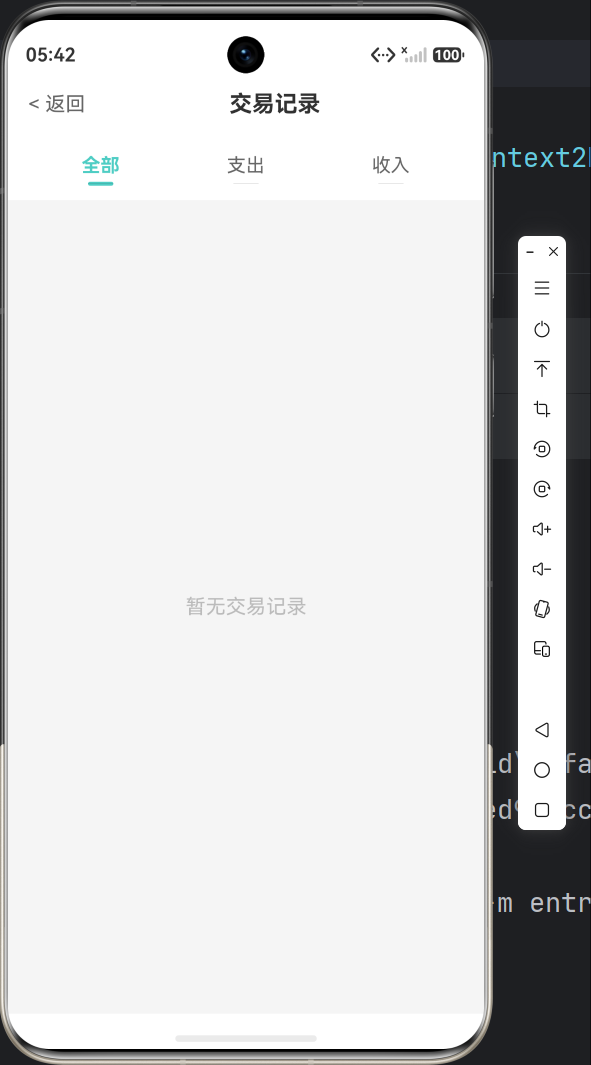
10.3 功能测试
✅ 测试清单:
- 首页显示月度统计
- 切换月份
- 添加收入记录
- 添加支出记录
- 查看账单列表
- 筛选收入/支出
- 左滑删除记录
- 查看支出分布图
十一、常见问题
Q1: Canvas 绑制不出来?
确保在 onReady 后才绘制:
Canvas(this.canvasContext)
  .onReady(() => {
    this.drawChart();  // ✅ 正确
  })

// ❌ 错误:直接在 aboutToAppear 绘制
Q2: 页面跳转失败?
检查路由配置:
// main_pages.json 必须包含所有页面
{
  "src": [
    "pages/Index",
    "pages/AddTransactionPage",
    "pages/TransactionListPage"
  ]
}
Q3: 数据不保存?
确保调用了 flush():
await this.store.put('key', value);
await this.store.flush();  // ✅ 必须!
Q4: 列表不刷新?
使用监听器:
aboutToAppear(): void {
  this.service.registerListener(() => this.refreshData());  // ✅
}
十二、下一步学习
完成基础功能后,可以继续扩展:
12.1 添加统计页面
参考首页的图表组件,创建柱状图和饼图。
12.2 添加分类管理
实现自定义分类、图标选择功能。
12.3 数据导出
将交易记录导出为 CSV 文件。
12.4 云端同步
接入华为云服务,实现数据备份。
总结
恭喜你完成了一个 HarmonyOS NEXT 应用!🎉
你学到了什么
| 知识点 | 掌握程度 |
|---|---|
| ArkTS 基础语法 | ⭐⭐⭐⭐⭐ |
| 组件化开发 | ⭐⭐⭐⭐ |
| Canvas 图表 | ⭐⭐⭐ |
| 数据持久化 | ⭐⭐⭐⭐ |
| 页面路由 | ⭐⭐⭐⭐⭐ |
项目亮点
✨ 完整业务闭环:记账 → 查看 → 分析
✨ 美观界面:卡片式设计、渐变色彩
✨ 自定义图表:纯 Canvas 实现
✨ 响应式更新:监听器模式
本文适合初学者快速上手,帮你 30 分钟构建第一个鸿蒙应用。如有问题,欢迎评论区交流!

AtomGit 是由开放原子开源基金会联合 CSDN 等生态伙伴共同推出的新一代开源与人工智能协作平台。平台坚持“开放、中立、公益”的理念,把代码托管、模型共享、数据集托管、智能体开发体验和算力服务整合在一起,为开发者提供从开发、训练到部署的一站式体验。
更多推荐



 7
7 0
0- 0


 已为社区贡献15条内容

所有评论(0)