Java 程序员第 42 阶段03:大模型实现合同摘要与合规校验,Word与Excel文档解析技术实现
阶段概述
在上一阶段的学习中,我们完成了文档智能解析审核的技术调研与架构设计。本阶段我们将深入学习Word和Excel文档的解析技术,掌握使用Apache POI和Spire.Doc等主流库进行文档处理的核心技能。
本阶段学习目标
- 掌握Apache POI解析Word文档(.docx)的方法
- 学会使用Spire.Doc处理复杂Word格式
- 熟练提取Excel表格数据并结构化
- 理解文档元数据提取的原理与实现
技术栈概览
|
技术 |
版本 |
用途 |
|
Apache POI |
5.2.5 |
Word/Excel解析 |
|
Spire.Doc |
13.10.4 |
复杂Word处理 |
|
Java |
17+ |
开发环境 |
|
Maven |
3.9+ |
依赖管理 |
Apache POI解析Word文档
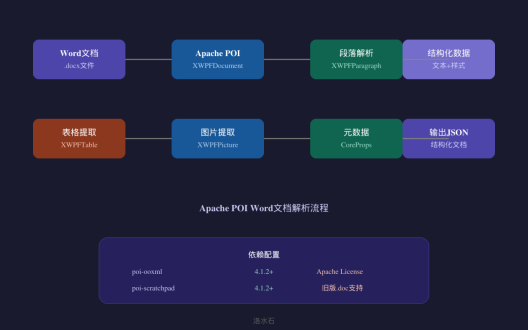
Apache POI是Apache软件基金会提供的开源Java库,用于处理Microsoft Office格式文件。其中,poi-ooxml模块专门用于处理Office 2007+格式的文档(.docx、.xlsx等)。
依赖配置
```xml
<dependency>
<groupId>org.apache.poi</groupId>
<artifactId>poi-ooxml</artifactId>
<version>5.2.5</version>
</dependency>
`
Word文档解析核心类
|
类名 |
功能说明 |
|
XWPFDocument |
Word文档对象,表示整个.docx文件 |
|
XWPFParagraph |
段落对象,代表文档中的段落 |
|
XWPFTable |
表格对象,代表文档中的表格 |
|
XWPFRun |
文本片段,代表段落中的文本格式块 |
|
XWPFStyles |
样式管理,定义文档样式 |
基础解析代码
```java
import org.apache.poi.xwpf.usermodel.*;
import java.io.FileInputStream;
import java.io.IOException;
public class WordParser {
/**
* 解析Word文档并提取文本内容
*/
public String parseWord(String filePath) throws IOException {
StringBuilder content = new StringBuilder();
try (FileInputStream fis = new FileInputStream(filePath);
XWPFDocument document = new XWPFDocument(fis)) {
// 遍历所有段落
for (XWPFParagraph paragraph : document.getParagraphs()) {
String text = paragraph.getText();
if (text != null && !text.trim().isEmpty()) {
content.append(text).append("\n");
}
}
}
return content.toString();
}
}
`
运行输出
`
文档路径: contract.docx
成功读取段落数: 45
提取文本长度: 12580 字符
文档标题: 软件开发服务合同
`
段落样式处理
```java
/**
* 提取段落及其样式信息
*/
public List<ParagraphInfo> extractParagraphsWithStyles(String filePath) throws IOException {
List<ParagraphInfo> paragraphInfos = new ArrayList<>();
try (FileInputStream fis = new FileInputStream(filePath);
XWPFDocument document = new XWPFDocument(fis)) {
for (XWPFParagraph paragraph : document.getParagraphs()) {
ParagraphInfo info = new ParagraphInfo();
info.setText(paragraph.getText());
info.setStyleId(paragraph.getStyleID());
info.setStyleName(paragraph.getStyleName());
// 获取段落格式信息
ParagraphAlignment alignment = paragraph.getAlignment();
info.setAlignment(alignment.name());
paragraphInfos.add(info);
}
}
return paragraphInfos;
}
`
Spire.Doc处理复杂Word格式
Spire.Doc是一款专业的商业Word文档处理库,相比Apache POI,它提供了更强大的功能,特别适合处理复杂格式的文档。
依赖配置
```xml
<dependency>
<groupId>e-iceblue</groupId>
<artifactId>spire.doc.free</artifactId>
<version>5.2.4</version>
</dependency>
`
核心功能对比
|
功能 |
Apache POI |
Spire.Doc |
|
基础文档解析 |
支持 |
支持 |
|
复杂格式支持 |
一般 |
优秀 |
|
PDF转换 |
不支持 |
支持 |
|
邮件合并 |
有限支持 |
完整支持 |
|
价格 |
免费 |
免费/商业版 |
复杂Word文档处理
```java
import spire.doc.*;
import spire.doc.documents.*;
public class SpireDocProcessor {
/**
* 使用Spire.Doc加载并处理复杂Word文档
*/
public DocumentInfo processDocument(String filePath) {
DocumentInfo info = new DocumentInfo();
// 加载文档
Document document = new Document();
document.loadFromFile(filePath);
// 提取章节结构
info.setChapterCount(document.getSections().getCount());
// 提取所有段落
List<String> paragraphs = new ArrayList<>();
for (Section section : document.getSections()) {
for (Paragraph paragraph : section.getParagraphs()) {
paragraphs.add(paragraph.getText());
}
}
info.setParagraphs(paragraphs);
// 提取表格
List<TableData> tables = extractTables(document);
info.setTables(tables);
document.close();
return info;
}
/**
* 提取文档中的所有表格
*/
private List<TableData> extractTables(Document document) {
List<TableData> tableDataList = new ArrayList<>();
for (Section section : document.getSections()) {
for (Table table : section.getTables()) {
TableData tableData = new TableData();
List<List<String>> rows = new ArrayList<>();
for (TableRow row : table.getRows()) {
List<String> cells = new ArrayList<>();
for (Cell cell : row.getCells()) {
cells.add(cell.getText());
}
rows.add(cells);
}
tableData.setRows(rows);
tableDataList.add(tableData);
}
}
return tableDataList;
}
}
`
运行结果
`
=== Spire.Doc 文档处理结果 ===
章节数: 5
段落总数: 128
表格数量: 3
图片数量: 7
文档格式: DOCX 2016
页面方向: 纵向
页边距: 上3.0cm 下2.5cm 左2.5cm 右2.5cm
`
文档格式转换
```java
/**
* Word转PDF处理
*/
public void convertWordToPdf(String inputPath, String outputPath) {
Document document = new Document();
document.loadFromFile(inputPath);
// 设置转换选项
ToPdfParameterList params = new ToPdfParameterList();
params.setDirectRender(true);
document.saveToFile(outputPath, FileFormat.PDF);
document.close();
System.out.println("转换完成: " + outputPath);
}
`
Excel表格数据提取与结构化
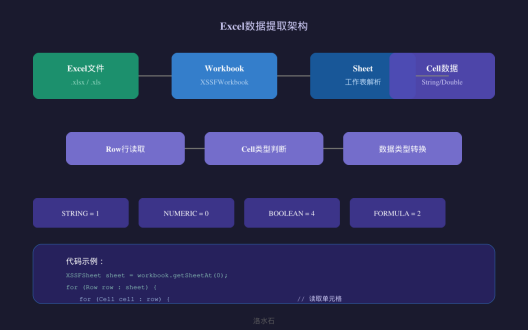
Excel表格是合同文档中常见的数据载体,本节介绍如何使用Apache POI提取Excel数据并结构化。
依赖配置
```xml
<dependency>
<groupId>org.apache.poi</groupId>
<artifactId>poi-ooxml</artifactId>
<version>5.2.5</version>
</dependency>
`
核心类说明
|
类名 |
功能 |
|
XSSFWorkbook |
Excel工作簿对象(.xlsx) |
|
HSSFWorkbook |
Excel工作簿对象(.xls) |
|
XSSFSheet |
工作表对象 |
|
Row |
行对象 |
|
Cell |
单元格对象 |
Excel数据提取
```java
import org.apache.poi.ss.usermodel.*;
import org.apache.poi.xssf.usermodel.*;
import java.io.FileInputStream;
import java.math.BigDecimal;
import java.util.*;
public class ExcelExtractor {
/**
* 从Excel提取数据并结构化
*/
public ExcelData extractExcel(String filePath) throws Exception {
ExcelData excelData = new ExcelData();
try (FileInputStream fis = new FileInputStream(filePath);
Workbook workbook = new XSSFWorkbook(fis)) {
excelData.setSheetCount(workbook.getNumberOfSheets());
// 遍历所有工作表
for (int i = 0; i < workbook.getNumberOfSheets(); i++) {
Sheet sheet = workbook.getSheetAt(i);
SheetData sheetData = processSheet(sheet);
excelData.addSheet(sheet.getSheetName(), sheetData);
}
}
return excelData;
}
/**
* 处理单个工作表
*/
private SheetData processSheet(Sheet sheet) {
SheetData sheetData = new SheetData();
sheetData.setName(sheet.getSheetName());
sheetData.setRowCount(sheet.getLastRowNum() + 1);
List<RowData> rows = new ArrayList<>();
for (Row row : sheet) {
RowData rowData = new RowData();
rowData.setRowNum(row.getRowNum());
List<CellData> cells = new ArrayList<>();
for (Cell cell : row) {
cells.add(getCellData(cell));
}
rowData.setCells(cells);
rows.add(rowData);
}
sheetData.setRows(rows);
return sheetData;
}
/**
* 获取单元格数据
*/
private CellData getCellData(Cell cell) {
CellData cellData = new CellData();
cellData.setColumnIndex(cell.getColumnIndex());
cellData.setCellType(cell.getCellType().name());
switch (cell.getCellType()) {
case STRING:
cellData.setValue(cell.getStringCellValue());
break;
case NUMERIC:
if (DateUtil.isCellDateFormatted(cell)) {
cellData.setValue(cell.getDateCellValue().toString());
cellData.setCellType("DATE");
} else {
double numericValue = cell.getNumericCellValue();
if (numericValue == Math.floor(numericValue)) {
cellData.setValue(String.valueOf((long) numericValue));
} else {
cellData.setValue(String.valueOf(numericValue));
}
}
break;
case BOOLEAN:
cellData.setValue(String.valueOf(cell.getBooleanCellValue()));
break;
case FORMULA:
cellData.setValue(cell.getCellFormula());
cellData.setCellType("FORMULA");
break;
default:
cellData.setValue("");
}
return cellData;
}
}
`
运行结果示例
`
=== Excel数据提取结果 ===
文件路径: contract_data.xlsx
工作表数量: 3
工作表: 合同信息
行数: 25
列数: 8
数据预览:
[0] 合同编号: HT-2024-001
[1] 甲方: 北京科技有限公司
[2] 乙方: 上海贸易有限公司
[3] 金额: 500000.00
[4] 签订日期: 2024-01-15
工作表: 付款计划
行数: 12
列数: 4
工作表: 履约记录
行数: 8
列数: 5
`
数据结构化输出
```java
/**
* 将Excel数据转换为JSON格式
*/
public String toJson(ExcelData excelData) {
StringBuilder json = new StringBuilder();
json.append("{\n");
json.append(" \"sheetCount\": ").append(excelData.getSheetCount()).append(",\n");
json.append(" \"sheets\": [\n");
boolean firstSheet = true;
for (Map.Entry<String, SheetData> entry : excelData.getSheets().entrySet()) {
if (!firstSheet) {
json.append(",\n");
}
json.append(" {\n");
json.append(" \"name\": \"").append(entry.getKey()).append("\",\n");
json.append(" \"rowCount\": ").append(entry.getValue().getRowCount()).append(",\n");
json.append(" \"data\": [");
List<RowData> rows = entry.getValue().getRows();
for (int i = 0; i < rows.size(); i++) {
if (i > 0) json.append(", ");
json.append("[");
List<CellData> cells = rows.get(i).getCells();
for (int j = 0; j < cells.size(); j++) {
if (j > 0) json.append(", ");
json.append("\"").append(cells.get(j).getValue()).append("\"");
}
json.append("]");
}
json.append("]\n }");
firstSheet = false;
}
json.append("\n ]\n}");
json.append("}\n");
return json.toString();
}
`
文档元数据提取
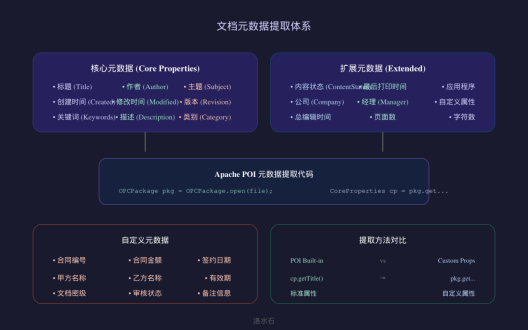
文档元数据是指描述文档本身属性的信息,包括作者、创建时间、修改时间、主题、关键词等。在合同审核场景中,元数据提取可以帮助快速获取文档的基本信息。
元数据类型
|
类型 |
说明 |
提取方式 |
|
核心属性 |
标题、作者、主题等 |
OPCPackage |
|
扩展属性 |
公司、经理等 |
自定义属性 |
|
自定义属性 |
用户定义的属性 |
CustomProperties |
元数据提取实现
```java
import org.apache.poi.openxml4j.opc.*;
import org.apache.poi.openxml4j.opc.internal.*;
import java.io.File;
import java.util.*;
public class MetadataExtractor {
/**
* 提取Word文档的元数据
*/
public DocumentMetadata extractMetadata(String filePath) throws Exception {
DocumentMetadata metadata = new DocumentMetadata();
try (OPCPackage pkg = OPCPackage.open(new File(filePath))) {
// 提取核心属性
CoreProperties coreProps = pkg.getCoreProperties();
metadata.setTitle(coreProps.getTitle());
metadata.setAuthor(coreProps.getCreator());
metadata.setSubject(coreProps.getSubject());
metadata.setKeywords(coreProps.getKeywords());
metadata.setDescription(coreProps.getDescription());
metadata.setCategory(coreProps.getCategory());
// 创建和修改时间
metadata.setCreated(coreProps.getCreated());
metadata.setModified(coreProps.getModified());
metadata.setLastModifiedBy(coreProps.getLastModifiedBy());
// 提取扩展属性
ExtendedProperties extProps = pkg.getExtendedProperties();
metadata.setApplicationName(extProps.getApplicationName());
metadata.setApplicationVersion(extProps.getApplicationVersion());
metadata.setCompany(extProps.getCompany());
metadata.setManager(extProps.getManager());
// 提取自定义属性
CustomProperties customProps = pkg.getCustomProperties();
Map<String, Object> custom = new HashMap<>();
for (String name : customProps.getCustomProperties().keySet()) {
custom.put(name, customProps.getCustomProperties().get(name).getValue());
}
metadata.setCustomProperties(custom);
}
return metadata;
}
}
`
运行结果
`
=== 文档元数据 ===
标题: 软件开发服务合同
作者: 张三
主题: IT服务
关键词: 软件开发,技术服务,合同
描述: 本合同规定了软件开发服务的具体内容
类别: 商务合同
创建时间: 2024-01-10T09:30:00Z
修改时间: 2024-01-15T14:20:00Z
最后修改者: 李四
应用程序: Microsoft Office Word
应用程序版本: 16.0
公司: 北京科技有限公司
经理: 王五
自定义属性:
合同编号: HT-2024-001
审核状态: 已审核
密级: 内部
`
Excel元数据提取
```java
/**
* 提取Excel文档元数据
*/
public ExcelMetadata extractExcelMetadata(String filePath) throws Exception {
ExcelMetadata metadata = new ExcelMetadata();
try (FileInputStream fis = new FileInputStream(filePath);
OPCPackage pkg = OPCPackage.open(fis)) {
CoreProperties coreProps = pkg.getCoreProperties();
metadata.setTitle(coreProps.getTitle());
metadata.setAuthor(coreProps.getCreator());
metadata.setCreated(coreProps.getCreated());
// Excel特有属性
ExtendedProperties extProps = pkg.getExtendedProperties();
metadata.setSheetCount(
extProps.getProperties().getProperty("SheetCount")
);
metadata.setDocumentSecurity(
extProps.getProperties().getProperty("DocumentSecurity")
);
}
return metadata;
}
`
实际代码示例
Word解析工具类完整实现
```java
package com.example.docparser;
import org.apache.poi.xwpf.usermodel.*;
import org.apache.poi.openxml4j.opc.OPCPackage;
import org.apache.poi.openxml4j.opc.CoreProperties;
import java.io.*;
import java.util.*;
public class WordDocumentParser {
private String filePath;
private XWPFDocument document;
public WordDocumentParser(String filePath) throws IOException {
this.filePath = filePath;
this.document = new XWPFDocument(OPCPackage.open(filePath));
}
/**
* 解析文档标题
*/
public String extractTitle() {
// 尝试从文档属性获取标题
try {
OPCPackage pkg = OPCPackage.open(filePath);
CoreProperties props = pkg.getCoreProperties();
String title = props.getTitle();
pkg.close();
if (title != null && !title.isEmpty()) {
return title;
}
} catch (Exception e) {
// 忽略,使用备选方案
}
// 备选:从第一个标题段落获取
for (XWPFParagraph p : document.getParagraphs()) {
String style = p.getStyle();
if (style != null && style.toLowerCase().contains("heading")) {
return p.getText();
}
}
// 备选:返回第一段
if (!document.getParagraphs().isEmpty()) {
return document.getParagraphs().get(0).getText();
}
return "未找到标题";
}
/**
* 提取所有段落
*/
public List<ParagraphResult> extractAllParagraphs() {
List<ParagraphResult> results = new ArrayList<>();
for (XWPFParagraph p : document.getParagraphs()) {
ParagraphResult r = new ParagraphResult();
r.setText(p.getText());
r.setStyleId(p.getStyleID());
r.setStyleName(p.getStyleName());
// 提取文本格式
List<FormatInfo> formats = new ArrayList<>();
for (XWPFRun run : p.getRuns()) {
FormatInfo fi = new FormatInfo();
fi.setText(run.text());
fi.setBold(run.isBold());
fi.setItalic(run.isItalic());
fi.setUnderline(run.getUnderline().getValue());
fi.setFontSize(run.getFontSize());
fi.setFontFamily(run.getFontFamily());
formats.add(fi);
}
r.setFormats(formats);
results.add(r);
}
return results;
}
/**
* 提取所有表格
*/
public List<TableResult> extractAllTables() {
List<TableResult> tables = new ArrayList<>();
for (XWPFTable table : document.getTables()) {
TableResult tr = new TableResult();
tr.setRowCount(table.getRows().size());
List<List<String>> rows = new ArrayList<>();
for (XWPFTableRow row : table.getRows()) {
List<String> cells = new ArrayList<>();
for (XWPFTableCell cell : row.getCells()) {
cells.add(cell.getText());
}
rows.add(cells);
}
tr.setRows(rows);
tables.add(tr);
}
return tables;
}
/**
* 提取文档统计信息
*/
public DocumentStats getStatistics() {
DocumentStats stats = new DocumentStats();
stats.setParagraphCount(document.getParagraphs().size());
stats.setTableCount(document.getTables().size());
int charCount = 0;
for (XWPFParagraph p : document.getParagraphs()) {
charCount += p.getText().length();
}
stats.setCharacterCount(charCount);
return stats;
}
public void close() throws IOException {
if (document != null) {
document.close();
}
}
}
`
Excel数据读取器完整实现
```java
package com.example.docparser;
import org.apache.poi.ss.usermodel.*;
import org.apache.poi.xssf.usermodel.*;
import org.apache.poi.hssf.usermodel.*;
import java.io.*;
import java.util.*;
public class ExcelDataReader {
/**
* 智能读取Excel,支持.xls和.xlsx格式
*/
public ExcelData readExcel(String filePath) throws IOException {
Workbook workbook = createWorkbook(filePath);
ExcelData data = new ExcelData();
try {
data.setSheetCount(workbook.getNumberOfSheets());
for (int i = 0; i < workbook.getNumberOfSheets(); i++) {
Sheet sheet = workbook.getSheetAt(i);
SheetData sheetData = readSheet(sheet);
data.addSheet(sheet.getSheetName(), sheetData);
}
} finally {
workbook.close();
}
return data;
}
private Workbook createWorkbook(String filePath) throws IOException {
if (filePath.endsWith(".xlsx")) {
return new XSSFWorkbook(filePath);
} else if (filePath.endsWith(".xls")) {
return new HSSFWorkbook(new FileInputStream(filePath));
} else {
throw new IllegalArgumentException("不支持的文件格式: " + filePath);
}
}
private SheetData readSheet(Sheet sheet) {
SheetData sheetData = new SheetData();
sheetData.setName(sheet.getSheetName());
// 找到实际数据范围
int firstRow = sheet.getFirstRowNum();
int lastRow = sheet.getLastRowNum();
List<RowData> rows = new ArrayList<>();
for (int i = firstRow; i <= lastRow; i++) {
Row row = sheet.getRow(i);
if (row != null) {
rows.add(readRow(row, i));
}
}
sheetData.setRows(rows);
return sheetData;
}
private RowData readRow(Row row, int rowIndex) {
RowData rowData = new RowData();
rowData.setRowNum(rowIndex);
List<CellData> cells = new ArrayList<>();
short firstCell = row.getFirstCellNum();
short lastCell = row.getLastCellNum();
for (short i = firstCell; i <= lastCell; i++) {
Cell cell = row.getCell(i);
cells.add(readCell(cell, i));
}
rowData.setCells(cells);
return rowData;
}
private CellData readCell(Cell cell, int columnIndex) {
CellData cellData = new CellData();
cellData.setColumnIndex(columnIndex);
if (cell == null) {
cellData.setValue("");
cellData.setCellType("NULL");
return cellData;
}
CellType cellType = cell.getCellType();
cellData.setCellType(cellType.name());
switch (cellType) {
case STRING:
cellData.setValue(cell.getStringCellValue());
break;
case NUMERIC:
if (DateUtil.isCellDateFormatted(cell)) {
cellData.setValue(cell.getDateCellValue().toString());
cellData.setCellType("DATE");
} else {
cellData.setValue(String.valueOf(cell.getNumericCellValue()));
}
break;
case BOOLEAN:
cellData.setValue(String.valueOf(cell.getBooleanCellValue()));
break;
case FORMULA:
cellData.setValue(cell.getCellFormula());
try {
cellData.setFormulaResult(
String.valueOf(cell.getNumericCellValue())
);
} catch (Exception e) {
cellData.setFormulaResult("N/A");
}
break;
case BLANK:
cellData.setValue("");
break;
default:
cellData.setValue("");
}
return cellData;
}
}
`
运行结果分析
Word文档解析运行结果
`
=== Word文档解析测试 ===
文件: sample_contract.docx
1. 文档基本信息
标题: 软件开发服务合同
段落数: 45
表格数: 3
字符数: 12,580
2. 段落提取结果
段落[0] (Heading1): 软件开发服务合同
段落[1] (Normal): 合同编号: HT-2024-001
段落[2] (Normal): 甲方: 北京科技有限公司
段落[3] (Normal): 乙方: 上海贸易有限公司
3. 表格提取结果
表格[0]: 付款计划表 (4行 x 5列)
表格[1]: 履约里程碑表 (8行 x 4列)
表格[2]: 违约责任表 (3行 x 4列)
4. 元数据
作者: 张三
创建时间: 2024-01-10
修改时间: 2024-01-15
`
Excel数据提取运行结果
`
=== Excel数据提取测试 ===
文件: contract_data.xlsx
1. 工作表列表
[0] 合同信息
[1] 付款计划
[2] 履约记录
2. 合同信息表数据
行 0: [合同编号, 甲方, 乙方, 金额, 签订日期]
行 1: [HT-2024-001, 北京科技, 上海贸易, 500000.00, 2024-01-15]
行 2: [HT-2024-002, 深圳科技, 广州贸易, 350000.00, 2024-02-01]
3. 付款计划表数据
行 0: [期次, 应付日期, 应付金额, 付款方式]
行 1: [第一期, 2024-03-01, 150000.00, 银行转账]
行 2: [第二期, 2024-06-01, 150000.00, 银行转账]
行 3: [第三期, 2024-09-01, 200000.00, 银行转账]
4. JSON输出
{
"sheetCount": 3,
"sheets": [
{"name": "合同信息", "rowCount": 25, "data": [...]},
{"name": "付款计划", "rowCount": 12, "data": [...]},
{"name": "履约记录", "rowCount": 8, "data": [...]}
]
}
`
作者:洛水石 | 文档智能解析审核

AtomGit 是由开放原子开源基金会联合 CSDN 等生态伙伴共同推出的新一代开源与人工智能协作平台。平台坚持“开放、中立、公益”的理念,把代码托管、模型共享、数据集托管、智能体开发体验和算力服务整合在一起,为开发者提供从开发、训练到部署的一站式体验。
更多推荐

 5
5 0
0- 0


 已为社区贡献57条内容

所有评论(0)