多模态+neo4j+langchain构建知识图谱问答
·
1.首先安装neo4j,我使用的华为镜像:
docker pull swr.cn-north-4.myhuaweicloud.com/ddn-k8s/docker.io/neo4j:5.26.9-community
2. 运行容器
这里注意:需要配置neo4j的apoc插件,后期langchain就可以调用了。
docker run \
    -p 7474:7474 -p 7687:7687 \
    --name neo4j-apoc \
    -e NEO4J_apoc_export_file_enabled=true \
    -e NEO4J_apoc_import_file_enabled=true \
    -e NEO4J_apoc_import_file_use__neo4j__config=true \
    -e NEO4J_PLUGINS=\[\"apoc\"\] \
    -v /data/data01/users/lzm/lzm/neo4j_data/data:/data \
    -v /data/data01/users/lzm/lzm/neo4j_data/logs:/logs \
    -v /data/data01/users/lzm/lzm/neo4j_data/import:/var/lib/neo4j/import \
    -v /data/data01/users/lzm/lzm/neo4j_data/plugins:/plugins \
    -e NEO4J_AUTH=neo4j/scxx123456 \
    swr.cn-north-4.myhuaweicloud.com/ddn-k8s/docker.io/neo4j:5.26.9-community
3.启动后页面可以运行命令:
RETURN apoc.version() AS version;
验证插件有没有安装成功。
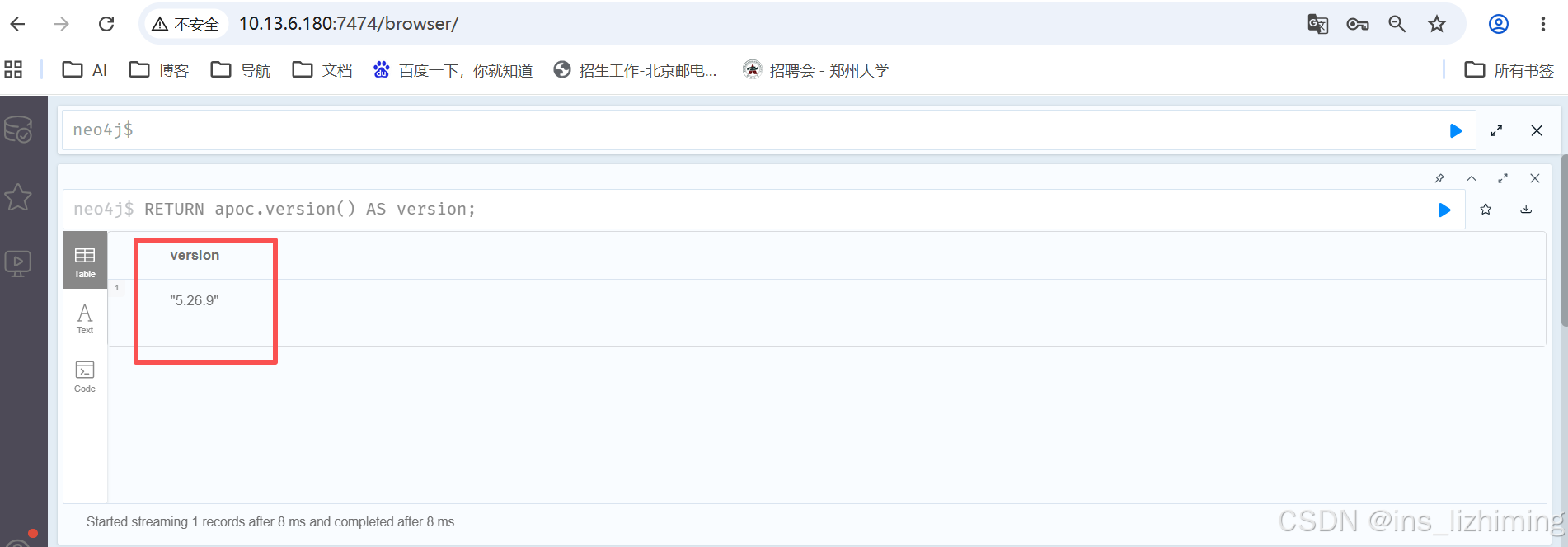
4.接下来开始处理数据,我这里是使用多模态对图片内容进行处理。
import json
import requests
from neo4j import GraphDatabase
from typing import List, Dict, Any
import base64
import os


class DocumentImageProcessor:
    """
    处理投标文件图片,使用多模态模型抽取人员信息,并存入Neo4j知识图谱
    """

    def __init__(self, api_url: str, api_key: str, model_name: str, neo4j_uri: str, neo4j_user: str,
                 neo4j_password: str):
        self.api_url = api_url
        self.api_key = api_key
        self.model_name = model_name

        # 初始化Neo4j连接
        self.driver = GraphDatabase.driver(neo4j_uri, auth=(neo4j_user, neo4j_password))

        # 定义期望的实体类型
        self.expected_entities = ["姓名", "职位", "证书", "证书编号", "证书有效期"]

    def image_to_base64(self, image_path: str) -> str:
        """将图片文件转换为base64编码字符串"""
        with open(image_path, "rb") as image_file:
            return base64.b64encode(image_file.read()).decode('utf-8')

    def query_multimodal_model(self, image_path: str) -> Dict[str, Any]:
        """
        调用多模态模型API,解析图片中的人员信息
        """
        headers = {
            "Authorization": f"Bearer {self.api_key}",
            "Content-Type": "application/json"
        }

        # 将图片转为base64
        image_base64 = self.image_to_base64(image_path)

        # 构造请求体
        payload = {
            "model": self.model_name,
            "messages": [
                {
                    "role": "user",
                    "content": [
                        {
                            "type": "text",
                            "text": "请仔细分析这张图片,从中提取所有人员的相关信息。请严格按照以下JSON格式返回,提取的实体包括:姓名、职位、证书、证书编号、证书有效期。如果某个实体不存在,请忽略该字段。请只返回JSON数组,不要有任何其他文字。格式为:[{\"姓名\": \"xxx\", \"职位\": \"xxx\", \"证书\": \"xxx\", \"证书编号\": \"xxx\", \"证书有效期\": \"xxx\"}]"
                        },
                        {
                            "type": "image_url",
                            "image_url": {
                                "url": f"data:image/jpeg;base64,{image_base64}"
                            }
                        }
                    ]
                }
            ],
            "temperature": 0.1  # 设置较低温度以提高输出的一致性
        }

        try:
            response = requests.post(self.api_url, headers=headers, json=payload)
            response.raise_for_status()
            result = response.json()
            print("模式回复:",result)
            # 提取AI生成的内容
            content = result['choices'][0]['message']['content']

            # 尝试解析JSON
            try:
                # 如果直接是JSON字符串,解析它
                parsed_data = json.loads(content)
                if isinstance(parsed_data, list):
                    return parsed_data
                elif isinstance(parsed_data, dict):
                    return [parsed_data]
            except json.JSONDecodeError:
                # 如果返回的是包含JSON的文本,尝试查找并解析JSON部分
                import re
                json_match = re.search(r'\[.*\]|\{.*\}', content, re.DOTALL)
                if json_match:
                    parsed_data = json.loads(json_match.group())
                    if isinstance(parsed_data, list):
                        return parsed_data
                    elif isinstance(parsed_data, dict):
                        return [parsed_data]
                else:
                    print(f"无法解析模型返回内容为JSON: {content}")
                    return []

        except Exception as e:
            print(f"调用多模态模型API失败: {e}")
            return []

    def extract_triplets_from_person_data(self, person_data: Dict[str, Any], source_image: str) -> List[tuple]:
        """
        从单个人员数据中提取知识图谱三元组
        三元组格式: (主体, 关系, 客体)
        """
        triplets = []
        name = person_data.get("姓名")
        if not name:
            return []  # 如果没有姓名,则跳过此人

        # 创建人员节点
        triplets.append(("Person", "CREATE", {"name": name}))

        # 提取并关联职位
        position = person_data.get("职位")
        if position:
            triplets.append((name, "HAS_POSITION", position))
            triplets.append(("Position", "CREATE", {"title": position}))

        # 提取并关联证书
        certificate = person_data.get("证书")
        cert_number = person_data.get("证书编号")
        cert_expiry = person_data.get("证书有效期")

        if certificate or cert_number:
            cert_label = "Certificate"
            cert_properties = {}
            if certificate:
                cert_properties["type"] = certificate
            if cert_number:
                cert_properties["number"] = cert_number
            if cert_expiry:
                cert_properties["expiry_date"] = cert_expiry

            # 创建证书节点
            triplets.append((cert_label, "CREATE", cert_properties))

            # 创建人员到证书的关系
            triplets.append((name, "HOLDS_CERTIFICATE", cert_number or certificate))  # 使用编号或类型作为客体标识

        return triplets

    def process_image_and_build_kg(self, image_path: str):
        """
        处理单张图片,抽取信息并更新知识图谱
        """
        print(f"正在处理图片: {image_path}")

        # 步骤1: 调用模型抽取信息
        extracted_data = self.query_multimodal_model(image_path)

        if not extracted_data:
            print(f"未能从图片 {image_path} 中提取到有效信息。")
            return

        print(f"从图片 {image_path} 中提取到 {len(extracted_data)} 条人员记录: {extracted_data}")

        # 步骤2: 为每条记录提取三元组并存入图数据库
        all_triplets = []
        for person_info in extracted_data:
            triplets = self.extract_triplets_from_person_data(person_info, image_path)
            all_triplets.extend(triplets)

        # 步骤3: 将三元组写入Neo4j
        self.write_triplets_to_neo4j(all_triplets, image_path)

    def write_triplets_to_neo4j(self, triplets: List[tuple], source_image: str):
        """
        将三元组列表写入Neo4j数据库
        """
        with self.driver.session() as session:
            for triplet in triplets:
                subject, predicate, obj = triplet

                # 根据不同的操作类型执行Cypher查询
                if predicate == "CREATE":
                    # 创建节点
                    label = subject
                    properties = obj

                    # 确定用于MERGE的唯一标识属性
                    unique_prop = None
                    unique_val = None
                    if label == "Person" and "name" in properties:
                        unique_prop = "name"
                        unique_val = properties["name"]
                    elif label == "Position" and "title" in properties:
                        unique_prop = "title"
                        unique_val = properties["title"]
                    elif label == "Certificate":
                        # 对于证书,优先使用'number',然后是'type'
                        if "number" in properties:
                            unique_prop = "number"
                            unique_val = properties["number"]
                        elif "type" in properties:
                            unique_prop = "type"
                            unique_val = properties["type"]

                    if unique_prop and unique_val is not None:
                        # 为所有属性构建SET子句
                        set_parts = []
                        params = {"source_image": source_image, f"merge_val": unique_val}
                        for k, v in properties.items():
                            set_parts.append(f"n.{k} = ${k}")
                            params[k] = v

                        # MERGE子句仅使用唯一标识符
                        cypher_query = f"""
                        MERGE (n:{label} {{{unique_prop}: $merge_val}})
                        ON CREATE SET n.source_image = $source_image, {', '.join(set_parts)}
                        ON MATCH SET n.source_image = $source_image, {', '.join(set_parts)}
                        """
                        session.run(cypher_query, params)

                elif predicate in ["HAS_POSITION", "HOLDS_CERTIFICATE"]:
                    # 创建关系
                    person_name = subject
                    rel_type = predicate
                    target_identifier = obj  # 这可能是职位名、证书编号等

                    if rel_type == "HAS_POSITION":
                        # 查找人员和职位节点,然后创建关系
                        cypher_query = """
                        MATCH (p:Person {name: $person_name})
                        MATCH (pos:Position {title: $target_identifier})
                        MERGE (p)-[:HAS_POSITION]->(pos)
                        """
                        session.run(cypher_query, {"person_name": person_name, "target_identifier": target_identifier})

                    elif rel_type == "HOLDS_CERTIFICATE":
                        # 查找人员和证书节点,然后创建关系
                        # 优先通过'number'匹配,否则通过'type'匹配
                        match_by_number = " " not in target_identifier and len(target_identifier) > 5

                        if match_by_number:
                            cypher_query = """
                            MATCH (p:Person {name: $person_name})
                            MATCH (c:Certificate {number: $target_identifier})
                            MERGE (p)-[:HOLDS_CERTIFICATE]->(c)
                            """
                        else:
                            cypher_query = """
                            MATCH (p:Person {name: $person_name})
                            MATCH (c:Certificate {type: $target_identifier})
                            MERGE (p)-[:HOLDS_CERTIFICATE]->(c)
                            """
                        session.run(cypher_query, {"person_name": person_name, "target_identifier": target_identifier})

    def close_connection(self):
        """关闭Neo4j连接"""
        self.driver.close()


def main():
    # --- 配置信息 ---
    api_key = "token-xxxxxx"
    modelName = "qwen_vl"
    modelUrl = "http://xxxxxx:7007/v1/chat/completions"

    neo4j_uri = "bolt://xxxxxxx:7687"  # 注意Neo4j的bolt协议端口通常是7687,不是HTTP端口7474
    neo4j_user = "neo4j"
    neo4j_password = "xxxxxx"

    # 存放投标文件图片的目录
    images_directory = "./tender_images"  # 请将您的图片放入此目录

    # --- 初始化处理器 ---
    processor = DocumentImageProcessor(
        api_url=modelUrl,
        api_key=api_key,
        model_name=modelName,
        neo4j_uri=neo4j_uri,
        neo4j_user=neo4j_user,
        neo4j_password=neo4j_password
    )

    # --- 批量处理图片 ---
    if not os.path.exists(images_directory):
        print(f"错误:图片目录 '{images_directory}' 不存在!")
        return

    image_files = [f for f in os.listdir(images_directory) if f.lower().endswith(('.png', '.jpg', '.jpeg'))]

    if not image_files:
        print(f"错误:在目录 '{images_directory}' 中未找到任何图片文件!")
        return

    print(f"找到 {len(image_files)} 张图片,开始处理...")

    for image_file in image_files:
        image_path = os.path.join(images_directory, image_file)
        try:
            processor.process_image_and_build_kg(image_path)
        except Exception as e:
            print(f"处理图片 {image_path} 时发生错误: {e}")
            continue  # 继续处理下一张图片

    # --- 清理 ---
    processor.close_connection()
    print("\n所有图片处理完成,知识图谱已更新!")


if __name__ == "__main__":
    main()
5. 处理完成后,验证数据。查询所有节点和关系:
MATCH (n)-[r]->(m)
RETURN n, r, m
LIMIT 200
6. 构建集成 langchain 的问答应用:
from langchain_openai import ChatOpenAI
from langchain_community.graphs import Neo4jGraph
# 注意这里的导入路径变化
from langchain_community.chains.graph_qa.cypher import GraphCypherQAChain

class Neo4jQABot:
    def __init__(self, neo4j_url, neo4j_user, neo4j_password, llm_api_key):
        # 1. 初始化 Neo4j 连接
        self.graph = Neo4jGraph(
            url=neo4j_url,
            username=neo4j_user,
            password=neo4j_password
        )

        # 2. 【关键】刷新 Schema
        # 这一步会让 LangChain 读取数据库中现有的节点标签和关系类型
        # 如果不执行这一步,AI 就不知道数据库里有什么,无法生成正确的 Cypher
        self.graph.refresh_schema()
        print("Neo4j Schema loaded successfully.")

        # 3. 初始化 LLM
        self.llm = ChatOpenAI(
            model="gpt-3.5-turbo",  # 或者 gpt-4
            temperature=0,          # 设为0以保证生成 Cypher 的稳定性
            base_url='http://xxxxxxx:7007/v1',          # 设为0以保证生成 Cypher 的稳定性
            openai_api_key=llm_api_key
        )

        # 4. 构建问答链
        self.chain = GraphCypherQAChain.from_llm(
            graph=self.graph,
            llm=self.llm,
            verbose=True,           # 开启调试模式,可以看到生成的 Cypher 语句
            allow_dangerous_requests=True # 允许执行生成的查询
        )

    def ask(self, question):
        """提问入口"""
        try:
            response = self.chain.invoke({"query": question})
            return response['result']
        except Exception as e:
            return f"Error: {str(e)}"
# --- 使用示例 ---
if __name__ == "__main__":
    # 替换为你的实际配置
    bot = Neo4jQABot(
        neo4j_url="bolt://xxxxx:7687",
        neo4j_user="neo4j",
        neo4j_password="xxxxxx",
        llm_api_key="sk-wwwwww"
    )
    # 测试提问
    print(bot.ask("高级系统架构师?"))

AtomGit 是由开放原子开源基金会联合 CSDN 等生态伙伴共同推出的新一代开源与人工智能协作平台。平台坚持“开放、中立、公益”的理念,把代码托管、模型共享、数据集托管、智能体开发体验和算力服务整合在一起,为开发者提供从开发、训练到部署的一站式体验。
更多推荐



 0
0 0
0- 0


 已为社区贡献1条内容

所有评论(0)