Claude Code Config Helper 3.1.0 发布:内置浏览器让 Claude 不只读代码,还能打开页面、查看控制台、执行脚本、截图验证,真正参与前端、Webview 与插件 UI
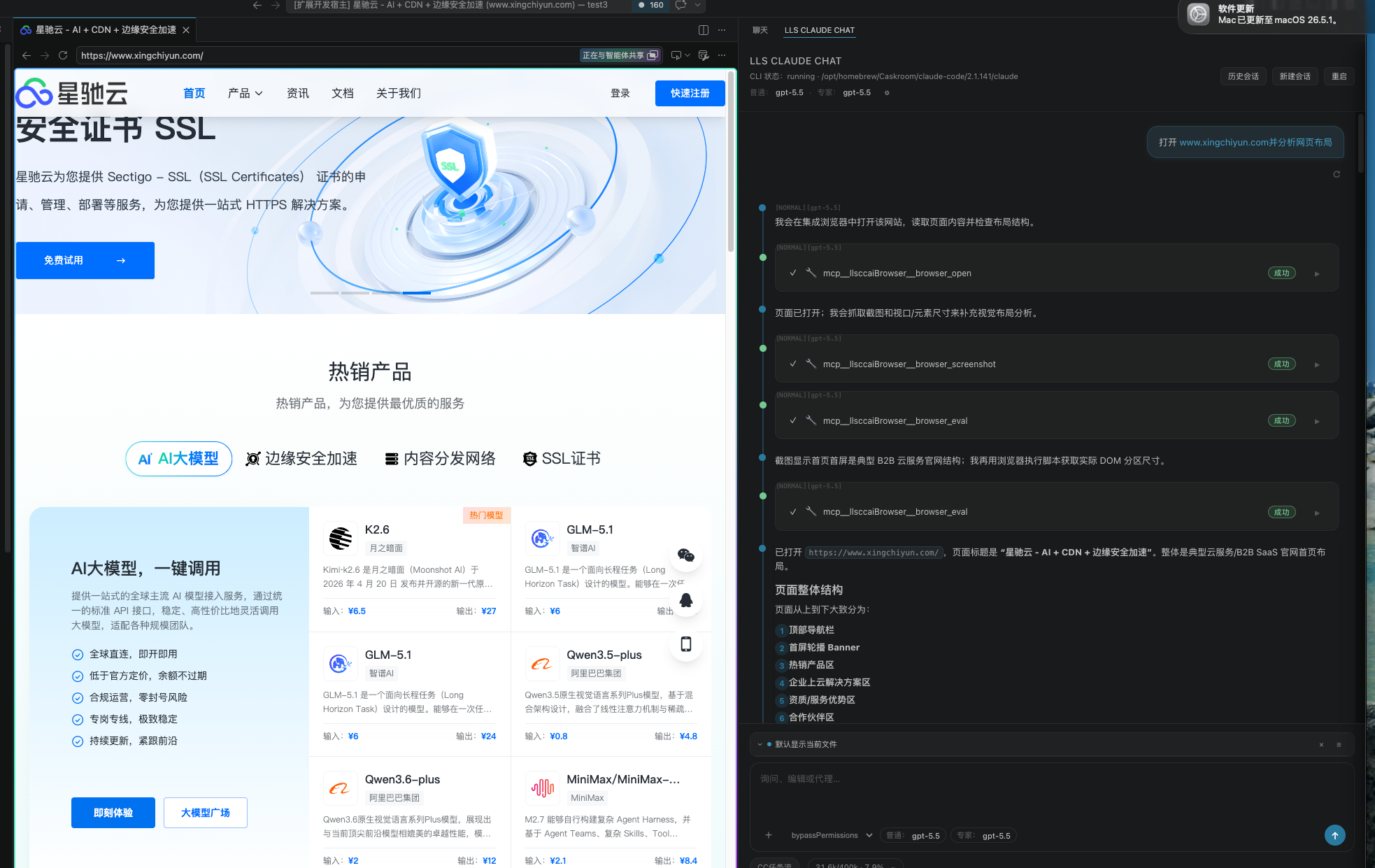
Claude Code Config Helper 3.1.0 的重点,是让 VS Code 中的 Claude 不只会读代码、改代码,还能通过内置浏览器参与实际页面调试。
在前端、Webview、插件 UI 或 Web 应用开发中,很多问题并不能只靠阅读源码判断。页面是否真的渲染出来、按钮是否可点击、控制台有没有报错、交互流程是否符合预期,都需要在浏览器里验证。
3.1.0 将浏览器能力接入到 Claude 的工具链中。Claude 可以打开页面、跳转页面、读取页面内容、查看控制台事件、执行页面脚本,并获取页面截图。这样它不只是根据代码“猜测”问题,而是可以结合真实页面状态辅助判断。
对开发调试的帮助
内置浏览器让 Claude 可以更接近开发者实际看到的页面。比如,当你修改了一个组件、修复了一个交互 bug,或者调整了 Webview 布局后,Claude 可以通过浏览器读取页面结构、查看控制台信息,并根据截图判断页面是否符合预期。
它特别适合这些开发场景:
- 前端页面调试:检查页面内容、布局和交互状态
- Webview 开发:验证 VS Code 插件里的 Webview UI 是否正常渲染
- 控制台问题排查:查看页面运行时错误和警告
- 功能回归验证:修改代码后确认页面行为没有被破坏
- UI 细节检查:结合截图判断按钮、弹窗、提示信息是否符合预期
减少重复确认,保持开发连续性
使用浏览器工具时,VS Code 可能会反复弹出 “Open Browser Page?” 确认。3.1.0 在聊天框下方的 CC 任务流 按钮后增加了一个提示入口,用于引导用户开启浏览器工具相关设置。
点击提示后,会先在 Webview 内弹出确认说明,告知开启原因和安全影响。只有用户确认后,才会启用相关设置,减少重复确认带来的打断,同时保留必要的用户授权。
一句话总结
Claude Code Config Helper 3.1.0 让 Claude 能通过内置浏览器参与真实页面调试,从“看代码”进一步走向“看页面、查控制台、辅助验证交互”,更适合前端、Webview 和插件 UI 开发。
安装方式
打开 VS Code 扩展面板,在搜索框中搜索 Claude Code Config Helper,找到扩展后点击 Install 即可安装。
安装完成后,打开 VS Code 侧边栏中的 Claude Code Config Helper,即可使用内置浏览器相关能力辅助开发调试。
GitHub 地址
项目地址:https://github.com/liliangshan/claude-code-config-helper
English Version
Claude Code Config Helper 3.1.0: The built-in browser lets Claude go beyond reading code — it can open pages, inspect console output, run scripts, capture screenshots, and actively support frontend, Webview, and VS Code extension UI debugging
Claude Code Config Helper 3.1.0 focuses on making Claude inside VS Code more useful during real development. With the built-in browser integration, Claude can do more than read and modify source code — it can also help inspect the actual page you are developing.
For frontend apps, Webviews, VS Code extension UIs, and web-based tools, many issues cannot be fully diagnosed by reading source code alone. You often need to verify whether the page actually renders correctly, whether buttons are clickable, whether the console contains errors, and whether the interaction flow behaves as expected.
In 3.1.0, browser capabilities are connected to Claude’s toolchain. Claude can open pages, navigate between URLs, read page content, inspect recent console events, run scripts in the page, and capture screenshots. This allows Claude to reason from the real page state instead of only guessing from code.
How it helps during development
The built-in browser gives Claude access to what developers actually see in the UI. After you update a component, fix an interaction bug, or adjust a Webview layout, Claude can inspect the page structure, check console output, and use screenshots to help verify whether the result matches expectations.
It is especially useful for:
- Frontend page debugging: inspect content, layout, and interaction states
- Webview development: verify that VS Code Webview UIs render correctly
- Console issue investigation: check runtime errors and warnings
- Regression checks: confirm that behavior still works after code changes
- UI detail review: use screenshots to verify buttons, dialogs, hints, and visual states
Reduce repeated confirmations and keep development flowing
When browser tools are used, VS Code may repeatedly show the “Open Browser Page?” confirmation. Version 3.1.0 adds a hint right after the CC task flow button under the chat box to guide users through enabling the related browser settings.
Clicking the hint opens an in-Webview confirmation dialog that explains why the settings are needed and what security impact they have. The settings are only enabled after the user confirms, reducing repetitive interruptions while still keeping explicit user consent.
One-line summary
Claude Code Config Helper 3.1.0 lets Claude participate in real page debugging through the built-in browser — moving from “reading code” to “seeing pages, checking the console, and helping verify interactions,” especially for frontend, Webview, and VS Code extension UI development.
Installation
Open the VS Code Extensions panel, search for Claude Code Config Helper, then click Install.
After installation, open Claude Code Config Helper from the VS Code sidebar to use the built-in browser capabilities for development and debugging.
GitHub
Project: https://github.com/liliangshan/claude-code-config-helper

AtomGit 是由开放原子开源基金会联合 CSDN 等生态伙伴共同推出的新一代开源与人工智能协作平台。平台坚持“开放、中立、公益”的理念,把代码托管、模型共享、数据集托管、智能体开发体验和算力服务整合在一起,为开发者提供从开发、训练到部署的一站式体验。
更多推荐



 5
5 0
0- 0


 已为社区贡献8条内容

所有评论(0)