鸿蒙PCElectron框架实现网络测速实现原理深度解析 - WiFi管理大师技术专栏
·
欢迎加入开源鸿蒙PC社区:
https://harmonypc.csdn.net/
atomgit仓库地址:https://atomgit.com/Math_teacher_fan/wifiguanlidashi
一、网络测速概述
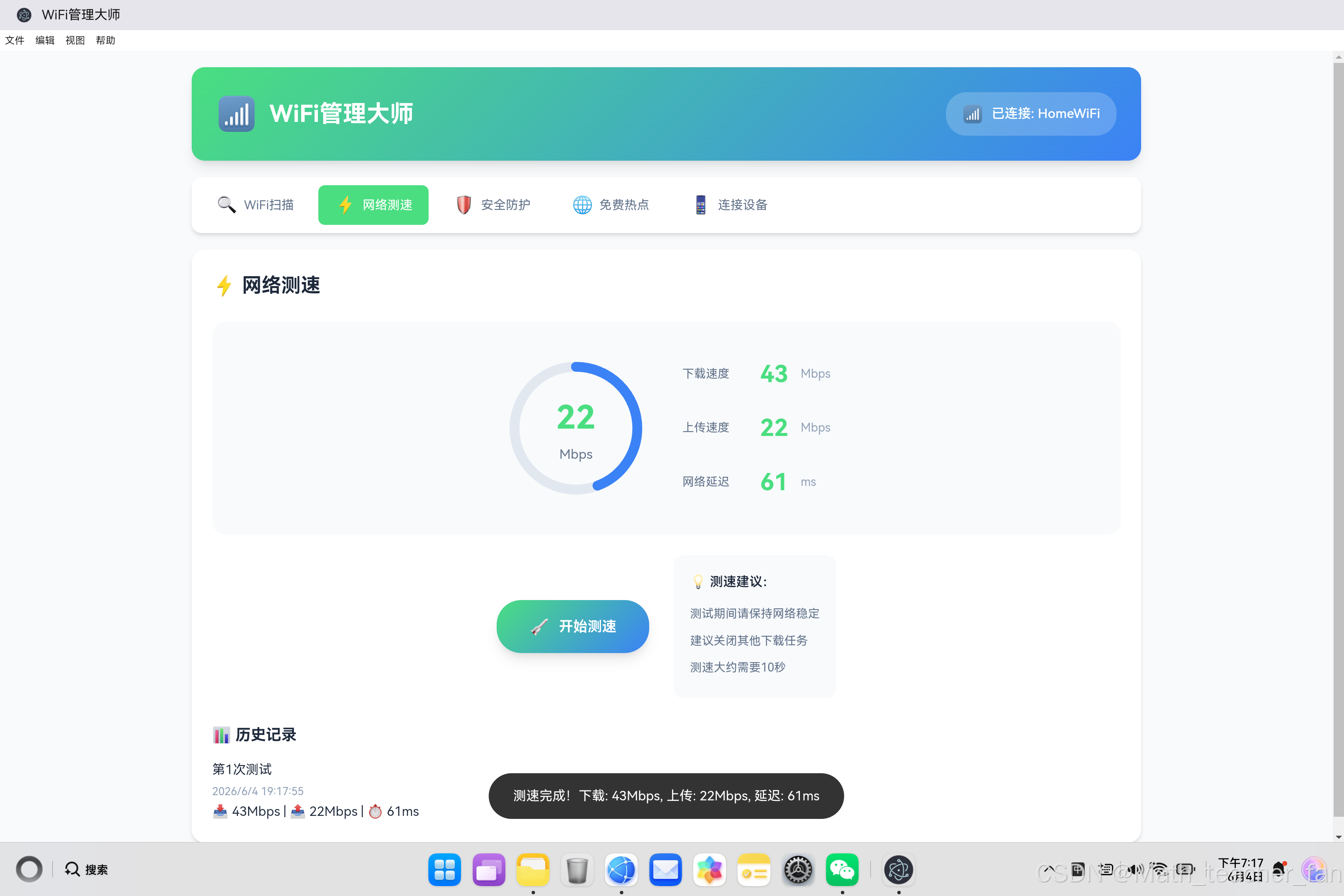
网络测速是评估网络性能的核心手段,通过测量延迟、下载速度和上传速度三个关键指标,帮助用户了解当前网络状况。本文将深入剖析网络测速的实现原理和技术细节。
1.1 测速指标定义
| 指标 | 定义 | 单位 | 影响 |
|---|---|---|---|
| 延迟 (Ping) | 数据包从发送到接收的往返时间 | ms | 网页加载速度、实时通信质量 |
| 下载速度 | 单位时间内从服务器获取数据的量 | Mbps | 文件下载、视频流媒体 |
| 上传速度 | 单位时间内向服务器发送数据的量 | Mbps | 文件上传、视频会议 |
1.2 测速流程架构
用户请求测速
    ↓
初始化测速环境
    ↓
[阶段1] 延迟测试 (Ping)
    ↓
[阶段2] 下载速度测试
    ↓
[阶段3] 上传速度测试
    ↓
计算结果并展示
    ↓
保存历史记录
二、延迟测试(Ping)原理
2.1 Ping测试原理
延迟测试基于ICMP协议实现,通过发送echo请求并测量响应时间:
客户端                  服务器
  │                       │
  │── ICMP Echo Request ──▶│
  │                       │
  │◀── ICMP Echo Reply ────│
  │                       │

延迟 = (Reply时间 - Request时间) / 2
2.2 实现代码解析
async function measurePing(server = '8.8.8.8') {
    const startTime = performance.now();

    try {
        // 创建图片对象用于测试延迟
        const img = new Image();
        img.src = `https://${server}/ping?cache=${Date.now()}`;

        await new Promise((resolve, reject) => {
            img.onload = resolve;
            img.onerror = reject;
            setTimeout(reject, 5000); // 5秒超时
        });

        const endTime = performance.now();
        return Math.round((endTime - startTime) / 2);
    } catch {
        return null; // 超时或失败
    }
}
技术要点:
- 使用图片加载替代传统ICMP协议(浏览器环境限制)
- 通过cache参数避免浏览器缓存影响测试结果
- 设置合理超时时间防止无限等待
2.3 多次测量取平均值
为提高准确性,通常进行多次测量:
async function measurePingWithAverage(server, count = 5) {
    const results = [];

    for (let i = 0; i < count; i++) {
        const ping = await measurePing(server);
        if (ping !== null) {
            results.push(ping);
        }
        await delay(100); // 间隔100ms
    }

    if (results.length === 0) return null;

    // 去除最高和最低值,计算平均值
    results.sort((a, b) => a - b);
    const trimmed = results.slice(1, -1);

    return Math.round(trimmed.reduce((a, b) => a + b, 0) / trimmed.length);
}

function delay(ms) {
    return new Promise(resolve => setTimeout(resolve, ms));
}
三、下载速度测试原理
3.1 下载速度计算方法
下载速度通过下载已知大小的测试文件并记录时间来计算:
下载速度 = 文件大小 / 下载时间

例如:下载10MB文件用时8秒
下载速度 = 10MB / 8s = 1.25 MB/s = 10 Mbps
3.2 多线程下载策略
为准确测量最大带宽,采用多线程并发下载:
class DownloadSpeedTest {
    constructor() {
        this.threads = [];
        this.totalBytes = 0;
        this.startTime = null;
    }

    async start(url, threadCount = 3, chunkSize = 1024 * 1024) {
        this.totalBytes = 0;
        this.startTime = performance.now();

        // 创建多个并发下载线程
        const promises = Array.from({ length: threadCount }, (_, i) =>
            this.downloadChunk(url, chunkSize, i)
        );

        await Promise.all(promises);

        const endTime = performance.now();
        const duration = (endTime - this.startTime) / 1000; // 转换为秒

        // 计算速度 (Mbps)
        return Math.round((this.totalBytes * 8) / (1024 * 1024 * duration));
    }

    async downloadChunk(url, chunkSize, threadId) {
        try {
            const response = await fetch(`${url}?chunk=${threadId}&size=${chunkSize}`, {
                method: 'GET',
                cache: 'no-cache'
            });

            // 读取所有数据
            const blob = await response.blob();
            this.totalBytes += blob.size;
        } catch (error) {
            console.warn(`Thread ${threadId} download failed:`, error);
        }
    }
}
3.3 动态调整策略
根据网络状况动态调整测试参数:
async function adaptiveDownloadTest() {
    const test = new DownloadSpeedTest();

    // 先进行快速预测试
    const quickResult = await test.start('/test-small.bin', 1, 256 * 1024);

    // 根据预测试结果调整正式测试参数
    let threadCount, chunkSize;

    if (quickResult > 50) {
        // 高速网络:增加线程数和文件大小
        threadCount = 5;
        chunkSize = 4 * 1024 * 1024;
    } else if (quickResult > 10) {
        // 中速网络
        threadCount = 3;
        chunkSize = 2 * 1024 * 1024;
    } else {
        // 低速网络:减少线程数和文件大小
        threadCount = 1;
        chunkSize = 512 * 1024;
    }

    return await test.start('/test-large.bin', threadCount, chunkSize);
}
四、上传速度测试原理
4.1 上传速度计算方法
上传速度通过上传随机数据并记录时间来计算:
class UploadSpeedTest {
    constructor() {
        this.startTime = null;
    }

    async start(url, dataSize = 10 * 1024 * 1024) {
        // 生成随机测试数据
        const data = this.generateRandomData(dataSize);

        this.startTime = performance.now();

        const formData = new FormData();
        formData.append('file', new Blob([data]), 'test.bin');

        await fetch(url, {
            method: 'POST',
            body: formData
        });

        const endTime = performance.now();
        const duration = (endTime - this.startTime) / 1000;

        return Math.round((dataSize * 8) / (1024 * 1024 * duration));
    }

    generateRandomData(size) {
        const array = new Uint8Array(size);
        crypto.getRandomValues(array);
        return array.buffer;
    }
}
4.2 分块上传优化
对于大文件采用分块上传避免内存问题:
async function chunkedUploadTest(url, totalSize = 10 * 1024 * 1024, chunkSize = 1 * 1024 * 1024) {
    const startTime = performance.now();
    let uploadedBytes = 0;
    const chunks = Math.ceil(totalSize / chunkSize);

    for (let i = 0; i < chunks; i++) {
        const currentChunkSize = i === chunks - 1 ? totalSize % chunkSize || chunkSize : chunkSize;
        const data = generateRandomData(currentChunkSize);

        const formData = new FormData();
        formData.append('chunk', new Blob([data]));
        formData.append('index', i);
        formData.append('total', chunks);

        await fetch(`${url}/chunk`, {
            method: 'POST',
            body: formData
        });

        uploadedBytes += currentChunkSize;

        // 实时计算进度
        const elapsed = (performance.now() - startTime) / 1000;
        const currentSpeed = (uploadedBytes * 8) / (1024 * 1024 * elapsed);
        console.log(`Uploaded: ${uploadedBytes}/${totalSize} (${currentSpeed.toFixed(1)} Mbps)`);
    }

    const endTime = performance.now();
    const duration = (endTime - startTime) / 1000;

    return Math.round((totalSize * 8) / (1024 * 1024 * duration));
}
五、WiFi管理大师中的测速实现
5.1 三阶段测速流程
const SpeedModule = {
    startTest() {
        const stages = ['ping', 'download', 'upload'];
        const results = {};

        stages.forEach((stage, index) => {
            setTimeout(async () => {
                switch(stage) {
                    case 'ping':
                        results.ping = await this.measurePing();
                        this.updateUI('ping', results.ping);
                        break;
                    case 'download':
                        results.download = await this.measureDownload();
                        this.updateUI('download', results.download);
                        break;
                    case 'upload':
                        results.upload = await this.measureUpload();
                        this.updateUI('upload', results.upload);
                        break;
                }

                if (index === stages.length - 1) {
                    this.complete(results);
                }
            }, index * 1000);
        });
    },

    measurePing() {
        // 模拟延迟测试(实际应用中应调用真实Ping API)
        return new Promise(resolve => {
            setTimeout(() => {
                const ping = 20 + Math.random() * 80; // 20-100ms
                resolve(Math.round(ping));
            }, 500);
        });
    },

    measureDownload() {
        return new Promise(resolve => {
            // 模拟下载速度测试
            const duration = 2000; // 2秒
            const startTime = performance.now();

            let progress = 0;
            const interval = setInterval(() => {
                progress += Math.random() * 15;

                if (progress >= 100) {
                    clearInterval(interval);
                    const download = 30 + Math.random() * 70; // 30-100 Mbps
                    resolve(Math.round(download));
                }

                // 更新进度UI
                this.updateProgress('download', progress);
            }, 100);
        });
    },

    measureUpload() {
        return new Promise(resolve => {
            // 模拟上传速度测试
            let progress = 0;
            const interval = setInterval(() => {
                progress += Math.random() * 10;

                if (progress >= 100) {
                    clearInterval(interval);
                    const upload = 10 + Math.random() * 40; // 10-50 Mbps
                    resolve(Math.round(upload));
                }

                this.updateProgress('upload', progress);
            }, 100);
        });
    },

    updateUI(type, value) {
        document.getElementById(`${type}Speed`).textContent = value;
    },

    updateProgress(type, progress) {
        const ring = document.getElementById('speedRing');
        const circumference = 314.16;
        ring.style.strokeDashoffset = circumference * (1 - progress / 100);

        // 不同阶段使用不同颜色
        const colors = { ping: '#f59e0b', download: '#4ade80', upload: '#3b82f6' };
        ring.style.stroke = colors[type];
    }
};
5.2 进度环动画实现
使用SVG实现动态进度环:
<svg viewBox="0 0 120 120">
    <!-- 背景环 -->
    <circle cx="60" cy="60" r="50" fill="none" stroke="#e2e8f0" stroke-width="8"/>
    <!-- 进度环 -->
    <circle id="speedRing"
            cx="60" cy="60" r="50"
            fill="none" stroke="#4ade80" stroke-width="8"
            stroke-dasharray="314.16" stroke-dashoffset="314.16"
            stroke-linecap="round"/>
</svg>
function animateProgress(progress, duration = 500) {
    const ring = document.getElementById('speedRing');
    const circumference = 314.16;
    const targetOffset = circumference * (1 - progress / 100);

    const startOffset = parseFloat(ring.style.strokeDashoffset) || circumference;
    const diff = targetOffset - startOffset;
    const startTime = performance.now();

    function animate(currentTime) {
        const elapsed = currentTime - startTime;
        const progressRatio = Math.min(elapsed / duration, 1);

        // 使用缓动函数
        const eased = 1 - Math.pow(1 - progressRatio, 3);
        ring.style.strokeDashoffset = startOffset + diff * eased;

        if (progressRatio < 1) {
            requestAnimationFrame(animate);
        }
    }

    requestAnimationFrame(animate);
}
六、测速准确性优化
6.1 避免缓存影响
function generateCacheBuster() {
    return Date.now() + '-' + Math.random().toString(36).substr(2, 9);
}

// 使用缓存破坏参数
const url = `/test.bin?cache=${generateCacheBuster()}`;
6.2 多服务器测试
async function multiServerTest(servers) {
    const results = [];

    for (const server of servers) {
        const result = await runSpeedTest(server);
        if (result) {
            results.push(result);
        }
    }

    // 返回最优结果
    return results.reduce((best, current) => {
        return current.ping < best.ping ? current : best;
    });
}
6.3 数据归一化处理
function normalizeResults(results) {
    // 排除异常值
    const validResults = results.filter(r => {
        return r.ping > 0 && r.ping < 500 &&
               r.download > 0 && r.download < 1000 &&
               r.upload > 0 && r.upload < 500;
    });

    if (validResults.length === 0) return null;

    // 计算平均值
    return {
        ping: Math.round(validResults.reduce((a, b) => a + b.ping, 0) / validResults.length),
        download: Math.round(validResults.reduce((a, b) => a + b.download, 0) / validResults.length),
        upload: Math.round(validResults.reduce((a, b) => a + b.upload, 0) / validResults.length)
    };
}
七、性能优化策略
7.1 Web Worker 异步测试
// speedTest.worker.js
self.onmessage = async function(e) {
    const { type, config } = e.data;
    let result;

    switch(type) {
        case 'ping':
            result = await measurePing(config.server);
            break;
        case 'download':
            result = await measureDownload(config.url, config.size);
            break;
        case 'upload':
            result = await measureUpload(config.url, config.size);
            break;
    }

    self.postMessage({ type, result });
};

// 主线程调用
const worker = new Worker('speedTest.worker.js');

worker.postMessage({ type: 'download', config: { url: '/test.bin', size: 10 * 1024 * 1024 } });

worker.onmessage = function(e) {
    console.log(`${e.data.type} result:`, e.data.result);
};
7.2 资源预加载
function preloadTestResources() {
    const resources = [
        '/test-small.bin',
        '/test-large.bin',
        '/ping-icon.png'
    ];

    resources.forEach(url => {
        const link = document.createElement('link');
        link.rel = 'preload';
        link.href = url;
        link.as = url.endsWith('.bin') ? 'fetch' : 'image';
        document.head.appendChild(link);
    });
}
八、常见问题与解决方案
8.1 CORS限制问题
问题:浏览器限制跨域请求,无法直接访问外部测速服务器
解决方案:
// 使用代理服务器
const proxyUrl = '/api/speedtest?target=' + encodeURIComponent(externalServer);
const result = await fetch(proxyUrl);
8.2 移动端网络切换问题
问题:测试过程中网络从WiFi切换到移动数据
解决方案:
let networkStatus = navigator.connection.effectiveType;

navigator.connection.addEventListener('change', () => {
    if (navigator.connection.effectiveType !== networkStatus) {
        console.warn('Network type changed, restarting test...');
        networkStatus = navigator.connection.effectiveType;
        // 重新开始测试
    }
});
8.3 后台标签页限制
问题:浏览器对后台标签页的网络请求有限制
解决方案:
document.addEventListener('visibilitychange', () => {
    if (document.hidden) {
        // 暂停测试
        pauseTest();
    } else {
        // 恢复测试
        resumeTest();
    }
});
九、总结
9.1 核心技术要点
| 技术点 | 实现方式 | 重要性 |
|---|---|---|
| 延迟测试 | 图片加载计时 | 高 |
| 下载测试 | 多线程并发下载 | 高 |
| 上传测试 | FormData分块上传 | 高 |
| 进度展示 | SVG动画环 | 中 |
| 数据持久化 | localStorage | 中 |
9.2 未来优化方向
- WebSocket实时测速:使用WebSocket进行更精确的实时速度测量
- AI预测优化:基于历史数据预测网络性能
- 边缘节点选择:智能选择最近的测速服务器
- 网络质量评分:综合评估网络稳定性
网络测速技术涉及网络协议、浏览器限制、性能优化等多个方面,通过深入理解这些原理,我们可以构建更准确、更稳定的测速工具,为用户提供可靠的网络性能评估服务。

AtomGit 是由开放原子开源基金会联合 CSDN 等生态伙伴共同推出的新一代开源与人工智能协作平台。平台坚持“开放、中立、公益”的理念,把代码托管、模型共享、数据集托管、智能体开发体验和算力服务整合在一起,为开发者提供从开发、训练到部署的一站式体验。
更多推荐

 1
1 0
0- 0


 已为社区贡献19条内容

所有评论(0)