Depth Anything 3 从安装部署到 ONNX 导出完整实践
·
Depth Anything 3 从安装部署到 ONNX 导出完整实践
前言
Depth Anything 3(DA3)是新一代单目深度估计框架,相比前代版本在深度预测精度、多视图一致性以及三维重建能力方面均有明显提升。
本文记录从环境搭建、模型部署、深度推理、点云生成到 ONNX 导出的完整流程,并总结实际开发过程中常见问题及解决方案。
环境准备
系统环境
| 软件 | 版本 |
|---|---|
| Python | 3.10 |
| PyTorch | 2.4+ |
| CUDA | 12.x |
| OpenCV | 4.8+ |
| Open3D | 0.18+ |
创建虚拟环境
conda create -n depth-anything python=3.10

conda activate depth-anything
安装 PyTorch
CUDA 12.4:
pip install torch torchvision torchaudio \
--index-url https://download.pytorch.org/whl/cu124
CPU 环境:
pip install torch torchvision torchaudio
安装 Depth Anything 3
下载源码
git clone https://github.com/DepthAnything/Depth-Anything-3.git

cd Depth-Anything-3
安装依赖
pip install -r requirements.txt
安装点云库:
pip install open3d
安装 Gaussian Splatting:
pip install git+https://github.com/nerfstudio-project/gsplat.git
模型下载
Depth Anything 3 提供多个模型版本:
| 模型 | 说明 |
|---|---|
| DA3-SMALL | 小模型 |
| DA3-LARGE | 大模型 |
| DA3NESTED-GIANT-LARGE | 超大模型 |
在线加载:
model = DepthAnything3.from_pretrained(
    "depth-anything/DA3-SMALL"
)
本地加载:
model = DepthAnything3.from_pretrained(
    r"D:\Models\DA3-SMALL"
)
模型目录结构:
DA3-SMALL
├── config.json
├── model.safetensors
├── preprocessor_config.json
模型推理
加载模型
import torch
from depth_anything_3.api import DepthAnything3

device = torch.device("cuda")

model = DepthAnything3.from_pretrained(
    r"D:\Models\DA3-SMALL"
)

model = model.to(device)
执行推理
prediction = model.inference(images)
返回结果:
prediction.processed_images
prediction.depth
prediction.conf
prediction.extrinsics
prediction.intrinsics
推理结果解析
processed_images
预处理后的 RGB 图像:
(N,H,W,3)
例如:
(2,280,504,3)
表示:
- 2张图像
- 分辨率 280×504
- RGB三通道
depth
深度图:
(N,H,W)
保存每个像素对应的深度值。
conf
置信度图:
(N,H,W)
表示深度预测可信程度。
intrinsics
相机内参矩阵:
(N,3,3)
extrinsics
相机外参矩阵:
(N,3,4)

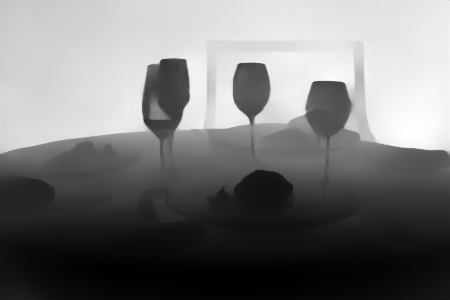
导出深度图
灰度深度图
depth = prediction.depth[0]

depth_norm = cv2.normalize(
    depth,
    None,
    0,
    255,
    cv2.NORM_MINMAX
)

depth_norm = depth_norm.astype(np.uint8)

cv2.imwrite(
    "depth.png",
    depth_norm
)
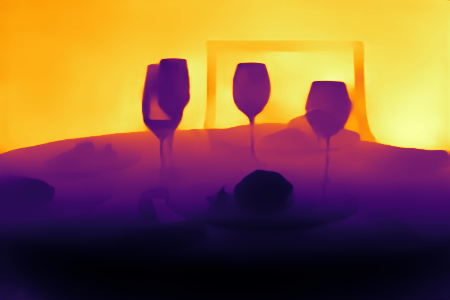
彩色深度图
depth_color = cv2.applyColorMap(
    depth_norm,
    cv2.COLORMAP_JET
)

cv2.imwrite(
    "depth_color.png",
    depth_color
)
点云生成
安装 Open3D:
pip install open3d
根据深度图和相机内参恢复三维坐标:
X=(u-cx)Z/fx

Y=(v-cy)Z/fy

Z=depth
导出点云:
o3d.io.write_point_cloud(
    "pointcloud.ply",
    pcd
)
生成文件:
pointcloud.ply
可直接使用 CloudCompare 或 MeshLab 查看。
多视图点云融合
读取点云:
pcd1 = o3d.io.read_point_cloud("1.ply")
pcd2 = o3d.io.read_point_cloud("2.ply")
ICP 配准:
reg = o3d.pipelines.registration.registration_icp(
    pcd2,
    pcd1,
    0.05,
    np.eye(4)
)
变换:
pcd2.transform(reg.transformation)
融合:
merged = pcd1 + pcd2
保存:
o3d.io.write_point_cloud(
    "merged.ply",
    merged
)
ONNX 导出
安装依赖:
pip install onnx
pip install onnxruntime
pip install safetensors
执行导出:
python export_onnx.py \
--model DA3-SMALL \
--process-res 504 \
--output DA3-SMALL-504.onnx
生成:
DA3-SMALL-504.onnx
ONNX 推理
加载模型:
import onnxruntime as ort

session = ort.InferenceSession(
    "DA3-SMALL-504.onnx"
)
执行推理:
depth = session.run(
    None,
    {"image": input_tensor}
)[0]
输出:
(1,1,504,504)
常见问题
Conda 无法激活环境
执行:
conda init powershell
重新打开终端。
HuggingFace 下载失败
推荐提前下载模型并采用本地加载方式。
safetensors 缺失
安装:
pip install safetensors
xFormers 警告
仅影响性能优化模块,不影响推理结果。
gsplat 警告
仅在 Gaussian Splatting 渲染时需要安装。
总结
本文完成了 Depth Anything 3 从环境搭建、模型部署、深度估计、点云生成、多视图融合到 ONNX 导出的完整流程。通过 Open3D 可以进一步实现三维重建,而 ONNX 模型则便于后续 TensorRT、C++ 或边缘设备部署。

AtomGit 是由开放原子开源基金会联合 CSDN 等生态伙伴共同推出的新一代开源与人工智能协作平台。平台坚持“开放、中立、公益”的理念,把代码托管、模型共享、数据集托管、智能体开发体验和算力服务整合在一起,为开发者提供从开发、训练到部署的一站式体验。
更多推荐

 19
19 0
0- 0


 已为社区贡献4条内容

所有评论(0)