HarmonyOS NEXT 实战:从零打造个人财务记账应用
HarmonyOS NEXT 实战:从零打造个人财务记账应用
SDK版本:HarmonyOS NEXT API 23
开发工具:DevEco Studio
一、项目背景与目标
在移动互联时代,记账类应用已成为个人财务管理的刚需工具。随着 HarmonyOS NEXT 的发布,原生应用开发迎来了全新机遇。本文将带领大家从零开始,构建一个功能完整、界面美观的个人财务记账应用。
1.1 功能规划
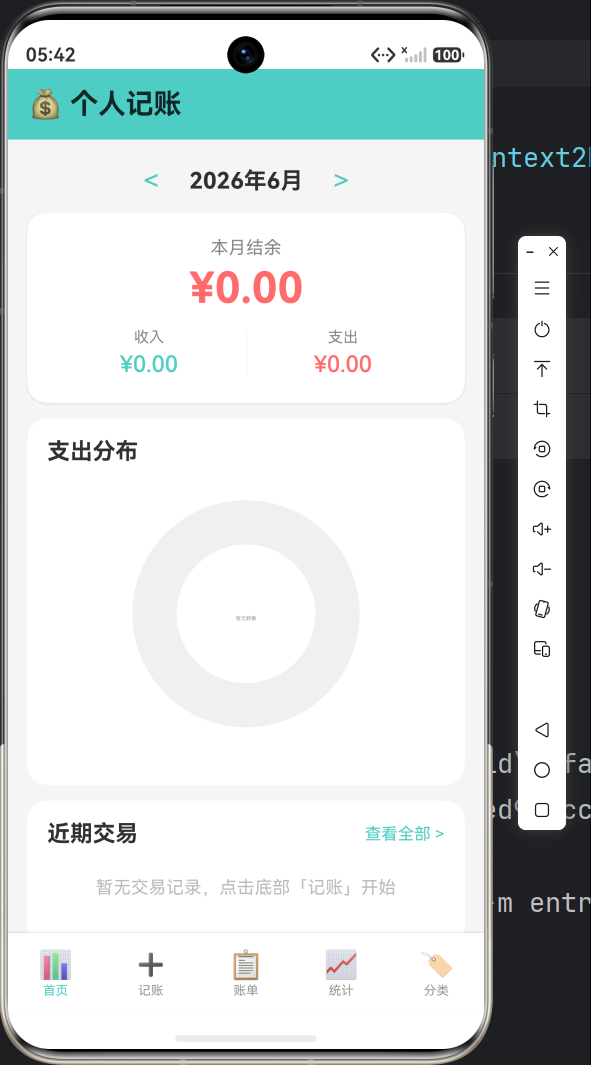
- 首页仪表盘:月度收支概览、支出分布环形图、近期交易记录
- 记账功能:支持收入/支出切换、分类选择、日期选择、备注添加
- 账单列表:按日期分组展示、支持筛选、左滑删除、点击编辑
- 统计分析:每日收支柱状图、分类占比饼图、月度切换
- 分类管理:自定义收支分类、图标选择、分类增删
1.2 技术栈
| 技术 | 说明 |
|---|---|
| ArkTS | HarmonyOS 声明式开发语言 |
| @ohos.router | 页面路由导航 |
| @ohos.data.preferences | 轻量级数据持久化 |
| Canvas | 图表绑制(环形图、柱状图、饼图) |
| @ohos.arkui.UI | 日期选择器弹窗 |
二、项目结构设计
2.1 目录结构
MyApplication/
├── AppScope/
│   ├── app.json5                 # 应用全局配置
│   └── resources/
│       └── base/
│           ├── element/          # 字符串、颜色资源
│           └── media/            # 图片资源
├── entry/
│   ├── src/main/
│   │   ├── ets/
│   │   │   ├── entryability/
│   │   │   │   └── EntryAbility.ets    # 应用入口
│   │   │   ├── models/
│   │   │   │   └── FinanceModels.ets  # 数据模型定义
│   │   │   ├── services/
│   │   │   │   └── FinanceDataService.ets  # 数据服务
│   │   │   └── pages/
│   │   │       ├── Index.ets           # 首页
│   │   │       ├── AddTransactionPage.ets   # 记账页
│   │   │       ├── TransactionListPage.ets  # 账单列表
│   │   │       ├── StatisticsPage.ets       # 统计页
│   │   │       └── CategoryManagePage.ets   # 分类管理
│   │   ├── resources/
│   │   └── module.json5
│   ├── build-profile.json5
│   └── hvigorfile.ts
├── build-profile.json5
└── oh-package.json5
2.2 架构设计理念
采用经典的 MVVM 模式:
- Model:
FinanceModels.ets定义数据结构 - ViewModel:
FinanceDataService.ets单例服务,管理数据状态 - View:各页面组件通过
@State响应式更新
数据流:View → Service → Preferences → Service → View
三、数据模型设计
3.1 核心模型定义
// models/FinanceModels.ets

// 交易类型枚举
export enum TransactionType {
  EXPENSE = 0,  // 支出
  INCOME = 1    // 收入
}

// 分类接口
export interface Category {
  id: number;
  name: string;
  icon: string;
  type: TransactionType;
}

// 交易记录接口
export interface Transaction {
  id: number;
  type: TransactionType;
  amount: number;
  categoryId: number;
  note: string;
  date: string;  // YYYY-MM-DD 格式
}

// 图表颜色配置
export const CHART_COLORS: string[] = [
  '#FF6B6B', '#4ECDC4', '#45B7D1', '#96CEB4',
  '#FFEAA7', '#DDA0DD', '#FF8C94', '#A8E6CF',
  '#FFD93D', '#6BCB77', '#4D96FF', '#F48484',
];
3.2 默认分类数据
// 支出分类
export const DEFAULT_EXPENSE_CATEGORIES: Category[] = [
  makeCategory(1, '餐饮', '🍜', TransactionType.EXPENSE),
  makeCategory(2, '交通', '🚌', TransactionType.EXPENSE),
  makeCategory(3, '购物', '🛒', TransactionType.EXPENSE),
  makeCategory(4, '娱乐', '🎮', TransactionType.EXPENSE),
  makeCategory(5, '住房', '🏠', TransactionType.EXPENSE),
  makeCategory(6, '医疗', '💊', TransactionType.EXPENSE),
  makeCategory(7, '教育', '📚', TransactionType.EXPENSE),
  makeCategory(8, '其他', '📦', TransactionType.EXPENSE),
];

// 收入分类
export const DEFAULT_INCOME_CATEGORIES: Category[] = [
  makeCategory(9, '工资', '💼', TransactionType.INCOME),
  makeCategory(10, '兼职', '💻', TransactionType.INCOME),
  makeCategory(11, '红包', '🧧', TransactionType.INCOME),
  makeCategory(12, '理财', '📈', TransactionType.INCOME),
  makeCategory(13, '其他', '💰', TransactionType.INCOME),
];
四、数据服务层实现
4.1 单例服务类
// services/FinanceDataService.ets

export class FinanceDataService {
  private static instance: FinanceDataService;
  private store: preferences.Preferences | null = null;
  private categories: Category[] = [];
  private transactions: Transaction[] = [];
  private dataVersion: number = 0;
  private listeners: DataChangeCallback[] = [];

  private constructor() {}

  static getInstance(): FinanceDataService {
    if (FinanceDataService.instance == null) {
      FinanceDataService.instance = new FinanceDataService();
    }
    return FinanceDataService.instance;
  }
}
4.2 数据持久化
使用 @ohos.data.preferences 实现本地存储:
async init(context: Context): Promise<void> {
  this.store = await preferences.getPreferences(context, 'finance_data');
  await this.loadData();
}

private async loadData(): Promise<void> {
  // 加载分类
  const catJson = await this.store.get('categories', '') as string;
  if (catJson !== '') {
    this.categories = this.parseCategoryArray(catJson);
  } else {
    // 首次启动,初始化默认分类
    this.categories = [...DEFAULT_EXPENSE_CATEGORIES, ...DEFAULT_INCOME_CATEGORIES];
    await this.saveCategories();
  }

  // 加载交易记录
  const txJson = await this.store.get('transactions', '') as string;
  if (txJson !== '') {
    this.transactions = this.parseTransactionArray(txJson);
    // 恢复自增ID
    let maxId = 0;
    for (const tx of this.transactions) {
      if (tx.id > maxId) maxId = tx.id;
    }
    setNextTransactionId(maxId);
  }
}
4.3 监听器模式实现数据同步
type DataChangeCallback = () => void;

registerListener(callback: DataChangeCallback): void {
  if (this.listeners.indexOf(callback) < 0) {
    this.listeners.push(callback);
  }
}

unregisterListener(callback: DataChangeCallback): void {
  const idx = this.listeners.indexOf(callback);
  if (idx >= 0) {
    this.listeners.splice(idx, 1);
  }
}

private notifyDataChanged(): void {
  this.dataVersion++;
  for (const cb of this.listeners) {
    cb();
  }
}
这种设计确保了:当数据变化时,所有注册的页面会自动刷新。
4.4 核心业务方法
添加交易
async addTransaction(
  type: TransactionType,
  amount: number,
  categoryId: number,
  note: string,
  date: string
): Promise<Transaction> {
  const tx = makeTransaction(type, amount, categoryId, note, date);
  this.transactions.push(tx);
  await this.saveTransactions();
  return tx;
}
月度统计
getMonthlySummary(year: number, month: number): MonthlySummary {
  const monthTxs = this.getTransactionsByMonth(year, month);
  let totalIncome = 0;
  let totalExpense = 0;
  for (const tx of monthTxs) {
    if (tx.type === TransactionType.INCOME) {
      totalIncome += tx.amount;
    } else {
      totalExpense += tx.amount;
    }
  }
  return {
    totalIncome: totalIncome,
    totalExpense: totalExpense,
    balance: totalIncome - totalExpense
  };
}
分类占比计算
getCategoryBreakdown(year: number, month: number, type: TransactionType): CategoryBreakdown[] {
  const monthTxs = this.getTransactionsByMonth(year, month);
  const filtered = monthTxs.filter(tx => tx.type === type);
  const total = filtered.reduce((sum, tx) => sum + tx.amount, 0);

  if (total === 0) return [];

  // 按分类聚合
  const catMap: Map<number, number> = new Map();
  for (const tx of filtered) {
    catMap.set(tx.categoryId, (catMap.get(tx.categoryId) || 0) + tx.amount);
  }

  // 构建结果
  const result: CategoryBreakdown[] = [];
  catMap.forEach((amount, categoryId) => {
    const cat = this.getCategoryById(categoryId);
    result.push({
      category: cat || makeCategory(-1, '未知', '❓', type),
      amount: amount,
      percentage: Math.round((amount / total) * 10000) / 100
    });
  });

  return result.sort((a, b) => b.amount - a.amount);
}
五、首页实现:仪表盘设计
5.1 页面结构
// pages/Index.ets

@Entry
@Component
struct Index {
  private service: FinanceDataService = FinanceDataService.getInstance();

  @State currentYear: number = 0;
  @State currentMonth: number = 0;
  @State summary: MonthlySummary = { totalIncome: 0, totalExpense: 0, balance: 0 };
  @State expenseBreakdown: CategoryBreakdown[] = [];
  @State recentTransactions: DisplayTransaction[] = [];

  aboutToAppear(): void {
    const now = new Date();
    this.currentYear = now.getFullYear();
    this.currentMonth = now.getMonth() + 1;
    this.refreshData();
    this.service.registerListener(this.refreshCallback);
  }
}
5.2 月份切换逻辑
changeMonth(delta: number): void {
  this.currentMonth += delta;
  if (this.currentMonth > 12) {
    this.currentMonth = 1;
    this.currentYear++;
  } else if (this.currentMonth < 1) {
    this.currentMonth = 12;
    this.currentYear--;
  }
  this.refreshData();
}
5.3 环形图组件实现
这是本项目的核心图表之一,使用 Canvas 绑制:
@Component
struct DonutChart {
  private canvasContext: CanvasRenderingContext2D = new CanvasRenderingContext2D();
  @Prop @Watch('onBreakdownChanged') breakdown: CategoryBreakdown[] = [];
  chartWidth: number = 220;
  chartHeight: number = 220;
  @State isReady: boolean = false;

  onBreakdownChanged(): void {
    if (this.isReady) {
      this.drawChart();
    }
  }

  drawChart(): void {
    const ctx = this.canvasContext;
    const cx = this.chartWidth / 2;
    const cy = this.chartHeight / 2;
    const chartRadius = 90;
    const innerRadius = 55;

    ctx.clearRect(0, 0, this.chartWidth, this.chartHeight);

    if (this.breakdown.length === 0) {
      // 无数据时显示占位
      ctx.beginPath();
      ctx.arc(cx, cy, chartRadius, 0, Math.PI * 2);
      ctx.fillStyle = '#F0F0F0';
      ctx.fill();
      // ... 中间留白
      ctx.fillStyle = '#999999';
      ctx.fillText('暂无数据', cx, cy + 5);
      return;
    }

    // 绑制扇形
    let startAngle = -Math.PI / 2;
    const total = this.breakdown.reduce((sum, b) => sum + b.amount, 0);

    for (let i = 0; i < this.breakdown.length; i++) {
      const item = this.breakdown[i];
      const sliceAngle = (item.amount / total) * Math.PI * 2;
      const endAngle = startAngle + sliceAngle;

      const path = new Path2D();
      path.arc(cx, cy, chartRadius, startAngle, endAngle);
      path.lineTo(cx, cy);
      path.closePath();
      ctx.fillStyle = CHART_COLORS[i % CHART_COLORS.length];
      ctx.fill(path);

      startAngle = endAngle;
    }

    // 绑制中心圆(形成环形)
    ctx.beginPath();
    ctx.arc(cx, cy, innerRadius, 0, Math.PI * 2);
    ctx.fillStyle = '#FFFFFF';
    ctx.fill();

    // 显示总金额
    ctx.fillStyle = '#333333';
    ctx.font = 'bold 16px';
    ctx.textAlign = 'center';
    ctx.fillText('¥' + total.toFixed(0), cx, cy + 6);
  }

  build() {
    Canvas(this.canvasContext)
      .width(this.chartWidth)
      .height(this.chartHeight)
      .onReady(() => {
        this.isReady = true;
        this.drawChart();
      })
  }
}
关键技术点:
@Prop @Watch监听数据变化,自动重绘onReady生命周期确保 Canvas 已初始化Path2D创建扇形路径- 内圆遮罩形成环形效果
5.4 底部导航栏
Row() {
  this.navButton('📊', '首页', 'pages/Index', true)
  this.navButton('➕', '记账', 'pages/AddTransactionPage', false)
  this.navButton('📋', '账单', 'pages/TransactionListPage', false)
  this.navButton('📈', '统计', 'pages/StatisticsPage', false)
  this.navButton('🏷️', '分类', 'pages/CategoryManagePage', false)
}
.width('100%')
.height(64)
.backgroundColor('#FFFFFF')
.shadow({ radius: 4, color: '#20000000', offsetY: -2 })

@Builder
navButton(icon: string, label: string, target: string, isActive: boolean) {
  Column() {
    Text(icon).fontSize(22)
    Text(label)
      .fontSize(10)
      .fontColor(isActive ? '#4ECDC4' : '#999999')
  }
  .layoutWeight(1)
  .onClick(() => {
    if (!isActive) {
      router.pushUrl({ url: target });
    }
  })
}
六、记账页面实现
6.1 收支类型切换
Row() {
  Button() {
    Text('支出')
      .fontColor(this.txType === TransactionType.EXPENSE ? '#FFFFFF' : '#FF6B6B')
  }
  .width(120)
  .height(44)
  .backgroundColor(this.txType === TransactionType.EXPENSE ? '#FF6B6B' : '#FFF0F0')
  .borderRadius(22)
  .onClick(() => {
    this.switchType(TransactionType.EXPENSE);
  })

  Blank()

  Button() {
    Text('收入')
      .fontColor(this.txType === TransactionType.INCOME ? '#FFFFFF' : '#4ECDC4')
  }
  .width(120)
  .height(44)
  .backgroundColor(this.txType === TransactionType.INCOME ? '#4ECDC4' : '#F0FFFA')
  .borderRadius(22)
  .onClick(() => {
    this.switchType(TransactionType.INCOME);
  })
}
切换逻辑:
switchType(type: TransactionType): void {
  this.txType = type;
  this.selectedCategoryId = -1;
  this.loadCategories();  // 重新加载对应类型的分类
}
6.2 分类网格选择
Grid() {
  ForEach(this.categories, (cat: Category) => {
    GridItem() {
      Column() {
        Text(cat.icon).fontSize(32)
        Text(cat.name).fontSize(12).margin({ top: 4 })
        if (this.selectedCategoryId === cat.id) {
          Text('✓').fontSize(12).fontColor('#4ECDC4').margin({ top: 2 })
        }
      }
      .width('100%')
      .alignItems(HorizontalAlign.Center)
      .padding({ top: 10, bottom: 10 })
      .backgroundColor(this.selectedCategoryId === cat.id ? '#F0FFFA' : '#F8F8F8')
      .borderRadius(10)
      .onClick(() => {
        this.selectCategory(cat.id);
      })
    }
  }, (cat: Category) => String(cat.id))
}
.columnsTemplate('1fr 1fr 1fr 1fr')
.rowsGap(8)
.columnsGap(8)
6.3 日期选择器
showDateDialog(): void {
  const parts = this.txDate.split('-');
  let curYear = parseInt(parts[0]);
  let curMonth = parseInt(parts[1]);
  let curDay = parseInt(parts[2]);

  DatePickerDialog.show({
    start: new Date(2020, 0, 1),
    end: new Date(2035, 11, 31),
    selected: new Date(curYear, curMonth - 1, curDay),
    onDateAccept: (value: Date) => {
      this.txDate = `${value.getFullYear()}-${String(value.getMonth() + 1).padStart(2, '0')}-${String(value.getDate()).padStart(2, '0')}`;
    }
  });
}
6.4 保存交易
async saveTransaction(): Promise<void> {
  const amountNum = parseFloat(this.amount);
  if (isNaN(amountNum) || amountNum <= 0) return;
  if (this.selectedCategoryId < 0) return;
  if (this.txDate === '') return;

  const params = router.getParams() as Record<string, Object>;
  const editId = params['editId'] as number | undefined;

  if (editId !== undefined) {
    // 编辑模式
    await this.service.updateTransaction(
      editId, this.txType, amountNum,
      this.selectedCategoryId, this.note, this.txDate
    );
  } else {
    // 新增模式
    await this.service.addTransaction(
      this.txType, amountNum,
      this.selectedCategoryId, this.note, this.txDate
    );
  }

  router.back();  // 返回上一页
}
设计亮点:同一个页面支持新增和编辑两种模式,通过路由参数区分。
七、账单列表实现
7.1 按日期分组
interface DateGroup {
  date: string;
  items: Transaction[];
  totalIncome: number;
  totalExpense: number;
}

refreshList(): void {
  // 获取并排序
  let allTxs = this.filterType === -1
    ? this.service.getAllTransactions()
    : this.service.getTransactionsByType(this.filterType);

  allTxs.sort((a, b) => {
    const dateCmp = b.date.localeCompare(a.date);
    return dateCmp !== 0 ? dateCmp : b.id - a.id;
  });

  // 按日期分组
  const groupMap: Record<string, Transaction[]> = {};
  for (const tx of allTxs) {
    if (!groupMap[tx.date]) groupMap[tx.date] = [];
    groupMap[tx.date].push(tx);
  }

  // 构建分组数组
  const dateKeys = Object.keys(groupMap).sort().reverse();
  const result: DateGroup[] = [];
  for (const dateKey of dateKeys) {
    const txs = groupMap[dateKey];
    let totIncome = 0, totExpense = 0;
    for (const tx of txs) {
      if (tx.type === TransactionType.INCOME) totIncome += tx.amount;
      else totExpense += tx.amount;
    }
    result.push({ date: dateKey, items: txs, totalIncome: totIncome, totalExpense: totExpense });
  }

  this.groups = result;
}
7.2 左滑删除功能
List() {
  ForEach(this.groups, (group: DateGroup) => {
    // 日期头部
    ListItem() {
      Row() {
        Text(this.formatDateDisplay(group.date))
        Blank()
        if (group.totalExpense > 0) {
          Text('支出 ¥' + group.totalExpense.toFixed(2)).fontColor('#FF6B6B')
        }
        if (group.totalIncome > 0) {
          Text('收入 ¥' + group.totalIncome.toFixed(2)).fontColor('#4ECDC4')
        }
      }
    }

    // 交易列表
    ForEach(group.items, (tx: Transaction) => {
      ListItem() {
        Row() {
          Text(this.getCategoryIcon(tx.categoryId)).fontSize(24)
          Column() {
            Text(this.getCategoryName(tx.categoryId))
            if (tx.note !== '') {
              Text(tx.note).fontSize(12).fontColor('#888888')
            }
          }
          Blank()
          Text((tx.type === TransactionType.EXPENSE ? '-' : '+') + '¥' + tx.amount.toFixed(2))
            .fontColor(tx.type === TransactionType.EXPENSE ? '#FF6B6B' : '#4ECDC4')
        }
        .onClick(() => {
          this.editTransaction(tx.id);  // 点击编辑
        })
      }
      .swipeAction({
        end: this.deleteButton(tx.id)  // 左滑显示删除按钮
      })
    })
  })
}

@Builder
deleteButton(txId: number) {
  Button() {
    Text('删除').fontColor('#FFFFFF')
  }
  .width(72)
  .height('100%')
  .backgroundColor('#FF6B6B')
  .onClick(() => {
    this.deleteTransaction(txId);
  })
}
7.3 筛选标签页
Row() {
  this.filterTab('全部', -1)
  this.filterTab('支出', 0)
  this.filterTab('收入', 1)
}
.width('100%')
.height(48)

@Builder
filterTab(label: string, type: number) {
  Column() {
    Text(label)
      .fontColor(this.filterType === type ? '#4ECDC4' : '#666666')
    Divider()
      .width(20)
      .height(3)
      .backgroundColor(this.filterType === type ? '#4ECDC4' : 'transparent')
      .borderRadius(2)
      .margin({ top: 4 })
  }
  .layoutWeight(1)
  .onClick(() => {
    this.setFilter(type);
  })
}
八、统计分析页面
8.1 柱状图组件
展示每日收支趋势:
@Component
struct BarChart {
  private canvasContext: CanvasRenderingContext2D = new CanvasRenderingContext2D();
  @Prop @Watch('onDataChanged') dailyTotals: DailyTotal[] = [];
  chartWidth: number = 340;
  chartHeight: number = 200;
  @State isReady: boolean = false;

  drawChart(): void {
    const ctx = this.canvasContext;
    ctx.clearRect(0, 0, this.chartWidth, this.chartHeight);

    if (this.dailyTotals.length === 0) {
      ctx.fillStyle = '#999999';
      ctx.textAlign = 'center';
      ctx.fillText('暂无数据', this.chartWidth / 2, this.chartHeight / 2);
      return;
    }

    const paddingLeft = 40, paddingRight = 10;
    const paddingTop = 10, paddingBottom = 24;
    const drawWidth = this.chartWidth - paddingLeft - paddingRight;
    const drawHeight = this.chartHeight - paddingTop - paddingBottom;

    // 计算最大值
    let maxVal = 0;
    for (const dt of this.dailyTotals) {
      if (dt.income > maxVal) maxVal = dt.income;
      if (dt.expense > maxVal) maxVal = dt.expense;
    }

    const barWidth = Math.max(3, Math.min(12, (drawWidth / this.dailyTotals.length) * 0.7));
    const gap = drawWidth / this.dailyTotals.length;

    // 绘制坐标轴
    ctx.strokeStyle = '#E0E0E0';
    ctx.lineWidth = 1;
    ctx.beginPath();
    ctx.moveTo(paddingLeft, paddingTop);
    ctx.lineTo(paddingLeft, paddingTop + drawHeight);
    ctx.lineTo(paddingLeft + drawWidth, paddingTop + drawHeight);
    ctx.stroke();

    // 绘制柱状
    for (let i = 0; i < this.dailyTotals.length; i++) {
      const dt = this.dailyTotals[i];
      const x = paddingLeft + i * gap + (gap - barWidth) / 2;

      // 支出(红色)
      if (dt.expense > 0) {
        const barH = (dt.expense / maxVal) * drawHeight;
        ctx.fillStyle = '#FF6B6B';
        ctx.fillRect(x, paddingTop + drawHeight - barH, barWidth / 2, barH);
      }

      // 收入(青色)
      if (dt.income > 0) {
        const barH = (dt.income / maxVal) * drawHeight;
        ctx.fillStyle = '#4ECDC4';
        ctx.fillRect(x + barWidth / 2, paddingTop + drawHeight - barH, barWidth / 2, barH);
      }

      // X轴标签(每5天显示一次)
      if (i % 5 === 0 || i === this.dailyTotals.length - 1) {
        ctx.fillStyle = '#999999';
        ctx.font = '9px';
        ctx.textAlign = 'center';
        ctx.fillText(String(i + 1), x + barWidth / 2, paddingTop + drawHeight + 16);
      }
    }
  }

  build() {
    Canvas(this.canvasContext)
      .width(this.chartWidth)
      .height(this.chartHeight)
      .onReady(() => {
        this.isReady = true;
        this.drawChart();
      })
  }
}
8.2 饼图组件
@Component
struct PieChart {
  private canvasContext: CanvasRenderingContext2D = new CanvasRenderingContext2D();
  @Prop @Watch('onDataChanged') breakdown: CategoryBreakdown[] = [];
  chartWidth: number = 200;
  chartHeight: number = 200;
  @State isReady: boolean = false;

  drawChart(): void {
    const ctx = this.canvasContext;
    const cx = this.chartWidth / 2;
    const cy = this.chartHeight / 2;
    const radius = 85;

    ctx.clearRect(0, 0, this.chartWidth, this.chartHeight);

    if (this.breakdown.length === 0) {
      ctx.beginPath();
      ctx.arc(cx, cy, radius, 0, Math.PI * 2);
      ctx.fillStyle = '#F0F0F0';
      ctx.fill();
      ctx.fillStyle = '#999999';
      ctx.textAlign = 'center';
      ctx.fillText('暂无数据', cx, cy + 5);
      return;
    }

    let startAngle = -Math.PI / 2;
    const total = this.breakdown.reduce((sum, b) => sum + b.amount, 0);

    for (let i = 0; i < this.breakdown.length; i++) {
      const item = this.breakdown[i];
      const sliceAngle = (item.amount / total) * Math.PI * 2;
      const endAngle = startAngle + sliceAngle;

      const path = new Path2D();
      path.arc(cx, cy, radius, startAngle, endAngle);
      path.lineTo(cx, cy);
      path.closePath();
      ctx.fillStyle = CHART_COLORS[i % CHART_COLORS.length];
      ctx.fill(path);

      startAngle = endAngle;
    }
  }

  build() {
    Canvas(this.canvasContext)
      .width(this.chartWidth)
      .height(this.chartHeight)
      .onReady(() => {
        this.isReady = true;
        this.drawChart();
      })
  }
}
8.3 统计卡片
Row() {
  this.statCard('收入', '¥' + this.summary.totalIncome.toFixed(2), '#4ECDC4')
  this.statCard('支出', '¥' + this.summary.totalExpense.toFixed(2), '#FF6B6B')
  this.statCard('结余', '¥' + this.summary.balance.toFixed(2),
    this.summary.balance >= 0 ? '#FF6B6B' : '#4ECDC4')
}

@Builder
statCard(label: string, value: string, color: string) {
  Column() {
    Text(label).fontSize(12).fontColor('#888888')
    Text(value)
      .fontSize(16)
      .fontWeight(FontWeight.Bold)
      .fontColor(color)
      .margin({ top: 4 })
  }
  .layoutWeight(1)
  .alignItems(HorizontalAlign.Center)
  .backgroundColor('#FFFFFF')
  .borderRadius(12)
  .padding({ top: 12, bottom: 12 })
}
九、分类管理页面
9.1 图标选择器
private availableIcons: string[] = [
  '🍜', '🚌', '🛒', '🎮', '🏠', '💊', '📚', '📦',
  '💼', '💻', '🧧', '📈', '💰', '🍕', '☕', '🎬',
  '✈️', '🏥', '🎂', '📱', '👕', '💄', '🐱', '🎵',
  '📌', '⭐', '🎯', '💡', '🔧', '🎨'
];

Flex({ wrap: FlexWrap.Wrap }) {
  ForEach(this.availableIcons, (icon: string) => {
    Text(icon)
      .fontSize(26)
      .width(44)
      .height(44)
      .textAlign(TextAlign.Center)
      .backgroundColor(this.addIcon === icon ? '#E8FFF5' : '#F5F5F5')
      .borderRadius(8)
      .margin({ bottom: 6, right: 6 })
      .onClick(() => {
        this.addIcon = icon;
      })
  })
}
9.2 添加分类
async confirmAdd(): Promise<void> {
  const name = this.addName.trim();
  if (name === '') return;

  await this.service.addCategory(name, this.addIcon, this.addType);
  this.showAddForm = false;
  this.loadCategories();
}
9.3 删除确认对话框
async deleteCategory(id: number): Promise<void> {
  AlertDialog.show({
    title: '删除分类',
    message: '确定要删除此分类吗?已有该分类的交易将显示为"未知"。',
    primaryButton: {
      value: '取消',
      action: () => {}
    },
    secondaryButton: {
      value: '删除',
      fontColor: '#FF6B6B',
      action: async () => {
        await this.service.deleteCategory(id);
        this.loadCategories();
      }
    }
  });
}
十、应用入口初始化
10.1 EntryAbility 配置
// entry/src/main/ets/entryability/EntryAbility.ets

import { UIAbility, AbilityConstant, Want } from '@kit.AbilityKit';
import { hilog } from '@kit.PerformanceAnalysisKit';
import { window } from '@kit.ArkUI';
import { FinanceDataService } from '../services/FinanceDataService';

export default class EntryAbility extends UIAbility {
  onCreate(want: Want, launchParam: AbilityConstant.LaunchParam): void {
    hilog.info(0x0000, 'FinanceApp', 'Ability onCreate');
  }

  onWindowStageCreate(windowStage: window.WindowStage): void {
    hilog.info(0x0000, 'FinanceApp', 'Ability onWindowStageCreate');

    // 初始化数据服务
    FinanceDataService.getInstance().init(this.context);

    windowStage.loadContent('pages/Index', (err) => {
      if (err.code) {
        hilog.error(0x0000, 'FinanceApp', 'Failed to load content: %{public}s', JSON.stringify(err));
        return;
      }
      hilog.info(0x0000, 'FinanceApp', 'Succeeded in loading content.');
    });
  }
}
关键点:在 onWindowStageCreate 中初始化数据服务,传入 this.context 用于 Preferences 初始化。
十一、踩坑经验总结
11.1 Canvas 绑定时机
问题:直接在 aboutToAppear 中绘制图表失败。
原因:Canvas 组件尚未完成初始化。
解决方案:
@State isReady: boolean = false;

build() {
  Canvas(this.canvasContext)
    .onReady(() => {
      this.isReady = true;
      this.drawChart();
    })
}
11.2 数据响应式更新
问题:修改数组元素后界面不刷新。
原因:ArkTS 的 @State 只检测引用变化。
解决方案:
// ❌ 错误:直接修改元素
this.transactions[0].amount = 100;

// ✅ 正确:重新赋值
const newTxs = [...this.transactions];
newTxs[0].amount = 100;
this.transactions = newTxs;
11.3 ForEach 的 key 函数
问题:列表渲染异常或重复。
解决方案:必须提供稳定的 key 函数:
ForEach(this.categories, (cat: Category) => {
  // ...
}, (cat: Category) => String(cat.id))  // key 函数
11.4 页面间数据同步
问题:记账后首页不更新。
解决方案:使用监听器模式:
// 注册
aboutToAppear(): void {
  this.service.registerListener(this.refreshCallback);
}

// 注销
aboutToDisappear(): void {
  this.service.unregisterListener(this.refreshCallback);
}
11.5 Preferences 异步特性
问题:数据未及时保存导致丢失。
解决方案:确保 await 和 flush():
private async saveTransactions(): Promise<void> {
  const json = JSON.stringify(this.transactions);
  await this.store.put('transactions', json);
  await this.store.flush();  // 重要!确保写入磁盘
  this.notifyDataChanged();
}
十二、性能优化建议
12.1 列表懒加载
对于交易记录较多的情况,使用 LazyForEach 替代 ForEach:
// 实现 IDataSource 接口
class TransactionDataSource implements IDataSource {
  private dataArray: Transaction[] = [];

  totalCount(): number {
    return this.dataArray.length;
  }

  getData(index: number): Transaction {
    return this.dataArray[index];
  }
}

// 使用
LazyForEach(this.dataSource, (tx: Transaction) => {
  ListItem() { /* ... */ }
}, (tx: Transaction) => String(tx.id))
12.2 图表缓存
避免每次重绘都重新计算:
@State cachedBreakdown: CategoryBreakdown[] = [];

onBreakdownChanged(): void {
  // 数据未变化时不重绘
  if (JSON.stringify(this.cachedBreakdown) === JSON.stringify(this.breakdown)) {
    return;
  }
  this.cachedBreakdown = [...this.breakdown];
  this.drawChart();
}
12.3 避免过度监听
只在需要的页面注册监听器:
// 首页需要实时刷新
aboutToAppear(): void {
  this.service.registerListener(this.refreshCallback);
}

// 统计页也需要
aboutToAppear(): void {
  this.service.registerListener(this.refreshCallback);
}
十三、功能扩展方向
13.1 预算管理
- 设置月度预算
- 预算超支提醒
- 分类预算分配
13.2 数据导出
- 导出为 CSV/Excel
- 生成月度报告
- 云端同步备份
13.3 智能分析
- 消费趋势预测
- 异常消费提醒
- 节流建议
13.4 账户体系
- 多账户管理
- 账户间转账
- 信用卡账单管理
十四、总结
通过本项目的开发,我们完整实践了 HarmonyOS NEXT 应用开发的各项核心技术:
| 技术点 | 应用场景 |
|---|---|
| ArkTS 声明式语法 | 所有页面组件 |
| @State/@Prop/@Watch | 状态管理 |
| Canvas | 环形图、柱状图、饼图 |
| Preferences | 数据持久化 |
| Router | 页面导航 |
| DatePickerDialog | 日期选择 |
| List + swipeAction | 左滑删除 |
| Grid | 分类网格 |
| AlertDialog | 确认对话框 |
项目亮点:
- 完整的业务闭环:从记账到分析,形成完整管理流程
- 优雅的数据架构:单例服务 + 监听器模式,确保数据一致性
- 自定义图表:纯 Canvas 实现,无第三方依赖
- 交互细节:左滑删除、日期分组、筛选切换等
本文详细记录了个人财务记账应用从需求分析到功能实现的完整过程,希望能为正在学习 HarmonyOS NEXT 开发的朋友提供参考。如有疑问或建议,欢迎在评论区交流讨论!
截图位置:
- 首页仪表盘(月度概览 + 环形图)
- 记账页面(分类选择)
- 账单列表(日期分组)
- 统计页面(柱状图 + 饼图)
- 分类管理(图标选择器)

AtomGit 是由开放原子开源基金会联合 CSDN 等生态伙伴共同推出的新一代开源与人工智能协作平台。平台坚持“开放、中立、公益”的理念,把代码托管、模型共享、数据集托管、智能体开发体验和算力服务整合在一起,为开发者提供从开发、训练到部署的一站式体验。
更多推荐

 1
1 0
0- 0


 已为社区贡献6条内容

所有评论(0)