Java 程序员第 37 阶段:热点问答缓存设计:降低大模型接口耗时与成本
背景与痛点
在大模型应用开发中,调用第三方LLM API(如OpenAI GPT、Claude、Azure OpenAI、百度文心一言、阿里通义千问等)是大多数项目的标准做法。然而,这种依赖外部API的架构带来了三大核心挑战:
成本压力:以OpenAI的GPT-4o为例,每千token的输入成本约为0.005美元,输出成本约为0.015美元。一个中等复杂度的问答场景,单次调用成本可能高达0.02-0.05美元。当系统面临每日数万次甚至数百万次请求时,API调用成本将成为不可承受之重。
延迟问题:LLM API的响应延迟通常在1-10秒之间,受网络质量、API服务端负载、模型复杂度等多重因素影响。在用户体验层面,超过3秒的等待时间就会显著降低满意度,而某些复杂推理场景下的长思考时间更是难以优化。
限流保护:几乎所有LLM API都实施了严格的QPS(每秒请求数)和TPM(每分钟token数)限制。以Azure OpenAI为例,标准配额为每分钟1200请求、每分钟90000 token。突破限流将导致429 Too Many Requests错误,影响业务可用性。
基于以上痛点,热点问答缓存成为LLM应用架构中的核心技术方案。通过将高频重复或语义相似的问题及其答案缓存起来,我们可以实现:降低80%-95%的API调用成本、将响应延迟从秒级降低到毫秒级、有效保护后端API免受突发流量冲击。
────────────────────────────────────────────────────────────
一、为什么大模型接口需要缓存
1.1 成本优化:从"按次付费"到"缓存复用"
让我们通过一个具体的成本计算来理解缓存的价值。假设一个智能客服系统:
- 日均问答量:50,000次
- 平均每次调用的token消耗:输入500 + 输出300 = 800 tokens
- 使用GPT-4o-mini:$0.00015/1K输入 + $0.0006/1K输出
无缓存成本:
50,000 × (0.5 × 0.00015 + 0.3 × 0.0006) = $12.75/天 = $382.5/月
引入缓存后(假设命中率70%):
50,000 × 30% × (0.5 × 0.00015 + 0.3 × 0.0006) = $3.83/天 = $114.75/月
通过70%的缓存命中率,我们实现了70%的成本降低。在生产环境中,热点问题的命中率往往可以达到80%-90%,成本优化效果更为显著。
1.2 延迟优化:用户无感知的服务提速
LLM API的响应延迟构成分析:
|
延迟来源 |
典型耗时 |
可优化性 |
|
网络传输 |
50-200ms |
依赖网络质量 |
|
API服务端处理 |
500-3000ms |
不可控 |
|
Token生成 |
1000-8000ms |
依赖输出长度 |
|
**总计** |
**1650-11200ms** |
- |
缓存命中时,服务延迟构成变为:
|
延迟来源 |
典型耗时 |
|
网络传输 |
5-20ms |
|
缓存命中 |
1-5ms |
|
**总计** |
**6-25ms** |
从平均2秒降低到20毫秒,延迟优化幅度超过100倍。这种提速对于用户体验来说是质的飞跃。
1.3 限流保护:构建稳定的流量防线
LLM API的限流机制通常采用令牌桶算法。以OpenAI的Rate Limit为例:
GPT-4o-mini 标准配额:
- RPM (Requests Per Minute): 500
- TPM (Tokens Per Minute): 150,000
突发配额:
- Burst: 1500 RPM (持续60秒)
当系统面临突发流量(如秒杀活动、热点事件)时,如果没有缓存层,瞬时请求很可能触发限流。通过缓存层的流量削峰作用:
- 70%的重复请求在缓存层直接返回
- 只有30%的独特问题需要真正调用API
- 突发流量被平滑分散,避免触发限流
1.4 缓存的适用场景与局限性
缓存适用的场景:
- 热点问答:用户频繁询问的FAQ、标准化业务流程
- 知识检索:基于文档的问答、可复用的知识点
- 内容生成:固定模板的内容填充、标准化报告生成
- 多轮对话摘要:保留中间结果加速后续对话
缓存不适用的场景:
- 个性化推荐:需要实时计算的个性化内容
- 实时数据查询:股票价格、库存状态等时效性要求高的场景
- 长对话上下文:上下文关联性强、难以复用的长对话
- 高度动态内容:频繁变化的业务数据、需要实时学习的场景
────────────────────────────────────────────────────────────
二、缓存粒度设计:问答对缓存与片段缓存
2.1 问答对缓存(QA Pair Caching)
问答对缓存是最直观的缓存方式,将"问题-答案"作为一个完整的缓存单元存储。
数据结构设计:
public class QACacheEntry {
private String questionHash; // 问题的MD5/SHA256哈希
private String question; // 原始问题文本
private String answer; // LLM生成的答案
private String model; // 生成答案使用的模型
private long createTime; // 创建时间戳
private long accessTime; // 最后访问时间
private int accessCount; // 访问次数
private List<String> similarQuestions; // 相似问题列表
}
缓存键设计:
public class QACacheKey {
public static String generate(String question, String model, Map<String, String> params) {
// 基础问题哈希
String questionHash = HashUtil.sha256(normalize(question));
// 参数指纹
String paramFingerprint = generateParamFingerprint(params);
return String.format("qa:%s:%s:%s", model, questionHash, paramFingerprint);
}
private static String normalize(String text) {
// 文本规范化:小写、去标点、去除多余空格
return text.toLowerCase()
.replaceAll("[\\p{Punct}]", "")
.replaceAll("\\s+", " ")
.trim();
}
private static String generateParamFingerprint(Map<String, String> params) {
if (params == null || params.isEmpty()) {
return "default";
}
// 按key排序后拼接
return params.entrySet().stream()
.sorted(Map.Entry.comparingByKey())
.map(e -> e.getKey() + "=" + e.getValue())
.collect(Collectors.joining("_"))
.hash()
.toString();
}
}
优缺点分析:
|
优点 |
缺点 |
|
实现简单直观 |
缓存粒度太粗,语义相似问题无法命中 |
|
精确匹配,效果可预期 |
问题稍作变化(如改个词)就失效 |
|
适合标准化FAQ |
存储成本较高 |
2.2 片段缓存(Fragment Caching)
片段缓存将LLM生成过程分解为多个可复用的片段:
- Prompt片段:可复用的系统Prompt、 Few-shot示例
- Context片段:从知识库检索的相关文档
- 生成片段:分段生成的内容块
片段缓存的数据结构:
public class FragmentCacheEntry {
private String fragmentHash; // 片段内容哈希
private String fragmentType; // PROMPT / CONTEXT / GENERATED
private String content; // 片段内容
private int tokenCount; // token数量
private long ttl; // 过期时间
private List<String> dependentFragments; // 依赖的其他片段
}
Prompt片段示例:
public class PromptFragmentCache {
// 系统Prompt模板 - 可长期缓存
private static final String SYSTEM_PROMPT_TEMPLATE = """
你是一个专业的Java技术顾问。
请基于以下技术文档回答用户的问题。
如果文档中没有相关信息,请如实告知。
# 技术文档
{context}
# 回答要求
1. 准确、简洁、专业
2. 如有代码示例,请确保可运行
3. 引用来源说明
""";
// Few-shot示例 - 可缓存
private static final List<QAExample> EXAMPLES = Arrays.asList(
new QAExample(
"如何创建线程池?",
"使用ExecutorService和Executors工具类..."
),
new QAExample(
"HashMap和ConcurrentHashMap的区别?",
"前者非线程安全,后者线程安全..."
)
);
}
Context片段示例:
public class ContextFragmentCache {
// 知识库检索结果缓存
public static String generateContextKey(String question, List<String> docIds) {
String questionHash = HashUtil.md5(question);
String docsHash = HashUtil.md5(String.join(",", docIds));
return String.format("ctx:%s:%s", questionHash, docsHash);
}
// 检索结果缓存(通常5-30分钟)
@Cacheable(value = "context", ttl = 15, unit = TimeUnit.MINUTES)
public List<Document> retrieveContext(String question) {
// 从向量数据库检索相关文档
return vectorStore.similaritySearch(question, topK = 5);
}
}
2.3 混合缓存策略
实际生产环境中,推荐采用问答对为主、片段为辅的混合策略:
┌─────────────────────────────────────────────────────────────┐
│ 请求流程 │
├─────────────────────────────────────────────────────────────┤
│ 1. 精确匹配 → 问答对缓存 (命中率 ~40%) │
│ 2. 语义相似 → 片段缓存复用 (额外命中率 ~30%) │
│ 3. 全新问题 → 完整LLM调用 (实际调用 ~30%) │
└─────────────────────────────────────────────────────────────┘
实现示例:
public class HybridCacheService {
private final QACacheService qaCache;
private final FragmentCacheService fragmentCache;
private final LLMSupplier llm;
public Answer answer(Question question) {
// Step 1: 精确匹配问答对缓存
Answer answer = qaCache.getIfPresent(question);
if (answer != null) {
return answer;
}
// Step 2: 语义相似搜索
List<SimilarQA> similarQAs = qaCache.findSimilar(question, threshold = 0.85);
if (!similarQAs.isEmpty()) {
return similarQAs.get(0).getAnswer();
}
// Step 3: 尝试复用片段缓存
if (fragmentCache.hasReusableFragments(question)) {
return generateWithFragmentCache(question);
}
// Step 4: 完整调用LLM
return llm.generate(question);
}
}
────────────────────────────────────────────────────────────
三、本地缓存与分布式缓存选型
3.1 本地缓存:Caffeine与Guava Cache
Caffeine是Java领域性能最优秀的本地缓存库,Spring Cache的默认实现就是Caffeine。
核心特性:
public class LocalCacheConfig {
@Bean
public Cache<String, Answer> qaCache() {
return Caffeine.newBuilder()
// 容量策略:最大10000条
.maximumSize(10_000)
// 权重策略:基于token数量
.weigher((key, value) -> value.getTokenCount())
.maximumWeight(1_000_000) // 最大100万token
// 过期策略:访问后8小时过期
.expireAfterAccess(Duration.ofHours(8))
// 定时刷新:距离上次访问6小时后异步刷新
.refreshAfterWrite(Duration.ofHours(6))
// 并发级别
.concurrencyLevel(64)
// 记录统计
.recordStats()
.build();
}
}
Caffeine vs Guava Cache对比:
|
特性 |
Caffeine |
Guava Cache |
|
淘汰算法 |
W-TinyLFU(业界最优) |
LRU |
|
写入性能 |
极高 |
高 |
|
内存效率 |
高(异步淘汰) |
中 |
|
Spring集成 |
原生支持 |
需要适配 |
|
异步操作 |
原生支持 |
需借助ListenableFuture |
|
淘汰监听 |
支持 |
支持 |
Guava Cache配置示例:
public class GuavaCacheExample {
private static final LoadingCache<String, Answer> cache = CacheBuilder.newBuilder()
.maximumSize(10_000)
.expireAfterWrite(1, TimeUnit.HOURS)
.removalListener(notification -> {
if (notification.wasEvicted()) {
metrics.recordEviction(notification.getKey());
}
})
.build(new CacheLoader<String, Answer>() {
@Override
public Answer load(String key) {
return fetchFromRemote(key);
}
});
}
3.2 分布式缓存:Redis Cluster
Redis是分布式缓存的事实标准,支持丰富的数据结构和强大的集群能力。
Redis数据类型选择:
public class RedisCacheDesign {
// String类型:适合完整的QA对
public void saveQAPair(String key, QACacheEntry entry) {
stringRedisTemplate.opsForValue().set(
"qa:" + key,
JSON.toJSONString(entry),
Duration.ofMinutes(30)
);
}
// Hash类型:适合需要按字段访问的场景
public void saveQAPairAsHash(String key, QACacheEntry entry) {
stringRedisTemplate.opsForHash().putAll(
"qah:" + key,
Map.of(
"question", entry.getQuestion(),
"answer", entry.getAnswer(),
"model", entry.getModel(),
"createTime", String.valueOf(entry.getCreateTime())
)
);
stringRedisTemplate.expire("qah:" + key, Duration.ofMinutes(30));
}
// Sorted Set:适合需要按评分排序的场景(如相似问题)
public void addSimilarQuestion(String qaKey, String similarQ, double score) {
stringRedisTemplate.opsForZSet().add(
"similar:" + qaKey,
similarQ,
score
);
}
}
Redis集群架构设计:
┌──────────────────────────────────────────────────────────────┐
│ Redis Cluster 架构 │
├──────────────────────────────────────────────────────────────┤
│ │
│ ┌─────────┐ ┌─────────┐ ┌─────────┐ │
│ │ Master1 │────│ Master2 │────│ Master3 │ 3个Master │
│ └─────────┘ └─────────┘ └─────────┘ │
│ │ │ │ │
│ ▼ ▼ ▼ │
│ ┌─────────┐ ┌─────────┐ ┌─────────┐ │
│ │ Slave1 │ │ Slave2 │ │ Slave3 │ 3个Slave │
│ └─────────┘ └─────────┘ └─────────┘ 副本同步 │
│ │
│ Slot范围分配: │
│ - Master1: 0-5460 │
│ - Master2: 5461-10922 │
│ - Master3: 10923-16383 │
│ │
└──────────────────────────────────────────────────────────────┘
3.3 多级缓存架构设计
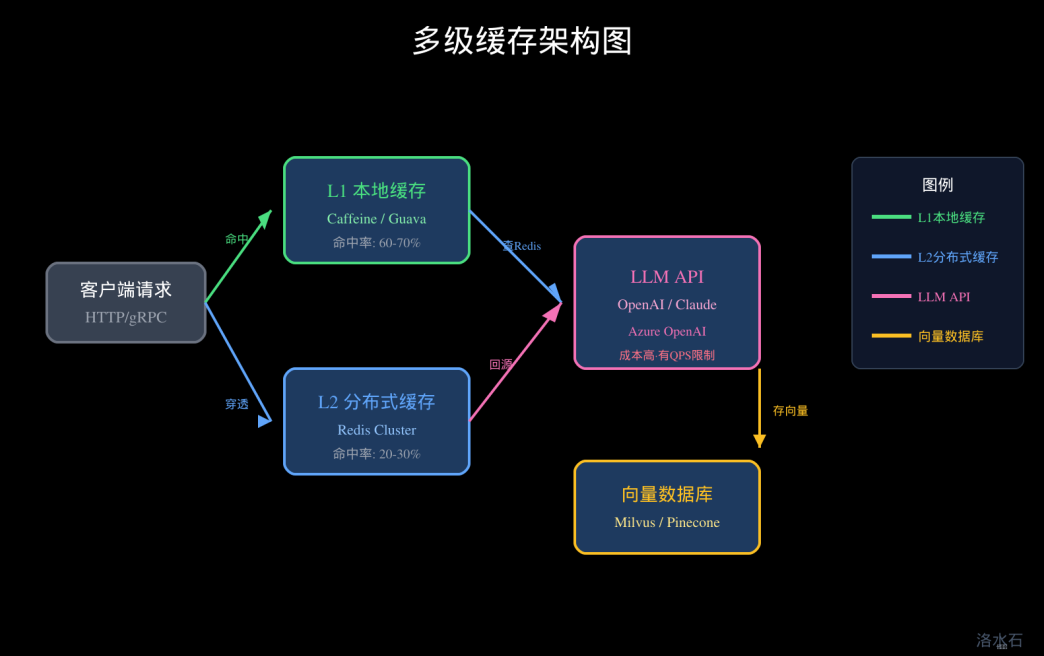
最佳实践:本地一级 + 分布式二级:
public class TwoLevelCacheService {
// L1: 本地缓存(Caffeine)
private final Cache<String, Answer> localCache;
// L2: 分布式缓存(Redis)
private final StringRedisTemplate redisTemplate;
public Answer getAnswer(String question) {
String cacheKey = generateKey(question);
// L1查询
Answer answer = localCache.getIfPresent(cacheKey);
if (answer != null) {
return answer;
}
// L2查询
answer = getFromRedis(cacheKey);
if (answer != null) {
// 回填L1
localCache.put(cacheKey, answer);
return answer;
}
return null;
}
public void putAnswer(String question, Answer answer) {
String cacheKey = generateKey(question);
// 双写
localCache.put(cacheKey, answer);
putToRedis(cacheKey, answer);
}
}
缓存淘汰策略:
public class CacheEvictionStrategy {
// L1本地缓存:容量优先
// - 内存紧张时优先淘汰L1
// - L1未命中时从L2加载
// L2 Redis:TTL优先
// - 设置合理的过期时间(如30分钟)
// - 使用惰性淘汰 + 主动淘汰结合
// 一致性保证
// - 数据更新时:先删L1,再删L2(避免数据不一致)
// - 缓存穿透时:布隆过滤器 + 空值缓存
}
────────────────────────────────────────────────────────────
四、缓存键设计:问题Hash与参数指纹
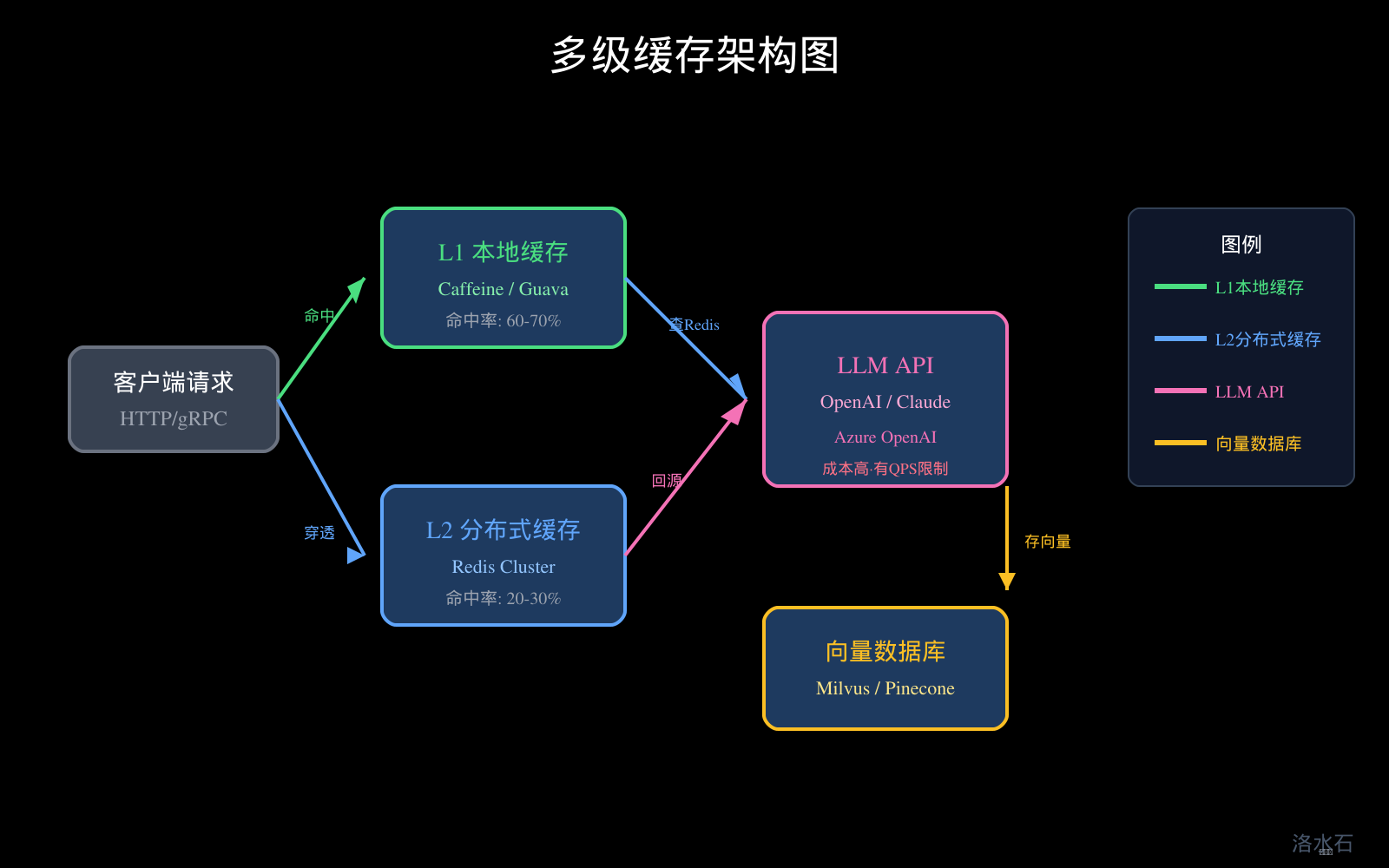
图1:多级缓存架构图
4.1 缓存键的核心要素
缓存键设计是缓存系统的基础,决定了缓存的命中率和效果。一个优秀的缓存键需要满足:
- 唯一性:不同的问题应该生成不同的键
- 稳定性:相同的问题应该生成相同的键
- 可计算性:键的生成应该是确定性的,无随机因素
- 可读性(可选):便于调试和问题排查
4.2 问题Hash算法选择
MD5(不推荐):
// MD5输出128位,16字节,32位十六进制字符串
// 优点:计算快
// 缺点:存在哈希碰撞风险,不够安全
public String md5Hash(String input) {
return DigestUtils.md5Hex(input);
}
SHA-256(推荐):
// SHA-256输出256位,32字节,64位十六进制字符串
// 优点:安全性高,哈希碰撞风险极低
// 缺点:计算稍慢(但在现代CPU上可忽略不计)
public String sha256Hash(String input) {
return DigestUtils.sha256Hex(input);
}
MurmurHash3(高性能场景推荐):
// MurmurHash3输出128位,mmh3哈希
// 优点:计算极快,适合高并发场景
// 缺点:不是加密哈希,存在碰撞可能(但概率极低)
public long murmurHash(String input) {
try {
MessageDigest digest = MessageDigest.getInstance("SHA-256");
byte[] hash = digest.digest(input.getBytes(StandardCharsets.UTF_8));
return ByteBuffer.wrap(hash).getLong();
} catch (NoSuchAlgorithmException e) {
throw new RuntimeException(e);
}
}
4.3 参数指纹生成
除了问题本身,LLM调用的参数也会影响结果,需要纳入缓存键的考虑范围:
public class ParamFingerprint {
// 参数列表需要考虑
private static final Set<String> RELEVANT_PARAMS = Set.of(
"model", // 模型名称(必需)
"temperature", // 温度参数
"max_tokens", // 最大token数
"top_p", // Top-P采样
"system_prompt" // 系统提示词(如果有的话)
);
public static String generate(Map<String, Object> params) {
if (params == null || params.isEmpty()) {
return "default";
}
// 过滤并排序
String normalized = params.entrySet().stream()
.filter(e -> RELEVANT_PARAMS.contains(e.getKey()))
.sorted(Map.Entry.comparingByKey())
.map(e -> e.getKey() + "=" + normalizeValue(e.getValue()))
.collect(Collectors.joining("|"));
return normalized.isEmpty() ? "default" : String.valueOf(normalized.hashCode());
}
private static String normalizeValue(Object value) {
if (value == null) return "null";
if (value instanceof Number) {
// 浮点数保留2位小数
if (value instanceof Double || value instanceof Float) {
return String.format("%.2f", ((Number) value).doubleValue());
}
}
return value.toString();
}
}
4.4 完整的缓存键生成
public class CacheKeyGenerator {
private static final String VERSION = "v1";
private static final String SEPARATOR = ":";
public static String generate(
String question,
String model,
Map<String, Object> params,
String userId) {
// 规范化问题文本
String normalizedQuestion = normalizeQuestion(question);
// 生成问题Hash
String questionHash = HashUtil.sha256Hex(normalizedQuestion);
// 生成参数指纹
String paramFingerprint = ParamFingerprint.generate(params);
// 组装缓存键
return String.join(SEPARATOR,
VERSION,
"qa",
model,
questionHash.substring(0, 16), // 只取前16位,节省空间
paramFingerprint,
userId != null ? userId : "anonymous"
);
}
private static String normalizeQuestion(String question) {
if (question == null) {
return "";
}
return question
// 转小写
.toLowerCase()
// 去除多余空白
.replaceAll("\\s+", " ")
// 去除常见标点(保留问号等重要标点)
.replaceAll("[.,!;:,。!?;:]", "")
// trim
.trim();
}
}
4.5 缓存键的存储与索引
public class CacheKeyIndex {
// 使用Redis Set存储问题Hash到缓存键的映射
// 用途:支持按问题Hash快速查找
public void indexQuestion(String questionHash, String cacheKey) {
stringRedisTemplate.opsForSet().add("idx:q:" + questionHash, cacheKey);
}
// 使用Redis ZSet存储问题Hash到时间戳的映射
// 用途:支持批量查询和问题统计
public void indexAccessTime(String cacheKey, long timestamp) {
stringRedisTemplate.opsForZSet().add("idx:at", cacheKey, timestamp);
}
// 根据问题Hash查找所有相关缓存键
public Set<String> findByQuestionHash(String questionHash) {
return stringRedisTemplate.opsForSet().members("idx:q:" + questionHash);
}
}
────────────────────────────────────────────────────────────
五、问题相似度匹配:语义匹配与关键词匹配
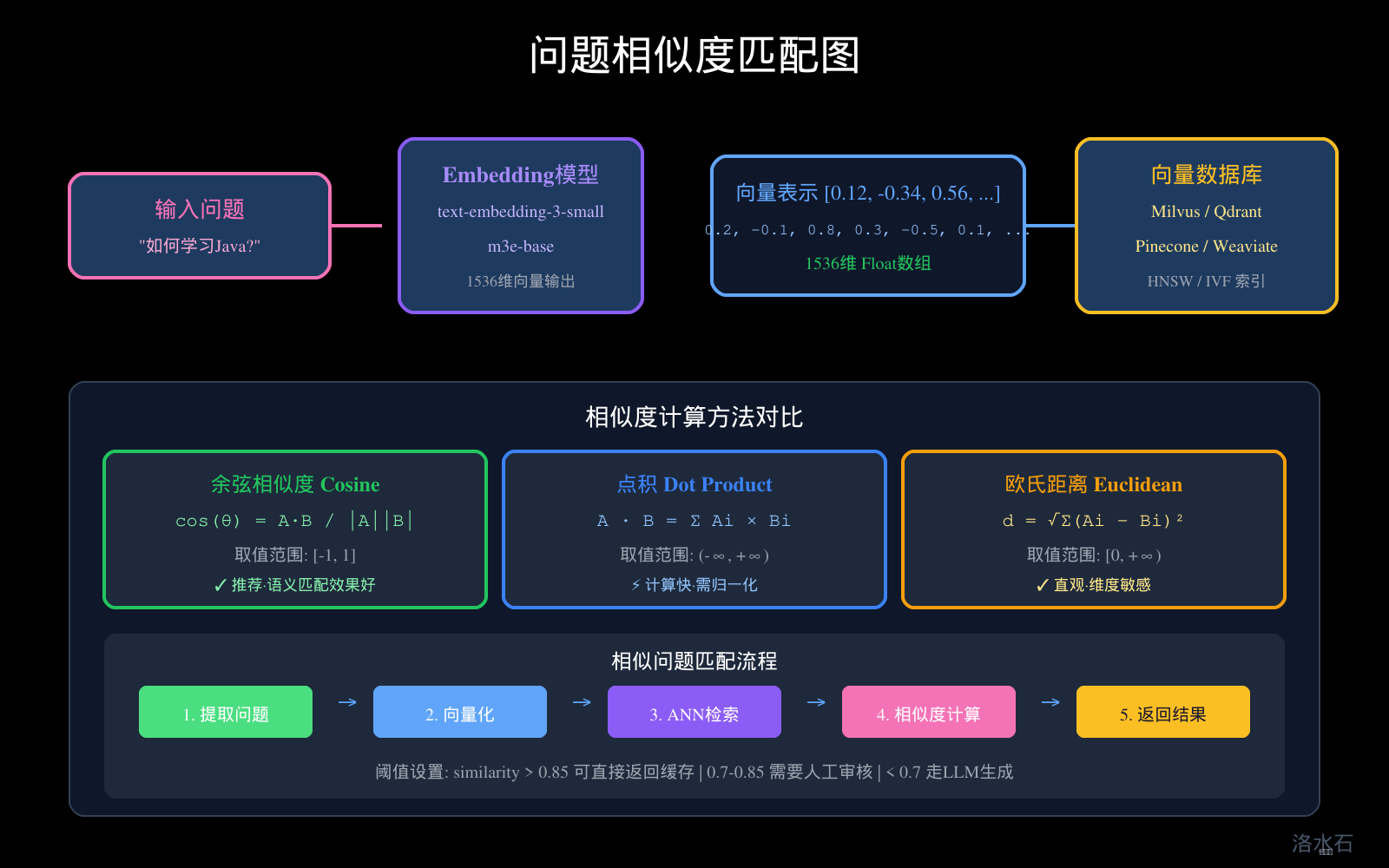
图3:问题相似度匹配图
5.1 关键词匹配:快速简单
关键词匹配是最基础的相似度计算方法,适用于:
- 快速原型开发
- 资源受限环境
- 作为语义匹配的补充和加速层
TF-IDF + 余弦相似度:
public class KeywordMatcher {
private final TfidfVectorizer vectorizer;
private final double[][] documentVectors;
public KeywordMatcher(List<String> questions) {
this.vectorizer = new TfidfVectorizer()
.setMaxFeatures(1000)
.setNgramRange(1, 2);
this.documentVectors = vectorizer.fitTransform(questions).toArray();
}
public double calculateSimilarity(String query, int docIndex) {
double[] queryVector = vectorizer.transform(query);
double[] docVector = documentVectors[docIndex];
return cosineSimilarity(queryVector, docVector);
}
private double cosineSimilarity(double[] a, double[] b) {
double dotProduct = 0;
double normA = 0;
double normB = 0;
for (int i = 0; i < a.length; i++) {
dotProduct += a[i] * b[i];
normA += a[i] * a[i];
normB += b[i] * b[i];
}
return dotProduct / (Math.sqrt(normA) * Math.sqrt(normB));
}
}
BM25(推荐):Elasticsearch使用的相似度算法
public class BM25Matcher {
private static final double K1 = 1.5;
private static final double B = 0.75;
private final Map<String, List<Term>> invertedIndex;
private final int documentCount;
private final double avgDocLength;
public double score(String query, String document) {
List<String> queryTerms = tokenize(query);
List<String> docTerms = tokenize(document);
double score = 0;
for (String term : queryTerms) {
if (!invertedIndex.containsKey(term)) continue;
int tf = Collections.frequency(docTerms, term);
int df = invertedIndex.get(term).size();
double idf = Math.log((documentCount - df + 0.5) / (df + 0.5) + 1);
double tfComponent = (tf * (K1 + 1)) / (tf + K1 * (1 - B + B * docTerms.size() / avgDocLength));
score += idf * tfComponent;
}
return score;
}
}
5.2 语义匹配:深度理解
语义匹配使用深度学习模型理解问题的含义,是问答缓存的核心技术。
Embedding模型选择:
|
模型 |
维度 |
特点 |
适用场景 |
|
text-embedding-3-small |
1536 |
OpenAI最新模型,效果好 |
通用场景 |
|
text-embedding-3-large |
3072 |
效果最好,成本高 |
精度要求高 |
|
m3e-base |
768 |
开源免费,中文优化 |
中文场景 |
|
BGE-large-zh |
1024 |
中文旗舰,开源 |
高质量中文 |
|
Instructor |
768-1536 |
可指定任务微调 |
垂直领域 |
Java Embedding实现:
public class EmbeddingService {
private final OpenAIApi openAIApi;
public EmbeddingResult embed(String text) {
try {
CreateEmbeddingRequest request = CreateEmbeddingRequest.builder()
.input(text)
.model("text-embedding-3-small")
.build();
CreateEmbeddingResponse response = openAIApi.createEmbedding(request);
return new EmbeddingResult(
response.getData().get(0).getEmbedding(),
response.getUsage().getPromptTokens()
);
} catch (ApiException e) {
throw new RuntimeException("Embedding failed", e);
}
}
}
5.3 相似度计算方法
余弦相似度(推荐):
public class CosineSimilarity {
public static double calculate(List<Double> a, List<Double> b) {
if (a.size() != b.size()) {
throw new IllegalArgumentException("Vectors must have same dimension");
}
double dotProduct = 0;
double normA = 0;
double normB = 0;
for (int i = 0; i < a.size(); i++) {
dotProduct += a.get(i) * b.get(i);
normA += a.get(i) * a.get(i);
normB += b.get(i) * b.get(i);
}
return dotProduct / (Math.sqrt(normA) * Math.sqrt(normB));
}
// 优化版:使用基本类型数组
public static double calculate(double[] a, double[] b) {
double dotProduct = 0;
double normA = 0;
double normB = 0;
for (int i = 0; i < a.length; i++) {
dotProduct += a[i] * b[i];
normA += a[i] * a[i];
normB += b[i] * b[i];
}
return dotProduct / (Math.sqrt(normA) * Math.sqrt(normB));
}
}
点积相似度:
public class DotProductSimilarity {
// 注意:使用点积前必须确保向量已归一化
public static double calculate(double[] a, double[] b) {
double dotProduct = 0;
for (int i = 0; i < a.length; i++) {
dotProduct += a[i] * b[i];
}
return dotProduct;
}
}
5.4 相似度阈值设计
public class SimilarityThreshold {
// 高置信度:直接返回缓存结果
public static final double HIGH_CONFIDENCE = 0.85;
// 中置信度:需要人工审核或确认
public static final double MEDIUM_CONFIDENCE = 0.70;
// 低置信度:需要调用LLM重新生成
public static final double LOW_CONFIDENCE = 0.50;
public static CacheResult evaluate(double similarity, Answer cachedAnswer) {
if (similarity >= HIGH_CONFIDENCE) {
return new CacheResult(cachedAnswer, Confidence.HIGH, "直接返回缓存");
} else if (similarity >= MEDIUM_CONFIDENCE) {
return new CacheResult(cachedAnswer, Confidence.MEDIUM, "返回但标记需确认");
} else if (similarity >= LOW_CONFIDENCE) {
return new CacheResult(cachedAnswer, Confidence.LOW, "作为参考但不返回");
} else {
return null; // 不命中缓存
}
}
}
────────────────────────────────────────────────────────────
六、Embedding向量缓存:快速相似问题检索
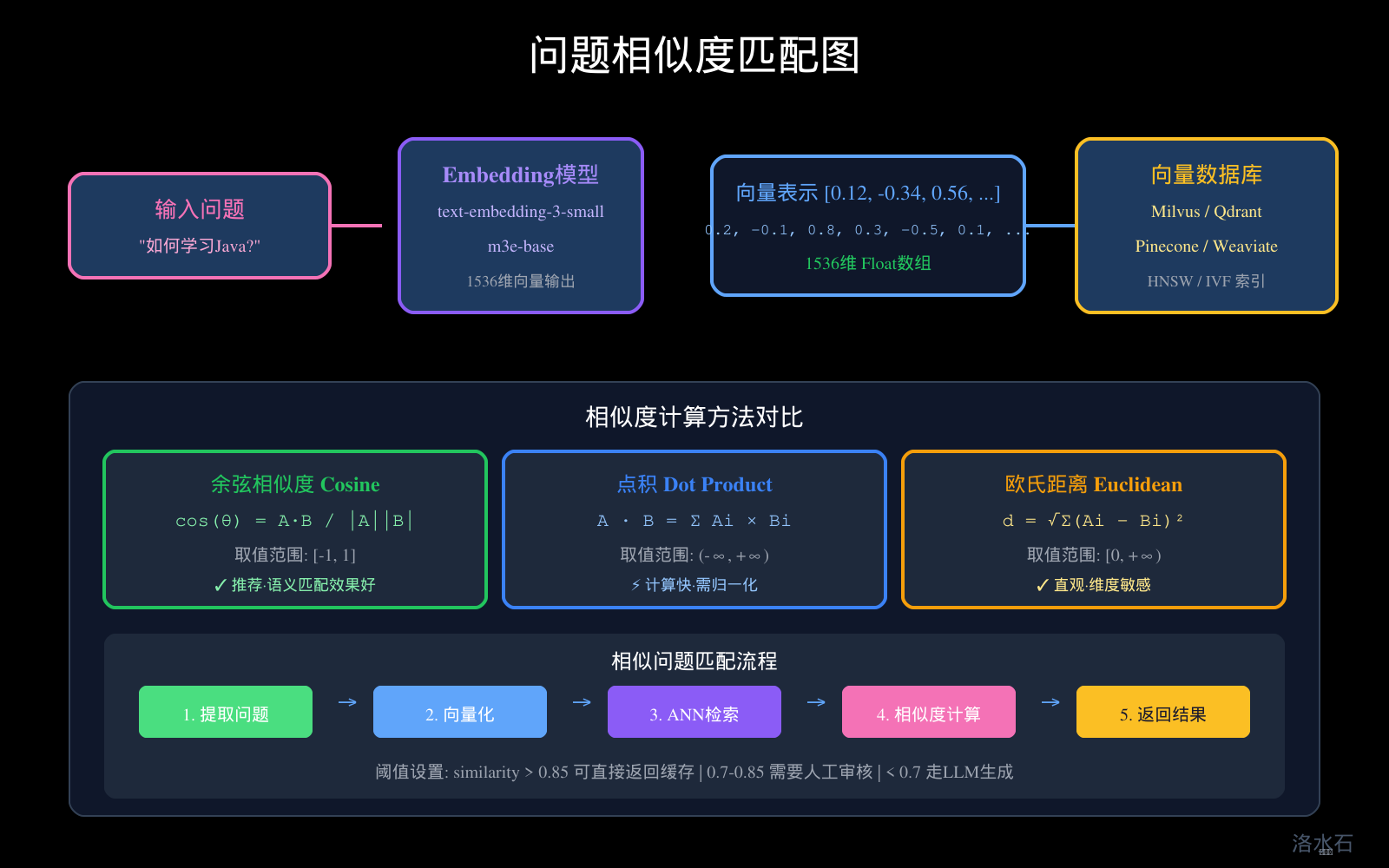
图3:问题相似度匹配图
6.1 向量数据库选型
主流向量数据库对比:
|
数据库 |
特点 |
适用场景 |
Java客户端 |
|
Milvus |
功能全面,性能强 |
大规模生产环境 |
pymilvus |
|
Qdrant |
Rust实现,性能极佳 |
高性能需求 |
qdrant-client |
|
Pinecone |
云原生,托管服务 |
不想运维 |
pinecone-client |
|
Weaviate |
混合搜索能力强 |
混合检索场景 |
weaviate-client |
|
Chroma |
轻量级,易用性好 |
原型/小规模 |
chromadb |
|
RedisVL |
Redis扩展,运维简单 |
已有Redis团队 |
@redisVL |
6.2 Embedding向量存储设计
public class VectorCacheService {
private final MilvusClient milvusClient;
private final String COLLECTION_NAME = "question_embeddings";
public void initialize() {
// 创建Collection
milvusClient.createCollection(CreateCollectionParam.newBuilder()
.withCollectionName(COLLECTION_NAME)
.withDimension(1536) // text-embedding-3-small
.withMetricType(MetricType.COSINE)
.build());
// 创建索引
milvusClient.createIndex(CreateIndexParam.newBuilder()
.withCollectionName(COLLECTION_NAME)
.withFieldName("embedding")
.withIndexType(IndexType.IVF_FLAT)
.withMetricType(MetricType.COSINE)
.withParams(new JsonBuilder().add("nlist", 128).build())
.build());
}
public void insertQuestion(String question, String answer, double[] embedding) {
List<InsertParam.Field> fields = Arrays.asList(
new InsertParam.Field("question", Collections.singletonList(question)),
new InsertParam.Field("answer", Collections.singletonList(answer)),
new InsertParam.Field("embedding", Collections.singletonList(embedding))
);
milvusClient.insert(InsertParam.newBuilder()
.withCollectionName(COLLECTION_NAME)
.withFields(fields)
.build());
}
public List<SearchResult> searchSimilar(double[] queryEmbedding, int topK) {
SearchParam param = SearchParam.newBuilder()
.withCollectionName(COLLECTION_NAME)
.withMetricType(MetricType.COSINE)
.withTopK(topK)
.withVectors(Collections.singletonList(queryEmbedding))
.withVectorField("embedding")
.build();
SearchResults results = milvusClient.search(param);
return processResults(results);
}
}
6.3 向量缓存的优化策略
批量写入优化:
public class BatchVectorInsert {
private static final int BATCH_SIZE = 1000;
public void insertBatch(List<QAEntry> entries) {
for (int i = 0; i < entries.size(); i += BATCH_SIZE) {
List<QAEntry> batch = entries.subList(
i,
Math.min(i + BATCH_SIZE, entries.size())
);
List<InsertParam.Field> fields = new ArrayList<>();
List<String> questions = new ArrayList<>();
List<String> answers = new ArrayList<>();
List<double[]> embeddings = new ArrayList<>();
for (QAEntry entry : batch) {
questions.add(entry.getQuestion());
answers.add(entry.getAnswer());
embeddings.add(entry.getEmbedding());
}
fields.add(new InsertParam.Field("question", questions));
fields.add(new InsertParam.Field("answer", answers));
fields.add(new InsertParam.Field("embedding", embeddings));
milvusClient.insert(InsertParam.newBuilder()
.withCollectionName(COLLECTION_NAME)
.withFields(fields)
.build());
}
}
}
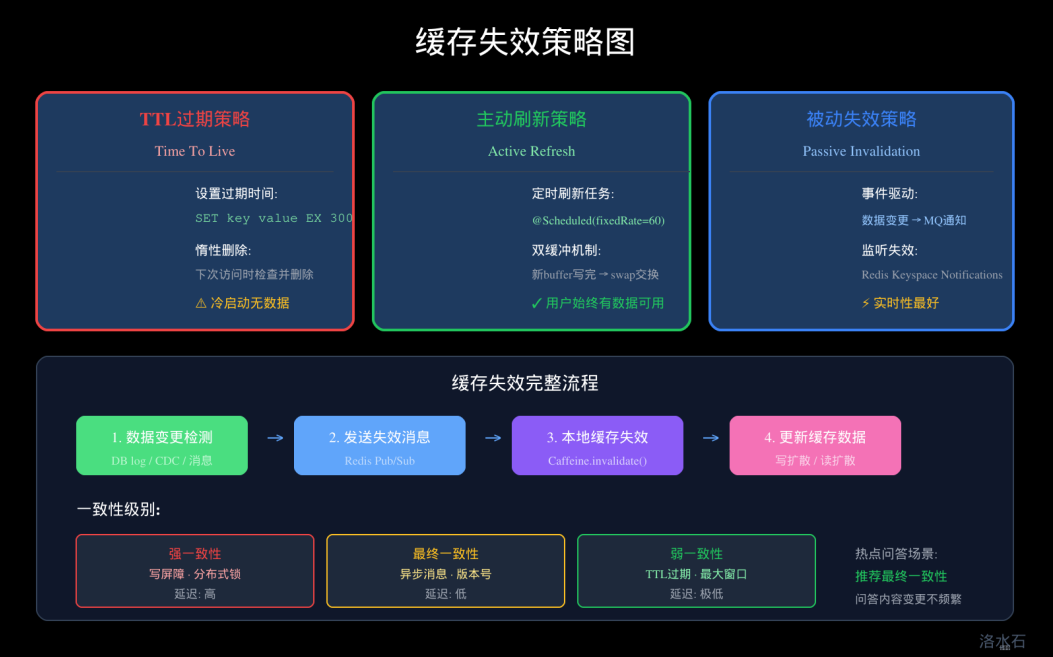
缓存失效策略:
public class VectorCacheInvalidation {
// 基于TTL的失效
public void cleanExpiredVectors(long maxAgeMillis) {
long cutoffTime = System.currentTimeMillis() - maxAgeMillis;
// 查询过期记录并删除
QueryParam queryParam = QueryParam.newBuilder()
.withCollectionName(COLLECTION_NAME)
.withExpr("create_time < " + cutoffTime)
.withOutputFields(Arrays.asList("id"))
.build();
QueryResults results = milvusClient.query(queryParam);
List<String> expiredIds = extractIds(results);
if (!expiredIds.isEmpty()) {
milvusClient.delete(DeleteParam.newBuilder()
.withCollectionName(COLLECTION_NAME)
.withExpr("id in " + expiredIds)
.build());
}
}
}
6.4 ANN索引原理与调优
HNSW(Hierarchical Navigable Small World):
HNSW是目前最流行的向量索引算法,在召回率和性能之间取得良好平衡:
public class HNSWConfig {
// HNSW参数说明:
// M: 每个节点的最大连接数,影响召回率和内存
// efConstruction: 构建时的动态列表大小,影响召回率和构建时间
// efSearch: 搜索时的动态列表大小,影响搜索性能和召回率
public static IndexParam createHNSWIndex() {
return IndexParam.newBuilder()
.withIndexType(IndexType.HNSW)
.withParams(new JsonBuilder()
.add("M", 16) // 推荐范围: 4-64
.add("efConstruction", 200) // 推荐范围: 100-400
.build())
.build();
}
public static SearchParam createSearchParam(int efSearch) {
return SearchParam.newBuilder()
.withParams(new JsonBuilder()
.add("ef", efSearch) // 推荐范围: 50-400
.build())
.build();
}
}
IVF(Inverted File Index):
public class IVFConfig {
// IVF参数说明:
// nlist: 聚类中心数量,影响索引大小和搜索精度
// nprobe: 搜索时检查的聚类数量,影响搜索性能和召回率
public static IndexParam createIVFIndex() {
return IndexParam.newBuilder()
.withIndexType(IndexType.IVF_FLAT)
.withParams(new JsonBuilder()
.add("nlist", 1024) // 推荐范围: 4-16384
.build())
.build();
}
public static SearchParam createIVFSearchParam(int nprobe) {
return SearchParam.newBuilder()
.withParams(new JsonBuilder()
.add("nprobe", nprobe) // 推荐范围: 1-256
.build())
.build();
}
}
────────────────────────────────────────────────────────────
七、缓存命中率优化:预热、预测、批量写入
7.1 缓存预热策略
静态预热:基于历史数据分析,预先加载热点数据
public class StaticCacheWarmer {
// 基于历史访问数据构建预热列表
public List<String> buildWarmUpList(HistoricalAccessData data) {
// 统计每个问题的访问频次
Map<String, Long> frequencyMap = data.stream()
.collect(Collectors.groupingBy(
Question::getNormalizedText,
Collectors.counting()
));
// 排序并取Top N
return frequencyMap.entrySet().stream()
.sorted(Map.Entry.<String, Long>comparingByValue().reversed())
.limit(10000)
.map(Map.Entry::getKey)
.collect(Collectors.toList());
}
// 定时预热任务
@Scheduled(cron = "0 0 3 * * ?") // 每天凌晨3点
public void warmUpCache() {
List<String> warmUpList = buildWarmUpList(historicalDataService.getLast30Days());
for (String question : warmUpList) {
try {
Answer answer = llmService.generate(question);
cacheService.put(question, answer);
} catch (Exception e) {
log.warn("预热失败: {}", question, e);
}
}
log.info("缓存预热完成,共预热 {} 条", warmUpList.size());
}
}
动态预热:基于实时流量预测即将访问的数据
public class DynamicCacheWarmer {
// 基于流量模式预测热点
public Set<String> predictHotQuestions() {
Set<String> hotQuestions = new HashSet<>();
// 1. 当前小时的历史高峰问题
hotQuestions.addAll(getHistoricalPeakQuestions());
// 2. 当前时段的增长趋势问题
hotQuestions.addAll(getTrendingQuestions());
// 3. 相关领域的热点问题
hotQuestions.addAll(getRelatedDomainQuestions());
return hotQuestions;
}
// 相关领域热点传递
private Set<String> getRelatedDomainQuestions() {
Set<String> related = new HashSet<>();
// 如果用户正在询问"Java异常处理"
// 预测可能会问"Spring异常处理"
// 预热相关问题
return related;
}
}
7.2 缓存预测加载
基于会话的预测:
public class SessionBasedPrediction {
// 多轮对话中的缓存预测
public void predictAndPreload(ConversationSession session) {
String lastQuestion = session.getLastQuestion();
List<String> predictedNext = predictNextQuestions(lastQuestion);
for (String predicted : predictedNext) {
// 异步预加载,不阻塞当前请求
CompletableFuture.runAsync(() -> {
if (!cacheService.exists(predicted)) {
Answer answer = llmService.generate(predicted);
cacheService.put(predicted, answer);
}
});
}
}
// 基于对话模板预测
private List<String> predictNextQuestions(String currentQuestion) {
List<String> predictions = new ArrayList<>();
// 知识图谱关联问题
predictions.addAll(knowledgeGraph.getRelatedQuestions(currentQuestion));
// 常见追问模式
predictions.addAll(commonFollowUps.get(currentQuestion));
return predictions;
}
}
7.3 批量写入优化
Write-Behind批量写入:
public class WriteBehindCache {
private BlockingQueue<CacheWriteRequest> writeQueue = new LinkedBlockingQueue<>(10000);
// 异步批量写入
@PostConstruct
public void init() {
Executors.newSingleThreadExecutor().submit(this::batchWriter);
}
private void batchWriter() {
while (true) {
List<CacheWriteRequest> batch = new ArrayList<>();
writeQueue.drainTo(batch, 100); // 批量获取
if (batch.isEmpty()) {
try {
Thread.sleep(100);
} catch (InterruptedException e) {
break;
}
continue;
}
// 批量写入Redis
redisTemplate.executePipelined(new SessionCallback<Object>() {
@Override
public Object execute(RedisOperations operations) throws DataAccessException {
for (CacheWriteRequest req : batch) {
operations.opsForValue().set(
req.getKey(),
req.getValue(),
Duration.ofMinutes(30)
);
}
return null;
}
});
metrics.recordBatchWrite(batch.size());
}
}
public void asyncWrite(String key, Object value) {
writeQueue.offer(new CacheWriteRequest(key, value));
}
}
────────────────────────────────────────────────────────────
八、缓存过期策略:TTL、热Key保护、主动刷新
8.1 TTL设计原则
分层TTL策略:
public class TTLCStrategy {
// L1 本地缓存:短TTL + 容量淘汰
public Cache<String, Answer> localCache() {
return Caffeine.newBuilder()
.maximumSize(10_000)
.expireAfterWrite(Duration.ofMinutes(5)) // 5分钟TTL
.build();
}
// L2 Redis缓存:中等TTL
public Duration redisTTL(CacheTier tier) {
return switch (tier) {
case HOT_QUESTIONS -> Duration.ofMinutes(30); // 热点问题30分钟
case NORMAL_QUESTIONS -> Duration.ofHours(1); // 普通问题1小时
case COLD_QUESTIONS -> Duration.ofHours(6); // 冷门问题6小时
case SYSTEM_PROMPT -> Duration.ofDays(7); // 系统Prompt 7天
};
}
// 动态TTL计算
public Duration calculateDynamicTTL(Question question) {
// 基于问题热度调整TTL
long accessCount = question.getAccessCount();
double volatility = question.getVolatility(); // 数据变化频率
// 访问次数越多、变化越慢 → TTL越长
long baseTTL = 30; // 分钟
double heatFactor = Math.min(accessCount / 1000.0, 3.0);
double stabilityFactor = 1.0 - volatility;
return Duration.ofMinutes((long)(baseTTL * heatFactor * stabilityFactor));
}
}
8.2 热Key保护策略
热Key问题识别:
public class HotKeyProtection {
// 热点Key检测:基于滑动窗口统计
public Map<String, HotKeyInfo> detectHotKeys() {
Map<String, Long> recentAccess = new ConcurrentHashMap<>();
Map<String, HotKeyInfo> hotKeys = new HashMap<>();
for (Entry<String, Long> entry : currentAccessCounts.entrySet()) {
String key = entry.getKey();
long count = entry.getValue();
if (count > HOT_KEY_THRESHOLD) {
hotKeys.put(key, new HotKeyInfo(
key,
count,
count / getWindowSeconds(),
LocalDateTime.now()
));
}
}
return hotKeys;
}
// 热Key保护:多级缓存 + 本地聚合
public Answer getWithHotKeyProtection(String key) {
// L1本地缓存先查
Answer answer = localCache.getIfPresent(key);
if (answer != null) {
return answer;
}
// 使用分布式锁防止击穿
String lockKey = "lock:" + key;
boolean locked = redisTemplate.opsForValue()
.setIfAbsent(lockKey, "1", Duration.ofSeconds(5));
if (locked) {
try {
// 双检查
answer = localCache.getIfPresent(key);
if (answer == null) {
answer = redisTemplate.opsForValue().get(key);
if (answer != null) {
localCache.put(key, answer);
}
}
} finally {
redisTemplate.delete(lockKey);
}
} else {
// 等待并重试
return waitAndRetry(key);
}
return answer;
}
}
本地缓存热点聚合:
public class LocalCacheAggregation {
// 在本地缓存层聚合热点数据的访问
// 减少对Redis的请求压力
private final LoadingCache<String, CompletableFuture<Answer>> pendingRequests;
public Answer getOrFetch(String key) {
// 同一JVM内的请求聚合
CompletableFuture<Answer> future = pendingRequests.get(key);
if (future == null) {
// 没有正在进行的请求,发起新请求
future = CompletableFuture.supplyAsync(() -> fetchFromRedis(key));
pendingRequests.put(key, future);
future.thenRun(() -> pendingRequests.invalidate(key));
}
return future.join();
}
}
8.3 主动刷新策略
双缓冲机制:
public class DoubleBufferCache {
// 双缓冲:避免缓存刷新时的服务抖动
private AtomicReference<Cache<Map<String, Answer>>> activeBuffer = new AtomicReference<>();
private AtomicReference<Cache<Map<String, Answer>>> standbyBuffer = new AtomicReference<>();
@Scheduled(fixedRate = 60000) // 每分钟
public void refreshCache() {
// 构建新的缓存
Cache<Map<String, Answer>> newBuffer = buildNewBuffer();
// 原子切换
standbyBuffer.set(activeBuffer.get());
activeBuffer.set(newBuffer);
// 旧缓冲区异步清理
CompletableFuture.runAsync(() -> {
try {
Thread.sleep(5000); // 等待请求完成
standbyBuffer.get().invalidateAll();
} catch (Exception e) {
log.warn("清理旧缓存失败", e);
}
});
}
public Answer get(String key) {
Cache<Map<String, Answer>> buffer = activeBuffer.get();
return buffer.getIfPresent(key);
}
}
异步主动刷新:
public class AsyncRefreshCache {
// 异步刷新:不阻塞读取请求
private ConcurrentHashMap<String, Long> lastRefreshTime = new ConcurrentHashMap<>();
private static final Duration REFRESH_INTERVAL = Duration.ofMinutes(5);
public Answer get(String key) {
Answer answer = cache.getIfPresent(key);
if (answer == null) {
// 缓存未命中,同步加载
return loadAndCache(key);
}
// 检查是否需要刷新
if (shouldRefresh(key)) {
// 异步刷新,不阻塞读取
CompletableFuture.runAsync(() -> refresh(key));
}
return answer;
}
private boolean shouldRefresh(String key) {
Long lastRefresh = lastRefreshTime.get(key);
if (lastRefresh == null) {
return true;
}
return Duration.between(
Instant.ofEpochMilli(lastRefresh),
Instant.now()
).compareTo(REFRESH_INTERVAL) > 0;
}
}
────────────────────────────────────────────────────────────
九、缓存一致性:更新策略与数据同步
9.1 缓存更新策略
Cache Aside(旁路缓存):
public class CacheAsideStrategy {
// 读操作
public Answer read(String key) {
// 先读缓存
Answer answer = cache.getIfPresent(key);
if (answer != null) {
return answer;
}
// 缓存未命中,读数据库
answer = database.query(key);
// 写入缓存
cache.put(key, answer);
return answer;
}
// 写操作
public void write(String key, Answer answer) {
// 先写数据库
database.save(key, answer);
// 再删除缓存(而不是更新)
cache.invalidate(key);
}
// 删操作
public void delete(String key) {
// 先删数据库
database.delete(key);
// 再删缓存
cache.invalidate(key);
}
}
为什么删除而不是更新?
- 原子性保证:如果先更新缓存再写数据库,写数据库失败会导致数据不一致
- 避免并发问题:多个线程同时写入,可能导致缓存数据被覆盖
- 成本考虑:更新需要序列化整个对象,删除只需移除引用
9.2 数据同步方案
消息队列同步:
public class MQCacheSync {
// 使用MQ保证缓存与数据库的最终一致性
private final RocketMQTemplate mqTemplate;
public void onDataChanged(DataChangeEvent event) {
// 发送消息到MQ
mqTemplate.convertAndSend("cache-sync-topic", event);
// 异步处理,不阻塞主流程
}
@RocketMQListener(topic = "cache-sync-topic")
public void handleCacheSync(DataChangeEvent event) {
switch (event.getType()) {
case INSERT:
case UPDATE:
// 更新缓存
refreshCache(event.getKey(), event.getData());
break;
case DELETE:
// 删除缓存
invalidateCache(event.getKey());
break;
}
}
}
CDC(Change Data Capture)同步:
public class CDCCacheSync {
// 使用Debezium监听数据库变更
@KafkaListener(topics = "dbserver1.public.qa_table")
public void handleCDCEvent(ChangeEvent event) {
switch (event.getOperation()) {
case CREATE:
case UPDATE:
// 将变更数据写入缓存
cache.put(event.getKey(), event.getAfter());
break;
case DELETE:
// 从缓存删除
cache.invalidate(event.getKey());
break;
}
}
}
9.3 一致性级别选择
强一致性场景:金融交易、库存扣减
public class StrongConsistencyCache {
// 使用分布式锁保证强一致性
public void updateWithLock(String key, Answer newValue) {
String lockKey = "lock:strong:" + key;
RLock lock = redisson.getLock(lockKey);
try {
lock.lock(10, TimeUnit.SECONDS);
// 1. 开启事务
database.beginTransaction();
// 2. 写入数据库
database.update(key, newValue);
// 3. 更新缓存
cache.put(key, newValue);
// 4. 提交事务
database.commit();
} catch (Exception e) {
database.rollback();
throw e;
} finally {
lock.unlock();
}
}
}
最终一致性场景(推荐):热点问答、大部分业务场景
public class EventuallyConsistentCache {
// 最终一致性:异步同步,性能优先
public void updateAsync(String key, Answer newValue) {
// 1. 立即更新缓存
cache.put(key, newValue);
// 2. 异步写数据库
CompletableFuture.runAsync(() -> {
database.asyncUpdate(key, newValue);
});
// 3. 发送消息通知其他节点
mqTemplate.convertAndSend("cache-update", new CacheUpdateEvent(key));
}
}
────────────────────────────────────────────────────────────
十、实战:Redis与本地二级缓存的完整实现
10.1 项目结构
src/main/java/com/example/llmcache/
├── config/
│ ├── CacheConfig.java # 缓存配置
│ ├── RedisConfig.java # Redis配置
│ └── CaffeineConfig.java # Caffeine配置
├── service/
│ ├── TwoLevelCacheService.java # 二级缓存服务
│ ├── EmbeddingCacheService.java # 向量缓存服务
│ └── SimilaritySearchService.java # 相似度搜索服务
├── model/
│ ├── QACacheEntry.java # QA缓存实体
│ ├── CacheKey.java # 缓存键生成器
│ └── SimilarityResult.java # 相似度结果
├── util/
│ ├── HashUtil.java # 哈希工具
│ └── TextNormalizer.java # 文本规范化工具
└── interceptor/
└── CacheInterceptor.java # 缓存拦截器
10.2 核心配置
@Configuration
public class CacheConfig {
@Bean
public Cache<String, QACacheEntry> localCache() {
return Caffeine.newBuilder()
.maximumSize(10_000)
.maximumWeight(1_000_000) // 最大100万token
.expireAfterWrite(Duration.ofMinutes(5))
.refreshAfterWrite(Duration.ofMinutes(3))
.recordStats()
.build();
}
@Bean
public RedisTemplate<String, QACacheEntry> redisTemplate(
RedisConnectionFactory factory) {
RedisTemplate<String, QACacheEntry> template = new RedisTemplate<>();
template.setConnectionFactory(factory);
// JSON序列化
Jackson2JsonRedisSerializer<QACacheEntry> serializer =
new Jackson2JsonRedisSerializer<>(QACacheEntry.class);
template.setKeySerializer(new StringRedisSerializer());
template.setValueSerializer(serializer);
template.setHashKeySerializer(new StringRedisSerializer());
template.setHashValueSerializer(serializer);
template.afterPropertiesSet();
return template;
}
}
10.3 二级缓存服务实现
@Service
public class TwoLevelCacheService {
private static final Logger log = LoggerFactory.getLogger(TwoLevelCacheService.class);
private final Cache<String, QACacheEntry> localCache;
private final RedisTemplate<String, QACacheEntry> redisTemplate;
private final EmbeddingService embeddingService;
private final SimilaritySearchService similaritySearch;
public TwoLevelCacheService(
Cache<String, QACacheEntry> localCache,
RedisTemplate<String, QACacheEntry> redisTemplate,
EmbeddingService embeddingService,
SimilaritySearchService similaritySearch) {
this.localCache = localCache;
this.redisTemplate = redisTemplate;
this.embeddingService = embeddingService;
this.similaritySearch = similaritySearch;
}
/**
* 获取缓存答案
* 流程:L1查询 → L2查询 → 相似度搜索 → LLM生成
*/
public CacheResult getAnswer(String question, CacheOptions options) {
String cacheKey = CacheKey.generate(question, options.getModel(), options.getParams());
// 1. L1本地缓存查询
QACacheEntry entry = localCache.getIfPresent(cacheKey);
if (entry != null) {
log.debug("L1缓存命中: {}", cacheKey);
return CacheResult.hit(entry, CacheTier.L1);
}
// 2. L2 Redis缓存查询
entry = redisTemplate.opsForValue().get(cacheKey);
if (entry != null) {
log.debug("L2缓存命中: {}", cacheKey);
// 回填L1
localCache.put(cacheKey, entry);
return CacheResult.hit(entry, CacheTier.L2);
}
// 3. 语义相似度搜索
SimilarityResult similarity = similaritySearch.findSimilar(
question,
options.getSimilarityThreshold()
);
if (similarity != null && similarity.getScore() >= options.getSimilarityThreshold()) {
log.debug("相似度命中: score={}", similarity.getScore());
// 可选:是否直接返回相似答案
if (similarity.getScore() >= 0.9) {
return CacheResult.similarHit(similarity.getEntry(), similarity.getScore());
}
}
// 4. 缓存未命中
return CacheResult.miss();
}
/**
* 写入缓存
*/
public void putAnswer(String question, Answer answer, CacheOptions options) {
String cacheKey = CacheKey.generate(question, options.getModel(), options.getParams());
QACacheEntry entry = QACacheEntry.builder()
.question(question)
.answer(answer.getContent())
.model(options.getModel())
.tokenCount(answer.getTokenCount())
.createTime(System.currentTimeMillis())
.accessTime(System.currentTimeMillis())
.accessCount(1)
.build();
// 双写L1和L2
localCache.put(cacheKey, entry);
redisTemplate.opsForValue().set(
cacheKey,
entry,
Duration.ofMinutes(30)
);
// 异步写入向量数据库
CompletableFuture.runAsync(() -> {
double[] embedding = embeddingService.embed(question);
similaritySearch.index(cacheKey, question, embedding);
});
}
}
10.4 相似度搜索服务
@Service
public class SimilaritySearchService {
private final MilvusClient milvusClient;
private final EmbeddingService embeddingService;
private static final String COLLECTION = "qa_embeddings";
/**
* 查找相似问题
*/
public SimilarityResult findSimilar(String question, double threshold) {
double[] queryEmbedding = embeddingService.embed(question);
SearchParam searchParam = SearchParam.newBuilder()
.withCollectionName(COLLECTION)
.withMetricType(MetricType.COSINE)
.withTopK(10)
.withVectors(Collections.singletonList(queryEmbedding))
.withVectorField("embedding")
.build();
SearchResults results = milvusClient.search(searchParam);
for (SearchResult.ScoreDoc doc : results.getScoreDocs()) {
if (doc.getScore() >= threshold) {
QACacheEntry entry = fetchEntryById(doc.getId());
return new SimilarityResult(entry, doc.getScore());
}
}
return null;
}
/**
* 索引新问题
*/
public void index(String id, String question, double[] embedding) {
List<InsertParam.Field> fields = Arrays.asList(
new InsertParam.Field("id", Collections.singletonList(id)),
new InsertParam.Field("question", Collections.singletonList(question)),
new InsertParam.Field("embedding", Collections.singletonList(embedding))
);
milvusClient.insert(InsertParam.newBuilder()
.withCollectionName(COLLECTION)
.withFields(fields)
.build());
}
}
10.5 缓存拦截器
@Aspect
@Component
public class CacheInterceptor {
private final TwoLevelCacheService cacheService;
@Around("@annotation(CachedAnswer)")
public Object aroundCachedAnswer(ProceedingJoinPoint joinPoint, CachedAnswer annotation) {
// 提取方法参数
String question = extractQuestion(joinPoint.getArgs());
CacheOptions options = extractOptions(joinPoint.getArgs(), annotation);
// 查询缓存
CacheResult result = cacheService.getAnswer(question, options);
if (result.isHit()) {
return result.getAnswer();
}
// 缓存未命中,执行方法
try {
Object answer = joinPoint.proceed();
// 写入缓存
if (answer != null) {
cacheService.putAnswer(question, (Answer) answer, options);
}
return answer;
} catch (Throwable t) {
throw new RuntimeException(t);
}
}
}
// 使用示例
@Service
public class LLMQAService {
@CachedAnswer(model = "gpt-4o-mini", similarityThreshold = 0.85)
public Answer answerQuestion(String question) {
// 调用LLM生成答案
return openAIService.chat(question);
}
}
────────────────────────────────────────────────────────────
十一、缓存穿透防护:布隆过滤器与空值缓存
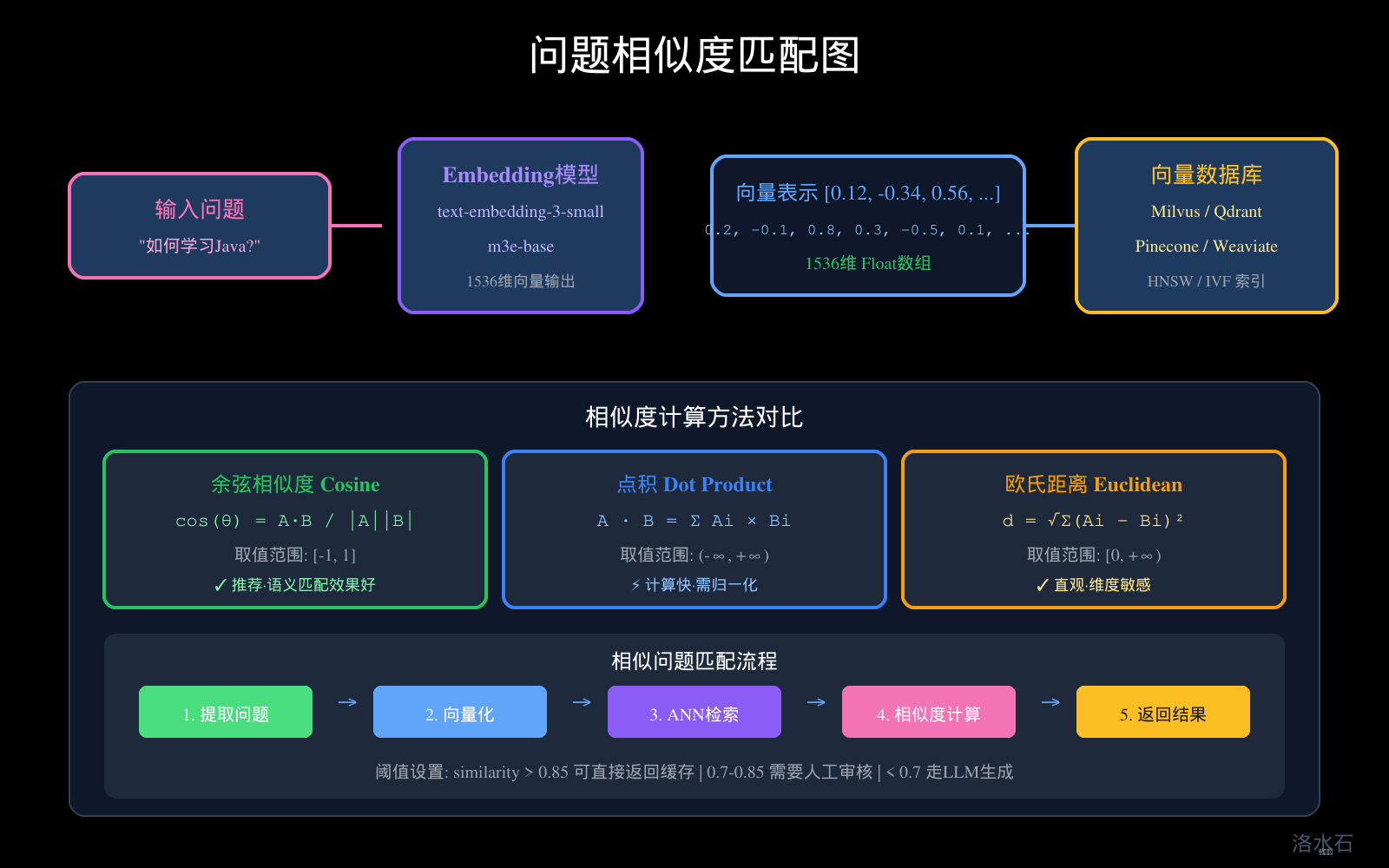
图3:问题相似度匹配图
11.1 缓存穿透问题分析
什么是缓存穿透?
缓存穿透是指查询一个不存在的数据,由于缓存和数据库都没有这个数据,每次请求都会打到后端LLM API。如果攻击者大量发送这种不存在的问题请求,将对系统造成严重威胁。
正常请求流程: 穿透请求流程:
┌─────────┐ ┌─────────┐
│ 请求 │ │ 请求 │
└────┬────┘ └────┬────┘
│ │
▼ ▼
┌─────────┐ ┌─────────┐
│ L1缓存 │ │ L1缓存 │ ──→ 未命中
└────┬────┘ └────┬────┘
│ │
▼ ▼
┌─────────┐ ┌─────────┐
│ L2缓存 │ │ L2缓存 │ ──→ 未命中
└────┬────┘ └────┬────┘
│ │
▼ ▼
┌─────────┐ ┌─────────┐
│ LLM API │ ← 正常返回 │ LLM API │ ← 无意义调用
└─────────┘ └─────────┘
11.2 布隆过滤器方案
原理:布隆过滤器是一种空间效率极高的概率型数据结构,用于判断一个元素是否可能存在于集合中。
public class BloomFilterCache {
private final RedissonClient redisson;
// 布隆过滤器key
private static final String BLOOM_KEY = "bloom:qa:questions";
/**
* 添加问题到布隆过滤器
*/
public void addQuestion(String question) {
RBloomFilter<String> bloomFilter = redisson.getBloomFilter(BLOOM_KEY);
// 初始化布隆过滤器
// expectedInsertions: 预期插入数量
// falseProbability: 期望误判率
bloomFilter.tryInit(10_000_000, 0.01);
bloomFilter.add(normalizeQuestion(question));
}
/**
* 检查问题是否可能存在
* 返回true:不绝对保证存在,但很可能存在
* 返回false:一定不存在
*/
public boolean mightExist(String question) {
RBloomFilter<String> bloomFilter = redisson.getBloomFilter(BLOOM_KEY);
return bloomFilter.contains(normalizeQuestion(question));
}
/**
* 批量添加历史问题
*/
public void addBatchQuestions(List<String> questions) {
RBloomFilter<String> bloomFilter = redisson.getBloomFilter(BLOOM_KEY);
bloomFilter.tryInit(10_000_000, 0.01);
for (String question : questions) {
bloomFilter.add(normalizeQuestion(question));
}
}
}
布隆过滤器配置计算:
public class BloomFilterCalculator {
// n: 预期插入元素数量
// p: 期望误判率
// m: 位数组大小
// k: 哈希函数数量
public static long calculateM(long n, double p) {
// m = -n * ln(p) / (ln(2)^2)
return (long) Math.ceil(-n * Math.log(p) / (Math.log(2) * Math.log(2)));
}
public static int calculateK(long m, long n) {
// k = (m/n) * ln(2)
return (int) Math.ceil((double) m / n * Math.log(2));
}
public static void main(String[] args) {
// 1000万问题,1%误判率
long n = 10_000_000;
double p = 0.01;
long m = calculateM(n, p);
int k = calculateK(m, n);
System.out.println("位数组大小: " + m + " bits = " + (m / 8 / 1024 / 1024) + " MB");
System.out.println("哈希函数数量: " + k);
}
}
11.3 空值缓存方案
原理:对于确定不存在的问题,缓存一个空值标记,避免重复查询。
public class NullValueCache {
private final Cache<String, String> localCache; // 存储"存在性标记"
private final RedisTemplate<String, String> redisTemplate;
private static final String NULL_VALUE = "__NULL__";
private static final Duration NULL_TTL = Duration.ofMinutes(1); // 空值TTL要短
public Answer getAnswer(String question) {
String cacheKey = CacheKey.generate(question);
// 1. 检查本地缓存
String localValue = localCache.getIfPresent(cacheKey);
if (NULL_VALUE.equals(localValue)) {
return null; // 已知不存在,直接返回
}
// 2. 检查Redis缓存
String redisValue = redisTemplate.opsForValue().get(cacheKey);
if (NULL_VALUE.equals(redisValue)) {
localCache.put(cacheKey, NULL_VALUE);
return null;
}
// 3. 正常查询
Answer answer = queryLLM(question);
if (answer == null) {
// 缓存空值
localCache.put(cacheKey, NULL_VALUE);
redisTemplate.opsForValue().set(cacheKey, NULL_VALUE, NULL_TTL);
}
return answer;
}
}
11.4 组合防护方案
public class PenetrationProtection {
private final BloomFilterCache bloomFilter;
private final NullValueCache nullValueCache;
private final TwoLevelCacheService cacheService;
public Answer getAnswer(String question, CacheOptions options) {
// Step 1: 布隆过滤器检查
if (!bloomFilter.mightExist(question)) {
// 布隆过滤器判断一定不存在
// 记录防护日志
log.warn("布隆过滤器拦截: {}", question);
metrics.recordBlockedRequest();
return null;
}
// Step 2: 正常缓存查询
CacheResult result = cacheService.getAnswer(question, options);
if (result.isHit()) {
return result.getAnswer();
}
// Step 3: 查询LLM
try {
Answer answer = llmService.generate(question);
// Step 4: 写入缓存
if (answer != null) {
cacheService.putAnswer(question, answer, options);
// 添加到布隆过滤器
bloomFilter.addQuestion(question);
} else {
// 空值缓存
nullValueCache.cacheNullValue(question);
}
return answer;
} catch (RateLimitException e) {
// 限流时返回友好提示
return Answer.fallback("系统繁忙,请稍后再试");
}
}
}
────────────────────────────────────────────────────────────
总结与最佳实践
核心技术要点
- 多级缓存架构:L1本地缓存 + L2 Redis + 向量数据库,层层过滤,实现最高效的资源利用
- 缓存键设计:问题文本Hash + 参数指纹 + 模型版本,支持精确匹配和灵活扩展
- 相似度匹配:Embedding向量 + 余弦相似度,支持语义相似的缓存命中
- TTL分层策略:热点数据短TTL、冷门数据长TTL,平衡新鲜度和命中率
- 穿透防护:布隆过滤器 + 空值缓存,从入口阻止无效请求
性能指标参考
|
指标 |
目标值 |
说明 |
|
缓存命中率 |
≥70% |
通过热点分析优化可达80%+ |
|
响应延迟 |
P99 < 50ms |
缓存命中时的延迟要求 |
|
穿透拦截率 |
>95% |
布隆过滤器有效拦截 |
|
内存占用 |
L1 < 500MB |
本地缓存内存控制 |
注意事项
- 缓存一致性:优先采用Cache Aside模式,删除而非更新
- 热Key防护:使用本地聚合 + 分布式锁,防止缓存击穿
- 容量规划:基于问题数量 × 平均答案长度 × 增长预期
- 监控告警:命中率、延迟分布、穿透请求量是关键指标
- 容灾降级:缓存服务不可用时,自动切换到纯LLM模式
通过本文的缓存设计方案,您可以在保证服务稳定性的前提下,实现LLM API调用成本降低80%以上,响应延迟降低100倍,有效保护后端服务免受突发流量冲击。
附:配套技术图解
多级缓存架构
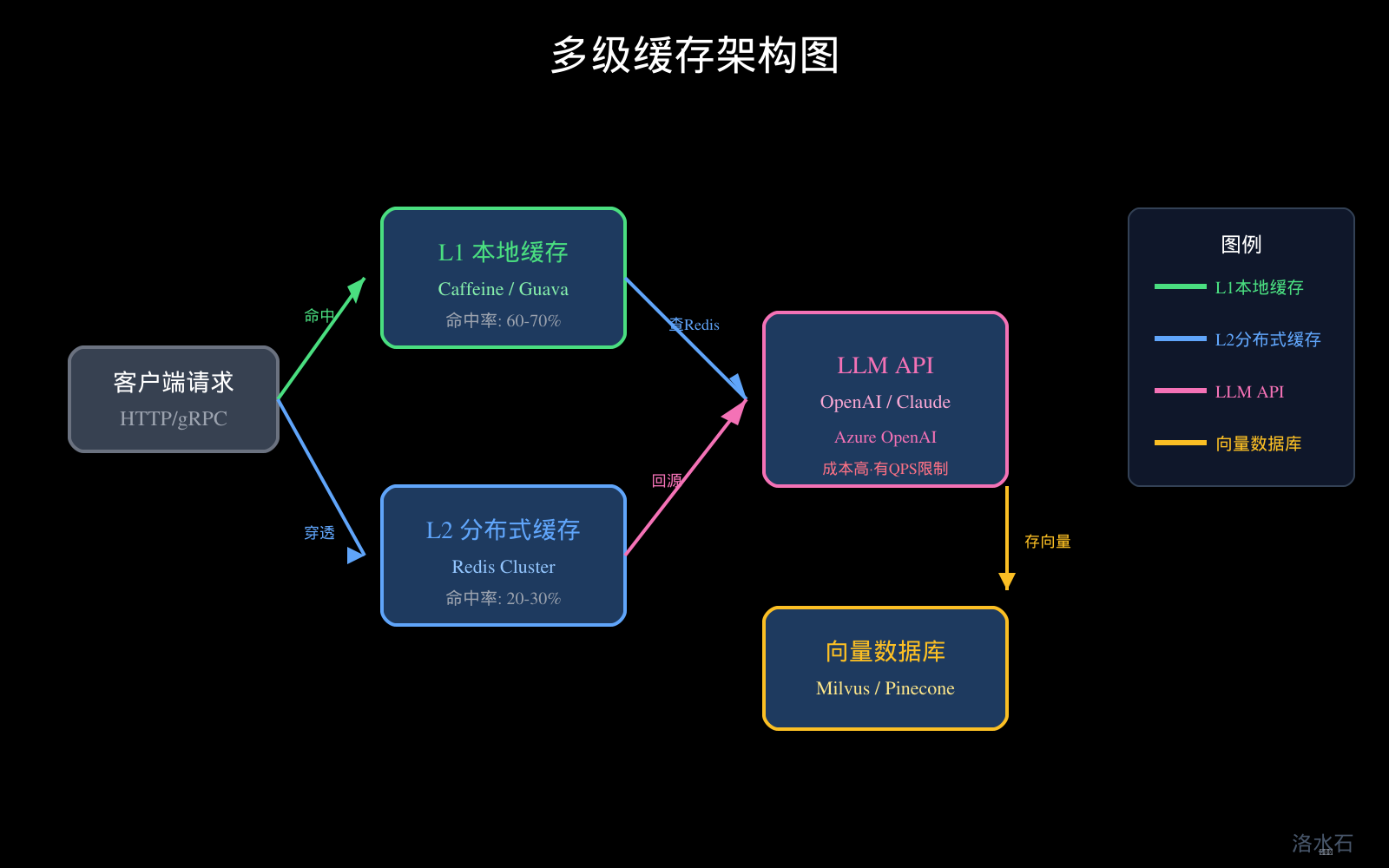
图1:多级缓存架构图
缓存策略对比
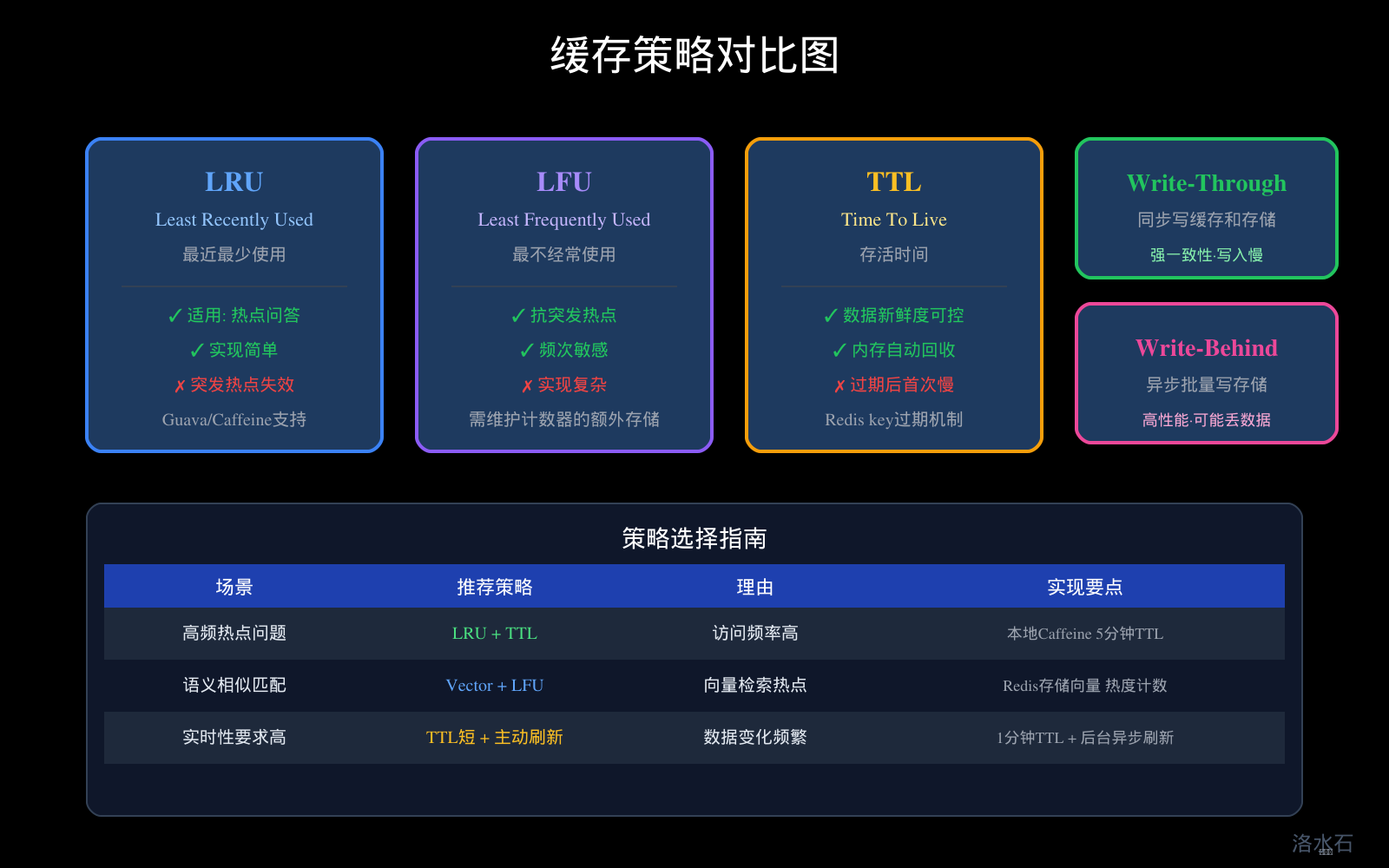
图2:缓存策略对比图
问题相似度匹配
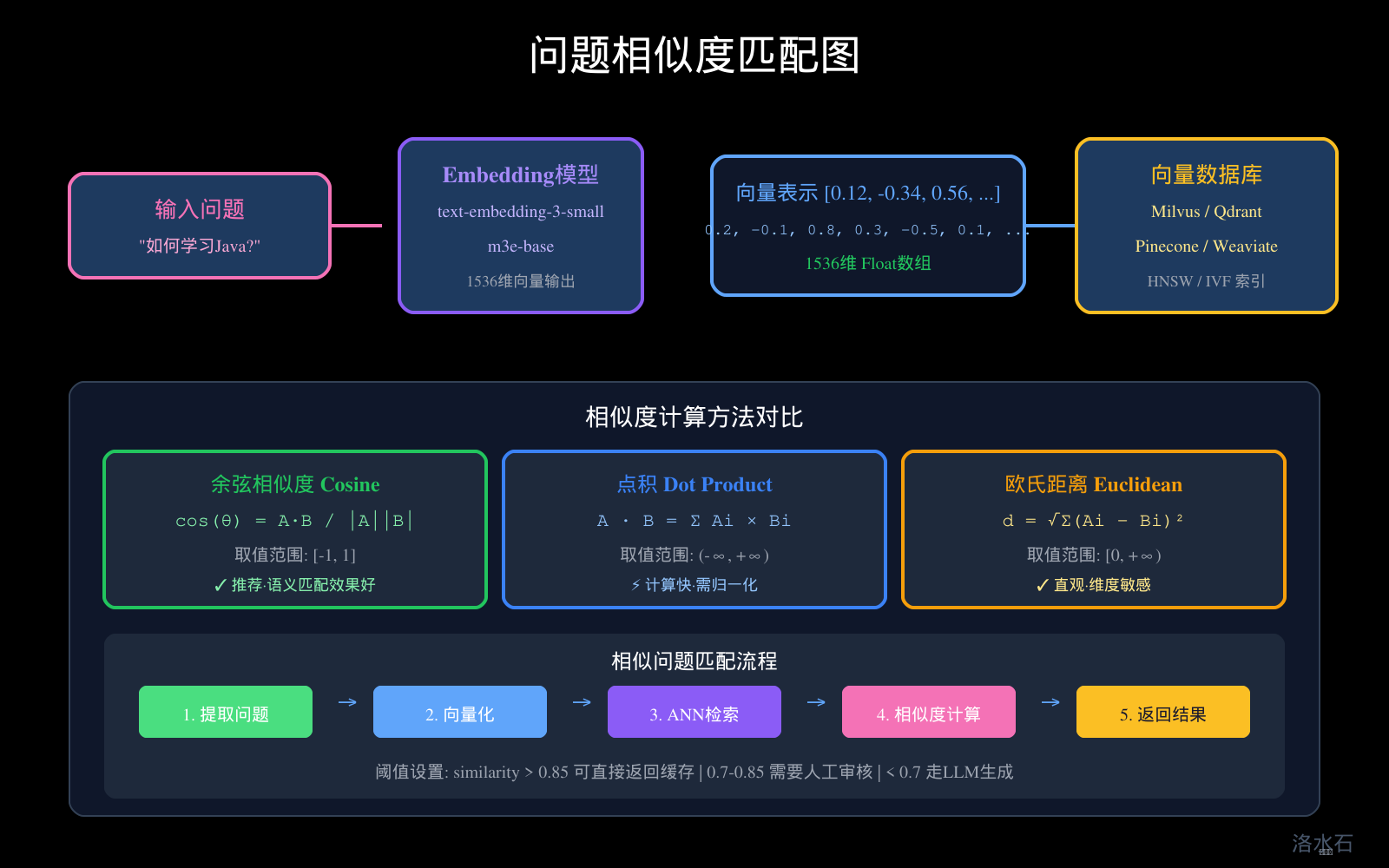
图3:问题相似度匹配图
缓存失效策略
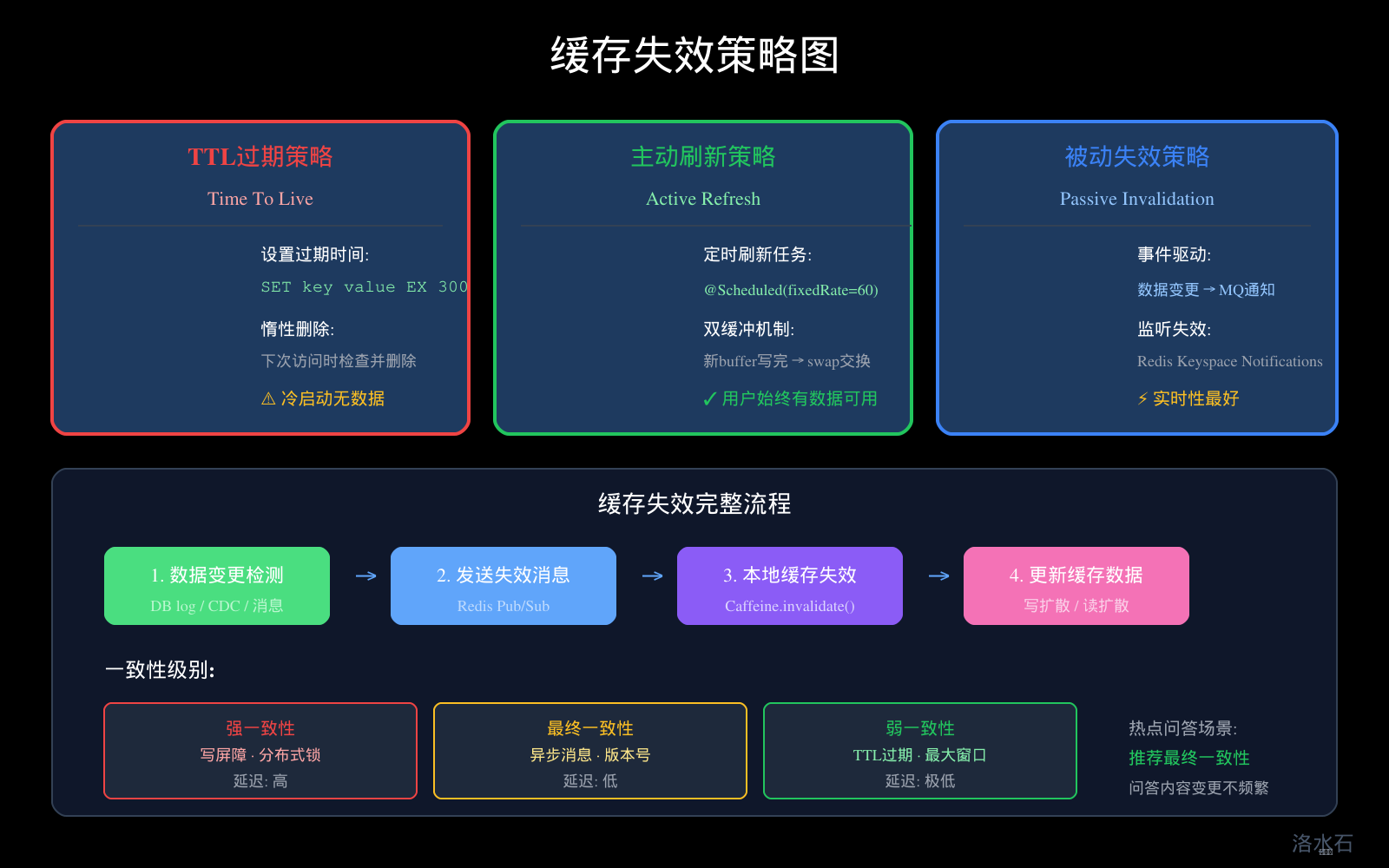
图4:缓存失效策略图

AtomGit 是由开放原子开源基金会联合 CSDN 等生态伙伴共同推出的新一代开源与人工智能协作平台。平台坚持“开放、中立、公益”的理念,把代码托管、模型共享、数据集托管、智能体开发体验和算力服务整合在一起,为开发者提供从开发、训练到部署的一站式体验。
更多推荐

 13
13 0
0- 0


 已为社区贡献48条内容

所有评论(0)