在泰山派(rk3566)上部署原版yolov5模型
前言:本次教程作为一次模型量化的练手,主要是针对算子支持不完善的情况进行,实际使用时建议只用rknn model zoo中支持的代码进行运行,以获得更好的推理效果
项目地址:https://gitee.com/Hans_Rudle/yolov5_rknn.git
电脑端准备
我们这里的重点是将模型转换后部署到rknn板子上,所以不会讲解如何训练yolo模型,这里我们直接使用yolo官方预训练好的模型yolov5n.pt\
pt转换onnx
虽然pt可以直接转为rknn模型,但是原始模型的640x640让泰山派处理还是有点费力,所以我的
想法是先用pt模型转换一个320x320输入的onnx模型,方便我们后续转换为相应的rknn模型
得益于yolo官方的ultralytics库,这部分代码可以做的非常简单,几行代码就可以搞定
(记得提前拉取相应的仓库,并下载好依赖)
from ultralytics import YOLO

# Load a model
model = YOLO("model/yolov5nu.pt")  # load an official model

# Export the model
model.export(format="onnx",opset = 19,imgsz = 320)
#opset可以选择其他版本,我这里rknn toolkit推荐opset19
可以使用netron来查看转换后的输入形式,这里使用网页端查看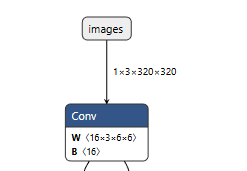
输入为1x3x320x320成功
linux端准备
由于rknn官方的转换工具只能在x86结构的linux系统下运行,所以这部分不能再我们的windows下运行了
我这里是选择去autodl上租了一个x86架构 无GPU的服务器(主要是电脑空间有限,没办法再去搞虚拟机了)
如果电脑空间允许的话推荐再自己的电脑上执行模型转换
更新:rknn toolkit2 在后续的版本(2.3.0)中以及开始支持在arm架构上运行 不需要在找一个x86的主机了,推荐使用更新的版本优化体验
rknn toolkit2安装
为了方便,我这里再服务器上提前选择了minconda3,我们先创建一个conda环境
conda activate rknn python=3.10
之后再这个虚拟环境下安装一下常用的包,比如numpy opencv,pillow等
在rknn的仓库中 将整个文件夹下来下来
https://github.com/rockchip-linux/rknn-toolkit2
我这里选择的是1.6.0版本,可根据自己的需求选择
在rknn环境下,进入如下目录
rknn-toolkit2/rknn-toolkit2/packages/
里面有如下文件
根据自己的python版本选择合适的require依赖和.whl包,我们python版本为3.10选择cp310,x86的包
pip install rknn_toolkit2-1.6.0+81f21f4d-cp310-cp310-linux_x86_64.whl
数据集准备
在int8量化中,需要使用训练的数据集进行数据校准,以保证量化后推理的进度,这里我直接下载了
ultralytics的coc128数据集来进行校准,使用如下代码来生成dataset.txt
import os

image_dir = 'train' #替换为自己的数据集路径
output_txt = 'dataset.txt'

# 获取所有图片路径并写入 txt
with open(output_txt, 'w') as f:
    for img_name in os.listdir(image_dir):
        if img_name.endswith(('.jpg', '.jpeg', '.png')):
            # 写入绝对路径
            f.write(os.path.abspath(os.path.join(image_dir, img_name)) + '\n')

print(f"校准列表已生成至: {output_txt}")
onnx转rknn
在依赖安装就绪后,我们就可以执行模型转换的代码了,相应的介绍在toolkit文件夹中的doc文件下
里面介绍了转换时候的步骤,可以参考着写转换代码
这里我给一个通用的示例
from rknn.api import RKNN
from PIL import Image
import numpy as np
import cv2
model_path = "yolov5nu.onnx"
DATASET_PATH = "dataset.txt"

def main():
    rknn = RKNN(verbose=True, verbose_file='./yolo.log')
    rknn.config(
    mean_values=[0, 0, 0],
    std_values=[255, 255, 255],
    quant_img_RGB2BGR=False,
    target_platform='rk3566',
    quantized_method='channel')
    print('--> Loading model')
    ret = rknn.load_onnx(model=model_path)
    if ret != 0:
        print('Load model failed!')
        exit(ret)
    print('done')
    print('--> Building model')
    ret = rknn.build(do_quantization=True, dataset=DATASET_PATH,auto_hybrid=True)
    # ret = rknn.build(do_quantization=False, dataset=DATASET_PATH)
    if ret != 0:
        print('Build model failed!')
        exit(ret)
    print('done')
    print('--> Export rknn model')
    ret = rknn.export_rknn(export_path='./yolo.rknn')
    if ret != 0:
        print('Export rknn model failed!')
        exit(ret)
    print('done')
    rknn.release()
if __name__ == "__main__":
    main()
初次之外rknn还提供了模拟工具,可以让我们直接在x86平台上使用模拟器进行推理,查看转换后
模型的推理效果,这里我们直接放在一起,转换后直接进行模拟推理
# 此代码主要是yolo图像预处理和后处理部分,命名为proecees.py
from PIL import Image
import numpy as np

IMG_SZ = 320  # 输入图片尺寸(export 时使用的大小)
CONF_THRES = 0.25  # 置信度阈值
IOU_THRES = 0.45  # IOU 阈值
NUM_CLASSES = 80  # 类别数

def letterbox(im, new_size=IMG_SZ, color=(114,114,114)):
    w0, h0 = im.size
    r = min(new_size / w0, new_size / h0)
    new_unpad = (int(round(w0 * r)), int(round(h0 * r)))
    im_resized = im.resize(new_unpad, Image.BILINEAR)
    new_im = Image.new("RGB", (new_size, new_size), color)
    pad_x = (new_size - new_unpad[0]) // 2
    pad_y = (new_size - new_unpad[1]) // 2
    new_im.paste(im_resized, (pad_x, pad_y))
    return new_im, r, (pad_x, pad_y)

def preprocess(img_path):
    im = Image.open(img_path).convert("RGB")
    im_resized, scale, pad = letterbox(im, IMG_SZ)
    # x = np.array(im_resized).astype(np.float32) / 255.0
    x = np.array(im_resized)
    x = x.transpose((2, 0, 1))  # 1x3xHxW
    x = np.expand_dims(x,axis=0)
    x = np.ascontiguousarray(x) #将数组转换为内存中连续存储的形式
    return im, x, scale, pad

def nms_numpy(boxes, scores, iou_threshold=0.45):
    if boxes.shape[0] == 0:
        return []
    x1 = boxes[:, 0]
    y1 = boxes[:, 1]
    x2 = boxes[:, 2]
    y2 = boxes[:, 3]
    areas = (x2 - x1) * (y2 - y1)
    order = scores.argsort()[::-1]
    keep = []
    while order.size > 0:
        i = order[0]
        keep.append(i)
        if order.size == 1:
            break
        xx1 = np.maximum(x1[i], x1[order[1:]])
        yy1 = np.maximum(y1[i], y1[order[1:]])
        xx2 = np.minimum(x2[i], x2[order[1:]])
        yy2 = np.minimum(y2[i], y2[order[1:]])
        w = np.maximum(0.0, xx2 - xx1)
        h = np.maximum(0.0, yy2 - yy1)
        inter = w * h
        iou = inter / (areas[i] + areas[order[1:]] - inter)
        inds = np.where(iou <= iou_threshold)[0]
        order = order[inds + 1]
    return keep

def parse_preds(pred, img_sz=IMG_SZ, num_classes=NUM_CLASSES):
    """
    pred: numpy array shape (1, C, N) like (1, 84, 8400)
    returns boxes (N,4) in xyxy relative to original image after letterbox undo,
            scores (N,), class_ids (N,)
    """

    # pred = (pred.astype(np.float32) - 0 )/ 255.0
    # 转成 (num_preds, C)
    pred = np.asarray(pred)
    if pred.ndim == 3 and pred.shape[0] == 1:
        pred = pred[0]  # (C, N)
        print("1")
    pred = pred.T  # (N, C)  e.g. (8400, 84)

    # 切分:前4=xywh, 接着 num_classes 分为 class scores
    xywh = pred[:, :4].copy()
    probs = pred[:, 4:4 + num_classes].copy()
    print(probs.max())
    print(probs.min())
    # 判断 xywh 的尺度:如果值 >1 很可能是以像素为单位(0..IMG_SZ),否则是 0..1
    mean_xy = xywh[:, :2].mean()
    normalized = mean_xy <= 1.0  # 简单判断,如果中心坐标平均 <=1 则认为是归一化

    if normalized:
        # xywh 为 0..1 相对值 -> 乘以 img_sz 得到相对于输入尺度(例如 640)
        xywh = xywh * img_sz
    # 现在 xywh 假设为相对于 IMG_SZ 的像素尺度(即 [0..IMG_SZ])

    cx = xywh[:, 0]
    cy = xywh[:, 1]
    w = xywh[:, 2]
    h = xywh[:, 3]
    x1 = cx - w / 2
    y1 = cy - h / 2
    x2 = cx + w / 2
    y2 = cy + h / 2
    boxes = np.stack([x1, y1, x2, y2], axis=1)  # 相对于 input (IMG_SZ) 的坐标
    print(boxes)
    # class scores & ids
    scores = probs.max(axis=1)
    class_ids = probs.argmax(axis=1)

    return boxes, scores, class_ids, normalized
这个是转换代码
from rknn.api import RKNN
from PIL import Image
import numpy as np
import process as pre
import cv2
model_path = "yolov5nu.onnx"
DATASET_PATH = "dataset.txt"
img_path = "output.png"

IMG_SZ = 320  # 输入图片尺寸(export 时使用的大小)
CONF_THRES = 0.25  # 置信度阈值
IOU_THRES = 0.45  # IOU 阈值
NUM_CLASSES = 80  # 类别数

def main():
    rknn = RKNN(verbose=True, verbose_file='./yolo.log')
    rknn.config(
    mean_values=[0, 0, 0],
    std_values=[255, 255, 255], #让模型自动归一化 不需要再手动归一化,节省时间
    quant_img_RGB2BGR=False,
    target_platform='rk3566',
    quantized_method='channel')
    print('--> Loading model')
    ret = rknn.load_onnx(model=model_path)
    if ret != 0:
        print('Load model failed!')
        exit(ret)
    print('done')
    print('--> Building model')
    ret = rknn.build(do_quantization=True, dataset=DATASET_PATH,auto_hybrid=True)
    # ret = rknn.build(do_quantization=False, dataset=DATASET_PATH)
    if ret != 0:
        print('Build model failed!')
        exit(ret)
    print('done')
    print('--> Export rknn model')
    ret = rknn.export_rknn(export_path='./yolo.rknn')
    if ret != 0:
        print('Export rknn model failed!')
        exit(ret)
    print('done')
    ret = rknn.init_runtime()
    if ret != 0:
        print('Init runtime environment failed!')
        exit(ret)
    print('done')
    orig_img, x, scale, pad = pre.preprocess(img_path)
    outs = rknn.inference(inputs=[x], data_format=['nchw'])
    pred = outs[0]
    print(pred)
    if pred is None or np.size(pred) == 0:
        print("No output from model")
        return
    boxes, scores, class_ids, normalized = pre.parse_preds(pred, img_sz=IMG_SZ, num_classes=NUM_CLASSES)
    pad_x, pad_y = pad
    # 减去 pad(pad 在 IMG_SZ 尺度下),再除以 scale(scale 是原图->IMG_SZ 的缩放因子)
    boxes[:, [0, 2]] -= pad_x
    boxes[:, [1, 3]] -= pad_y
    boxes /= scale  # 现在是相对于原始图像的像素坐标
    print(scores.max())
    print(scores.min())
    print(scores)
    print(rknn.get_output_attrs())
    # 置信度过滤
    keep_mask = scores > CONF_THRES
    boxes = boxes[keep_mask]
    scores = scores[keep_mask]
    class_ids = class_ids[keep_mask]

    if boxes.shape[0] == 0:
        print("No detections after confidence filtering")
        return
    keep_indices = pre.nms_numpy(boxes, scores, iou_threshold=IOU_THRES)
    boxes = boxes[keep_indices]
    scores = scores[keep_indices]
    class_ids = class_ids[keep_indices]
    boxes = boxes.astype(np.int32)
    img_cv = cv2.cvtColor(np.array(orig_img), cv2.COLOR_RGB2BGR)
    for (x1, y1, x2, y2), s, cid in zip(boxes, scores, class_ids):
        cv2.rectangle(img_cv, (x1, y1), (x2, y2), (0, 255, 0), 2)
        label = f"{cid}:{s:.2f}"
        cv2.putText(img_cv, label, (x1, max(0, y1 - 8)), cv2.FONT_HERSHEY_SIMPLEX, 0.5, (0, 255, 0), 1)
    out_file = "result_nms.jpg"
    cv2.imwrite(out_file, img_cv)
    print(f"Saved {out_file} with {len(boxes)} detections")
    rknn.release()
if __name__ == "__main__":
    main()
这里出现了一个问题,就是scores里面的所有数据都是为0,但是如果我们使用非量化的转换是
可以出现正常的推理结果的,这说明目前的问题只能出现在量化上。
我们使用netron打开rknn模型的结构排查一下问题(netron也是可以查看rknn的结构的)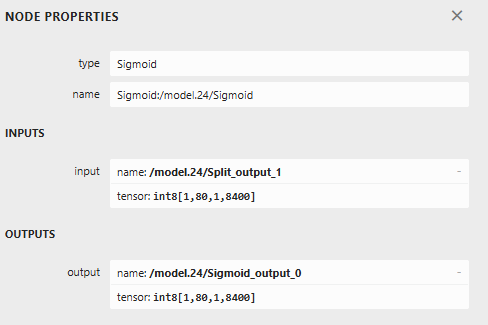
在最后的sigmoid函数中,发现他的输入输出都是int8,估计问题就在这里,因为sigmoid函数
的输出为-1~1,如果赋值到int类型不就变成全0了吗
混合量化
在rknn toolkite2中rknn提供了一种混合量化的步骤,他可以指定模型的具体某一个部分使用f16量化,
这里正好符合我们的需求,我们只需要最后输出为浮点数。具体不走在SDK文件中的混合量化中有讲解,可以自行查阅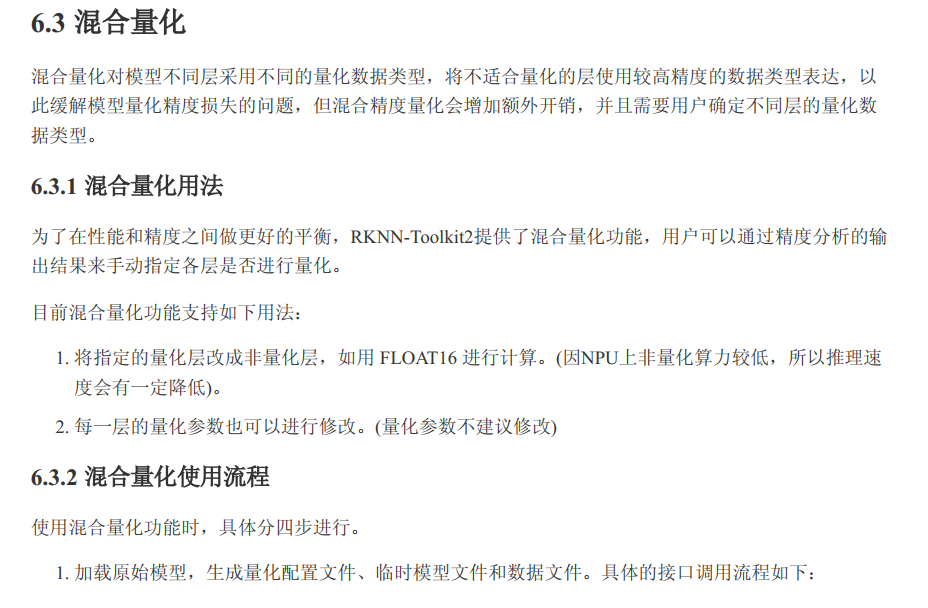
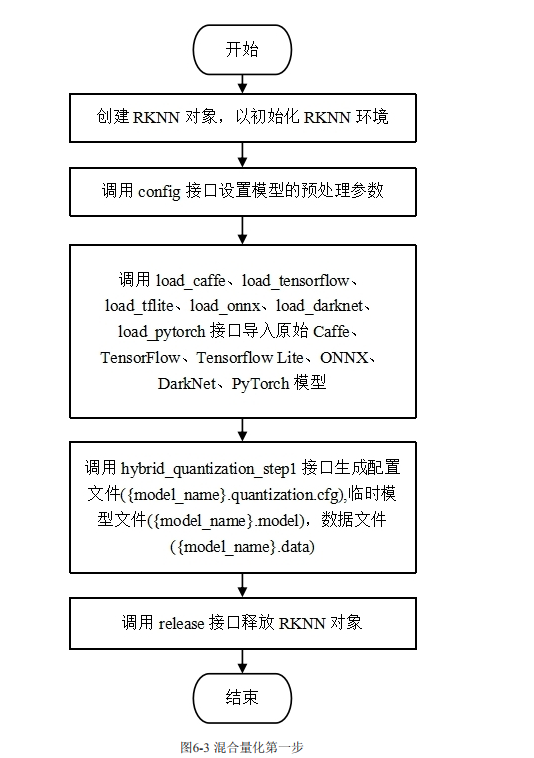
我这里安装SDK的讲解和例程,编写如下代码
#此处代码主要是提取出模型的结构和量化方式,命名为step1.py
import numpy as np
import cv2
from rknn.api import RKNN
model_path = "yolov5nu.onnx"
DATASET_PATH = "dataset.txt"
if __name__ == '__main__':

    # Create RKNN object
    rknn = RKNN(verbose=True)

    # Pre-process config
    print('--> Config model')
    rknn.config(
    mean_values=[0, 0, 0],
    std_values=[255, 255, 255],
    quant_img_RGB2BGR=False,
    target_platform='rk3566',
    quantized_method='channel')
    print('done')

    print('--> Loading model')
    ret = rknn.load_onnx(model=model_path)
    if ret != 0:
        print('Load model failed!')
        exit(ret)
    print('done')

    # Build model
    print('--> hybrid_quantization_step1')
    ret = rknn.hybrid_quantization_step1(dataset='./dataset.txt', proposal=False)
    if ret != 0:
        print('hybrid_quantization_step1 failed!')
        exit(ret)
    print('done')
    rknn.release()
打开生成的.quantization.cfg文件,将需要的部分转换为float16量化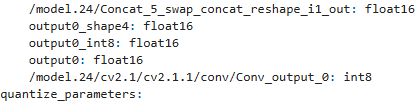
注意:之前在2.3.0实验的时候发现这里不会重新生成所有的节点名称,可以使用netron打开.model后缀的文件查看模型结构以及相应的节点名称
最后执行以下模型转换代码,并完成推理部分
from rknn.api import RKNN
from PIL import Image
import numpy as np
import process as pre
import cv2
model_path = "yolov5nu.onnx"
DATASET_PATH = "dataset.txt"
img_path = "output.png"

IMG_SZ = 320  # 输入图片尺寸(export 时使用的大小)
CONF_THRES = 0.25  # 置信度阈值
IOU_THRES = 0.45  # IOU 阈值
NUM_CLASSES = 80  # 类别数

def main():
    rknn = RKNN(verbose=True, verbose_file='./yolo.log')
    ret = rknn.hybrid_quantization_step2(model_input='./yolov5int8.model',
                                         data_input='./yolov5int8.data',
                                         model_quantization_cfg='./yolov5int8.quantization.cfg')
    if ret != 0:
        print('hybrid_quantization_step2 failed!')
        exit(ret)
    print('done')
    print('--> Export rknn model')
    ret = rknn.export_rknn(export_path='./yolo.rknn')
    if ret != 0:
        print('Export rknn model failed!')
        exit(ret)
    print('done')
    ret = rknn.init_runtime()
    if ret != 0:
        print('Init runtime environment failed!')
        exit(ret)
    print('done')
    orig_img, x, scale, pad = pre.preprocess(img_path)
    outs = rknn.inference(inputs=[x], data_format=['nchw'])
    pred = outs[0]
    print(pred)
    if pred is None or np.size(pred) == 0:
        print("No output from model")
        return
    boxes, scores, class_ids, normalized = pre.parse_preds(pred, img_sz=IMG_SZ, num_classes=NUM_CLASSES)
    pad_x, pad_y = pad
    # 减去 pad(pad 在 IMG_SZ 尺度下),再除以 scale(scale 是原图->IMG_SZ 的缩放因子)
    boxes[:, [0, 2]] -= pad_x
    boxes[:, [1, 3]] -= pad_y
    boxes /= scale  # 现在是相对于原始图像的像素坐标
    print(scores.max())
    print(scores.min())
    print(scores)
    # 置信度过滤
    keep_mask = scores > CONF_THRES
    boxes = boxes[keep_mask]
    scores = scores[keep_mask]
    class_ids = class_ids[keep_mask]

    if boxes.shape[0] == 0:
        print("No detections after confidence filtering")
        return
    keep_indices = pre.nms_numpy(boxes, scores, iou_threshold=IOU_THRES)
    boxes = boxes[keep_indices]
    scores = scores[keep_indices]
    class_ids = class_ids[keep_indices]
    boxes = boxes.astype(np.int32)
    img_cv = cv2.cvtColor(np.array(orig_img), cv2.COLOR_RGB2BGR)
    for (x1, y1, x2, y2), s, cid in zip(boxes, scores, class_ids):
        cv2.rectangle(img_cv, (x1, y1), (x2, y2), (0, 255, 0), 2)
        label = f"{cid}:{s:.2f}"
        cv2.putText(img_cv, label, (x1, max(0, y1 - 8)), cv2.FONT_HERSHEY_SIMPLEX, 0.5, (0, 255, 0), 1)
    out_file = "result_nms.jpg"
    cv2.imwrite(out_file, img_cv)
    print(f"Saved {out_file} with {len(boxes)} detections")
    rknn.release()
if __name__ == "__main__":
    main()
查看推理结果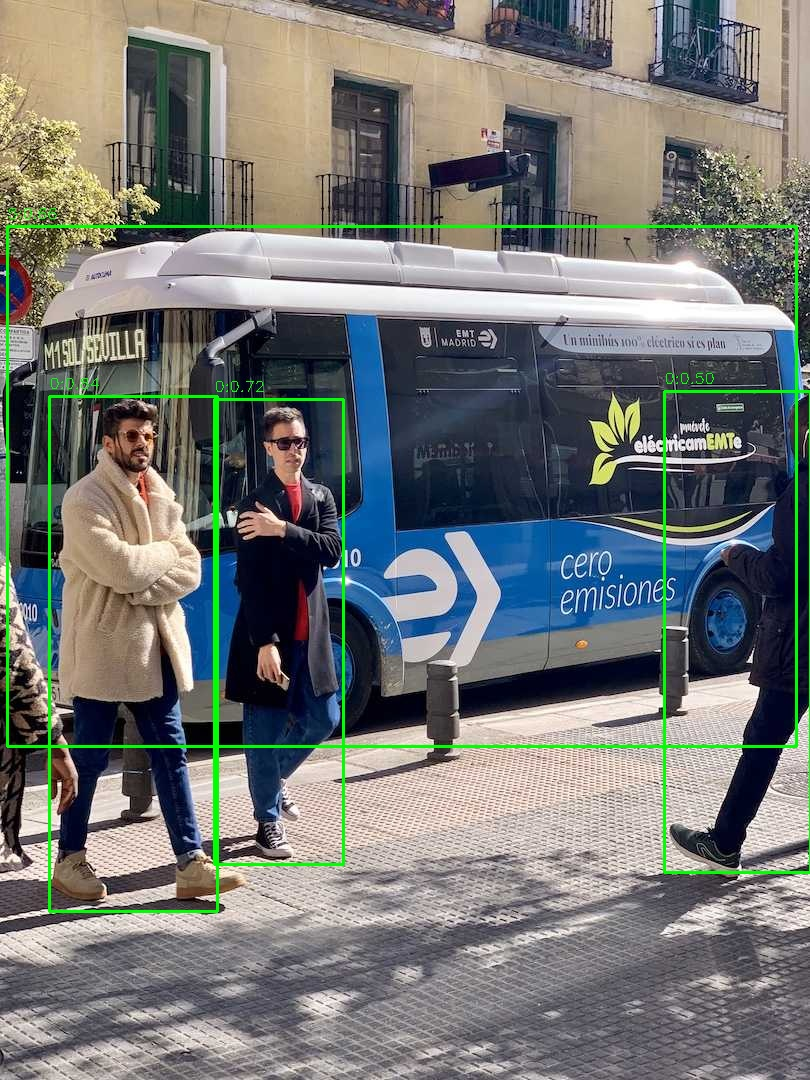
效果还是可以的
rk3566部署
到此为止,我们已经成功获得了转换后的.rknn文件,接下来我们就可以将模型放在rk3566上
实际部署查看效果了
安装toolkit2 lite
安装步骤与toolkit2类似,在泰山派上安装好miniconda3并创建rknn的虚拟环境,并安装好opencv,numpy
这些库。
从github上拉取文件中,安装rknn-toolkit2/rknn_toolkit_lite2/packages/找到我们相应版本的whl文件
安装即可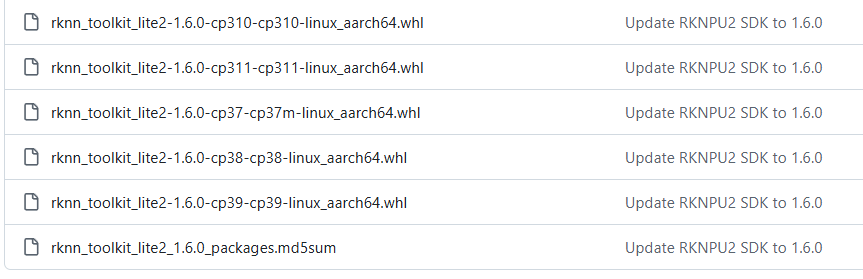
编写推理代码
有了之前模型转换部分的代码,这里的代码直接套用即可
from rknnlite.api import RKNNLite
import numpy as np
from PIL import Image
import cv2
import time
RKNN_MODEL = "yolo320.rknn"  # ONNX 文件路径
IMG_PATH = "bus.jpg"  # 输入图片路径
IMG_SZ = 320  # 输入图片尺寸(export 时使用的大小)
CONF_THRES = 0.25  # 置信度阈值
IOU_THRES = 0.45  # IOU 阈值
NUM_CLASSES = 80  # 类别数

# def letterbox(im, new_size=IMG_SZ, color=(0, 0, 0)):
#     w0, h0 = im.size
#     r = min(new_size / w0, new_size / h0)
#     new_unpad = (int(round(w0 * r)), int(round(h0 * r)))
#     im_resized = im.resize(new_unpad, Image.BILINEAR)
#     new_im = Image.new("RGB", (new_size, new_size), color)
#     pad_x = (new_size - new_unpad[0]) // 2
#     pad_y = (new_size - new_unpad[1]) // 2
#     new_im.paste(im_resized, (pad_x, pad_y))
#     return new_im, r, (pad_x, pad_y)

def letterbox(im, new_size=IMG_SZ, color=(0, 0, 0)):
    h, w = im.shape[:2]
    r = min(new_size / w, new_size / h)
    new_unpad_w = int(round(w * r))
    new_unpad_h = int(round(h * r))
    im_resized = cv2.resize(im, (new_unpad_w, new_unpad_h), interpolation=cv2.INTER_LINEAR)
    new_im = np.full((new_size, new_size, 3), color, dtype=np.uint8)
    pad_x = (new_size - new_unpad_w) // 2
    pad_y = (new_size - new_unpad_h) // 2
    new_im[pad_y:pad_y+new_unpad_h, pad_x:pad_x+new_unpad_w] = im_resized
    return new_im, r, (pad_x, pad_y)

# def preprocess(img_path):
#     im = Image.open(img_path).convert("RGB")
#     im_resized, scale, pad = letterbox(im, IMG_SZ)
#     # x = np.array(im_resized).astype(np.float32) / 255.0
#     x = np.array(im_resized)
#     x = x.transpose((2, 0, 1))  # 1x3xHxW
#     x = np.expand_dims(x,axis=0)
#     x = np.ascontiguousarray(x) #将数组转换为内存中连续存储的形式
#     return im, x, scale, pad

def preprocess(img_path):
    im = cv2.imread(img_path)
    im = cv2.cvtColor(im, cv2.COLOR_BGR2RGB)
    im_resized, scale, pad = letterbox(im, IMG_SZ)
    x = im_resized.transpose((2, 0, 1))  # 变为(3, H, W)
    x = np.expand_dims(x, axis=0)  # 变为(1, 3, H, W)
    x = np.ascontiguousarray(x)
    return im, x, scale, pad

def nms_numpy(boxes, scores, iou_threshold=0.45):
    if boxes.shape[0] == 0:
        return []
    x1 = boxes[:, 0]
    y1 = boxes[:, 1]
    x2 = boxes[:, 2]
    y2 = boxes[:, 3]
    areas = (x2 - x1) * (y2 - y1)
    order = scores.argsort()[::-1]
    keep = []
    while order.size > 0:
        i = order[0]
        keep.append(i)
        if order.size == 1:
            break
        xx1 = np.maximum(x1[i], x1[order[1:]])
        yy1 = np.maximum(y1[i], y1[order[1:]])
        xx2 = np.minimum(x2[i], x2[order[1:]])
        yy2 = np.minimum(y2[i], y2[order[1:]])
        w = np.maximum(0.0, xx2 - xx1)
        h = np.maximum(0.0, yy2 - yy1)
        inter = w * h
        iou = inter / (areas[i] + areas[order[1:]] - inter)
        inds = np.where(iou <= iou_threshold)[0]
        order = order[inds + 1]
    return keep

def parse_preds(pred, img_sz=IMG_SZ, num_classes=NUM_CLASSES):
    """
    pred: numpy array shape (1, C, N) like (1, 84, 8400)
    returns boxes (N,4) in xyxy relative to original image after letterbox undo,
            scores (N,), class_ids (N,)
    """
    # 转成 (num_preds, C)
    pred = np.asarray(pred)
    if pred.ndim == 3 and pred.shape[0] == 1:
        pred = pred[0]  # (C, N)
    pred = pred.T  # (N, C)  e.g. (8400, 84)

    # 切分:前4=xywh, 接着 num_classes 分为 class scores
    xywh = pred[:, :4].copy()
    probs = pred[:, 4:4 + num_classes].copy()

    # 判断 xywh 的尺度:如果值 >1 很可能是以像素为单位(0..IMG_SZ),否则是 0..1
    mean_xy = xywh[:, :2].mean()
    normalized = mean_xy <= 1.0  # 简单判断,如果中心坐标平均 <=1 则认为是归一化

    if normalized:
        # xywh 为 0..1 相对值 -> 乘以 img_sz 得到相对于输入尺度(例如 640)
        xywh = xywh * img_sz
    # 现在 xywh 假设为相对于 IMG_SZ 的像素尺度(即 [0..IMG_SZ])

    cx = xywh[:, 0]
    cy = xywh[:, 1]
    w = xywh[:, 2]
    h = xywh[:, 3]
    x1 = cx - w / 2
    y1 = cy - h / 2
    x2 = cx + w / 2
    y2 = cy + h / 2
    boxes = np.stack([x1, y1, x2, y2], axis=1)  # 相对于 input (IMG_SZ) 的坐标

    # class scores & ids
    scores = probs.max(axis=1)
    class_ids = probs.argmax(axis=1)

    return boxes, scores, class_ids, normalized

def main(onnx_path=RKNN_MODEL, img_path=IMG_PATH):
    rknn_lite = RKNNLite()
    ret = rknn_lite.load_rknn(RKNN_MODEL)
    if ret != 0:
        print('Load RKNN model failed')
        exit(ret)
    print('done1')
    ret = rknn_lite.init_runtime()
    if ret != 0:
        print('Init runtime environment failed')
        exit(ret)
    print('done2')
    pre_start = time.time()
    orig_img, x, scale, pad = preprocess(img_path)
    pre_end = time.time()
    infer_start = time.time()
    outs = rknn_lite.inference(inputs=[x],data_format = ["nchw"])
    infer_end = time.time()

    pro_start =  time.time()
    pred = outs[0]
    if pred is None or np.size(pred) == 0:
        print("No output from model")
        return

    boxes, scores, class_ids, normalized = parse_preds(pred, img_sz=IMG_SZ, num_classes=NUM_CLASSES)
    # 说明:此处 boxes 是相对于 IMG_SZ(例如 640)的坐标,需要减去 letterbox 的 pad 并除以 scale 恢复到原图像素
    pad_x, pad_y = pad
    # 减去 pad(pad 在 IMG_SZ 尺度下),再除以 scale(scale 是原图->IMG_SZ 的缩放因子)
    boxes[:, [0, 2]] -= pad_x
    boxes[:, [1, 3]] -= pad_y
    boxes /= scale  # 现在是相对于原始图像的像素坐标
    # 置信度过滤
    keep_mask = scores > CONF_THRES
    boxes = boxes[keep_mask]
    scores = scores[keep_mask]
    class_ids = class_ids[keep_mask]
    # boxes = boxes[0]
    # scores = scores[0]
    # class_ids = class_ids[0]

    if boxes.shape[0] == 0:
        print("No detections after confidence filtering")
        return

    # NMS
    keep_indices = nms_numpy(boxes, scores, iou_threshold=IOU_THRES)
    boxes = boxes[keep_indices]
    scores = scores[keep_indices]
    class_ids = class_ids[keep_indices]

    boxes = boxes.astype(np.int32)
    pro_end =  time.time()
    # 可视化并保存
    img_cv = cv2.cvtColor(np.array(orig_img), cv2.COLOR_RGB2BGR)
    for (x1, y1, x2, y2), s, cid in zip(boxes, scores, class_ids):
        cv2.rectangle(img_cv, (x1, y1), (x2, y2), (0, 255, 0), 2)
        label = f"{cid}:{s:.2f}"
        cv2.putText(img_cv, label, (x1, max(0, y1 - 8)), cv2.FONT_HERSHEY_SIMPLEX, 0.5, (0, 255, 0), 1)

    total_time = time.time()
    out_file = "result_nms.jpg"
    cv2.imwrite(out_file, img_cv)
    print(f"Saved {out_file} with {len(boxes)} detections")
    print(f"pre:{1000 * (pre_end-pre_start ):.2f}ms")
    print(f"Inference time: {1000 * (infer_end - infer_start):.2f} ms")
    print(f"pro time: {1000 * (pro_end - pro_start):.2f} ms")
    print(f"total time: {1000 * (pro_end-pre_start):.2f} ms")
    rknn_lite.release()

if __name__ == "__main__":
    main()
查看运行效果以及推理时间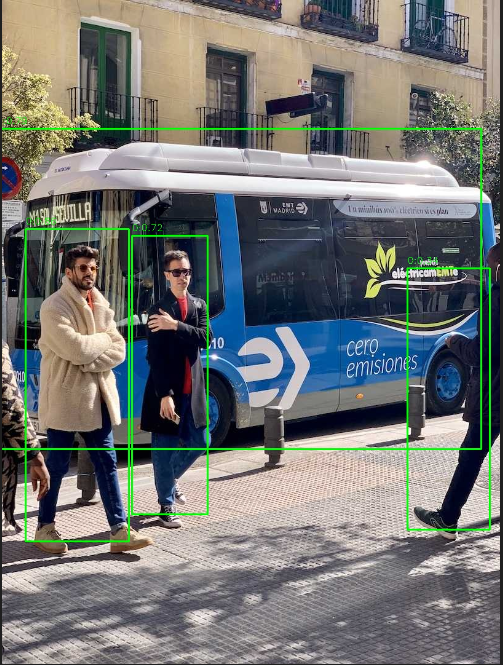
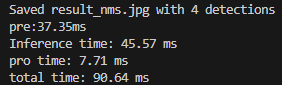
100ms应该是够用了

AtomGit 是由开放原子开源基金会联合 CSDN 等生态伙伴共同推出的新一代开源与人工智能协作平台。平台坚持“开放、中立、公益”的理念,把代码托管、模型共享、数据集托管、智能体开发体验和算力服务整合在一起,为开发者提供从开发、训练到部署的一站式体验。
更多推荐


 10
10 0
0- 0


 已为社区贡献1条内容

所有评论(0)