Spring AI Alibaba 快速掌握,看这篇文章就够了
大家好,我是Java1234_小锋老师。
一句话总结:Spring AI Alibaba = Spring AI 的“国产 Agent 加强版”,帮 Java 开发者用最少代码做出能思考、能调工具、能编排多智能体、能跑工作流的 AI 应用。
官方文档:https://java2ai.com | 源码:https://github.com/alibaba/spring-ai-alibaba
一、它到底是什么?
如果你已经会用 Spring Boot 写业务,那大概率也听说过 Spring AI——它把大模型、向量库、工具调用这些能力,用 Spring 一贯的风格(自动配置、Bean、Starter)包装好了。
Spring AI Alibaba 则是在 Spring AI 之上,由阿里云开源团队维护的 Agent 与工作流框架,主打:
| 能力 | 白话解释 |
|---|---|
| ReactAgent | 会“想一步、做一步”的智能体,能自己决定要不要调工具 |
| 多 Agent 编排 | 多个智能体按顺序、并行、路由、循环等方式协作 |
| Graph 工作流 | 把复杂业务流程拆成节点,像画流程图一样编排 |
| 通义 / DashScope 深度集成 | 百炼 API、模型参数、国内部署更顺手 |
| 上下文工程 | 记忆压缩、调用次数限制、人工审批等“生产必备”能力 |
| 可观测 & 可视化 | Admin 平台、Studio 调试、链路追踪 |
官方说法很实在:不到 10 行代码就能跑起一个 Agent。对 Java 后端来说,不用再切 Python 写 LangChain,也不必从零拼 HTTP 调模型。
重要说明(2026 年官方口径)
Spring AI Alibaba 的ReactAgent跑在 Graph Runtime 之上,更擅长 工作流 + 多智能体编排。
若你追求更“模型驱动”的高级 Agent 范式,可关注阿里 AgentScope 项目;Spring AI Alibaba 会持续维护 ReactAgent 并修安全漏洞,同时强化 Spring 生态集成。
二、三层架构一张图看懂
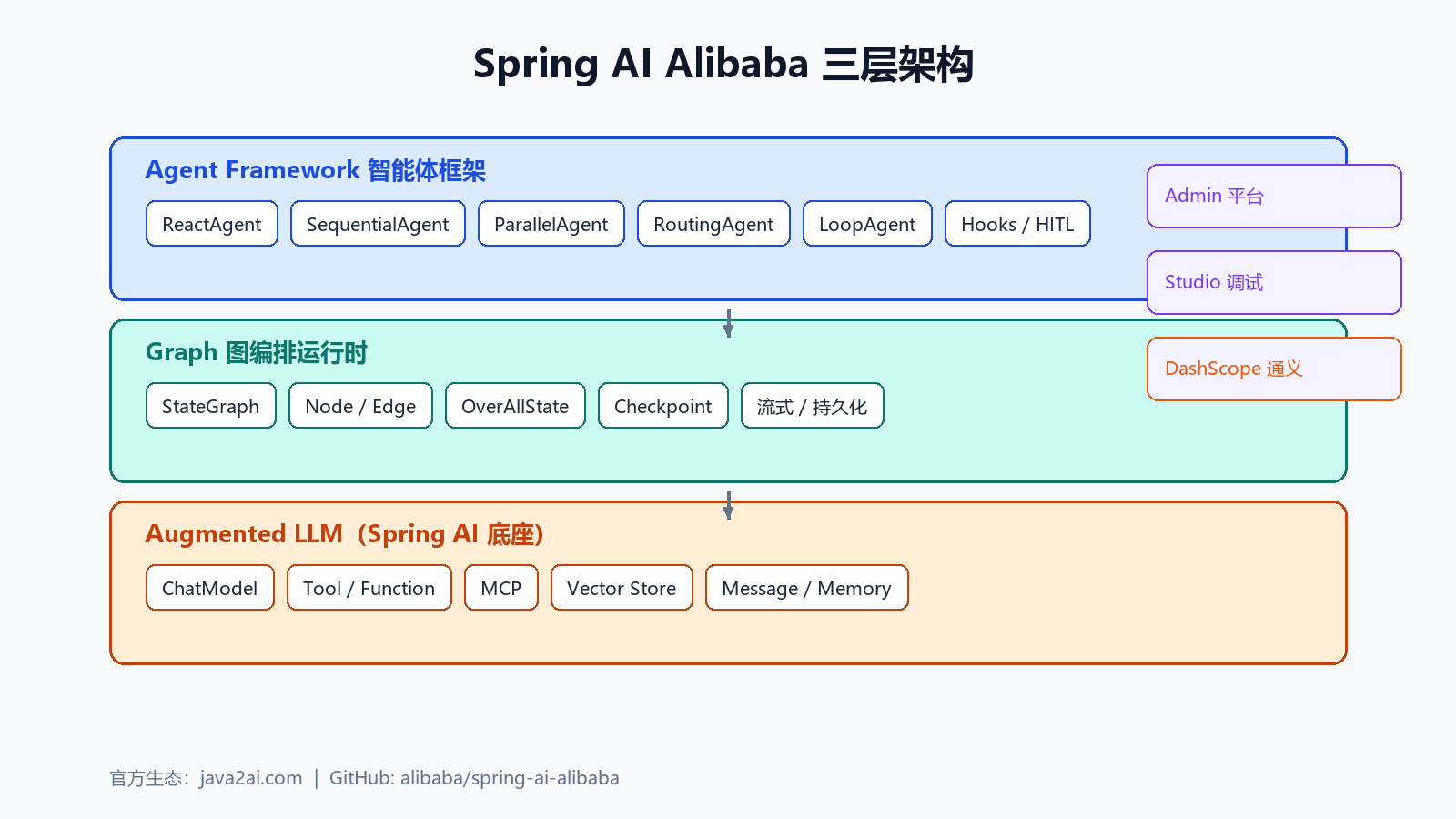
从上到下分三层,记牢就不迷路:
1. Agent Framework(你最常接触的层)
- ReactAgent:ReAct 范式(推理 + 行动)
- SequentialAgent / ParallelAgent / RoutingAgent / LoopAgent:多 Agent 套路
- Hooks:人机协同、限流、工具重试等
2. Graph(底层运行时)
- StateGraph:状态图
- Node / Edge:节点与边
- OverAllState:全局共享状态
- Checkpoint:断点续跑、持久化
3. Augmented LLM(Spring AI 底座)
- ChatModel、Tool、MCP、Vector Store、Message 等
关系可以这么理解:Spring AI 提供“零件”,Graph 提供“流水线”,Agent Framework 提供“老师傅帮你组装好的机器人”。
三、和 Spring AI、LangChain4j 怎么选?
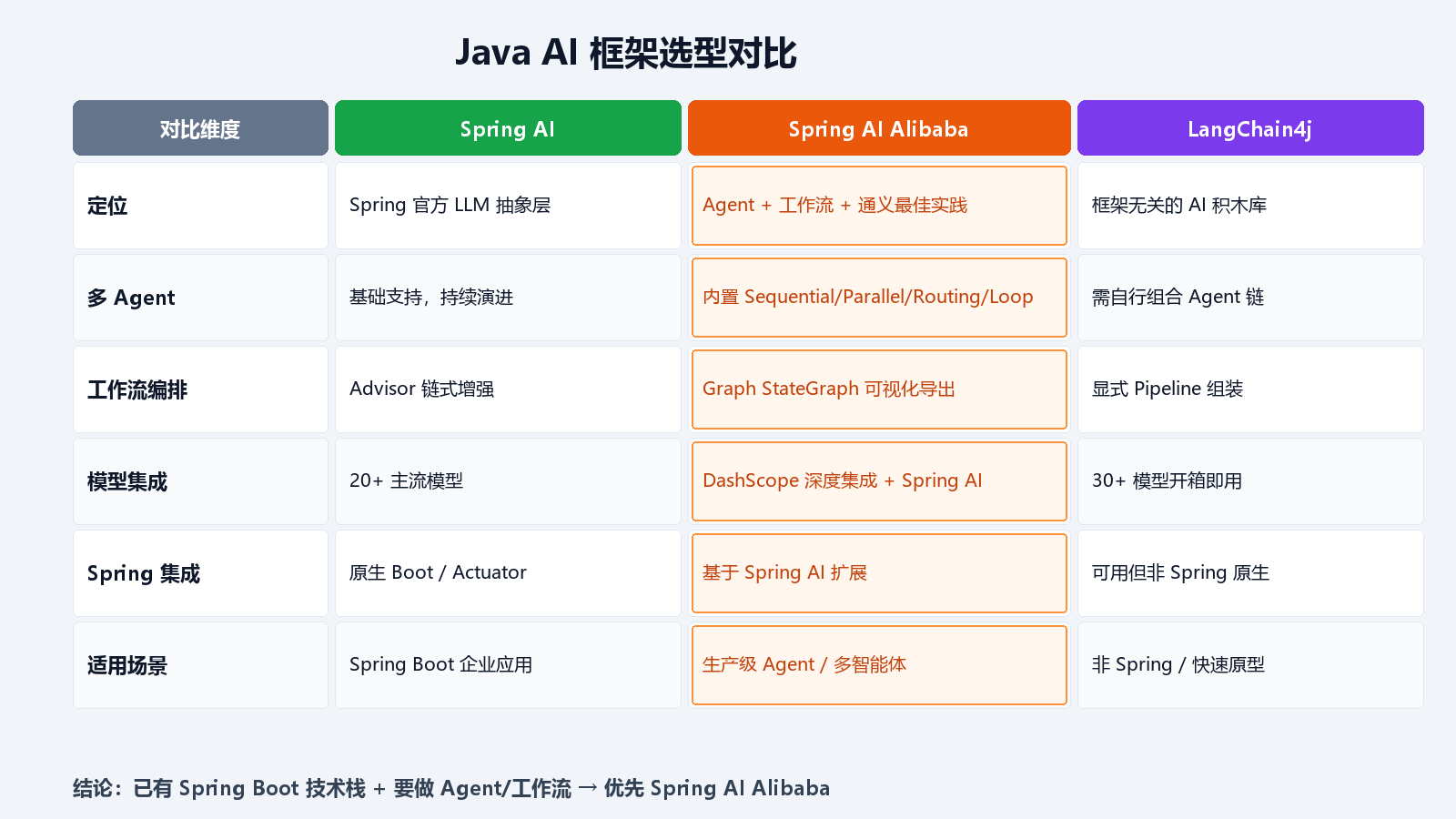
3.1 三者定位(大白话)
| 框架 | 是什么 | 适合谁 |
|---|---|---|
| Spring AI | Spring 官方的 AI 抽象层,像 JDBC 统一数据库一样统一各家大模型 | 已有 Spring Boot 项目,主要做 RAG、对话、简单 Tool |
| Spring AI Alibaba | 在 Spring AI 上长出的 Agent + 工作流 + 通义 全家桶 | 要做智能体、多 Agent、复杂流程、国内通义模型 |
| LangChain4j | 不绑 Spring 的 AI 积木库,Quarkus/Micronaut/纯 Java 都能用 | 非 Spring 技术栈、要最多供应商集成、喜欢自己拼装 |
3.2 核心差异
Spring AI vs Spring AI Alibaba
- Spring AI 解决的是:怎么调模型、怎么接向量库、怎么做 Advisor 链。
- Spring AI Alibaba 解决的是:怎么让模型像员工一样干活——自己推理、调工具、多 Agent 协作、画工作流、人工审批。
可以类比:
- Spring AI = 发动机 + 变速箱
- Spring AI Alibaba = 整车 + 自动驾驶编排系统
Spring AI Alibaba vs LangChain4j
| 维度 | Spring AI Alibaba | LangChain4j |
|---|---|---|
| Spring 亲和度 | 极高,Starter + 自动配置 | 可用,但要自己拼更多 |
| Agent / 工作流 | 内置 ReactAgent、Graph、多 Agent 模式 | 灵活,Agent 链需更多手写 |
| 国内模型 | DashScope 一等公民 | 支持但不如 SAA 深 |
| 可观测 | 接 Spring Actuator / Micrometer 顺滑 | 需额外接入 |
| 学习资料 | java2ai.com 中文文档全 | 社区示例多、偏国际模型 |
3.3 选型口诀
已有 Spring Boot + 要做 Agent/工作流     → Spring AI Alibaba
已有 Spring Boot + 只要聊天/RAG         → Spring AI 够用
不用 Spring(Quarkus/纯 Java)           → LangChain4j
四、5 分钟快速入门
4.1 环境要求
- JDK 17+
- Maven 3.8+
- 阿里云百炼 DashScope API Key(或其他 Spring AI 支持的模型)
4.2 Maven 依赖
<dependencies>
    <!-- Agent 框架 -->
    <dependency>
        <groupId>com.alibaba.cloud.ai</groupId>
        <artifactId>spring-ai-alibaba-agent-framework</artifactId>
        <version>1.1.2.2</version>
    </dependency>
    <!-- 通义 DashScope 模型 -->
    <dependency>
        <groupId>com.alibaba.cloud.ai</groupId>
        <artifactId>spring-ai-alibaba-starter-dashscope</artifactId>
        <version>1.1.2.2</version>
    </dependency>
</dependencies>
4.3 配置 API Key
推荐环境变量(别写死在代码里):
# Linux / macOS
export AI_DASHSCOPE_API_KEY=你的密钥

# Windows PowerShell
$env:AI_DASHSCOPE_API_KEY="你的密钥"
或 application.yml:
spring:
  ai:
    dashscope:
      api-key: ${AI_DASHSCOPE_API_KEY}
百炼控制台获取密钥:https://bailian.console.aliyun.com
4.4 十行代码跑起 Agent
import com.alibaba.cloud.ai.dashscope.api.DashScopeApi;
import com.alibaba.cloud.ai.dashscope.chat.DashScopeChatModel;
import com.alibaba.cloud.ai.graph.agent.ReactAgent;
import org.springframework.ai.chat.model.ChatModel;

public class QuickStart {
    public static void main(String[] args) throws Exception {
        DashScopeApi api = DashScopeApi.builder()
                .apiKey(System.getenv("AI_DASHSCOPE_API_KEY"))
                .build();
        ChatModel chatModel = DashScopeChatModel.builder()
                .dashScopeApi(api)
                .build();

        ReactAgent agent = ReactAgent.builder()
                .name("hello_agent")
                .model(chatModel)
                .systemPrompt("你是一个友好的 Java AI 助手,回答简洁。")
                .build();

        var reply = agent.call("用一句话介绍 Spring AI Alibaba");
        System.out.println(reply.getText());
    }
}
4.5 官方 ChatBot 示例(推荐先跑通)
git clone --depth=1 https://github.com/alibaba/spring-ai-alibaba.git
cd spring-ai-alibaba
export AI_DASHSCOPE_API_KEY=你的密钥
./mvnw -pl examples/chatbot spring-boot:run
浏览器打开:http://localhost:8080/chatui/index.html
五、核心概念扫盲
把这些词搞懂,看官方文档就不会晕:
| 概念 | 干什么用 |
|---|---|
| ChatModel | 和大模型对话的入口,类似 JdbcTemplate |
| ChatClient | 更顺手的流式 API(Spring AI 提供) |
| Tool / ToolCallback | 让模型能调你写的 Java 方法 |
| Message | User / Assistant / System 等消息体 |
| ReactAgent | 会自动“想 + 调工具 + 再想”的智能体 |
| RunnableConfig | 一次运行的配置,含 threadId、元数据 |
| MemorySaver / Checkpointer | 对话记忆与状态持久化 |
| StateGraph | 工作流图:节点 + 边 + 共享状态 |
| NodeAction | 工作流里的一个步骤 |
| Hook | 在 Agent 生命周期里插入逻辑(审批、限次等) |
| MCP | Model Context Protocol,标准化接外部工具/数据 |
六、ReactAgent:最常用的智能体
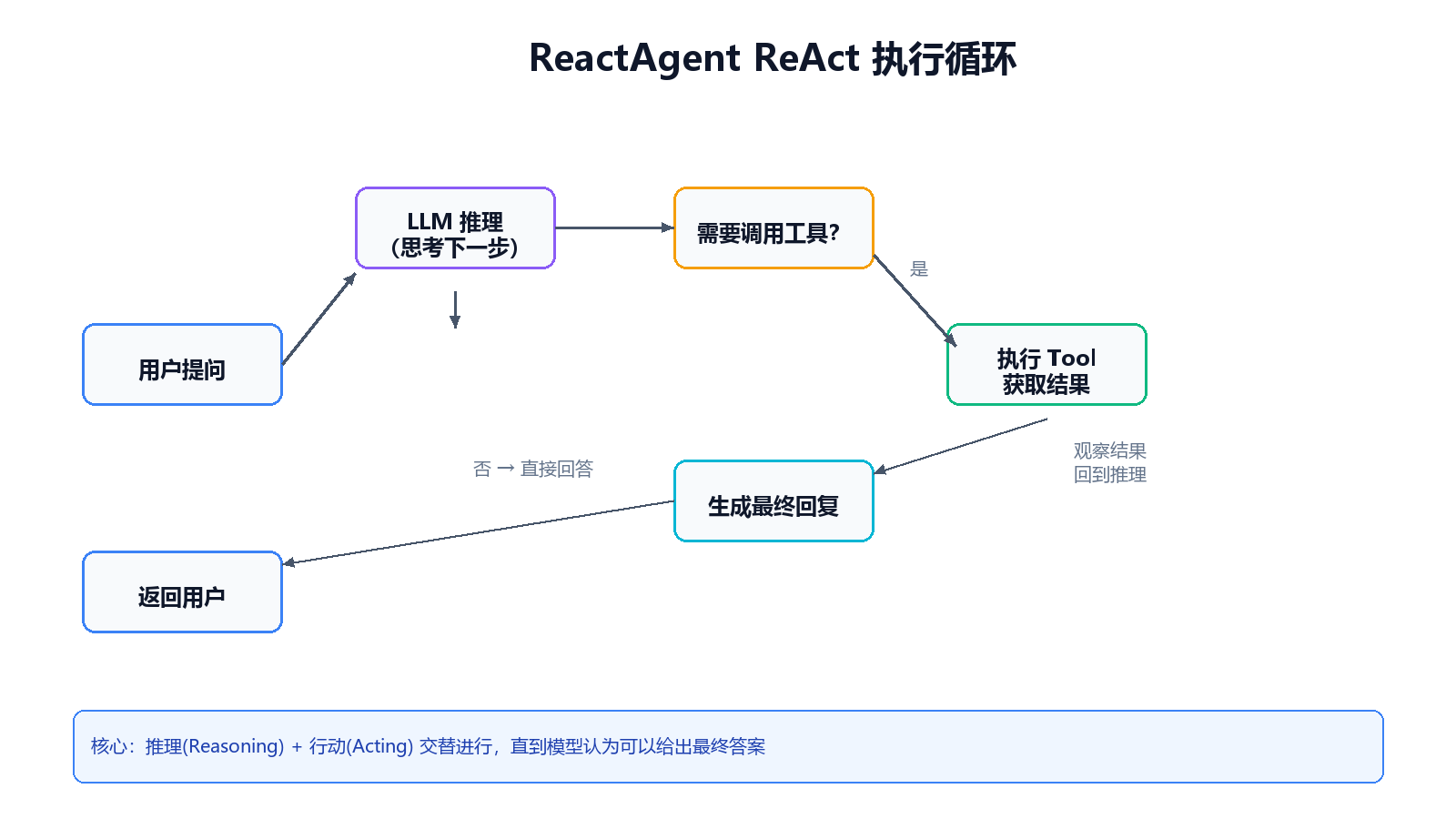
ReAct = Reasoning(推理) + Acting(行动)。
模型不是一次性瞎编答案,而是:先想 → 决定要不要查天气/查库 → 看结果 → 再想 → 直到满意才回复。
6.1 最小可用 Agent(带系统提示)
ReactAgent agent = ReactAgent.builder()
        .name("weather_agent")
        .model(chatModel)
        .systemPrompt("你是天气预报助手,回答要简短。")
        .build();

AssistantMessage msg = agent.call("杭州今天天气怎么样?");
System.out.println(msg.getText());
6.2 限制模型调用次数(防死循环)
import com.alibaba.cloud.ai.graph.agent.hook.modelcalllimit.ModelCallLimitHook;

ModelCallLimitHook hook = ModelCallLimitHook.builder()
        .runLimit(5)
        .exitBehavior(ModelCallLimitHook.ExitBehavior.ERROR)
        .build();

ReactAgent agent = ReactAgent.builder()
        .name("safe_agent")
        .model(chatModel)
        .hooks(hook)
        .saver(new MemorySaver())
        .build();
6.3 获取完整状态(调试用)
import com.alibaba.cloud.ai.graph.OverAllState;
import java.util.Optional;

Optional<OverAllState> result = agent.invoke("写一首关于春天的诗");
result.ifPresent(state -> {
    System.out.println("当前状态: " + state);
});
七、Tool 工具调用实战
工具就是 你给 Agent 准备的 Java 函数,模型在需要时自动调用。
7.1 定义天气工具
import org.springframework.ai.chat.model.ToolContext;
import org.springframework.ai.tool.ToolCallback;
import org.springframework.ai.tool.annotation.ToolParam;
import org.springframework.ai.tool.function.FunctionToolCallback;

import java.util.function.BiFunction;

public class WeatherForLocationTool implements BiFunction<String, ToolContext, String> {
    @Override
    public String apply(
            @ToolParam(description = "城市名称,如:杭州") String city,
            ToolContext toolContext) {
        // 生产环境这里接真实天气 API
        return city + " 今天晴,25°C,适合出门。";
    }
}

ToolCallback weatherTool = FunctionToolCallback.builder(
                "get_weather_for_location", new WeatherForLocationTool())
        .description("查询指定城市的天气")
        .inputType(String.class)
        .build();
7.2 带用户上下文的工具
import com.alibaba.cloud.ai.graph.RunnableConfig;
import static com.alibaba.cloud.ai.graph.agent.Agent.AGENT_CONFIG_CONTEXT_KEY;

public class UserLocationTool implements BiFunction<String, ToolContext, String> {
    @Override
    public String apply(String query, ToolContext toolContext) {
        String userId = "1";
        if (toolContext != null && toolContext.getContext() != null) {
            RunnableConfig config = (RunnableConfig)
                    toolContext.getContext().get(AGENT_CONFIG_CONTEXT_KEY);
            if (config != null) {
                userId = config.metadata("user_id").map(Object::toString).orElse("1");
            }
        }
        return "1".equals(userId) ? "杭州" : "上海";
    }
}
7.3 组装进 Agent
String SYSTEM_PROMPT = """
    你是天气助手。需要查天气时用 get_weather_for_location;
    不知道用户在哪时,先用 get_user_location。
    """;

ReactAgent agent = ReactAgent.builder()
        .name("weather_pun_agent")
        .model(chatModel)
        .systemPrompt(SYSTEM_PROMPT)
        .tools(weatherTool, userLocationTool)
        .saver(new MemorySaver())
        .build();

RunnableConfig config = RunnableConfig.builder()
        .threadId("session-001")
        .addMetadata("user_id", "1")
        .build();

agent.call("我这边天气怎么样?", config);
写好 Tool 的三条经验:
- 名字、描述、参数说明 都会进 prompt,写得越清楚,模型越不容易乱调。
- 用
@ToolParam标注参数含义。 - 需要登录用户、租户 ID 等,走
ToolContext+RunnableConfig.metadata。
八、对话记忆与结构化输出
8.1 多轮对话(threadId)
import com.alibaba.cloud.ai.graph.checkpoint.savers.MemorySaver;
import com.alibaba.cloud.ai.graph.RunnableConfig;

ReactAgent agent = ReactAgent.builder()
        .name("chat_agent")
        .model(chatModel)
        .saver(new MemorySaver())
        .build();

String threadId = "user-10001-thread";
RunnableConfig config = RunnableConfig.builder().threadId(threadId).build();

agent.call("杭州天气如何?", config);
agent.call("那明天呢?", config);  // 能记住上一轮
生产环境把 MemorySaver 换成 持久化 Checkpointer(数据库、Redis 等)。
8.2 结构化 JSON 输出
方式一:Java 类
public class WeatherResponse {
    private String punnyResponse;
    private String weatherConditions;
    // getter / setter
}

ReactAgent agent = ReactAgent.builder()
        .name("structured_agent")
        .model(chatModel)
        .outputType(WeatherResponse.class)
        .saver(new MemorySaver())
        .build();
方式二:自定义 JSON Schema 字符串
String schema = """
    {
      "title": "标题",
      "content": "正文",
      "style": "风格"
    }
    """;

ReactAgent agent = ReactAgent.builder()
        .name("schema_agent")
        .model(chatModel)
        .outputSchema(schema)
        .build();
8.3 模型参数 tuning
import com.alibaba.cloud.ai.dashscope.chat.DashScopeChatOptions;

ChatModel chatModel = DashScopeChatModel.builder()
        .dashScopeApi(dashScopeApi)
        .defaultOptions(DashScopeChatOptions.builder()
                .withModel(DashScopeChatModel.DEFAULT_MODEL_NAME)
                .withTemperature(0.5)
                .withMaxToken(2000)
                .build())
        .build();
九、Hooks 与人机协同(HITL)
有些工具不能随便执行(发短信、转账、删数据),就要 Human In The Loop(人在回路)。
import com.alibaba.cloud.ai.graph.agent.hook.hip.HumanInTheLoopHook;
import com.alibaba.cloud.ai.graph.agent.hook.hip.ToolConfig;

Hook humanInTheLoopHook = HumanInTheLoopHook.builder()
        .approvalOn("get_weather_for_location",
                ToolConfig.builder()
                        .description("请确认是否查询天气")
                        .build())
        .build();

ReactAgent agent = ReactAgent.builder()
        .name("hitl_agent")
        .model(chatModel)
        .tools(weatherTool)
        .hooks(humanInTheLoopHook)
        .saver(new MemorySaver())
        .build();
常见 Hook 场景:
| Hook 类型 | 作用 |
|---|---|
| ModelCallLimitHook | 限制 LLM 调用次数 |
| HumanInTheLoopHook | 敏感工具人工审批 |
| 上下文压缩 / 编辑 | 控制 token、提升稳定性 |
| 工具重试 | 瞬时失败自动重试 |
十、多 Agent 编排模式
单个 Agent 搞不定时,就拆成多个“专员”协作。框架内置四种套路:
| 模式 | 干什么 | 生活例子 |
|---|---|---|
| SequentialAgent | 按顺序一个接一个干 | 先翻译,再润色,再排版 |
| ParallelAgent | 同时干,再汇总 | 三个分析师同时写报告 |
| RoutingAgent / LlmRoutingAgent | 先分类,再派给对的人 | 前台分流:技术/账单/投诉 |
| LoopAgent | 循环直到满足条件 | 改稿改到通过为止 |
设计建议:
- 每个 Agent 职责单一,system prompt 别又长又杂。
- 路由 Agent 的分类标准写清楚(最好给 JSON 输出格式)。
- 并行注意 token 成本 和 超时。
十一、Graph 工作流编排
需要 固定流程、多分支、要人工审核 的场景(客服邮件、审批流、工单),用 Graph 比单个 ReactAgent 更合适。
11.1 思路五步法
- 把业务拆成 节点(Node)
- 画清楚 谁连谁(Edge)
- 设计 共享状态(State)——只存原始数据,别存拼好的 prompt
- 每个节点写 NodeAction
- 用 条件边 做分支
11.2 状态设计示例(客服邮件)
import com.alibaba.cloud.ai.graph.KeyStrategy;
import com.alibaba.cloud.ai.graph.KeyStrategyFactory;
import com.alibaba.cloud.ai.graph.state.strategy.ReplaceStrategy;
import com.alibaba.cloud.ai.graph.state.strategy.AppendStrategy;

import java.util.HashMap;

public static KeyStrategyFactory createKeyStrategyFactory() {
    return () -> {
        HashMap<String, KeyStrategy> strategies = new HashMap<>();
        strategies.put("email_content", new ReplaceStrategy());
        strategies.put("classification", new ReplaceStrategy());
        strategies.put("search_results", new ReplaceStrategy());
        strategies.put("draft_response", new ReplaceStrategy());
        strategies.put("messages", new AppendStrategy());
        return strategies;
    };
}
11.3 构建 StateGraph(简化示例)
import com.alibaba.cloud.ai.graph.StateGraph;
import com.alibaba.cloud.ai.graph.action.AsyncNodeAction;
import com.alibaba.cloud.ai.graph.action.AsyncEdgeAction;
import static com.alibaba.cloud.ai.graph.action.AsyncNodeAction.node_async;
import static com.alibaba.cloud.ai.graph.action.AsyncEdgeAction.edge_async;

StateGraph graph = new StateGraph(createKeyStrategyFactory())
        .addNode("read_email", node_async(new ReadEmailNode()))
        .addNode("classify", node_async(new ClassifyIntentNode(chatModel)))
        .addNode("search_docs", node_async(new SearchDocumentationNode()))
        .addNode("draft_reply", node_async(new DraftReplyNode(chatModel)))
        .addNode("human_review", node_async(new HumanReviewNode()))
        .addNode("send_reply", node_async(new SendReplyNode()))
        .addEdge(StateGraph.START, "read_email")
        .addEdge("read_email", "classify")
        .addConditionalEdges("classify",
                edge_async(new IntentDispatcher()),
                Map.of(
                        "question", "search_docs",
                        "bug", "bug_track",
                        "complex", "human_review",
                        StateGraph.END, StateGraph.END
                ))
        .addEdge("search_docs", "draft_reply")
        .addEdge("draft_reply", "human_review")
        .addEdge("human_review", "send_reply")
        .addEdge("send_reply", StateGraph.END);
11.4 预置节点(省事利器)
对标 Dify、百炼低代码平台的常见节点,框架里已有:
- LLMNode — 大模型节点
- QuestionClassifierNode — 问题分类
- ToolNode — 工具调用
- 还有更多,见 Graph 文档
11.5 导出流程图(PlantUML / Mermaid)
import com.alibaba.cloud.ai.graph.GraphRepresentation;

GraphRepresentation representation = graph.getGraph(
        GraphRepresentation.Type.PLANTUML, "客服邮件流程");
System.out.println(representation.content());
从 Dify 迁移:社区支持把 Dify 等平台的工作流 导出成 Spring AI Alibaba 工程,适合从低代码过渡到代码管控。
11.6 错误处理策略(必记)
| 错误类型 | 处理方式 |
|---|---|
| 网络抖动、限流 | 自动重试 |
| 工具失败、JSON 解析失败 | 错误写入 state,让 LLM 看见并重试 |
| 缺用户输入 | interruptBefore 暂停等人填 |
| 未知 Bug | 抛出让开发者查 |
十二、MCP、RAG、向量库
12.1 MCP(Model Context Protocol)
MCP 是 接外部工具和数据的标准协议。Spring AI 1.1+ 对 MCP 支持已较成熟,Spring AI Alibaba 沿用这套体系,方便接:
- 数据库查询服务
- 企业内部 API
- 第三方 SaaS
Starter 方式接入(示意):
<dependency>
    <groupId>org.springframework.ai</groupId>
    <artifactId>spring-ai-starter-mcp-client</artifactId>
    <version>1.1.2</version>
</dependency>
12.2 RAG 检索增强
经典流程:
Spring AI 里 VectorStore、DocumentReader、Advisor 负责 RAG;Agent 里把检索封装成 Tool 或 Graph 节点 即可。
12.3 向量库选型提示
| 场景 | 常见选择 |
|---|---|
| 已有 PostgreSQL | pgvector(和 Spring DataSource 共用连接池) |
| 纯内存 Demo | SimpleVectorStore |
| 大规模生产 | Milvus、Elasticsearch、Redis Stack 等 |
十三、A2A 分布式智能体
A2A(Agent-to-Agent) 解决的是:多个服务里的 Agent 怎么互相喊话。
- 集成 Nacos 做注册发现
- 跨微服务协作、任务委派
- 适合“订单 Agent 调库存 Agent 再调物流 Agent”这类分布式场景
<!-- 示意:A2A 相关 starter 以官方文档为准 -->
<dependency>
    <groupId>com.alibaba.cloud.ai</groupId>
    <artifactId>spring-ai-alibaba-starter-a2a-nacos</artifactId>
    <version>1.1.2.2</version>
</dependency>
十四、生态工具:Admin 与 Studio
| 组件 | 作用 |
|---|---|
| Spring AI Alibaba Admin | 可视化开发 Agent、观测、评估、MCP 管理、对接 Dify 迁移 |
| Spring AI Alibaba Studio | 嵌入式 UI,看推理过程、工具调用细节 |
| 示例仓库 examples | chatbot、graph、multi-agent、voice-agent 等 |
生态项目(可借鉴):
- JManus — Java 版 Manus 实现
- DataAgent — 自然语言转 SQL
- DeepResearch — 基于 Graph 的深度研究
- Copilot — 编码辅助
十五、Spring Boot 完整工程示例
15.1 pom.xml 核心依赖
<parent>
    <groupId>org.springframework.boot</groupId>
    <artifactId>spring-boot-starter-parent</artifactId>
    <version>3.4.0</version>
</parent>

<dependencies>
    <dependency>
        <groupId>org.springframework.boot</groupId>
        <artifactId>spring-boot-starter-web</artifactId>
    </dependency>
    <dependency>
        <groupId>com.alibaba.cloud.ai</groupId>
        <artifactId>spring-ai-alibaba-agent-framework</artifactId>
        <version>1.1.2.2</version>
    </dependency>
    <dependency>
        <groupId>com.alibaba.cloud.ai</groupId>
        <artifactId>spring-ai-alibaba-starter-dashscope</artifactId>
        <version>1.1.2.2</version>
    </dependency>
</dependencies>
15.2 配置类
import com.alibaba.cloud.ai.dashscope.api.DashScopeApi;
import com.alibaba.cloud.ai.dashscope.chat.DashScopeChatModel;
import org.springframework.ai.chat.model.ChatModel;
import org.springframework.beans.factory.annotation.Value;
import org.springframework.context.annotation.Bean;
import org.springframework.context.annotation.Configuration;

@Configuration
public class AiConfig {

    @Bean
    public DashScopeApi dashScopeApi(@Value("${spring.ai.dashscope.api-key}") String apiKey) {
        return DashScopeApi.builder().apiKey(apiKey).build();
    }

    @Bean
    public ChatModel chatModel(DashScopeApi dashScopeApi) {
        return DashScopeChatModel.builder().dashScopeApi(dashScopeApi).build();
    }
}
15.3 Agent Bean + Controller
import com.alibaba.cloud.ai.graph.agent.ReactAgent;
import com.alibaba.cloud.ai.graph.checkpoint.savers.MemorySaver;
import com.alibaba.cloud.ai.graph.RunnableConfig;
import org.springframework.ai.chat.messages.AssistantMessage;
import org.springframework.ai.chat.model.ChatModel;
import org.springframework.context.annotation.Bean;
import org.springframework.context.annotation.Configuration;
import org.springframework.web.bind.annotation.*;

@Configuration
class AgentConfig {
    @Bean
    ReactAgent weatherAgent(ChatModel chatModel) {
        return ReactAgent.builder()
                .name("boot_weather_agent")
                .model(chatModel)
                .systemPrompt("你是天气助手")
                .saver(new MemorySaver())
                .build();
    }
}

@RestController
@RequestMapping("/api/chat")
class ChatController {
    private final ReactAgent agent;

    ChatController(ReactAgent agent) {
        this.agent = agent;
    }

    @PostMapping
    public String chat(@RequestParam String message,
                       @RequestParam(defaultValue = "default-thread") String threadId) {
        RunnableConfig config = RunnableConfig.builder().threadId(threadId).build();
        AssistantMessage reply = agent.call(message, config);
        return reply.getText();
    }
}
15.4 application.yml
server:
  port: 8080

spring:
  ai:
    dashscope:
      api-key: ${AI_DASHSCOPE_API_KEY}
十六、生产环境注意事项
- API Key:只用环境变量或密钥管理服务,别提交 Git。
- 记忆持久化:
MemorySaver仅适合开发;上线用数据库 Checkpointer。 - 限流与预算:
ModelCallLimitHook+ 网关限流,防止 Agent 死循环烧 token。 - 敏感工具必走 HITL:支付、删库、群发等。
- 可观测:接 Micrometer / Actuator,记录每次 model、tool 调用耗时。
- 版本对齐:
agent-framework与starter-dashscope版本尽量一致(如 1.1.2.x)。 - JDK:官方要求 17+,用 LTS 版本更稳。
十七、学习路线与资源
推荐学习顺序
官方资源
| 资源 | 链接 |
|---|---|
| 文档首页 | https://java2ai.com |
| 概览 | https://java2ai.com/docs/overview |
| 快速开始 | https://java2ai.com/docs/quick-start |
| Agent 教程 | https://java2ai.com/docs/frameworks/agent-framework/tutorials/agents |
| Graph 教程 | https://java2ai.com/docs/frameworks/graph-core/quick-start |
| GitHub 主仓库 | https://github.com/alibaba/spring-ai-alibaba |
| 示例代码 | https://github.com/alibaba/spring-ai-alibaba/tree/main/examples |
写在最后
Spring AI Alibaba 不是替代 Spring AI,而是在 Spring AI 铺好的路上,把 Agent、多智能体、工作流、通义模型、国内工程化 打包成一套能直接上生产的方案。
你只要记住三句话:
- 聊天 + RAG → Spring AI 可能就够了。
- 要 Agent 自动调工具、多轮记忆 → 上
ReactAgent。 - 要固定流程、人工审核、多 Agent 协作 → 用 Agent Framework + Graph。

AtomGit 是由开放原子开源基金会联合 CSDN 等生态伙伴共同推出的新一代开源与人工智能协作平台。平台坚持“开放、中立、公益”的理念,把代码托管、模型共享、数据集托管、智能体开发体验和算力服务整合在一起,为开发者提供从开发、训练到部署的一站式体验。
更多推荐

 3
3 0
0- 0


 已为社区贡献47条内容

所有评论(0)