在Prism中使用DialogHost,使用接口扩展方法优雅的实现
·
如果你想在 Prism 架构中用 DialogHost 的效果,有个开源库 MaterialDesignThemes.Prism 可以帮你桥接:
// 注册 MaterialDialogService 替代默认 IDialogService
containerRegistry.Register<IDialogService, MaterialDialogService>();

// 使用时调用 ShowDialogHost 而不是 ShowDialog
_dialogService.ShowDialogHost("YourDialog", new DialogParameters(), r =>
{
    // 处理结果
}, "RootDialog");  // 传 DialogHost 的 Identifier
但是这个库只支持.net framework,下面我就参考这个库,在.net core中实现同样的效果。
技术栈
- 框架: .NET 8.0 (Windows Presentation Foundation)
- MVVM框架: Prism.DryIoc 9.0.537
- UI组件库: MaterialDesignThemes 5.3.2
项目结构
MaterialDesignThemesPrismDemo/
├── Services/
│   ├── DialogServiceExtension.cs     # 对话框服务扩展方法
│   └── MaterialDialogService.cs      # 自定义 MaterialDesign 对话框服务实现
├── ViewModels/
│   ├── MainWindowViewModel.cs        # 主窗口视图模型
│   └── AlertDialogViewModel.cs       # 对话框视图模型
├── Views/
│   ├── MainWindow.xaml               # 主窗口
│   ├── MainWindow.xaml.cs
│   ├── AlertDialogView.xaml          # 对话框视图
│   └── AlertDialogView.xaml.cs
├── App.xaml                          # 应用程序入口
├── App.xaml.cs
└── MaterialDesignThemesPrismDemo.csproj
实现步骤
一、引用NuGet包
在vs2022顶部菜单栏选择工具 -> NuGet包管理 -> 管理解决方案的NuGet程序包: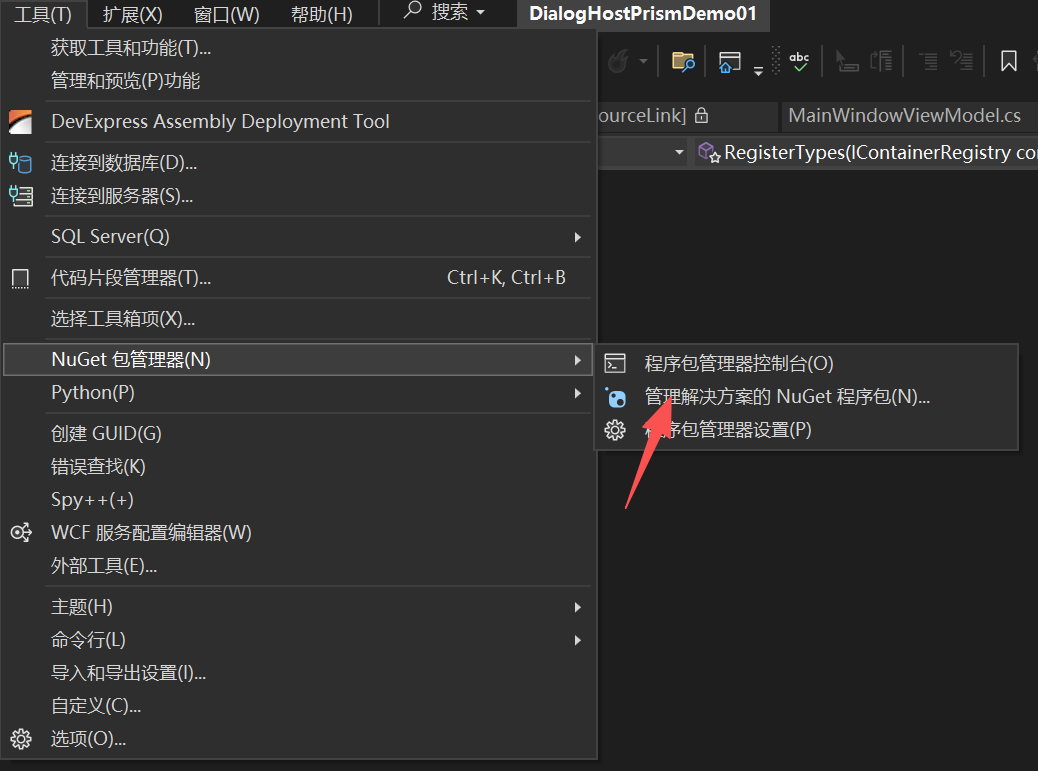
然后选择浏览,安装这两个NuGet包:
| 名称 | 版本 |
|---|---|
| Prism.DryIoc | 9.0.537 |
| MaterialDesignThemes | 5.3.2 |
二、改造App.xaml
<prism:PrismApplication
    x:Class="MaterialDesignThemesPrismDemo.App"
    xmlns="http://schemas.microsoft.com/winfx/2006/xaml/presentation"
    xmlns:x="http://schemas.microsoft.com/winfx/2006/xaml"
    xmlns:local="clr-namespace:MaterialDesignThemesPrismDemo"
    xmlns:materialDesign="http://materialdesigninxaml.net/winfx/xaml/themes"
    xmlns:prism="http://prismlibrary.com/">
    <Application.Resources>
        <ResourceDictionary>
            <ResourceDictionary.MergedDictionaries>
                <!--  基础主题:亮色,主色 DeepPurple,辅色 Lime  -->
                <materialDesign:BundledTheme
                    BaseTheme="Light"
                    PrimaryColor="DeepPurple"
                    SecondaryColor="Lime" />

                <!--  必须合并的默认样式  -->
                <ResourceDictionary Source="pack://application:,,,/MaterialDesignThemes.Wpf;component/Themes/MaterialDesign3.Defaults.xaml" />
            </ResourceDictionary.MergedDictionaries>
        </ResourceDictionary>
    </Application.Resources>
</prism:PrismApplication>
三、注册服务 - App.xaml.cs
public partial class App
{
    protected override Window CreateShell()
    {
        return Container.Resolve<MainWindow>();
    }

    protected override void RegisterTypes(IContainerRegistry containerRegistry)
    {
        // 注册自定义对话框服务
        containerRegistry.RegisterSingleton<IDialogService, MaterialDialogService>();

        // 注册对话框 View 和 ViewModel(用于 DialogService 导航,同时支持 ViewModel 定位)
        containerRegistry.RegisterDialog<AlertDialogView>();

    }
}
四、定义对话框的UI以及对应的ViewModel
AlertDialogView.xaml、AlertDialogViewModel.cs
代码在这篇文章中有:在Prism框架中使用MDIX的DialogHost
五、实现对话框服务 - MaterialDialogService.cs
namespace Prism.Dialogs
{
    public class MaterialDialogService : DialogService
    {
        private IContainerExtension _containerExtension;
        public MaterialDialogService(IContainerExtension containerExtension) : base(containerExtension)
        {
            _containerExtension = containerExtension;
        }

        public void ShowDialogHost(string name, string dialogHostName, IDialogParameters parameters, Action<IDialogResult> callback)
        {
            ShowDialogHostInternal(name, dialogHostName, parameters, callback);
        }

        public async void ShowDialogHostInternal(string name, string dialogHostName, IDialogParameters parameters, Action<IDialogResult> callback)
        {
            if (parameters == null)
                parameters = new DialogParameters();

            var content = _containerExtension.Resolve<object>(name);
            if (!(content is FrameworkElement dialogContent))
            {
                throw new NullReferenceException("A dialog's content must be a FrameworkElement");
            }

            AutowireViewModel(dialogContent);

            if (!(dialogContent.DataContext is IDialogAware dialogAware))
            {
                throw new ArgumentException("A dialog's ViewModel must implement IDialogAware interface");
            }

            var openedEventHandler = new DialogOpenedEventHandler((sender, args) =>
            {
                dialogAware.OnDialogOpened(parameters);
            });
            var closedEventHandler = new DialogClosedEventHandler((sender, args) =>
            {
                dialogAware.OnDialogClosed();
            });

            var result = dialogHostName == null
                ? await DialogHost.Show(dialogContent, openedEventHandler, null, closedEventHandler)
                : await DialogHost.Show(dialogContent, dialogHostName, openedEventHandler, null, closedEventHandler);

            var dRes = new DialogResult(result is bool b && b ? ButtonResult.OK : ButtonResult.Cancel);
            callback.Invoke(dRes);
        }

        private static void AutowireViewModel(object viewOrViewModel)
        {
            if (viewOrViewModel is FrameworkElement view && view.DataContext is null && ViewModelLocator.GetAutoWireViewModel(view) is null)
            {
                ViewModelLocator.SetAutoWireViewModel(view, true);
            }
        }
    }
}
六、扩展IDialogService - DialogServiceExtension.cs
namespace Prism.Dialogs
{
    public static class DialogServiceExtension
    {
        public static void ShowDialogHost(this IDialogService dialogService, string name,
            IDialogParameters parameters, Action<IDialogResult> callback, string windowName = "Root")
        {
            if(!(dialogService is MaterialDialogService materialDialogService))
                throw new NullReferenceException("DialogService must be a MaterialDialogService");

            materialDialogService.ShowDialogHost(name, windowName, parameters, callback);
        }
    }
}
不了解扩展方法的话可以看看这篇文章:C#中的扩展方法
在界面中使用
MainWindowViewModel.cs
public class MainWindowViewModel : BindableBase
{
    private IDialogService _dialogService;
    private string _title = "Prism Application";
    public string Title
    {
        get { return _title; }
        set { SetProperty(ref _title, value); }
    }

    public DelegateCommand ShowDialogCommand {  get; }

    public MainWindowViewModel(IDialogService dialogService)
    {
        _dialogService = dialogService;
        ShowDialogCommand = new DelegateCommand(ShowDialog);
    }

    private void ShowDialog()
    {
        var  parameter = new DialogParameters()
        {
            { "message" ,"你确定要执行吗?" }
        };
        _dialogService.ShowDialogHost("AlertDialogView", parameter, (callback) => {

            string msg = callback.Result == ButtonResult.OK ? "你点击了确定" : "你点击了取消或关闭";
            System.Windows.MessageBox.Show(msg, "结果");
        });
    }

}
MainWindow.xaml
<Window x:Class="MaterialDesignThemesPrismDemo.Views.MainWindow"
        xmlns="http://schemas.microsoft.com/winfx/2006/xaml/presentation"
        xmlns:x="http://schemas.microsoft.com/winfx/2006/xaml"
        xmlns:prism="http://prismlibrary.com/"
        xmlns:materialDesign="http://materialdesigninxaml.net/winfx/xaml/themes"
        prism:ViewModelLocator.AutoWireViewModel="True"
        Title="{Binding Title}" Height="350" Width="525" >
    <!--  整窗口作为 DialogHost 的宿主  -->
    <materialDesign:DialogHost Identifier="Root">
        <Grid Margin="20">
            <StackPanel HorizontalAlignment="Center" VerticalAlignment="Center">
                <TextBlock
                Margin="0,0,0,20"
                FontSize="16"
                Text="这是一个 Prism + DialogHost 示例" />
                <Button
                Width="160"
                Command="{Binding ShowDialogCommand}"
                Content="打开提示框"
                Style="{StaticResource MaterialDesignRaisedButton}" />
            </StackPanel>
        </Grid>
    </materialDesign:DialogHost>
</Window>
实现的功能
- 使用 Prism 框架实现依赖注入和导航
- 自定义
MaterialDialogService集成 MaterialDesignThemes 对话框 - 基于 Prism
IDialogService接口实现统一的对话框管理 - 支持对话框结果返回和视图模型定位
- MaterialDesign 风格的现代化 UI
运行效果
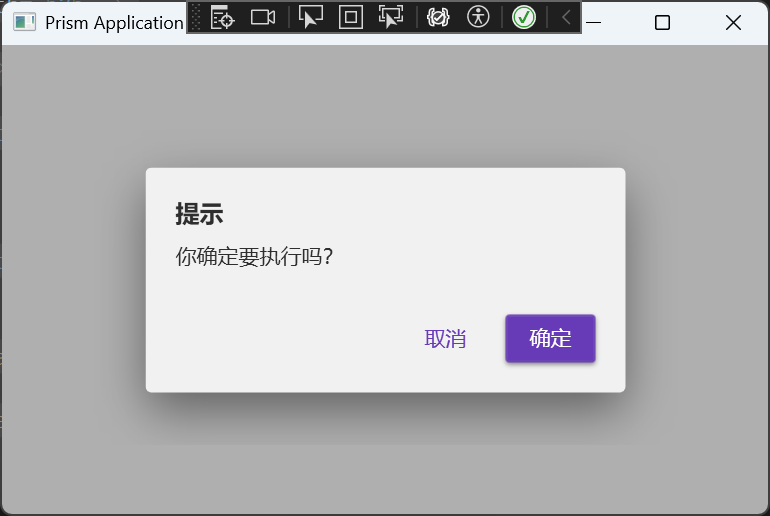
参考
相关文章

AtomGit 是由开放原子开源基金会联合 CSDN 等生态伙伴共同推出的新一代开源与人工智能协作平台。平台坚持“开放、中立、公益”的理念,把代码托管、模型共享、数据集托管、智能体开发体验和算力服务整合在一起,为开发者提供从开发、训练到部署的一站式体验。
更多推荐


 13
13 0
0- 0


 已为社区贡献2条内容

所有评论(0)