Claude Code Subagent:从 Prompt 进化到 AI 团队协作系统
Subagents 是 Claude Code 中的一种“专业 AI 分身”机制。 主 Agent 负责整体任务规划与统筹,Subagent 负责具体某一类专业工作。 把复杂任务拆成多个专门 AI,各自处理自己擅长的部分,从而提高效率和准确性。
一、为什么需要Subagent
1. 避免 Context Pollution(上下文污染)
这是最核心价值。如果所有的东西全放在一个上下文。Claude 很容易:忘记前文、指令串味 、风格漂移。
而Subagent 会:
- 每个 Agent 只关注自己领域
- 保持 Prompt 干净
- 长任务更稳定
2. 支持并行执行
Claude 可以:同时调用多个 Subagent。例如:
- 一个检查安全漏洞
- 一个生成测试
- 一个分析性能
最后再进行统一汇总。
3. 固化领域经验
Subagent 最大价值之一:把经验写进 Prompt。
例如团队中的安全规范:
- 禁止字符串拼 SQL
- JWT 必须校验 exp
- 禁止硬编码密钥
都可以直接写进:security-reviewer.md。以后每次调用这个 Agent,都会自动按团队规范审查。
这就相当于把“高级工程师经验”做成可复用 AI 模块。
二、Subagent 的定义方式
Subagent 本质是又又又又是一个 Markdown 文件,其结构分成两部分
---
name: security-reviewer
description: Security-focused code reviewer
tools: Read, Grep, Glob
---

You are a senior security engineer...
1. YAML Frontmatter
在文件头部定义 Agent 身份。
例如:
---
name: security-reviewer
description: Security-focused code reviewer
tools: Read, Grep, Glob
---
字段含义:
| 字段 | 作用 |
|---|---|
| name | Agent 名称 |
| description | Agent 描述 |
| tools | 可用工具 |
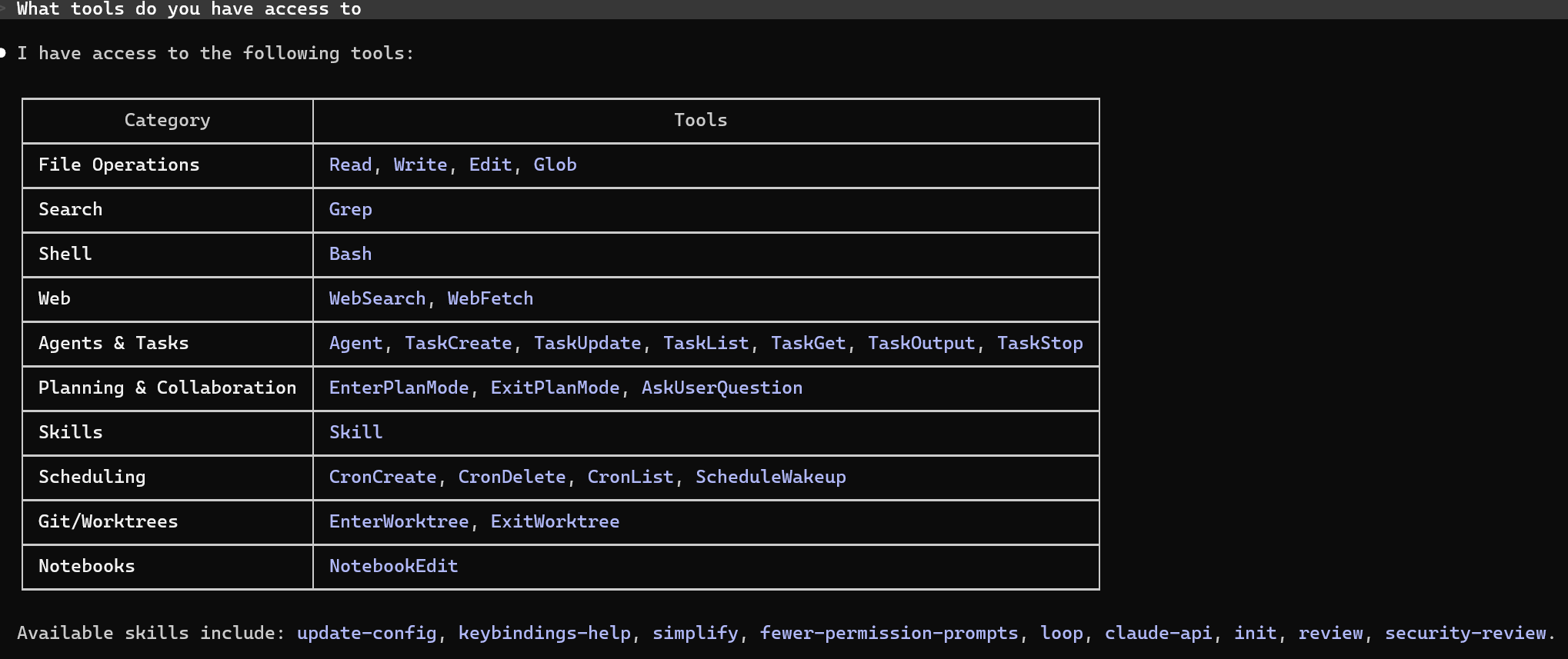
对于有哪些工具可以用,咱们不懂就问。你可以在 Claude 会话中直接问 **What tools do you have access to?**,它能列出当前环境所有可用的确切工具名
2. Markdown Body
核心提示词应定义在文件正文中。在编写某类型的提示词时,请把claude视为一个精通这方面的专家。确保指令清晰、专业。
You are a senior security engineer specializing in application security.
三、Subagent 的存放位置
Claude 支持多个作用域。
1. 临时 Session
通过**–agents**参数启动,仅当前会话有效。
claude --agents
2. Project Scope(项目级别)
放到.claude/agents/目录下面。可以和项目团队共享
.claude/agents/
3. User Scope(用户级别)
放到~/.claude/agents/目录下面,适合你个人所有项目复用。
~/.claude/agents/
4.优先级机制
Claude Code 里的agent的优先级:
policy > CLI-defined > project > user > plugin > built-in
含义类似:
| 层级 | 来源 |
|---|---|
| policy | 官方安全策略 |
| CLI-defined | 命令行临时注入 |
| project | 当前项目 .claude/ |
| user | 用户全局配置 |
| plugin | 插件/MCP |
| built-in | 内置默认行为 |
四、/agents 命令
可以使用斜杆命令 **/agents **来管理Agents。其本质是对 .claude/agents 的快捷管理入口。
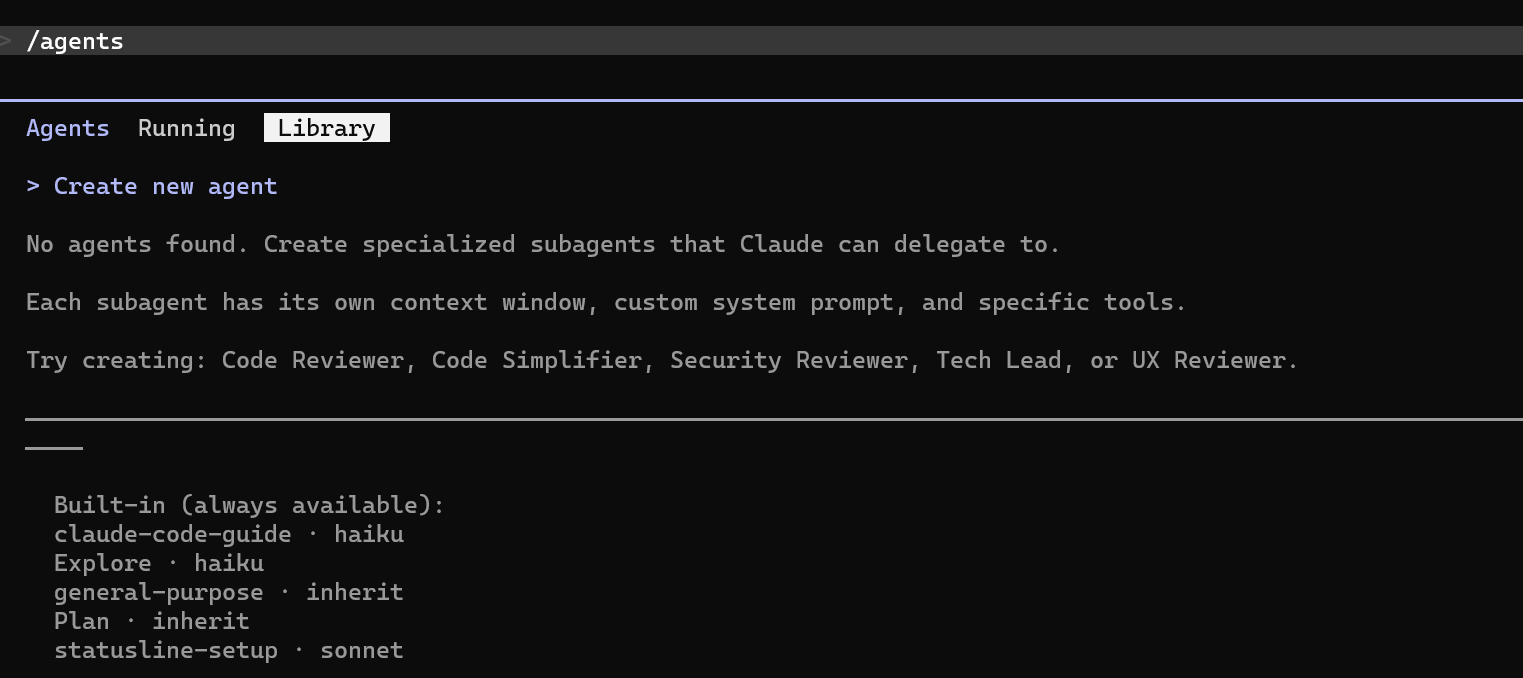
可以直接在终端中:
- 创建 Agent
- 修改 Agent Prompt
- 查看 Agent 配置
- 删除 Agent
- 调试 Agent 行为
我们也可以通过使用 **claude agents **命令 来查看有什么agents
claude agents
五、一个完整示例
比如有一个前端 Todo 项目,希望 Claude 专门帮你检查:
- Vue/React 代码规范
- 组件拆分是否合理
- 状态管理问题
- 性能问题
- UI 交互问题
可以创建一个:
.claude/agents/frontend-reviewer.md
内容如下:
---
name: frontend-reviewer
description: Frontend code reviewer for Todo applications
tools: Read, Grep, Glob
---

You are a senior frontend engineer.

Focus on reviewing:

1. Component structure
2. State management
3. Performance issues
4. Reusable component design
5. UI/UX consistency
6. Vue/React best practices

For each issue provide:

- severity
- file location
- description
- suggested improvement

When invoked:

- first analyze the project structure
- identify duplicated UI logic
- review recent modified files first
如何使用
1. 启用 Agent 功能
使用–agents 开启 Agent 能力
claude --agents
2. 进入项目目录
例如:
cd todo-app
确保项目里存在:
.claude/agents/frontend-reviewer.md
3. 在 Claude 中调用 Agent
方式一:显式调用(推荐)
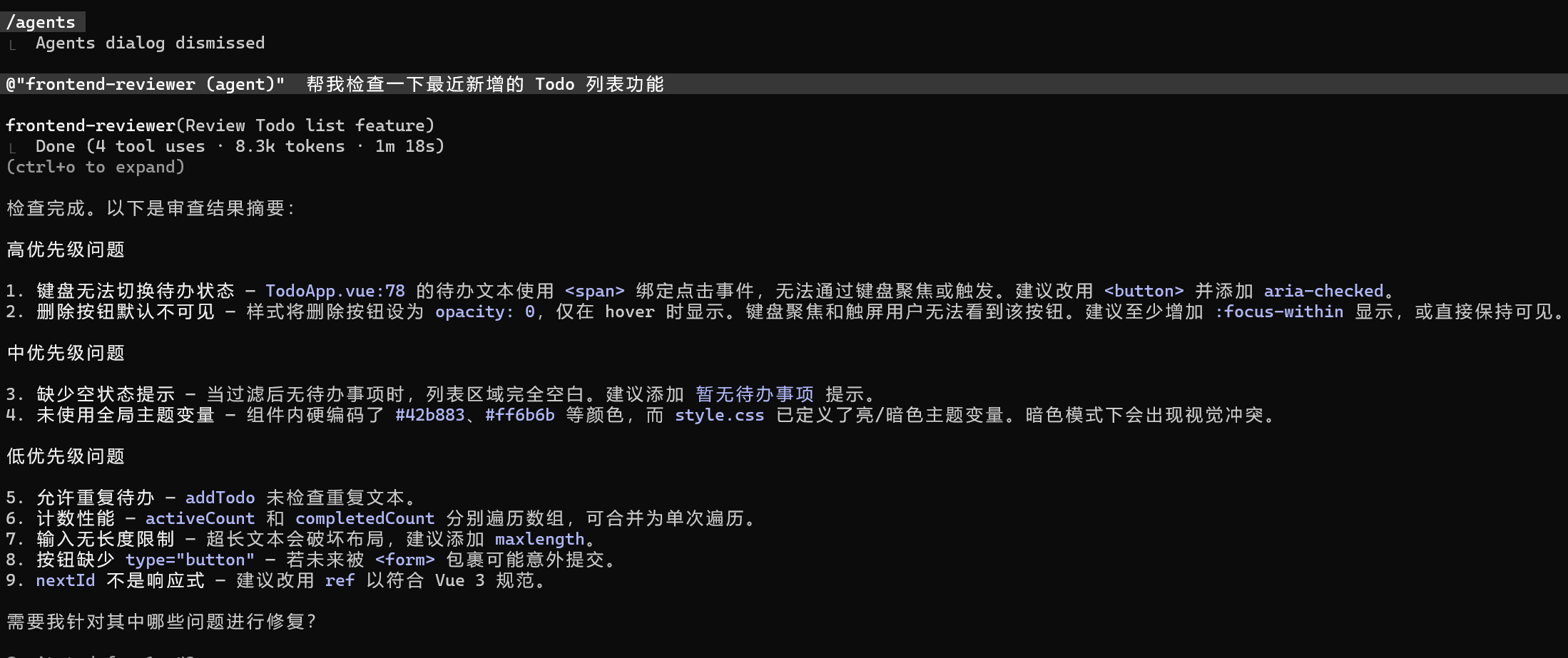
@frontend-reviewer 帮我检查一下最近新增的 Todo 列表功能
或者:
@"frontend-reviewer (agent)" review src/views/Todo.vue
当然,在使用的过程中。需要需要某个agent。claude也会自动帮我们调用。
4. Claude 会自动执行
Agent 会:
- 读取项目代码
- 分析组件结构
- 检查状态管理
- 找出性能问题
- 输出修改建议
六、Subagent 的高级配置
除了基础的:
name
description
tools
之外,Claude Subagent 还支持很多高级能力
model:指定 Agent 使用的模型
model: haiku
或者:
model: sonnet
model: opus
model: inherit
不同模型的定位:
| 模型 | 特点 | 场景 |
|---|---|---|
| haiku | 速度快、成本低 | 日志分类,文本整理 ,简单代码生成 ,批量处理 |
| sonnet | 平衡型 | 日常开发 ,架构分析,中等复杂任务 |
| opus | 最强推理能力 | 复杂推理 ,大规模重构 ,多步骤规划 |
effort:控制推理深度
effort: high
常见等级:
| 等级 | 特点 |
|---|---|
| low | 快速响应 |
| medium | 默认平衡 |
| high | 深度分析 |
| max | 极限推理(仅会话) |
maxTurns:限制 Agent 生命周期
maxTurns: 8
限制:Agent 最多执行多少轮。防止:
- Agent 死循环
- 无限调用工具
- Token 爆炸
permissionMode:权限模式
这是Agent 的安全控制层,例如:
permissionMode: plan
目前官方主要有这些 permissionMode:
| 模式 | 作用 | 适合场景 |
|---|---|---|
default |
默认模式,每次敏感操作都询问 | 安全优先 |
plan |
只分析和规划,不主动修改 | 架构分析、方案设计 |
acceptEdits |
自动接受文件修改 | 高频开发 |
auto |
自动执行大部分操作 | 长任务 Agent |
dontAsk |
不询问,未授权直接拒绝 | CI / 自动化 |
bypassPermissions |
跳过所有权限检查 | 沙箱/容器环境 |
disallowedTools:禁止某些工具
Agent 默认继承所有工具。你也可以显式禁用。
例如:
disallowedTools:
  - Bash
  - Edit
skills:预加载技能
作用:提前加载特定技能集。
skills:
  - react
  - postgres
  - security
mcpServers:Agent 专属 MCP
限制这个 Agent只能访问指定 MCP。
例如:
mcpServers:
  - github
  - postgres
initialPrompt:自动发送首条消息
Agent 启动时自动执行。
initialPrompt: |
  Analyze current git changes first
memory:持久记忆
这个配置可以让这个Subagent 在多个会话之间记住你, Claude 会自动读取你项目里的 MEMORY.md(前 200 行)并把悄悄注入到 System Prompt 里
示例
创建 Agent
路径:
.claude/agents/researcher.md
内容:
---
name: researcher
description: Research assistant with persistent memory
memory: user
---

You are a research assistant.

When you discover important project information:
- update MEMORY.md
- keep entries concise
- avoid duplicates
创建 MEMORY.md
项目根目录:
MEMORY.md
内容:
# MEMORY

## 项目信息
- 使用 Spring Boot 3
- Java 17
- MyBatis-Plus

## 编码规范
- 禁止 field 注入
- Controller 返回 Result<T>

## 已知模块
- user-service
- order-service
isolation: worktree
让 Claude 在独立 Git Worktree 中工作,而不是直接修改当前工作区。
isolation: worktree
Claude 会自动:
- 创建独立 Git 分支
- 创建独立工作目录
- 在隔离环境修改代码
- 主工作区保持不变
background: true
让 Subagent 以后台任务方式运行,不阻塞当前会话。
background: true
Ctrl+B还能把当前运行 Agent:直接后台化。
Agent Allowlist
限制当前 Agent 可以调用或生成哪些子 Agent。
用于防止:
- Agent 无限递归创建 Agent
- 权限失控
- 多 Agent 混乱调用
- 资源滥用
allowedAgents:
  - code-reviewer
  - tester
七、Agent Chain(链式调用)
让多个 Subagent 按顺序协作完成任务。
Claude 会自动:
Agent A 分析
→ 输出结果
→ 传递上下文
→ Agent B 继续处理
形成一条完整工作流。
示例:
First use the code-analyzer agent to find bottlenecks,
then use the optimizer agent to fix them.
八、内置 Agent(了解)
Claude Code 自带的一组官方 Agent,不需要用户手动创建,可直接使用。 Claude会在合适的时候进行调用。我们也可以明确的和Claude说明需要调用那个agent。
| Agent | 角色 | 核心能力 |
|---|---|---|
| general-purpose | 通用执行 | 做所有任务 |
| Explore | 快速分析 | 读代码、找信息 |
| Plan | 方案设计 | 只做规划不写代码 |
| claude-code-guide | 使用助手 | 解释 Claude Code |

AtomGit 是由开放原子开源基金会联合 CSDN 等生态伙伴共同推出的新一代开源与人工智能协作平台。平台坚持“开放、中立、公益”的理念,把代码托管、模型共享、数据集托管、智能体开发体验和算力服务整合在一起,为开发者提供从开发、训练到部署的一站式体验。
更多推荐

 5
5 0
0- 0


 已为社区贡献7条内容

所有评论(0)