基于大模型,实现带记忆的多轮对话chat box聊天框
一、实现chat box基本功能
循环执行:接收用户输入的问题,发送问题到大模型,最后将大模型答复返回前端显示打印
import os
import sys
import tkinter as tk
from tkinter import font as tkfont
import threading
from datetime import datetime

# ==================== Windows DPI 感知 ====================
try:
    from ctypes import windll
    windll.shcore.SetProcessDpiAwareness(1)
except Exception:
    try:
        windll.user32.SetProcessDPIAware()
    except Exception:
        pass

# ==================== 配置区域 ====================
class Theme:
    """自然简约配色方案"""
    BG_MAIN = '#F7F5F0'
    BG_CHAT = '#FFFFFF'
    BG_INPUT = '#FFFFFF'
    BG_USER_BUBBLE = '#E3F2FD'
    BG_BOT_BUBBLE = '#FFFFFF'
    BG_SYSTEM = '#F5F3EF'

    FG_PRIMARY = '#1A1A1A'
    FG_SECONDARY = '#5A5A5A'
    FG_SYSTEM = '#7A6F5B'
    FG_PLACEHOLDER = '#AAAAAA'

    ACCENT = '#2E86C1'
    ACCENT_HOVER = '#1B6FA3'

    BORDER = '#E0DDD5'
    DIVIDER = '#EAE7E0'

    SCROLLBAR_BG = '#F0EDE8'
    SCROLLBAR_FG = '#D1CBC2'
    SCROLLBAR_ACTIVE = '#B8B0A5'

# ==================== 自定义滚动条 ====================
class CustomScrollbar(tk.Canvas):
    def __init__(self, parent, command, **kwargs):
        super().__init__(parent, bg=Theme.SCROLLBAR_BG, highlightthickness=0, width=10, **kwargs)
        self.command = command
        self.thumb = self.create_rectangle(0, 0, 10, 0, fill=Theme.SCROLLBAR_FG,
                                          outline="", tags="thumb", width=0)
        self.bind("<ButtonPress-1>", self.on_press)
        self.bind("<B1-Motion>", self.on_drag)
        self.bind("<Enter>", lambda e: self.itemconfig("thumb", fill=Theme.SCROLLBAR_ACTIVE))
        self.bind("<Leave>", lambda e: self.itemconfig("thumb", fill=Theme.SCROLLBAR_FG))

    def set(self, lo, hi):
        if float(lo) <= 0.0 and float(hi) >= 1.0:
            self.place_forget()
        else:
            self.place(relx=1.0, rely=0.0, relheight=1.0, anchor="ne")
            height = self.winfo_height()
            y0 = max(int(float(lo) * height), 0)
            y1 = min(int(float(hi) * height), height)
            if y1 < y0 + 30:
                y1 = y0 + 30
            self.coords("thumb", 2, y0, 8, y1)

    def on_press(self, event):
        self.y_start = event.y
        self.lo_start = float(self.command("get")[0])

    def on_drag(self, event):
        height = self.winfo_height()
        delta = (event.y - self.y_start) / height
        self.command("moveto", self.lo_start + delta)

# ==================== 气泡消息组件 ====================
class MessageBubble(tk.Frame):
    def __init__(self, parent, sender, message, is_user=False, is_system=False, wrap_width=700, **kwargs):
        super().__init__(parent, bg=Theme.BG_CHAT, **kwargs)
        self.is_user = is_user
        self.is_system = is_system
        self.wrap_width = wrap_width

        if is_system:
            self._create_system_message(message)
        else:
            self._create_bubble_message(sender, message)

    def _create_system_message(self, message):
        container = tk.Frame(self, bg=Theme.BG_CHAT)
        container.pack(pady=6)

        label = tk.Label(
            container,
            text=message,
            font=("Segoe UI", 10),
            fg=Theme.FG_SYSTEM,
            bg=Theme.BG_SYSTEM,
            padx=14,
            pady=4
        )
        label.pack()

    def _create_bubble_message(self, sender, message):
        outer = tk.Frame(self, bg=Theme.BG_CHAT)
        outer.pack(fill=tk.X, padx=16, pady=(6, 2))

        if self.is_user:
            # 用户消息靠右,宽度自适应
            spacer = tk.Label(outer, bg=Theme.BG_CHAT)
            spacer.pack(side=tk.LEFT, expand=True, fill=tk.X)

            content_frame = tk.Frame(outer, bg=Theme.BG_USER_BUBBLE)
            content_frame.pack(side=tk.RIGHT)

            bubble = tk.Frame(content_frame, bg=Theme.BG_USER_BUBBLE, padx=12, pady=10)
            bubble.pack()

            sender_label = tk.Label(
                bubble, text="你",
                font=("Segoe UI", 9, "bold"),
                fg=Theme.ACCENT,
                bg=Theme.BG_USER_BUBBLE
            )
            sender_label.pack(anchor="ne")

            msg_label = tk.Label(
                bubble,
                text=message,
                font=("Segoe UI", 11),
                fg=Theme.FG_PRIMARY,
                bg=Theme.BG_USER_BUBBLE,
                wraplength=self.wrap_width,
                justify=tk.LEFT,
                anchor="w"
            )
            msg_label.pack(fill=tk.X, pady=(2, 0))

            time_label = tk.Label(
                bubble,
                text=datetime.now().strftime("%H:%M"),
                font=("Segoe UI", 8),
                fg=Theme.FG_PLACEHOLDER,
                bg=Theme.BG_USER_BUBBLE
            )
            time_label.pack(anchor="se", pady=(4, 0))

        else:
            # 机器人消息全行显示,占满整行宽度
            content_frame = tk.Frame(outer, bg=Theme.BG_BOT_BUBBLE)
            content_frame.pack(side=tk.LEFT, fill=tk.X, expand=True)

            bubble = tk.Frame(content_frame, bg=Theme.BG_BOT_BUBBLE, padx=12, pady=10,
                            highlightbackground=Theme.BORDER, highlightthickness=1)
            bubble.pack(fill=tk.X, expand=True)

            sender_label = tk.Label(
                bubble, text=sender,
                font=("Segoe UI", 9, "bold"),
                fg=Theme.ACCENT,
                bg=Theme.BG_BOT_BUBBLE
            )
            sender_label.pack(anchor="nw")

            msg_label = tk.Label(
                bubble,
                text=message,
                font=("Segoe UI", 11),
                fg=Theme.FG_PRIMARY,
                bg=Theme.BG_BOT_BUBBLE,
                wraplength=self.wrap_width,
                justify=tk.LEFT,
                anchor="w"
            )
            msg_label.pack(fill=tk.X, expand=True, pady=(2, 0))

            time_label = tk.Label(
                bubble,
                text=datetime.now().strftime("%H:%M"),
                font=("Segoe UI", 8),
                fg=Theme.FG_PLACEHOLDER,
                bg=Theme.BG_BOT_BUBBLE
            )
            time_label.pack(anchor="sw", pady=(4, 0))

# ==================== 流式消息气泡 ====================
class StreamingBubble(tk.Frame):
    def __init__(self, parent, wrap_width=700, **kwargs):
        super().__init__(parent, bg=Theme.BG_CHAT, **kwargs)
        self.wrap_width = wrap_width

        outer = tk.Frame(self, bg=Theme.BG_CHAT)
        outer.pack(fill=tk.X, padx=16, pady=(6, 2))

        # 机器人消息全行显示
        self.content_frame = tk.Frame(outer, bg=Theme.BG_BOT_BUBBLE)
        self.content_frame.pack(side=tk.LEFT, fill=tk.X, expand=True)

        self.bubble = tk.Frame(self.content_frame, bg=Theme.BG_BOT_BUBBLE, padx=12, pady=10,
                              highlightbackground=Theme.BORDER, highlightthickness=1)
        self.bubble.pack(fill=tk.X, expand=True)

        sender_label = tk.Label(
            self.bubble, text="小神经",
            font=("Segoe UI", 9, "bold"),
            fg=Theme.ACCENT,
            bg=Theme.BG_BOT_BUBBLE
        )
        sender_label.pack(anchor="nw")

        self.msg_text = tk.StringVar()
        self.msg_text.set("")

        self.msg_label = tk.Label(
            self.bubble,
            textvariable=self.msg_text,
            font=("Segoe UI", 11),
            fg=Theme.FG_PRIMARY,
            bg=Theme.BG_BOT_BUBBLE,
            wraplength=self.wrap_width,
            justify=tk.LEFT,
            anchor="w"
        )
        self.msg_label.pack(fill=tk.X, expand=True, pady=(2, 0))

        # 底部行:光标 + 时间
        bottom_frame = tk.Frame(self.bubble, bg=Theme.BG_BOT_BUBBLE)
        bottom_frame.pack(fill=tk.X, pady=(4, 0))

        self.cursor_label = tk.Label(
            bottom_frame,
            text="▋",
            font=("Segoe UI", 11),
            fg=Theme.ACCENT,
            bg=Theme.BG_BOT_BUBBLE
        )
        self.cursor_label.pack(side=tk.LEFT)

        self.time_label = tk.Label(
            bottom_frame,
            text="",
            font=("Segoe UI", 8),
            fg=Theme.FG_PLACEHOLDER,
            bg=Theme.BG_BOT_BUBBLE
        )
        self.time_label.pack(side=tk.LEFT, padx=(6, 0))

        self._cursor_blink()

    def append_text(self, text):
        current = self.msg_text.get()
        self.msg_text.set(current + text)

    def finish(self):
        self.cursor_label.destroy()
        self.time_label.config(text=datetime.now().strftime("%H:%M"))

    def _cursor_blink(self):
        try:
            current_fg = self.cursor_label.cget("fg")
            new_fg = Theme.ACCENT if current_fg == Theme.BG_BOT_BUBBLE else Theme.BG_BOT_BUBBLE
            self.cursor_label.config(fg=new_fg)
            self.after(530, self._cursor_blink)
        except tk.TclError:
            pass

# ==================== API 客户端 ====================
def get_client():
    try:
        os.chdir(os.path.join(os.path.dirname(os.path.abspath('')), 'course_core'))
        sys.path.insert(0, os.getcwd())
    except Exception:
        pass

    from config.load_key import load_key
    load_key()
    print(f"你配置的 API Key 是: {os.environ['DASHSCOPE_API_KEY'][:5]+'*'*5}")

    from openai import OpenAI
    client = OpenAI(
        api_key=os.getenv("DASHSCOPE_API_KEY"),
        base_url="https://dashscope.aliyuncs.com/compatible-mode/v1",
    )
    return client

client = get_client()

# ==================== 主应用 ====================
class ChatApp:
    def __init__(self, root):
        self.root = root
        self.root.title("小神经 · 智能答疑")
        self.root.geometry("950x750")
        self.root.configure(bg=Theme.BG_MAIN)
        self.root.minsize(700, 500)

        self.wrap_width = 750  # 根据窗口初始宽度设置

        self._create_header()
        self._create_chat_area()
        self._create_input_area()

        self._add_system_message("小神经已就绪,随时为你解答问题")
        self.current_streaming = None

    def _create_header(self):
        header = tk.Frame(self.root, bg=Theme.BG_MAIN, height=56)
        header.pack(fill=tk.X, padx=0, pady=0)
        header.pack_propagate(False)

        title = tk.Label(
            header,
            text="小神经",
            font=("Segoe UI", 17, "bold"),
            fg=Theme.FG_PRIMARY,
            bg=Theme.BG_MAIN
        )
        title.pack(side=tk.LEFT, padx=28, pady=12)

        subtitle = tk.Label(
            header,
            text="智能答疑助手",
            font=("Segoe UI", 10),
            fg=Theme.FG_SECONDARY,
            bg=Theme.BG_MAIN
        )
        subtitle.pack(side=tk.LEFT, padx=0, pady=14)

        divider = tk.Frame(self.root, bg=Theme.DIVIDER, height=1)
        divider.pack(fill=tk.X, padx=24)

    def _create_chat_area(self):
        chat_outer = tk.Frame(self.root, bg=Theme.BG_MAIN)
        chat_outer.pack(fill=tk.BOTH, expand=True, padx=24, pady=(14, 10))

        chat_bg = tk.Frame(chat_outer, bg=Theme.BG_CHAT, highlightbackground=Theme.BORDER,
                          highlightthickness=1)
        chat_bg.pack(fill=tk.BOTH, expand=True)

        self.chat_canvas = tk.Canvas(chat_bg, bg=Theme.BG_CHAT, highlightthickness=0)
        self.chat_canvas.pack(side=tk.LEFT, fill=tk.BOTH, expand=True, padx=(0, 2))

        self.scrollbar = CustomScrollbar(chat_bg, command=self.chat_canvas.yview)
        self.scrollbar.pack(side=tk.RIGHT, fill=tk.Y)

        self.chat_canvas.config(yscrollcommand=self.scrollbar.set)

        self.messages_frame = tk.Frame(self.chat_canvas, bg=Theme.BG_CHAT)
        self.canvas_window = self.chat_canvas.create_window((0, 0), window=self.messages_frame,
                                                           anchor="nw", width=900)

        self.messages_frame.bind("<Configure>", self._on_frame_configure)
        self.chat_canvas.bind("<Configure>", self._on_canvas_configure)
        self.chat_canvas.bind_all("<MouseWheel>", self._on_mousewheel)

    def _create_input_area(self):
        input_outer = tk.Frame(self.root, bg=Theme.BG_MAIN)
        input_outer.pack(fill=tk.X, padx=24, pady=(0, 24))

        input_frame = tk.Frame(input_outer, bg=Theme.BORDER, padx=1, pady=1)
        input_frame.pack(side=tk.LEFT, fill=tk.BOTH, expand=True, padx=(0, 12))

        self.user_input = tk.Text(
            input_frame,
            font=("Segoe UI", 11),
            bg=Theme.BG_INPUT,
            fg=Theme.FG_PRIMARY,
            height=4,
            bd=0,
            highlightthickness=0,
            padx=14,
            pady=12,
            wrap=tk.WORD,
            insertbackground=Theme.ACCENT,
            insertwidth=2
        )
        self.user_input.pack(fill=tk.BOTH, expand=True)
        self.user_input.focus_set()

        self.user_input.insert("1.0", "输入你的问题...")
        self.user_input.config(fg=Theme.FG_PLACEHOLDER)
        self.user_input.bind("<FocusIn>", self._on_focus_in)
        self.user_input.bind("<FocusOut>", self._on_focus_out)

        self.user_input.bind("<Return>", self._on_send)
        self.user_input.bind("<Control-Return>", lambda e: self.user_input.insert(tk.INSERT, "\n"))

        btn_frame = tk.Frame(input_outer, bg=Theme.ACCENT)
        btn_frame.pack(side=tk.RIGHT)

        self.send_button = tk.Label(
            btn_frame,
            text="发送",
            font=("Segoe UI", 11, "bold"),
            fg="#FFFFFF",
            bg=Theme.ACCENT,
            padx=24,
            pady=12,
            cursor="hand2"
        )
        self.send_button.pack()

        self.send_button.bind("<Enter>", lambda e: self.send_button.config(bg=Theme.ACCENT_HOVER))
        self.send_button.bind("<Leave>", lambda e: self.send_button.config(bg=Theme.ACCENT))
        self.send_button.bind("<Button-1>", self._on_send)

    def _on_focus_in(self, event):
        if self.user_input.get("1.0", tk.END).strip() == "输入你的问题...":
            self.user_input.delete("1.0", tk.END)
            self.user_input.config(fg=Theme.FG_PRIMARY)

    def _on_focus_out(self, event):
        if not self.user_input.get("1.0", tk.END).strip():
            self.user_input.delete("1.0", tk.END)
            self.user_input.insert("1.0", "输入你的问题...")
            self.user_input.config(fg=Theme.FG_PLACEHOLDER)

    def _on_frame_configure(self, event=None):
        self.chat_canvas.config(scrollregion=self.chat_canvas.bbox("all"))
        self.chat_canvas.yview_moveto(1.0)

    def _on_canvas_configure(self, event):
        new_width = event.width - 8
        self.chat_canvas.itemconfig(self.canvas_window, width=new_width)
        # 动态调整换行宽度
        self.wrap_width = max(new_width - 80, 400)

    def _on_mousewheel(self, event):
        self.chat_canvas.yview_scroll(int(-1 * (event.delta / 120)), "units")

    def _add_user_message(self, message):
        bubble = MessageBubble(self.messages_frame, "你", message, is_user=True, wrap_width=self.wrap_width)
        bubble.pack(fill=tk.X, anchor="e")
        self._on_frame_configure()

    def _add_system_message(self, message):
        bubble = MessageBubble(self.messages_frame, "System", message, is_system=True)
        bubble.pack(fill=tk.X)
        self._on_frame_configure()

    def _start_bot_stream(self):
        self.current_streaming = StreamingBubble(self.messages_frame, wrap_width=self.wrap_width)
        self.current_streaming.pack(fill=tk.X)
        self._on_frame_configure()

    def _append_stream_content(self, content):
        if self.current_streaming:
            self.current_streaming.append_text(content)
            self._on_frame_configure()

    def _finish_bot_stream(self):
        if self.current_streaming:
            self.current_streaming.finish()
            self.current_streaming = None
            self._on_frame_configure()

    def _on_send(self, event=None):
        question = self.user_input.get("1.0", tk.END).strip()
        if not question or question == "输入你的问题...":
            if event:
                return "break"
            return

        self.user_input.delete("1.0", tk.END)
        self.user_input.insert("1.0", "输入你的问题...")
        self.user_input.config(fg=Theme.FG_PLACEHOLDER)

        self._add_user_message(question)

        self.user_input.config(state='disabled')
        self.send_button.config(fg='#FFFFFF', bg='#B0A99F')

        thread = threading.Thread(target=self._process_response, args=(question,))
        thread.start()

        if event:
            return "break"

    def _process_response(self, question):
        try:
            response = client.chat.completions.create(
                model="qwen-max",
                messages=[{"role": "user", "content": question}],
                stream=True
            )

            self.root.after(0, self._start_bot_stream)

            for chunk in response:
                content = chunk.choices[0].delta.content
                if content:
                    self.root.after(0, self._append_stream_content, content)

        except Exception as e:
            error_msg = f'请求出错: {e}'
            print(error_msg)
            self.root.after(0, self._add_system_message, f"错误: {e}")
        finally:
            self.root.after(0, self._finish_bot_stream)
            self.root.after(0, self._enable_input)

    def _enable_input(self):
        self.user_input.config(state='normal')
        self.send_button.config(fg='#FFFFFF', bg=Theme.ACCENT)
        self.user_input.focus_set()

if __name__ == "__main__":
    root = tk.Tk()
    app = ChatApp(root)
    root.mainloop()
运行结果:运行成功,可以和大模型进行对话了。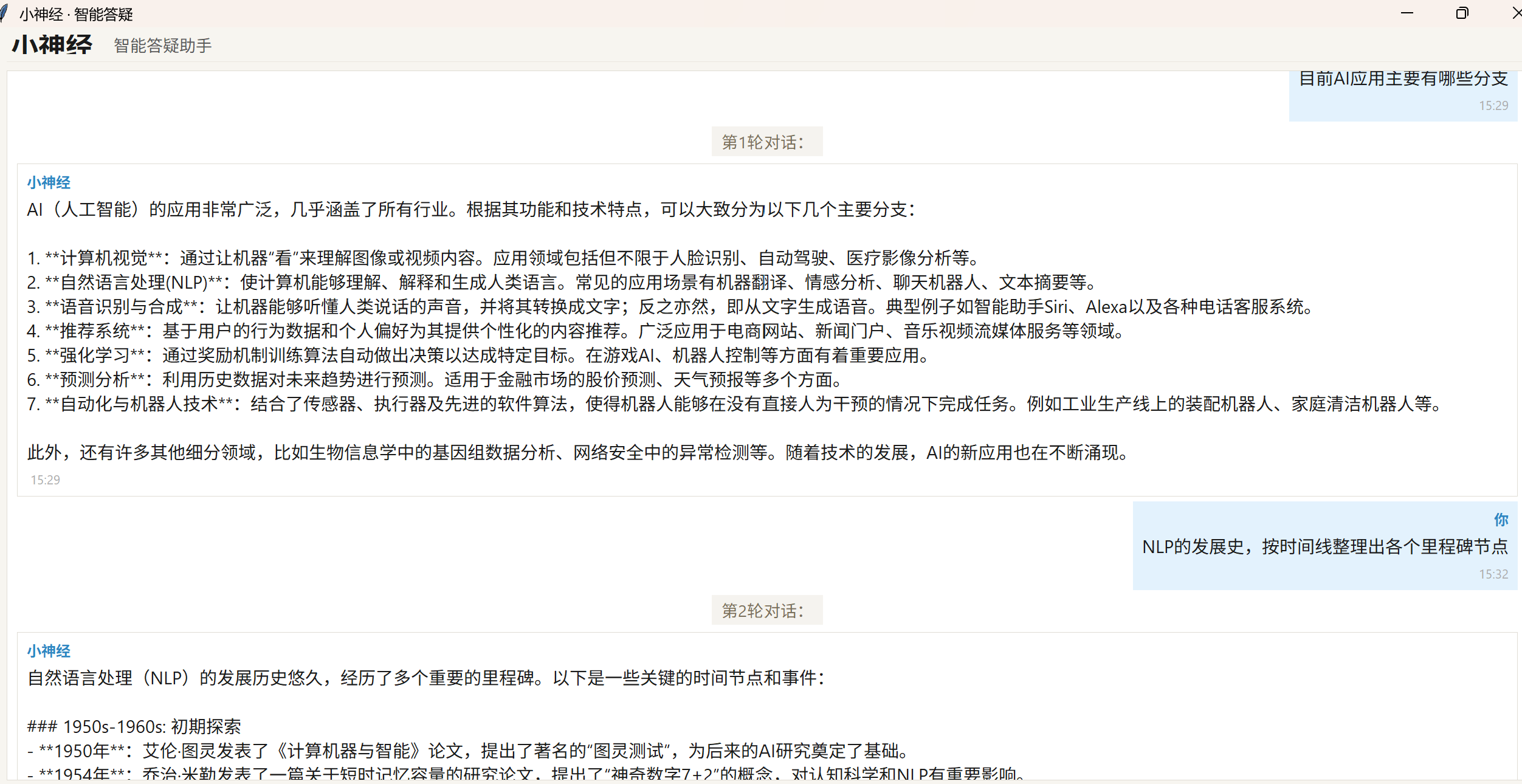
二、多轮对话中添加记忆
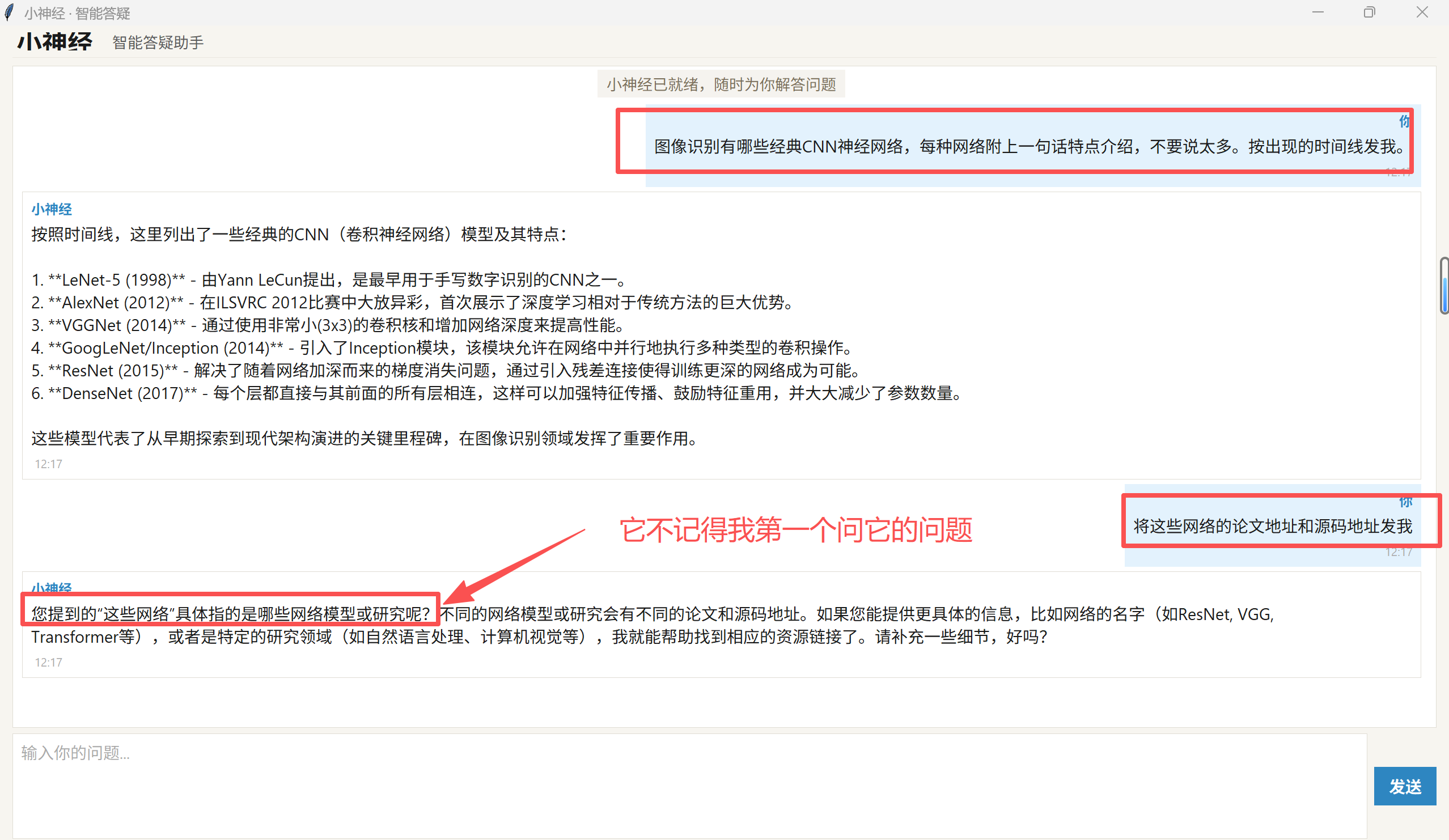 上面代码执行,会发现,调用大模型API是“无状态”的,对话间不能上下文关联。要实现多轮对话的上下文关联,只需要在每轮对话时,添加历史信息conversation_history即可:修改ChatApp的__init__, 和_process_response, 详见 “”# 添加记忆能力”部分, 其他代码不变:
class ChatApp:
    def __init__(self, root):
        self.root = root
        self.root.title("小神经 · 智能答疑")
        self.root.geometry("950x750")
        self.root.configure(bg=Theme.BG_MAIN)
        self.root.minsize(700, 500)

        self.wrap_width = 750  # 根据窗口初始宽度设置

        self._create_header()
        self._create_chat_area()
        self._create_input_area()

        self._add_system_message("小神经已就绪,随时为你解答问题")
        self.current_streaming = None

        # 添加记忆能力:初始化对话历史,包含系统提示词
        self.conversation_history = [
            {"role": "system", "content": "你的名字叫公司小神经,你负责回答我关于深度学习、大模型、IA应用的问题。"}
        ]
def _process_response(self, question):
try:
# 添加记忆能力:把本次用户问题加入到历史对话中
self.conversation_history.append({"role": "user", "content": question})
response = client.chat.completions.create(
model="qwen-max",
messages = self.conversation_history,
stream=True
)
self.root.after(0, self._start_bot_stream)
whole_response = ""
for chunk in response:
content = chunk.choices[0].delta.content
if content:
self.root.after(0, self._append_stream_content, content)
whole_response += content
#添加记忆能力:把本次大模型回复加入到历史对话中
self.conversation_history.append({"role": "assistant", "content": whole_response})
except Exception as e:
error_msg = f'请求出错: {e}'
print(error_msg)
self.root.after(0, self._add_system_message, f"错误: {e}")
#添加记忆能力:报错时删除本来问题,以免污染历史对话
if self.conversation_history[-1]['role'] == 'user':
self.conversation_history.pop()
finally:
self.root.after(0, self._finish_bot_stream)
self.root.after(0, self._enable_input)运行结果:第二个问题中“将这些网络的论文地址和源码地址发我”,小神经关联了第一个问题直接给出了答案。大模型记住了历史对话。
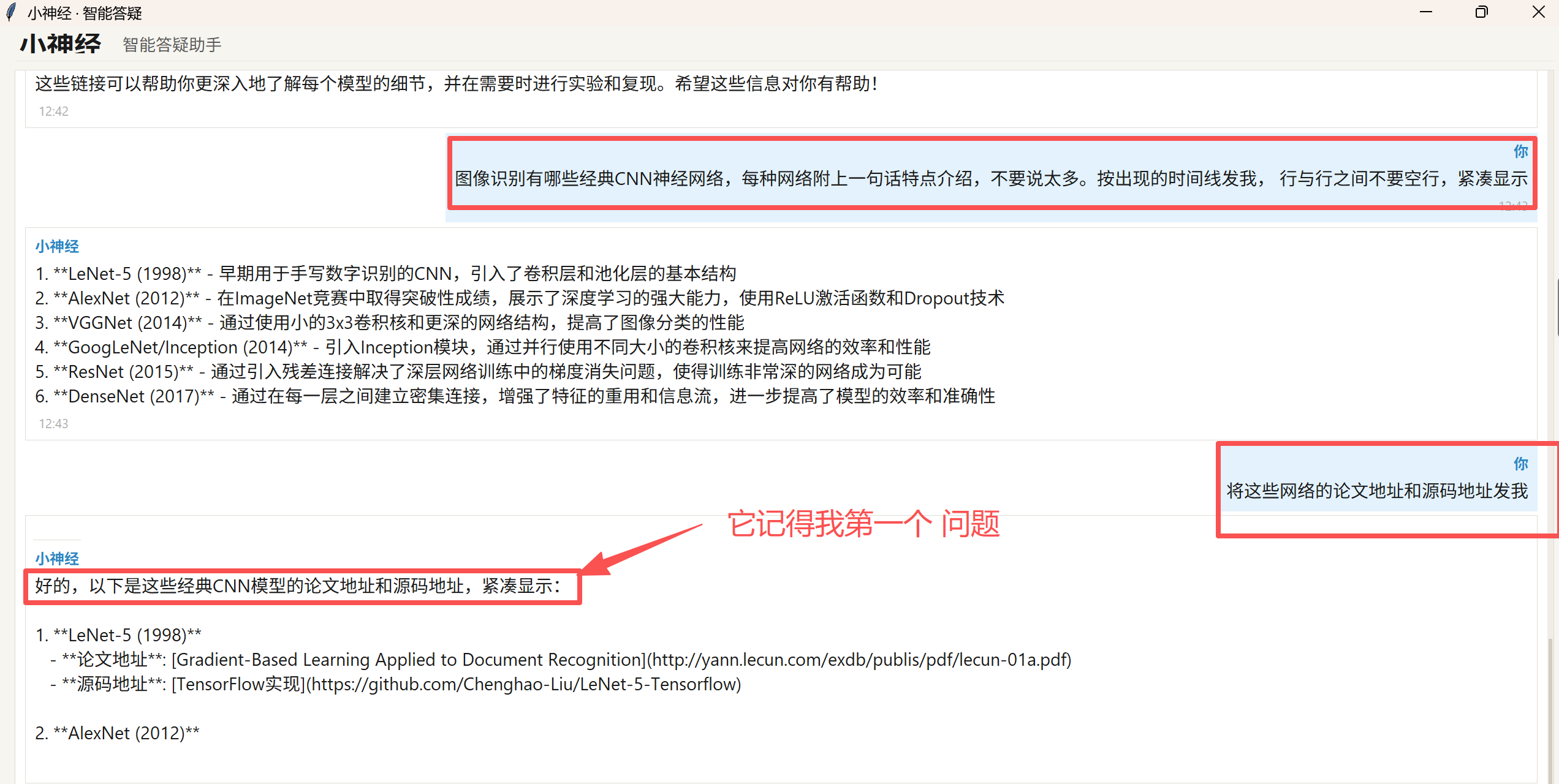 实现多轮对话,核心是维护一个 conversation_history数组,将每次用户的问题和大模型的答复都追加到这个数据中,并将其作为下一次请求的输入:
conversation_history = [ {"role": "user", "content": "用户问题1"},
{"role": "assistant", "content": "大模型回答1"},
{"role": "user", "content": "用户问题 2"},
{"role": "assistant", "content": "大模型回答2"},
{"role": "user", "content": "用户问题 3"}, ]
划重点:大模型的上下文窗口决定了模型在单次对话或处理任务时,能够一次性“看到”并记住多少信息。目前主流大模型的上下文窗口已经普遍达到了 100万 Token(1M) 级别,部分模型甚至突破了 200 万 Token。 其重要性体现在以下3个方面。 :
a、决定处理长文档和复杂任务的能力,更大的窗口意味着模型可以一次性读取并分析更长的内容;
b、维持长对话的连贯性:在长时间的聊天中,对话历史会不断累积并占用上下文空间。窗口越大,模型就能记住越久之前你提到的细节、背景设定和个人偏好,不会出现聊着聊着就“失忆”或前言不搭后语的情况;
c、减少“幻觉”:通过扩大上下文,你可以一次性投喂给模型大量的背景资料。模型在生成回答时,因为有这大量资料 ,会大幅提高回答的准确性和可靠性。
三、多轮对话中添加记忆进阶版
多轮对话中,每次对话都将历史问题和答案添加到messages中,有以下问题:
a、messages部分会重复计算并计费,会带来巨大的token消耗;
b、如果对话轮次过多,历史消息可能会超出大模型上下文窗口大小限制导致报错。
解决方法:
1、上下文管理:
1.1、上下文截断
当对话历史过长时,messages只保留最近n轮的对话历史。
优点:实现简单 缺点:会丢失较早的对话信息
修改ChatApp的__init__, 和_process_response, 详见 “”# 上下文截断”部分, 其他代码不变
class ChatApp:
    def __init__(self, root):
        self.root = root
        self.root.title("小神经 · 智能答疑")
        self.root.geometry("950x750")
        self.root.configure(bg=Theme.BG_MAIN)
        self.root.minsize(700, 500)

        self.wrap_width = 750  # 根据窗口初始宽度设置

        self._create_header()
        self._create_chat_area()
        self._create_input_area()

        self._add_system_message("小神经已就绪,随时为你解答问题")
        self.current_streaming = None

        #添加记忆能力:初始化对话历史,包含系统提示词
        self.conversation_history = [
            {"role": "system", "content": "你的名字叫公司小神经,你负责回答我关于深度学习、大模型、IA应用的问题。"}
        ]
        #上下文截断:保留最近3轮的对话历史
        self.num_chat =  6  #即 3 轮“用户提问+AI回答”
        self.curr_chat = 0
def _process_response(self, question):
try:
#上下文截断:统计当前是第几轮会话
self.curr_chat += 1
self.root.after(0, self._add_system_message,"第%d轮对话:" % self.curr_chat )
# 添加记忆能力:把本次用户问题加入到历史对话中
self.conversation_history.append({"role": "user", "content": question})
#上下文截断:如果对话轮数大于约定数,则进行截断。
if len(self.conversation_history) >= self.num_chat +1:
#conversation_history[0]是最开头的系统提示词 system prompt; -num_chat提取最后num_chat条记录
self.conversation_history = [self.conversation_history[0]] + self.conversation_history[-self.num_chat:]
response = client.chat.completions.create(
model="qwen-max",
messages = self.conversation_history,
stream=True
)
self.root.after(0, self._start_bot_stream)
whole_response = ""
for chunk in response:
content = chunk.choices[0].delta.content
if content:
self.root.after(0, self._append_stream_content, content)
whole_response += content
# 添加记忆能力:把本次大模型回复加入到历史对话中
self.conversation_history.append({"role": "assistant", "content": whole_response})
except Exception as e:
error_msg = f'请求出错: {e}'
print(error_msg)
self.root.after(0, self._add_system_message, f"错误: {e}")
#添加记忆能力:报错时删除本来问题,以免污染历史对话
if self.conversation_history[-1]['role'] == 'user':
self.conversation_history.pop()
finally:
self.root.after(0, self._finish_bot_stream)
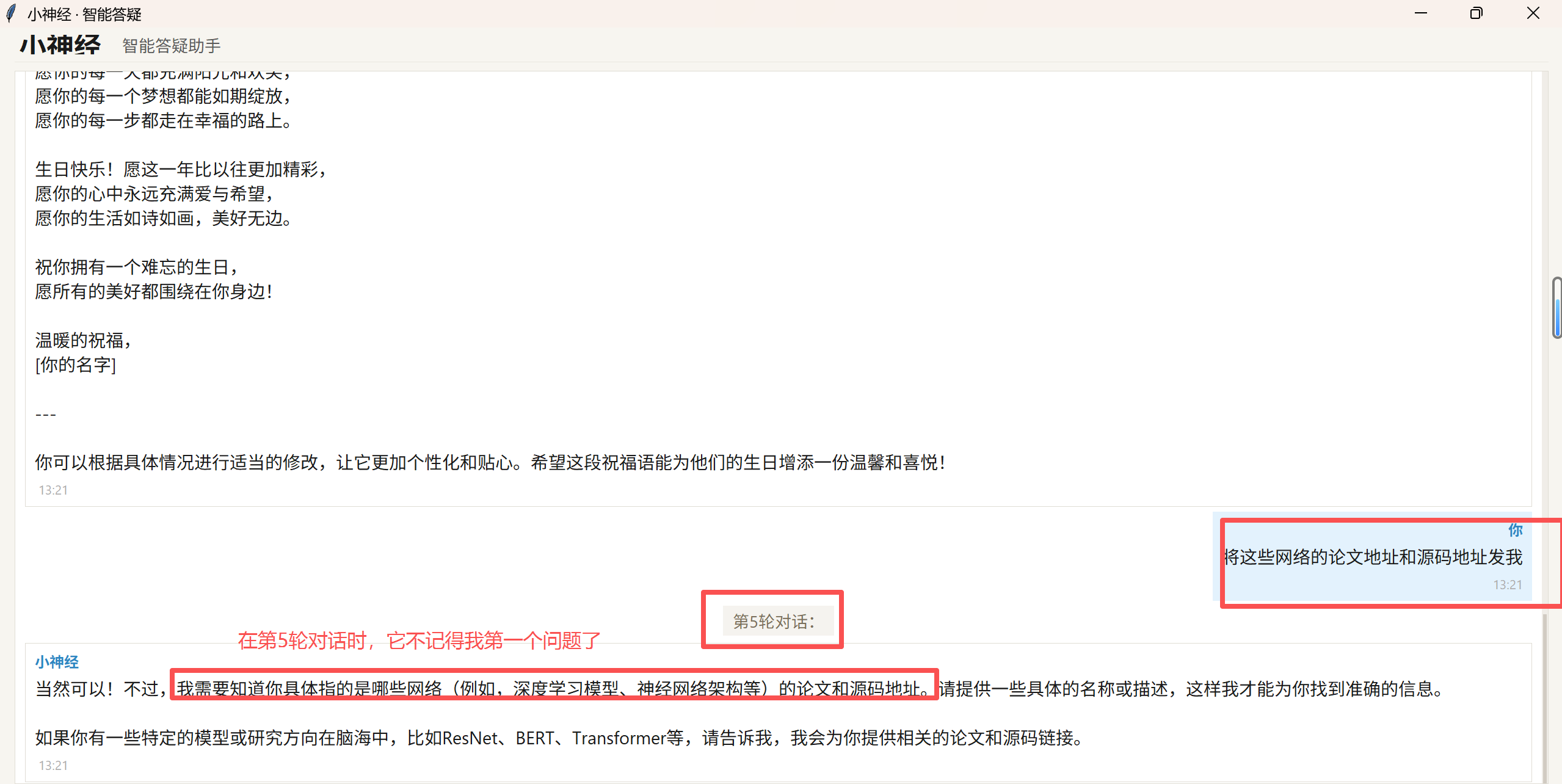
self.root.after(0, self._enable_input)运行结果:超过num_chat后,再问和第一轮相关的问题,它就不记得了。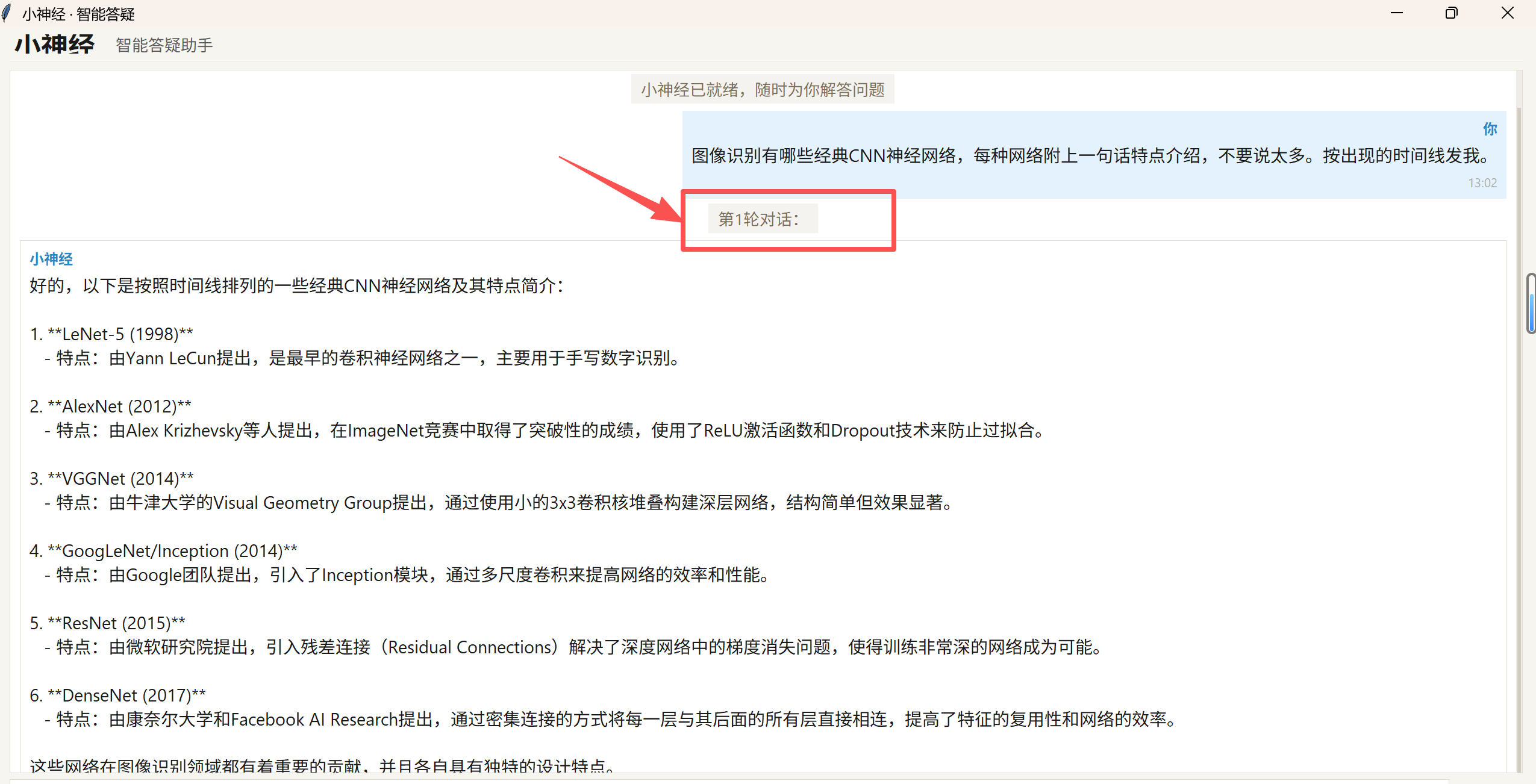
1.2、摘要
对历史对话进行摘要,在控制上下文长度的同时,保留核心历史信息。
缺点:摘要会丢失部分信息
修改_process_response, 添加“”# 摘要”部分,去掉“#上下文截断”部分, 其他代码不变
    def _process_response(self, question):
        try:
            #上下文截断:统计当前是第几轮会话
            self.curr_chat += 1
            self.root.after(0, self._add_system_message,"第%d轮对话:" % self.curr_chat )

            #摘要: 如果对话轮数大于约定数,就对历史对话的早期对话进行摘要处理,保留最后1个对话
            if len(self.conversation_history) >= self.num_chat+1  :
                try:
                    summary_messages = [
                        {"role": "system", "content": "你是一个高效的对话摘要助手。请将以下对话历史浓缩成一段简短的总结,保留关键信息和上下文,不要遗漏任何重要的事实。直接输出摘要内容,不要加任何前缀。"},
                        {"role": "user", "content": str(self.conversation_history[1:-2])}
                    ]
                    response = client.chat.completions.create(
                                model="qwen-max",
                                messages = summary_messages ,
                                stream = False
                            )
                    summary_content = response.choices[0].message.content
                    print(f"摘要后的历史对话内容:{summary_content}")
                except Exception as e:
                    print(f"❌ 摘要生成失败,将跳过摘要直接继续:{e}\n")


                self.conversation_history = [self.conversation_history[0] ,                    #保留system promot
                                    {"role": "system", "content": f"【历史对话摘要】:{summary_content}"}, # 注入摘要
                                    *self.conversation_history[-2:]]                   #保留最后1个会话(含问题和ai答案)


            # 添加记忆能力:把本次用户问题加入到历史对话中
            self.conversation_history.append({"role": "user", "content": question})

            #上下文截断:如果对话轮数大于约定数,则进行截断。
            #if len(self.conversation_history) >= 1:
            #    #conversation_history[0]是最开头的系统提示词 system prompt; -num_chat提取最后num_chat条记录
            #    self.conversation_history = [self.conversation_history[0]] + self.conversation_history[-self.num_chat:]

            response = client.chat.completions.create(
                model="qwen-max",
                messages = self.conversation_history,
                stream=True
            )

            self.root.after(0, self._start_bot_stream)

            whole_response = ""
            for chunk in response:
                content = chunk.choices[0].delta.content
                if content:
                    self.root.after(0, self._append_stream_content, content)
                    whole_response += content


            # 添加记忆能力:把本次大模型回复加入到历史对话中
            self.conversation_history.append({"role": "assistant", "content": whole_response})

        except Exception as e:
            error_msg = f'请求出错: {e}'
            print(error_msg)
            self.root.after(0, self._add_system_message, f"错误: {e}")
            #添加记忆能力:报错时删除本来问题,以免污染历史对话
            if self.conversation_history[-1]['role'] == 'user':
                self.conversation_history.pop()

        finally:
            self.root.after(0, self._finish_bot_stream)
            self.root.after(0, self._enable_input)
运行结果:摘要后的信息里包含了cnn各种网络的信息,所以在第6轮对话时 ,它还能记得是哪些网络。
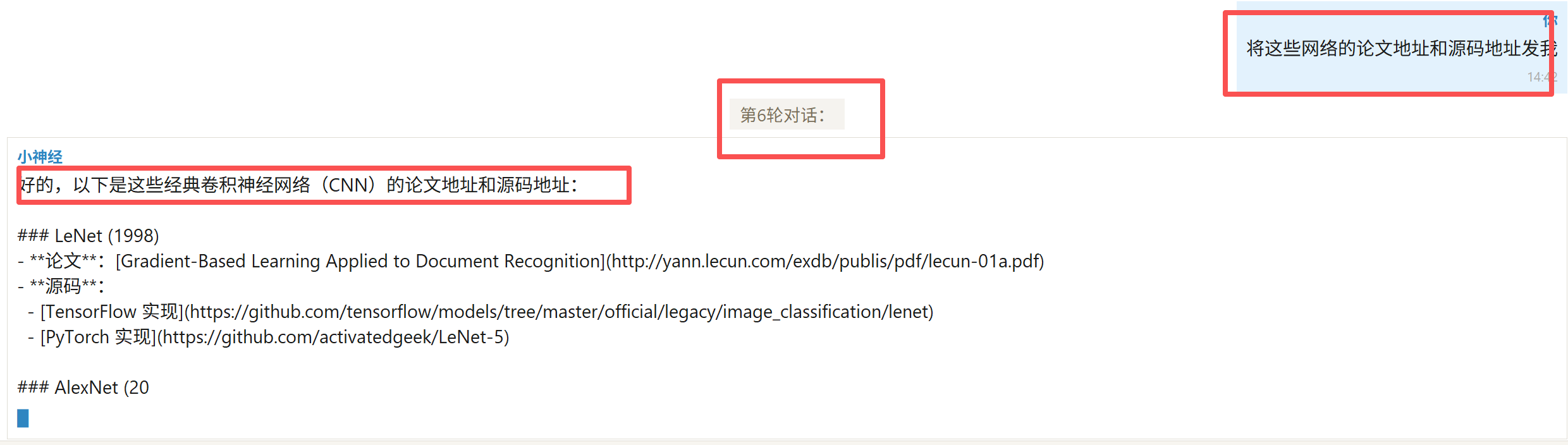
但是如果问关于人类感知世界的方式 中详细内容时就不会记得了,因为摘要不包含这部分详细信息,所以摘要方式也是会损失部分信息的。
1.3、向量化召回
核心是“按需检索”,一般在生产环境中使用:
a、每轮对话结束后,将该轮对话的用户问题和大模型答复存入向量数据库;
b、用户提问时,通过相似度检索相关对话记录;
c、将检索到的对话记录和本次用户问题拼接messages,传入大模型
优点:不会丢失信息 缺点:实现复杂,需要额外的向量数据库等资源
(因为需要搭建向量数据库比较复杂,待后续再上传实现和结果)
2、成本控制
2.1、使用支持上下文缓存的模型:部分模型提供了上下文缓存功能,可以降低使用成本并提升响应速度,建议优先使用支持上下文缓存的模型。
缓存机制主要分为三类:
-
自动缓存:平台自动识别重复前缀,无需代码改造
-
显式缓存:需在 API 请求中手动标记可缓存段落
-
隐式缓存:平台自动对近期重复 Token 进行 KV 复用,按缓存命中计费
每家大模型的缓存类型、方式和缓存部分计费都不一样, 在选型时注意查看官方API文档中关于缓存部分的说明。

AtomGit 是由开放原子开源基金会联合 CSDN 等生态伙伴共同推出的新一代开源与人工智能协作平台。平台坚持“开放、中立、公益”的理念,把代码托管、模型共享、数据集托管、智能体开发体验和算力服务整合在一起,为开发者提供从开发、训练到部署的一站式体验。
更多推荐

 0
0 0
0- 0


 已为社区贡献2条内容

所有评论(0)