VS Code Claude Code 配置助手:支持任务流自动推进,实时获取错误并让 AI 自动分析修复的开发效率工具
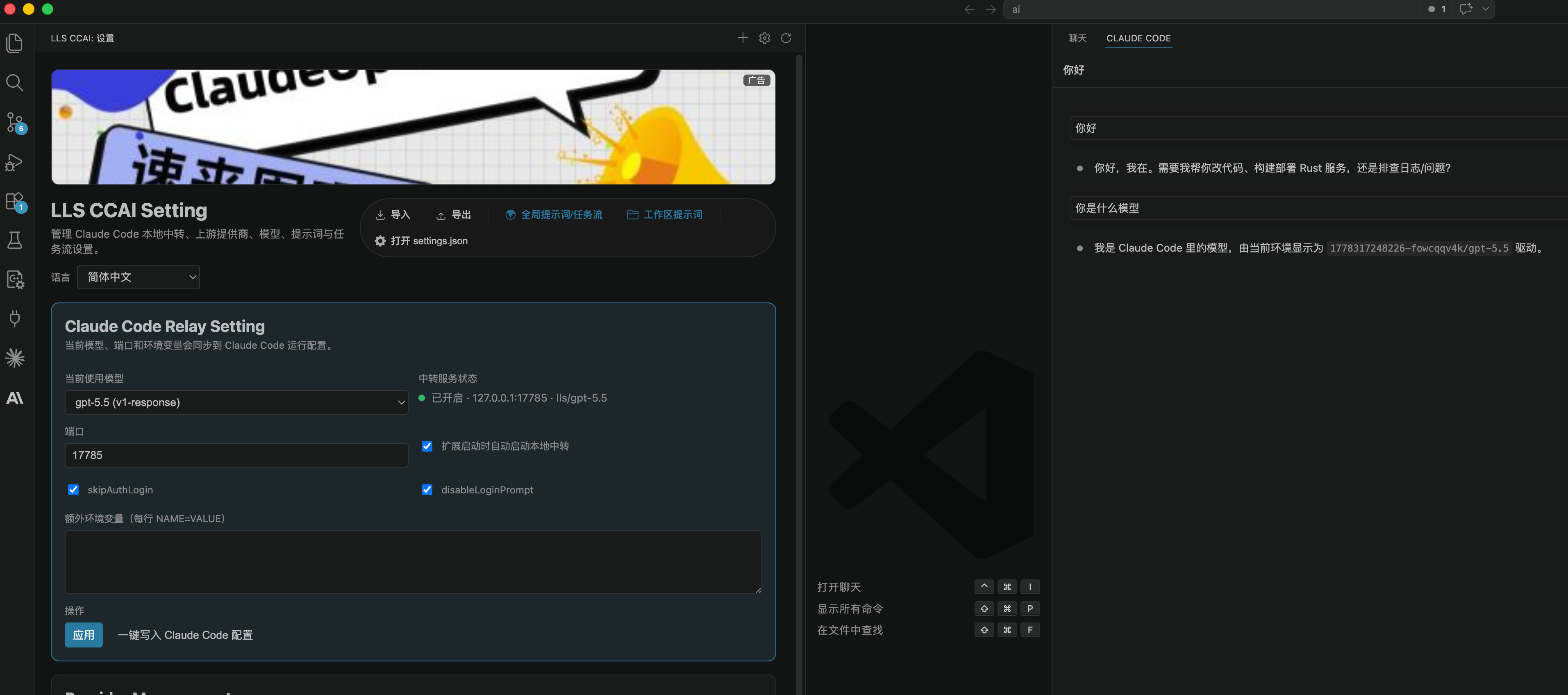
VS Code Claude Code 配置助手:支持任务流自动推进,实时获取错误并让 AI 自动分析修复的开发效率工具
Claude Code Config Helper 是一款专为 Claude Code 用户打造的 VS Code 扩展,帮助开发者更轻松地管理模型配置、切换上游接口、接入 OpenAI / Anthropic 兼容服务,并通过本地 Relay 转发增强 Claude Code 的使用体验。
这个项目最大的特色是内置 任务流功能。当你处理复杂开发需求时,它可以把大任务拆解成清晰的执行步骤,持续跟踪每个任务的状态,并在任务未完成时自动续推,让 AI 不只是回答问题,而是像一个真正的开发助手一样持续推进工作。
你也可以在晚上睡觉前,把需求文档、开发计划或待修复的问题交给任务流,让它按照步骤持续分析、修改、检查和推进。第二天早上打开 VS Code,就可以直接查看任务执行进度、代码修改结果和剩余问题,把碎片化的等待时间变成自动化开发时间。
同时,它还支持 直接获取 VS Code Problems 面板中的错误信息。模型可以主动读取当前项目里的 TypeScript、编译、语法或诊断错误,并基于真实错误内容进行分析和修复,避免只靠猜测修改代码。对于日常开发中的报错排查、自动修复、连续调试非常实用。
核心亮点
- 支持 Claude Code 配置可视化管理。
- 支持 Anthropic、OpenAI Chat Completions、OpenAI Responses 等多种上游协议。
- 支持任务流创建、进度跟踪、自动续推。
- 支持 AI 直接获取 VS Code 错误并自动修复。
- 支持全局和项目级系统提示词。
- 支持模型、Provider、API Key、Headers 等统一配置。
- 支持配置导入导出。
- 支持多语言界面。
- 适合需要长期任务执行、自动修复代码、提升 Claude Code 开发效率的用户。
安装说明
使用前请先安装 Anthropic 官方 Claude Code 扩展,然后再安装 Claude Code Config Helper。
你可以直接通过链接安装,也可以在 VS Code 左侧扩展商店中搜索安装:先搜索 Claude Code 并安装 Anthropic 官方扩展,再搜索 Claude Code Config Helper 并安装本扩展。
- 安装官方 Claude Code 扩展:
https://marketplace.visualstudio.com/items?itemName=anthropic.claude-code - 安装 Claude Code Config Helper 扩展:
https://marketplace.visualstudio.com/items?itemName=liliangshan.claude-code-config-helper
安装完成后,打开 VS Code 命令面板,运行 Claude Code Config: Open Config Panel,即可开始配置 Provider、模型、API 地址和任务流能力。
相关链接
- VS Code Marketplace:https://marketplace.visualstudio.com/items?itemName=liliangshan.claude-code-config-helper
- GitHub 仓库:https://github.com/liliangshan/claude-code-config-helper.git
如果你希望 Claude Code 不只是“聊天式辅助”,而是能持续执行任务、读取真实 IDE 错误、自动修复问题,那么 Claude Code Config Helper 会是一个非常实用的增强工具。
VS Code Claude Code Config Helper: Task Workflow Automation, Real-Time Error Retrieval, and AI-Powered Fixes
Claude Code Config Helper is a VS Code extension built for Claude Code users. It helps developers manage model configurations, switch upstream providers, connect to OpenAI / Anthropic-compatible services, and enhance Claude Code through a local relay layer.
Its biggest highlight is the built-in task workflow capability. When you are working on complex development tasks, it can break a large request into clear steps, track each task state, and automatically continue unfinished work. Instead of only answering questions, the AI can keep moving the work forward like a persistent development assistant.
You can also hand over requirement documents, development plans, or issues to the task workflow before going to sleep. It can keep analyzing, editing, checking, and progressing step by step. When you open VS Code the next morning, you can review the task progress, code changes, and remaining issues, turning idle waiting time into automated development time.
It also supports directly retrieving errors from the VS Code Problems panel. The model can read real TypeScript, compile, syntax, or diagnostic errors from the current workspace and fix code based on actual editor feedback instead of guessing. This is especially useful for daily debugging, automatic error fixing, and continuous development loops.
Key Highlights
- Visual configuration management for Claude Code.
- Support for Anthropic, OpenAI Chat Completions, OpenAI Responses, and other compatible upstream APIs.
- Task workflow creation, progress tracking, and automatic continuation.
- AI can directly retrieve VS Code errors and fix them automatically.
- Global and workspace-level system prompts.
- Unified management for models, providers, API keys, and custom headers.
- Import and export for configuration data.
- Multi-language UI support.
- Designed for users who need long-running task execution, automated code fixing, and a more productive Claude Code workflow.
Installation
Please install the official Anthropic Claude Code extension first, then install Claude Code Config Helper.
You can install them from the links below, or search in the VS Code Extensions view: search for Claude Code and install the official Anthropic extension first, then search for Claude Code Config Helper and install this extension.
- Install the official Claude Code extension:
https://marketplace.visualstudio.com/items?itemName=anthropic.claude-code - Install Claude Code Config Helper:
https://marketplace.visualstudio.com/items?itemName=liliangshan.claude-code-config-helper
After installation, open the VS Code Command Palette and run Claude Code Config: Open Config Panel to configure providers, models, API endpoints, and task workflow features.
Links
- VS Code Marketplace: https://marketplace.visualstudio.com/items?itemName=liliangshan.claude-code-config-helper
- GitHub Repository: https://github.com/liliangshan/claude-code-config-helper.git
If you want Claude Code to be more than a chat-based assistant, and instead continuously execute tasks, read real IDE errors, and automatically fix problems, Claude Code Config Helper can be a very practical productivity extension.

AtomGit 是由开放原子开源基金会联合 CSDN 等生态伙伴共同推出的新一代开源与人工智能协作平台。平台坚持“开放、中立、公益”的理念,把代码托管、模型共享、数据集托管、智能体开发体验和算力服务整合在一起,为开发者提供从开发、训练到部署的一站式体验。
更多推荐



 7
7 0
0- 0


 已为社区贡献8条内容

所有评论(0)