Marddown转word文档工具软件
·
下面是 Markdown 转 Word 工具在浏览器中运行时的界面截图:
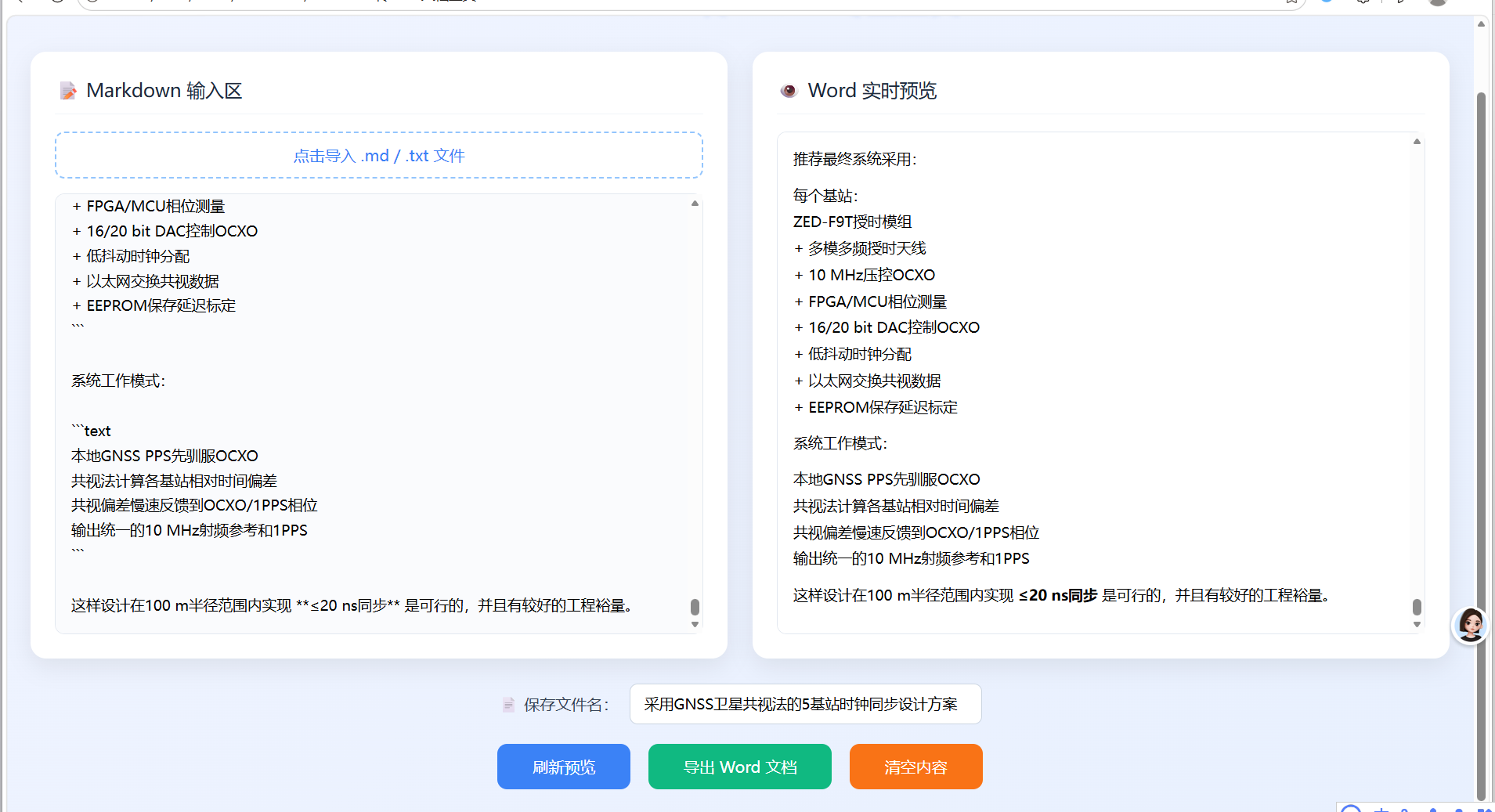
界面布局说明:
- 顶部标题区:显示"Markdown 转 Word 专业工具"主标题
- 左侧输入区:包含文件导入功能和Markdown文本编辑区域
- 右侧预览区:实时显示转换后的Word样式预览
- 底部控制区:文件名设置和功能按钮(刷新预览、导出Word、清空内容)
<!DOCTYPE html>
<html lang="zh-CN">
<head>
    <meta charset="UTF-8">
    <meta name="viewport" content="width=device-width, initial-scale=1.0">
    <title>Markdown 转 Word 专业工具</title>
    <script src="https://cdn.jsdelivr.net/npm/marked/marked.min.js"></script>
    <script src="https://cdn.jsdelivr.net/npm/file-saver@2.0.5/dist/FileSaver.min.js"></script>
    <style>
        * {
            margin: 0;
            padding: 0;
            box-sizing: border-box;
            font-family: "PingFang SC", "Microsoft YaHei", sans-serif;
        }

        body {
            background: linear-gradient(135deg, #f0f4ff 0%, #e8f0fe 100%);
            min-height: 100vh;
            padding: 30px 20px;
        }

        .main-title {
            text-align: center;
            font-size: 32px;
            color: #2563eb;
            margin-bottom: 35px;
            font-weight: 600;
            text-shadow: 0 2px 4px rgba(37,99,235,0.15);
        }

        .wrap-box {
            max-width: 1450px;
            margin: 0 auto;
            display: grid;
            grid-template-columns: 1fr 1fr;
            gap: 25px;
        }

        .col-card {
            background: #ffffff;
            border-radius: 16px;
            box-shadow: 0 8px 24px rgba(0,0,0,0.08);
            padding: 25px;
            height: 620px;
            display: flex;
            flex-direction: column;
        }

        .card-head {
            display: flex;
            align-items: center;
            justify-content: space-between;
            margin-bottom: 18px;
            padding-bottom: 12px;
            border-bottom: 1px solid #f1f5f9;
        }

        .card-title {
            font-size: 19px;
            color: #1e293b;
            font-weight: 500;
        }

        .file-upload {
            border: 2px dashed #93c5fd;
            border-radius: 10px;
            text-align: center;
            padding: 12px;
            cursor: pointer;
            color: #3b82f6;
            margin-bottom: 15px;
            transition: all 0.3s ease;
        }

        .file-upload:hover {
            background-color: #eff6ff;
            border-color: #3b82f6;
        }

        #fileInput {
            display: none;
        }

        #mdInput {
            flex: 1;
            width: 100%;
            border: 1px solid #e2e8f0;
            border-radius: 10px;
            padding: 16px;
            font-size: 15px;
            line-height: 1.7;
            resize: none;
            background: #fafbfd;
            transition: border 0.3s;
        }

        #mdInput:focus {
            outline: none;
            border-color: #3b82f6;
        }

        #previewBox {
            flex: 1;
            width: 100%;
            border: 1px solid #e2e8f0;
            border-radius: 10px;
            padding: 16px;
            overflow-y: auto;
            background: #ffffff;
            line-height: 1.8;
            font-size: 15px;
        }

        /* 文件名输入区域 */
        .filename-bar {
            max-width: 1450px;
            margin: 25px auto 0;
            display: flex;
            justify-content: center;
            align-items: center;
            gap: 12px;
            flex-wrap: wrap;
        }

        .filename-label {
            font-size: 16px;
            color: #334155;
            font-weight: 500;
        }

        #fileNameInput {
            padding: 10px 14px;
            width: 360px;
            border: 1px solid #cbd5e1;
            border-radius: 8px;
            font-size: 15px;
            outline: none;
            transition: border 0.3s;
        }

        #fileNameInput:focus {
            border-color: #3b82f6;
        }

        .btn-bar {
            max-width: 1450px;
            margin: 20px auto 0;
            display: flex;
            justify-content: center;
            gap: 18px;
            flex-wrap: wrap;
        }

        .btn {
            padding: 13px 36px;
            border-radius: 10px;
            border: none;
            font-size: 16px;
            font-weight: 500;
            cursor: pointer;
            transition: all 0.3s ease;
        }

        .btn-refresh { background: #3b82f6; color: #fff; }
        .btn-down { background: #10b981; color: #fff; }
        .btn-clear { background: #f97316; color: #fff; }

        .btn:hover {
            transform: translateY(-3px);
            box-shadow: 0 6px 16px rgba(0,0,0,0.12);
        }

        #previewBox h1 {font-size:26px;margin:16px 0;color:#1e293b;}
        #previewBox h2 {font-size:22px;margin:14px 0;color:#334155;}
        #previewBox h3 {font-size:19px;margin:12px 0;}
        #previewBox p {margin:10px 0;}
        #previewBox ul, #previewBox ol {margin:10px 0 10px 24px;}
        #previewBox blockquote {
            border-left:4px solid #3b82f6;
            padding:10px 15px;
            background:#f8fafc;
            margin:12px 0;
        }
        #previewBox table {
            width:100%;
            border-collapse:collapse;
            margin:15px 0;
        }
        #previewBox th, #previewBox td {
            border:1px solid #cbd5e1;
            padding:9px 12px;
            text-align:left;
        }
        #previewBox th {
            background:#f1f5f9;
            font-weight:600;
        }

        @media(max-width:900px){
            .wrap-box{grid-template-columns:1fr;}
        }
    </style>
</head>

<body>
    <h2 class="main-title">Markdown 转 Word 专业工具</h2>

    <div class="wrap-box">
        <!-- 左侧输入 -->
        <div class="col-card">
            <div class="card-head">
                <span class="card-title">📝 Markdown 输入区</span>
            </div>
            <div class="file-upload">
                <label for="fileInput">点击导入 .md / .txt 文件</label>
                <input type="file" id="fileInput" accept=".md,.txt">
            </div>
            <textarea id="mdInput" placeholder="请输入Markdown内容,第一行将自动作为默认文件名..."></textarea>
        </div>

        <!-- 右侧预览 -->
        <div class="col-card">
            <div class="card-head">
                <span class="card-title">👁️ Word 实时预览</span>
            </div>
            <div id="previewBox"></div>
        </div>
    </div>

    <!-- 文件名设置 -->
    <div class="filename-bar">
        <label class="filename-label">📄 保存文件名:</label>
        <input type="text" id="fileNameInput" placeholder="自动提取第一行,可自行修改">
    </div>

    <!-- 功能按钮 -->
    <div class="btn-bar">
        <button class="btn btn-refresh" id="refreshPre">刷新预览</button>
        <button class="btn btn-down" id="exportWord">导出 Word 文档</button>
        <button class="btn btn-clear" id="emptyAll">清空内容</button>
    </div>

    <script>
        marked.setOptions({ gfm: true, tables: true, breaks: true });

        const mdInput = document.getElementById('mdInput');
        const previewBox = document.getElementById('previewBox');
        const fileInput = document.getElementById('fileInput');
        const fileNameInput = document.getElementById('fileNameInput');
        const refreshPre = document.getElementById('refreshPre');
        const exportWord = document.getElementById('exportWord');
        const emptyAll = document.getElementById('emptyAll');

        // 渲染预览
        function renderPreview() {
            previewBox.innerHTML = marked.parse(mdInput.value);
            updateFileNameFromFirstLine(); // 实时更新文件名
        }

        // 自动提取第一行作为文件名
        function updateFileNameFromFirstLine() {
            let text = mdInput.value.trim().split('\n')[0] || '';
            text = text.replace(/[#\s\|]/g, '').trim();
            if (text) {
                fileNameInput.value = text;
            } else {
                fileNameInput.value = '未命名文档';
            }
        }

        // 实时监听
        mdInput.addEventListener('input', renderPreview);
        refreshPre.addEventListener('click', renderPreview);

        // 文件导入
        fileInput.addEventListener('change', function (e) {
            const file = e.target.files[0];
            if (!file) return;
            const reader = new FileReader();
            reader.onload = res => {
                mdInput.value = res.target.result;
                renderPreview();
            };
            reader.readAsText(file);
        });

        // 导出 Word(支持路径选择 + 自定义文件名)
        exportWord.addEventListener('click', function () {
            const text = mdInput.value.trim();
            if (!text) {
                alert('请先输入Markdown内容!');
                return;
            }

            const html = marked.parse(text);
            const wordHtml = `
            <html>
            <head>
            <meta charset="UTF-8">
            <style>
                body{font-family:宋体,微软雅黑;font-size:15px;line-height:1.7;}
                table{border-collapse:collapse;width:100%;margin:12px 0;}
                th,td{border:1px solid #000;padding:8px;}
                th{background:#f2f2f2;}
                h1,h2,h3{font-family:黑体;}
            </style>
            </head>
            <body>${html}</body>
            </html>`;

            const fileName = fileNameInput.value.trim() || '未命名文档';
            const blob = new Blob([wordHtml], { type: "application/msword" });

            // 触发浏览器路径选择 + 自定义文件名保存
            saveAs(blob, fileName + ".doc");
        });

        // 清空
        emptyAll.addEventListener('click', function () {
            mdInput.value = '';
            previewBox.innerHTML = '';
            fileNameInput.value = '';
            fileInput.value = '';
        });

        renderPreview();
    </script>
</body>
</html>

AtomGit 是由开放原子开源基金会联合 CSDN 等生态伙伴共同推出的新一代开源与人工智能协作平台。平台坚持“开放、中立、公益”的理念,把代码托管、模型共享、数据集托管、智能体开发体验和算力服务整合在一起,为开发者提供从开发、训练到部署的一站式体验。
更多推荐
 0
0 0
0- 0


 已为社区贡献1条内容

所有评论(0)