Windows下OpenMetadata Airflow 开发环境搭建与配置
一、为什么需要 Airflow
OpenMetadata 使用 Airflow 作为其默认的工作流编排引擎(Pipeline Service Client),主要用于自动化和管理元数据摄取任务。
核心作用
1. 编排摄取工作流 (Orchestration)
OpenMetadata 的摄取框架(Ingestion Framework)是用 Python 编写的。为了实现定时自动采集、数据质量分析(Profiler)和数据血缘追踪,OpenMetadata 需要一个成熟的调度器来运行这些 Python 脚本。Airflow 提供了任务调度、重试机制和日志监控能力。
File: ingestion/src/airflow_provider_openmetadata/lineage/runner.py (L85-100)
class AirflowLineageRunner:
    """
    Given the OpenMetadata connection, a service name and a DAG:

    1. Create the Pipeline Service (if not exists)
    2. Create or update the Pipeline (DAG + tasks)
    3. Add the task status (Task Instances). We'll pick this up from the available information.
          This operator should run the last to have the complete view.
    4. Add Pipeline Lineage from xlets

    This Runner will be called either from:
    1. Lineage Backend
    2. Lineage Operator
    In both cases, this will run directly on an Airflow instance. Therefore,
    we'll use the airflow config data to populate entities' details.
    """
2. 动态 DAG 管理 (Managed APIs)
通过 openmetadata-managed-apis 插件,OpenMetadata Server 可以直接通过 REST API 在 Airflow 中动态地部署 (Deploy)、触发 (Trigger) 和停止摄取任务(DAGs) 。这意味着你不需要手动编写 Airflow DAG 代码,一切都可以通过 OpenMetadata UI 完成。
File:** openmetadata-service/src/main/java/org/openmetadata/service/clients/pipeline/airflow/AirflowRESTClient.java (L49-72)
public class AirflowRESTClient extends PipelineServiceClient {

  private static final String PLATFORM = "Airflow";
  private static final String USERNAME_KEY = "username";
  private static final String PASSWORD_KEY = "password";
  private static final String TIMEOUT_KEY = "timeout";
  private static final String TRUSTSTORE_PATH_KEY = "truststorePath";
  private static final String TRUSTSTORE_PASSWORD_KEY = "truststorePassword";
  private static final String DOCS_LINK =
      "Follow [this guide](https://docs.open-metadata.org/deployment/ingestion/openmetadata) for further details.";

  protected final String username;
  protected final String password;
  protected final HttpClient client;
  protected final URL serviceURL;
  private volatile List<String> apiEndpointSegments;
  private static final String DAG_ID = "dag_id";
  private static final String CONF = "conf";
  private static final String APP_CONFIG_OVERRIDE = "appConfigOverride";
  private String detectedAirflowVersion = null;
  private final Object detectionLock = new Object();
  private volatile String csrfToken = null;
  private volatile List<String> sessionCookies = null;
3. 作为元数据源 (Metadata Source)
Airflow 本身也是一个重要的数据资产。OpenMetadata 通过 AirflowSource 提取 Airflow 中的流水线(Pipelines)、任务(Tasks)及其运行状态,并自动解析任务间的数据血缘 (Lineage) 。
File:** ingestion/src/metadata/ingestion/source/pipeline/airflow/metadata.py (L11-13)
"""
Airflow source to extract metadata from OM UI
"""
File: ingestion/src/airflow_provider_openmetadata/lineage/backend.py (L34-45)
class OpenMetadataLineageBackend(LineageBackend):
    """
    Sends lineage data from tasks to OpenMetadata.

    Configurable via `airflow.cfg` as follows:

    [lineage]
    backend = airflow_provider_openmetadata.lineage.backend.OpenMetadataLineageBackend
    airflow_service_name = airflow
    openmetadata_api_endpoint = http://localhost:8585/api
    jwt_token = <token>  # To auth to the OpenMetadata API
    """
技术架构实现
Java 后端与 Airflow 的交互
OpenMetadata Server 通过 AirflowRESTClient 调用 Airflow 暴露的插件接口。
-
版本检测:它能自动识别 Airflow 2.x 或 3.x 环境 。
File: openmetadata-service/src/main/java/org/openmetadata/service/clients/pipeline/airflow/AirflowRESTClient.java (L113-146)
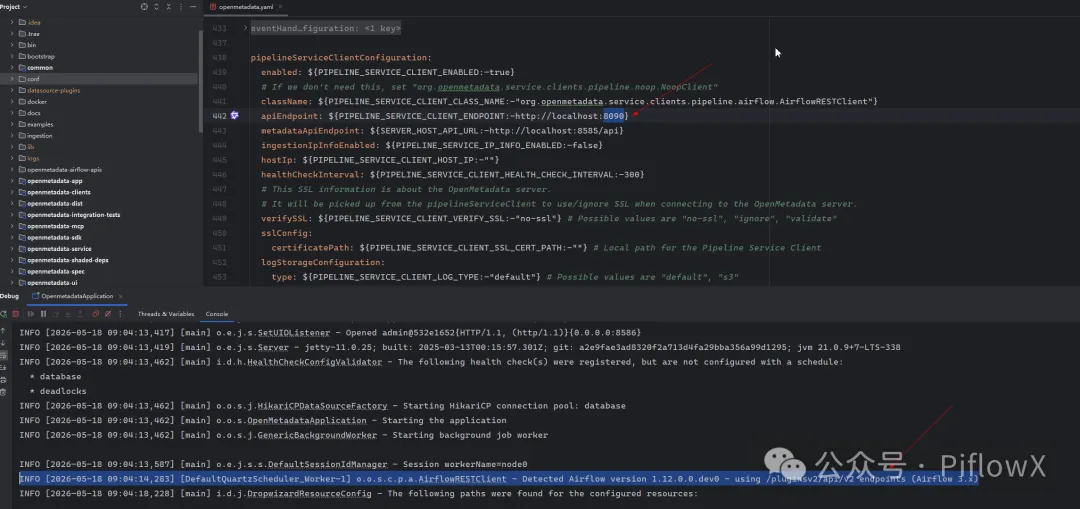
private List<String> detectAirflowApiVersion() { // Try Airflow 3.x with /pluginsv2 prefix first try { List<String> v3Segments = List.of("pluginsv2", "api", "v2", "openmetadata"); URIBuilder v3Builder = new URIBuilder(String.valueOf(serviceURL)); List<String> segments = new ArrayList<>(v3Builder.getPathSegments()); segments.addAll(v3Segments); segments.add("health-auth"); v3Builder.setPathSegments(segments); HttpRequest request = HttpRequest.newBuilder(v3Builder.build()) .header(CONTENT_HEADER, CONTENT_TYPE) .header(AUTH_HEADER, getBasicAuthenticationHeader(username, password)) .GET() .timeout(Duration.ofSeconds(5)) .build(); HttpResponse<String> response = client.send(request, HttpResponse.BodyHandlers.ofString()); if (response.statusCode() == 200) { try { JSONObject responseJSON = new JSONObject(response.body()); detectedAirflowVersion = responseJSON.getString("version"); LOG.info( "Detected Airflow version {} - using /pluginsv2/api/v2 endpoints (Airflow 3.x)", detectedAirflowVersion); return v3Segments; } catch (Exception parseError) { LOG.debug( "Received 200 response from /pluginsv2 health-auth but failed to parse version: {}", parseError.getMessage()); } } -
配置集成:在
openmetadata.yaml中,你可以看到pipelineServiceClientConfiguration默认指向了 Airflow 的 REST 客户端 。File: conf/openmetadata.yaml (L544-549)
pipelineServiceClientConfiguration:
  enabled: ${PIPELINE_SERVICE_CLIENT_ENABLED:-true}
  # If we don't need this, set "org.openmetadata.service.clients.pipeline.noop.NoopClient"
  className: ${PIPELINE_SERVICE_CLIENT_CLASS_NAME:-"org.openmetadata.service.clients.pipeline.airflow.AirflowRESTClient"}
  apiEndpoint: ${PIPELINE_SERVICE_CLIENT_ENDPOINT:-http://localhost:8080}
  metadataApiEndpoint: ${SERVER_HOST_API_URL:-http://localhost:8585/api}
摄取任务的生命周期
| 阶段 | 执行动作 | 涉及组件 |
|---|---|---|
| 部署 | UI 点击“Schedule”,Server 调用 API 创建 DAG | AirflowRESTClient -> managed-apis |
| 执行 | Airflow 调度器启动 Worker 运行 Python 摄取代码 | airflow-env (Python Ingestion) |
| 监控 | UI 展示任务成功/失败状态和实时日志 | AirflowRESTClient -> managed-apis |
扩展支持
虽然 Airflow 是官方推荐和默认集成的引擎,但 OpenMetadata 的设计是插件化的。在 openmetadata.yaml 中,className 可以配置为其他实现(如 NoopClient 或自定义 K8s 客户端),但目前 Airflow 提供了最完整的功能支持 。
Notes
-
解耦运行
:虽然 OpenMetadata 依赖 Airflow 进行调度,但你可以使用外部已有的 Airflow 集群(如 AWS MWAA 或 GCP Composer),只需配置好连接信息即可 。
File: openmetadata-ui/src/main/resources/ui/public/locales/en-US/Pipeline/Airflow.md (L40-46)
## Airflow REST API Connection

The REST API connection calls the Airflow web server over HTTP/HTTPS and does not require direct access to Airflow's metadata database. This makes it the right choice for managed deployments (Astronomer, GCP Cloud Composer, MWAA) and for any self-hosted Airflow where direct DB access is not available or desired.

$$note
The REST API connection fetches DAG topology, task structure, schedules, and run statuses. **Lineage is not captured through this connection.** To get table-level and column-level lineage in OpenMetadata, you must separately install the <a href="https://docs.open-metadata.org/connectors/pipeline/airflow/lineage-backend" target="_blank">OpenMetadata Lineage Backend</a> in Airflow (strategy 2) or use the <a href="https://docs.open-metadata.org/connectors/pipeline/airflow/lineage-operator" target="_blank">Lineage Operator</a> in your DAGs (strategy 3). Once those emit OpenLineage events, lineage edges will appear automatically in OpenMetadata.
$$
- Airflow 3.x:最新版本的 OpenMetadata 已全面支持 Airflow 3.x,包括其新的 API 路径和环境要求。
二、以数据源连接示例
UI 上的数据源测试连接【 Test Connection】 按钮强依赖 Airflow 可用性。TestConnection.tsx 中明确检查了 isAirflowAvailable,不可用时按钮禁用。
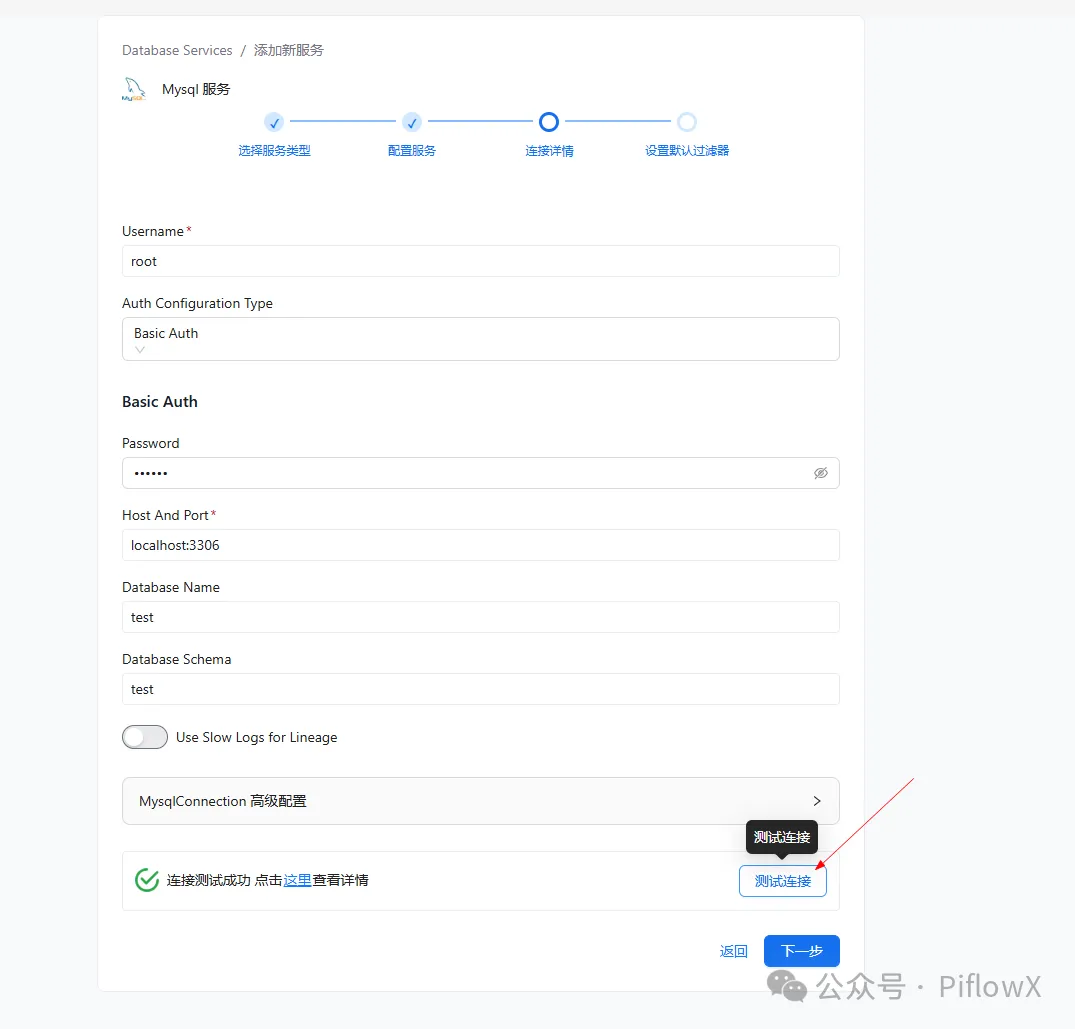
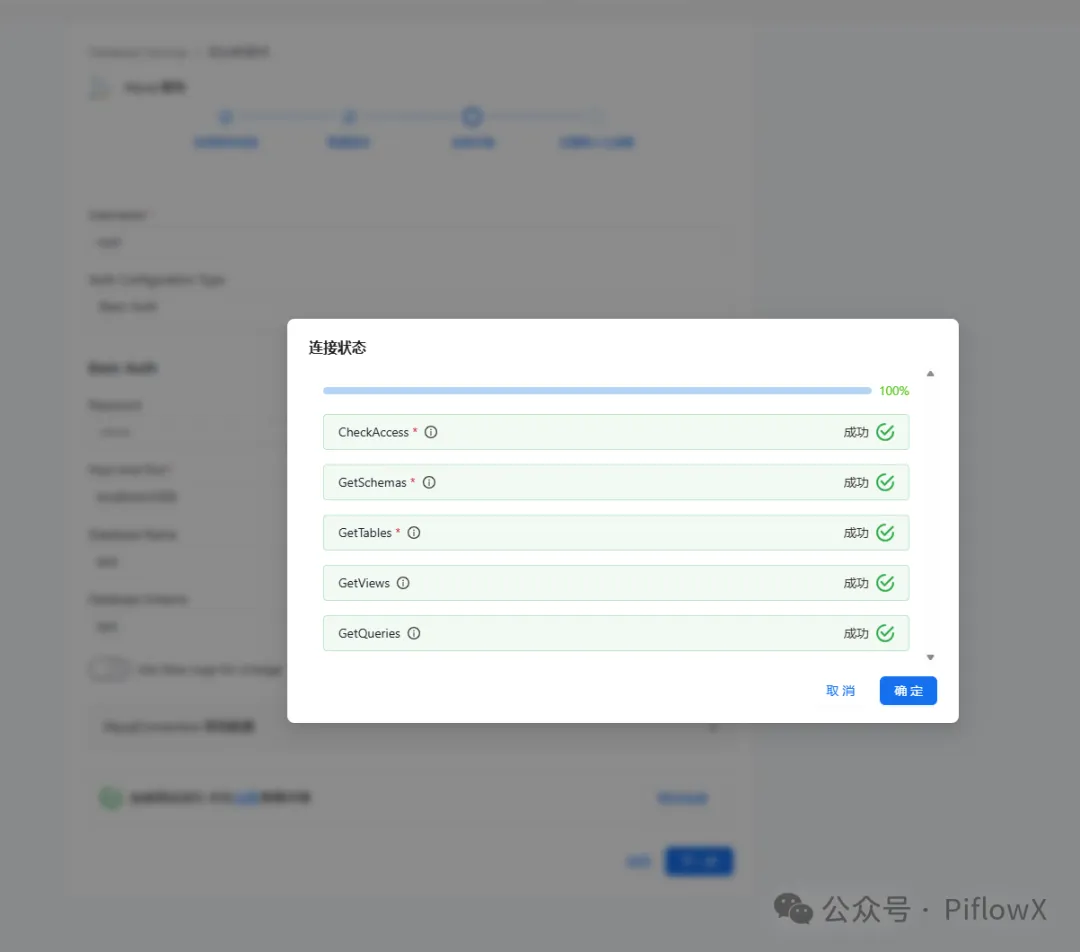
File: openmetadata-ui/src/main/resources/ui/src/components/common/TestConnection/TestConnection.tsx (L128-132)
  const isTestConnectionDisabled =
    isTestingConnection ||
    isTestingDisabled ||
    !allowTestConn ||
    !isAirflowAvailable;
整体交互链路:
UI (浏览器)
  └─ POST /api/v1/automations/workflows/{id}/trigger
          └─ Java 后端 (Windows:8585)
                  └─ AirflowRESTClient.runAutomationsWorkflow()
                          └─ POST http://localhost:8080/run_automation
                                  └─ Airflow (WSL:8080)
                                          └─ execute(automation_workflow)
                                                  └─ ingestion 直连目标数据库
                                                  └─ PATCH 结果回写 Java 后端
Java 后端通过 AirflowRESTClient 调用 Airflow 的 /run_automation 端点:
File: openmetadata-service/src/main/java/org/openmetadata/service/clients/pipeline/airflow/AirflowRESTClient.java (L511-540)
  @Override
  public PipelineServiceClientResponse runAutomationsWorkflow(Workflow workflow) {
    HttpResponse<String> response;
    try {
      String automationsUrl = buildURI("run_automation").build().toString();
      String workflowPayload = JsonUtils.pojoToJson(workflow);
      response = post(automationsUrl, workflowPayload);
      if (response.statusCode() == 200) {
        return getResponse(200, response.body());
      }
    } catch (IOException | URISyntaxException e) {
      // We can end up here if the test connection is not sending back anything after the POST
      // request
      // due to the connection to the source service not being properly resolved.
      throw IngestionPipelineDeploymentException.byMessage(
          workflow.getName(),
          TRIGGER_ERROR,
          "No response from the test connection. Make sure your service is reachable and accepting connections");
    } catch (InterruptedException e) {
      Thread.currentThread().interrupt();
      throw IngestionPipelineDeploymentException.byMessage(
          workflow.getName(), TRIGGER_ERROR, e.getMessage());
    }
    throw new PipelineServiceClientException(
        String.format(
            "%s Failed to trigger workflow due to airflow API returned %s and response %s",
            workflow.getName(),
            Response.Status.fromStatusCode(response.statusCode()),
            response.body()));
  }
Airflow 侧的 run_automation 路由接收请求后调用 execute(automation_workflow)
File: openmetadata-airflow-apis/openmetadata_managed_apis/api/routes/run_automation.py (L54-85)
    @blueprint.route("/run_automation", methods=["POST"])
    @csrf.exempt
    @requires_access_decorator(
        [(permissions.ACTION_CAN_READ, permissions.RESOURCE_DAG)]
    )
    def run_automation() -> Response:
        """
        Given a WorkflowSource Schema, create the engine
        and test the connection
        """

        json_request = request.get_json(cache=False)

        try:
            automation_workflow = parse_automation_workflow_gracefully(
                config_dict=json_request
            )

            # we need to instantiate the secret manager in case secrets are passed
            SecretsManagerFactory(
                automation_workflow.openMetadataServerConnection.secretsManagerProvider,
                automation_workflow.openMetadataServerConnection.secretsManagerLoader,
            )

            # Should this be triggered async?
            execute(automation_workflow)

            return ApiResponse.success(
                {
                    "message": f"Workflow [{escape(automation_workflow.name)}] has been triggered."
                }
            )
三、安装 Airflow(独立虚拟环境)
OpenMetadata 1.12 对应的 Airflow 版本:
File: ingestion/setup.py (L22-23)
VERSIONS = {
    "airflow": "apache-airflow==3.1.7",
第一步:创建 Airflow 专用虚拟环境
确保ingestion环境已安装(可参考之前的文章)。
# 与 ingestion 的 env 完全分开
python3.11 -m venv ~/airflow-env


source ~/airflow-env/bin/activate

pip config set global.index-url https://mirrors.aliyun.com/pypi/simple/
第二步:安装 Airflow
pip install "apache-airflow==3.1.7" --constraint "https://raw.githubusercontent.com/apache/airflow/constraints-3.1.7/constraints-3.11.txt"
如果 constraints 文件不存在(URL 404),去掉 constraints 直接安装:
pip install "apache-airflow==3.1.7"
第三步:安装 OpenMetadata Airflow 插件
cd
 ~/OpenMetadata/openmetadata-airflow-apis
pip install -e .
插件通过 [project.entry-points."airflow.plugins"] 注册到 Airflow:
File: openmetadata-airflow-apis/pyproject.toml (L47-48)
[project.entry-points."airflow.plugins"]
openmetadata_managed_apis = "openmetadata_managed_apis.plugin:RestApiPlugin"
第四步:初始化 Airflow 数据库
如果不使用mysql数据库,可跳过该命令,默认情况下,Airflow 使用 SQLite。
cat >> ~/.bashrc << 'EOF'
export AIRFLOW_HOME=~/airflow
export DB_SCHEME=mysql+pymysql
export DB_USER=root
export DB_PASSWORD=123456
export DB_HOST=localhost
export DB_PORT=3306
export AIRFLOW_DB=airflow_db
export AIRFLOW__DATABASE__SQL_ALCHEMY_CONN="mysql+pymysql://root:123456@localhost:3306/airflow_db"
EOF


source ~/.bashrc
# 初始化数据库
airflow db migrate
四、启动 Airflow
Airflow 3.x 启动方式
Airflow 3.x 移除了 airflow users 命令,使用 standalone 命令启动,自动创建管理员用户:
source ~/airflow-env/bin/activate

# 启动airflow
airflow standalone
启动时会在日志中打印自动生成的密码:
standalone | Login with username: admin  password: <自动生成的密码>
standalone | Airflow Standalone is for development purposes only.
记录下这个密码,后续配置 Java 后端时需要用到。
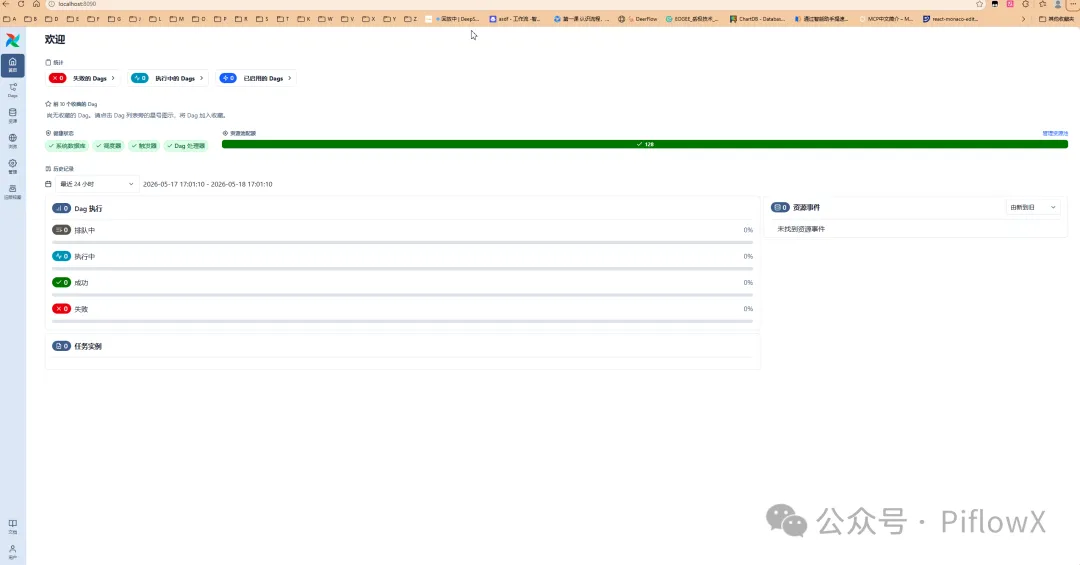
修改默认端口(8080 被占用时)
查看当前配置的端口:
airflow config get-value api port
查看哪个进程占用了 8080:
sudo lsof -i :8080
方式一:环境变量(临时)
AIRFLOW__API__PORT=8090 airflow standalone
方式二:修改**airflow.cfg(永久)**
# 找到配置文件位置
echo $AIRFLOW_HOME   # 默认是 ~/airflow
编辑 ~/airflow/airflow.cfg:
[api]
port = 8090
五、配置 Java 后端连接 Airflow
找到 Java 后端配置文件 conf/openmetadata.yaml,修改 pipelineServiceClientConfiguration 部分:File: conf/openmetadata.yaml (L544-589)
pipelineServiceClientConfiguration:
  enabled: ${PIPELINE_SERVICE_CLIENT_ENABLED:-true}
  # If we don't need this, set "org.openmetadata.service.clients.pipeline.noop.NoopClient"
  className: ${PIPELINE_SERVICE_CLIENT_CLASS_NAME:-"org.openmetadata.service.clients.pipeline.airflow.AirflowRESTClient"}
  apiEndpoint: ${PIPELINE_SERVICE_CLIENT_ENDPOINT:-http://localhost:8080}
  metadataApiEndpoint: ${SERVER_HOST_API_URL:-http://localhost:8585/api}
  ingestionIpInfoEnabled: ${PIPELINE_SERVICE_IP_INFO_ENABLED:-false}
  hostIp: ${PIPELINE_SERVICE_CLIENT_HOST_IP:-""}
  healthCheckInterval: ${PIPELINE_SERVICE_CLIENT_HEALTH_CHECK_INTERVAL:-300}
  # This SSL information is about the OpenMetadata server.
  # It will be picked up from the pipelineServiceClient to use/ignore SSL when connecting to the OpenMetadata server.
  verifySSL: ${PIPELINE_SERVICE_CLIENT_VERIFY_SSL:-"no-ssl"} # Possible values are "no-ssl", "ignore", "validate"
  sslConfig:
    certificatePath: ${PIPELINE_SERVICE_CLIENT_SSL_CERT_PATH:-""} # Local path for the Pipeline Service Client
  logStorageConfiguration:
    type: ${PIPELINE_SERVICE_CLIENT_LOG_TYPE:-"default"} # Possible values are "default", "s3"
    enabled: ${PIPELINE_SERVICE_CLIENT_LOG_ENABLED:-false} # Enable it for pipelines deployed in the server
    # if type is s3, provide the following configuration
    bucketName: ${PIPELINE_SERVICE_CLIENT_LOG_BUCKET_NAME:-""}
    # optional path within the bucket to store the logs
    prefix: ${PIPELINE_SERVICE_CLIENT_LOG_PREFIX:-""}
    enableServerSideEncryption: ${PIPELINE_SERVICE_CLIENT_LOG_SSE_ENABLED:-false}
    sseAlgorithm: ${PIPELINE_SERVICE_CLIENT_LOG_SSE_ALGORITHM:-"AES256"} # Allowed values: "AES256" or "aws:kms"
    kmsKeyId: ${PIPELINE_SERVICE_CLIENT_LOG_KMS_KEY_ID:-""} # Required only if sseAlgorithm is "aws:kms"
    awsConfig:
      enabled: ${PIPELINE_SERVICE_CLIENT_AWS_IAM_AUTH_ENABLED:-false}
      awsAccessKeyId: ${PIPELINE_SERVICE_CLIENT_LOG_AWS_ACCESS_KEY_ID:-""}
      awsSecretAccessKey: ${PIPELINE_SERVICE_CLIENT_LOG_AWS_SECRET_ACCESS_KEY:-""}
      awsRegion: ${PIPELINE_SERVICE_CLIENT_LOG_REGION:-""}
      awsSessionToken: ${PIPELINE_SERVICE_CLIENT_LOG_AWS_SESSION_TOKEN:-""}
      endPointURL: ${PIPELINE_SERVICE_CLIENT_LOG_AWS_ENDPOINT_URL:-""} # port forward localhost:9000 for minio

  # Secrets Manager Loader: specify to the Ingestion Framework how to load the SM credentials from its env
  # Supported: noop, airflow, env
  secretsManagerLoader: ${PIPELINE_SERVICE_CLIENT_SECRETS_MANAGER_LOADER:-"noop"}

  # Default required parameters for Airflow as Pipeline Service Client
  parameters:
    ## Airflow parameters
    username: ${AIRFLOW_USERNAME:-admin}
    password: ${AIRFLOW_PASSWORD:-admin}
    timeout: ${AIRFLOW_TIMEOUT:-10}
    # If we need to use SSL to reach Airflow
    truststorePath: ${AIRFLOW_TRUST_STORE_PATH:-""}
    truststorePassword: ${AIRFLOW_TRUST_STORE_PASSWORD:-""}
    ## Kubernetes client parameters
开发环境最小配置:
pipelineServiceClientConfiguration:
  enabled: true
  className: "org.openmetadata.service.clients.pipeline.airflow.AirflowRESTClient"
  apiEndpoint: "http://localhost:8080"        # Airflow 端口(如改了端口则对应修改)
  metadataApiEndpoint: "http://localhost:8585/api"
  parameters:
    username: admin
    password: <airflow standalone 启动时显示的密码>
    timeout: 10
修改后重启 Java 后端使配置生效。
六、验证 Airflow 连接状态
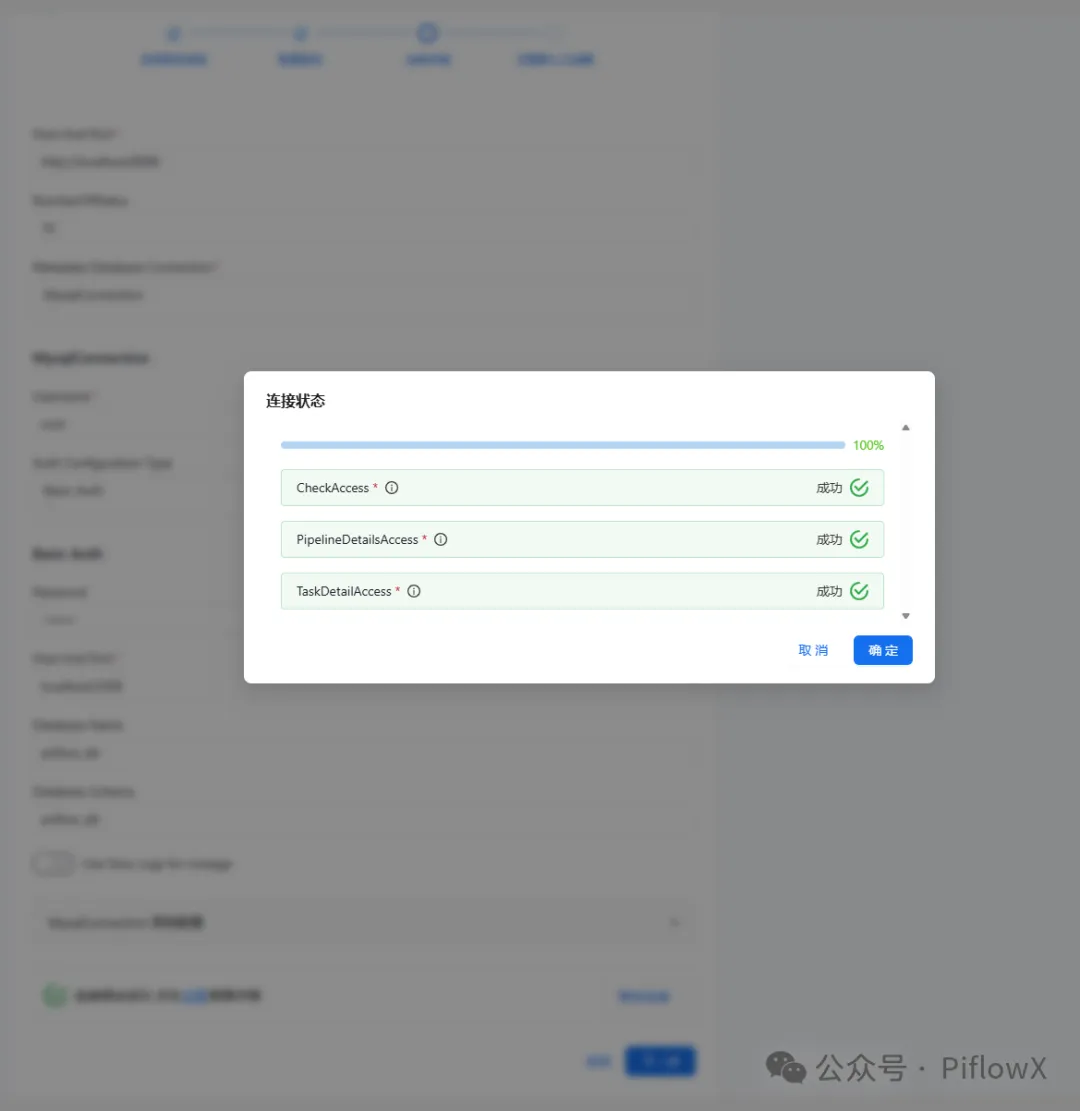
方式一:通过 UI 验证
进入 OpenMetadata UI → 设置→ 服务→ 工作流
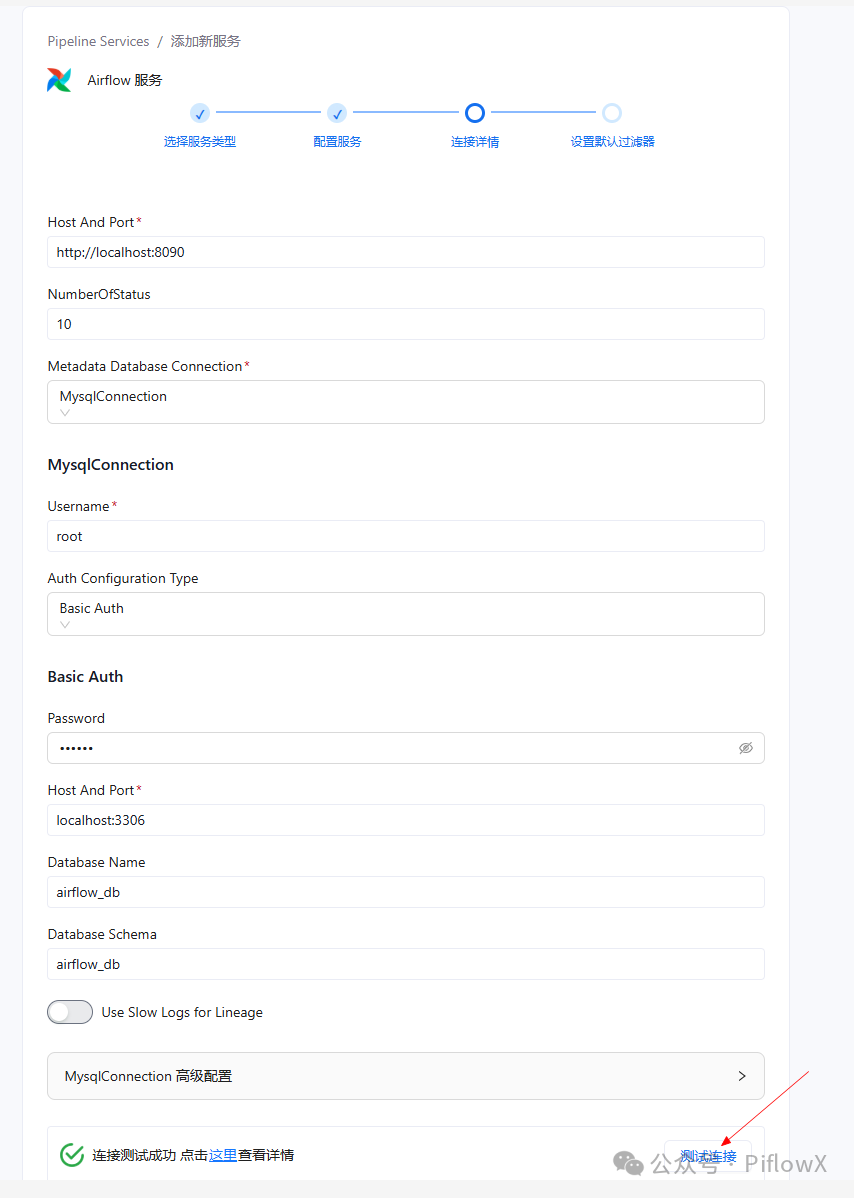
方式二:通过 API 验证
# 在 WSL 中测试 Airflow 健康检查接口
curl -u admin:<password> http://localhost:8099/pluginsv2/api/v2/openmetadata/health-auth

Java 后端也会定期调用此接口检查 Airflow 状态:File: openmetadata-service/src/main/java/org/openmetadata/service/clients/pipeline/airflow/AirflowRESTClient.java (L450-509)
  @Override
  public PipelineServiceClientResponse getServiceStatusInternal() {
    HttpResponse<String> response;
    try {
      String healthUrl = buildURI("health-auth").build().toString();
      response = getRequestAuthenticatedForJsonContent(healthUrl);

      // We can reach the APIs and get the status back from Airflow
      if (response.statusCode() == 200) {
        JSONObject responseJSON = new JSONObject(response.body());
        String ingestionVersion = responseJSON.getString("version");
        return validServerClientVersions(ingestionVersion, SERVER_VERSION)
            ? buildHealthyStatus(ingestionVersion)
            : buildUnhealthyStatus(
                buildVersionMismatchErrorMessage(ingestionVersion, SERVER_VERSION));
      }

      // Auth error when accessing the APIs
      if (response.statusCode() == 401 || response.statusCode() == 403) {
        return buildUnhealthyStatus(
            String.format(
                "Authentication failed for user [%s] trying to access the Airflow APIs at [%s]",
                this.username, serviceURL.toString()));
      }

      // APIs URL not found
      if (response.statusCode() == 404) {
        return buildUnhealthyStatus(
            String.format(
                "Airflow APIs not found at [%s]. Please validate if the OpenMetadata Airflow plugin is installed correctly. %s",
                serviceURL.toString(), DOCS_LINK));
      }

      return buildUnhealthyStatus(
          String.format(
              "Unexpected status response at [%s]: code [%s] - [%s]",
              serviceURL.toString(), response.statusCode(), response.body()));

    } catch (IOException | URISyntaxException e) {
      String exceptionMsg;
      if (e.getMessage() != null) {
        exceptionMsg =
            String.format(
                "Failed to get Airflow status at [%s] due to [%s].",
                serviceURL.toString(), e.getMessage());
      } else {
        exceptionMsg =
            String.format(
                "Failed to connect to Airflow due to %s. Is the host available at %s?",
                e.getCause().toString(), serviceURL.toString());
      }
      return buildUnhealthyStatus(String.format("%s %s", exceptionMsg, DOCS_LINK));
    } catch (InterruptedException e) {
      Thread.currentThread().interrupt();
      return buildUnhealthyStatus(
          String.format(
              "Failed to connect to Airflow due to %s. Is the host available at %s? %s.",
              e.getMessage(), serviceURL.toString(), DOCS_LINK));
    }
  }
七、两个虚拟环境的管理
| 虚拟环境 | 路径 | 用途 |
|---|---|---|
| ingestion env | ~/OpenMetadata/ingestion/env |
metadata ingest 等命令 |
| airflow env | ~/airflow-env |
Airflow + OpenMetadata 插件 |
每次使用时激活对应的虚拟环境:
# 使用 ingestion
source ~/OpenMetadata/ingestion/env/bin/activate

# 使用 Airflow
source ~/airflow-env/bin/activate
八、常见问题速查
| 错误信息 | 原因 | 解决方案 |
|---|---|---|
airflow command error: invalid choice: 'users' |
Airflow 3.x 移除了 users 命令 |
直接运行 airflow standalone,自动创建用户 |
Could not open requirements file: ' ' |
多行命令反斜杠换行未正确处理 | 把 pip install 命令写成一行 |
| Test Connection 按钮灰色不可点击 | Airflow 不可用或未配置 | 启动 Airflow 并配置 openmetadata.yaml |
Authentication failed for user [admin] |
Airflow 密码配置错误 | 检查 openmetadata.yaml 中的 parameters.password |
Airflow APIs not found at [...] |
OpenMetadata 插件未安装 | pip install openmetadata-managed-apis |

AtomGit 是由开放原子开源基金会联合 CSDN 等生态伙伴共同推出的新一代开源与人工智能协作平台。平台坚持“开放、中立、公益”的理念,把代码托管、模型共享、数据集托管、智能体开发体验和算力服务整合在一起,为开发者提供从开发、训练到部署的一站式体验。
更多推荐

 13
13 0
0- 0


 已为社区贡献2条内容

所有评论(0)