私人菜谱向量检索:基于用户隔离的个性化RAG
需求场景
用户A创建了私人菜谱"妈妈的红烧肉",用户B也有一道"秘制红烧肉"。在AI对话中:
- 用户A问"做点红烧的" → 应该召回A的私人菜谱,不应该看到B的
- 用户B问同样的问题 → 应该召回B的,不应该看到A的
这需要向量检索支持用户级数据隔离。
架构设计
双集合方案
Qdrant
├── recipes            ← 系统菜谱(全量,无过滤)
└── private_recipes    ← 私人菜谱(按openid过滤)
为什么不放在同一个集合里用filter区分?因为:
- 系统菜谱搜索不应受
isPrivate过滤影响性能 - 私人菜谱的payload需要额外字段(openid)
- 集合独立,方便单独管理和清理
检索时的3路并发
// chat/index.js - retrieveContext()
async function retrieveContext(message, openid) {
  // 第1路: 系统菜谱向量搜索
  let systemRagRecipes = []
  // ... Qdrant vectorSearch(message, 3) ...

  // 第2路: TF-IDF降级(仅在第1路无结果时)
  if (systemRagRecipes.length === 0) {
    // ... search(message, recipes, 3) ...
  }

  // 第3路: 私人菜谱语义检索(独立于前两路)
  let privateRagRecipes = []
  if (openid && openid !== 'anonymous') {
    const privateResults = await qdrant.searchPrivateRecipes(message, openid, 2)
    const relevant = privateResults.filter(r => r.similarity > 0.3)
    if (relevant.length > 0) {
      privateRagRecipes = relevant.map(r => r.recipe)
      // 拼接到上下文
      contextText += '\n\n以下是用户的私人菜谱库中的相关菜谱:\n'
      contextText += formatContext(relevant)
    }
  }

  // 合并两路结果
  const ragRecipes = [...systemRagRecipes, ...privateRagRecipes]
  return { contextText, ragRecipes }
}
第3路与第1/2路独立,不会因为向量搜索失败而跳过私人菜谱检索。
用户隔离:Qdrant Filter
// chat/qdrant.js - searchPrivateRecipes()
async function searchPrivateRecipes(message, openid, topK = 2) {
  const queryVector = await getEmbedding(message)

  const response = await got.post(
    `${QDRANT_CONFIG.baseUrl}/collections/private_recipes/points/query`,
    {
      json: {
        query: queryVector,
        limit: topK,
        with_payload: true,
        filter: {                    // ← 核心隔离机制
          must: [
            { key: 'openid', match: { value: openid } }
          ]
        }
      }
    }
  )

  return hits.map(hit => ({
    recipe: { ..., isPrivate: true },  // 标记为私人菜谱
    similarity: hit.score
  }))
}
Qdrant的filter在向量搜索阶段就生效,先过滤再计算相似度,不会返回其他用户的数据。
写入链路:双写一致性
私人菜谱的写入涉及两个存储:云数据库(主存储)+ Qdrant(向量索引)。
云函数端
// userProfile/index.js - addPrivateRecipe()
async function addPrivateRecipe(openid, recipeData) {
  // 1. 写入云数据库(同步,主操作)
  const recipe = { ...recipeData, openid, isPrivate: true, ... }
  const { id: recipeId } = await db.collection('recipes').add({ data: recipe })
  recipe._id = recipeId

  // 2. 同步到Qdrant(异步,不阻塞响应)
  qdrantPrivate.upsertPrivateRecipe(recipe, openid).catch(err => {
    console.error('[userProfile] 私人菜谱 Qdrant 同步失败:', err.message)
  })

  return { code: 0, message: '添加成功', data: { recipeId } }
}
设计决策:Qdrant同步是异步的(fire-and-forget),原因:
- 向量生成+网络写入需要3-5秒,不应让用户等待
- 即使Qdrant同步失败,数据库中的菜谱仍然可用(下次编辑时会重新upsert)
- 最终一致性:用户下次编辑菜谱时会重新触发upsert,自动修复
向量写入细节
// userProfile/qdrant-private.js - upsertPrivateRecipe()
async function upsertPrivateRecipe(recipe, openid) {
  await ensurePrivateCollection()  // 自动创建集合(首次)

  // 构建检索文本
  const text = [recipe.name, recipe.description, tags.join(' '), recipe.category, ingredientNames].join(' ')

  // 生成Embedding
  const vector = await getEmbedding(text)

  // 用hashCode生成point ID(同一菜谱始终映射到同一point,实现upsert语义)
  const pointId = Math.abs(hashCode(recipe._id)) % 2147483647

  // 写入Qdrant
  await got.put('.../collections/private_recipes/points', {
    json: {
      points: [{
        id: pointId,
        vector: vector,
        payload: {
          recipeId: recipe._id,   // 关联数据库ID
          openid: openid,          // 用户隔离字段
          name: recipe.name,
          description: recipe.description,
          // ... 其他检索字段
        }
      }]
    }
  })
}
删除链路
删除比写入复杂——需要先按payload找到point ID,再删除:
async function deletePrivateRecipe(recipeId, openid) {
  // Step1: 用scroll API按条件查找point
  const scrollRes = await got.post('.../points/scroll', {
    json: {
      limit: 1,
      with_payload: false,
      filter: {
        must: [
          { key: 'recipeId', match: { value: recipeId } },
          { key: 'openid', match: { value: openid } }
        ]
      }
    }
  })
  const points = scrollResult.result?.points || []
  if (points.length === 0) return

  // Step2: 删除找到的point
  const pointIds = points.map(p => p.id)
  await got.post('.../points/delete', { json: { points: pointIds } })
}
删除时同时过滤recipeId + openid,防止误删其他用户的同ID菜谱。
自动创建集合
首次使用私有菜谱时,private_recipes集合还不存在。ensurePrivateCollection()处理了这个冷启动问题:
async function ensurePrivateCollection() {
  try {
    const checkRes = await got.get('.../collections/private_recipes')
    if (checkData.status === 'ok') return  // 已存在
  } catch (e) {
    // 404,继续创建
  }

  // 创建集合,配置与系统菜谱一致
  await got.put('.../collections/private_recipes', {
    json: {
      vectors: { size: 1024, distance: 'Cosine' }
    }
  })
}
云函数隔离问题
微信云函数是独立部署的,chat和userProfile不能共享模块文件。解决方案:在userProfile中复制了一份精简版的Qdrant操作:
cloudfunctions/
├── chat/
│   ├── qdrant.js          ← 完整版(向量搜索 + 私有菜谱CRUD)
│   └── tfidf.js
└── userProfile/
    └── qdrant-private.js  ← 精简版(仅upsert + delete)
两份代码逻辑相同但依赖不同:chat/qdrant.js需要搜索功能,userProfile/qdrant-private.js只需写入和删除。
上下文格式区分
私人菜谱在注入LLM时会被标记:
// tfidf.js - formatContext()
const privateTag = r.isPrivate ? '[私人菜谱] ' : ''
lines.push(`${i + 1}. ${privateTag}${idTag}${r.name}...`)
LLM看到的上下文:
以下是系统菜谱库中的相关菜谱:
1. [ID:abc123] 红烧肉(中等,60分钟):经典家常菜...

以下是用户的私人菜谱库中的相关菜谱:
2. [私人菜谱] [ID:def456] 妈妈的红烧肉(简单,45分钟):妈妈的味道...
[私人菜谱]标签让LLM知道这是用户自己的菜谱,推荐时可以优先提及。
前端保存入口
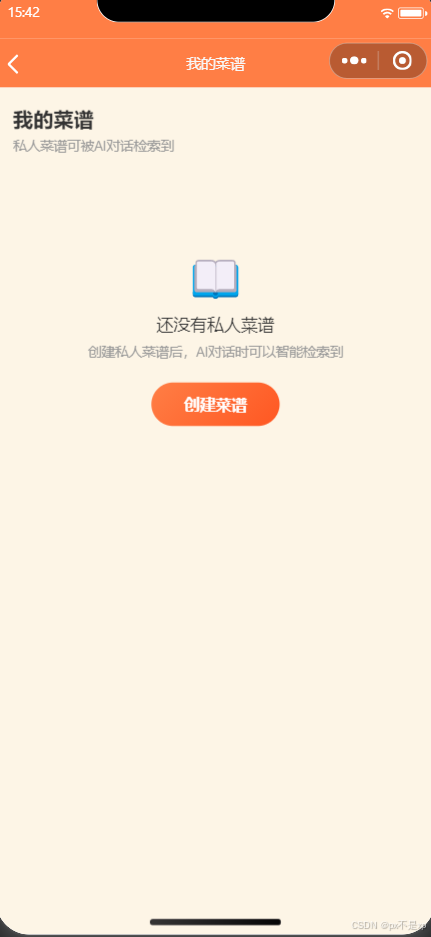
AI聊天页面的菜谱卡片新增"保存菜谱"按钮,一键将AI推荐的菜谱保存到私人菜谱库:
// index.js - saveToMyRecipes()
async saveToMyRecipes(e) {
  // 从聊天消息中找到该菜谱
  let recipe = null;
  for (let i = this.data.chatMessages.length - 1; i >= 0; i--) {
    recipe = msg.recommendations.find(r => this._recipeKey(r) === clickedRecipeId)
    if (recipe) break
  }

  // 提取完整菜谱数据(AI生成的含fullRecipe)
  const recipeData = {
    name: recipe.name,
    description: recipe.reason || '',
    // ...如果有fullRecipe则提取食材/步骤
  }

  // 调用userProfile云函数保存
  const res = await callFunction('userProfile', {
    action: 'addPrivateRecipe',
    data: recipeData
  })
  // 标记为已保存,防止重复
  savedRecipeIds[clickedRecipeId] = true
}
保存成功后,下次AI对话就能语义检索到这道私人菜谱。
小结
私人菜谱向量检索是RAG系统从"通用"走向"个性化"的关键一步。核心设计点:
- 双集合隔离:系统菜谱和私人菜谱分开存储,互不影响
- Qdrant Filter:向量搜索阶段按openid过滤,保证数据隔离
- 异步双写:数据库同步写+Qdrant异步写,保证响应速度
- 自动建集合:首次使用时自动创建
private_recipes,无需手动运维 - 上下文标记:
[私人菜谱]标签帮助LLM区分菜谱来源
作者:「倒灶了队」
项目:灶台导航 - 微信小程序
更新时间:2026-05-18

AtomGit 是由开放原子开源基金会联合 CSDN 等生态伙伴共同推出的新一代开源与人工智能协作平台。平台坚持“开放、中立、公益”的理念,把代码托管、模型共享、数据集托管、智能体开发体验和算力服务整合在一起,为开发者提供从开发、训练到部署的一站式体验。
更多推荐


 10
10 0
0- 0


 已为社区贡献6条内容

所有评论(0)