Runnable组件介绍
Runnable组件动态添加默认参数调用
bind函数用途与使用技巧
在使用 LangChain 开发的时候,某些场合我们希望在一个 Runnable 可运行队列中调用另一个 Runnable,并传递一些常量参数,但是这些参数不是前一个 Runnable 的输出的一部分,也不是用户输入的一部分,而是某个 Runnable 组件的一部分参数。
我们就可以考虑使用 Runnable.bind() 来传递这些默认参数。
例如以下场景:
- 创建了一个 ChatOpenAI 的 LLM 大语言模型,利用这个 LLM 来构建两条链;
- 第 1 条链的 temperature 为 0.7,即生成的内容确定性更强;第 2 条链的 temperature 为 1.2,生成的内容会更随机,更有创意;
- 在构建时,即可通过 LLM.bind(temperature=0.7) 和 LLM.bind(temperature=1.2) 来为 LLM 设置不同的默认调用参数;
bind() 函数用于修改 Runnable 底层的默认调用参数,并在调用时会自动传递该参数,无需手动传递,像原始链一样正常调用即可。所以如果在构建 Runnable 链应用时就知道对应的参数,可以使用 bind 函数来绑定参数(事先指定)。
动态添加默认参数调用
例如在构建链应用时,初始化一个通用的 LLM 大语言模型,在构建链应用时才绑定对应的停止词,可以让 LLM 在更多链上被使用,灵活性更强,而无需实例化多个 LLM,实例如下:
import dotenv
from langchain_core.output_parsers import StrOutputParser
from langchain_core.prompts import ChatPromptTemplate
from langchain_openai import ChatOpenAI

dotenv.load_dotenv()

prompt = ChatPromptTemplate.from_messages([
    (
        "system",
        "你正在执行一项测试,请重复用户传递的内容,除了重复其他均不要操作"
    ),
    ("human", "{query}")
])

llm = ChatOpenAI(model="gpt-4o")

chain = prompt | llm.bind(stop="world") | StrOutputParser()

content = chain.invoke({"query": "Hello world"})

print(content)
输出
Hello
解决多参RunnableLambda函数传参
在 LangChain 中,如果要将一个函数变成 Runnable 组件,可以通过 RunnableLambda 函数进行包装。但是封装后,所有的 Runnable 组件的 invoke 函数,调用时只能传递一个参数(类型不限制),如果原本的函数支持多个参数,并且是必填参数,就会出现报错。
例如:
import random
from langchain_core.runnables import RunnableLambda


def get_weather(location: str, unit: str) -> str:
    """根据传入的位置+温度单位获取对应的天气信息"""
    print("location:", location)
    print("unit:", unit)
    return f"{location}天气为{random.randint(24, 40)}{unit}"


get_weather_runnable = RunnableLambda(get_weather)

resp = get_weather_runnable.invoke({"location": "广州", "unit": "摄氏度"})
print(resp)
上述代码在执行 invoke 时虽然传递了字典,并且包含了 location 和 unit 两个参数,但是这个参数只会作为唯一的一个值,传递给 get_weather 函数的 location 参数,所以实际上 get_weather 函数接收的参数如下:
{
    "location": {"location": "广州", "unit": "摄氏度"},
    "unit": None
}
而使用 bind() 函数绑定添加其他默认调用参数,从而巧妙实现 RunnableLambda 组件接收多个参数,修改示例:
import random
from langchain_core.runnables import RunnableLambda


def get_weather(location: str, unit: str) -> str:
    """根据传入的位置+温度单位获取对应的天气信息"""
    print("location:", location)
    print("unit:", unit)
    return f"{location}天气为{random.randint(24, 40)}{unit}"


get_weather_runnable = RunnableLambda(get_weather).bind(unit="摄氏度")

resp = get_weather_runnable.invoke("广州")
print(resp)
输出内容:
location: {'location': '广州', 'unit': '摄氏度'}
unit: 摄氏度
{'location': '广州', 'unit': '摄氏度'}天气为31摄氏度
bind函数运行流程解析
通过上述的案例,可以知道 .bind() 函数是在构建应用的时候添加上对应的默认调用参数,而在 Runnable.bind() 函数的底层,本质上是往 Runnable 的 kwargs 属性添加对应的字段,并生成一个新的 Runnable,当 Runnable 组件执行调用时(invoke、ainvoke、stream、astream、batch、abatch 等),会自动将 kwargs 字段里的所有参数合并并覆盖默认调用参数。
从而完成动态添加默认调用参数的效果,Runnable.bind() 的运行流程如下: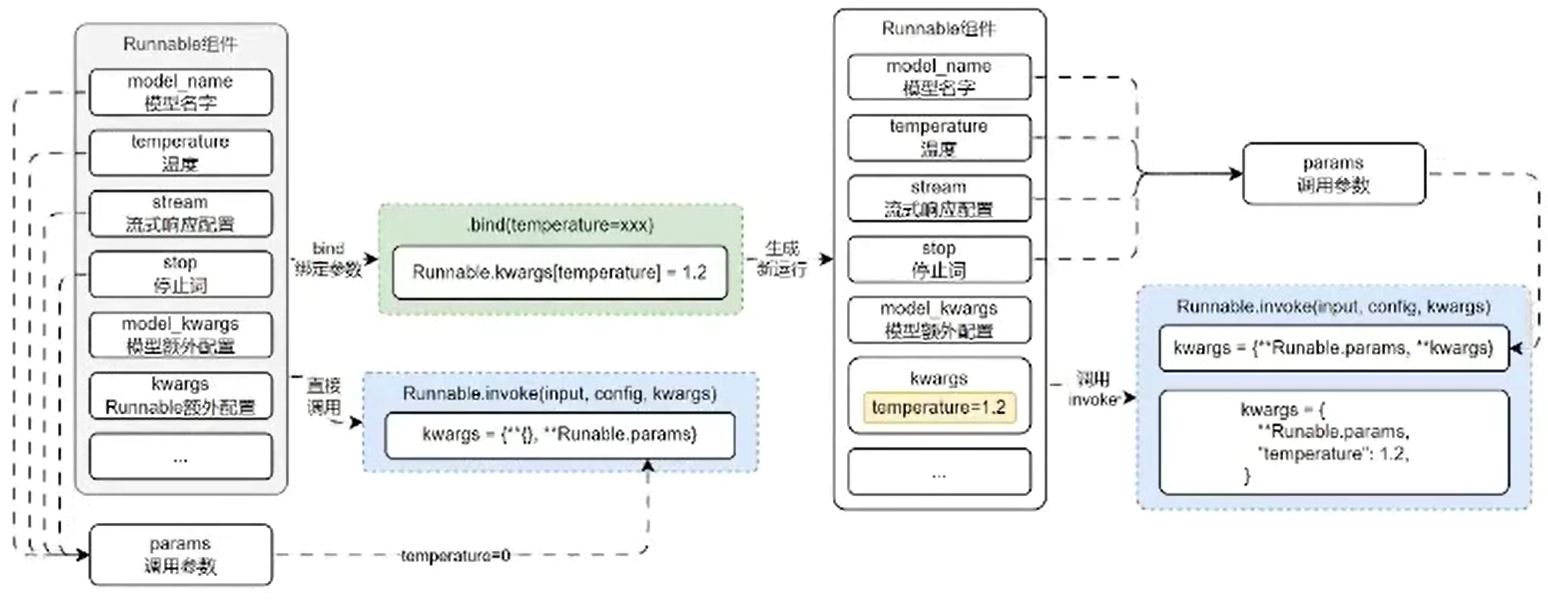
虽然 .bind() 是所有 Runnable 共有的方法,但是并不是所有的 Runnable 组件都支持绑定默认调用参数,部分组件底层并没有默认调用参数的概念,例如 PromptTemplate 底层的 invoke 方法,并没有使用到 .bind() 的逻辑。
# langchain_core/prompts/base.py -> BasePromptTemplate
def invoke(
    self, input: Dict, config: Optional[RunnableConfig] = None
) -> PromptValue:
    config = ensure_config(config)
    if self.metadata:
        config["metadata"] = {**config["metadata"], **self.metadata}
    if self.tags:
        config["tags"] = config["tags"] + self.tags
    return self._call_with_config(
        self._format_prompt_with_error_handling,
        input,
        config,
        run_type="prompt",
    )
Runnable组件配置运行时链内部
configurable_fields方法使用技巧
在某些场合下除了在构建链的时候配置对应的调用参数,也可能让链在执行调用的时候才去配置对应的运行时链内部(运行时修改链相应参数),包括运行时动态调整温度、停止词、传递自定义参数、甚至是运行时动态替换模型为另外一个。
针对这类需求,在 LangChain 也提供了相应的解决方案:
- configurable_fields():和 bind() 方法接近,但是并不是在构建时传递对应的参数,而是在链运行时为链中的给定步骤指定参数,比 bind() 更灵活。
- configurable_alternatives():使用这个方法可以在链运行时,将链中的某一个部分替换成其他替换方案,例如:运行中更换提示模板、更换大语言模型等。
configurable_fields() 方法使用分成两个流程:
- 为 Runnable 定义哪些字段可以在链运行时动态配置;
- 在调用 invoke() 函数时,传递对应的配置信息 configurable 完成动态配置;
例如,在链的调用过程中,将 temperature 温度设置为 0,使用代码如下:
import dotenv
from langchain_core.output_parsers import StrOutputParser
from langchain_core.prompts import PromptTemplate
from langchain_openai import ChatOpenAI
from langchain_core.runnables import ConfigurableField

dotenv.load_dotenv()

# 1. 创建提示模版
prompt = PromptTemplate.from_template("请生成一个小于{x}的随机整数")

# 2.创建LLM大语言模型,并配置temperature参数为可在运行时配置,配置键位llm_temperature
llm = ChatOpenAI(model="gpt-3.5-turbo-16k").configurable_fields(
    temperature = ConfigurableField(
        id="llm_temperature",
        name="大语言模型的温度",
        description="温度越低,大语言模型生成的内容越确定,温度越高,生成内容越随机"
    )
)

# 3. 构建链应用
chain = prompt | llm | StrOutputParser()

# 4.正常调用内容
content = chain.invoke({"x": 1000})
print(content)

print("==============================================")

# 5.将temperature修改为0调用内容
with_config_chain = chain.with_config(configurable={"llm_temperature": 0})
content = with_config_chain.invoke({"x": 1000})
# content = chain.invoke({"x": 1000},config={"configurable":{"llm_temperature": 0}})
print(content)
configurable_fields 运行流程与解析
configurable_fields() 和 bind() 非常接近,但是可配置范围更广,只要 Runnable 组件下有的所有属性,都可以通过 configurable_fields() 进行配置,而 bind() 只能配置调用参数(一般调用参数都和组件参数有关系)。
可以通过以下函数来查看 configurable_fields() 支持配置哪些字段(父类属性也可以配置,但是在这里不显示):
Runnable.__fields__.keys()
例如 PromptTemplate 组件下存在 template 字段,这个字段是提示模板的模板本体,同样也可以快速实现动态配置。
代码如下:
from langchain_core.prompts import PromptTemplate
from langchain_core.runnables import ConfigurableField

# 1. 创建提示模板并配置支持动态配置的字段
prompt = PromptTemplate.from_template("请写一篇关于{subject}主题的冷笑话").configurable_fields(
    template=ConfigurableField(
        id="prompt_template",
        name="提示模板",
        description="提示模板字符串本身",
    )
)

# 2. 传递配置更改prompt_template并调用生成内容
content = prompt.invoke(
    {"subject": "程序员"},
    config={"configurable": {"prompt_template": "请写一篇关于{subject}主题的藏头诗"}}
).to_string()

print(content)
输出结果
请写一篇关于程序员主题的藏头诗
configurable_fields() 的运行原理及流程其实也非常简单,在调用 invoke() 函数调用链的时候,会调用 _replace() 函数来创建一个新的实例,在预处理函数这里,会重新依据原有参数 + 配置的参数创建对应的组件进行覆盖,从而实现配置的修改。
运行流程: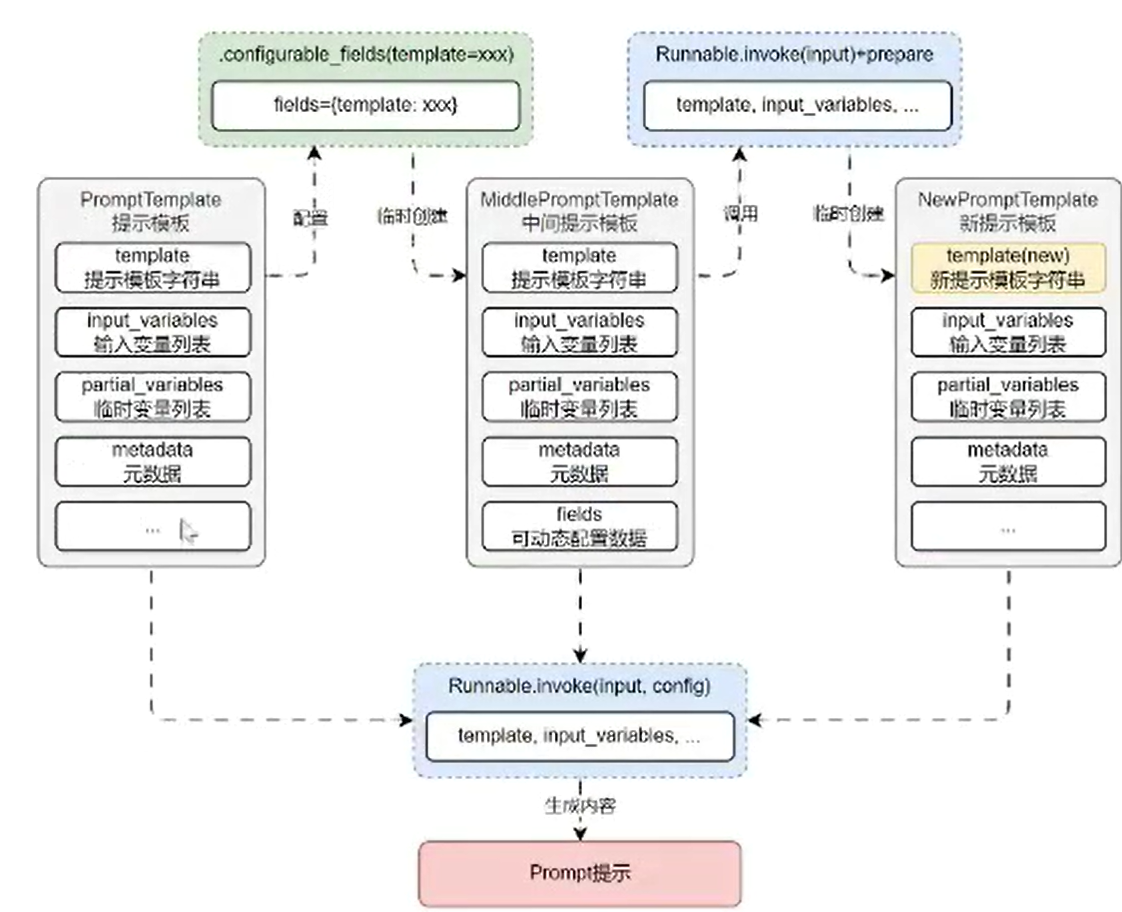
核心代码:
# langchain_core/runnables/configurable.py --> RunnableConfigurableFields
def _prepare(
    self, config: Optional[RunnableConfig] = None
) -> Tuple[Runnable[Input, Output], RunnableConfig]:
    config = ensure_config(config)
    specs_by_id = {spec.id: (key, spec) for key, spec in self.fields.items()}
    configurable_fields = ...
    configurable_single_options = ...
    configurable_multi_options = ...
    configurable = {
        **configurable_fields,
        **configurable_single_options,
        **configurable_multi_options,
    }

    if configurable:
        init_params = {
            k: v
            for k, v in self.default.__dict__.items()
            if k in self.default.__fields__
        }
        return (
            self.default.__class__(**{**init_params, **configurable}),
            config,
        )
    else:
        return (self.default, config)
Runnable组件动态替换运行时组件
configurable_alternatives 方法与使用技巧
在 LLMOps 项目中,应用编排页面可以在调试的过程中替换大语言模型继续之前的对话进行调试,这就是需要运行时组件替换功能,例如在构建的链应用中,动态替换掉特定的模型、提示词等整个组件本身,而不是替换组件里的参数信息。
在 LangChain 中,提供了一个叫 configurable_alternatives() 方法来实现这个功能,所有的 Runnable 组件均支持这个函数。
使用动态替换的流程也存在几个步骤:
- 为有可能替换的组件定义一个键,这样在链应用中就可以区分出来是哪一个组件;
- 接下来为当前的组件选项设置一个默认值,当没有传递任何配置信息时,使用的就是默认值,组件不会发生替换;
- 接下来创建所有替换组件的实例,并为备选方案添加上对应的 key 值,以便配置信息知道值和对应组件的关系;
- 调用链,并传递配置信息,执行对应的动态替换运行组件。
例如,构建一条链,可以同时选择 gpt-4o、gpt-3.5-turbo-16k、文心一言等模型,代码如下:
import dotenv
from langchain_community.chat_models.baidu_qianfan_endpoint import QianfanChatEndpoint
from langchain_core.output_parsers import StrOutputParser
from langchain_core.prompts import ChatPromptTemplate
from langchain_core.runnables import ConfigurableField
from langchain_openai import ChatOpenAI

dotenv.load_dotenv()

# 1. 创建提示模板&定义默认大语言模型
prompt = ChatPromptTemplate.from_template("{query}")
llm = ChatOpenAI(model="gpt-3.5-turbo-16k").configurable_alternatives(
    ConfigurableField(id="llm"),
    gpt4=ChatOpenAI(model="gpt-4o"),
    wenxin=QianfanChatEndpoint(),
)

# 2. 构建链应用
chain = prompt | llm | StrOutputParser()

# 3. 调用链并传递配置信息
content = chain.invoke(
    {"query": "你好,你是什么模型呢?"},
    # config={"configurable": {"llm": "gpt4"}},
    config={"configurable": {"llm": "wenxin"}}
)
print(content)
输出如下:
您好,我是百度研发的知识增强大语言模型,中文名是文心一言,英文名是 ERNIE Bot。我能够与人对话互动,回答问题,协助创作,高效便捷地帮助人们获取信息、知识和灵感。如果您有任何问题,请随时告诉我。
configurable_alternatives 运行流程与解析
configurable_alternatives() 的运行流程非常简单,在底层会通过一个字典 alternatives 存储所有替换组件,并且从传递的 configurable 字典中获取当前需要选择的组件 key,根据对应的 key 在 alternatives 中找到对应的组件返回并执行后续的操作。
运行流程图如下: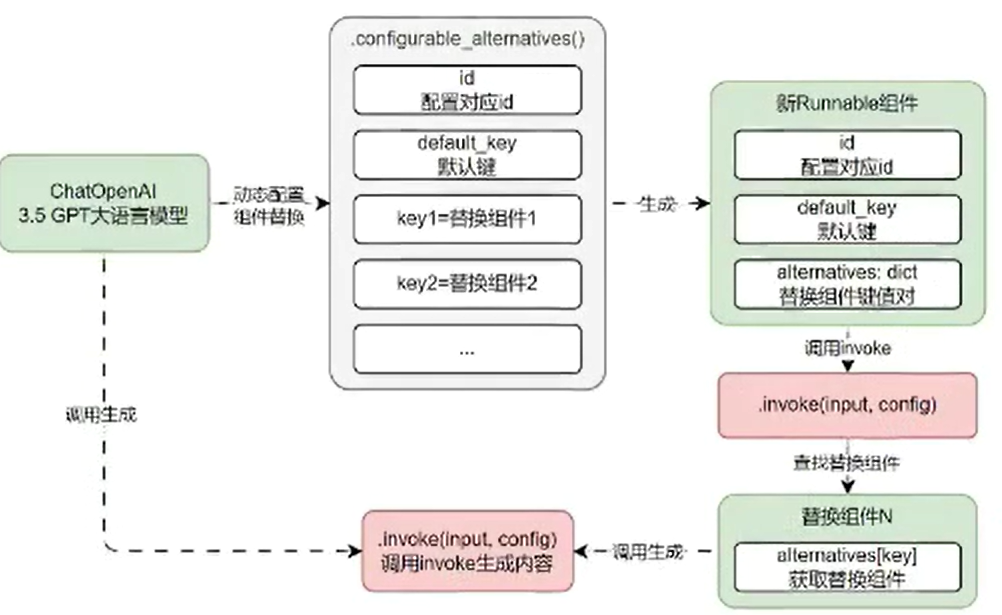
核心代码:
# langchain_core/runnables/configurable.py => RunnableConfigurableAlternatives
def _prepare(
    self, config: Optional[RunnableConfig] = None
) -> Tuple[Runnable[Input, Output], RunnableConfig]:
    config = ensure_config(config)
    which = config.get("configurable", {}).get(self.which.id, self.default_key)
    # remap configurable keys for the chosen alternative
    if self.prefix_keys:
        config = cast(
            RunnableConfig,
            {
                **config,
                "configurable": {
                    _strremoveprefix(k, f"{self.which.id}=={which}/"): v
                    for k, v in config.get("configurable", {}).items()
                },
            },
        )
    # return the chosen alternative
    if which == self.default_key:
        return (self.default, config)
    elif which in self.alternatives:
        alt = self.alternatives[which]
        if isinstance(alt, Runnable):
            return (alt, config)
        else:
            return (alt(), config)
    else:
        raise ValueError(f"unknown alternative: {which}")
Runnable组件重试与回退机制降低程序错误率
Runnable重试机制
在 LangChain 中,针对 Runnable 抛出的异常提供了重试机制 ——with_retry(),当 Runnable 组件出现异常时,支持针对特定的异常或所有异常,重试特定的次数,并且配置每次重试时间的时间进行指数增加。
with_retry 函数的参数如下:
- retry_if_exception_type:需要重试的异常,默认为所有异常,类型为元组。
- wait_exponential_jitter:是否在重试之间添加抖动,默认为 True,即每次重试时间指数增加(并随机再增加 1 秒内的时间)。
- stop_after_attempt:重试的次数,默认为 3,即 3 次重试后没有正常结果就暂停。
例如,想要让一个 Runnable 组件最多重试 2 次,只需在 with_retry() 函数中传递 stop_after_attempt 参数即可,代码:
from langchain_core.runnables import RunnableLambda

counter = -1

def func(x):
    global counter
    counter += 1
    print(f"当前的值为{counter=}")
    return x / counter

chain = RunnableLambda(func).with_retry(stop_after_attempt=2)

resp = chain.invoke(2)

print(resp)
with_retry() 函数的运行原理非常简单,通过构建一个新的 Runnable,在执行调用链的函数时,循环特定次数,直到能正常结束即暂停,并且在每次循环的过程中,休眠特定的时间,运行流程图如下: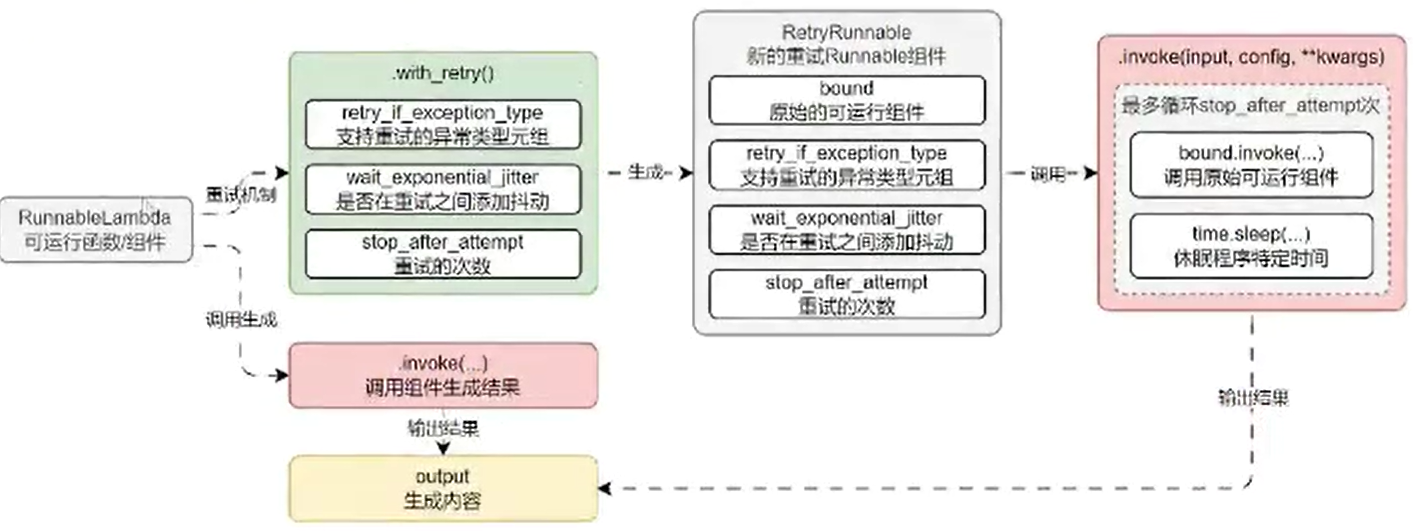
Runnable回退机制
在某些场合中,对于 Runnable 组件的出错,并不想执行重试方案,而是执行特定的备份 / 回退方案,例如 OpenAI 的 LLM 大模型出现异常时,自动切换到文心一言的模型上,在 LangChain 中也提供了对应的回退机制 ——with_fallback。
with_fallback 函数的参数:
- fallbacks:原始组件运行失败,进行回退 / 替换的 Runnable 组件列表,必填参数。
- exceptions_to_handle:需要回退的异常,默认为所有异常,类型为元组。
- exception_key:错误异常键,当指定错误信息后,Runnable 组件产生的错误异常作为输入的一部分传递给回退组件,且以指定的键名存储,默认为 None,表示异常不会传递给回退处理程序。
例如,为 LLM 添加回退备选方案,当 OpenAI 模型调用失败时,自动切换到文心一言执行任务:
import dotenv
from langchain_core.output_parsers import StrOutputParser
from langchain_core.prompts import ChatPromptTemplate
from langchain_openai import ChatOpenAI
from langchain_community.chat_models.baidu_qianfan_endpoint import QianfanChatEndpoint

dotenv.load_dotenv()

# 1. 构建prompt与LLM,并将model切换gpt-3.5-turbo-18k已发出错
prompt = ChatPromptTemplate.from_template("{query}")
llm = ChatOpenAI(model="gpt-3.5-turbo-18k").with_fallbacks([QianfanChatEndpoint()])

# 2. 构建链应用
chain = prompt | llm | StrOutputParser

# 3.调用链并输出结果
content = chain.invoke({"query":"你好,你是?"})
print(content)
运行流程如下: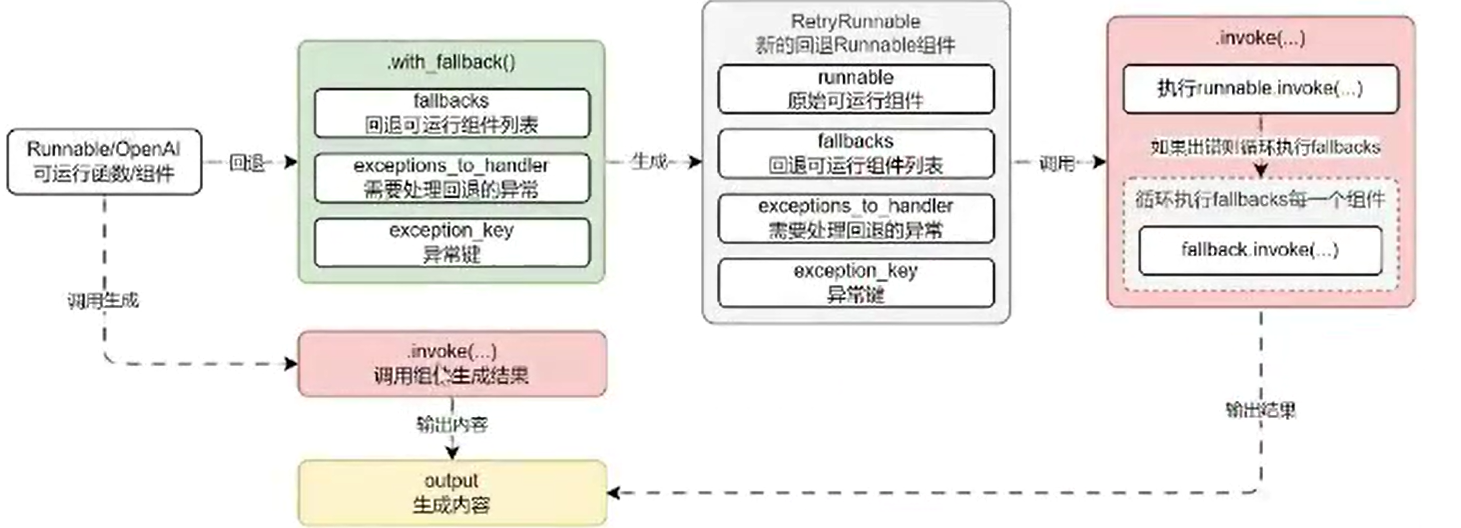
Runnable组件生命周期监听器与使用场景
Runnable生命周期监听器
在 LangChain 中,除了在链执行时传递 config+callbacks 来对链进行监听,Runnable 还提供了一个简约的方法 with_listeners 来监听开始、结束、出错这 3 个常见的生命周期,并且 with_listeners 提供的方法比 callbackHandler 更简洁,更统一。
with_listeners 配置的 on_start、on_end、on_error 函数格式参数一模一样,如下:
- run_obj: Run:运行时对象,内部涵盖了运行 id、运行名称、开始时间、结束时间、运行类型、额外数据、错误信息、输入字典、输出字典、标签等内容。
- config: RunnableConfig:执行时传递的 config 配置信息,类型为字典。
例如,为 RunnableLambda 添加对应的生命周期监听器:
import time

from langchain_core.runnables import RunnableLambda
from langchain_core.tracers.schemas import Run
from langchain_core.runnables import RunnableConfig

def on_start(run_obj: Run, config: RunnableConfig) -> None:
    print("on_start")
    print("run_obj:", run_obj)
    print("config:", config)
    print("================")

def on_end(run_obj: Run, config: RunnableConfig) -> None:
    print("on_end")
    print("run_obj:", run_obj)
    print("config:", config)
    print("================")

def on_error(run_obj: Run, config: RunnableConfig) -> None:
    print("on_error")
    print("run_obj:", run_obj)
    print("config:", config)
    print("================")

# 1.创建RunnableLambda与链
runnable = RunnableLambda(lambda x: time.sleep(x)).with_listeners(
    on_start=on_start,
    on_end=on_end,
    on_error=on_error,
)
chain = runnable

# 2. 调用并执行链
chain.invoke(2, config={"configurablle": {"name":"幕小课"}})
输出内容:
on_start
run_obj: {'input': 2}
config: {'configurable': {'name': '慕小课'}}
====================
on_end
run_obj: id=UUID('3479d7ab-3bc7-4c4c-9db9-aaaff0c1fd04') name='RunnableLambda'
start_time=datetime.datetime(2024, 7, 6, 9, 24, 52, 820817, tzinfo=datetime.timezone.utc) run_type='chain'
end_time=datetime.datetime(2024, 7, 6, 9, 24, 54, 821575, tzinfo=datetime.timezone.utc) extra={'metadata':
{'name': '慕小课'}} error=None serialized={'lc': 1, 'type': 'not_implemented', 'id': ['langchain_core',
'runnables', 'base', 'RunnableLambda'], 'repr': 'RunnableLambda(lambda x: time.sleep(x))'} events=[{'name':
'start', 'time': datetime.datetime(2024, 7, 6, 9, 24, 52, 820817, tzinfo=datetime.timezone.utc)}, {'name':
'end', 'time': datetime.datetime(2024, 7, 6, 9, 24, 54, 821575, tzinfo=datetime.timezone.utc)}] inputs=
{'input': 2} outputs={'output': None} reference_example_id=None parent_run_id=None tags=[] child_runs=[]
trace_id=UUID('3479d7ab-3bc7-4c4c-9db9-aaaff0c1fd04') dotted_order='20240706T092452820817z3479d7ab-3bc7-
4c4c-9db9-aaaff0c1fd04'
config: {'configurable': {'name': '慕小课'}}
====================
with_listeners运行流程与解析
with_listeners() 在底层会将传递的 on_start、on_end、on_error 合并到 config 配置选项中的 callbacks 中,本质上就是使用 callbackHandler 的逻辑来实现对应的监听。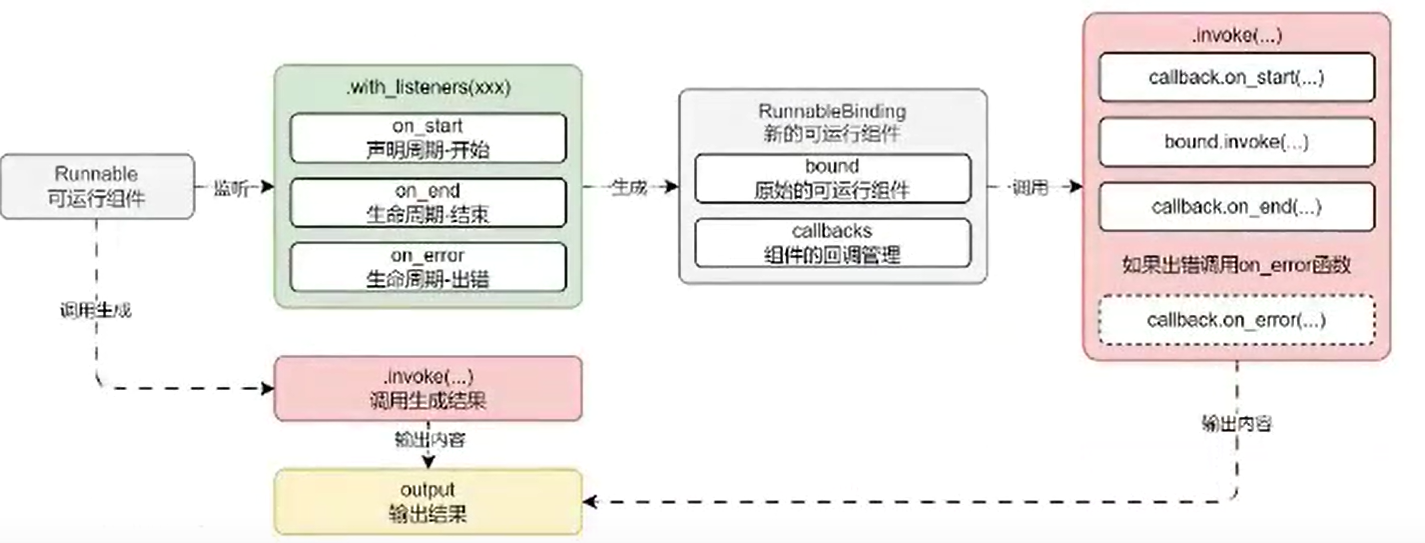
核心源码:
# langchain_core/runnables/base.py -> Runnable
def with_listeners(
    self,
    *,
    on_start: Optional[
        Union[Callable[[Run], None], Callable[[Run, RunnableConfig], None]]
    ] = None,
    on_end: Optional[
        Union[Callable[[Run], None], Callable[[Run, RunnableConfig], None]]
    ] = None,
    on_error: Optional[
        Union[Callable[[Run], None], Callable[[Run, RunnableConfig], None]]
    ] = None,
) -> Runnable[Input, Output]:
    from langchain_core.tracers.root_listeners import RootListenersTracer

    return RunnableBinding(
        bound=self,
        config_factories=[
            lambda config: {
                "callbacks": [
                    RootListenersTracer(
                        config=config,
                        on_start=on_start,
                        on_end=on_end,
                        on_error=on_error,
                    )
                ],
            }
        ],
    )
# langchain_core/runnables/base.py -> RunnableBindingBase
def _merge_configs(self, *configs: Optional[RunnableConfig]) -> RunnableConfig:
    config = merge_configs(self.config, *configs)
    return merge_configs(config, *(f(config) for f in self.config_factories))
基于Runnable封装记忆链实现记忆自动管理
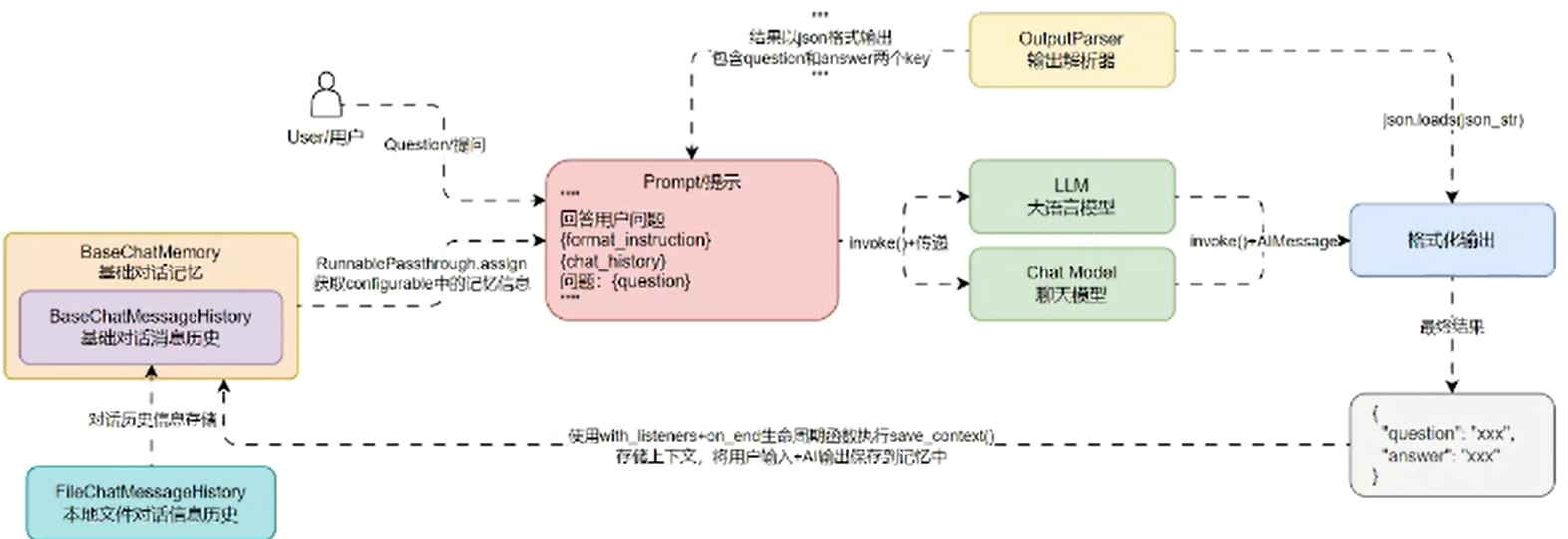
在 Runnable 链应用中,可以考虑将 memory 通过 config+configurable 的形式传递给链,在链的执行函数(invoke、stream 等)中可以通过第 2 个参数获取到对应的 memory 实例,从而获取到记忆历史,并且为链添加 on_end 函数,即可获取到整个链的输入与输出,在 on_end 生命周期中将对话信息存储到记忆系统中。
运行流程如下:
Runnable封装记忆组件思路
@classmethod
def _save_context(cls, run: Run, config: RunnableConfig) -> None:
    configurable = config.get("configurable", {})
    configurable_memory = configurable.get("memory", None)
    if configurable_memory is not None and isinstance(configurable_memory, BaseMemory):
        configurable_memory.save_context(run.inputs, run.outputs)

def debug(self, app_id: UUID):
    """聊天接口"""
    ...
    chain = (
        RunnablePassthrough.assign(
            history=RunnableLambda(self._load_memory_variables) | itemgetter("history")
        ) | prompt | llm | StrOutputParser()
    ).with_listeners(on_end=self._save_context)

    # 5. 调用链生成内容
    chain_input = {"query": req.query.data}
    content = chain.invoke(chain_input, config={"configurable": {"memory": memory}})
    ...
Runnable其他细节功能探索
LCEL 表达式与 Runnable 其他细节功能:

AtomGit 是由开放原子开源基金会联合 CSDN 等生态伙伴共同推出的新一代开源与人工智能协作平台。平台坚持“开放、中立、公益”的理念,把代码托管、模型共享、数据集托管、智能体开发体验和算力服务整合在一起,为开发者提供从开发、训练到部署的一站式体验。
更多推荐



 11
11 0
0- 0


 已为社区贡献14条内容

所有评论(0)