玩转Hermes 2 向导
hermes setup
向导会引导你完成(可以先选择quicksetup,基础的配置和模型设置好,后续按需修改配置):
-
选择 LLM 提供商
-
填入 API Key
-
配置默认工具集
-
设置基础偏好
一、配置provider
| 角色 | 模型 | Provider | 说明 |
| 主力模型 | GLM-5.1 | Z.AI (智谱) | Coding Plan 性价比极高,国内直连 |
| 备选模型 | DeepSeek V4 Pro | DeepSeek | 复杂推理时切过来用 |
| 辅助模型 | DeepSeek V4 | DeepSeek | 上下文压缩、记忆摘要等轻量任务 |
选完 Provider 后,API Key 会存在 ~/.hermes/.env 文件中。
模型随时可切换,不影响已积累的记忆和技能。以后想换模型,再跑一次 hermes model 即可。
国内模型完全够用:GLM、DeepSeek、Kimi、通义千问都支持,不用翻墙也能跑。我自己日常主力 GLM-5.1,编码和文本生成都很稳,价格也划算。
二、注册智谱,为Hermes单独新增一个KEY。
过程中要填写 base url,可以在智谱文档中找到 https://docs.bigmodel.cn/cn/api/introduction
https://open.bigmodel.cn/api/paas/v4
三、其他选择
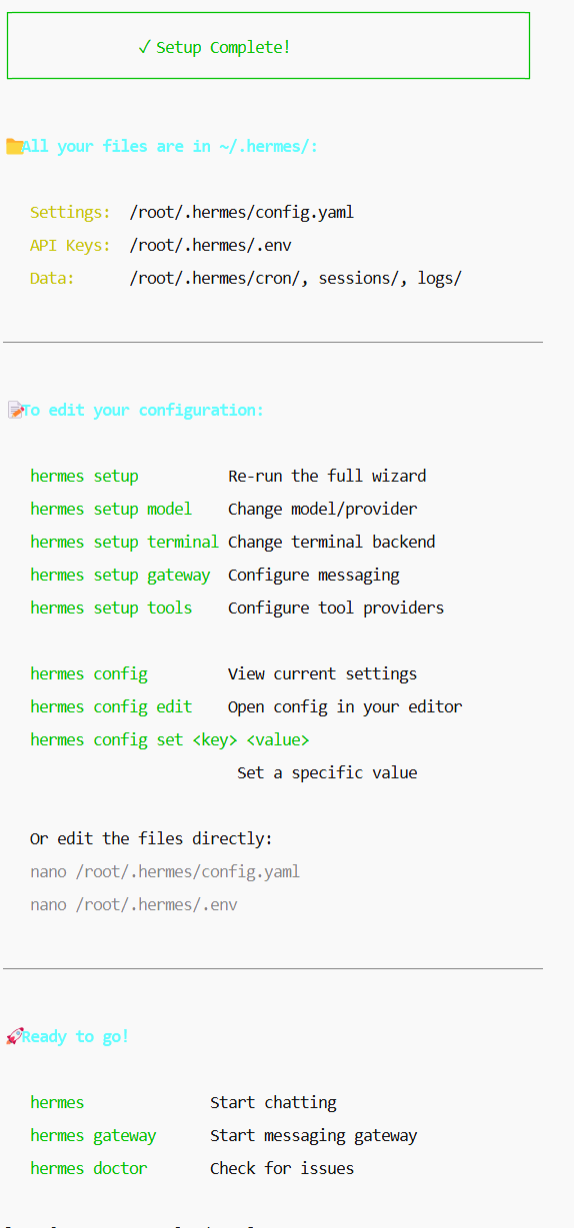
Hermes Gateway 工作目录
Hermes Gateway 的工作目录默认是 ~/.hermes/-4-5。
这是 Hermes 存放所有配置、数据和状态的根目录。在 Linux 系统中,~ 代表当前用户的家目录,因此完整路径通常是 /home/用户名/.hermes/。
📁 目录结构与内容
执行 ls -la ~/.hermes/ 可以看到以下重要文件:
| 文件/目录 | 说明 |
|---|---|
config.yaml | 主配置文件(模型、工具、网关等设置)-5-9 |
.env | API 密钥、Bot Token 等敏感信息-4-5 |
SOUL.md | Agent 的个性/身份设定-3-5 |
sessions/ | 网关会话记录-3 |
memories/ | 持久化记忆存储-3 |
logs/ | 运行时日志-3 |
skills/ | 已安装的技能-3 |
cron/ | 定时任务定义 |
cli我选择了weixin,大功告成。
四、验证安装:hermes doctor
[root@VM-0-10-opencloudos ~]# hermes doctor --fix

┌─────────────────────────────────────────────────────────┐
│                 🩺 Hermes Doctor                        │
└─────────────────────────────────────────────────────────┘

◆ Security Advisories
  ✓ No active security advisories

◆ Python Environment
  ✓ Python 3.11.6
  ⚠ Not in virtual environment (recommended)

◆ Required Packages
  ✓ OpenAI SDK
  ✓ Rich (terminal UI)
  ✓ python-dotenv
  ✓ PyYAML
  ✓ HTTPX
  ✓ Croniter (cron expressions) (optional)
  ⚠ python-telegram-bot (optional, not installed)
  ⚠ discord.py (optional, not installed)

◆ Configuration Files
  ✓ ~/.hermes/.env file exists
  ✓ API key or custom endpoint configured
  ✓ ~/.hermes/config.yaml exists
  ✓ Config version up to date (v23)

◆ Auth Providers
  ⚠ Nous Portal auth (not logged in)
  ⚠ OpenAI Codex auth (not logged in)
    → No Codex credentials stored. Run `hermes auth` to authenticate.
  ⚠ Google Gemini OAuth (not logged in)
  ⚠ MiniMax OAuth (not logged in)
    → codex CLI not installed (optional — only required to import tokens from an existing Codex CLI login)

◆ Directory Structure
  ✓ ~/.hermes directory exists
  ✓ ~/.hermes/cron/ exists
  ✓ ~/.hermes/sessions/ exists
  ✓ ~/.hermes/logs/ exists
  ✓ ~/.hermes/skills/ exists
  ✓ ~/.hermes/memories/ exists
  ✓ ~/.hermes/SOUL.md exists (persona configured)
  ✓ ~/.hermes/memories/ directory exists
    → MEMORY.md not created yet (will be created when the agent first writes a memory)
    → USER.md not created yet (will be created when the agent first writes a memory)
    → ~/.hermes/state.db not created yet (will be created on first session)

◆ Command Installation
  ⚠ Venv entry point not found (hermes not in venv/bin/ or .venv/bin/ — reinstall with pip install -e '.[all]')

◆ External Tools
  ✓ git
  ⚠ ripgrep (rg) not found (file search uses grep fallback)
    → Install for faster search: sudo apt install ripgrep
  ⚠ docker not found (optional)
  ✓ Node.js
  ✓ agent-browser (browser automation)
  ✓ Playwright Chromium (browser engine)

◆ API Connectivity
  ⚠ OpenRouter API (not configured)
  ✗ Z.AI / GLM           (invalid API key)

◆ Submodules
  ⚠ tinker-atropos not found (run: git submodule update --init --recursive)

◆ Tool Availability
  ✓ browser
  ✓ clarify
  ✓ code_execution
  ✓ cronjob
  ✓ terminal
  ✓ delegation
  ✓ file
  ✓ memory
  ✓ session_search
  ✓ skills
  ✓ todo
  ✓ tts
  ✓ vision
  ✓ video
  ✓ kanban (runtime-gated; loaded only for dispatcher-spawned workers)
  ⚠ browser-cdp (system dependency not met)
  ⚠ computer_use (system dependency not met)
  ⚠ discord (missing DISCORD_BOT_TOKEN)
  ⚠ discord_admin (missing DISCORD_BOT_TOKEN)
  ⚠ feishu_doc (system dependency not met)
  ⚠ feishu_drive (system dependency not met)
  ⚠ homeassistant (system dependency not met)
  ⚠ image_gen (system dependency not met)
  ⚠ moa (missing OPENROUTER_API_KEY)
  ⚠ rl (missing TINKER_API_KEY, WANDB_API_KEY)
  ⚠ messaging (system dependency not met)
  ⚠ video_gen (system dependency not met)
  ⚠ web (missing EXA_API_KEY, PARALLEL_API_KEY, TAVILY_API_KEY, FIRECRAWL_API_KEY, FIRECRAWL_API_URL, FIRECRAWL_GATEWAY_URL, TOOL_GATEWAY_DOMAIN, TOOL_GATEWAY_SCHEME, TOOL_GATEWAY_USER_TOKEN)
  ⚠ hermes-yuanbao (system dependency not met)

◆ Skills Hub
  ⚠ Skills Hub directory not initialized (run: hermes skills list)
  ⚠ No GITHUB_TOKEN (60 req/hr rate limit — set in ~/.hermes/.env for better rates)

◆ Memory Provider
  ✓ Built-in memory active (no external provider configured — this is fine)

────────────────────────────────────────────────────────────
  Found 3 issue(s) to address:

  1. Check GLM_API_KEY in .env
  2. Run 'hermes setup' to configure missing API keys for full tool access
  3. Reinstall entry point: cd /usr/local/lib/python3.11/site-packages && source venv/bin/activate && pip install -e '.[all]'
问题1: 1. Check GLM_API_KEY in .env
vi ~/.hermes/.env
GLM_API_KEY=你的智谱API密钥 这里我不小心弄成了API的名称了,修改保存。
验证方法1:再次执行hermes doctor,发现问题1消失了。
验证方法2:hermes chat,可以看到调用到GLM了。
hermes chat
██╗ ██╗███████╗██████╗ ███╗ ███╗███████╗███████╗ █████╗ ██████╗ ███████╗███╗ ██╗████████╗
██║ ██║██╔════╝██╔══██╗████╗ ████║██╔════╝██╔════╝ ██╔══██╗██╔════╝ ██╔════╝████╗ ██║╚══██╔══╝
███████║█████╗ ██████╔╝██╔████╔██║█████╗ ███████╗█████╗███████║██║ ███╗█████╗ ██╔██╗ ██║ ██║
██╔══██║██╔══╝ ██╔══██╗██║╚██╔╝██║██╔══╝ ╚════██║╚════╝██╔══██║██║ ██║██╔══╝ ██║╚██╗██║ ██║
██║ ██║███████╗██║ ██║██║ ╚═╝ ██║███████╗███████║ ██║ ██║╚██████╔╝███████╗██║ ╚████║ ██║
╚═╝ ╚═╝╚══════╝╚═╝ ╚═╝╚═╝ ╚═╝╚══════╝╚══════╝ ╚═╝ ╚═╝ ╚═════╝ ╚══════╝╚═╝ ╚═══╝ ╚═╝
╭──────────────────────────────────────────────────────────────────────────────────────────────────────────────────────── Hermes Agent v0.13.0 (2026.5.7) ────────────────────────────────────────────────────────────────────────────────────────────────────────────────────────╮
│ Available Tools │
│ ⠀⠀⠀⠀⠀⠀⠀⠀⠀⠀⢀⣀⡀⠀⣀⣀⠀⢀⣀⡀⠀⠀⠀⠀⠀⠀⠀⠀⠀⠀ browser: browser_back, browser_click, ... │
│ ⠀⠀⠀⠀⠀⠀⢀⣠⣴⣾⣿⣿⣇⠸⣿⣿⠇⣸⣿⣿⣷⣦⣄⡀⠀⠀⠀⠀⠀⠀ browser-cdp: browser_cdp │
│ ⠀⢀⣠⣴⣶⠿⠋⣩⡿⣿⡿⠻⣿⡇⢠⡄⢸⣿⠟⢿⣿⢿⣍⠙⠿⣶⣦⣄⡀⠀ clarify: clarify │
│ ⠀⠀⠉⠉⠁⠶⠟⠋⠀⠉⠀⢀⣈⣁⡈⢁⣈⣁⡀⠀⠉⠀⠙⠻⠶⠈⠉⠉⠀⠀ code_execution: execute_code │
│ ⠀⠀⠀⠀⠀⠀⠀⠀⠀⠀⣴⣿⡿⠛⢁⡈⠛⢿⣿⣦⠀⠀⠀⠀⠀⠀⠀⠀⠀⠀ computer_use: computer_use │
│ ⠀⠀⠀⠀⠀⠀⠀⠀⠀⠀⠿⣿⣦⣤⣈⠁⢠⣴⣿⠿⠀⠀⠀⠀⠀⠀⠀⠀⠀⠀ cronjob: cronjob │
│ ⠀⠀⠀⠀⠀⠀⠀⠀⠀⠀⠀⠈⠉⠻⢿⣿⣦⡉⠁⠀⠀⠀⠀⠀⠀⠀⠀⠀⠀⠀ delegation: delegate_task │
│ ⠀⠀⠀⠀⠀⠀⠀⠀⠀⠀⠀⠀⠘⢷⣦⣈⠛⠃⠀⠀⠀⠀⠀⠀⠀⠀⠀⠀⠀⠀ discord: discord │
│ ⠀⠀⠀⠀⠀⠀⠀⠀⠀⠀⠀⢠⣴⠦⠈⠙⠿⣦⡄⠀⠀⠀⠀⠀⠀⠀⠀⠀⠀⠀ (and 20 more toolsets...) │
│ ⠀⠀⠀⠀⠀⠀⠀⠀⠀⠀⠀⠸⣿⣤⡈⠁⢤⣿⠇⠀⠀⠀⠀⠀⠀⠀⠀⠀⠀⠀ │
│ ⠀⠀⠀⠀⠀⠀⠀⠀⠀⠀⠀⠀⠀⠉⠛⠷⠄⠀⠀⠀⠀⠀⠀⠀⠀⠀⠀⠀⠀⠀ Available Skills │
│ ⠀⠀⠀⠀⠀⠀⠀⠀⠀⠀⠀⠀⢀⣀⠑⢶⣄⡀⠀⠀⠀⠀⠀⠀⠀⠀⠀⠀⠀⠀ No skills installed │
│ ⠀⠀⠀⠀⠀⠀⠀⠀⠀⠀⠀⠀⣿⠁⢰⡆⠈⡿⠀⠀⠀⠀⠀⠀⠀⠀⠀⠀⠀⠀ │
│ ⠀⠀⠀⠀⠀⠀⠀⠀⠀⠀⠀⠀⠈⠳⠈⣡⠞⠁⠀⠀⠀⠀⠀⠀⠀⠀⠀⠀⠀⠀ 29 tools · 0 skills · /help for commands │
│ ⠀⠀⠀⠀⠀⠀⠀⠀⠀⠀⠀⠀⠀⠀⠈⠀⠀⠀⠀⠀⠀⠀⠀⠀⠀⠀⠀⠀⠀⠀ │
│ │
│ glm-5.1 · Nous Research │
│ /root │
│ Session: 20260515_225816_c95a96 │
╰─────────────────────────────────────────────────────────────────────────────────────────────────────────────────────────────────────────────────────────────────────────────────────────────────────────────────────────────────────────────────────────────────────────────────╯
Welcome to Hermes Agent! Type your message or /help for commands.
A legacy OpenClaw directory was detected at ~/.openclaw/.
To port your config, memory, and skills over to Hermes, run `hermes claw migrate`.
If you've already migrated and want to archive the old directory, run `hermes claw cleanup` (renames it to ~/.openclaw.pre-migration — OpenClaw will stop working after this).
This tip only shows once.
✦ Tip: /debug uploads a support bundle (system info + logs) and returns shareable links — works in chat too.
⚠ tirith security scanner enabled but not available — command scanning will use pattern matching only
────────────────────────────────────────
● 你好
Initializing agent...
────────────────────────────────────────
─ ⚕ Hermes ────────────────────────────────────────────────────────────────────────────────────────────────────────────────────────────────────────────────────────────────────────────────────────────────────────────────────────────────────────────────────────────────────
你好!有什么我可以帮你的吗?
─────────────────────────────────────────────────────────────────────────────────────────────────────────────────────────────────────────────────────────────────────────────────────────────────────────────────────────────────────────────────────────────────────────────────
⚕ glm-5.1 │ 12.4K/200K │ [█░░░░░░░░░] 6% │ 13s │ ⏲ 4s
问题2:Run 'hermes setup' to configure missing API keys
看到 hermes doctor 提示 "Run 'hermes setup' to configure missing API keys",这并不是你配置错误,而是因为 hermes doctor 的检查逻辑设计上,对 API 密钥(尤其是 OpenRouter 等通用提供商)的存在性检查比较严格-5。
不过别担心,既然你之前已经成功执行过 hermes setup,这个问题完全不影响实际使用,只是诊断工具的提示而已。
问题3: Reinstall entry point: cd /usr/local/lib/python3.11/site-packages && source venv/bin/activate && pip install -e '.[all]'
这其实是 doctor 检测到你当前的安装状态不符合它的预期,主动给出的修复指令。
deepseek的答复:
那你的意思是不做也没有问题吧
是的,你的理解完全正确。
简单来说:只要 hermes chat 能正常工作,就可以完全忽略 hermes doctor 的这条提示。

AtomGit 是由开放原子开源基金会联合 CSDN 等生态伙伴共同推出的新一代开源与人工智能协作平台。平台坚持“开放、中立、公益”的理念,把代码托管、模型共享、数据集托管、智能体开发体验和算力服务整合在一起,为开发者提供从开发、训练到部署的一站式体验。
更多推荐


 8
8 0
0- 0


 已为社区贡献2条内容

所有评论(0)