抓住 AI 人工智能的风口之第 2 章 —— 搭建 SpringBoot 新项目脚手架
1、引言
以一个简单的电商客服项目,把 SpringBoot 企业级项目开发用到的技术点涵盖进来,起到抛砖引玉的效果。当然,还有很多技术点没有引进来,也有很多人直接使用开源的项目(比如:若依框架 https://gitee.com/y_project/RuoYi),如果要你自己搭建一套架构,或者去理解某一套架构的设计逻辑,你能搞得定吗?IT 界不缺会使用框架和工具的人,缺的是会造工具的人。
纸上得来终觉浅,绝知此事要躬行。
2、脚手架技术点拆解
源代码已经放到 Gitee:https://gitee.com/biandanLoveyou/customer-service/tree/01-project-init/
master 分支是最终系统分支(Spring AI 电商客服系统)。01-project-init 是新项目脚手架分支。
接下来以【用户登录】和【退出登录】2个功能点展开技术拆解。
2.1 代码结构图
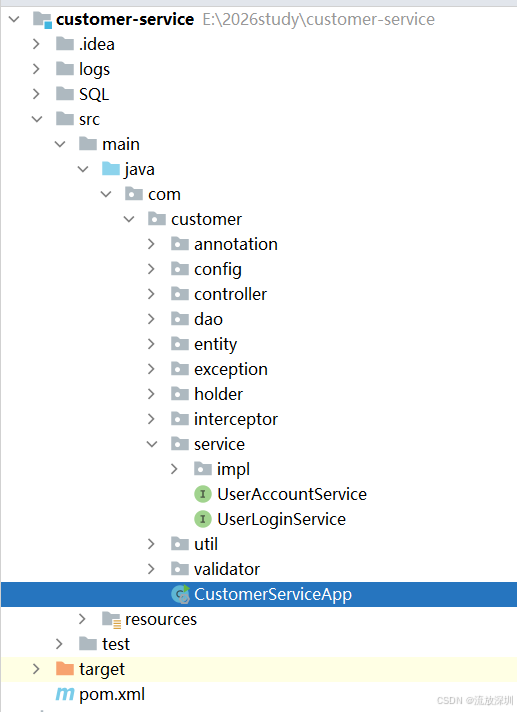
代码目录结构拆解:
1、logs:这是系统运行时生成 log 日志的目录,默认是在当前项目下会自动创建 log 文件夹,并以配置的策略进行日志文件滚动。
2、SQL:这是系统里操作的数据库文件,建议放在项目下,方便后续维护。企业级项目开发资料的完善性始终是一个难题,所以放在代码仓库里是最稳妥的做法。
3、annotation:存放自定义的注解类。用注解+拦截器或者过滤器来实现某些功能是常见的做法。
4、config:系统的配置信息类。比如:Redis配置、消息中间件配置等。
5、controller:业务控制层类。一般对接 web 的 API 接口类。
6、dao:持久化类。一般对接数据库、ES 的类。
7、entity:实体类。包括 dto 入参类、vo 视图类、po 数据库映射类等等。
8、exception:定义运行时异常和全局异常类。
9、holder:系统上下文类。一般将数据存入上下文,可以在系统中获取到信息(多线程获取不到需要额外处理)。
10、interceptor:拦截器。在一次请求前、中、后要处理一些逻辑,可以放在这里。
11、service/impl:业务逻辑接口定义和实现类。这是代码的核心处理类。
12、util:工具类。大部分工具类都可以使用 hutool 工具包,极个别需要自定义的可以写在这里。
13、validator:参数校验类。
14、resources:系统资源类。比如系统配置、日志配置、mybatis配置等等。
15、pom.xml:项目依赖管理。
2.2 核心技术点拆解
2.2.1 统一接口返回
一套好的系统必然会设计统一的接口调用和返回规范,这里定义一个调用返回类 CallResult(类名可以自定义)。
package com.customer.util;

import com.customer.entity.enums.SysExceptionEnum;
import lombok.Data;

import java.io.Serializable;

/**
 * @author CSDN流放深圳
 * @description 封装统一的返回信息,返回的状态码使用标准的状态码
 * @create 2026-05-12 17:40
 * @since 1.0.0
 */
@Data
public class CallResult<T> implements Serializable {

    private static final long serialVersionUID = 1L;

    public static final int SUCCESS_CODE = 0;

    public static final String SUCCESS_MSG = "success";

    public static final int ERROR_CODE = -1;

    public static final String ERROR_MSG = "error";

    /**
     * 返回码
     */
    private int code;

    /**
     * 消息
     */
    private String message;

    /**
     * 数据
     */
    private T data;

    /**
     * 无参构造函数
     */
    public CallResult() {
    }

    /**
     * 全参构造函数
     *
     * @param code
     * @param message
     * @param data
     */
    public CallResult(int code, String message, T data) {
        this.code = code;
        this.message = message;
        this.data = data;
    }

    /**
     * 调用成功,返回系统默认的消息体
     *
     * @return
     */
    public static CallResult success() {
        return new CallResult(SUCCESS_CODE, SUCCESS_MSG, "");
    }


    /**
     * 调用成功,返回数据
     *
     * @param data
     * @return
     */
    public static <T> CallResult success(T data) {
        return new CallResult(SUCCESS_CODE, SUCCESS_MSG, data);
    }

    /**
     * 调用成功,返回自定义消息、数据
     *
     * @param message
     * @param data
     * @return
     */
    public static <T> CallResult success(String message, T data) {
        return new CallResult(SUCCESS_CODE, message, data);
    }

    /**
     * 调用成功,返回自定义 code、message、data
     *
     * @param code
     * @param message
     * @param data
     * @return
     */
    public static <T> CallResult success(int code, String message, T data) {
        return new CallResult(code, message, data);
    }

    /**
     * 调用失败,返回系统默认的消息体
     *
     * @return
     */
    public static CallResult error() {
        return new CallResult(ERROR_CODE, ERROR_MSG, "");
    }

    /**
     * 调用失败,返回自定义提示消息
     *
     * @param message
     * @return
     */
    public static CallResult error(String message) {
        return new CallResult(ERROR_CODE, message, "");
    }

    /**
     * 调用失败,返回数据
     *
     * @param data
     * @return
     */
    public static <T> CallResult error(T data) {
        return new CallResult(ERROR_CODE, ERROR_MSG, data);
    }

    /**
     * 调用失败,返回自定义消息、数据
     *
     * @param message
     * @param data
     * @return
     */
    public static <T> CallResult error(String message, T data) {
        return new CallResult(ERROR_CODE, message, data);
    }

    /**
     * 调用失败,返回自定义消息、数据
     *
     * @param code
     * @param message
     * @param data
     * @return
     */
    public static <T> CallResult error(int code, String message, T data) {
        return new CallResult(code, message, data);
    }

    /**
     * 调用失败,返回系统错误枚举类
     * @param exceptionEnum
     * @return
     */
    public static CallResult error(SysExceptionEnum exceptionEnum) {
        return new CallResult(exceptionEnum.getCode(), exceptionEnum.getDes(), "");
    }

}
2.2.2 运行时异常和全局异常捕获
在系统运行时出现未知异常能够捕获并按照规范给调用者返回。
1、定义运行时异常类(类名可以自己修改)CustomerRuntimeException,并继承 RuntimeException,就可以实现自定义运行时异常的功能。
package com.customer.exception;

import com.customer.entity.enums.SysExceptionEnum;
import lombok.Data;

/**
 * @author CSDN流放深圳
 * @description 自定义运行时异常
 * @create 2026-05-12 17:21
 */
@Data
public class CustomerRuntimeException extends RuntimeException {

    /**
     * 系统异常枚举类型
     */
    private SysExceptionEnum exceptionEnum;

    /**
     * 返回的消息
     */
    private String message;

    /**
     * 返回的额外数据
     */
    private Object data;


    /**
     * 无参构造函数,默认返回 500 的错误
     */
    public CustomerRuntimeException() {
        this(SysExceptionEnum.SYS_ERROR, SysExceptionEnum.SYS_ERROR.getDes());
    }

    /**
     * 抛出自定义异常消息
     *
     * @param message
     */
    public CustomerRuntimeException(String message) {
        this(SysExceptionEnum.SYS_ERROR, message);
    }

    /**
     * 抛出系统异常错误
     *
     * @param exceptionEnum
     */
    public CustomerRuntimeException(SysExceptionEnum exceptionEnum) {
        this(exceptionEnum, exceptionEnum.getDes());
    }

    /**
     * 系统异常:带 message 的构造函数
     *
     * @param exceptionEnum
     * @param message
     */
    public CustomerRuntimeException(SysExceptionEnum exceptionEnum, String message) {
        this.exceptionEnum = exceptionEnum;
        this.message = message;
    }

    /**
     * 系统异常:带 data 的构造函数
     *
     * @param data
     */
    public CustomerRuntimeException(SysExceptionEnum exceptionEnum, Object data) {
        this.exceptionEnum = exceptionEnum;
        this.data = data;
    }

    /**
     * 构造函数
     *
     * @param exceptionEnum
     * @param message
     * @param data
     */
    public CustomerRuntimeException(SysExceptionEnum exceptionEnum, String message, Object data) {
        this.exceptionEnum = exceptionEnum;
        this.message = message;
        this.data = data;
    }

}
2、在定义一个全局异常捕获类 CustomerExceptionAdvance,需要增加注解 @RestControllerAdvice 才能生效。
package com.customer.exception;

import cn.hutool.core.util.StrUtil;
import com.customer.entity.enums.SysExceptionEnum;
import com.customer.util.CallResult;
import jakarta.servlet.http.HttpServletRequest;
import jakarta.validation.ConstraintViolation;
import jakarta.validation.ConstraintViolationException;
import lombok.extern.slf4j.Slf4j;
import org.springframework.validation.BindException;
import org.springframework.validation.FieldError;
import org.springframework.validation.ObjectError;
import org.springframework.web.bind.MethodArgumentNotValidException;
import org.springframework.web.bind.annotation.ExceptionHandler;
import org.springframework.web.bind.annotation.RestControllerAdvice;
import org.springframework.web.context.request.RequestContextHolder;
import org.springframework.web.context.request.ServletRequestAttributes;

import java.util.ArrayList;
import java.util.List;
import java.util.stream.Collectors;

/**
 * @author CSDN流放深圳
 * @description 全局的异常捕捉类
 * @create 2026-05-12 17:21
 */
@RestControllerAdvice
@Slf4j
public class CustomerExceptionAdvance {

    /**
     * 捕捉运行时异常
     *
     * @param exception
     * @return
     */
    @ExceptionHandler(CustomerRuntimeException.class)
    public final CallResult runtimeException(CustomerRuntimeException exception) {
        SysExceptionEnum exceptionEnum = exception.getExceptionEnum();
        String message = exception.getMessage();
        //如果系统异常对象为空,则获取业务层异常
        if (null != exceptionEnum) {
            log.error("{}", exception);//系统日志 error 级别
            return CallResult.error(exceptionEnum.getCode(), StrUtil.isNotBlank(message) ? message : exception.getMessage(), exception.getData());
        }
        return CallResult.error(SysExceptionEnum.SYS_ERROR.getCode(), SysExceptionEnum.SYS_ERROR.getDes(), null != exception.getCause() ? exception.getCause().getMessage() : exception.getMessage());
    }

    /**
     * 捕捉未知抛出的异常
     *
     * @param exception
     * @return
     */
    @ExceptionHandler(Exception.class)
    public final CallResult handleException(Exception exception) {
        HttpServletRequest request = ((ServletRequestAttributes) RequestContextHolder.getRequestAttributes()).getRequest();
        log.error("error request url:{},request method:{}", request.getRequestURI(), request.getMethod());
        log.error("exception:{}", exception);
        return CallResult.error(SysExceptionEnum.SYS_ERROR.getCode(), SysExceptionEnum.SYS_ERROR.getDes(), null != exception.getCause() ? exception.getCause().getMessage() : exception.getMessage());
    }

    /**
     * 参数校验异常
     * 前端提交的方式为json格式有效
     */
    @ExceptionHandler(MethodArgumentNotValidException.class)
    public CallResult MethodArgumentNotValidExceptionHandler(MethodArgumentNotValidException e) {
        List<ObjectError> allErrors = e.getBindingResult().getAllErrors();
        List<String> msgList = new ArrayList<>();
        for (ObjectError allError : allErrors) {
            msgList.add(allError.getDefaultMessage());
        }
        return new CallResult(SysExceptionEnum.BAD_REQUEST.getCode(), msgList.toString(), "");
    }


    /**
     * 参数异常校验
     */
    @ExceptionHandler(value = ConstraintViolationException.class)
    public CallResult handler(ConstraintViolationException e) {
        List<String> msgList = new ArrayList<>();
        for (ConstraintViolation<?> constraintViolation : e.getConstraintViolations()) {
            msgList.add(constraintViolation.getMessage());
        }
        return new CallResult(SysExceptionEnum.BAD_REQUEST.getCode(), msgList.toString(), "");
    }

    /**
     * 参数校验异常
     */
    @ExceptionHandler(BindException.class)
    public CallResult ConstraintViolationExceptionHandler(BindException e) {
        List<FieldError> fieldErrors = e.getBindingResult().getFieldErrors();
        List<String> msgList = fieldErrors.stream()
                .map(o -> o.getDefaultMessage())
                .collect(Collectors.toList());
        return new CallResult(SysExceptionEnum.BAD_REQUEST.getCode(), msgList.toString(), "");
    }
}
3、定义异常描述的枚举类 SysExceptionEnum ,这样可以统一管理异常描述信息,避免在团队开发过程中每个人都写硬编码在代码里。还方便后续实现国际化。当然,还可以增加其它业务的枚举类,用于区分系统异常或者业务异常:
package com.customer.entity.enums;

import lombok.Getter;

/**
 * @author CSDN流放深圳
 * @description 系统抛出的异常枚举类
 * @create 2026-05-12 17:45
 * @since 1.0.0
 */
@Getter
public enum SysExceptionEnum {

    BAD_REQUEST(400, "请求参数异常"),
    UN_LOGIN(401, "用户未登录"),
    NOT_FOUND(404, "请求路径暂未找到"),
    SYS_ERROR(500, "系统异常"),

    /**************** 用户登录类错误枚举 ******************/
    USER_ACCOUNT_LOGIN_ERROR_ERROR(10001, "登录的账号或密码错误!"),
    USER_ACCOUNT_DISABLE_ERROR(10002, "该账号已被禁用"),

    ;
    private final Integer code;

    private final String des;

    SysExceptionEnum(Integer code, String des) {
        this.code = code;
        this.des = des;
    }

    public Integer getCode() {
        return this.code;
    }

    public String getDes() {
        return this.des;
    }

    /**
     * 根据 code 获取 value
     *
     * @param code
     * @return
     */
    public static String getDescByCode(Integer code) {
        for (SysExceptionEnum value : SysExceptionEnum.values()) {
            if (value.getCode().equals(code)) {
                return value.getDes();
            }
        }
        return null;
    }
}
2.2.3 参数校验
参数校验使用 SpringBoot 自带的参数校验。本次引入的 SpringBoot 是3.0版本。
1、pom.xml
        <dependency>
            <groupId>org.springframework.boot</groupId>
            <artifactId>spring-boot-starter-validation</artifactId>
        </dependency>
2、在 validator 目录下创建自定义的几个校验分组,比如 AddGroup 用于新增时校验,DeleteGroup 用于删除时校验
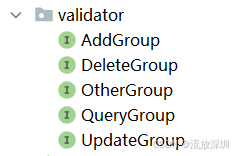
package com.customer.validator;

/**
 * @author CSDN流放深圳
 * @description 新增类型的分组校验
 * @create 2026-05-14 10:55
 * @since 1.0.0
 */
public interface AddGroup {
}
在 DTO 入参实体的属性中使用,比如:
package com.customer.entity.dto;

import com.customer.validator.OtherGroup;
import jakarta.validation.constraints.NotBlank;
import lombok.Data;

/**
 * @author CSDN流放深圳
 * @description 用户登录参数
 * @create 2026-05-13 14:19
 * @since 1.0.0
 */
@Data
public class UserLoginDTO {

    /**
     * 用户账号
     */
    @NotBlank(message = "【用户账号】不允许为空[userAccount]", groups = {OtherGroup.class})
    private String userAccount;

    /**
     * 密码
     */
    @NotBlank(message = "【密码】不允许为空[password]", groups = {OtherGroup.class})
    private String password;
}
只需要在属性值增加注解(比如 NotBlank 用于字符串的非空校验),message 用于提示错误信息,groups 用于校验的分组,可以是多个,用英文逗号隔开。
如果调用者请求的属性值缺失,会在全局异常类被捕获到,抛出异常信息 message 给调用者。
2.2.4 将信息放入请求的上下文
因本次以用户登录为锚点,当用户登录成功后,将用户信息存入系统上下文,在后续的逻辑中可以直接获取到用户信息,实现过程如下:
1、先定义用户上下文信息的实体类 CustomerUserInfo,字段属性可以自己根据业务扩展。比如:用户ID、用户姓名、性别、所在部门、上级Leader等等。
package com.customer.entity.system;

import lombok.Data;

/**
 * @author CSDN流放深圳
 * @description 用户信息业务实体
 * @create 2026-05-13 11:19
 * @since 1.0.0
 */
@Data
public class CustomerUserInfo {

    /**
     * 用户 id
     */
    private Long userId;

    /**
     * 用户账号
     */
    private String userAccount;

    /**
     * 用户姓名
     */
    private String userName;

}
2、定义本地线程类 UserContextHolder,用于存放用户信息到线程中。
package com.customer.holder;

import com.customer.entity.system.CustomerUserInfo;
import com.customer.exception.CustomerRuntimeException;
import com.customer.entity.enums.SysExceptionEnum;
import org.springframework.stereotype.Component;

/**
 * @author CSDN流放深圳
 * @description 将【用户信息】存入本地线程,上下文请求中都可以获取到。用法:UserContextHolder.getLzmUserInfo()
 * @create 2026-05-12 17:21
 * @since 1.0.0
 */
@Component
public class UserContextHolder {

    /**
     * 用户本地变量
     */
    private static ThreadLocal<CustomerUserInfo> tokenMessageInfo = new ThreadLocal<>();


    /**
     * 设置本地线程值
     * @param customerUserInfo
    */
    public static void setCustomerUserInfo(CustomerUserInfo customerUserInfo) {
        tokenMessageInfo.set(customerUserInfo);
    }


    /**
     * 获取本地线程变量
     * @return
     */
    public static CustomerUserInfo customerUserInfo() {
        CustomerUserInfo customerUserInfo = tokenMessageInfo.get();
        if (null == customerUserInfo) {
            throw new CustomerRuntimeException(SysExceptionEnum.UN_LOGIN);
        }
        return customerUserInfo;
    }

    /**
     * 删除本地变量值
     */
    public static void remove() {
        tokenMessageInfo.remove();
    }
}
3、定义一个拦截器 CustomerInterceptor,用于拦截所有的请求,解析前端传递的 token 得到用户信息,并把用户信息存入上下文线程中。每次有接口请求,就续期 token。
package com.customer.interceptor;

import cn.hutool.core.util.StrUtil;
import com.alibaba.fastjson2.JSONObject;
import com.customer.annotation.NoNeedLogin;
import com.customer.entity.constant.CommonKeys;
import com.customer.entity.constant.CommonRedisKeys;
import com.customer.entity.enums.SysExceptionEnum;
import com.customer.entity.system.CustomerUserInfo;
import com.customer.exception.CustomerRuntimeException;
import com.customer.holder.UserContextHolder;
import com.customer.util.CustomerJwtUtils;
import jakarta.servlet.http.HttpServletRequest;
import jakarta.servlet.http.HttpServletResponse;
import lombok.extern.slf4j.Slf4j;
import org.springframework.beans.factory.annotation.Autowired;
import org.springframework.beans.factory.annotation.Value;
import org.springframework.core.Ordered;
import org.springframework.core.annotation.Order;
import org.springframework.data.redis.core.RedisTemplate;
import org.springframework.stereotype.Component;
import org.springframework.web.method.HandlerMethod;
import org.springframework.web.servlet.HandlerInterceptor;
import org.springframework.web.servlet.ModelAndView;

import java.util.Objects;
import java.util.concurrent.TimeUnit;

/**
 * @author CSDN流放深圳
 * @description 拦截器
 * @create 2026-05-12 17:18
 * @since 1.0.0
 */
@Order(Ordered.HIGHEST_PRECEDENCE)
@Component
@Slf4j
public class CustomerInterceptor implements HandlerInterceptor {

    @Autowired
    private UserContextHolder userContextHolder;

    @Autowired
    private RedisTemplate redisTemplate;

    /**
     * token 失效时间
     */
    @Value("${jwt.expireTime:168}")
    private int tokenExpireTime;

    /**
     * jwt 加解密的秘钥
     */
    @Value("${jwt.jwtPassword:wonderful666}")
    private String jwtPassword;

    /**
     * 统一验证是否登录。该方法将在 Controller 处理之前进行调用
     *
     * @param request
     * @param response
     * @param handler
     * @return
     * @throws Exception
     */
    @Override
    public boolean preHandle(HttpServletRequest request, HttpServletResponse response, Object handler) throws Exception {

        //如果不是 method,直接放行
        if (!(handler instanceof HandlerMethod)) return true;

        //如果不需要登录,直接放行
        if (checkNoNeedLogin(handler)) return true;

        //解析 token,获取用户信息(从缓存里读取)
        CustomerUserInfo customerUserInfo = getCustomerUserInfoByToken(request);

        //如果用户信息为空,则抛出异常
        if (null == customerUserInfo) {
            log.error("用户信息为空:customerUserInfo is null");
            throw new CustomerRuntimeException(SysExceptionEnum.UN_LOGIN);
        }
        userContextHolder.setCustomerUserInfo(customerUserInfo);//设置用户信息到上下文
        return true;
    }


    /**
     * 在 Controller 的方法调用之后执行,但是它会在 DispatcherServlet 进行视图的渲染之前执行,可以对 ModelAndView 进行操作
     *
     * @param request
     * @param response
     * @param handler
     * @param modelAndView
     * @throws Exception
     */
    @Override
    public void postHandle(HttpServletRequest request, HttpServletResponse response, Object handler, ModelAndView modelAndView) throws Exception {
    }

    /**
     * 该方法将在整个请求完成之后,也就是 DispatcherServlet 渲染了视图执行,主要作用是用于清理资源
     *
     * @param request
     * @param response
     * @param handler
     * @param ex
     * @throws Exception
     */
    @Override
    public void afterCompletion(HttpServletRequest request, HttpServletResponse response, Object handler, Exception ex) throws Exception {
        //删除本地变量,避免内存泄露
        userContextHolder.remove();
    }

    /**
     * 获取用户信息,将用户信息存储到 ThreadLocal 中,在本次请求中持有用户信息,即可在后续操作中使用到用户信息
     *
     * @param request
     * @return
     */
    private CustomerUserInfo getCustomerUserInfoByToken(HttpServletRequest request) {
        String token = request.getHeader(CommonKeys.AUTHORIZATION);
        //解密 token,得到 token_key
        String tokenKey = CustomerJwtUtils.decryptToken(token, jwtPassword);
        if (StrUtil.isEmpty(tokenKey)) return null;
        //从缓存里读取用户信息
        Object obj = null;
        try {
            obj = redisTemplate.opsForValue().get(CommonRedisKeys.CUSTOMER_USER_LOGIN_TOKEN + tokenKey);
            //刷新缓存(续期)
            redisTemplate.expire(CommonRedisKeys.CUSTOMER_USER_LOGIN_TOKEN + tokenKey, tokenExpireTime, TimeUnit.HOURS);
        } catch (Exception e) {
            log.error("操作 Redis 异常:{}", e.getMessage(), e);
        }
        if (Objects.isNull(obj)) return null;
        CustomerUserInfo customerUserInfo = JSONObject.parseObject(String.valueOf(obj), CustomerUserInfo.class);
        return customerUserInfo;
    }

    /**
     * 校验是否不需要登录
     *
     * @param handler
     * @return
     */
    private Boolean checkNoNeedLogin(Object handler) {
        //获取方法上的注解
        HandlerMethod method = (HandlerMethod) handler;
        NoNeedLogin methodAnnotation = method.getMethodAnnotation(NoNeedLogin.class);
        if (methodAnnotation != null) return true;
        return false;
    }

}
这里用到一个自定义注解 NoNeedLogin,代码如下:
package com.customer.annotation;

import java.lang.annotation.ElementType;
import java.lang.annotation.Retention;
import java.lang.annotation.RetentionPolicy;
import java.lang.annotation.Target;

/**
 * @author CSDN流放深圳
 * @description 添加此注解表示不需要登录,但是要注意:如果后续代码有从上下文获取用户信息的操作将会抛出异常!
 * @create 2026-05-13 11:17
 * @since 1.0.0
 */
@Target(ElementType.METHOD)
@Retention(RetentionPolicy.RUNTIME)
public @interface NoNeedLogin {

}
4、注册拦截器到 WebMvc 中,定义一个实现类 InterceptorWebConfig,实现接口 WebMvcConfigurer:
package com.customer.interceptor;

import org.springframework.beans.factory.annotation.Autowired;
import org.springframework.context.annotation.Configuration;
import org.springframework.web.servlet.config.annotation.EnableWebMvc;
import org.springframework.web.servlet.config.annotation.InterceptorRegistry;
import org.springframework.web.servlet.config.annotation.WebMvcConfigurer;

/**
 * @author CSDN流放深圳
 * @description web拦截器
 * @create 2026-05-12 17:17
 * @since 1.0.0
 */
@Configuration
@EnableWebMvc
public class InterceptorWebConfig implements WebMvcConfigurer {

    @Autowired
    private CustomerInterceptor customerInterceptor;

    /**
     * 配置拦截器
     *
     * @param registry
     */
    @Override
    public void addInterceptors(InterceptorRegistry registry) {
        registry.addInterceptor(customerInterceptor)
                .addPathPatterns("/**");//拦截所有请求
    }
}
5、用户登录后,把信息刷新到 Redis 缓存中。
package com.customer.service.impl;

import cn.hutool.core.lang.UUID;
import cn.hutool.core.util.StrUtil;
import cn.hutool.crypto.digest.DigestUtil;
import com.alibaba.fastjson2.JSON;
import com.customer.entity.constant.CommonKeys;
import com.customer.entity.constant.CommonRedisKeys;
import com.customer.entity.dto.UserLoginDTO;
import com.customer.entity.enums.SysExceptionEnum;
import com.customer.entity.enums.UserAccountStateEnum;
import com.customer.entity.po.UserAccountEntity;
import com.customer.entity.system.CustomerUserInfo;
import com.customer.entity.vo.UserLoginVO;
import com.customer.exception.CustomerRuntimeException;
import com.customer.holder.UserContextHolder;
import com.customer.service.UserAccountService;
import com.customer.service.UserLoginService;
import com.customer.util.CustomerJwtUtils;
import jakarta.servlet.http.HttpServletRequest;
import lombok.extern.slf4j.Slf4j;
import org.springframework.beans.BeanUtils;
import org.springframework.beans.factory.annotation.Autowired;
import org.springframework.beans.factory.annotation.Value;
import org.springframework.data.redis.core.RedisTemplate;
import org.springframework.stereotype.Service;

import java.util.concurrent.TimeUnit;

/**
 * @author CSDN流放深圳
 * @description 用户登录服务实现类
 * @create 2026-05-13 16:37
 * @since 1.0.0
 */
@Service
@Slf4j
public class UserLoginServiceImpl implements UserLoginService {

    /**
     * jwt 加解密的秘钥
     */
    @Value("${jwt.jwtPassword:wonderful666}")
    private String jwtPassword;

    /**
     * token 失效时间
     */
    @Value("${jwt.expireTime:168}")
    private int tokenExpireTime;

    @Autowired
    private RedisTemplate redisTemplate;

    @Autowired
    private UserAccountService userAccountService;

    /**
     * 用户登录(账号、密码)
     *
     * @param dto
     * @return
     */
    @Override
    public UserLoginVO login(UserLoginDTO dto) {
        //验证账号、密码准确性
        UserAccountEntity accountEntity = checkAccountPwd(dto.getUserAccount(), dto.getPassword());

        String token_key = UUID.fastUUID().toString().replaceAll("-", "");
        //生成 token
        String token = CustomerJwtUtils.createJwtToken(token_key, jwtPassword, String.valueOf(accountEntity.getUserId()));

        //刷新用户信息到缓存
        refreshUserInfoToRedis(accountEntity, token_key);
        //赋值相同属性
        UserLoginVO vo = new UserLoginVO();
        BeanUtils.copyProperties(accountEntity, vo);
        vo.setToken(token);

        return vo;
    }


    /**
     * 刷新用户信息到缓存
     *
     * @param accountEntity
     * @param token_key
     */
    @Override
    public void refreshUserInfoToRedis(UserAccountEntity accountEntity, String token_key) {
        CustomerUserInfo customerUserInfo = new CustomerUserInfo();
        BeanUtils.copyProperties(accountEntity, customerUserInfo);
        //赋值给当前线程变量
        UserContextHolder.setCustomerUserInfo(customerUserInfo);
        //将 token 放入缓存
        try {
            redisTemplate.opsForValue().set(CommonRedisKeys.CUSTOMER_USER_LOGIN_TOKEN + token_key, JSON.toJSONString(customerUserInfo), tokenExpireTime, TimeUnit.HOURS);
        } catch (Exception e) {
            log.error("刷新用户信息到缓存异常:{}", e.getMessage(), e);
        }
    }


    /**
     * 退出登录
     *
     * @param request
     */
    @Override
    public void logout(HttpServletRequest request) {
        //1、获取 token,注意这里的 token 是需要解析的
        String token = request.getHeader(CommonKeys.AUTHORIZATION);

        //2 解析 token,得到 redisKey
        String token_key = CustomerJwtUtils.decryptToken(token, jwtPassword);
        if (StrUtil.isEmpty(token_key)) return;

        //3、根据 token_key 删除缓存里的 token
        try {
            redisTemplate.delete(CommonRedisKeys.CUSTOMER_USER_LOGIN_TOKEN + token_key);
        } catch (Exception e) {
            log.error("退出登录异常:{}", e.getMessage(), e);
        }
    }

    /**
     * 验证账号、密码准确性
     *
     * @param userAccount
     * @param password
     */
    private UserAccountEntity checkAccountPwd(String userAccount, String password) {
        //根据账号查询数据库
        UserAccountEntity dbEntity = userAccountService.getEntityByUserAccount(userAccount);
        if (null == dbEntity) {
            throw new CustomerRuntimeException(SysExceptionEnum.USER_ACCOUNT_LOGIN_ERROR_ERROR);
        }

        //将密码进行 md5 加密,然后与数据库的密码进行比较
        String decryptPassword = DigestUtil.md5Hex(password);
        if (!decryptPassword.equals(dbEntity.getPassword())) {
            throw new CustomerRuntimeException(SysExceptionEnum.USER_ACCOUNT_LOGIN_ERROR_ERROR);
        }

        //判断其它业务逻辑,如:禁用状态等...
        Integer state = dbEntity.getState();
        if (null != state && UserAccountStateEnum.DISABLE.getCode().equals(state)) {
            throw new CustomerRuntimeException(SysExceptionEnum.USER_ACCOUNT_DISABLE_ERROR);
        }
        return dbEntity;
    }


}
2.2.5 单元测试
在 test 目录下有单元测试类 UserLoginTest:
import com.alibaba.fastjson2.JSON;
import com.customer.CustomerServiceApp;
import com.customer.entity.constant.CommonKeys;
import com.customer.entity.dto.UserLoginDTO;
import jakarta.annotation.Resource;
import org.junit.jupiter.api.BeforeEach;
import org.junit.jupiter.api.Test;
import org.springframework.boot.test.autoconfigure.web.servlet.AutoConfigureMockMvc;
import org.springframework.boot.test.context.SpringBootTest;
import org.springframework.http.MediaType;
import org.springframework.test.web.servlet.MockMvc;
import org.springframework.test.web.servlet.ResultActions;

import static org.springframework.test.web.servlet.request.MockMvcRequestBuilders.post;
import static org.springframework.test.web.servlet.result.MockMvcResultMatchers.status;
/**
 * @author CSDN流放深圳
 * @description 用户登录测试类
 * @create 2026-05-14 14:36
 * @since 1.0.0
 */
//指定主启动类,
@SpringBootTest(classes = CustomerServiceApp.class, webEnvironment = SpringBootTest.WebEnvironment.MOCK)
@AutoConfigureMockMvc
public class UserLoginTest {

    @Resource
    private MockMvc mockMvc;

    /**
     * 测试用户登录
     * @throws Exception
     */
    @Test
    public void testLogin() throws Exception{
        System.out.println("------- 单元测试用户登录 --------");
        UserLoginDTO dto = new UserLoginDTO();
        dto.setUserAccount("admin");
        dto.setPassword("123456");
        ResultActions resultActions = mockMvc.perform(post("/login")
                        .contentType(MediaType.APPLICATION_JSON)
                        .content(JSON.toJSONString(dto)))
                .andExpect(status().isOk());
        System.out.println("------- 返回结果 --------");
        resultActions.andDo(result -> System.out.println(result.getResponse().getContentAsString()));
    }

    private String token;

    @BeforeEach
    void setUp() {
        // 通过登录接口获取实际 token
        token = "eyJ0eXAiOiJKV1QiLCJhbGciOiJIUzI1NiJ9.eyJUT0tFTl9LRVkiOiI5NWFiZjFjOWU3ZTg0M2Y4OWY5YmJmYjllZDE1OTRiMSIsIlVzZXItSWQiOiIxMjM0NTY3ODkiLCJpYXQiOjE3Nzg3NDYyMzB9.mpYNposWgz7FNMjKq7yWf3rF7AF2vTTXoOEn1PDySQc";
    }

    /**
     * 测试用户退出
     * @throws Exception
     */
    @Test
    public void testLogout() throws Exception {
        System.out.println("------- 单元测试用户退出 --------");
        ResultActions resultActions = mockMvc.perform(post("/logout")
                        .header(CommonKeys.AUTHORIZATION, token)
                        .contentType(MediaType.APPLICATION_JSON))
                .andExpect(status().isOk());
        System.out.println("------- 返回结果 --------");
        resultActions.andDo(result -> System.out.println(result.getResponse().getContentAsString()));
    }

}
在 SpringBoot 测试中,主要有以下 4 种测试方法:
| 枚举值 | 是否启动嵌入式容器 | 端口 | 适用场景 |
|---|---|---|---|
| MOCK | ❌ 不启动 | - | 单元测试、Controller 层测试(模拟环境) |
| RANDOM_PORT | ✅ 启动 | 随机可用端口 | 集成测试、需要真实 HTTP 请求 |
| DEFINED_PORT | ✅ 启动 | 固定端口 (server.port) | 集成测试、需要特定端口 |
| NONE | ❌ 不启动 | - | 仅测试 Service/Repository 层 |
1. MOCK (默认值)
不启动真实 Web 环境,使用 Spring MVC Test 框架模拟。
示例:
@SpringBootTest(webEnvironment = SpringBootTest.WebEnvironment.MOCK)
@AutoConfigureMockMvc
class UserControllerTest {

    @Autowired
    private MockMvc mockMvc;  // 模拟 HTTP 请求,不真实监听端口

    @Test
    void testLogin() throws Exception {
        mockMvc.perform(post("/api/login")
                .contentType(MediaType.APPLICATION_JSON)
                .content("{\"username\":\"admin\",\"password\":\"123\"}"))
                .andExpect(status().isOk())
                .andExpect(jsonPath("$.code").value(200));

        // 注意:不会真正启动 Tomcat,不监听任何端口
    }
}
特点:
-
最快(不启动真实服务器 Tomcat)
-
适合单元测试 Controller 层
-
使用
MockMvc模拟请求 -
不能发送真实 HTTP 请求(如用 RestTemplate)
2. RANDOM_PORT
启动完整 Web 容器,使用随机端口(避免端口冲突)。
@SpringBootTest(webEnvironment = SpringBootTest.WebEnvironment.RANDOM_PORT)
class UserServiceIntegrationTest {

    @LocalServerPort
    private int port;  // 注入随机端口号

    @Autowired
    private TestRestTemplate restTemplate;  // 发送真实 HTTP 请求

    @Test
    void testLogin() {
        LoginRequest request = new LoginRequest("admin", "123");

        ResponseEntity<Result> response = restTemplate.postForEntity(
            "http://localhost:" + port + "/api/login",
            request,
            Result.class
        );
        assertEquals(200, response.getStatusCodeValue());
        // 注意:真实启动 Tomcat,端口随机(如 54321)
    }
}
特点:
-
启动完整 Web 容器(Tomcat/Jetty/Undertow)
-
端口随机分配(避免并行测试冲突)
-
适合集成测试、数据库测试
-
可以发送真实 HTTP 请求
3. DEFINED_PORT
启动完整 Web 容器,使用 application.properties 中配置的端口。
@SpringBootTest(webEnvironment = SpringBootTest.WebEnvironment.DEFINED_PORT)
@ActiveProfiles("test")
class FixedPortIntegrationTest {

    @Autowired
    private TestRestTemplate restTemplate;

    @Test
    void testApi() {
        // 使用配置文件中指定的端口 (8080)
        ResponseEntity<String> response = restTemplate.getForEntity(
            "/api/users",  // 不需要写完整 URL
            String.class
        );

        // 注意:端口固定,如果有其他测试也使用 8080 会冲突
    }
}
特点:
-
启动完整 Web 容器
-
使用配置文件中的固定端口
-
可能端口冲突(CI/CD 并行测试风险)
-
适合需要固定端口的特殊场景
4. NONE
完全不启动 Web 环境。
@SpringBootTest(webEnvironment = SpringBootTest.WebEnvironment.NONE)
class UserServiceTest {

    @Autowired
    private UserService userService;  // 只测试 Service 层

    @Test
    void testServiceMethod() {
        // 测试业务逻辑
        User user = userService.findById(1L);
        assertNotNull(user);

        // 注意:连 Servlet 容器都不初始化,MockMvc 都不能用
    }
}
特点:
-
最轻量,启动最快
-
不创建任何 Web 相关 Bean(如
DispatcherServlet) -
适合纯 Service/Repository 层测试
-
不能使用
MockMvc或TestRestTemplate
5.总结
| 测试类型 | 推荐环境 | 原因 |
|---|---|---|
| Controller 单元测试 | MOCK | 快速,不依赖容器 |
| Service 单元测试 | NONE | 最快,纯逻辑测试 |
| Repository 集成测试 | RANDOM_PORT | 真实环境,避免冲突 |
| 全栈集成测试 | RANDOM_PORT | 接近生产环境 |
| 回调/Webhook 测试 | DEFINED_PORT | 需要固定端口(但慎用) |
最佳实践:
-
单元测试用 MOCK 或 NONE
-
集成测试用 RANDOM_PORT(避免端口冲突)
-
避免使用 DEFINED_PORT(除非有特殊需求)
3、总结
本篇简单介绍单体项目脚手架的搭建和核心技术点,后续会完善 SpringCloud + SpringAI 微服务架构的整体设计,敬请期待。

AtomGit 是由开放原子开源基金会联合 CSDN 等生态伙伴共同推出的新一代开源与人工智能协作平台。平台坚持“开放、中立、公益”的理念,把代码托管、模型共享、数据集托管、智能体开发体验和算力服务整合在一起,为开发者提供从开发、训练到部署的一站式体验。
更多推荐



 8
8 0
0- 0


 已为社区贡献2条内容

所有评论(0)