LangChain服务部署与链路监控
·
LangChain系列文章目录
- 第一章 LangChain介绍与核心包
- 第二章 LangChain提示词工程
- 第三章 LangChain工作流
- 第四章 LangChain服务部署与链路监控
文章目录
前言
本文整理 LangChain 服务部署与链路监控相关内容,主要包括 LangServe 服务部署、LangChain CLI、服务端与客户端调用示例,以及 LangSmith Tracing、Verbose、Debug 等链路监控和调试方法。
LangChain服务部署与链路监控
一、LangServe服务部署
1. LangServe服务概述
- LangServe作用:将LangChain链部署为REST API,对外提供服务。
- LangServe的web服务是基于FastAPI,并使用pydantic进行数据验证。
- Pydantic是一个在 Python中用于数据验证和解析的第三方库。
- Pydantic利用声明式的方式定义数据模型和Python类型。
- Pydantic还可以从模型生成JSON架构,提供了自动生成文档等功能
- LangServe提供了JavaScript和Python的客户端,可用于调用部署在服务器上的可运行对象。
2. LangServe特性
- 从LangChain对象自动推断输入和输出模式,并在每次API调用中执行,提供丰富的错误信息
- 带有JSONSchema和Swagger的API文档页面
- 高效的/invoke、/batch、/stream接口,支持单个服务器上的多个并发请求
- /stream_log接口,用于流式传输链或代理的所有中间步骤
- 支持/stream_events,使流式传输更加简便,无需解析/stream_log的输出。
- 使用经过严格测试的开源Python库构建,如FastAPI、Pydantic、uvloop和asyncio
- 使用客户端SDK调用LangServe服务器,就像本地运行可运行对象一样(或直接调用 HTTP API)
3. LangServe安装
- 安装客户端和服务端:pip install -U langserve[all]
- 只安装客户端:pip install langserve[client]
- 只安装服务端:pip install langserve[server]
4. 第三方包安装
- 在fastapi中使用Form需要先安装python-multipart
pip install python-multipart
二、LangChain CLI
1. LangChain CLI
- 作用:命令行工具,可快速创建LangServe项目。
2. 使用LangChain CLI创建LangServe项目
- 安装LangServe包:pip install -U langserve[all]
- 安装langchain CLI包:pip install -U langchain-cli
- 使用langchain cli命令创建新应用
- 创建应用:langchain app new my_server
- 使用langchain app new命令,类似于项目脚手架,将所有需要的文件都生成
- 会根据项目名称自动创建目录,并且内部生成所需要文件。
- 在项目app\server.py中,编辑add_routes()来定义web服务接口(后面说明)
add_routes(app. NotImplemented)
- 使用poetry添加第三方包(如langchain-openai、langchain-anthropic、langchain-mistral等)
- 安装pipx包:pip install pipx
- 加入到环境变量(需要重启PyCharm):pipx ensurepath
- 安装poetry:pipx install poetry
- Linux可能需要安装:apt install python3-poetry
- 可能也需要升级:pip install --upgrade poetry
- 使用poetry安装langchain-openai库,如:poetry add [package-name]
poetry add langchain
poetry add langchain-openai
- 启动应用:poetry run langchain serve --port=8000 --host=0.0.0.0
3. pipx/poetry工具说明
- pipx是一个有自身环境的pip,用于安装poetry
- pipx ensurepath用于增加环境变量
- 使用pipx ensurepath会将使用它来安装的应用,在C:\Users\62845.local\bin\文件夹中创建一个超链接。这样就能像设置环境变量那样直接使用应用。
- 如,安装了poetry,poetry本身执行文件在:C:\Users\62845\pipx\venvs\poetry\Scripts\poetry.exe中,pipx会自动同步超链接到C:\Users\62845.local\bin\poetry.exe中
- LangServe的依赖管理是通过poetry工具
- 执行poetry时,需要于项目目录中执行。
- LangServe是通过poetry工具管理依赖的
- poetry依赖文件是pyproject.toml,里面有所有已经安装的依赖的列表。
4. 安装报错
- poetry安装langchain时报错:
- 报错内容:
Using version ^0.3.25 for langchain
Updating dependencies
Resolving dependencies... (0.7s)
Because no versions of langchain match >0.3.25,<0.4.0
and langchain (0.3.25) depends on pydantic (>=2.7.4,<3.0.0), langchain (>=0.3.25,<0.4.0) requires pydantic (>=2.7.4,<3.0.0).
So, because my-server depends on both pydantic (<2) and langchain (^0.3.25), version solving failed.
- 原因:pydantic版本不合适,需要先安装pydantic的指定范围版本:
(不是范围安装,应该是2.7.4版本,后面报错说明)
poetry add pydantic">=2.7.4,<3.0.0"
- 进入/docs的swagger页面时报错:
-
页面报错:
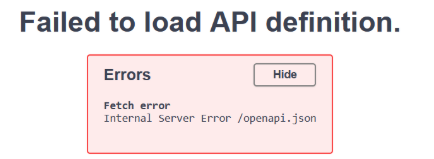
-
报错内容:
-
raise PydanticUserError(self._error_message, code=self._code)
pydantic.errors.PydanticUserError: `TypeAdapter[typing.Annotated[langserve.validation.chainBatchRequest, <class 'langserve.validation.chainBatchRequest'>, Body(PydanticUndefined)]]` is not fully defined; you should define `typing.Annotated[langserve.validation.chainBatchRequest, <class 'langserve.validation.chainBatchRequest'>, Body(PydanticUndefined)]` and all referenced types, then call `.rebuild()` on the instance.
For further information visit https://errors.pydantic.dev/2.11/u/class-not-fully-defined
- 原因:pydantic版本不合适,需要安装pydantic最低的指定版本:
pip install pydantic==2.7.4
- 每次安装包时提示错误:
- 错误内容:
ERROR: pip's dependency resolver does not currently take into account all the packages that are installed. This behaviour is the source of the following dependency conflicts.
chromadb 1.0.9 requires fastapi==0.115.9, but you have fastapi 0.115.12 which is incompatible.
- 原因:chromadb 1.0.9版本需要fastapi 0.115.9版本,所以需要重新安装fastapi的指定版本:
pip install fastapi==0.115.9
5. pip安装的主要的包版本参考:
langchain                                0.3.25
langchain-chroma                         0.2.4
langchain-community                      0.3.24
langchain-core                           0.3.60
langchain-huggingface                    0.2.0
langchain-openai                         0.3.17
langchain-text-splitters                 0.3.8
langserve                                0.3.1
langsmith                                0.3.42
chromadb                                 1.0.9
fastapi                                  0.115.9
pydantic                                 2.7.4
pydantic_core                            2.18.4
pydantic-settings                        2.9.1
6. 不使用pipx创建LangServe项目(适合Linux)
- 创建conda环境,python版本3.12
- 安装LangServe包:pip install -U langserve[all]
- 安装langchain CLI包:pip install -U langchain-cli
- 使用langchain cli命令创建新应用
- 创建应用:langchain app new my_server
- 使用langchain app new命令,类似于项目脚手架,将所有需要的文件都生成
- 会根据项目名称自动创建目录,并且内部生成所需要文件。
- 安装poetry:pip install poetry
- 使用poetry安装库,如:poetry add [package-name]
poetry add pydantic@^2.7.4
poetry add langchain
poetry add langchain-openai
- 安装后,pyproject.toml文件的tool.poetry.dependencies部分
pyproject.toml代码:
...
[tool.poetry.dependencies]
python = "^3.11"
uvicorn = "^0.23.2"
langserve = {extras = ["server"], version = ">=0.0.30"}
pydantic = ">=2.7.4"
langchain = "^0.3.23"
langchain-openai = "^0.3.14"
...
- 由于fastapi中pydantic的相关问题需要修改版本
pip install -U fastapi==0.100.0
- 在fastapi中使用Form需要先安装python-multipart
pip install python-multipart
- 安装其他库(可能需要)
pip install pymilvus
pip install langchain_milvus
pip install langchain_huggingface
pip install sentence-transformers
pip install langchain-core
pip install langchain-community
pip install langchain-experimental
pip install langchain-chroma
pip install faiss-cpu
- 启动应用:poetry run langchain serve --port=8000 --host=0.0.0.0
7. 不使用LangChain CLI创建LangServe项目(可选)
- 直接使用fastapi创建服务,使用langserve提供路由功能
- 只有一个执行文件,没有依赖管理
- 虽然简单,但不建议使用这种方式
- 文件内容与示例的服务端的app\server.py文件一样。
8. 接口示例(如接口名为my_runnable)
- 使用add_routes()来定义路由和接口服务
- app为FastAPI的对象
- runnable为链后模型的可运行对象。可以是链或者LCEL组件。
- path服务的路由字符串,需要/开头。
代码:
...
add_routes(
    app=app,
    runnable=runnable,
    path="/my_runnable",
)
...
- 接口集合
- POST /my_runnable/invoke - 单个输入调用可运行项
- POST /my_runnable/batch - 一批输入调用可运行项
- POST /my_runnable/stream - 单个输入调用,流式传输输出
- POST /my_runnable/stream_log - 单个输入调用,流式传输输出
- 中间步骤接口输出
- POST /my_runnable/astream_events - 单个输入调用,流式传输事件
- 中间步骤接口事件
- GET /my_runnable/input_schema - 可运行项的输入的JSON模式
- GET /my_runnable/output_schema - 可运行项的输出的JSON模式
- GET /my_runnable/config_schema - 可运行项的配置的JSON模式
三、LangServe示例
1. 服务端
- 服务端的入口文件是app\server.py。
- 通过add_routes()方法增加api来将链对外服务
- 启动服务:poetry run langchain serve --port=8000 --host=0.0.0.0
- 执行启动服务,必须在项目根目录上执行
- 项目文件有修改会默认动态重启
- 使用FastAPI内置中间件,提供跨域功能,能被不同IP的前端调用。
- app\server.py示例:
代码:
from fastapi import FastAPI
from fastapi.responses import RedirectResponse
from fastapi.middleware.cors import CORSMiddleware
from langserve import add_routes
from langchain_openai import ChatOpenAI
from langchain_core.prompts import ChatPromptTemplate
from langchain_core.output_parsers import StrOutputParser

# 1. 创建提示词模版
system_template = "Translate the following into {language}:"
prompt_template = ChatPromptTemplate.from_messages([
    ('system', system_template),
    ('user', '{text}')
])

# 2. 创建模型
model = ChatOpenAI(
    model='Pro/deepseek-ai/DeepSeek-V3',
    openai_api_key="************",
    openai_api_base='https://api.siliconflow.cn/v1',
    temperature=0.7,
    max_tokens=8000
)

# 3. 创建解析器
parser = StrOutputParser()

# 4. 创建链
chain = prompt_template | model | parser

# 5. App 定义
app = FastAPI(
    title="LangChain 服务器",
    version="1.0",
    description="使用Langchain的Runnable接口的简单API服务器",
)

# 6. 提供跨域
app.add_middleware(
    CORSMiddleware,
    allow_origins=["*"],
    allow_credentials=True,
    allow_methods=["*"],
    allow_headers=["*"],
    expose_headers=["*"],
)

# 7. 默认提供一个swagger的功能,默认路径是/docs。这里使用重定向
@app.get("/")
async def redirect_root_to_docs():
    return RedirectResponse("/docs")

# 8.增加链的接口
add_routes(
    app=app,
    runnable=chain,
    path="/openai",
)

if __name__ == "__main__":
    import uvicorn
    uvicorn.run(app, host="0.0.0.0", port=8000)
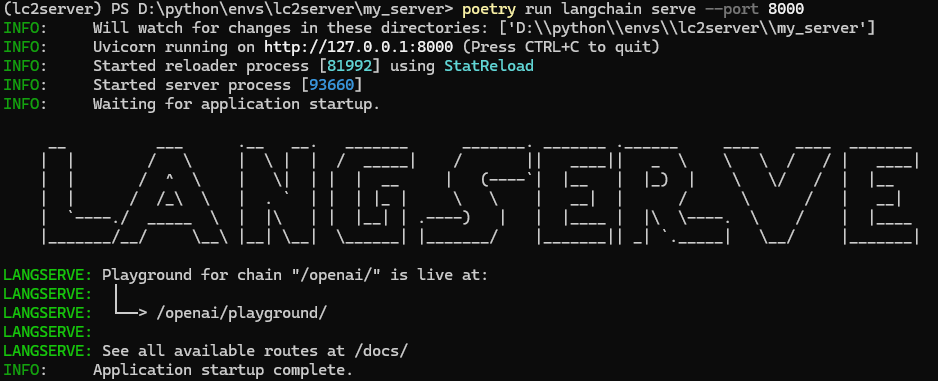
结果:
启动服务:poetry run langchain serve --port=8000
-
启动服务后,默认会提供swagger页面
- 默认路径:/docs
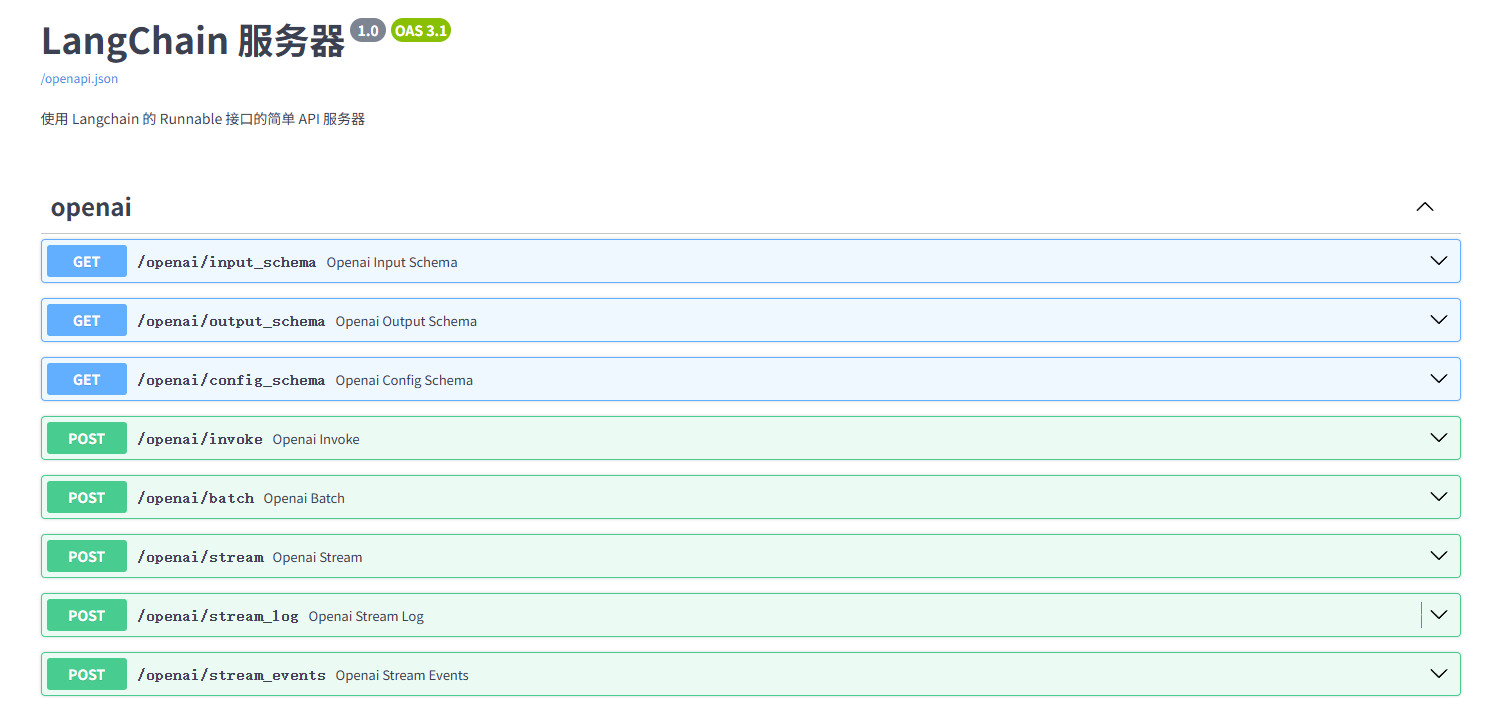
- 默认路径:/docs
-
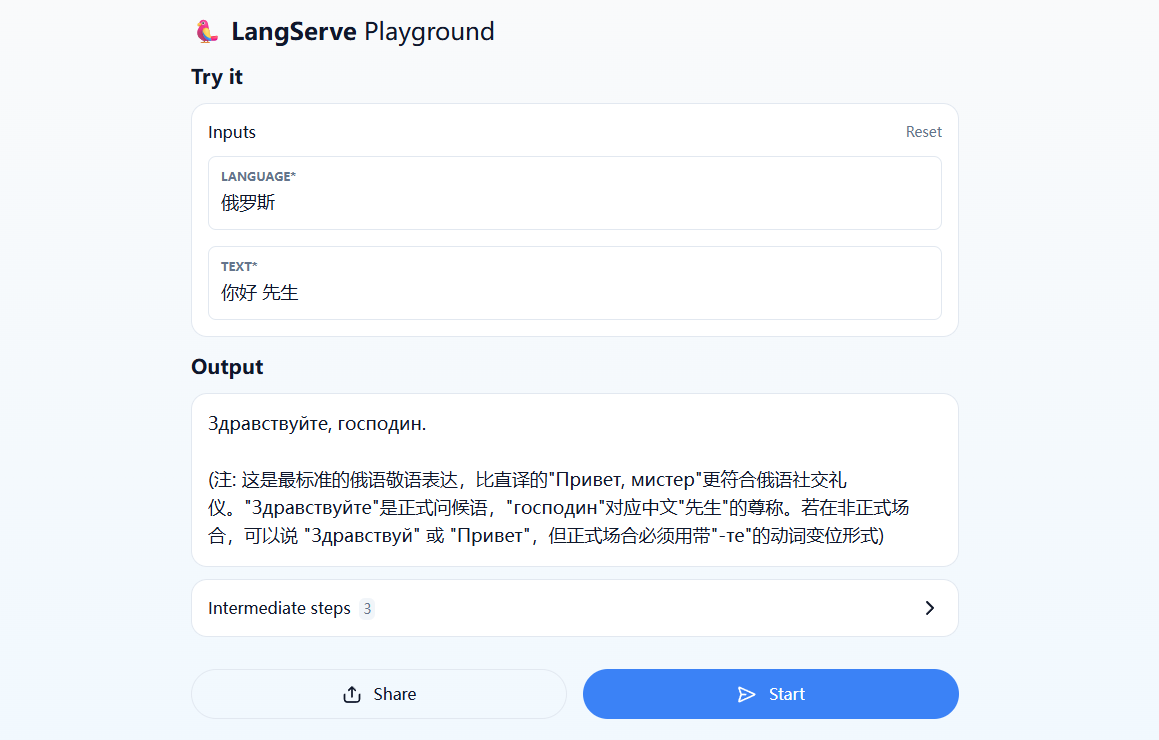
启动服务后,默认会提供playground的测试页面
- 会自动为每一个接口提供playground测试页面
- 默认路径:/playground
2. 客户端
- 使用Langserve提供的Python客户端
- Langserve的Python客户端:就是一个python库。用来调用Langserve服务端的API接口。其实可以不用客户端直接使用requests或curl等。
- 服务端提供链服务,不是模型接口服务
- 使用RemoteRunnable来获取Langserve提供的接口
代码:
from langserve import RemoteRunnable

chain = RemoteRunnable("http://localhost:8000/openai/")
response = chain.batch([
        {"language": "泰文", "text": "你好"},
        {"language": "英文", "text": "吃饭没有?"}
])
print(response)
结果:
['สวัสดี', 'Have you eaten yet? \n\n或 \n\nDid you have your meal? \n\n(这两个翻译都很常用,第一个更口语化,第二个更正式一些)']
- 如果服务端提供的不是一个链,而只是一个模型的接口能力,需要在客户端创建链并执行。
- 使用RunnableMap来指定模型功能
代码:
from langchain.schema.runnable import RunnableMap
from langchain_core.prompts import ChatPromptTemplate
from langserve import RemoteRunnable

openai = RemoteRunnable("http://localhost:8000/openai/")
prompt = ChatPromptTemplate.from_messages([
    ("system", "你是一个喜欢写故事的助手"),
    ("system", "写一个故事,主题是: {topic}")
])

# 自定义链
chain = prompt | RunnableMap({"openai": openai})
response = chain.batch([{"topic": "猫"}])
print(response)
- 使用requests的Python代码:
代码:
import requests

response = requests.post(
    "http://localhost:8000/openai",
    json={"input": {"language": "俄罗斯", "text": "你好,你吃饭没有?"}},
)
response.json()
- 使用curl
命令:
curl --location --request POST 'http://localhost:8000/openai/stream' \
    --header 'Content-Type: application/json' \
    --data-raw '{
        "input": {
            "language": "俄罗斯", "text": "你好,你吃饭没有?"
        }
    }'
四、LangChain服务监控
1. LangChain服务监控
- LangChain服务监控能提供错误输出的能力。
- 三种主要的调试方法:
- LangSmith跟踪(LangSmith Tracing):将事件记录到LangSmith,以便可视化
- 详细模式(Verbose):为链中的重要事件添加打印语句。
- 调试模式(Debug):为链中的所有事件添加日志记录语句。
2. LangSmith跟踪(LangSmith Tracing)
-
LangSmith跟踪:
- 定义:通过在本地设置LangSmith官网上提供的api信息(包括api key,api地址,project名称,api版本),在运行LangChain链时,会自动地将执行的过程结果发送到LangSmith官网账号上
- LangSmith跟踪的本质就是需要详细日志打印模式(Verbose)
- LangSmith官网:https://smith.langchain.com/
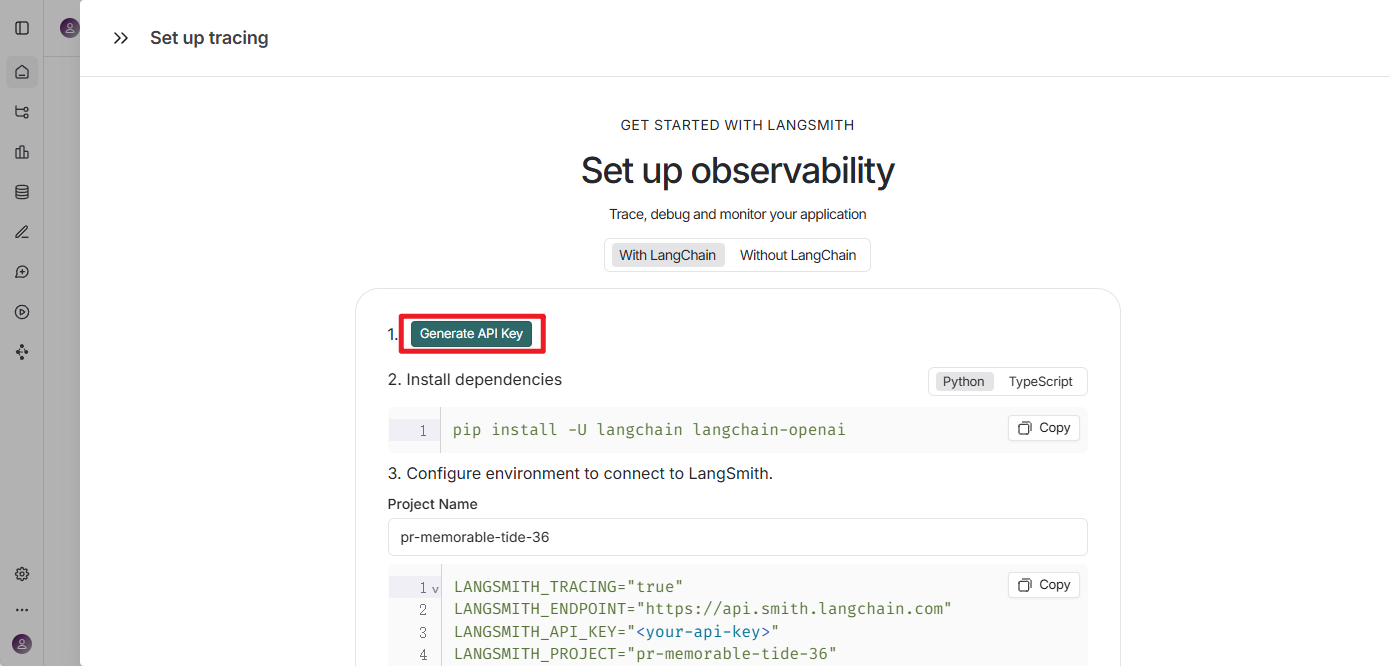
- LangSmith的api key需要在LangSmith官网中获取
-
官网获取api key
-
本地设置LangSmith的api信息:
- 直接在代码上设置LangSmith信息
代码:
import os
os.environ["LANGCHAIN_TRACING_V2"] = "true"
os.environ["LANGCHAIN_API_KEY"] = "************"
os.environ["LANGSMITH_ENDPOINT"]="https://api.smith.langchain.com"
os.environ["LANGCHAIN_PROJECT"] = "test_01"
...
- 通过环境变量设置LangSmith信息
- windows导入环境变量
代码:
# 配置LangSmith 监控开关,true开启,false关闭
setx LANGCHAIN_TRACING_V2 "true"
# 配置 LangSmith api key
setx LANGCHAIN_API_KEY "************"
- linux/mac导入环境变量
代码:
export LANGCHAIN_TRACING_V2="true"
export LANGCHAIN_API_KEY="************"
- 执行代码,启动LangSmith Tracing
- 启动set_verbose后,默认也会启动LangSmith Tracing
代码:
import os
from langchain_openai import ChatOpenAI
from langchain.agents import AgentExecutor, create_tool_calling_agent
from langchain_tavily import TavilySearch
from langchain_core.prompts import ChatPromptTemplate
from langchain.globals import set_verbose

os.environ['TAVILY_API_KEY'] = "************"

llm = ChatOpenAI(
    model='Pro/deepseek-ai/DeepSeek-V3',
    openai_api_key="************",
    openai_api_base='https://api.siliconflow.cn/v1',
    temperature=0.7,
    max_tokens=8000
)

tools = [TavilySearch(max_results=1)]

prompt = ChatPromptTemplate.from_messages([
    ("system","你是一位得力的助手。"),
    ("placeholder", "{chat_history}"),
    ("human", "{input}"),
    ("placeholder", "{agent_scratchpad}"),
])

# 构建工具代理
agent = create_tool_calling_agent(llm, tools, prompt)

# 启动LangSmith Tracing,也需要详细日志打印
set_verbose(True)

# 通过传入代理和工具来创建代理执行器
agent_executor = AgentExecutor(agent=agent, tools=tools)
agent_executor.invoke(
    {"input": "谁执导了2023年的电影《奥本海默》,他多少岁了?"}
)
- 查看情况:
- 可以直接进入LangSmith账号参考对应project的信息
- 也可以使用LangSmith提供的地址,查看操作的所有记录,如:
https://smith.langchain.com/public/a89ff88xxxxxxx/r
3. 详细日志打印模式(Verbose)
- 设置set_verbose(True)将开启详细日志打印模式,默认set_verbose(False)
代码:
import os
from langchain_openai import ChatOpenAI
from langchain.agents import AgentExecutor, create_tool_calling_agent
from langchain_tavily import TavilySearch
from langchain_core.prompts import ChatPromptTemplate
from langchain.globals import set_verbose

os.environ["TAVILY_API_KEY"] = "************"

llm = ChatOpenAI(
    model="Pro/deepseek-ai/DeepSeek-V3",
    openai_api_key="************",
    openai_api_base="https://api.siliconflow.cn/v1",
    temperature=0.7,
    max_tokens=8000,
)

tools = [TavilySearch(max_results=1)]

prompt = ChatPromptTemplate.from_messages([
    ("system","你是一位得力的助手。"),
    ("placeholder", "{chat_history}"),
    ("human", "{input}"),
    ("placeholder", "{agent_scratchpad}"),
])

# 构建工具代理
agent = create_tool_calling_agent(llm, tools, prompt)

# 启动详细日志打印
set_verbose(True)

# 通过传入代理和工具来创建代理执行器
agent_executor = AgentExecutor(agent=agent, tools=tools)
res = agent_executor.invoke(
    {"input": "谁执导了2023年的电影《奥本海默》,他多少岁了?"}
)
print(res)
设置set_verbose(True)结果:
> Entering new AgentExecutor chain...

Invoking: `tavily_search_results_json` with `{'query': '2023年电影《奥本海默》导演'}`

[{'title': '奥本海默(电影) - 维基百科,自由的百科全书', 'url': 'https://zh.wikipedia.org/zh-hans/%E5%A5%A7%E6%9C%AC%E6%B5%B7%E9%BB%98_(%E9%9B%BB%E5%BD%B1)', 'content': "|\n| 发行商 | 环球影业 |\n| 预算 | 1亿美元[2] |\n| 票房 | 9.77亿美元[3][4] |\n| 各地片名 |\n| 中国大 陆 | 奥本海默 |\n| 香港 | 奥本海默 |\n| 澳门 | 奥本海默 |\n| 台湾 | 奥本海默 |\n| 新加坡 | 奥本海默 |\n| 马来西亚 | 奥本海默 |\n《奥本 海默》(英语:Oppenheimer)是一部2023年美英合拍的传记惊悚片,由克里斯多福·诺兰编剧和执导,改编自凯·柏德(英语:Kai Bird)和马丁·J·薛文 (英语:Martin J. Sherwin)撰写的传记《奥本海默传》,剧情讲述了美国理论物理学家罗伯特·欧本海默参与研制原子弹的过程;主演阵容包括席尼·墨菲、艾蜜莉·布朗、麦特·戴蒙及小劳勃·道尼。 [...] ^ 32.0 32.1 32.2 Collin, Robbie. Oppenheimer director Christopher Nolan: 'Not worried about a nuclear holocaust? You should be'. The Daily Telegraph. 2023-07-14 [2023-07-14]. (原始内容存档于2023-07-14).\xa0\n^ Guerrasio, Jason. Christopher Nolan feels brand new. Insider. 2023-07-18 [2023-07-19]. (原始内容存档于2023-07-18).\xa0\n^ Maytum, Matt. Christopher Nolan confirms Oppenheimer is his longest film yet. Total Film. GamesRadar+. 2023-05-26 [2023-07-12]. (原始内容存档于2023-05-20). [...] 《奥本海默》由环球影业定档2023年7月21日在美国上映,由于2020年底诺兰与华纳兄弟于2021年起全面实施院线与HBO Max同步上映的计划中产 生了分歧,使得诺兰宣布不再与华纳兄弟进行合作,因此本片成为诺兰继《跟踪》(1998年)和《记忆拼图》(2000年)后,第三部非由华纳兄弟发行的 长片;亦是继《敦克尔克大行动》之后诺兰第二部以第二次世界大战为背景的电影,也是迄今为止片长最长的诺兰电影。电影收获普遍正面的评价,诺兰 的执导、席尼·墨菲的演出表现、视觉效果、配乐、摄影、剪辑尤其获得评论家的赞誉;《奥本海默》的全球票房超过9亿美元,成为商业表现极为成功的 二战题材电影、传记片以及R级电影之一。电影入围和获得多项奖项,其中第81届金球奖入围8项提名,获得最佳戏剧类影片在内的5项大奖[5]。第96届奥 斯卡金像奖以13项奖项提名的记录领衔,最终赢得奥斯卡最佳影片奖、最佳男主角奖、最佳男配角奖、最佳导演奖、最佳摄影奖、最佳原创配乐奖、最佳 影片剪辑奖共计7项奖项,成为该届奥斯卡金像奖得奖最多的电影。\n剧情\n[编辑]", 'score': 0.9051298}]2023年的电影《奥本海默》由克里斯多福·诺兰(Christopher Nolan)执导。

关于他的年龄:克里斯多福·诺兰出生于1970年7月30日,因此2023年时他53岁。

> Finished chain.
{'input': '谁执导了2023年的电影《奥本海默》,他多少岁了?', 'output': '2023年的电影《奥本海默》由克里斯多福·诺兰(Christopher Nolan)执导。\n\n关于他的年龄:克里斯多福·诺兰出生于1970年7月30日,因此2023年时他53岁。'}
设置set_verbose(False)或不需要set_verbose结果:
{'input': '谁执导了2023年的电影《奥本海默》,他多少岁了?', 'output': '2023年的电影《奥本海默》由克里斯多福·诺兰(Christopher Nolan)执导。\n\n关于他的年龄:克里斯多福·诺兰出生于1970年7月30日,因此2023年时他53岁。'}
4. 调试日志打印模式(Debug)
- 设置set_debug(True)将开启调试日志打印模式,会将所有具有回调支持的LangChain组件(链、模型、代理、工具、检索器)打印它们接收的输入和生成的输出。默认set_debug(False)
代码:
import os
from langchain_openai import ChatOpenAI
from langchain.agents import AgentExecutor, create_tool_calling_agent
from langchain_tavily import TavilySearch
from langchain_core.prompts import ChatPromptTemplate
from langchain.globals import set_debug

os.environ["TAVILY_API_KEY"] = "************"

llm = ChatOpenAI(
    model="Pro/deepseek-ai/DeepSeek-V3",
    openai_api_key="************",
    openai_api_base="https://api.siliconflow.cn/v1",
    temperature=0.7,
    max_tokens=8000,
)
tools = [TavilySearch(max_results=1)]

prompt = ChatPromptTemplate.from_messages([
    ("system","你是一位得力的助手。"),
    ("placeholder", "{chat_history}"),
    ("human", "{input}"),
    ("placeholder", "{agent_scratchpad}"),
])

# 构建工具代理
agent = create_tool_calling_agent(llm, tools, prompt)

# 启动调试日志打印
set_debug(True)

# 通过传入代理和工具来创建代理执行器
agent_executor = AgentExecutor(agent=agent, tools=tools)
res = agent_executor.invoke(
    {"input": "谁执导了2023年的电影《奥本海默》,他多少岁了?"}
)
print(res)
结果:
[chain/start] [chain:AgentExecutor] Entering Chain run with input:
{
  "input": "谁执导了2023年的电影《奥本海默》,他多少岁了?"
}
[chain/start] [chain:AgentExecutor > chain:RunnableSequence] Entering Chain run with input:
{
  "input": ""
}
...
[chain/end] [chain:AgentExecutor] [20.10s] Exiting Chain run with output:
{
  "output": "2023年的电影《奥本海默》由克里斯托弗·诺兰(Christopher Nolan)执导。他出生于1970年7月30日,截至2023年,他的年龄是53岁。"
}
{'input': '谁执导了2023年的电影《奥本海默》,他多少岁了?', 'output': '2023年的电影《奥本海默》由克里斯托弗·诺兰(Christopher Nolan)执导。他出生于1970年7月30日,截至2023年,他的年龄是53岁。'}
总结
本文主要介绍了 LangServe 的服务部署方式、CLI 项目创建方法、服务端和客户端调用示例,以及 LangSmith、Verbose、Debug 等链路监控与调试方式。实际项目中,可以先用 LangServe 将链条发布为 REST API,再通过 LangSmith 或日志模式观察链路执行过程,从而提升服务部署、问题定位和后期维护效率。

AtomGit 是由开放原子开源基金会联合 CSDN 等生态伙伴共同推出的新一代开源与人工智能协作平台。平台坚持“开放、中立、公益”的理念,把代码托管、模型共享、数据集托管、智能体开发体验和算力服务整合在一起,为开发者提供从开发、训练到部署的一站式体验。
更多推荐

 3
3 0
0- 0


 已为社区贡献3条内容

所有评论(0)