Agent Skills简单理解
文章目录
Agent Skills简单理解
什么是Agent Skills?
2025 年 10 月中旬,Anthropic 正式发布 Claude Skills。
两个月后,Agent Skills 作为开放标准被进一步发布,意在引导一个新的 AI Agent 开发生态。Agent 可通过加载不同的 Skills 包,来具备不
同的专业知识、工具使用能力,稳定完成特定任务。
Skills 是模块化的能力,扩展了 Agent 的功能。每个Skill 都打包了 LLM 指令、元数据、可选资源(脚本、模板等),Agent 会在需要时自动使
用他们。
核心设计理念:
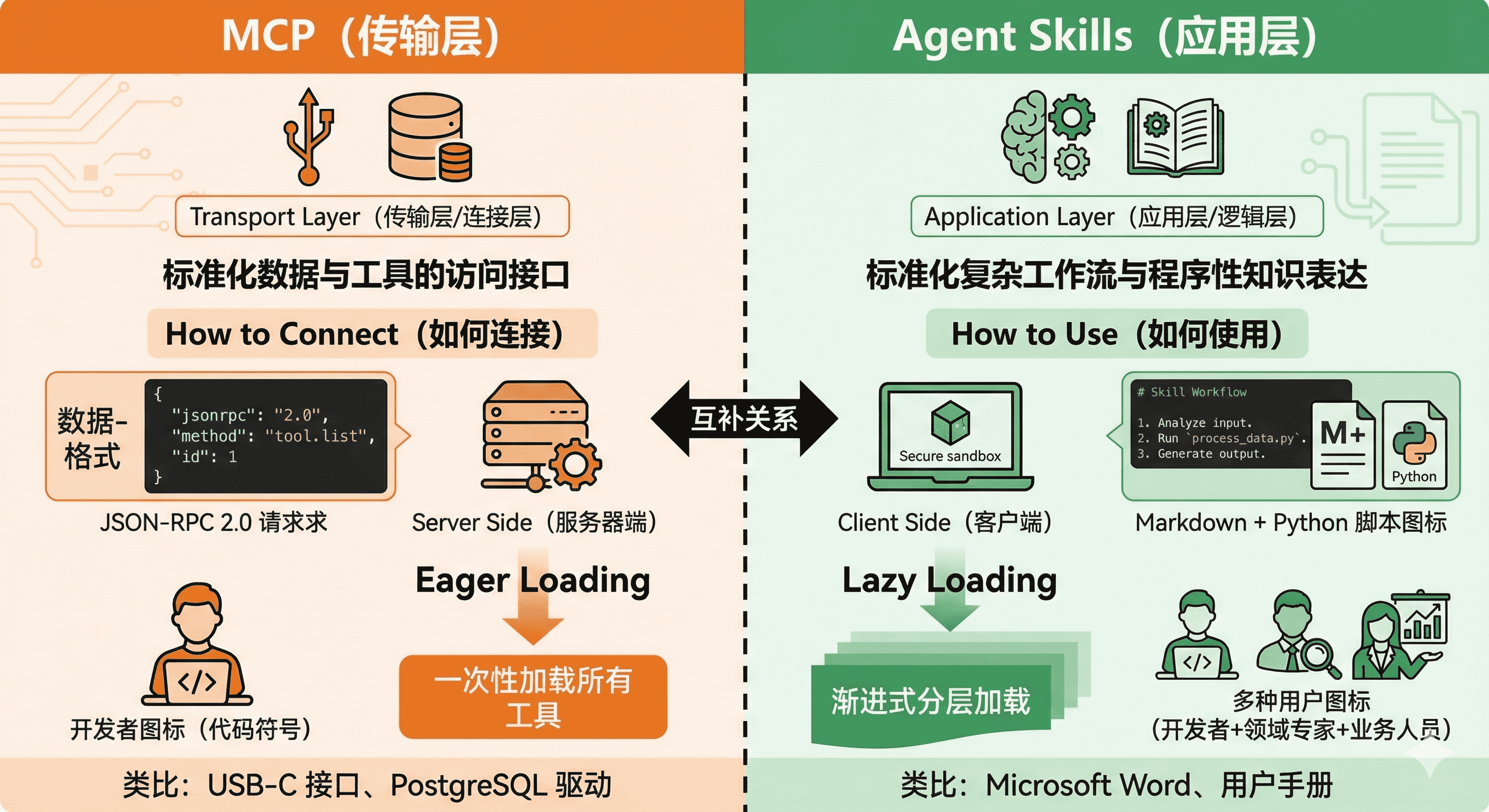
Agent Skills 是一种标准化的程序性知识封装格式。如果说 MCP 为智能体提供了"手"来操作工具,那么 Skills 就提供了"操作手册"或"SOP(标准作业程序)",教导智能体如何正确使用这些工具。
这种设计理念源于一个简单但深刻的洞察:连接性(Connectivity)与能力(Capability)应该分离。MCP 专注于前者,Skills 专注于后者。这种职责分离带来了清晰的架构优势:
- MCP 的职责:提供标准化的访问接口,让智能体能够"够得着"外部世界的数据和工具
- Skills 的职责:提供领域专业知识,告诉智能体在特定场景下"如何组合使用这些工具"
用一个类比来理解:MCP 像是 USB 接口或驱动程序,它定义了设备如何连接;而 Skills 像是软件应用程序,它定义了如何使用这些连接的设备来完成具体任务。你可以拥有一个功能完善的打印机驱动(MCP),但如果没有告诉你如何在 Word 里设置页边距和双面打印(Skill),你仍然无法高效地完成打印任务。
解决的问题:渐进式披露:破解上下文困境
Agent Skills 最核心的创新是渐进式披露(Progressive Disclosure)机制。这种机制将技能信息分为三个层次,智能体按需逐步加载,既确保必要时不遗漏细节,又避免一次性将过多内容塞入上下文窗口。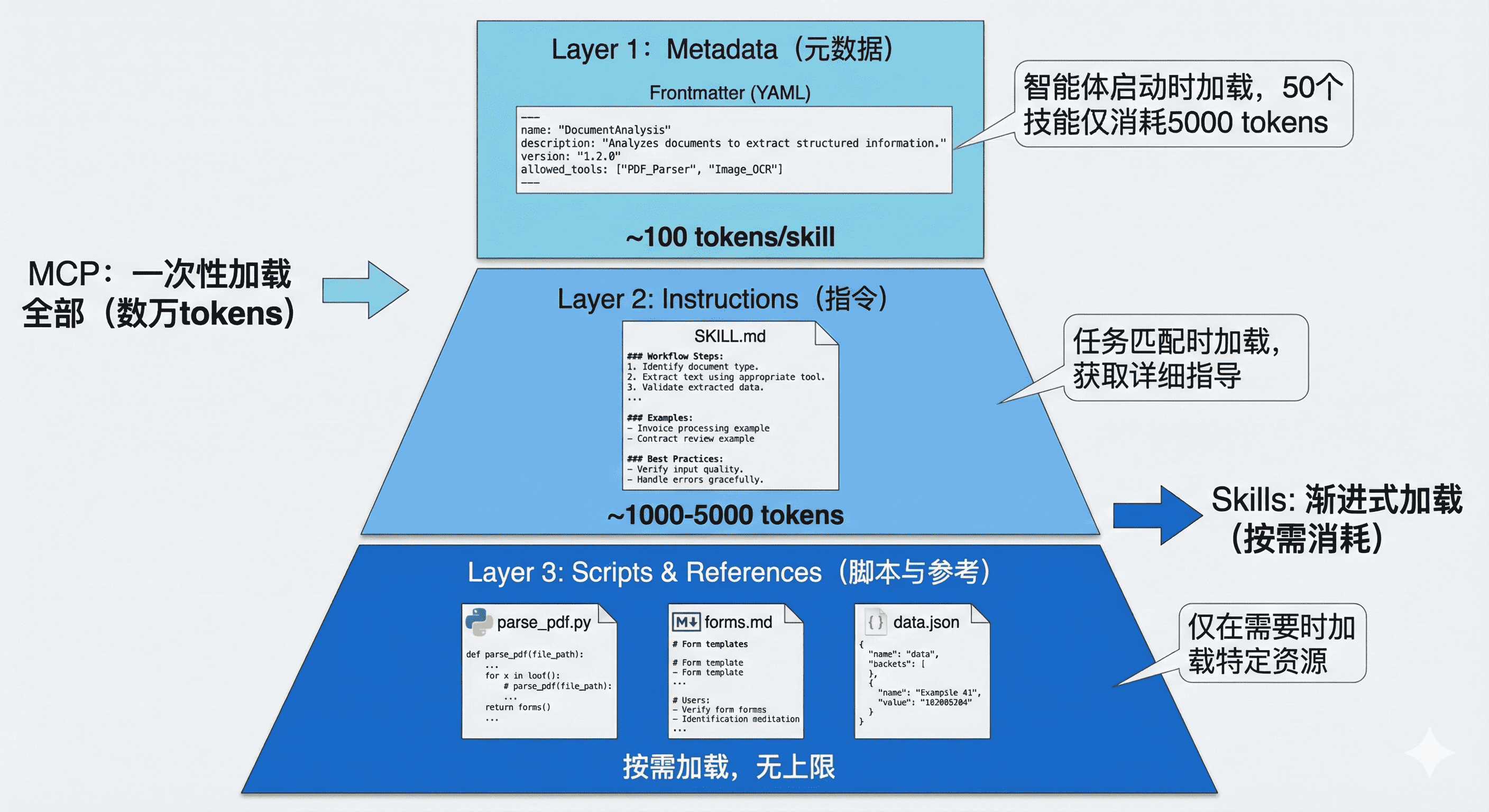
Agent Skills来干什么?
为了更好的理解,你可以把 Skills 理解为“通用 Agent 的扩展包”。
Agent 可通过加载不同的 Skills 包,来具备不同的专业知识、工具使用能力,稳定完成特定任务。
Agent Skills vs MCP:本质区别与协作关系
- 传统 MCP 方式:直接连接一个包含大量工具定义的 MCP 服务器,初始加载消耗 16,000 个 token
- Skills 包装后:创建一个简单的 Skill 作为"网关",仅在 Frontmatter 中描述功能,初始消耗仅 500 个 token
互补而非竞争:Skills + MCP 的混合架构: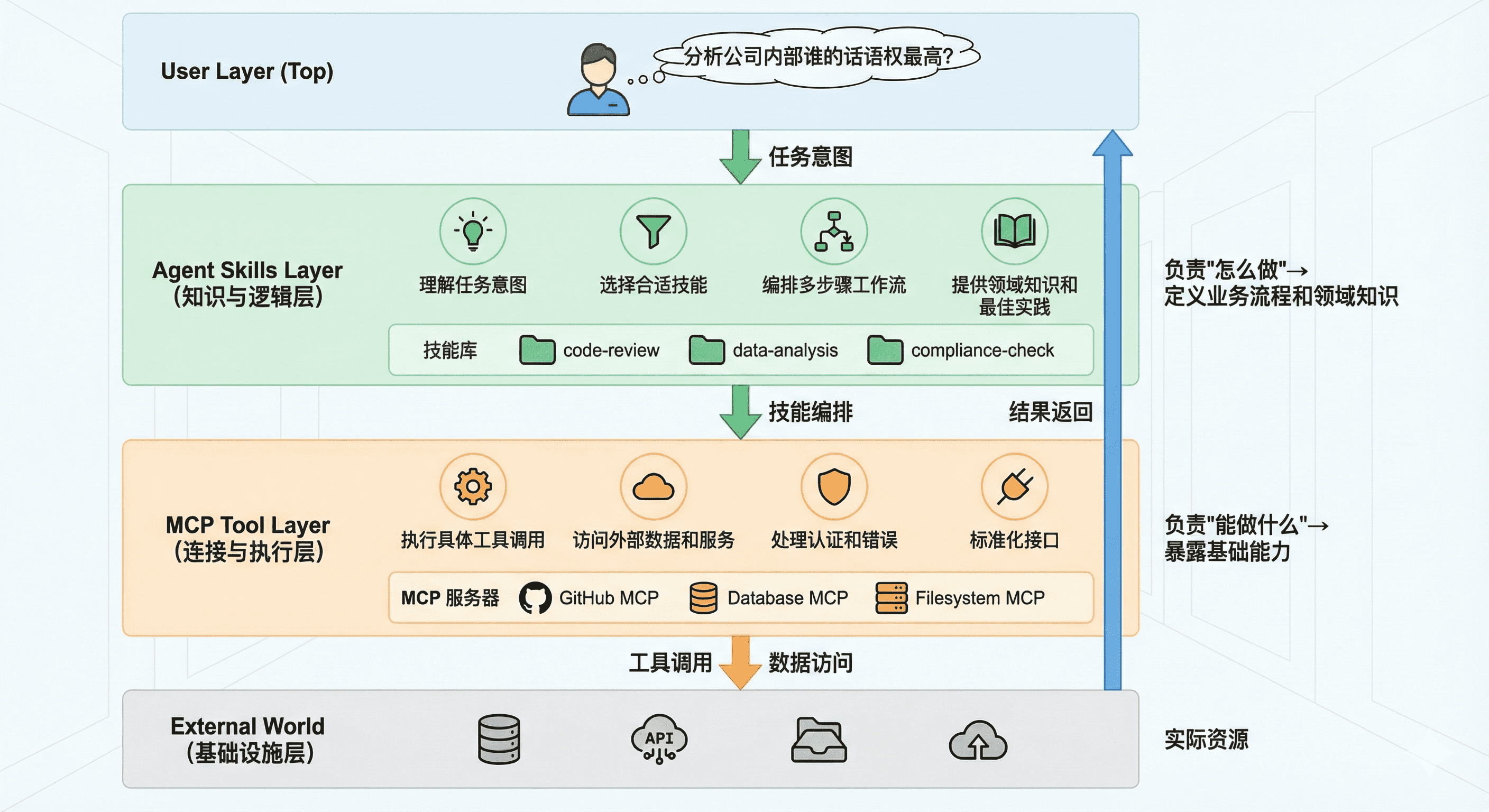
典型工作流:
1、用户问:“分析公司内部谁的话语权最高”
2、Skills 层识别这是一个数据分析任务,加载 mysql-employees-analysis 技能
3、Skills 层根据技能指令,将任务分解为子步骤:查询管理关系、薪资对比、任职时长等
4、MCP 层执行具体的 SQL 查询,返回结果
5、Skills 层根据技能中的领域知识,解读数据并生成综合分析
6、返回结构化的答案给用户
这种架构的优势是:
关注点分离:MCP 专注于"能力",Skills 专注于"智慧"
成本优化:渐进式加载大幅降低 token 消耗
可维护性:业务逻辑(Skills)与基础设施(MCP)解耦
复用性:同一个 MCP 服务器可以被多个 Skills 使用
如何写Skill?
官方文档:https://agentskills.io/specification
Agent Skills与Multi-Agent对比
Agent Skills 和 Multi-Agent 架构都旨在解决“如何让 AI Agent 处理复杂任务”的问题,但它们的思路、实现路径和适用场景有本质区别。
| 对比维度 | Agent Skills(技能模式) | Multi-Agent 架构 |
|---|---|---|
| 核心范式 | 单体智能体(SAS),通过能力扩展 | 多智能体系统(MAS),通过任务分解与协作 |
| 架构比喻 | 给一个专家配备一个多功能工具箱,工具按需取用。 | 一个项目经理带领一个专业团队,成员各司其职。 |
| 工作流程 | 单一 Agent 根据任务自主规划并调用一个或多个技能。 | Supervisor 接收任务,识别意图,分配给特定子 Agent 执行,并可能协调多个子 Agent。 |
| 上下文管理 | 渐进式披露:仅预加载技能描述,需要时再加载技能详情,上下文共享。 | 上下文隔离:每个子 Agent 拥有独立的上下文,通过状态(State)在 Agent 间传递关键信息。 |
| 通信成本 | 低。所有“思考”发生在单个模型调用内部,无额外网络往返。 | 高。每次子 Agent 的调用都是一次独立的模型调用,产生额外的 Token 消耗和延迟。 |
| 优势 | 高效、简洁、低延迟。非常适合逻辑线性、可序列化的任务。 | 专业化、容错性高、适合复杂协作。能处理需要不同模型、并行意见或隐私隔离的任务。 |
| 劣势 | 存在“认知过载”的物理极限,技能数量过多时性能会急剧下降。 | 架构复杂,通信和协调开销大,开发和运维成本高。 |
案例:Skills模式下的Agent(以高德地图及12306的mcp服务作为工具,另外加了一个假的天气查询skill)
申请key:
高德:https://console.amap.com/
12306:https://www.modelscope.cn/mcp/servers/@Joooook/12306-mcp
示例代码结构:(注:详细代码请见代码仓库)
## demo1 目录结构

```text
demo1/
|-- .env
|-- langgraph.json
|-- main.py
|-- pyproject.toml
|-- readme.md
|-- requirements.txt
|-- skills/
|   |-- example_skill/
|   |   |-- SKILL.md
|   |   |-- scripts/
|   |   |   |-- example_script.py
|-- src/
|   |-- agent/
|   |   |-- __init__.py
|   |   |-- class_multi_agent.py
|   |   |-- class_skills_agent_backup.py
|   |   |-- class_skills_list_backup.py
|   |   |-- mcp_tool_config.py
|   |   |-- skills_agent.py
|   |   |-- skills_list.py
|   |   |-- logs/
|   |   |-- llm/
|   |   |   |-- __init__.py
|   |   |   |-- env_utils.py
|   |   |   |-- log_utils.py
|   |   |   |-- my_llm.py
|   |   |-- skills/
|   |   |   |-- README.md
|   |   |   |-- gaode_navigation/
|   |   |   |   |-- SKILL.md
|   |   |   |-- railway_booking/
|   |   |   |   |-- SKILL.md
|   |   |   |-- weather_query/
|   |   |   |   |-- SKILL.md
|   |   |   |   |-- scripts/
|   |   |   |   |   |-- fake_weather_service.py
|-- tests/
|   |-- test_skills_agent.py
class(学习视频中的)代码测试输出结果:
C:\Users\houlj12\Desktop\work\test\LLM_development_learning\Agent_skills_demo\demo1\agent_env\Scripts\python.exe C:\Users\houlj12\Desktop\work\test\LLM_development_learning\Agent_skills_demo\demo1\tests\test_skills_agent.py
所有工具数量 - 高德: 15, 铁路: 8
工具名称验证:
工具 1: maps_direction_bicycling
工具 2: maps_direction_driving
工具 3: maps_direction_transit_integrated
工具 4: maps_direction_walking
工具 5: maps_distance
工具 6: maps_geo
工具 7: maps_regeocode
工具 8: maps_ip_location
工具 9: maps_schema_personal_map
工具 10: maps_around_search
工具 11: maps_search_detail
工具 12: maps_text_search
工具 13: maps_schema_navi
工具 14: maps_schema_take_taxi
工具 15: maps_weather
工具 16: get-current-date
工具 17: get-stations-code-in-city
工具 18: get-station-code-of-citys
工具 19: get-station-code-by-names
工具 20: get-station-by-telecode
工具 21: get-tickets
工具 22: get-interline-tickets
工具 23: get-train-route-stations
20260513 21:40:27 | MainProcess | MainThread | skills_agent.awrap_model_call:163 | DEBUG: 当前可用工具: ['load_skill']
20260513 21:40:32 | MainProcess | MainThread | skills_agent.load_skill:268 | INFO: 正在查找技能: gaode_navigation
20260513 21:40:32 | MainProcess | MainThread | skills_agent.load_skill:272 | INFO: ✅ 技能加载成功: gaode_navigation
20260513 21:40:32 | MainProcess | MainThread | skills_agent.awrap_model_call:134 | INFO: 技能状态变化: 加载→{'gaode_navigation'}, 移除→set()
20260513 21:40:32 | MainProcess | MainThread | skills_agent.awrap_model_call:154 | INFO: 加载技能 'gaode_navigation' 的工具,数量: 15
20260513 21:40:32 | MainProcess | MainThread | skills_agent.awrap_model_call:163 | DEBUG: 当前可用工具: ['load_skill', 'maps_direction_bicycling', 'maps_direction_driving', 'maps_direction_transit_integrated', 'maps_direction_walking', 'maps_distance', 'maps_geo', 'maps_regeocode', 'maps_ip_location', 'maps_schema_personal_map', 'maps_around_search', 'maps_search_detail', 'maps_text_search', 'maps_schema_navi', 'maps_schema_take_taxi', 'maps_weather']
加载技能响应: ✅ **高德导航技能已成功加载!**

现在我可以为您提供以下服务:

| 功能 | 说明 |
|------|------|
| 🌤️ **天气查询** | 查询指定城市的实时天气状况 |
| 🗺️ **地图搜索** | 搜索地点、POI信息(酒店、加油站、餐馆、学校等) |
| 🚗 **路线规划** | 驾车、步行、骑行、公交等多种出行方式 |
| 📍 **地理编码** | 地址与经纬度坐标互相转换 |
| 📏 **距离测量** | 测量两点之间的距离 |
| 🧭 **导航唤起** | 生成导航链接,一键唤起高德地图导航 |
| 🚕 **打车服务** | 生成打车链接,快速叫车 |

请问您需要什么帮助?比如:
- "从北京南站到天安门怎么走?"
- "查询上海今天天气怎么样?"
- "附近有什么好吃的餐厅?"
20260513 21:40:41 | MainProcess | MainThread | skills_agent.awrap_model_call:163 | DEBUG: 当前可用工具: ['load_skill', 'maps_direction_bicycling', 'maps_direction_driving', 'maps_direction_transit_integrated', 'maps_direction_walking', 'maps_distance', 'maps_geo', 'maps_regeocode', 'maps_ip_location', 'maps_schema_personal_map', 'maps_around_search', 'maps_search_detail', 'maps_text_search', 'maps_schema_navi', 'maps_schema_take_taxi', 'maps_weather']
20260513 21:40:48 | MainProcess | MainThread | skills_agent.awrap_model_call:163 | DEBUG: 当前可用工具: ['load_skill', 'maps_direction_bicycling', 'maps_direction_driving', 'maps_direction_transit_integrated', 'maps_direction_walking', 'maps_distance', 'maps_geo', 'maps_regeocode', 'maps_ip_location', 'maps_schema_personal_map', 'maps_around_search', 'maps_search_detail', 'maps_text_search', 'maps_schema_navi', 'maps_schema_take_taxi', 'maps_weather']
20260513 21:40:59 | MainProcess | MainThread | skills_agent.awrap_model_call:163 | DEBUG: 当前可用工具: ['load_skill', 'maps_direction_bicycling', 'maps_direction_driving', 'maps_direction_transit_integrated', 'maps_direction_walking', 'maps_distance', 'maps_geo', 'maps_regeocode', 'maps_ip_location', 'maps_schema_personal_map', 'maps_around_search', 'maps_search_detail', 'maps_text_search', 'maps_schema_navi', 'maps_schema_take_taxi', 'maps_weather']
工具调用响应: 以下是为您规划的 **北京 → 上海** 多种出行方案:

---

## 🚗 方案一:自驾出行

| 项目 | 详情 |
|------|------|
| 📏 总距离 | 约 **1,219 公里** |
| ⏱️ 预计时间 | 约 **14 小时 4 分钟** |
| 🛣️ 主要路线 | 正义路 → 东长安街 → **G3京台高速** → **G2京沪高速** → **G42沪蓉高速** → 武宁路 → 上海市区 |

**主要途经:** 北京 → 廊坊 → 沧州 → 济南 → 泰安 → 临沂 → 淮安 → 扬州 → 常州 → 无锡 → 苏州 → 上海

---

## 🚄 方案二:高铁出行(推荐⭐)

| 项目 | 详情 |
|------|------|
| ⏱️ 总耗时 | 约 **6 小时 19 分钟** |
| 🚄 推荐车次 | **G35(北京南 → 上海虹桥)** |

**详细路线:**
1. 🚶 步行至 **王府井站**(约852米)
2. 🚇 乘坐 **地铁1号线**(王府井 → 西单)
3. 🚇 换乘 **地铁4号线**(西单 → 北京南站)
4. 🚄 乘坐高铁 **G35**(北京南 → 上海虹桥)
5. 🚇 乘坐 **地铁2号线**(虹桥火车站 → 人民广场)

---

## 🚂 方案三:普通火车

| 项目 | 详情 |
|------|------|
| ⏱️ 总耗时 | 约 **15 小时 31 分钟** |
| 🚂 车次 | **K341 + Z171**(北京 → 上海) |

**详细路线:**
1. 🚌 乘坐 **103路公交**(台基厂 → 北京站西)
2. 🚂 乘坐 **K341** → 换乘 **Z171**(北京 → 上海站)
3. 🚇 乘坐 **地铁1号线**(上海火车站 → 人民广场)

---

### 💡 温馨建议:
- **推荐高铁出行**,G35次高铁约4.5小时即可直达上海虹桥,快速便捷!
- 自驾出行距离较长,建议中途在**济南**或**淮安**休息,注意行车安全。
- 如需导航,可点击唤起高德地图进行实时导航。

请问您需要我为您生成导航链接,或者查询更多细节吗?
20260513 21:41:17 | MainProcess | MainThread | skills_agent.awrap_model_call:163 | DEBUG: 当前可用工具: ['load_skill', 'maps_direction_bicycling', 'maps_direction_driving', 'maps_direction_transit_integrated', 'maps_direction_walking', 'maps_distance', 'maps_geo', 'maps_regeocode', 'maps_ip_location', 'maps_schema_personal_map', 'maps_around_search', 'maps_search_detail', 'maps_text_search', 'maps_schema_navi', 'maps_schema_take_taxi', 'maps_weather']
20260513 21:41:23 | MainProcess | MainThread | skills_agent.load_skill:268 | INFO: 正在查找技能: unknown_skill
20260513 21:41:23 | MainProcess | MainThread | skills_agent.load_skill:285 | WARNING: 技能未找到: unknown_skill,可用技能: gaode_navigation, railway_booking
20260513 21:41:23 | MainProcess | MainThread | skills_agent.awrap_model_call:163 | DEBUG: 当前可用工具: ['load_skill', 'maps_direction_bicycling', 'maps_direction_driving', 'maps_direction_transit_integrated', 'maps_direction_walking', 'maps_distance', 'maps_geo', 'maps_regeocode', 'maps_ip_location', 'maps_schema_personal_map', 'maps_around_search', 'maps_search_detail', 'maps_text_search', 'maps_schema_navi', 'maps_schema_take_taxi', 'maps_weather']
异常处理响应: ❌ **技能加载失败!**

未找到名为 `unknown_skill` 的技能。目前可用的技能如下:

| 技能名称 | 说明 |
|----------|------|
| 🗺️ `gaode_navigation` | 高德地图导航、路线规划、天气查询等 |
| 🚄 `railway_booking` | 铁路查询、火车票预订等 |

请您检查技能名称后重新尝试,或告诉我您需要什么功能,我可以为您加载对应的技能!
修改后测试输出:
==== 用例1: 显式加载天气技能 ====
所有工具数量 - 高德: 15, 铁路: 8
工具名称验证:
工具 1: maps_direction_bicycling
工具 2: maps_direction_driving
工具 3: maps_direction_transit_integrated
工具 4: maps_direction_walking
工具 5: maps_distance
工具 6: maps_geo
工具 7: maps_regeocode
工具 8: maps_ip_location
工具 9: maps_schema_personal_map
工具 10: maps_around_search
工具 11: maps_search_detail
工具 12: maps_text_search
工具 13: maps_schema_navi
工具 14: maps_schema_take_taxi
工具 15: maps_weather
工具 16: get-current-date
工具 17: get-stations-code-in-city
工具 18: get-station-code-of-citys
工具 19: get-station-code-by-names
工具 20: get-station-by-telecode
工具 21: get-tickets
工具 22: get-interline-tickets
工具 23: get-train-route-stations
20260513 22:28:37 | MainProcess | MainThread | skills_agent.awrap_model_call:202 | DEBUG: 当前可用工具: ['load_skill']
20260513 22:28:43 | MainProcess | MainThread | skills_agent.load_skill:308 | INFO: 正在查找技能: weather_query
20260513 22:28:43 | MainProcess | MainThread | skills_agent.load_skill:312 | INFO: ✅ 技能加载成功: weather_query
20260513 22:28:43 | MainProcess | MainThread | skills_agent.awrap_model_call:173 | INFO: 技能状态变化: 加载→{'weather_query'}, 移除→set()
20260513 22:28:43 | MainProcess | MainThread | skills_agent.awrap_model_call:193 | INFO: 加载技能 'weather_query' 的工具,数量: 1
20260513 22:28:43 | MainProcess | MainThread | skills_agent.awrap_model_call:202 | DEBUG: 当前可用工具: ['load_skill', 'weather_query']
用户问题: 加载技能 weather_query
模型响应: ✅ **weather_query(城市天气查询)技能已成功加载!**

该技能的功能如下:

| 功能 | 说明 |
|------|------|
| 🌤️ 城市天气查询 | 根据城市名返回天气信息 |
| 📊 返回内容 | 天气概况、温度、湿度 |
| ⚠️ 注意 | 使用本地模拟数据,非真实天气 API |

**使用方式:** 您只需要告诉我您想查询哪个城市的天气,我就可以为您查询。例如:

> "北京今天天气怎么样?"

请问您想查询哪个城市的天气呢? 🌈
已加载技能: ['weather_query']
调用工具: ['load_skill']

==== 用例2: 询问某城市天气,触发天气工具 ====
20260513 22:28:56 | MainProcess | MainThread | skills_agent.awrap_model_call:202 | DEBUG: 当前可用工具: ['load_skill', 'weather_query']
20260513 22:29:01 | MainProcess | MainThread | skills_agent.awrap_model_call:202 | DEBUG: 当前可用工具: ['load_skill', 'weather_query']
用户问题: 请查询北京天气
模型响应: 以下是 **北京** 的天气查询结果:

| 项目 | 详情 |
|------|------|
| 🏙️ 城市 | 北京 |
| ☀️ 天气 | 晴 |
| 🌡️ 温度 | 26°C |
| 💧 湿度 | 35% |

---

📌 **小贴士:** 今天北京天气晴朗,温度适宜,湿度较低,空气偏干燥。建议外出时注意补水保湿,同时做好防晒措施哦!🧴

请问还需要查询其他城市的天气吗? 😊
已加载技能: ['weather_query']
调用工具: ['load_skill', 'weather_query']

==== 用例3: 另一个城市天气问答 ====
20260513 22:29:13 | MainProcess | MainThread | skills_agent.awrap_model_call:202 | DEBUG: 当前可用工具: ['load_skill', 'weather_query']
20260513 22:29:17 | MainProcess | MainThread | skills_agent.awrap_model_call:202 | DEBUG: 当前可用工具: ['load_skill', 'weather_query']
用户问题: 那上海的天气呢?
模型响应: 以下是 **上海** 的天气查询结果:

| 项目 | 详情 |
|------|------|
| 🏙️ 城市 | 上海 |
| ⛅ 天气 | 多云 |
| 🌡️ 温度 | 24°C |
| 💧 湿度 | 58% |

---

📌 **小贴士:** 上海今天多云,温度舒适宜人,湿度适中。比较适合外出活动,不过多云天气可能会有变化,建议出门时随身携带一把雨伞以备不时之需哦!🌂

如果您还想了解其他城市的天气,随时告诉我! 😊
已加载技能: ['weather_query']
调用工具: ['load_skill', 'weather_query', 'weather_query']

==== 用例4: 显式加载高德技能 ====
20260513 22:29:24 | MainProcess | MainThread | skills_agent.awrap_model_call:202 | DEBUG: 当前可用工具: ['load_skill', 'weather_query']
20260513 22:29:29 | MainProcess | MainThread | skills_agent.load_skill:308 | INFO: 正在查找技能: gaode_navigation
20260513 22:29:29 | MainProcess | MainThread | skills_agent.load_skill:312 | INFO: ✅ 技能加载成功: gaode_navigation
20260513 22:29:29 | MainProcess | MainThread | skills_agent.awrap_model_call:173 | INFO: 技能状态变化: 加载→{'gaode_navigation'}, 移除→set()
20260513 22:29:29 | MainProcess | MainThread | skills_agent.awrap_model_call:193 | INFO: 加载技能 'weather_query' 的工具,数量: 1
20260513 22:29:29 | MainProcess | MainThread | skills_agent.awrap_model_call:193 | INFO: 加载技能 'gaode_navigation' 的工具,数量: 15
20260513 22:29:29 | MainProcess | MainThread | skills_agent.awrap_model_call:202 | DEBUG: 当前可用工具: ['load_skill', 'weather_query', 'maps_direction_bicycling', 'maps_direction_driving', 'maps_direction_transit_integrated', 'maps_direction_walking', 'maps_distance', 'maps_geo', 'maps_regeocode', 'maps_ip_location', 'maps_schema_personal_map', 'maps_around_search', 'maps_search_detail', 'maps_text_search', 'maps_schema_navi', 'maps_schema_take_taxi', 'maps_weather']
用户问题: 加载技能 gaode_navigation
模型响应: ✅ **gaode_navigation(高德地图导航)技能已成功加载!**

该技能的功能如下:

| 功能 | 说明 |
|------|------|
| 🌤️ 实时天气查询 | 获取指定位置的天气状况 |
| 🔍 地图信息查询 | 搜索地点、POI 信息 |
| 🗺️ 路线规划 | 驾车、步行、公交、骑行等多种出行方式 |
| 📍 地理编码 | 地址与经纬度坐标互相转换 |
| 🏨 地址查询 | 酒店、加油站、餐馆、学校等各类地点搜索 |

**使用示例:**
> - "帮我查一下天安门附近的加油站"
> - "从北京站到天安门怎么走?"
> - "帮我规划一条从上海外滩到东方明珠的驾车路线"

请问您有什么需要我帮您查询或规划的吗? 😊
已加载技能: ['weather_query', 'gaode_navigation']
调用工具: ['load_skill', 'weather_query', 'weather_query', 'load_skill']

==== 用例5: 高德路线规划查询 ====
20260513 22:29:38 | MainProcess | MainThread | skills_agent.awrap_model_call:202 | DEBUG: 当前可用工具: ['load_skill', 'weather_query', 'maps_direction_bicycling', 'maps_direction_driving', 'maps_direction_transit_integrated', 'maps_direction_walking', 'maps_distance', 'maps_geo', 'maps_regeocode', 'maps_ip_location', 'maps_schema_personal_map', 'maps_around_search', 'maps_search_detail', 'maps_text_search', 'maps_schema_navi', 'maps_schema_take_taxi', 'maps_weather']
20260513 22:29:47 | MainProcess | MainThread | skills_agent.awrap_model_call:202 | DEBUG: 当前可用工具: ['load_skill', 'weather_query', 'maps_direction_bicycling', 'maps_direction_driving', 'maps_direction_transit_integrated', 'maps_direction_walking', 'maps_distance', 'maps_geo', 'maps_regeocode', 'maps_ip_location', 'maps_schema_personal_map', 'maps_around_search', 'maps_search_detail', 'maps_text_search', 'maps_schema_navi', 'maps_schema_take_taxi', 'maps_weather']
20260513 22:29:54 | MainProcess | MainThread | skills_agent.awrap_model_call:202 | DEBUG: 当前可用工具: ['load_skill', 'weather_query', 'maps_direction_bicycling', 'maps_direction_driving', 'maps_direction_transit_integrated', 'maps_direction_walking', 'maps_distance', 'maps_geo', 'maps_regeocode', 'maps_ip_location', 'maps_schema_personal_map', 'maps_around_search', 'maps_search_detail', 'maps_text_search', 'maps_schema_navi', 'maps_schema_take_taxi', 'maps_weather']
用户问题: 请帮我规划从北京到上海的导航路线
模型响应: 以下是为您规划的 **北京 → 上海** 出行方案:

---

## 🚗 方案一:驾车出行

| 项目 | 详情 |
|------|------|
| 📏 总距离 | 约 **1219 公里** |
| ⏱️ 预计时间 | 约 **13小时50分钟** |

**主要路线:** 正义路 → 东长安街 → 崇文门内大街 → **G3京台高速** → **G2京沪高速** → **G42沪蓉高速** → 武宁路 → 延安高架路 → 人民大道 → 到达上海

> 💡 **建议:** 全程以高速为主,途经山东、江苏等地,长途驾驶请注意休息,建议中途在济南或徐州附近休息。

---

## 🚄 方案二:公共交通(推荐)

### 🔹 推荐方案:高铁出行
| 项目 | 详情 |
|------|------|
| ⏱️ 总耗时 | 约 **6小时19分钟** |
| 🚇 路线 | 王府井(地铁1号线)→ 西单(地铁4号线)→ **北京南站** → 🚄 **G35次高铁** → **上海虹桥站**(地铁2号线)→ 人民广场 |

**详细步骤:**
1. 🚶 步行至 **王府井** 地铁站
2. 🚇 地铁1号线 → **西单** 换乘地铁4号线 → **北京南站**
3. 🚄 乘坐 **G35次高铁**(北京南 → 上海虹桥)
4. 🚇 上海虹桥站乘地铁2号线 → **人民广场**

### 🔹 备选方案:普通列车
| 项目 | 详情 |
|------|------|
| ⏱️ 总耗时 | 约 **16小时15分钟** |
| 🚃 车次 | **T109次列车**(北京站 → 上海站) |

---

## 📊 方案对比

| 对比项 | 🚗 驾车 | 🚄 高铁 | 🚃 普通列车 |
|--------|---------|---------|-------------|
| 耗时 | ~13小时50分 | ~6小时19分 | ~16小时15分 |
| 距离 | 1219公里 | 1468公里 | - |
| 推荐度 | ⭐⭐⭐ | ⭐⭐⭐⭐⭐ | ⭐⭐ |

---

🎯 **推荐选择高铁出行**,用时最短、最为便捷!如需进一步查看地图或需要打车导航,随时告诉我! 😊
已加载技能: ['weather_query', 'gaode_navigation']
调用工具: ['load_skill', 'weather_query', 'weather_query', 'load_skill', 'maps_geo', 'maps_geo', 'maps_direction_driving', 'maps_direction_transit_integrated']

==== 用例6: 未知技能异常处理 ====
20260513 22:30:12 | MainProcess | MainThread | skills_agent.awrap_model_call:202 | DEBUG: 当前可用工具: ['load_skill', 'weather_query', 'maps_direction_bicycling', 'maps_direction_driving', 'maps_direction_transit_integrated', 'maps_direction_walking', 'maps_distance', 'maps_geo', 'maps_regeocode', 'maps_ip_location', 'maps_schema_personal_map', 'maps_around_search', 'maps_search_detail', 'maps_text_search', 'maps_schema_navi', 'maps_schema_take_taxi', 'maps_weather']
用户问题: 加载技能 unknown_skill
模型响应: 抱歉,**unknown_skill** 不是一个可用的技能名称。😅

目前系统支持加载的技能如下:

| 技能名称 | 说明 |
|----------|------|
| 🗺️ `gaode_navigation` | 高德地图服务:查询天气、地图信息、查询各种地址和规划行程路线 |
| 🚄 `railway_booking` | 12306铁路查询:查询火车站信息和火车票务 |
| 🌤️ `weather_query` | 城市天气查询:根据城市名返回天气信息(示例使用本地假数据) |

请从以上技能中选择一个进行加载,或者告诉我您想实现什么功能,我来为您推荐合适的技能! 😊
已加载技能: ['weather_query', 'gaode_navigation']
调用工具: ['load_skill', 'weather_query', 'weather_query', 'load_skill', 'maps_geo', 'maps_geo', 'maps_direction_driving', 'maps_direction_transit_integrated']
新增main.py与agent进行自由对话测试:
=== Skills Agent Chat ===
输入内容开始对话,输入 q / quit / exit 退出。

你: 你现在有哪些技能?
所有工具数量 - 高德: 15, 铁路: 8
工具名称验证:
工具 1: maps_direction_bicycling
工具 2: maps_direction_driving
工具 3: maps_direction_transit_integrated
工具 4: maps_direction_walking
工具 5: maps_distance
工具 6: maps_geo
工具 7: maps_regeocode
工具 8: maps_ip_location
工具 9: maps_schema_personal_map
工具 10: maps_around_search
工具 11: maps_search_detail
工具 12: maps_text_search
工具 13: maps_schema_navi
工具 14: maps_schema_take_taxi
工具 15: maps_weather
工具 16: get-current-date
工具 17: get-stations-code-in-city
工具 18: get-station-code-of-citys
工具 19: get-station-code-by-names
工具 20: get-station-by-telecode
工具 21: get-tickets
工具 22: get-interline-tickets
工具 23: get-train-route-stations
20260513 22:34:38 | MainProcess | MainThread | skills_agent.awrap_model_call:202 | DEBUG: 当前可用工具: ['load_skill']

Agent: 您好!我目前拥有以下技能领域,可以根据您的需求提供相应的服务:

---

### 🗺️ **gaode_navigation** — 高德地图服务
- 查询天气信息
- 查询地图信息
- 查询各种地址(如餐厅、景点、商店等)
- 规划行程路线(驾车、步行、公交等)

---

### 🚄 **railway_booking** — 12306铁路查询
- 查询火车站信息
- 查询火车票务(如车次、余票、票价等)

---

### 🌤️ **weather_query** — 城市天气查询
- 根据城市名称返回天气信息

---

您只需要告诉我您的需求,我会自动加载对应的技能并为您提供专业的服务!😊 请问有什么可以帮您的吗?

--- 运行信息 ---
当前已加载技能: 无
本轮新增技能: 无
本轮新增工具调用: 无
是否调用 skill: 否
是否调用工具: 否

你: 帮我查询一下深圳的天气
20260513 22:35:10 | MainProcess | MainThread | skills_agent.awrap_model_call:202 | DEBUG: 当前可用工具: ['load_skill']
20260513 22:35:17 | MainProcess | MainThread | skills_agent.load_skill:308 | INFO: 正在查找技能: weather_query
20260513 22:35:17 | MainProcess | MainThread | skills_agent.load_skill:312 | INFO: ✅ 技能加载成功: weather_query
20260513 22:35:17 | MainProcess | MainThread | skills_agent.awrap_model_call:173 | INFO: 技能状态变化: 加载→{'weather_query'}, 移除→set()
20260513 22:35:17 | MainProcess | MainThread | skills_agent.awrap_model_call:193 | INFO: 加载技能 'weather_query' 的工具,数量: 1
20260513 22:35:17 | MainProcess | MainThread | skills_agent.awrap_model_call:202 | DEBUG: 当前可用工具: ['load_skill', 'weather_query']
20260513 22:35:27 | MainProcess | MainThread | skills_agent.awrap_model_call:202 | DEBUG: 当前可用工具: ['load_skill', 'weather_query']

Agent: 以下是 **深圳** 的天气查询结果:

| 项目 | 详情 |
|------|------|
| 🏙️ 城市 | 深圳 |
| 🌦️ 天气 | 阵雨 |
| 🌡️ 温度 | 28°C |
| 💧 湿度 | 74% |

> ⚠️ 目前深圳有**阵雨**,出门建议携带雨具🌂。湿度较高,体感可能会比较闷热,注意防暑降温哦!

> 📌 **温馨提示**:此数据为本地模拟数据,仅供参考。如需获取实时天气,建议查看专业天气预报平台。

还有其他需要帮忙的吗?😊

--- 运行信息 ---
当前已加载技能: weather_query
本轮新增技能: weather_query
本轮新增工具调用: load_skill, weather_query
是否调用 skill: 是
是否调用工具: 是

你: q
已退出对话。
【代码仓库地址,希望大家能给小星星呀,以前没想过,现在有点想赚小星星了哈哈哈】https://github.com/monkeyhlj/LLM_development_learning
【参考】https://github.com/datawhalechina/hello-agents/blob/main/Extra-Chapter/Extra05-AgentSkills%E8%A7%A3%E8%AF%BB.md#%E4%BB%80%E4%B9%88%E6%98%AF-agent-skills
【参考】https://www.bilibili.com/video/BV1Uhz4BWEEw

AtomGit 是由开放原子开源基金会联合 CSDN 等生态伙伴共同推出的新一代开源与人工智能协作平台。平台坚持“开放、中立、公益”的理念,把代码托管、模型共享、数据集托管、智能体开发体验和算力服务整合在一起,为开发者提供从开发、训练到部署的一站式体验。
更多推荐

 10
10 0
0- 0


 已为社区贡献5条内容

所有评论(0)