GDSFactory简介
·
一、官网与核心资源
- 主站(GDSFactory+):https://gdsfactory.com/
- 开源仓库(GitHub):https://github.com/gdsfactory/gdsfactory
- 官方文档(含手册):https://gdsfactory.github.io/gdsfactory/
- PyPI 包:https://pypi.org/project/gdsfactory/
二、GDSFactory 简介
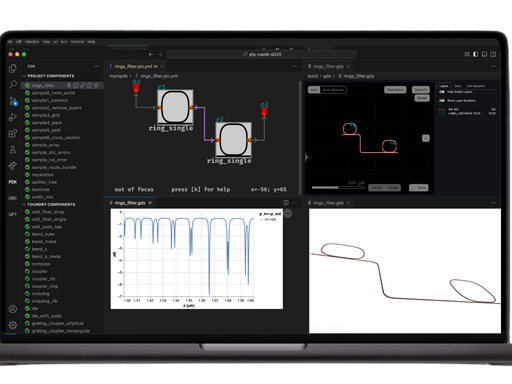
GDSFactory 是基于 Python 的开源芯片设计框架,适用于光子学、模拟 / 量子、MEMS、PCB 等领域,支持用代码生成 GDSII/OASIS 版图,集成设计、仿真、验证(DRC/LVS)全流程。
三、安装(Python 3.8+,推荐 3.11/3.12)
bash
运行
# 稳定版
pip install gdsfactory

# 或一键安装器(推荐)
pip install gdsfactory_install
gfi install

# 开发版
git clone https://github.com/gdsfactory/gdsfactory.git
cd gdsfactory
pip install -e .
四、基本用法(快速上手)
1. 基础示例:创建简单结构
python
运行
import gdsfactory as gf

# 1. 创建空白组件
c = gf.Component("my_first_chip")

# 2. 添加矩形(图层1,颜色0)
rect = c << gf.components.rectangle(size=(10, 10), layer=(1, 0))

# 3. 添加文本(图层2,字号10)
text = c << gf.components.text("GDSFactory", size=10, layer=(2, 0))

# 4. 定位文本(矩形右侧+5μm)
text.xmin = rect.xmax + 5
text.rotate(30)  # 旋转30度

# 5. 预览/保存
c.show()          # 浏览器3D预览
c.plot()          # 2D版图截图
c.write_gds("demo.gds")  # 导出GDS文件
2. 常用组件(光子 / 电子)
python
运行
import gdsfactory as gf

# 直波导(长10μm,宽0.5μm)
wg = gf.components.straight(length=10, width=0.5)

# 波导弯曲(半径5μm,90度)
bend = gf.components.bend_euler(radius=5, angle=90)

# 焊盘阵列(3×2,间距100μm)
pad_array = gf.components.pad_array(columns=3, rows=2, pitch=100)

# 组合组件
c = gf.Component("photonic_chip")
c << wg
c << bend
c << pad_array
c.show()
3. 连接与布线
python
运行
import gdsfactory as gf

c = gf.Component("routing_demo")
# 创建两个焊盘
pad1 = c << gf.components.pad()
pad2 = c << gf.components.pad()
pad2.move((100, 50))  # 移动第二个焊盘

# 自动布线(差分线)
route = gf.routing.route_differential(c, pad1.ports["e1"], pad2.ports["e1"])
c.show()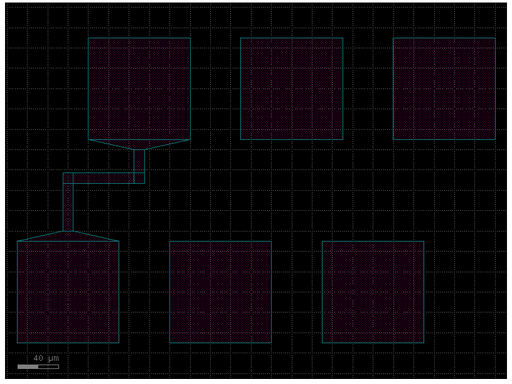
五、使用手册核心模块(官方文档)
- 入门指南
- 核心 API
- 组件(Component)与图层(Layer):https://gdsfactory.github.io/gdsfactory/api.html
- 常用组件库(光子 / 电子):https://gdsfactory.github.io/gdsfactory/components.html
- 布线与连接(Routing):https://gdsfactory.github.io/gdsfactory/notebooks/04_routing_electrical.html
- PDK 与工艺
- PDK 导入与配置:https://gdsfactory.github.io/gdsfactory/notebooks/09_pdk_import.html
- 支持 25 + 种工艺库(如 TSMC、GlobalFoundries)
- 验证与仿真
- DRC(设计规则检查):https://gdsfactory.com/plus/examples/1_drc/
- LVS(版图 vs 原理图)与仿真集成
六、关键特性
- 参数化设计:用 Python 函数定义可变参数组件,一键批量生成变体。
- 无缝集成:支持 Klayout、Lumerical、Sentaurus 等工具,兼容主流 PDK。
- 全流程自动化:代码→版图→验证→仿真→测试数据闭环。

AtomGit 是由开放原子开源基金会联合 CSDN 等生态伙伴共同推出的新一代开源与人工智能协作平台。平台坚持“开放、中立、公益”的理念,把代码托管、模型共享、数据集托管、智能体开发体验和算力服务整合在一起,为开发者提供从开发、训练到部署的一站式体验。
更多推荐


 6
6 0
0- 0


 已为社区贡献16条内容

所有评论(0)